Home › Music

 LU
LU
 USen-US
 CAen-CA
 DEde-DE
 ESes-ES
 UAen-GB
 AEen-GB
 AFen-GB
 AGen-GB
 AIen-GB
 ALen-GB
 AMen-GB
 AOen-GB
 ARes-MX
 ATde-DE
 AUen-AU
 AZen-GB
 BAen-GB
 BBen-GB
 BEen-GB
 BFen-GB
 BGen-GB
 BHen-GB
 BJen-GB
 BMen-GB
 BNen-GB
 BOes-MX
 BRpt-BR
 BSen-GB
 BTen-GB
 BWen-GB
 BYen-GB
 BZen-GB
 CDen-GB
 CGen-GB
 CHde-CH
 CIfr-FR
 CLes-MX
 CMfr-FR
 CNzh-Hans-CN
 COes-MX
 CRes-MX
 CVen-GB
 CYen-GB
 CZen-GB
 DKen-GB
 DMen-GB
 DOes-MX
 DZen-GB
 ECes-MX
 EGen-GB
 FIen-GB
 FJen-GB
 FMen-GB
 FRfr-FR
 GAfr-FR
 GBen-GB
 GDen-GB
 GEen-GB
 GHen-GB
 GMen-GB
 GRen-GB
 GTes-MX
 GWen-GB
 GYen-GB
 HKzh-Hant-HK
 HNes-MX
 HRen-GB
 HUen-GB
 IDen-GB
 IEen-GB
 ILen-GB
 INen-GB
 IQen-GB
 ISen-GB
 ITit
ITit JMen-GB
 JOen-GB
 JPja
JPja KEen-GB
 KGen-GB
 KHen-GB
 KNen-GB
 KRko
KRko KWen-GB
 KYen-GB
 KZen-GB
 LAen-GB
 LBen-GB
 LCen-GB
 LKen-GB
 LRen-GB
 LTen-GBLUen-GB
 LVen-GB
 LYen-GB
 MAen-GB
 MDen-GB
 MEen-GB
 MGen-GB
 MKen-GB
 MLen-GB
 MMen-GB
 MNen-GB
 MOzh-Hant-HK
 MRen-GB
 MSen-GB
 MTen-GB
 MUen-GB
 MVen-GB
 MWen-GB
 MXes-MX
 MYen-GB
 MZen-GB
 NAen-GB
 NEen-GB
 NGen-GB
 NIes-MX
 NLnl
NLnl NOen-GB
 NPen-GB
 NRen-GB
 NZen-AU
 OMen-GB
 PAes-MX
 PEes-MX
 PGen-GB
 PHen-GB
 PKen-GB
 PLen-GB
 PTpt-PT
 PWen-GB
 PYes-MX
 QAen-GB
 ROen-GB
 RSen-GB
 RUru
RUru RWen-GB
 SAen-GB
 SBen-GB
 SCen-GB
 SEsv
SEsv SGen-GB
 SIen-GB
 SKen-GB
 SLen-GB
 SNen-GB
 SRen-GB
 STen-GB
 SVes-MX
 SZen-GB
 TCen-GB
 TDen-GB
 THen-GB
 TJen-GB
 TMen-GB
 TNen-GB
 TOen-GB
 TRen-GB
 TTen-GB
 TWzh-Hant-TW
 TZen-GB
 UGen-GB
 UYen-GB
 UZen-GB
 VCen-GB
 VEes-MX
 VGen-GB
 VNen-GB
 VUen-GB
 XKen-GB
 YEen-GB
 ZAen-GB
 ZMen-GB
 ZWen-GB
174 of 174 storefronts
Content in en-US
Content in en-US
Information
Preview 3 platforms
iPhone 7 images


iPad 6 images


Apple TV 6 images



What’s New Version 3.1.0
AUTO-FILL YOUR WALLET
New this release: don't have a CDs playlist yet? CD Wally can build one for you, seeding it from a personal mix so your wallet fills up with albums you actually listen to.
SHARPER ALBUM MATCHING
We rebuilt how CD Wally finds your albums, so you never wind up with a disc you didn't expect. Matching is faster too.
Plus performance tuning and behind-the-scenes cleanup
Description
JUST YOUR MUSIC, NOT THE ENDLESS CATALOG
Streaming is infinite. CD Wally is personal. Pick the albums that matter to you right now, and they appear as discs in a CD wallet you flip through on your iPhone, iPad, Apple TV, or Mac—and now in CarPlay. Tap an album, hear the whole thing.
Not every track ever recorded. Just your albums, right now.
THE CD WALLET EXPERIENCE, BROUGHT TO LIFE
CD Wally recreates the tactile experience of a zippered CD wallet, complete with translucent woven sleeves and realistic disc rendering. Flip through your albums by cover art, memory, and mood, not by searching a bottomless catalog.
ALBUMS, PLAYED WHOLE
CD Wally is built around the album as a complete work. No shuffle. No algorithmic reordering. Tap a disc, and it plays front to back, the way the artist intended. It gently pulls you away from single-track grazing and back into the full-album experience.
YOUR "RIGHT NOW" COLLECTION
Build a wallet for the season you're in: summer drives, comfort albums, a workout rotation, late-night headphones, road-trip essentials. Swap albums in and out whenever you want by updating your "CDs" playlist in Apple Music.
REQUIRES APPLE MUSIC
CD Wally works with your existing Apple Music subscription. Create a playlist titled "CDs" and add at least one track from each album you want in your wallet. That's it. Your collection builds itself.
A PLAYER WITH REAL CD VIBES
Tap a disc and CD Wally opens its own player:
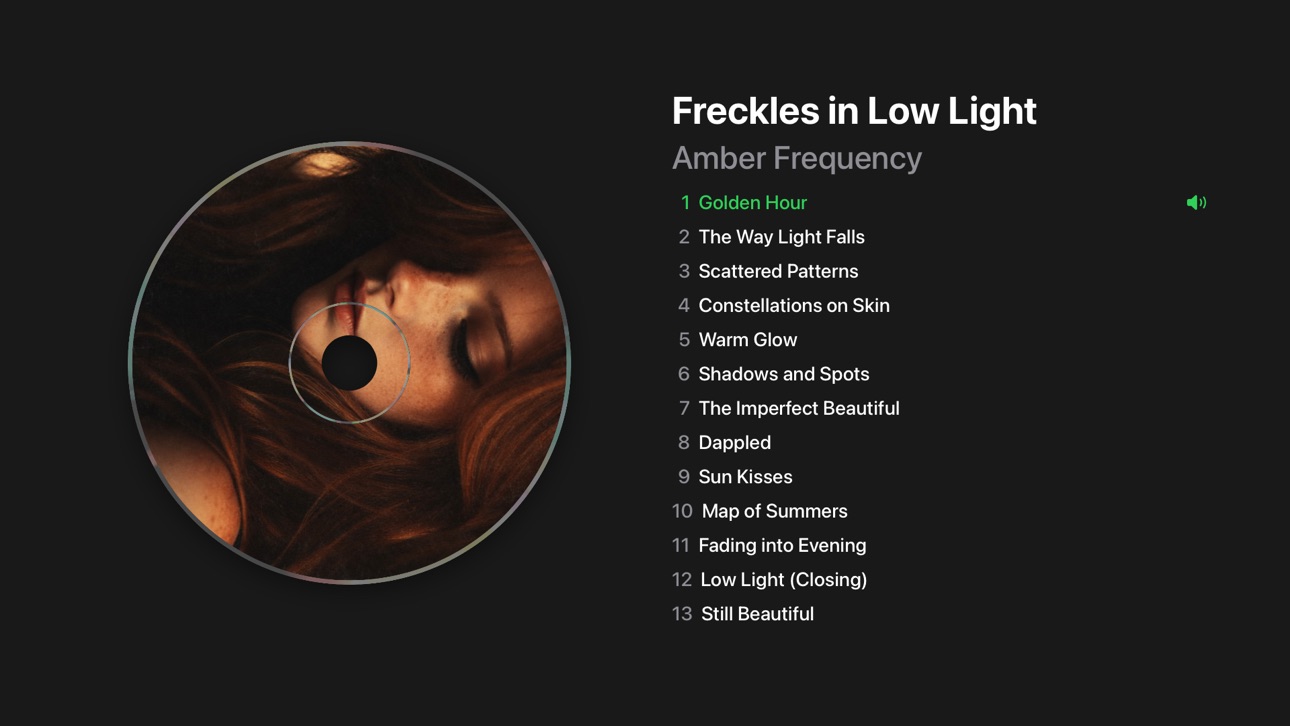
• Your CD spins up and plays
• Full track list with the current track highlighted
• Player controls for listening, not grazing
CD WALLY IN CARPLAY
The car is where albums belong. CD Wally brings your wallet to CarPlay, so you pick a CD and let it play the whole way.
• Your collection as a grid of album covers on the CarPlay screen
• Tap a cover to play the album front to back
• Now Playing shows the full track list with the current track highlighted
• Rolls into the next disc when an album ends
• Built for spotty coverage: playback rides through brief signal drops and picks back up when you're back online
FOR THOSE WITH AN EYE FOR THE DETAILS
• Subtle iridescent highlights on the disc edge and clamp ring respond naturally to device motion
• Discs spin at Red Book–accurate constant linear velocity
• Buttery-smooth 120fps animations on devices with ProMotion
ONE WALLET, EVERY SCREEN
CD Wally is a universal app for iPhone, iPad, Apple TV, and Mac. Your collection stays in sync across all of them with iCloud, and a wallet upgrade unlocks everywhere.
FREE TO DOWNLOAD
The free version includes a 6-disc wallet with full functionality. Upgrade to unlock larger wallets (24 or 48 discs). One-time purchase -- no subscription.
Capabilities
In-App Purchases
Accessibility
ipadiphonemacrealityDevicetvoswatch
Version history 14 versions
Build 887832387v3.1.02026-07-07 18:58:09
AUTO-FILL YOUR WALLET
New this release: don't have a CDs playlist yet? CD Wally can build one for you, seeding it from a personal mix so your wallet fills up with albums you actually listen to.
SHARPER ALBUM MATCHING
We rebuilt how CD Wally finds your albums, so you never wind up with a disc you didn't expect. Matching is faster too.
Plus performance tuning and behind-the-scenes cleanup
Build 887499397v3.0.32026-07-01 20:06:56
CARPLAY IMPROVEMENTS
• A "Now Playing" button now sits at the top of the disc grid on iOS 26
• Albums load faster after you tap one
REFRESH-ON-DEMAND
• Long-press the wallet's spine or say, "Hey Siri, Refresh CD Wally" to re-sync from your "CDs" playlist
A BIT MORE POLISH
Added the satisfying tap of haptic feedback and smoothed over a few rough edges
CARPLAY
CD Wally comes to the car. Your wallet, your albums, made for the drive.
• Browse your collection as a grid of album covers on the CarPlay screen
• Tap a cover to play the whole album, front to back
• Now Playing shows the full track list with the current track highlighted
• Moves to the next disc automatically when an album finishes
• Made for spotty coverage: playback continues through brief signal drops and picks back up when you're back online
• Stays in sync with the app on your iPhone
Build 887042367v3.0.22026-06-19 15:34:26
CARPLAY
CD Wally comes to the car. Your wallet, your albums, made for the drive.
• Browse your collection as a grid of album covers on the CarPlay screen
• Tap a cover to play the whole album, front to back
• Now Playing shows the full track list with the current track highlighted
• Moves to the next disc automatically when an album finishes
• Made for spotty coverage: playback continues through brief signal drops and picks back up when you're back online
• Stays in sync with the app on your iPhone
NEW DARK APP ICON
• A dark version of the CD Wally icon for your Home Screen and CarPlay, shown when you're in dark mode
FASTER AND MORE RELIABLE
• Albums load faster when your wallet refreshes
• Smoother disc spin-up and playback animation
• Fixed albums that appeared in your wallet but wouldn't play when tapped, including titles imported from CDs or older purchases
• Fixed a rare blank disc that did nothing when tapped
• Additional fixes and refinements throughout
Build 885407611v2.3.02026-05-08 21:19:59
- More immediate sync across iPhone, iPad, Apple TV, and Mac via iCloud, so changes show up everywhere automatically.
- Much faster refresh when you change your CDs playlist.
- Smoother artwork loading.
- Background performance improvements and small fixes.
Build 884950847v2.2.12026-04-26 21:20:48
• Combine Edit Playlist and Upgrade affordances on the back sticky
• Add "Edit Playlist" on back cover linking to Apple Music
• Prune zoom cache entries for discs no longer in wallet
• Fix wallet not refreshing on Mac (Designed for iPad) when returning from Apple Music
Build 884519061v2.2.02026-04-14 22:43:40
• New "rate and help" sticky note on the inside front cover (touch and hold to hide)
• Much faster loading for large Apple Music libraries
• Redesigned upgrade screen
• Track highlight now updates reliably when skipping
• Better handling of unavailable pre-release and region-restricted tracks
• Polish and bug fixes
Build 883882392v2.1.32026-03-29 19:32:41
UNIVERSAL APP
Runs natively on iPhone, iPad, Apple TV, and Mac with Apple silicon. Purchase once, unlock everywhere.
ICLOUD SYNC
Background color, disc zoom levels, and spinning/static mode stay in sync across all your devices.
IPAD & MAC
* Supports all orientations on iPad
* iPad multitasking: Split View, Slide Over, and Stage Manager resizing
* Long-press the background to pick a custom background color on iPad and Mac
* Resize window to any size on Mac
APPLETV
* Full tvOS app with Siri Remote navigation and playback
WALLET
* Immersive fullscreen layout
* Double-tap left/right edges to skip to the beginning or end of your CDs
* Long-press the thumb notch to straighten or unstraighten CDs in their sleeves
* Pinch to zoom and crop disc artwork
* Trackpad swipe gestures for page navigation
* Keyboard shortcuts: arrow keys for navigation, 1/2 to play left/right disc
PLAYER
* Auto-advances to the next disc when an album finishes
* Long-press the disc to toggle spinning animation
* Long-press close to dismiss without pausing
* Pinch to zoom on static discs
* Keyboard shortcuts: arrow keys for prev/next track, space to play/pause, esc to exit
OTHER IMPROVEMENTS
* Background audio for CarPlay and AirPods
* Improved external playback controls
* Dozens of bug fixes and performance improvements
Build 883855415v2.1.22026-03-28 16:29:58
UNIVERSAL APP
Runs natively on iPhone, iPad, Apple TV, and Mac with Apple silicon. Purchase once, unlock everywhere.
ICLOUD SYNC
Background color, disc zoom levels, and spinning/static mode stay in sync across all your devices.
IPAD & MAC
* Supports all orientations on iPad
* iPad multitasking: Split View, Slide Over, and Stage Manager resizing
* Long-press the background to pick a custom background color on iPad and Mac
* Resize window to any size on Mac
APPLETV
* Full tvOS app with Siri Remote navigation and playback
WALLET
* Immersive fullscreen layout
* Double-tap left/right edges to skip to the beginning or end of your CDs
* Long-press the thumb notch to straighten or unstraighten CDs in their sleeves
* Pinch to zoom and crop disc artwork
* Trackpad swipe gestures for page navigation
* Keyboard shortcuts: arrow keys for navigation, 1/2 to play left/right disc
PLAYER
* Auto-advances to the next disc when an album finishes
* Long-press the disc to toggle spinning animation
* Long-press close to dismiss without pausing
* Pinch to zoom on static discs
* Keyboard shortcuts: arrow keys for prev/next track, space to play/pause, esc to exit
OTHER IMPROVEMENTS
* Background audio for CarPlay and AirPods
* Improved external playback controls
* Dozens of bug fixes and performance improvements
Build 883721640v2.1.12026-03-25 16:39:22
UNIVERSAL APP
Runs natively on iPhone, iPad, Apple TV, and Mac with Apple silicon. Purchase once, unlock everywhere.
ICLOUD SYNC
Background color, disc zoom levels, and spinning/static mode stay in sync across all your devices.
IPAD & MAC
* Supports all orientations on iPad
* iPad multitasking: Split View, Slide Over, and Stage Manager resizing
* Long-press the background to pick a custom background color on iPad and Mac
* Resize window to any size on Mac
APPLETV
* Full tvOS app with Siri Remote navigation and playback
WALLET
* Immersive fullscreen layout
* Double-tap left/right edges to skip to the beginning or end of your CDs
* Long-press the thumb notch to straighten or unstraighten CDs in their sleeves
* Pinch to zoom and crop disc artwork
* Trackpad swipe gestures for page navigation
* Keyboard shortcuts: arrow keys for navigation, 1/2 to play left/right disc
PLAYER
* Auto-advances to the next disc when an album finishes
* Long-press the disc to toggle spinning animation
* Long-press close to dismiss without pausing
* Pinch to zoom on static discs
* Keyboard shortcuts: arrow keys for prev/next track, space to play/pause, esc to exit
OTHER IMPROVEMENTS
* Background audio for CarPlay and AirPods
* Improved external playback controls
* Dozens of bug fixes and performance improvements
Build 883435396v2.1.02026-03-21 17:44:27
UNIVERSAL APP
Runs natively on iPhone, iPad, Apple TV, and Mac with Apple silicon. Purchase once, unlock everywhere.
ICLOUD SYNC
Background color, disc zoom levels, and spinning/static mode stay in sync across all your devices.
IPAD & MAC
* Supports all orientations on iPad
* iPad multitasking: Split View, Slide Over, and Stage Manager resizing
* Long-press the background to pick a custom background color on iPad and Mac
* Resize window to any size on Mac
APPLETV
* Full tvOS app with Siri Remote navigation and playback
WALLET
* Immersive fullscreen layout
* Double-tap left/right edges to skip to the beginning or end of your CDs
* Long-press the thumb notch to straighten or unstraighten CDs in their sleeves
* Pinch to zoom and crop disc artwork
* Trackpad swipe gestures for page navigation
* Keyboard shortcuts: arrow keys for navigation, 1/2 to play left/right disc
PLAYER
* Auto-advances to the next disc when an album finishes
* Long-press the disc to toggle spinning animation
* Long-press close to dismiss without pausing
* Pinch to zoom on static discs
* Keyboard shortcuts: arrow keys for prev/next track, space to play/pause, esc to exit
OTHER IMPROVEMENTS
* Background audio for CarPlay and AirPods
* Improved external playback controls
* Dozens of bug fixes and performance improvements
Build 883137780v2.02026-03-13 17:27:18
iPhone:
• Immersive, fullscreen wallet layout
iPad:
• iPad now supports all orientations
• Long-press the background to change background color
• Runs on Mac with Apple silicon!
• Long-press the close button to keep music playing after closing the player
• Double-tap the left/right edges of the wallet to skip to beginning/end of CDs
• Long-press a thumb notch to straighten/unstraighten CDs in their sleeves
• Improved support for external controls (AirPods, CarPlay, etc.)
• Smoother progress bar updates during wallet refresh
• Lots of bug fixes and performance improvements
Build 882834877v1.0.32026-03-05 23:59:04
Bug fixes and improvements:
• Fixed an issue where the upgrade prompt could show an incorrect album count after relaunching
• Added progress status messages during playlist refresh
• Added a progress bar when resolving albums
Build 882681446v1.0.12026-02-22 23:19:17
- Improved subscription detection
- Bug fixes, UI/UX polish, and performance enhancements
Build 881934423v1.02026-02-19 00:37:35
No pricing data captured yet — comparisons appear once the app has paid storefronts or in-app purchases.
Availability 174 of 174 storefronts
| Region | Language | Price | Ratings | Avg | Version |
|---|---|---|---|---|---|
| US | en-US | Free | 11 | 4.7 | 3.1.0 |
| CA | en-CA | Free | 1 | 2.0 | 3.1.0 |
| DE | de-DE | Free | 1 | 5.0 | 3.1.0 |
| ES | es-ES | Free | 1 | 4.0 | 3.1.0 |
| UA | en-GB | Free | 1 | 5.0 | 3.1.0 |
| AE | en-GB | Free | 0 | — | 3.1.0 |
| AF | en-GB | Free | 0 | — | 3.1.0 |
| AG | en-GB | Free | 0 | — | 3.1.0 |
| AI | en-GB | Free | 0 | — | 3.1.0 |
| AL | en-GB | Free | 0 | — | 3.1.0 |
| AM | en-GB | Free | 0 | — | 3.1.0 |
| AO | en-GB | Free | 0 | — | 3.1.0 |
| AR | es-MX | Free | 0 | — | 3.1.0 |
| AT | de-DE | Free | 0 | — | 3.1.0 |
| AU | en-AU | Free | 0 | — | 3.1.0 |
| AZ | en-GB | Free | 0 | — | 3.1.0 |
| BA | en-GB | Free | 0 | — | 3.1.0 |
| BB | en-GB | Free | 0 | — | 3.1.0 |
| BE | en-GB | Free | 0 | — | 3.1.0 |
| BF | en-GB | Free | 0 | — | 3.1.0 |
| BG | en-GB | Free | 0 | — | 3.1.0 |
| BH | en-GB | Free | 0 | — | 3.1.0 |
| BJ | en-GB | Free | 0 | — | 3.1.0 |
| BM | en-GB | Free | 0 | — | 3.1.0 |
| BN | en-GB | Free | 0 | — | 3.1.0 |
| BO | es-MX | Free | 0 | — | 3.1.0 |
| BR | pt-BR | Free | 0 | — | 3.1.0 |
| BS | en-GB | Free | 0 | — | 3.1.0 |
| BT | en-GB | Free | 0 | — | 3.1.0 |
| BW | en-GB | Free | 0 | — | 3.1.0 |
| BY | en-GB | Free | 0 | — | 3.1.0 |
| BZ | en-GB | Free | 0 | — | 3.1.0 |
| CD | en-GB | Free | 0 | — | 3.1.0 |
| CG | en-GB | Free | 0 | — | 3.1.0 |
| CH | de-CH | Free | 0 | — | 3.1.0 |
| CI | fr-FR | Free | 0 | — | 3.1.0 |
| CL | es-MX | Free | 0 | — | 3.1.0 |
| CM | fr-FR | Free | 0 | — | 3.1.0 |
| CN | zh-Hans-CN | Free | 0 | — | 3.1.0 |
| CO | es-MX | Free | 0 | — | 3.1.0 |
| CR | es-MX | Free | 0 | — | 3.1.0 |
| CV | en-GB | Free | 0 | — | 3.1.0 |
| CY | en-GB | Free | 0 | — | 3.1.0 |
| CZ | en-GB | Free | 0 | — | 3.1.0 |
| DK | en-GB | Free | 0 | — | 3.1.0 |
| DM | en-GB | Free | 0 | — | 3.1.0 |
| DO | es-MX | Free | 0 | — | 3.1.0 |
| DZ | en-GB | Free | 0 | — | 3.1.0 |
| EC | es-MX | Free | 0 | — | 3.1.0 |
| EG | en-GB | Free | 0 | — | 3.1.0 |
| FI | en-GB | Free | 0 | — | 3.1.0 |
| FJ | en-GB | Free | 0 | — | 3.1.0 |
| FM | en-GB | Free | 0 | — | 3.1.0 |
| FR | fr-FR | Free | 0 | — | 3.1.0 |
| GA | fr-FR | Free | 0 | — | 3.1.0 |
| GB | en-GB | Free | 0 | — | 3.1.0 |
| GD | en-GB | Free | 0 | — | 3.1.0 |
| GE | en-GB | Free | 0 | — | 3.1.0 |
| GH | en-GB | Free | 0 | — | 3.1.0 |
| GM | en-GB | Free | 0 | — | 3.1.0 |
| GR | en-GB | Free | 0 | — | 3.1.0 |
| GT | es-MX | Free | 0 | — | 3.1.0 |
| GW | en-GB | Free | 0 | — | 3.1.0 |
| GY | en-GB | Free | 0 | — | 3.1.0 |
| HK | zh-Hant-HK | Free | 0 | — | 3.1.0 |
| HN | es-MX | Free | 0 | — | 3.1.0 |
| HR | en-GB | Free | 0 | — | 3.1.0 |
| HU | en-GB | Free | 0 | — | 3.1.0 |
| ID | en-GB | Free | 0 | — | 3.1.0 |
| IE | en-GB | Free | 0 | — | 3.1.0 |
| IL | en-GB | Free | 0 | — | 3.1.0 |
| IN | en-GB | Free | 0 | — | 3.1.0 |
| IQ | en-GB | Free | 0 | — | 3.1.0 |
| IS | en-GB | Free | 0 | — | 3.1.0 |
| IT | it | Free | 0 | — | 3.1.0 |
| JM | en-GB | Free | 0 | — | 3.1.0 |
| JO | en-GB | Free | 0 | — | 3.1.0 |
| JP | ja | Free | 0 | — | 3.1.0 |
| KE | en-GB | Free | 0 | — | 3.1.0 |
| KG | en-GB | Free | 0 | — | 3.1.0 |
| KH | en-GB | Free | 0 | — | 3.1.0 |
| KN | en-GB | Free | 0 | — | 3.1.0 |
| KR | ko | Free | 0 | — | 3.1.0 |
| KW | en-GB | Free | 0 | — | 3.1.0 |
| KY | en-GB | Free | 0 | — | 3.1.0 |
| KZ | en-GB | Free | 0 | — | 3.1.0 |
| LA | en-GB | Free | 0 | — | 3.1.0 |
| LB | en-GB | Free | 0 | — | 3.1.0 |
| LC | en-GB | Free | 0 | — | 3.1.0 |
| LK | en-GB | Free | 0 | — | 3.1.0 |
| LR | en-GB | Free | 0 | — | 3.1.0 |
| LT | en-GB | Free | 0 | — | 3.1.0 |
| LU | en-GB | Free | 0 | — | 3.1.0 |
| LV | en-GB | Free | 0 | — | 3.1.0 |
| LY | en-GB | Free | 0 | — | 3.1.0 |
| MA | en-GB | Free | 0 | — | 3.1.0 |
| MD | en-GB | Free | 0 | — | 3.1.0 |
| ME | en-GB | Free | 0 | — | 3.1.0 |
| MG | en-GB | Free | 0 | — | 3.1.0 |
| MK | en-GB | Free | 0 | — | 3.1.0 |
| ML | en-GB | Free | 0 | — | 3.1.0 |
| MM | en-GB | Free | 0 | — | 3.1.0 |
| MN | en-GB | Free | 0 | — | 3.1.0 |
| MO | zh-Hant-HK | Free | 0 | — | 3.1.0 |
| MR | en-GB | Free | 0 | — | 3.1.0 |
| MS | en-GB | Free | 0 | — | 3.1.0 |
| MT | en-GB | Free | 0 | — | 3.1.0 |
| MU | en-GB | Free | 0 | — | 3.1.0 |
| MV | en-GB | Free | 0 | — | 3.1.0 |
| MW | en-GB | Free | 0 | — | 3.1.0 |
| MX | es-MX | Free | 0 | — | 3.1.0 |
| MY | en-GB | Free | 0 | — | 3.1.0 |
| MZ | en-GB | Free | 0 | — | 3.1.0 |
| NA | en-GB | Free | 0 | — | 3.1.0 |
| NE | en-GB | Free | 0 | — | 3.1.0 |
| NG | en-GB | Free | 0 | — | 3.1.0 |
| NI | es-MX | Free | 0 | — | 3.1.0 |
| NL | nl | Free | 0 | — | 3.1.0 |
| NO | en-GB | Free | 0 | — | 3.1.0 |
| NP | en-GB | Free | 0 | — | 3.1.0 |
| NR | en-GB | Free | 0 | — | 3.1.0 |
| NZ | en-AU | Free | 0 | — | 3.1.0 |
| OM | en-GB | Free | 0 | — | 3.1.0 |
| PA | es-MX | Free | 0 | — | 3.1.0 |
| PE | es-MX | Free | 0 | — | 3.1.0 |
| PG | en-GB | Free | 0 | — | 3.1.0 |
| PH | en-GB | Free | 0 | — | 3.1.0 |
| PK | en-GB | Free | 0 | — | 3.1.0 |
| PL | en-GB | Free | 0 | — | 3.1.0 |
| PT | pt-PT | Free | 0 | — | 3.1.0 |
| PW | en-GB | Free | 0 | — | 3.1.0 |
| PY | es-MX | Free | 0 | — | 3.1.0 |
| QA | en-GB | Free | 0 | — | 3.1.0 |
| RO | en-GB | Free | 0 | — | 3.1.0 |
| RS | en-GB | Free | 0 | — | 3.1.0 |
| RU | ru | Free | 0 | — | 3.1.0 |
| RW | en-GB | Free | 0 | — | 3.1.0 |
| SA | en-GB | Free | 0 | — | 3.1.0 |
| SB | en-GB | Free | 0 | — | 3.1.0 |
| SC | en-GB | Free | 0 | — | 3.1.0 |
| SE | sv | Free | 0 | — | 3.1.0 |
| SG | en-GB | Free | 0 | — | 3.1.0 |
| SI | en-GB | Free | 0 | — | 3.1.0 |
| SK | en-GB | Free | 0 | — | 3.1.0 |
| SL | en-GB | Free | 0 | — | 3.1.0 |
| SN | en-GB | Free | 0 | — | 3.1.0 |
| SR | en-GB | Free | 0 | — | 3.1.0 |
| ST | en-GB | Free | 0 | — | 3.1.0 |
| SV | es-MX | Free | 0 | — | 3.1.0 |
| SZ | en-GB | Free | 0 | — | 3.1.0 |
| TC | en-GB | Free | 0 | — | 3.1.0 |
| TD | en-GB | Free | 0 | — | 3.1.0 |
| TH | en-GB | Free | 0 | — | 3.1.0 |
| TJ | en-GB | Free | 0 | — | 3.1.0 |
| TM | en-GB | Free | 0 | — | 3.1.0 |
| TN | en-GB | Free | 0 | — | 3.1.0 |
| TO | en-GB | Free | 0 | — | 3.1.0 |
| TR | en-GB | Free | 0 | — | 3.1.0 |
| TT | en-GB | Free | 0 | — | 3.1.0 |
| TW | zh-Hant-TW | Free | 0 | — | 3.1.0 |
| TZ | en-GB | Free | 0 | — | 3.1.0 |
| UG | en-GB | Free | 0 | — | 3.1.0 |
| UY | en-GB | Free | 0 | — | 3.1.0 |
| UZ | en-GB | Free | 0 | — | 3.1.0 |
| VC | en-GB | Free | 0 | — | 3.1.0 |
| VE | es-MX | Free | 0 | — | 3.1.0 |
| VG | en-GB | Free | 0 | — | 3.1.0 |
| VN | en-GB | Free | 0 | — | 3.1.0 |
| VU | en-GB | Free | 0 | — | 3.1.0 |
| XK | en-GB | Free | 0 | — | 3.1.0 |
| YE | en-GB | Free | 0 | — | 3.1.0 |
| ZA | en-GB | Free | 0 | — | 3.1.0 |
| ZM | en-GB | Free | 0 | — | 3.1.0 |
| ZW | en-GB | Free | 0 | — | 3.1.0 |
Change log 18 changes · LU
✎
releaseNotes updated
AUTO-FILL YOUR WALLET
New this release: don't have a CDs playlist yet? CD Wally can build one for you, seeding it from a personal mix so your wallet fills up wi
✎
description updated
JUST YOUR MUSIC, NOT THE ENDLESS CATALOG
Streaming is infinite. CD Wally is personal. Pick the albums that matter to you right now, and they appear as discs in
✎
subtitle updated
Your personal music collection
✎
name updated
CD Wally: Album Player
◆
Version 3.1.0 released
AUTO-FILL YOUR WALLET
New this release: don't have a CDs playlist yet? CD Wally can build one for you, seeding it from a personal mix so your wallet fills up with albums you actually listen to.
SHARPER ALBUM MATCHING
We rebuilt how CD Wall
◆
Version 3.0.3 released
CARPLAY IMPROVEMENTS
• A "Now Playing" button now sits at the top of the disc grid on iOS 26
• Albums load faster after you tap one
REFRESH-ON-DEMAND
• Long-press the wallet's spine or say, "Hey Siri, Refresh CD Wally" to re-sync from your
◆
Version 3.0.2 released
CARPLAY
CD Wally comes to the car. Your wallet, your albums, made for the drive.
• Browse your collection as a grid of album covers on the CarPlay screen
• Tap a cover to play the whole album, front to back
• Now Playing shows the full trac
◆
Version 2.3.0 released
- More immediate sync across iPhone, iPad, Apple TV, and Mac via iCloud, so changes show up everywhere automatically.
- Much faster refresh when you change your CDs playlist.
- Smoother artwork loading.
- Background performance improvements
◆
Version 2.2.1 released
• Combine Edit Playlist and Upgrade affordances on the back sticky
• Add "Edit Playlist" on back cover linking to Apple Music
• Prune zoom cache entries for discs no longer in wallet
• Fix wallet not refreshing on Mac (Designed for iPad) wh
◆
Version 2.2.0 released
• New "rate and help" sticky note on the inside front cover (touch and hold to hide)
• Much faster loading for large Apple Music libraries
• Redesigned upgrade screen
• Track highlight now updates reliably when skipping
• Better handling
◆
Version 2.1.3 released
UNIVERSAL APP
Runs natively on iPhone, iPad, Apple TV, and Mac with Apple silicon. Purchase once, unlock everywhere.
ICLOUD SYNC
Background color, disc zoom levels, and spinning/static mode stay in sync across all your devices.
IPAD & MAC
◆
Version 2.1.2 released
UNIVERSAL APP
Runs natively on iPhone, iPad, Apple TV, and Mac with Apple silicon. Purchase once, unlock everywhere.
ICLOUD SYNC
Background color, disc zoom levels, and spinning/static mode stay in sync across all your devices.
IPAD & MAC
◆
Version 2.1.1 released
UNIVERSAL APP
Runs natively on iPhone, iPad, Apple TV, and Mac with Apple silicon. Purchase once, unlock everywhere.
ICLOUD SYNC
Background color, disc zoom levels, and spinning/static mode stay in sync across all your devices.
IPAD & MAC
◆
Version 2.1.0 released
UNIVERSAL APP
Runs natively on iPhone, iPad, Apple TV, and Mac with Apple silicon. Purchase once, unlock everywhere.
ICLOUD SYNC
Background color, disc zoom levels, and spinning/static mode stay in sync across all your devices.
IPAD & MAC
◆
Version 2.0 released
iPhone:
• Immersive, fullscreen wallet layout
iPad:
• iPad now supports all orientations
• Long-press the background to change background color
• Runs on Mac with Apple silicon!
• Long-press the close button to keep music playing after cl
◆
Version 1.0.3 released
Bug fixes and improvements:
• Fixed an issue where the upgrade prompt could show an incorrect album count after relaunching
• Added progress status messages during playlist refresh
• Added a progress bar when resolving albums
◆
Version 1.0.1 released
- Improved subscription detection
- Bug fixes, UI/UX polish, and performance enhancements
◆
Version 1.0 released