Home › Utilities

 MO
MO
 USen-US
 FIen-GB
 AEen-GB
 AFen-GB
 ALen-GB
 AMen-GB
 ATde-DE
 AZen-GB
 BAen-GB
 BEen-GB
 BGen-GB
 BHen-GB
 BMen-GB
 BNen-GB
 BTen-GB
 BYen-GB
 CAen-CA
 CHde-CH
 CNzh-Hans-CN
 CYen-GB
 CZen-GB
 DKen-GB
 EEen-GB
 EGen-GB
 ESes-ES
 FJen-GB
 FMen-GB
 GBen-GB
 GEen-GB
 GRen-GB
 HKzh-Hant-HK
 HRen-GB
 HUen-GB
 IDen-GB
 IEen-GB
 ILen-GB
 INen-GB
 IQen-GB
 ISen-GB
 ITit
ITit JOen-GB
 JPja
JPja KGen-GB
 KHen-GB
 KRko
KRko KWen-GB
 KZen-GB
 LAen-GB
 LBen-GB
 LKen-GB
 LTen-GB
 LUen-GB
 LVen-GB
 MDen-GB
 MEen-GB
 MKen-GB
 MMen-GB
 MNen-GBMOzh-Hant-HK
 MRen-GB
 MTen-GB
 MVen-GB
 MYen-GB
 NLnl
NLnl NOen-GB
 NPen-GB
 NRen-GB
 NZen-AU
 OMen-GB
 PGen-GB
 PHen-GB
 PKen-GB
 PLen-GB
 PTpt-PT
 PWen-GB
 QAen-GB
 ROen-GB
 RUru
RUru SAen-GB
 SBen-GB
 SEsv
SEsv SGen-GB
 SIen-GB
 SKen-GB
 THen-GB
 TJen-GB
 TMen-GB
 TOen-GB
 TRen-GB
 TWzh-Hant-TW
 UAen-GB
 UZen-GB
 VNen-GB
 VUen-GB
 XKen-GB
 YEen-GB
 ZAen-GB
97 of 97 storefronts
Content in en-US
Content in en-US
Information
Preview 2 platforms
iPhone 7 images



iPad 3 images


What’s New Version 1.7.1
- Adds Stud Finder tool
- Bug fixes
Description
Just Sensors. Nothing more, nothing less.
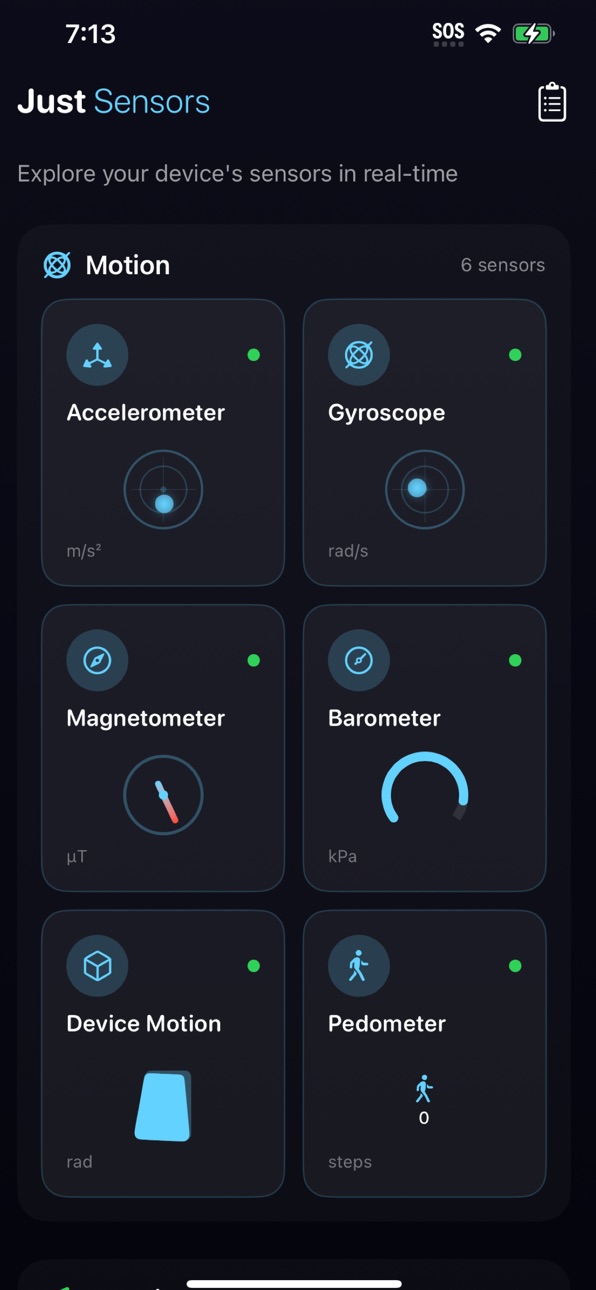
Your iPhone is packed with sophisticated sensors — accelerometers, gyroscopes, barometers, Bluetooth radios, and more — all working silently in the background. Just Sensors brings them to life with beautiful, real-time visualizations.
▸ EXPLORE 17 SENSORS
Motion Sensors
• Accelerometer — Interactive bubble level showing forces in real-time
• Gyroscope — Watch rotation rates with smooth visualizations
• Magnetometer — A digital compass with magnetic field strength
• Barometer — Track atmospheric pressure and relative altitude
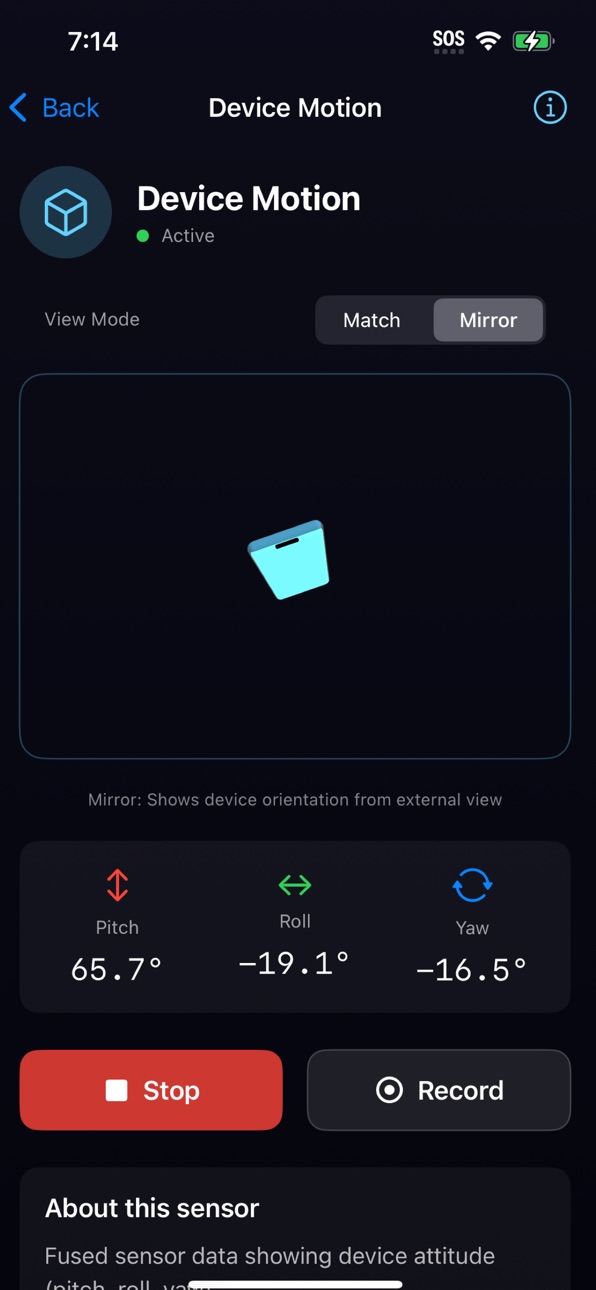
• Device Motion — Visualize pitch, roll, and yaw with an animated 3D cube
• Pedometer — Count steps, distance walked, and floors climbed
Location
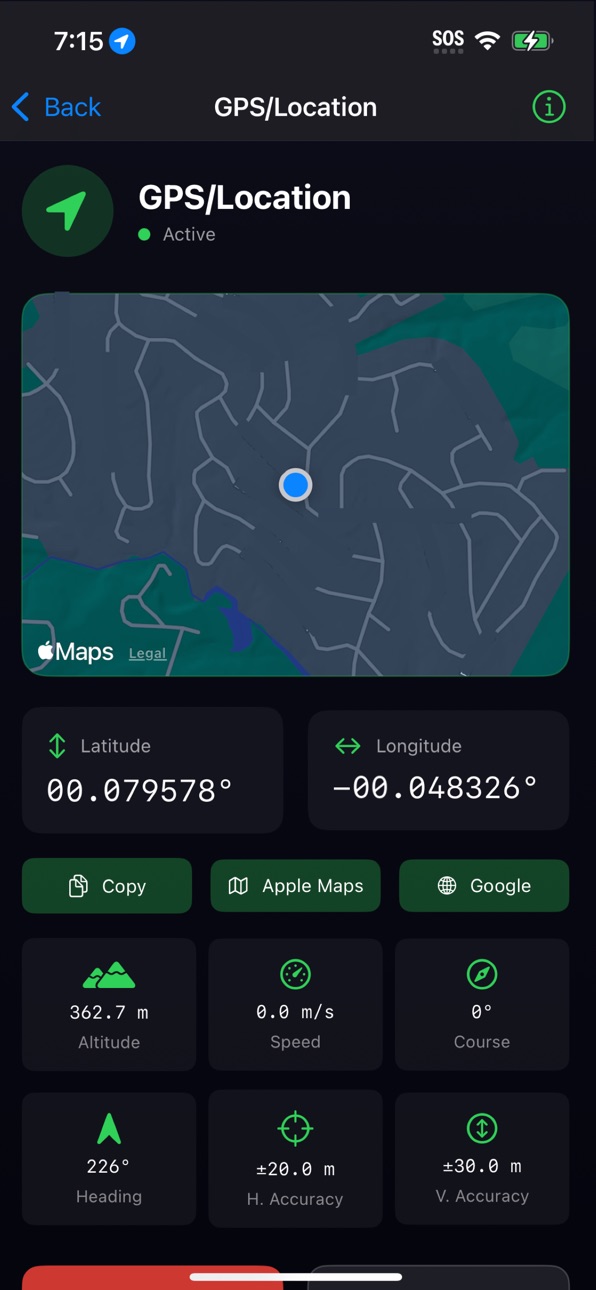
• GPS — View coordinates, altitude, speed, and course on a live map
Audio & Light
• Microphone — Visualize sound levels with a live waveform and dB meter
• Light Meter — Measure ambient light in lux using your camera
AR Sensors (Pro devices)
• LiDAR Scanner — Measure distances and visualize depth data
• Face Tracking — See 52 facial blend shapes detected in real-time
Device State
• Proximity — Detect when objects are near the screen
• Battery — Monitor charge level, state, and thermal condition
• Orientation — See portrait, landscape, face-up, face-down
• Brightness — Track display brightness levels
• NFC — Read NFC tags and view their data
• Bluetooth Scanner — Discover nearby BLE devices
▸ BLUETOOTH SCANNER
• Discover nearby BLE devices in real-time
• See signal strength (RSSI) for each device
• Identify manufacturers using official Bluetooth SIG data
• View advertised services and UUIDs
• Switch between feet and meters for distance estimates
▸ SETTINGS & DEVICE INFO
• Switch between US Standard and Metric units
• View all app permissions at a glance
• See detailed device information — model, memory, storage, screen specs
• Quick access to iOS Settings to manage permissions
▸ BEAUTIFUL VISUALIZATIONS
Every sensor gets its own tailored visualization:
• Interactive bubble levels for motion data
• An animated 3D cube for device orientation
• A smooth compass dial for magnetic heading
• Elegant gauges for pressure, light, and brightness
• Live waveforms for audio
• Device list for Bluetooth with signal strength
• Depth views for LiDAR
• Face mesh overlays for TrueDepth
▸ LIVE PREVIEWS
See sensor data at a glance — the home screen shows live mini-previews for every sensor, so you know what's happening before you tap.
▸ RECORD & EXPORT
Capture sensor data over time and export it for analysis:
• Record sessions from any sensor
• Export to CSV for spreadsheets
• Export to JSON for developers
• Share directly to Files, email, or other apps
• Review and manage past recordings
▸ DESIGNED FOR EVERYONE
Whether you're a developer debugging motion controls, a student learning about physics, a researcher collecting data, or just curious about your device — Just Sensors makes it easy.
• Clean, dark interface with vibrant accent colors
• Haptic feedback for a tactile experience
• Choose your preferred measurement units
• Works offline — no internet required
• Privacy-focused — your data stays on your device
▸ SMART SENSOR HANDLING
Just Sensors gracefully handles hardware differences:
• LiDAR features require iPhone 12 Pro or later
• Face tracking requires devices with Face ID
• Sensors that need permission show tap-to-activate previews
• Unavailable features are clearly indicated
No fluff. No bloat. Just Sensors.
Accessibility
ipadiphonemacrealityDevicetvoswatch
Version history 8 versions
Build 884605902v1.7.12026-04-16 23:56:11
- Adds Stud Finder tool
- Bug fixes
Build 884035612v1.6.12026-04-15 18:57:02
Improves app store listing
Build 883521857v1.6.02026-04-01 04:13:53
# What’s new
- Adds frequency generator
- Adds tuner
Build 882689587v1.5.02026-02-23 18:15:18
# What’s new
Home screen & Lock screen widgets
* Pedometer – Today’s steps, distance, and floors in small and medium widgets. Uses your preferred units from the app.
* Weather Station – Barometer pressure, relative altitude, and pressure trend (Rising / Falling / Steady) in small and medium widgets. Open the app and visit Barometer to feed the widget.
* Recording Live Activity – When you start a sensor recording, a Live Activity appears on the Lock Screen showing the active sensor, number of readings, and elapsed time until you stop recording.
# Improvements
* Widgets and the Watch app now share data with the main app via an App Group so preferences and sensor data stay in sync across the app, widgets, and Live Activity.
Build 882359686v1.4.02026-02-13 17:30:13
- Adds MQTT streaming
- Adds Camera details to device info
- Adds Doppler feature
- Adds export status
- Fixes memory leak
- Improves face tracking details
- Improves general performance
Build 882258820v1.3.02026-02-07 21:21:04
New Sensors:
- Acoustic Sonar (experimental, marked with a beta badge) — Uses the speaker and microphone to perform echolocation and estimate distance to nearby surfaces. Results are approximate and will vary with surface material, ambient noise, and device orientation. We'd love feedback on accuracy in different environments.
- LiDAR Point Cloud — The LiDAR scanner now has a toggle for a dense, colorized 3D point cloud visualization generated from depth data. Throttled to ~7 fps to prevent overheating. Available on LiDAR-equipped devices (iPhone Pro/iPad Pro).
Redesigned:
- Spatial Radar (formerly "UWB Peer Demo") — Completely overhauled with a radar sweep animation and audio ping feedback. Still requires two iPhones running the app with the screen open to test.
New Feature:
- MQTT Export — You can now publish saved recordings to an MQTT broker from the Recordings screen. Configure your broker in Settings.
- iPad Support
Bug Fixes & Stability:
- Fixed Bluetooth scanner sort menu dismissing itself when the device list updates.
- Fixed Compass settings menu disappearing during rapid heading updates (refactored into isolated sub-views for SwiftUI performance).
- Added a Device Conditions warning banner on the home screen — alerts you when battery is low, device is overheating, or Low Power Mode is on, all of which can affect sensor accuracy.
- New "Experimental Features" toggle in settings to show/hide beta sensors.
- Large monolithic view files have been broken into dedicated files. This doesn't change features but should improve app stability and build times.
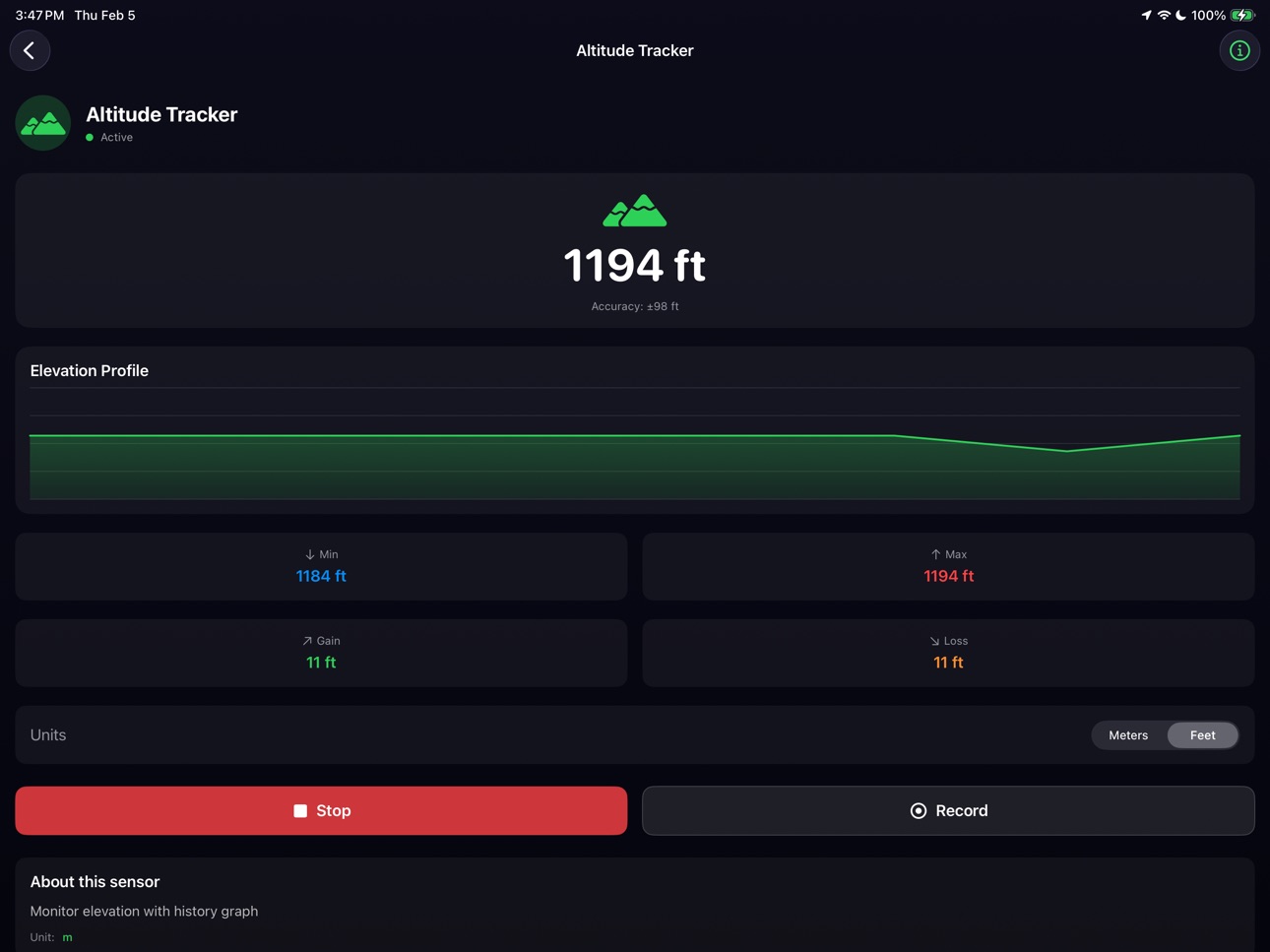
- Removed per-screen unit toggle pickers from Speed/Distance and Altitude views — units now respect the global setting in Settings consistently everywhere
- Sensor unit labels (SensorType.unit) now dynamically return metric or imperial based on your preference (ft vs m, mph vs km/h)
- UWB Spatial Radar distance labels now show feet when set to US Standard
- Mini altitude card on home screen now converts properly
- Memory & Stability Fixes
- Debug Logging Cleanup
- Accessibility Improvements
- MQTT Improvements
- Compass view performance
Known Limitations:
- Acoustic Sonar accuracy is limited — treat it as a fun experiment, not a measurement tool.
- Point cloud rendering can be demanding on older LiDAR devices.
Build 882066613v1.2.12026-02-02 23:23:10
Compass/Magnetometer - New Display Modes
- Two compass modes:
* Traditional - Fixed dial with rotating needle (classic compass behavior)
* Heading - Rotating dial with fixed indicator at top (shows your heading)
- True North vs Magnetic North toggle: Choose between GPS-corrected True North or raw sensor Magnetic North (defaults to Magnetic)
- Compact settings row puts both options side-by-side
Sun Position Tool
- 2D Compass Mode: The sun position indicator now rotates as you turn your device. Point your phone toward the sun to see the :sunny: icon align with the "You" arrow. Cardinal directions (N/E/S/W) rotate with you.
- AR Mode Improvements:
- Sun path now follows you as you move (no longer stuck at starting position)
- Time labels at hourly intervals along the sun path (e.g., "6 AM", "12 PM", "5 PM")
- Current sun position shows a "NOW" label
- Cardinal direction markers (N/E/S/W) with text labels that face the camera
- North is highlighted in red for easy orientation
- Accurate Sunrise/Sunset Times: NOAA Solar Calculator algorithm. Times should now match weather services within 1-2 minutes. Accounts for atmospheric refraction and proper timezone/DST handling.
UWB Peer Demo
- Renamed to set correct expectations
- Added prominent warning banner explaining this feature only detects other devices running Just Sensors
- Important: Cannot detect AirTags, HomePods, or other Apple accessories (Apple restriction)
- Updated "How It Works" with clear instructions on testing (need 2 iPhones with app open)
Wi-Fi Information in Settings
- Fixed issue where SSID showed "Requires Location Permission" even when granted
- Now refreshes when app becomes active or Settings view opens
- Requires Location permission + "Access WiFi Information" entitlement
Bug Fixes
- Fixed Swift 6 concurrency warnings in BluetoothManager and DeviceManager
- Improved NFC delegate handling for better Swift concurrency compatibility
- Fixed invalid SF Symbol for Magnetic North toggle (was "magnet", now uses valid symbol)
Build 881685677v1.1.02026-01-29 05:04:48
Price history by region
Currency
Show
Columns
Search
Availability 97 of 97 storefronts
| Region | Language | Price | Ratings | Avg | Version |
|---|---|---|---|---|---|
| US | en-US | USD 0.99 | 3 | 5.0 | 1.7.1 |
| FI | en-GB | EUR 0.99 | 1 | 5.0 | 1.7.1 |
| AE | en-GB | AED 2.99 | 0 | — | 1.7.1 |
| AF | en-GB | USD 0.99 | 0 | — | 1.7.1 |
| AL | en-GB | USD 0.99 | 0 | — | 1.7.1 |
| AM | en-GB | USD 0.99 | 0 | — | 1.7.1 |
| AT | de-DE | EUR 0.99 | 0 | — | 1.7.1 |
| AZ | en-GB | USD 0.99 | 0 | — | 1.7.1 |
| BA | en-GB | EUR 0.99 | 0 | — | 1.7.1 |
| BE | en-GB | EUR 0.99 | 0 | — | 1.7.1 |
| BG | en-GB | EUR 0.99 | 0 | — | 1.7.1 |
| BH | en-GB | USD 0.99 | 0 | — | 1.7.1 |
| BM | en-GB | USD 0.99 | 0 | — | 1.7.1 |
| BN | en-GB | USD 0.99 | 0 | — | 1.7.1 |
| BT | en-GB | USD 0.99 | 0 | — | 1.7.1 |
| BY | en-GB | USD 0.99 | 0 | — | 1.7.1 |
| CA | en-CA | CAD 0.99 | 0 | — | 1.7.1 |
| CH | de-CH | CHF 1 | 0 | — | 1.7.1 |
| CN | zh-Hans-CN | CNY 8 | 0 | — | 1.7.1 |
| CY | en-GB | EUR 0.99 | 0 | — | 1.7.1 |
| CZ | en-GB | CZK 29 | 0 | — | 1.7.1 |
| DK | en-GB | DKK 9 | 0 | — | 1.7.1 |
| EE | en-GB | EUR 0.99 | 0 | — | 1.7.1 |
| EG | en-GB | EGP 49.99 | 0 | — | 1.7.1 |
| ES | es-ES | EUR 0.99 | 0 | — | 1.7.1 |
| FJ | en-GB | USD 0.99 | 0 | — | 1.7.1 |
| FM | en-GB | USD 0.99 | 0 | — | 1.7.1 |
| GB | en-GB | GBP 0.99 | 0 | — | 1.7.1 |
| GE | en-GB | USD 0.99 | 0 | — | 1.7.1 |
| GR | en-GB | EUR 0.99 | 0 | — | 1.7.1 |
| HK | zh-Hant-HK | HKD 8 | 0 | — | 1.7.1 |
| HR | en-GB | EUR 0.99 | 0 | — | 1.7.1 |
| HU | en-GB | HUF 499 | 0 | — | 1.7.1 |
| ID | en-GB | IDR 19000 | 0 | — | 1.7.1 |
| IE | en-GB | EUR 0.99 | 0 | — | 1.7.1 |
| IL | en-GB | ILS 2.9 | 0 | — | 1.7.1 |
| IN | en-GB | INR 99 | 0 | — | 1.7.1 |
| IQ | en-GB | USD 0.99 | 0 | — | 1.7.1 |
| IS | en-GB | USD 0.99 | 0 | — | 1.7.1 |
| IT | it | EUR 0.99 | 0 | — | 1.7.1 |
| JO | en-GB | USD 0.99 | 0 | — | 1.7.1 |
| JP | ja | JPY 150 | 0 | — | 1.7.1 |
| KG | en-GB | USD 0.99 | 0 | — | 1.7.1 |
| KH | en-GB | USD 0.99 | 0 | — | 1.7.1 |
| KR | ko | KRW 1100 | 0 | — | 1.7.1 |
| KW | en-GB | USD 0.99 | 0 | — | 1.7.1 |
| KZ | en-GB | KZT 499 | 0 | — | 1.7.1 |
| LA | en-GB | USD 0.99 | 0 | — | 1.7.1 |
| LB | en-GB | USD 0.99 | 0 | — | 1.7.1 |
| LK | en-GB | USD 0.99 | 0 | — | 1.7.1 |
| LT | en-GB | EUR 0.99 | 0 | — | 1.7.1 |
| LU | en-GB | EUR 0.99 | 0 | — | 1.7.1 |
| LV | en-GB | EUR 0.99 | 0 | — | 1.7.1 |
| MD | en-GB | USD 0.99 | 0 | — | 1.7.1 |
| ME | en-GB | EUR 0.99 | 0 | — | 1.7.1 |
| MK | en-GB | USD 0.99 | 0 | — | 1.7.1 |
| MM | en-GB | USD 0.99 | 0 | — | 1.7.1 |
| MN | en-GB | USD 0.99 | 0 | — | 1.7.1 |
| MO | zh-Hant-HK | USD 0.99 | 0 | — | 1.7.1 |
| MR | en-GB | USD 0.99 | 0 | — | 1.7.1 |
| MT | en-GB | EUR 0.99 | 0 | — | 1.7.1 |
| MV | en-GB | USD 0.99 | 0 | — | 1.7.1 |
| MY | en-GB | MYR 4.9 | 0 | — | 1.7.1 |
| NL | nl | EUR 0.99 | 0 | — | 1.7.1 |
| NO | en-GB | NOK 9 | 0 | — | 1.7.1 |
| NP | en-GB | USD 0.99 | 0 | — | 1.7.1 |
| NR | en-GB | USD 0.99 | 0 | — | 1.7.1 |
| NZ | en-AU | NZD 1.99 | 0 | — | 1.7.1 |
| OM | en-GB | USD 0.99 | 0 | — | 1.7.1 |
| PG | en-GB | USD 0.99 | 0 | — | 1.7.1 |
| PH | en-GB | PHP 49 | 0 | — | 1.7.1 |
| PK | en-GB | PKR 300 | 0 | — | 1.7.1 |
| PL | en-GB | PLN 4.99 | 0 | — | 1.7.1 |
| PT | pt-PT | EUR 0.99 | 0 | — | 1.7.1 |
| PW | en-GB | USD 0.99 | 0 | — | 1.7.1 |
| QA | en-GB | QAR 2.99 | 0 | — | 1.7.1 |
| RO | en-GB | RON 4.99 | 0 | — | 1.7.1 |
| RU | ru | RUB 99 | 0 | — | 1.7.1 |
| SA | en-GB | SAR 4.99 | 0 | — | 1.7.1 |
| SB | en-GB | USD 0.99 | 0 | — | 1.7.1 |
| SE | sv | SEK 9 | 0 | — | 1.7.1 |
| SG | en-GB | SGD 0.98 | 0 | — | 1.7.1 |
| SI | en-GB | EUR 0.99 | 0 | — | 1.7.1 |
| SK | en-GB | EUR 0.99 | 0 | — | 1.7.1 |
| TH | en-GB | THB 29 | 0 | — | 1.7.1 |
| TJ | en-GB | USD 0.99 | 0 | — | 1.7.1 |
| TM | en-GB | USD 0.99 | 0 | — | 1.7.1 |
| TO | en-GB | USD 0.99 | 0 | — | 1.7.1 |
| TR | en-GB | TRY 49.99 | 0 | — | 1.7.1 |
| TW | zh-Hant-TW | TWD 30 | 0 | — | 1.7.1 |
| UA | en-GB | USD 0.99 | 0 | — | 1.7.1 |
| UZ | en-GB | USD 0.99 | 0 | — | 1.7.1 |
| VN | en-GB | VND 29000 | 0 | — | 1.7.1 |
| VU | en-GB | USD 0.99 | 0 | — | 1.7.1 |
| XK | en-GB | EUR 0.99 | 0 | — | 1.7.1 |
| YE | en-GB | USD 0.99 | 0 | — | 1.7.1 |
| ZA | en-GB | ZAR 19.99 | 0 | — | 1.7.1 |
Change log 12 changes · MO
✎
releaseNotes updated
- Adds Stud Finder tool
- Bug fixes
✎
description updated
Just Sensors. Nothing more, nothing less.
Your iPhone is packed with sophisticated sensors — accelerometers, gyroscopes, barometers, Bluetooth radios, and more
✎
subtitle updated
Explore Your Device's Sensors
✎
name updated
Just Sensors
◆
Version 1.7.1 released
- Adds Stud Finder tool
- Bug fixes
◆
Version 1.6.1 released
Improves app store listing
◆
Version 1.6.0 released
# What’s new
- Adds frequency generator
- Adds tuner
◆
Version 1.5.0 released
# What’s new
Home screen & Lock screen widgets
* Pedometer – Today’s steps, distance, and floors in small and medium widgets. Uses your preferred units from the app.
* Weather Station – Barometer pressure, relative altitude, and pressure
◆
Version 1.4.0 released
- Adds MQTT streaming
- Adds Camera details to device info
- Adds Doppler feature
- Adds export status
- Fixes memory leak
- Improves face tracking details
- Improves general performance
◆
Version 1.3.0 released
New Sensors:
- Acoustic Sonar (experimental, marked with a beta badge) — Uses the speaker and microphone to perform echolocation and estimate distance to nearby surfaces. Results are approximate and will vary with surface material, ambient
◆
Version 1.2.1 released
Compass/Magnetometer - New Display Modes
- Two compass modes:
* Traditional - Fixed dial with rotating needle (classic compass behavior)
* Heading - Rotating dial with fixed indicator at top (shows your heading)
- True North vs Magnetic
◆
Version 1.1.0 released