Home › Music

 ZM
ZM
 JPja
JPja AEen-GB
 AGen-GB
 AIen-GB
 ALen-GB
 AMen-GB
 AOen-GB
 ARes-MX
 ATde-DE
 AUen-AU
 AZen-GB
 BBen-GB
 BEen-GB
 BFen-GB
 BGen-GB
 BHen-GB
 BJen-GB
 BOes-MX
 BRpt-BR
 BSen-GB
 BWen-GB
 BZen-GB
 CAen-CA
 CDen-GB
 CGen-GB
 CHde-CH
 CIfr-FR
 CLes-MX
 CMfr-FR
 CNzh-Hans-CN
 COes-MX
 CRes-MX
 CVen-GB
 CYen-GB
 CZen-GB
 DEde-DE
 DKen-GB
 DMen-GB
 DOes-MX
 DZen-GB
 ECes-MX
 EEen-GB
 EGen-GB
 ESes-ES
 FIen-GB
 FRfr-FR
 GAfr-FR
 GBen-GB
 GDen-GB
 GEen-GB
 GHen-GB
 GMen-GB
 GRen-GB
 GTes-MX
 GWen-GB
 GYen-GB
 HNes-MX
 HUen-GB
 IEen-GB
 ILen-GB
 IQen-GB
 ISen-GB
 ITit
ITit JMen-GB
 JOen-GB
 KEen-GB
 KNen-GB
 KWen-GB
 KYen-GB
 LBen-GB
 LCen-GB
 LRen-GB
 LUen-GB
 LVen-GB
 LYen-GB
 MAen-GB
 MDen-GB
 MEen-GB
 MGen-GB
 MKen-GB
 MLen-GB
 MSen-GB
 MTen-GB
 MUen-GB
 MWen-GB
 MXes-MX
 MZen-GB
 NAen-GB
 NEen-GB
 NGen-GB
 NIes-MX
 NLnl
NLnl NOen-GB
 NZen-AU
 OMen-GB
 PAes-MX
 PEes-MX
 PLen-GB
 PTpt-PT
 PYes-MX
 QAen-GB
 ROen-GB
 RWen-GB
 SAen-GB
 SCen-GB
 SEsv
SEsv SKen-GB
 SLen-GB
 SNen-GB
 SRen-GB
 STen-GB
 SVes-MX
 SZen-GB
 TCen-GB
 TDen-GB
 TNen-GB
 TRen-GB
 TTen-GB
 TWzh-Hant-TW
 TZen-GB
 UGen-GB
 USen-US
 UYen-GB
 VCen-GB
 VEes-MX
 VGen-GB
 XKen-GB
 YEen-GBZMen-GB
 ZWen-GB
130 of 130 storefronts
Content in en-US
Content in en-US
Information
Preview 2 platforms
iPhone 9 images




iPad 3 images


What’s New Version 2.2.2
Improved Pro upgrade prompt timing — now shown only once, on your very first recording save.
Description
1Take turns your iPhone into a professional recording studio.
RECORD WITH STUDIO QUALITY
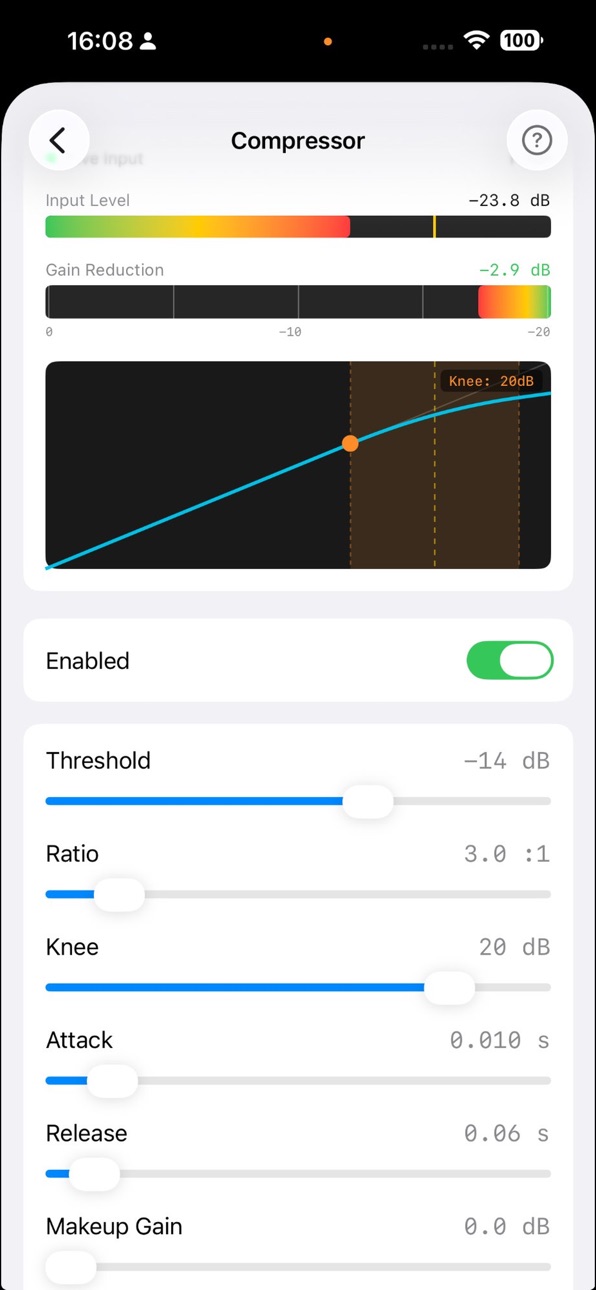
- Professional DSP chain: Gate, 5-band EQ, Compressor (LA-2A/1176/VCA modeling), Saturation, Stereo Field, Limiter
- 16-bit WAV (free) or 24-bit BWF (Pro)
- Real-time VU meter, LUFS loudness metering, spectrum analyzer
- 5-second pre-roll buffer — never miss the start
PHYSICAL MODELING COMPRESSORS
- LA-2A (Opto): Smooth, musical compression for vocals
- 1176 (FET): Fast, punchy compression for instruments
- VCA: Transparent, precise compression for any source
- Each modeled with authentic attack/release curves
AI AUDIO OPTIMIZATION
- Analyze your recording environment
- Auto-adjust DSP settings for optimal sound
- One-tap optimization after first recording
CLOUD SYNC
- Automatic backup to Dropbox, Google Drive, iCloud Drive, Backblaze B2
- Export as WAV, MP3, or AAC
PRO UPGRADE ($4.99, one-time purchase)
- 24-bit WAV/BWF recording
- Direct MP3/AAC recording
- Custom preset editing
- AI audio optimization
- Cloud sync
NOW IN 11 LANGUAGES
English, Japanese, Korean, German, Traditional Chinese, French, Dutch, Swedish, Spanish, Portuguese, Italian
Perfect for musicians, podcasters, and content creators who need professional quality from their iPhone.
In-App Purchases ZM pricing
One-Time Purchases
1Take Pro—
Capabilities
In-App Purchases
Accessibility
ipadiphonemacrealityDevicetvoswatch
Version history 17 versions
Build 886086846v2.2.22026-05-25 18:11:40
Improved Pro upgrade prompt timing — now shown only once, on your very first recording save.
Build 886023457v2.2.12026-05-22 19:57:48
Added Our Apps section in Settings to discover PeerClock Metronome and TenSync from the same developer.
Build 885760916v2.2.02026-05-17 20:59:16
New: Pro moment card appears after your 1st and 5th recordings, showing what 1TakePro unlocks. Security fix: removed embedded OAuth credentials. Bug fixes.
Build 884938320v2.1.12026-04-26 20:49:50
Fixes a rare crash during recording analysis.
Build 884924181v2.1.02026-04-25 19:35:08
Minor improvements and bug fixes.
Build 884381186v2.0.02026-04-11 17:39:44
v2.0.0 — 11 Language Localization
- Added 9 new languages: Korean, German, Traditional Chinese, French, Dutch, Swedish, Spanish, Portuguese (Brazil), Italian
- Full UI localization
- Performance and stability improvements
Build 884212897v1.5.02026-04-07 18:09:09
Physical Modeling Compressors — Custom DSP compressors modeled after legendary analog hardware:
• LA-2A opto-compressor with non-linear release and harmonic saturation
• 1176 FET compressor with input-dependent attack and punch
• VCA compressor for clean, transparent dynamics
Also new:
• Parameter hints on all effect sliders
• Saturation help topic added
• Expanded help content for compressors and presets
• English-standardized effect labels
• Security improvements
Build 883999877v1.4.22026-04-02 00:56:55
Bug fixes and stability improvements:
• Fixed memory crash after recording on some devices
• Fixed cloud sync not uploading all pending recordings
• Improved AI optimization recovery after app restart
• Fixed GPS location not captured on first permission grant
• Improved audio engine compatibility with iOS 26
• Audio Rebalance now handles long recordings efficiently
• Fixed Audio Rebalance cancellation reliability
Build 883909790v1.4.12026-03-30 20:12:17
v1.4.1:
• 1Take Pro: Unlock AI auto-optimization, lossless WAV/BWF export, and custom presets with a one-time purchase
• AI optimization now shows analysis insights for all users — Pro unlocks auto-apply
• Bug fixes and performance improvements
Build 883890159v1.42026-03-29 18:33:08
• Cloud Sync: Auto-backup recordings to iCloud Drive, Google Drive, Dropbox, or Backblaze B2
• GPS Location Tagging: Automatically tag where each recording was made
• Improved AI Optimization: View real-time adjustments inline with recording details
• Contextual Hints: Helpful tips throughout the app for easier discovery
• Redesigned Recording Detail View: Unified layout with cloud sync status and retry controls
• Security: Migrated to iOS native OAuth for Google Drive
• Various bug fixes and performance improvements
Build 883141439v1.3.22026-03-23 18:08:02
• Deleted recordings can now be recovered from "Recently Deleted" in the Files app for 30 days
• Fixed a rare crash during audio playback
• Fixed a rare crash when starting recording
Build 882673679v1.3.12026-02-22 21:28:12
Added MP3/AAC export and recording analysis.
NEW FEATURES:
- MP3/AAC Export - Convert recordings to MP3 or AAC (128-320kbps)
- MP3/AAC Recording (Pro) - Record directly to compressed format
- Batch Export - Convert multiple recordings at once
- Recording Analysis - Automatic audio quality assessment after recording (peak, RMS, LUFS, dynamic range)
- Auto-Record Calibration - Automatically set threshold based on ambient noise level
- 5-Band Parametric EQ - Adjust frequency, gain, and Q per band
- Sleep Prevention - Keep screen on during long recording sessions
IMPROVEMENTS & FIXES:
- Prevent conversion interruption when app goes to background
- Improved stability for long-duration recordings
- Optimized audio thread performance
Build 882074713v1.3.02026-02-02 23:23:32
NEW IN THIS VERSION:
• Pro features preview: Preset customization and BWF format options (coming soon)
• Added support links in Help section
• Privacy Policy accessible from the app
• Improved in-app documentation
• Performance improvements and bug fixes
Build 881841282v1.2.12026-01-27 11:51:39
- Added Pro in-app purchase
- Custom preset editing (Pro)
- BWF format export (Pro)
- Extended pre-roll now available for all users
- Bug fixes and stability improvements
Build 881802352v1.2.02026-01-26 03:41:10
Welcome to OneTake 1.0 — Professional audio recording, reimagined for iPhone.
- LUFS Metering: Broadcast-standard loudness measurement with momentary, short-term, integrated, and true peak values
- Real-time Effects: Noise gate, EQ, compressor, saturation, stereo spread, and maximizer
- Pro Audio Formats: 24-bit WAV and BWF with embedded timecode for seamless DAW integration
- Audio Presets: Flat, Studio, Studio+, and Live modes optimized for different recording scenarios
- Pre-roll Recording: Capture audio before you press record — never miss a moment
- Auto-Record: Hands-free recording triggered by audio threshold
- Audio Integrity Monitoring: Real-time buffer drop detection ensures recording quality
Start recording with confidence. Get it right in one take.
Build 881689498v1.1.02026-01-21 13:15:54
NEW IN THIS VERSION:
- Pro features preview: Preset customization and BWF format options (coming soon)
- Added support links in Help section
- Privacy Policy accessible from the app
- Improved in-app documentation
- Performance improvements and bug fixes
Build 881587565v1.0.02026-01-20 23:06:17
Price history by region
Currency
Show
Columns
Search
Availability 130 of 130 storefronts
| Region | Language | Price | Ratings | Avg | Version |
|---|---|---|---|---|---|
| JP | ja | Free | 5 | 5.0 | 2.2.2 |
| AE | en-GB | Free | 0 | — | 2.2.2 |
| AG | en-GB | Free | 0 | — | 2.2.2 |
| AI | en-GB | Free | 0 | — | 2.2.2 |
| AL | en-GB | Free | 0 | — | 2.2.2 |
| AM | en-GB | Free | 0 | — | 2.2.2 |
| AO | en-GB | Free | 0 | — | 2.2.2 |
| AR | es-MX | Free | 0 | — | 2.2.2 |
| AT | de-DE | Free | 0 | — | 2.2.2 |
| AU | en-AU | Free | 0 | — | 2.2.2 |
| AZ | en-GB | Free | 0 | — | 2.2.2 |
| BB | en-GB | Free | 0 | — | 2.2.2 |
| BE | en-GB | Free | 0 | — | 2.2.2 |
| BF | en-GB | Free | 0 | — | 2.2.2 |
| BG | en-GB | Free | 0 | — | 2.2.2 |
| BH | en-GB | Free | 0 | — | 2.2.2 |
| BJ | en-GB | Free | 0 | — | 2.2.2 |
| BO | es-MX | Free | 0 | — | 2.2.2 |
| BR | pt-BR | Free | 0 | — | 2.2.2 |
| BS | en-GB | Free | 0 | — | 2.2.2 |
| BW | en-GB | Free | 0 | — | 2.2.2 |
| BZ | en-GB | Free | 0 | — | 2.2.2 |
| CA | en-CA | Free | 0 | — | 2.2.2 |
| CD | en-GB | Free | 0 | — | 2.2.2 |
| CG | en-GB | Free | 0 | — | 2.2.2 |
| CH | de-CH | Free | 0 | — | 2.2.2 |
| CI | fr-FR | Free | 0 | — | 2.2.2 |
| CL | es-MX | Free | 0 | — | 2.2.2 |
| CM | fr-FR | Free | 0 | — | 2.2.2 |
| CN | zh-Hans-CN | Free | 0 | — | 2.2.2 |
| CO | es-MX | Free | 0 | — | 2.2.2 |
| CR | es-MX | Free | 0 | — | 2.2.2 |
| CV | en-GB | Free | 0 | — | 2.2.2 |
| CY | en-GB | Free | 0 | — | 2.2.2 |
| CZ | en-GB | Free | 0 | — | 2.2.2 |
| DE | de-DE | Free | 0 | — | 2.2.2 |
| DK | en-GB | Free | 0 | — | 2.2.2 |
| DM | en-GB | Free | 0 | — | 2.2.2 |
| DO | es-MX | Free | 0 | — | 2.2.2 |
| DZ | en-GB | Free | 0 | — | 2.2.2 |
| EC | es-MX | Free | 0 | — | 2.2.2 |
| EE | en-GB | Free | 0 | — | 2.2.2 |
| EG | en-GB | Free | 0 | — | 2.2.2 |
| ES | es-ES | Free | 0 | — | 2.2.2 |
| FI | en-GB | Free | 0 | — | 2.2.2 |
| FR | fr-FR | Free | 0 | — | 2.2.2 |
| GA | fr-FR | Free | 0 | — | 2.2.2 |
| GB | en-GB | Free | 0 | — | 2.2.2 |
| GD | en-GB | Free | 0 | — | 2.2.2 |
| GE | en-GB | Free | 0 | — | 2.2.2 |
| GH | en-GB | Free | 0 | — | 2.2.2 |
| GM | en-GB | Free | 0 | — | 2.2.2 |
| GR | en-GB | Free | 0 | — | 2.2.2 |
| GT | es-MX | Free | 0 | — | 2.2.2 |
| GW | en-GB | Free | 0 | — | 2.2.2 |
| GY | en-GB | Free | 0 | — | 2.2.2 |
| HN | es-MX | Free | 0 | — | 2.2.2 |
| HU | en-GB | Free | 0 | — | 2.2.2 |
| IE | en-GB | Free | 0 | — | 2.2.2 |
| IL | en-GB | Free | 0 | — | 2.2.2 |
| IQ | en-GB | Free | 0 | — | 2.2.2 |
| IS | en-GB | Free | 0 | — | 2.2.2 |
| IT | it | Free | 0 | — | 2.2.2 |
| JM | en-GB | Free | 0 | — | 2.2.2 |
| JO | en-GB | Free | 0 | — | 2.2.2 |
| KE | en-GB | Free | 0 | — | 2.2.2 |
| KN | en-GB | Free | 0 | — | 2.2.2 |
| KW | en-GB | Free | 0 | — | 2.2.2 |
| KY | en-GB | Free | 0 | — | 2.2.2 |
| LB | en-GB | Free | 0 | — | 2.2.2 |
| LC | en-GB | Free | 0 | — | 2.2.2 |
| LR | en-GB | Free | 0 | — | 2.2.2 |
| LU | en-GB | Free | 0 | — | 2.2.2 |
| LV | en-GB | Free | 0 | — | 2.2.2 |
| LY | en-GB | Free | 0 | — | 2.2.2 |
| MA | en-GB | Free | 0 | — | 2.2.2 |
| MD | en-GB | Free | 0 | — | 2.2.2 |
| ME | en-GB | Free | 0 | — | 2.2.2 |
| MG | en-GB | Free | 0 | — | 2.2.2 |
| MK | en-GB | Free | 0 | — | 2.2.2 |
| ML | en-GB | Free | 0 | — | 2.2.2 |
| MS | en-GB | Free | 0 | — | 2.2.2 |
| MT | en-GB | Free | 0 | — | 2.2.2 |
| MU | en-GB | Free | 0 | — | 2.2.2 |
| MW | en-GB | Free | 0 | — | 2.2.2 |
| MX | es-MX | Free | 0 | — | 2.2.2 |
| MZ | en-GB | Free | 0 | — | 2.2.2 |
| NA | en-GB | Free | 0 | — | 2.2.2 |
| NE | en-GB | Free | 0 | — | 2.2.2 |
| NG | en-GB | Free | 0 | — | 2.2.2 |
| NI | es-MX | Free | 0 | — | 2.2.2 |
| NL | nl | Free | 0 | — | 2.2.2 |
| NO | en-GB | Free | 0 | — | 2.2.2 |
| NZ | en-AU | Free | 0 | — | 2.2.2 |
| OM | en-GB | Free | 0 | — | 2.2.2 |
| PA | es-MX | Free | 0 | — | 2.2.2 |
| PE | es-MX | Free | 0 | — | 2.2.2 |
| PL | en-GB | Free | 0 | — | 2.2.2 |
| PT | pt-PT | Free | 0 | — | 2.2.2 |
| PY | es-MX | Free | 0 | — | 2.2.2 |
| QA | en-GB | Free | 0 | — | 2.2.2 |
| RO | en-GB | Free | 0 | — | 2.2.2 |
| RW | en-GB | Free | 0 | — | 2.2.2 |
| SA | en-GB | Free | 0 | — | 2.2.2 |
| SC | en-GB | Free | 0 | — | 2.2.2 |
| SE | sv | Free | 0 | — | 2.2.2 |
| SK | en-GB | Free | 0 | — | 2.2.2 |
| SL | en-GB | Free | 0 | — | 2.2.2 |
| SN | en-GB | Free | 0 | — | 2.2.2 |
| SR | en-GB | Free | 0 | — | 2.2.2 |
| ST | en-GB | Free | 0 | — | 2.2.2 |
| SV | es-MX | Free | 0 | — | 2.2.2 |
| SZ | en-GB | Free | 0 | — | 2.2.2 |
| TC | en-GB | Free | 0 | — | 2.2.2 |
| TD | en-GB | Free | 0 | — | 2.2.2 |
| TN | en-GB | Free | 0 | — | 2.2.2 |
| TR | en-GB | Free | 0 | — | 2.2.2 |
| TT | en-GB | Free | 0 | — | 2.2.2 |
| TW | zh-Hant-TW | Free | 0 | — | 2.2.2 |
| TZ | en-GB | Free | 0 | — | 2.2.2 |
| UG | en-GB | Free | 0 | — | 2.2.2 |
| US | en-US | Free | 0 | — | 2.2.2 |
| UY | en-GB | Free | 0 | — | 2.2.2 |
| VC | en-GB | Free | 0 | — | 2.2.2 |
| VE | es-MX | Free | 0 | — | 2.2.2 |
| VG | en-GB | Free | 0 | — | 2.2.2 |
| XK | en-GB | Free | 0 | — | 2.2.2 |
| YE | en-GB | Free | 0 | — | 2.2.2 |
| ZM | en-GB | Free | 0 | — | 2.2.2 |
| ZW | en-GB | Free | 0 | — | 2.2.2 |
Change log 21 changes · ZM
✎
releaseNotes updated
Improved Pro upgrade prompt timing — now shown only once, on your very first recording save.
✎
description updated
1Take turns your iPhone into a professional recording studio.
RECORD WITH STUDIO QUALITY
- Professional DSP chain: Gate, 5-band EQ, Compressor (LA-2A/1176/VCA
✎
subtitle updated
Pro Music Recording with AI
✎
name updated
1Take
◆
Version 2.2.2 released
Improved Pro upgrade prompt timing — now shown only once, on your very first recording save.
◆
Version 2.2.1 released
Added Our Apps section in Settings to discover PeerClock Metronome and TenSync from the same developer.
◆
Version 2.2.0 released
New: Pro moment card appears after your 1st and 5th recordings, showing what 1TakePro unlocks. Security fix: removed embedded OAuth credentials. Bug fixes.
◆
Version 2.1.1 released
Fixes a rare crash during recording analysis.
◆
Version 2.1.0 released
Minor improvements and bug fixes.
◆
Version 2.0.0 released
v2.0.0 — 11 Language Localization
- Added 9 new languages: Korean, German, Traditional Chinese, French, Dutch, Swedish, Spanish, Portuguese (Brazil), Italian
- Full UI localization
- Performance and stability improvements
◆
Version 1.5.0 released
Physical Modeling Compressors — Custom DSP compressors modeled after legendary analog hardware:
• LA-2A opto-compressor with non-linear release and harmonic saturation
• 1176 FET compressor with input-dependent attack and punch
• VCA compre
◆
Version 1.4.2 released
Bug fixes and stability improvements:
• Fixed memory crash after recording on some devices
• Fixed cloud sync not uploading all pending recordings
• Improved AI optimization recovery after app restart
• Fixed GPS location not captured on fi
◆
Version 1.4.1 released
v1.4.1:
• 1Take Pro: Unlock AI auto-optimization, lossless WAV/BWF export, and custom presets with a one-time purchase
• AI optimization now shows analysis insights for all users — Pro unlocks auto-apply
• Bug fixes and performance improve
◆
Version 1.4 released
• Cloud Sync: Auto-backup recordings to iCloud Drive, Google Drive, Dropbox, or Backblaze B2
• GPS Location Tagging: Automatically tag where each recording was made
• Improved AI Optimization: View real-time adjustments inline with recordin
◆
Version 1.3.2 released
• Deleted recordings can now be recovered from "Recently Deleted" in the Files app for 30 days
• Fixed a rare crash during audio playback
• Fixed a rare crash when starting recording
◆
Version 1.3.1 released
Added MP3/AAC export and recording analysis.
NEW FEATURES:
- MP3/AAC Export - Convert recordings to MP3 or AAC (128-320kbps)
- MP3/AAC Recording (Pro) - Record directly to compressed format
- Batch Export - Convert multiple record
◆
Version 1.3.0 released
NEW IN THIS VERSION:
• Pro features preview: Preset customization and BWF format options (coming soon)
• Added support links in Help section
• Privacy Policy accessible from the app
• Improved in-app documentation
• Performance improvement
◆
Version 1.2.1 released
- Added Pro in-app purchase
- Custom preset editing (Pro)
- BWF format export (Pro)
- Extended pre-roll now available for all users
- Bug fixes and stability improvements
◆
Version 1.2.0 released
Welcome to OneTake 1.0 — Professional audio recording, reimagined for iPhone.
- LUFS Metering: Broadcast-standard loudness measurement with momentary, short-term, integrated, and true peak values
- Real-time Effects: Noise gate, EQ, compre
◆
Version 1.1.0 released
NEW IN THIS VERSION:
- Pro features preview: Preset customization and BWF format options (coming soon)
- Added support links in Help section
- Privacy Policy accessible from the app
- Improved in-app documentation
- Performance improvement
◆
Version 1.0.0 released