Home › Developer Tools

 ZW
ZW
 USen-US
 GBen-GB
 BEen-GB
 BRpt-BR
 DEde-DE
 INen-GB
 MYen-GB
 NLnl
NLnl CAen-CA
 ESes-ES
 ITit
ITit KZen-GB
 UAen-GB
 AUen-AU
 CLes-MX
 IDen-GB
 ILen-GB
 JPja
JPja MXes-MX
 PEes-MX
 PHen-GB
 PLen-GB
 ROen-GB
 RSen-GB
 RUru
RUru SKen-GB
 TRen-GB
 VNen-GB
 AEen-GB
 AFen-GB
 AGen-GB
 AIen-GB
 ALen-GB
 AMen-GB
 AOen-GB
 ARes-MX
 ATde-DE
 AZen-GB
 BAen-GB
 BBen-GB
 BFen-GB
 BGen-GB
 BHen-GB
 BJen-GB
 BMen-GB
 BNen-GB
 BOes-MX
 BSen-GB
 BTen-GB
 BWen-GB
 BYen-GB
 BZen-GB
 CDen-GB
 CGen-GB
 CHde-CH
 CIfr-FR
 CMfr-FR
 CNzh-Hans-CN
 COes-MX
 CRes-MX
 CVen-GB
 CYen-GB
 CZen-GB
 DKen-GB
 DMen-GB
 DOes-MX
 DZen-GB
 ECes-MX
 EEen-GB
 EGen-GB
 FIen-GB
 FJen-GB
 FMen-GB
 FRfr-FR
 GAfr-FR
 GDen-GB
 GEen-GB
 GHen-GB
 GMen-GB
 GRen-GB
 GTes-MX
 GWen-GB
 GYen-GB
 HKzh-Hant-HK
 HNes-MX
 HRen-GB
 HUen-GB
 IEen-GB
 IQen-GB
 ISen-GB
 JMen-GB
 JOen-GB
 KEen-GB
 KGen-GB
 KHen-GB
 KNen-GB
 KRko
KRko KWen-GB
 KYen-GB
 LAen-GB
 LBen-GB
 LCen-GB
 LKen-GB
 LRen-GB
 LTen-GB
 LUen-GB
 LVen-GB
 LYen-GB
 MAen-GB
 MDen-GB
 MEen-GB
 MGen-GB
 MKen-GB
 MLen-GB
 MMen-GB
 MNen-GB
 MOzh-Hant-HK
 MRen-GB
 MSen-GB
 MTen-GB
 MUen-GB
 MVen-GB
 MWen-GB
 MZen-GB
 NAen-GB
 NEen-GB
 NGen-GB
 NIes-MX
 NOen-GB
 NPen-GB
 NRen-GB
 NZen-AU
 OMen-GB
 PAes-MX
 PGen-GB
 PKen-GB
 PTpt-PT
 PWen-GB
 PYes-MX
 QAen-GB
 RWen-GB
 SAen-GB
 SBen-GB
 SCen-GB
 SEsv
SEsv SGen-GB
 SIen-GB
 SLen-GB
 SNen-GB
 SRen-GB
 STen-GB
 SVes-MX
 SZen-GB
 TCen-GB
 TDen-GB
 THen-GB
 TJen-GB
 TMen-GB
 TNen-GB
 TOen-GB
 TTen-GB
 TWzh-Hant-TW
 TZen-GB
 UGen-GB
 UYen-GB
 UZen-GB
 VCen-GB
 VEes-MX
 VGen-GB
 VUen-GB
 XKen-GB
 YEen-GB
 ZAen-GB
 ZMen-GBZWen-GB
175 of 175 storefronts
Content in en-US
Content in en-US
Information
Preview 1 platform
iPhone 9 images



What’s New Version 1.2.3
Something not working? Screeny now explains what went wrong and makes it easy to get help. Plus fixes and polish under the hood.
Description
Turn any screenshot or screen recording into a polished product demo — framed, with a clean status bar and keyframe animation — right on your iPhone.
THE OLD WAY WAS SLOW
Creating a professional mockup used to mean:
1. Transfer your screenshot to a computer
2. Open an editing tool
3. Find the right device bezel
4. Position everything perfectly
5. Edit the status bar by hand
6. Export at the right size
15 minutes. Every single time. And for video? Forget it — most people just skip the mockup entirely.
THE NEW WAY TAKES 3 SECONDS
1. Import your screenshot or screen recording
2. Pick your device
3. Export
That's it. Status bar cleaned, frame applied, ready for the App Store, social, or your landing page.
CLEAN STATUS BAR, AUTOMATICALLY
A polished demo shows 9:41, full signal, full battery — not 3:47, 23%, and a recording indicator.
Cleaning that up by hand means a desktop editing tool and masking the status bar frame by frame. It's tedious enough that most apps don't bother — they leave the messy screen-recording bar right there in your shot.
Screeny rebuilds a clean status bar on every single frame of your video, automatically — with a homemade algorithm that keeps the background behind it perfectly intact. One tap. Light or dark. No ugly overlay.
The most annoying part of making a demo — now it's done for you.
ZOOM ON WHAT MATTERS
A flat screen recording is easy to scroll past. Punch in on the tap, the toggle, the one moment that sells it.
Drop a keyframe, set your focus, and Screeny animates a smooth zoom right to it. It's what makes a product demo stop the scroll on social — your UI, your interaction, front and center.
DROP IT IN A FRAME
Every iPhone, always up to date — 15, 16, 17, Air — in 20+ real colors and finishes. Match the exact device you filmed on.
MAKE IT YOURS
Solid colors, gradients, even custom gradients you build yourself. A photo from your library — or thousands straight from Unsplash, without ever leaving the app. Prefer transparent? Export with no background and drop the result into Figma or Keynote. Your brand colors sync across devices via iCloud.
FRAME IT PERFECTLY
Adjust the padding down to the pixel. Pick your aspect ratio — 1:1, 4:5, 9:16, 16:9 for YouTube and slides, or Free — sized for wherever it's headed.
SCREENSHOTS, JUST AS FAST
Don't need a video? Import a screenshot, frame it, export at 1x/2x/3x. Or screenshot anything, tap Share, pick Screeny — instant mockup.
BUILT WITH CARE
Fast, native, and crafted down to the last detail — Liquid Glass design, built for iOS 26. New iPhones the day they launch. And the roadmap is public, right inside the app: vote on what's next, suggest a feature, watch it ship.
YOUR JAR COLLECTION
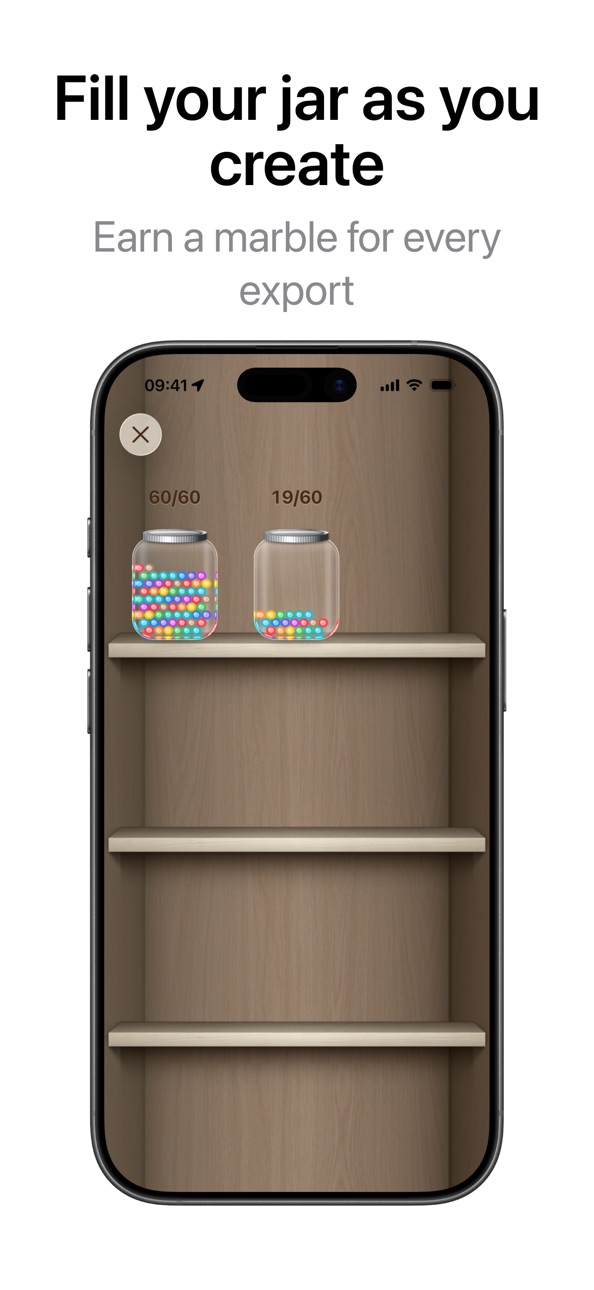
Every export drops a marble in your jar — 1 for a photo, 3 for a video. Open it any time to watch it fill up and see just how much you've made.
PRIVATE BY DEFAULT
No cloud upload, no server processing — everything happens on your iPhone. Presets sync through your own iCloud account.
WHO IT'S FOR
Indie developers shipping App Store previews. Designers building demo reels. Marketers and founders posting to social. Journalists and creators showing what's on screen. Anyone who wants to put iPhone content in a beautiful frame.
PRICING
10 free exports to start, no watermark — ever. Then:
- Export credits for occasional use
- Monthly or yearly for unlimited
- Lifetime — one payment, forever
Made by one indie developer who thought a great demo shouldn't take a Mac and an afternoon.
— Lazare
Privacy: https://getscreeny.app/privacy
Terms: https://getscreeny.app/terms/
In-App Purchases ZW pricing
Pro Subscription
Screeny Pro · Yearly—
Screeny Pro · Monthly—
One-Time Purchases
Screeny Lifetime —
50 Export Credits—
20 Export Credits—
Capabilities
In-App Purchases
Accessibility
ipadiphonemacrealityDevicetvoswatch
Version history 8 versions
Build 887787284v1.2.32026-07-03 20:25:55
Something not working? Screeny now explains what went wrong and makes it easy to get help. Plus fixes and polish under the hood.
Build 887526743v1.2.22026-06-27 23:39:41
Two new ways to move faster, and we're ready for iOS 27:
BATCH IMPORT + EXPORT
Bring in up to 10 screenshots at once and export them all in a single pass. Perfect for a complete App Store screenshot set. You can even mix photos and videos in one batch, so the same look runs across your whole collection.
READY FOR iOS 27
Screeny is tuned up and ready for iOS 27.
ALWAYS KNOW WHAT'S NEW
A brand-new What's New screen shows you exactly what changed in every update.
Plus polish and fixes throughout. Enjoy!
Build 886645030v1.2.12026-06-08 19:09:20
A big one. Screeny is now a full demo + mockup studio:
UNSPLASH BACKGROUNDS
Browse thousands of stunning photos and drop one behind your mockup — right inside the app. No downloads, no leaving Screeny.
YOUR JAR COLLECTION
Every export now earns a marble — 1 per photo, 3 per video. Watch your jar fill up and see everything you've made.
A BEAUTIFUL NEW ONBOARDING
A quick, gorgeous walkthrough that shows you exactly how to frame, animate, and export in seconds.
Plus polish and fixes throughout. Enjoy!
Build 884294313v1.2.02026-04-08 22:43:18
Custom image backgrounds are here.
Pick any photo from your library and use it as your mockup background.
Your screenshot. Your device. Your image. All in one frame.
Also: bug fixes and performance improvements.
Build 883399437v1.1.02026-03-28 14:54:00
Introducing Keyframe Animation
Create professional app preview videos with smooth zoom effects. Add keyframes on the timeline to control exactly when and how your mockup animates. Perfect for showcasing your app's best features.
We're constantly improving Screeny based on your feedback. If you love the app, please leave a review!
Build 883154738v1.0.22026-03-09 00:32:29
Smarter canvas
The preview now stays fully visible above the editor panel as you adjust settings — no more guessing what your mockup looks like while editing.
Improved zoom & layout controls
Zoom and position controls have been redesigned for a smoother, more precise editing experience.
Build 883069072v1.0.12026-03-06 00:15:03
Zoom & Position Control
Take full control of your composition. Pin your device to the top, center, or bottom of the frame — perfect for tall formats, social crops, and everything in between.
Presets — Your Favorite Setups, One Tap Away
Save any combination of background, bezel, zoom, and status bar as a named preset. Apply it instantly. Presets sync across all your devices via iCloud.
And more:
- Smoother, faster editor performance
- Refined icons and visual polish throughout
- Bug fixes and stability improvements
Build 881575322v1.02026-02-19 15:21:49
Price history by region
Currency
Show
Columns
Search
Availability 175 of 175 storefronts
| Region | Language | Price | Ratings | Avg | Version |
|---|---|---|---|---|---|
| US | en-US | Free | 17 | 4.5 | 1.2.3 |
| GB | en-GB | Free | 8 | 5.0 | 1.2.3 |
| BE | en-GB | Free | 3 | 5.0 | 1.2.3 |
| BR | pt-BR | Free | 3 | 5.0 | 1.2.3 |
| DE | de-DE | Free | 3 | 5.0 | 1.2.3 |
| IN | en-GB | Free | 3 | 3.3 | 1.2.3 |
| MY | en-GB | Free | 3 | 5.0 | 1.2.3 |
| NL | nl | Free | 3 | 5.0 | 1.2.3 |
| CA | en-CA | Free | 2 | 5.0 | 1.2.3 |
| ES | es-ES | Free | 2 | 5.0 | 1.2.3 |
| IT | it | Free | 2 | 5.0 | 1.2.3 |
| KZ | en-GB | Free | 2 | 3.0 | 1.2.3 |
| UA | en-GB | Free | 2 | 3.0 | 1.2.3 |
| AU | en-AU | Free | 1 | 4.0 | 1.2.3 |
| CL | es-MX | Free | 1 | 5.0 | 1.2.3 |
| ID | en-GB | Free | 1 | 5.0 | 1.2.3 |
| IL | en-GB | Free | 1 | 1.0 | 1.2.3 |
| JP | ja | Free | 1 | 5.0 | 1.2.3 |
| MX | es-MX | Free | 1 | 5.0 | 1.2.3 |
| PE | es-MX | Free | 1 | 5.0 | 1.2.3 |
| PH | en-GB | Free | 1 | 5.0 | 1.2.3 |
| PL | en-GB | Free | 1 | 5.0 | 1.2.3 |
| RO | en-GB | Free | 1 | 5.0 | 1.2.3 |
| RS | en-GB | Free | 1 | 5.0 | 1.2.3 |
| RU | ru | Free | 1 | 4.0 | 1.2.3 |
| SK | en-GB | Free | 1 | 5.0 | 1.2.3 |
| TR | en-GB | Free | 1 | 5.0 | 1.2.3 |
| VN | en-GB | Free | 1 | 5.0 | 1.2.3 |
| AE | en-GB | Free | 0 | — | 1.2.3 |
| AF | en-GB | Free | 0 | — | 1.2.3 |
| AG | en-GB | Free | 0 | — | 1.2.3 |
| AI | en-GB | Free | 0 | — | 1.2.3 |
| AL | en-GB | Free | 0 | — | 1.2.3 |
| AM | en-GB | Free | 0 | — | 1.2.3 |
| AO | en-GB | Free | 0 | — | 1.2.3 |
| AR | es-MX | Free | 0 | — | 1.2.3 |
| AT | de-DE | Free | 0 | — | 1.2.3 |
| AZ | en-GB | Free | 0 | — | 1.2.3 |
| BA | en-GB | Free | 0 | — | 1.2.3 |
| BB | en-GB | Free | 0 | — | 1.2.3 |
| BF | en-GB | Free | 0 | — | 1.2.3 |
| BG | en-GB | Free | 0 | — | 1.2.3 |
| BH | en-GB | Free | 0 | — | 1.2.3 |
| BJ | en-GB | Free | 0 | — | 1.2.3 |
| BM | en-GB | Free | 0 | — | 1.2.3 |
| BN | en-GB | Free | 0 | — | 1.2.3 |
| BO | es-MX | Free | 0 | — | 1.2.3 |
| BS | en-GB | Free | 0 | — | 1.2.3 |
| BT | en-GB | Free | 0 | — | 1.2.3 |
| BW | en-GB | Free | 0 | — | 1.2.3 |
| BY | en-GB | Free | 0 | — | 1.2.3 |
| BZ | en-GB | Free | 0 | — | 1.2.3 |
| CD | en-GB | Free | 0 | — | 1.2.3 |
| CG | en-GB | Free | 0 | — | 1.2.3 |
| CH | de-CH | Free | 0 | — | 1.2.3 |
| CI | fr-FR | Free | 0 | — | 1.2.3 |
| CM | fr-FR | Free | 0 | — | 1.2.3 |
| CN | zh-Hans-CN | Free | 0 | — | 1.2.3 |
| CO | es-MX | Free | 0 | — | 1.2.3 |
| CR | es-MX | Free | 0 | — | 1.2.3 |
| CV | en-GB | Free | 0 | — | 1.2.3 |
| CY | en-GB | Free | 0 | — | 1.2.3 |
| CZ | en-GB | Free | 0 | — | 1.2.3 |
| DK | en-GB | Free | 0 | — | 1.2.3 |
| DM | en-GB | Free | 0 | — | 1.2.3 |
| DO | es-MX | Free | 0 | — | 1.2.3 |
| DZ | en-GB | Free | 0 | — | 1.2.3 |
| EC | es-MX | Free | 0 | — | 1.2.3 |
| EE | en-GB | Free | 0 | — | 1.2.3 |
| EG | en-GB | Free | 0 | — | 1.2.3 |
| FI | en-GB | Free | 0 | — | 1.2.3 |
| FJ | en-GB | Free | 0 | — | 1.2.3 |
| FM | en-GB | Free | 0 | — | 1.2.3 |
| FR | fr-FR | Free | 0 | — | 1.2.3 |
| GA | fr-FR | Free | 0 | — | 1.2.3 |
| GD | en-GB | Free | 0 | — | 1.2.3 |
| GE | en-GB | Free | 0 | — | 1.2.3 |
| GH | en-GB | Free | 0 | — | 1.2.3 |
| GM | en-GB | Free | 0 | — | 1.2.3 |
| GR | en-GB | Free | 0 | — | 1.2.3 |
| GT | es-MX | Free | 0 | — | 1.2.3 |
| GW | en-GB | Free | 0 | — | 1.2.3 |
| GY | en-GB | Free | 0 | — | 1.2.3 |
| HK | zh-Hant-HK | Free | 0 | — | 1.2.3 |
| HN | es-MX | Free | 0 | — | 1.2.3 |
| HR | en-GB | Free | 0 | — | 1.2.3 |
| HU | en-GB | Free | 0 | — | 1.2.3 |
| IE | en-GB | Free | 0 | — | 1.2.3 |
| IQ | en-GB | Free | 0 | — | 1.2.3 |
| IS | en-GB | Free | 0 | — | 1.2.3 |
| JM | en-GB | Free | 0 | — | 1.2.3 |
| JO | en-GB | Free | 0 | — | 1.2.3 |
| KE | en-GB | Free | 0 | — | 1.2.3 |
| KG | en-GB | Free | 0 | — | 1.2.3 |
| KH | en-GB | Free | 0 | — | 1.2.3 |
| KN | en-GB | Free | 0 | — | 1.2.3 |
| KR | ko | Free | 0 | — | 1.2.3 |
| KW | en-GB | Free | 0 | — | 1.2.3 |
| KY | en-GB | Free | 0 | — | 1.2.3 |
| LA | en-GB | Free | 0 | — | 1.2.3 |
| LB | en-GB | Free | 0 | — | 1.2.3 |
| LC | en-GB | Free | 0 | — | 1.2.3 |
| LK | en-GB | Free | 0 | — | 1.2.3 |
| LR | en-GB | Free | 0 | — | 1.2.3 |
| LT | en-GB | Free | 0 | — | 1.2.3 |
| LU | en-GB | Free | 0 | — | 1.2.3 |
| LV | en-GB | Free | 0 | — | 1.2.3 |
| LY | en-GB | Free | 0 | — | 1.2.3 |
| MA | en-GB | Free | 0 | — | 1.2.3 |
| MD | en-GB | Free | 0 | — | 1.2.3 |
| ME | en-GB | Free | 0 | — | 1.2.3 |
| MG | en-GB | Free | 0 | — | 1.2.3 |
| MK | en-GB | Free | 0 | — | 1.2.3 |
| ML | en-GB | Free | 0 | — | 1.2.3 |
| MM | en-GB | Free | 0 | — | 1.2.3 |
| MN | en-GB | Free | 0 | — | 1.2.3 |
| MO | zh-Hant-HK | Free | 0 | — | 1.2.3 |
| MR | en-GB | Free | 0 | — | 1.2.3 |
| MS | en-GB | Free | 0 | — | 1.2.3 |
| MT | en-GB | Free | 0 | — | 1.2.3 |
| MU | en-GB | Free | 0 | — | 1.2.3 |
| MV | en-GB | Free | 0 | — | 1.2.3 |
| MW | en-GB | Free | 0 | — | 1.2.3 |
| MZ | en-GB | Free | 0 | — | 1.2.3 |
| NA | en-GB | Free | 0 | — | 1.2.3 |
| NE | en-GB | Free | 0 | — | 1.2.3 |
| NG | en-GB | Free | 0 | — | 1.2.3 |
| NI | es-MX | Free | 0 | — | 1.2.3 |
| NO | en-GB | Free | 0 | — | 1.2.3 |
| NP | en-GB | Free | 0 | — | 1.2.3 |
| NR | en-GB | Free | 0 | — | 1.2.3 |
| NZ | en-AU | Free | 0 | — | 1.2.3 |
| OM | en-GB | Free | 0 | — | 1.2.3 |
| PA | es-MX | Free | 0 | — | 1.2.3 |
| PG | en-GB | Free | 0 | — | 1.2.3 |
| PK | en-GB | Free | 0 | — | 1.2.3 |
| PT | pt-PT | Free | 0 | — | 1.2.3 |
| PW | en-GB | Free | 0 | — | 1.2.3 |
| PY | es-MX | Free | 0 | — | 1.2.3 |
| QA | en-GB | Free | 0 | — | 1.2.3 |
| RW | en-GB | Free | 0 | — | 1.2.3 |
| SA | en-GB | Free | 0 | — | 1.2.3 |
| SB | en-GB | Free | 0 | — | 1.2.3 |
| SC | en-GB | Free | 0 | — | 1.2.3 |
| SE | sv | Free | 0 | — | 1.2.3 |
| SG | en-GB | Free | 0 | — | 1.2.3 |
| SI | en-GB | Free | 0 | — | 1.2.3 |
| SL | en-GB | Free | 0 | — | 1.2.3 |
| SN | en-GB | Free | 0 | — | 1.2.3 |
| SR | en-GB | Free | 0 | — | 1.2.3 |
| ST | en-GB | Free | 0 | — | 1.2.3 |
| SV | es-MX | Free | 0 | — | 1.2.3 |
| SZ | en-GB | Free | 0 | — | 1.2.3 |
| TC | en-GB | Free | 0 | — | 1.2.3 |
| TD | en-GB | Free | 0 | — | 1.2.3 |
| TH | en-GB | Free | 0 | — | 1.2.3 |
| TJ | en-GB | Free | 0 | — | 1.2.3 |
| TM | en-GB | Free | 0 | — | 1.2.3 |
| TN | en-GB | Free | 0 | — | 1.2.3 |
| TO | en-GB | Free | 0 | — | 1.2.3 |
| TT | en-GB | Free | 0 | — | 1.2.3 |
| TW | zh-Hant-TW | Free | 0 | — | 1.2.3 |
| TZ | en-GB | Free | 0 | — | 1.2.3 |
| UG | en-GB | Free | 0 | — | 1.2.3 |
| UY | en-GB | Free | 0 | — | 1.2.3 |
| UZ | en-GB | Free | 0 | — | 1.2.3 |
| VC | en-GB | Free | 0 | — | 1.2.3 |
| VE | es-MX | Free | 0 | — | 1.2.3 |
| VG | en-GB | Free | 0 | — | 1.2.3 |
| VU | en-GB | Free | 0 | — | 1.2.3 |
| XK | en-GB | Free | 0 | — | 1.2.3 |
| YE | en-GB | Free | 0 | — | 1.2.3 |
| ZA | en-GB | Free | 0 | — | 1.2.3 |
| ZM | en-GB | Free | 0 | — | 1.2.3 |
| ZW | en-GB | Free | 0 | — | 1.2.3 |
Change log 12 changes · ZW
✎
releaseNotes updated
Something not working? Screeny now explains what went wrong and makes it easy to get help. Plus fixes and polish under the hood.
✎
description updated
Turn any screenshot or screen recording into a polished product demo — framed, with a clean status bar and keyframe animation — right on your iPhone.
THE OLD
✎
subtitle updated
Frame, bezel & animate videos
✎
name updated
Mockup & Demo Maker: Screeny
◆
Version 1.2.3 released
Something not working? Screeny now explains what went wrong and makes it easy to get help. Plus fixes and polish under the hood.
◆
Version 1.2.2 released
Two new ways to move faster, and we're ready for iOS 27:
BATCH IMPORT + EXPORT
Bring in up to 10 screenshots at once and export them all in a single pass. Perfect for a complete App Store screenshot set. You can even mix photos and videos
◆
Version 1.2.1 released
A big one. Screeny is now a full demo + mockup studio:
UNSPLASH BACKGROUNDS
Browse thousands of stunning photos and drop one behind your mockup — right inside the app. No downloads, no leaving Screeny.
YOUR JAR COLLECTION
Every export now
◆
Version 1.2.0 released
Custom image backgrounds are here.
Pick any photo from your library and use it as your mockup background.
Your screenshot. Your device. Your image. All in one frame.
Also: bug fixes and performance improvements.
◆
Version 1.1.0 released
Introducing Keyframe Animation
Create professional app preview videos with smooth zoom effects. Add keyframes on the timeline to control exactly when and how your mockup animates. Perfect for showcasing your app's best features.
We're cons
◆
Version 1.0.2 released
Smarter canvas
The preview now stays fully visible above the editor panel as you adjust settings — no more guessing what your mockup looks like while editing.
Improved zoom & layout controls
Zoom and position controls have been redesigned
◆
Version 1.0.1 released
Zoom & Position Control
Take full control of your composition. Pin your device to the top, center, or bottom of the frame — perfect for tall formats, social crops, and everything in between.
Presets — Your Favorite Setups, One Tap Away
Sav
◆
Version 1.0 released