Home › Health & Fitness

Information
Preview 3 platforms
iPhone 10 images




iPad 2 images


Apple Watch 2 images


What’s New Version 2.4.3
Thank you for using Intake!
In this version, we’re celebrating the introduction of Intake AI: an optional add-on that lets you log food even faster with a photo or text.
If you’d like to see exactly what’s new and how to use the new features, open Settings in the app and tap the “What’s New” card.
There you’ll find a short overview of all changes in this version. Have fun trying it out!
Description
Intake is a minimalist calorie tracker for people who simply want to track their food — without subscriptions, gamification, or unnecessary nutrition advice.
What Intake can do:
* Log calories quickly and easily to support healthy weight loss
* Daily overview with your goal, consumed calories, and remaining calories
* Track meals such as breakfast, lunch, dinner, and snacks
* Intake AI: add food to your meals using a photo or text
* Scan nutrition labels and let Intake AI fill in the values automatically
* Create your own recipes for quickly logging homemade meals
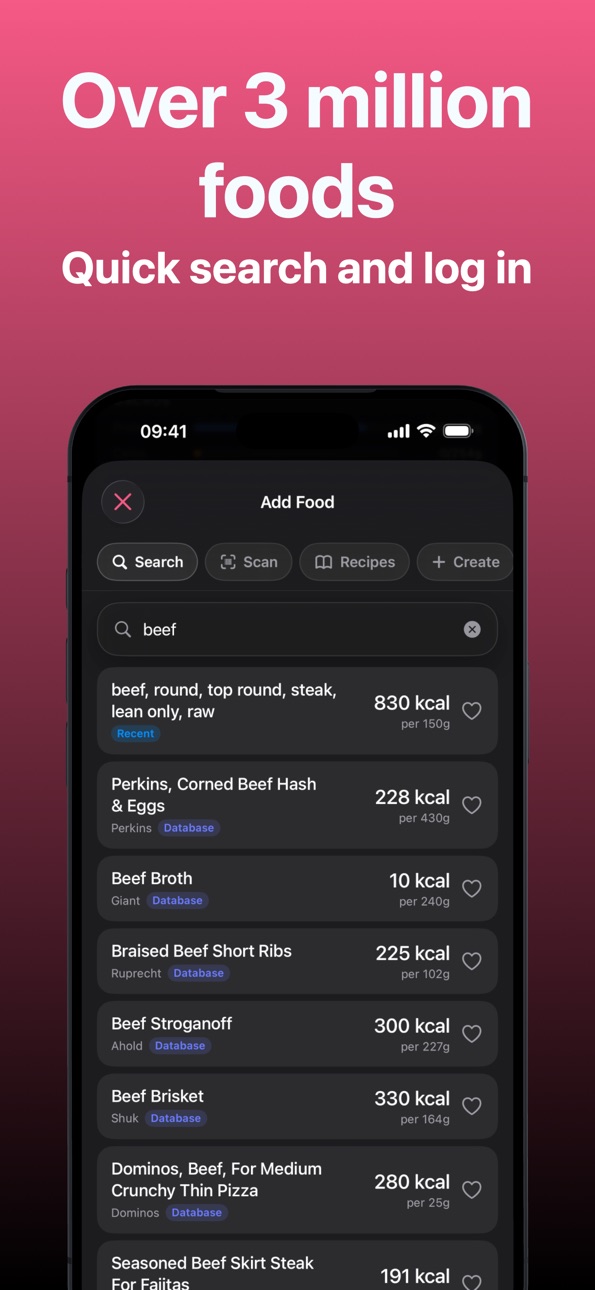
* Product search & barcode scanning
* Intermittent fasting
* Water tracking to help you drink enough
* Food database based on Open Food Facts
* Optional Apple Health integration for activity calories
All without an account — your data stays on your device.
Intake AI is an optional add-on for anyone who wants to log food even faster. You can take a photo of your meal or describe it, and Intake AI helps suggest matching foods, calories, and nutrition values. When creating your own meals, you can also scan a nutrition label — Intake AI will automatically fill in the values for you.
Intake AI is designed with generous fair use, so the feature remains reliable and affordable for everyone.
Who Intake is for
For anyone who wants a calm, beautiful app that feels like iOS — not like a fitness game.
No b******t
No subscription for the base app
No login
No streaks
No points
No “tips” you never asked for
Intake. Track. Done.
Terms of Use: https://www.apple.com/legal/internet-services/itunes/dev/stdeula/
In-App Purchases PG pricing
Intake AI Monthly Subscription
Monthly—
Intake AI Yearly Subscription
Yearly—
Capabilities
In-App Purchases
Accessibility
ipadiphonemacrealityDevicetvoswatch
Version history 25 versions
Build 887518636v2.4.32026-06-28 07:20:14
Thank you for using Intake!
In this version, we’re celebrating the introduction of Intake AI: an optional add-on that lets you log food even faster with a photo or text.
If you’d like to see exactly what’s new and how to use the new features, open Settings in the app and tap the “What’s New” card.
There you’ll find a short overview of all changes in this version. Have fun trying it out!
Build 887358956v2.4.22026-06-24 19:04:21
Thank you for using Intake!
In this version, we’re celebrating the introduction of Intake AI: an optional add-on that lets you log food even faster with a photo or text.
If you’d like to see exactly what’s new and how to use the new features, open Settings in the app and tap the “What’s New” card.
There you’ll find a short overview of all changes in this version. Have fun trying it out!
Build 887264119v2.4.12026-06-22 20:47:32
Thank you for using Intake!
In this version, we’re celebrating the introduction of Intake AI: an optional add-on that lets you log food even faster with a photo or text.
If you’d like to see exactly what’s new and how to use the new features, open Settings in the app and tap the “What’s New” card.
There you’ll find a short overview of all changes in this version. Have fun trying it out!
Build 887063674v2.4.02026-06-20 14:57:48
Thank you for using Intake!
In this version, we’re celebrating the introduction of Intake AI: an optional add-on that lets you log food even faster with a photo or text.
If you’d like to see exactly what’s new and how to use the new features, open Settings in the app and tap the “What’s New” card.
There you’ll find a short overview of all changes in this version. Have fun trying it out!
Build 886358312v2.3.22026-06-01 16:28:04
Thanks for using Intake!
This version includes some new features and improvements.
If you'd like to see what’s new and learn how to use the new features, open Settings in the app and tap the “What’s New” card.
You’ll find a quick overview of everything included in this update. Enjoy!
Build 885688362v2.3.12026-05-15 00:10:25
Thanks for using Intake!
This version includes some new features and improvements.
If you'd like to see what’s new and learn how to use the new features, open Settings in the app and tap the “What’s New” card.
You’ll find a quick overview of everything included in this update. Enjoy!
Build 884934629v2.3.02026-04-26 21:22:10
Thanks for using Intake!
This version includes some new features and improvements.
If you'd like to see what’s new and learn how to use the new features, open Settings in the app and tap the “What’s New” card.
You’ll find a quick overview of everything included in this update. Enjoy!
Build 884413009v2.2.22026-04-12 17:07:24
Thanks for using Intake!
This version includes some new features and improvements.
If you'd like to see what’s new and learn how to use the new features, open Settings in the app and tap the “What’s New” card.
You’ll find a quick overview of everything included in this update. Enjoy!
Build 884300894v2.2.12026-04-09 16:18:08
Thanks for using Intake!
This version includes some new features and improvements.
If you'd like to see what’s new and learn how to use the new features, open Settings in the app and tap the “What’s New” card.
You’ll find a quick overview of everything included in this update. Enjoy!
Build 883860884v2.2.02026-04-06 17:12:23
Thanks for using Intake!
This version includes some new features and improvements.
If you'd like to see what’s new and learn how to use the new features, open Settings in the app and tap the “What’s New” card.
You’ll find a quick overview of everything included in this update. Enjoy!
Build 883851208v2.1.42026-03-27 23:34:35
Thanks for using Intake!
This version includes some new features and improvements.
If you'd like to see what’s new and learn how to use the new features, open Settings in the app and tap the “What’s New” card.
You’ll find a quick overview of everything included in this update. Enjoy!
Build 883564329v2.1.32026-03-21 17:20:17
Thanks for using Intake!
This version includes some new features and improvements.
If you'd like to see what’s new and learn how to use the new features, open Settings in the app and tap the “What’s New” card.
You’ll find a quick overview of everything included in this update. Enjoy!
Build 883473948v2.1.22026-03-17 22:24:13
Thanks for using Intake!
This version includes some new features and improvements.
If you'd like to see what’s new and learn how to use the new features, open Settings in the app and tap the “What’s New” card.
You’ll find a quick overview of everything included in this update. Enjoy!
Build 883362685v2.1.12026-03-16 20:03:15
Thanks for using Intake!
This version includes some new features and improvements.
If you'd like to see what’s new and learn how to use the new features, open Settings in the app and tap the “What’s New” card.
You’ll find a quick overview of everything included in this update. Enjoy!
Build 883197726v2.1.02026-03-10 22:31:18
- Added quick log feature to log calories without creating a product
- Added extended macro statistics
- Added Apple Watch weight tracking
- You can now move food from one meal to the other
- Recipes now show nutrition info per portion
- Added support for Apple Shortcuts
- You can now add liquid recipes that count towards your water goal
- Added the ability to add liquid ingredients to recipes
- Added custom serving size to recipe logging
- Recipes are now searchable by name, ingredient and tag
- Ease of life fixes
- Bugfixes
Build 883100153v2.0.82026-03-06 23:13:36
- Fixed a bug where editing a food was not working correctly
Build 883034520v2.0.72026-03-05 07:53:44
- Improved statistics
- Added water complexion for Apple Watch
- Water can now be tracked on the Watch app
- Bugfixes- Bugfixes
Build 882875439v2.0.62026-02-28 06:56:05
- Products can now be marked as a beverage which causes them to be counted towards your daily water goal (e.g. coffee, soft-drinks etc)
- UX improvements and bug fixes- UX improvements and bug fixes
Build 882652122v2.0.52026-02-24 14:35:51
- New Feature: "Mood-Tracking" - keep a little diary on how you felt each day and write a few lines if you want
- Fixed some minor UI/UX bugs- Fixed some minor UI/UX bugs
Build 882541371v2.0.42026-02-18 22:45:45
- Personalize your home page, remove and add meals and hide or show cards
- Set individual calorie goals for each day with rules and one-off adjustments
- Improved water widget UX- Improved water widget UX
Build 882495993v2.0.32026-02-16 20:02:26
- Bugfixes for recent foods and user created products
- UI improvements around the app- UI improvements around the app
Build 882458541v2.0.22026-02-14 20:17:54
- Fixed a bug where cloud data was not imported correctly
- Fixed a bug where health permissions could be corrupted during update
- Added more information about how calorie goals where calculated and added more information about activity levels
- Fixed a bug where users couldnt click the create food button in the create food section
- Simplified barcode scanning- Simplified barcode scanning
Build 882282369v2.0.12026-02-13 14:35:47
- Complete redesign in SwiftUI
- Widgets for Homescreen and Lockscreen
- Apple Watch App and Complexion
- Quick Actions
- Change recipes on the fly
- Favorite and Frequent products
- Added language support for portuguese, italian, japanese, dutch, spanish, french- Added language support for portuguese, italian, japanese, dutch, spanish, french
Build 882118214v1.2.12026-02-06 09:06:15
- Recipes can now have categories to filter them
- Users can now select date ranges when viewing statistics to show historical data
- Water was now renamed to beverages
- Users can now import historical weight data from Health
- Users can now create their own activities and add them
- Fixed iCloud sync issues
Build 881942349v1.2.02026-02-03 11:26:38
- Recipes are now sorted alphabetically
- Notes can now be added to recipes
- Food can now be logged on future days for better planning
- Recipes can now be shared with other users
- Meal summary available by tapping on a meal
- Added expand/collapse functionality for meals
- Additional UI improvements
- iCloud sync improvements
- Bug fixes
Price history by region
Currency
Show
Columns
Search
Availability 23 of 23 storefronts
| Region | Language | Price | Ratings | Avg | Version |
|---|---|---|---|---|---|
 DE DE | de-DE | EUR 6.99 | 251 | 4.8 | 2.4.3 |
 US US | en-US | USD 5.99 | 1 | 5.0 | 2.4.3 |
 CN CN | zh-Hans-CN | CNY 38 | 0 | — | 2.4.3 |
 EE EE | en-GB | EUR 6.99 | 0 | — | 2.4.3 |
 GB GB | en-GB | GBP 5.99 | 0 | — | 2.4.3 |
 GD GD | en-GB | USD 5.99 | 0 | — | 2.4.3 |
 GE GE | en-GB | USD 6.99 | 0 | — | 2.4.3 |
 GW GW | en-GB | USD 5.99 | 0 | — | 2.4.3 |
 HK HK | zh-Hant-HK | HKD 48 | 0 | — | 2.4.3 |
 HR HR | en-GB | EUR 6.99 | 0 | — | 2.4.3 |
 JP JP | ja | JPY 1000 | 0 | — | 2.4.3 |
 KR KR | ko | KRW 9900 | 0 | — | 2.4.3 |
 PG PG | en-GB | USD 5.99 | 0 | — | 2.4.3 |
 SB SB | en-GB | USD 5.99 | 0 | — | 2.4.3 |
 SG SG | en-GB | SGD 8.98 | 0 | — | 2.4.3 |
 SI SI | en-GB | EUR 6.99 | 0 | — | 2.4.3 |
 ST ST | en-GB | USD 5.99 | 0 | — | 2.4.3 |
 TO TO | en-GB | USD 5.99 | 0 | — | 2.4.3 |
 UG UG | en-GB | USD 6.99 | 0 | — | 2.4.3 |
 VU VU | en-GB | USD 5.99 | 0 | — | 2.4.3 |
 ZA ZA | en-GB | ZAR 119.99 | 0 | — | 2.4.3 |
 ZM ZM | en-GB | USD 6.99 | 0 | — | 2.4.3 |
 ZW ZW | en-GB | USD 6.99 | 0 | — | 2.4.3 |
Change log 29 changes · PG
✎
releaseNotes updated
Thank you for using Intake!
In this version, we’re celebrating the introduction of Intake AI: an optional add-on that lets you log food even faster with a phot
✎
description updated
Intake is a minimalist calorie tracker for people who simply want to track their food — without subscriptions, gamification, or unnecessary nutrition advice.
W
✎
subtitle updated
No subscription. No account.
✎
name updated
Intake: Calorie Log
◆
Version 2.4.3 released
Thank you for using Intake!
In this version, we’re celebrating the introduction of Intake AI: an optional add-on that lets you log food even faster with a photo or text.
If you’d like to see exactly what’s new and how to use the new featur
◆
Version 2.4.2 released
Thank you for using Intake!
In this version, we’re celebrating the introduction of Intake AI: an optional add-on that lets you log food even faster with a photo or text.
If you’d like to see exactly what’s new and how to use the new featur
◆
Version 2.4.1 released
Thank you for using Intake!
In this version, we’re celebrating the introduction of Intake AI: an optional add-on that lets you log food even faster with a photo or text.
If you’d like to see exactly what’s new and how to use the new featur
◆
Version 2.4.0 released
Thank you for using Intake!
In this version, we’re celebrating the introduction of Intake AI: an optional add-on that lets you log food even faster with a photo or text.
If you’d like to see exactly what’s new and how to use the new featur
◆
Version 2.3.2 released
Thanks for using Intake!
This version includes some new features and improvements.
If you'd like to see what’s new and learn how to use the new features, open Settings in the app and tap the “What’s New” card.
You’ll find a quick overview
◆
Version 2.3.1 released
Thanks for using Intake!
This version includes some new features and improvements.
If you'd like to see what’s new and learn how to use the new features, open Settings in the app and tap the “What’s New” card.
You’ll find a quick overview
◆
Version 2.3.0 released
Thanks for using Intake!
This version includes some new features and improvements.
If you'd like to see what’s new and learn how to use the new features, open Settings in the app and tap the “What’s New” card.
You’ll find a quick overview
◆
Version 2.2.2 released
Thanks for using Intake!
This version includes some new features and improvements.
If you'd like to see what’s new and learn how to use the new features, open Settings in the app and tap the “What’s New” card.
You’ll find a quick overview
◆
Version 2.2.1 released
Thanks for using Intake!
This version includes some new features and improvements.
If you'd like to see what’s new and learn how to use the new features, open Settings in the app and tap the “What’s New” card.
You’ll find a quick overview
◆
Version 2.2.0 released
Thanks for using Intake!
This version includes some new features and improvements.
If you'd like to see what’s new and learn how to use the new features, open Settings in the app and tap the “What’s New” card.
You’ll find a quick overview
◆
Version 2.1.4 released
Thanks for using Intake!
This version includes some new features and improvements.
If you'd like to see what’s new and learn how to use the new features, open Settings in the app and tap the “What’s New” card.
You’ll find a quick overview
◆
Version 2.1.3 released
Thanks for using Intake!
This version includes some new features and improvements.
If you'd like to see what’s new and learn how to use the new features, open Settings in the app and tap the “What’s New” card.
You’ll find a quick overview
◆
Version 2.1.2 released
Thanks for using Intake!
This version includes some new features and improvements.
If you'd like to see what’s new and learn how to use the new features, open Settings in the app and tap the “What’s New” card.
You’ll find a quick overview
◆
Version 2.1.1 released
Thanks for using Intake!
This version includes some new features and improvements.
If you'd like to see what’s new and learn how to use the new features, open Settings in the app and tap the “What’s New” card.
You’ll find a quick overvie
◆
Version 2.1.0 released
- Added quick log feature to log calories without creating a product
- Added extended macro statistics
- Added Apple Watch weight tracking
- You can now move food from one meal to the other
- Recipes now show nutrition info per portion
- Ad
◆
Version 2.0.8 released
- Fixed a bug where editing a food was not working correctly
◆
Version 2.0.7 released
- Improved statistics
- Added water complexion for Apple Watch
- Water can now be tracked on the Watch app
- Bugfixes- Bugfixes
◆
Version 2.0.6 released
- Products can now be marked as a beverage which causes them to be counted towards your daily water goal (e.g. coffee, soft-drinks etc)
- UX improvements and bug fixes- UX improvements and bug fixes
◆
Version 2.0.5 released
- New Feature: "Mood-Tracking" - keep a little diary on how you felt each day and write a few lines if you want
- Fixed some minor UI/UX bugs- Fixed some minor UI/UX bugs
◆
Version 2.0.4 released
- Personalize your home page, remove and add meals and hide or show cards
- Set individual calorie goals for each day with rules and one-off adjustments
- Improved water widget UX- Improved water widget UX
◆
Version 2.0.3 released
- Bugfixes for recent foods and user created products
- UI improvements around the app- UI improvements around the app
◆
Version 2.0.2 released
- Fixed a bug where cloud data was not imported correctly
- Fixed a bug where health permissions could be corrupted during update
- Added more information about how calorie goals where calculated and added more information about activity le
◆
Version 2.0.1 released
- Complete redesign in SwiftUI
- Widgets for Homescreen and Lockscreen
- Apple Watch App and Complexion
- Quick Actions
- Change recipes on the fly
- Favorite and Frequent products
- Added language support for portuguese, italian, japanese,
◆
Version 1.2.1 released
- Recipes can now have categories to filter them
- Users can now select date ranges when viewing statistics to show historical data
- Water was now renamed to beverages
- Users can now import historical weight data from Health
- Users can n
◆
Version 1.2.0 released
- Recipes are now sorted alphabetically
- Notes can now be added to recipes
- Food can now be logged on future days for better planning
- Recipes can now be shared with other users
- Meal summary available by tapping on a meal
- Added expan