Home › Utilities

 VU
VU
 USen-US
 JPja
JPja AEen-GB
 AFen-GB
 ALen-GB
 AMen-GB
 AOen-GB
 ARes-MX
 ATde-DE
 AUen-AU
 AZen-GB
 BAen-GB
 BBen-GB
 BEen-GB
 BFen-GB
 BGen-GB
 BHen-GB
 BJen-GB
 BMen-GB
 BNen-GB
 BOes-MX
 BRpt-BR
 BSen-GB
 BTen-GB
 BWen-GB
 BYen-GB
 BZen-GB
 CAen-CA
 CDen-GB
 CGen-GB
 CHde-CH
 CIfr-FR
 CLes-MX
 CMfr-FR
 COes-MX
 CRes-MX
 CVen-GB
 CYen-GB
 CZen-GB
 DEde-DE
 DKen-GB
 DOes-MX
 DZen-GB
 ECes-MX
 EEen-GB
 EGen-GB
 ESes-ES
 FIen-GB
 FMen-GB
 FRfr-FR
 GAfr-FR
 GBen-GB
 GEen-GB
 GHen-GB
 GMen-GB
 GRen-GB
 GTes-MX
 GWen-GB
 GYen-GB
 HNes-MX
 HRen-GB
 HUen-GB
 IDen-GB
 IEen-GB
 ILen-GB
 INen-GB
 IQen-GB
 ISen-GB
 ITit
ITit JMen-GB
 JOen-GB
 KEen-GB
 KGen-GB
 KHen-GB
 KRko
KRko KWen-GB
 KYen-GB
 KZen-GB
 LAen-GB
 LKen-GB
 LRen-GB
 LTen-GB
 LUen-GB
 LVen-GB
 LYen-GB
 MAen-GB
 MDen-GB
 MEen-GB
 MGen-GB
 MKen-GB
 MLen-GB
 MMen-GB
 MNen-GB
 MOzh-Hant-HK
 MRen-GB
 MTen-GB
 MUen-GB
 MVen-GB
 MWen-GB
 MXes-MX
 MYen-GB
 MZen-GB
 NAen-GB
 NEen-GB
 NGen-GB
 NIes-MX
 NLnl
NLnl NOen-GB
 NPen-GB
 NRen-GB
 NZen-AU
 OMen-GB
 PAes-MX
 PEes-MX
 PHen-GB
 PKen-GB
 PLen-GB
 PTpt-PT
 PWen-GB
 PYes-MX
 QAen-GB
 ROen-GB
 RSen-GB
 RUru
RUru RWen-GB
 SAen-GB
 SCen-GB
 SEsv
SEsv SGen-GB
 SIen-GB
 SKen-GB
 SLen-GB
 SNen-GB
 SRen-GB
 STen-GB
 SVes-MX
 SZen-GB
 TCen-GB
 TDen-GB
 TJen-GB
 TMen-GB
 TNen-GB
 TRen-GB
 TTen-GB
 TZen-GB
 UAen-GB
 UGen-GB
 UYen-GB
 UZen-GB
 VEes-MX
 VGen-GB
 VNen-GBVUen-GB
 XKen-GB
 YEen-GB
 ZAen-GB
 ZMen-GB
 ZWen-GB
158 of 158 storefronts
Content in en-US
Content in en-US
Information
Preview 3 platforms
iPhone 10 images


iPad 6 images


Mac 6 images


What’s New Version 3.2.7
bug fix
Description
NanoMouse is a Rime keyboard and BytePaste workspace built for AI input. It saves common prompts, snippets, materials and clipboard content, then syncs them across iPhone, iPad, Mac and the keyboard extension under the same iCloud account.
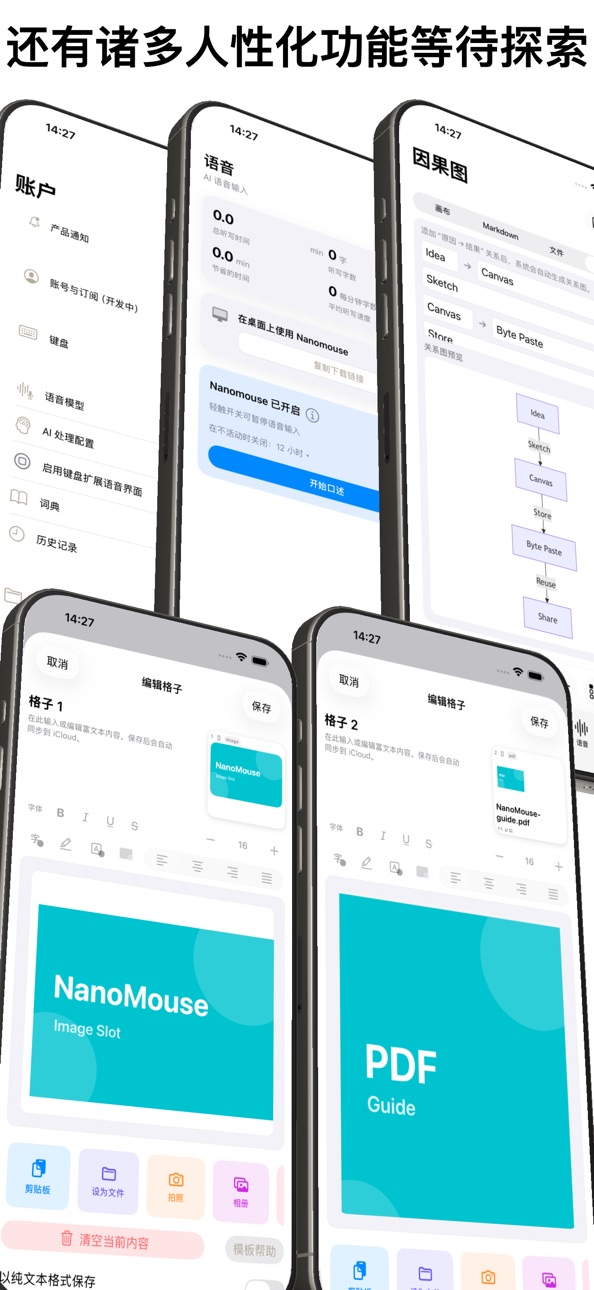
For AI chat, writing, coding and research, input is more than typing. You often need role settings, output formats, frequent phrases, images, Markdown, canvas sketches, causal graphs or quick voice notes. NanoMouse keeps those materials close to the keyboard.
Key features:
- Rime keyboard: Wusong Pinyin, double pinyin, Japanese romaji, stroke input and more.
- Pinyin shortcuts: easier rules such as `ng -> nn` and `uan/uang -> vn/vnn`.
- Mixed Chinese, Japanese and English input with quick switching.
- Long-press letters for extended characters, and long-press `123` for the number keypad.
- Keyboard toolbar for voice input, canvas, Markdown and BytePaste.
- AI workflow: store prompts, role settings, output templates, high-frequency text and code snippets in BytePaste.
- Multi-type cells: plain text, rich text, links, colors, images, camera, photo library, PDF, files, Markdown and canvas files.
- iCloud sync for cells and previews across devices signed in to the same iCloud account.
- Clipboard history: copy on Mac, reuse on iPhone, iPad or the keyboard extension.
- Voice input for capturing quick thoughts before turning them into AI-ready text.
- Markdown workspace with live preview, Mermaid diagrams and HTML color rendering.
- Canvas and causal graphs for expressing structure visually.
- macOS configuration tool for managing Squirrel/Rime settings without hand-editing YAML.
AI input and BytePaste are useful for:
- Pasting common prompts, system prompts, role settings and output formats with one tap.
- Reusing frequent phrases, canned replies, signatures, templates, code snippets and links.
- Keeping images, files or Markdown in fixed cells and continuing on another device.
- Recording ideas with voice, organizing context in Markdown, and expressing structure with canvas or causal graphs.
- Opening common materials inside the keyboard instead of switching between the current app and Files.
- Copying content on Mac and reusing it from the keyboard on iPhone or iPad.
Basic usage:
- In the main app or on Mac, open BytePaste and place common prompts, frequent phrases, rich text, images, files, Markdown, canvas files or causal graphs into cells.
- In any text field, switch to the NanoMouse keyboard and tap the BytePaste button in the toolbar.
- Plain text and prompts can be inserted by tapping a cell.
- Rich text, images, files, Markdown and canvas content are limited by the system keyboard environment. Usually, long press a cell, choose copy, preview, export or the matching action, then paste or insert it in the target app.
- Clipboard content copied on Mac can enter clipboard history and later be reused on iPhone, iPad or in the keyboard extension.
Long-press tips:
- Long press letters for extended characters.
- Long press `123` for the number keypad.
- Long press the language key to switch Chinese, Japanese and English input.
- Long press the candidate bar to switch between Simplified and Traditional Chinese.
- Long press or right-click a BytePaste cell to edit text, copy from clipboard, set as file, take a photo, choose from photo library, copy to clipboard or clear it.
NanoMouse respects system permissions and data boundaries. Voice, location, camera, photos and iCloud capabilities are used only when needed. BytePaste sync uses your private iCloud database and syncs only between devices signed in to the same iCloud account.
If you like Rime configurability and want less switching between typing, pasting, voice, drawing, Markdown and causal graphs before talking to AI, NanoMouse fits that workflow.
New: predictions, phrase bubbles, half/full-width symbols, one-hand layouts, keyboard visual effects, weather/diary fixes and macOS screenshot improvements.
In-App Purchases VU pricing
One-Time Purchases
BytePaste Slots Lifetime—
Capabilities
In-App Purchases
Accessibility
ipadiphonemacrealityDevicetvoswatch
Version history 18 versions
Build 887613452v3.2.72026-06-30 21:53:12
bug fix
Build 887073436v3.2.62026-06-17 18:48:13
bug fix
Build 886982871v3.2.52026-06-15 18:35:07
bug fix
Build 886918126v3.2.42026-06-13 17:30:03
Bug fixes, new functions added
Build 886730063v3.2.32026-06-09 18:22:26
bug fix
Build 886601597v3.2.22026-06-06 15:33:59
Telegram, Morse Keyboard
Build 886106793v3.22026-05-31 01:35:23
This version continues to improve keyboard input and AI input workflows:
- Added a predictive suggestion row. Chinese Rime can use a downloadable prediction dictionary plus suffix fallback; Traditional Chinese switches to the Traditional prediction database automatically. English and Japanese also show matching predictions.
- Predictive suggestions are enabled by default. On first install or first update to this version, NanoMouse checks and downloads the Rime prediction package automatically, with a manual install button kept in Settings.
- Added a Keyboard Visual Effects page with separate Light and Dark settings for iOS 26 Liquid Glass clear/regular styles, iOS 18 blur fallback, key tint, white glass strength, corner radius, spacing, borders and callout shape. Skin schemes can be saved and exported.
- Added Chinese one-hand layouts for 26-key, 123, long-press 123 and #+= keyboards. Swipe on the Simplified/Traditional area to switch left hand, standard and right hand layouts.
- System text replacements now appear behind a right-side phrase button. Tap it to open a bubble of replacement values instead of forcing them into the first candidate slots.
- Long-press number and symbol keys now show half-width and full-width variants with labels.
- Improved weather indicator refresh, fixed-city weather, diary merging, candidate refresh and iOS 26 host switching stability.
- macOS continues to improve Finder services, screenshot shortcut guidance and cross-device BytePaste.
Build 886345408v3.2.12026-05-31 18:15:17
This version continues to improve keyboard input and AI input workflows:
- Added a predictive suggestion row. Chinese Rime can use a downloadable prediction dictionary plus suffix fallback; Traditional Chinese switches to the Traditional prediction database automatically. English and Japanese also show matching predictions.
- Predictive suggestions are enabled by default. On first install or first update to this version, NanoMouse checks and downloads the Rime prediction package automatically, with a manual install button kept in Settings.
- Added a Keyboard Visual Effects page with separate Light and Dark settings for iOS 26 Liquid Glass clear/regular styles, iOS 18 blur fallback, key tint, white glass strength, corner radius, spacing, borders and callout shape. Skin schemes can be saved and exported.
- Added Chinese one-hand layouts for 26-key, 123, long-press 123 and #+= keyboards. Swipe on the Simplified/Traditional area to switch left hand, standard and right hand layouts.
- System text replacements now appear behind a right-side phrase button. Tap it to open a bubble of replacement values instead of forcing them into the first candidate slots.
- Long-press number and symbol keys now show half-width and full-width variants with labels.
- Improved weather indicator refresh, fixed-city weather, diary merging, candidate refresh and iOS 26 host switching stability.
- macOS continues to improve Finder services, screenshot shortcut guidance and cross-device BytePaste.
Build 885777666v3.12026-05-18 05:03:50
This version focuses on BytePaste:
- Added 36 BytePaste cells for text, rich text, images, files, Markdown, canvas content and more.
- Common prompts, frequent phrases, role settings and output templates can be stored in BytePaste and reused quickly in AI conversations.
- Added iCloud sync: iPhone, iPad, Mac and the keyboard extension under the same iCloud account can sync cells and previews.
- Added BytePaste panel inside the keyboard for direct access while typing.
- Added clipboard history sync: content copied on Mac can continue to be used on iOS and in the keyboard extension.
- Added preview, save, export and BytePaste integration for Markdown, canvas and causal graphs.
- Improved CloudKit sync progress, pause, retry, preview generation and large-file handling.
- Improved iPad, iOS 26, Markdown Chinese rendering and App Store screenshot compatibility.
- Added Diary mode: the keyboard can record enabled input sessions and organize them by date in the main app.
- Added one-handed Chinese keyboard layouts with left/right arc modes for easier thumb typing.
- Improved iOS 26 keyboard extension stability, including startup layout, BytePaste panel background matching and crash prevention.
Build 885500839v3.0.12026-05-11 14:24:13
本版本重点新增字节粘贴:
- 新增 36 格字节粘贴,可保存文本、富文本、图片、文件、Markdown、画布等内容。
- 常用 prompt、高频词、角色设定和输出模板可以放进字节粘贴,输入 AI 对话时快速调用。
- 新增 iCloud 同步,同一个 iCloud 账号下的 iPhone、iPad、Mac 和键盘扩展可同步格子与预览。
- 新增键盘内字节粘贴面板,输入时可直接调用常用内容。
- 新增剪贴板历史同步,Mac 端复制过的内容可以在 iOS 和键盘扩展中继续使用。
- 新增 Markdown、画布和因果图相关的预览、保存、导出和格纳到字节粘贴能力。
- 优化 CloudKit 同步进度、暂停、重试、预览生成和大文件处理。
- 优化 iPad、iOS 26、Markdown 中文渲染和 App Store 截图相关兼容性。
Build 885319846v3.02026-05-10 20:06:15
This version focuses on BytePaste:
- Added 36 BytePaste cells for text, rich text, images, files, Markdown, canvas content and more.
- Common prompts, frequent phrases, role settings and output templates can be stored in BytePaste and reused quickly in AI conversations.
- Added iCloud sync: iPhone, iPad, Mac and the keyboard extension under the same iCloud account can sync cells and previews.
- Added BytePaste panel inside the keyboard for direct access while typing.
- Added clipboard history sync: content copied on Mac can continue to be used on iOS and in the keyboard extension.
- Added preview, save, export and BytePaste integration for Markdown, canvas and causal graphs.
- Improved CloudKit sync progress, pause, retry, preview generation and large-file handling.
- Improved iPad, iOS 26, Markdown Chinese rendering and App Store screenshot compatibility.
Build 882662057v2.0.12026-02-22 00:02:56
修复了容易卡死的bug和键盘语言被宿主app强行更改的行为
iOS2.0版本新功能
- 新增语音输入工作流:支持“键盘触发 -> 主 App 录音识别 -> 自动回填到宿主 App”。
- 新增 AI 编辑能力:你可以在语音识别后使用预设指令整理文本结构(BYOK 模式)。
- 新增在线 ASR/LLM 可选配置:支持多供应商与模型切换,保留本地识别路径。
- 新增画布功能:你可以手绘示意图并导出低体积 JPG,再回填到聊天或笔记应用。
体验优化
- 重构主界面导航结构,统一“语音 / 画布 / 设置”三大入口,信息层级更清晰。
- 重构账户与配置页面,将词典、历史记录、键盘设置、AI 配置集中管理。
- 优化 Whisper 模型管理,支持模型下载、使用状态识别与可用性提示。
- 优化暗黑模式显示,修复多处文字对比度与可读性问题。
问题修复
- 修复语音回填偶发携带历史冗余文本的问题。
- 修复部分场景下语音处理状态提示不清晰的问题。
- 修复键盘扩展稳定性问题,降低切换失败与卡死概率。
- 修复画布导出与粘贴在常见宿主应用中的兼容性问题。
New Features
- Added a full voice input flow: keyboard trigger -> recording/transcription in main app -> automatic text insertion back to host app.
- Added AI editing with preset instructions to restructure recognized text (BYOK mode).
- Added optional online ASR/LLM configuration with multi-provider and model switching, while keeping local recognition paths.
- Added a canvas feature: draw quick sketches, export lightweight JPG, and paste back into chat or notes.
Improvements
- Refactored the main navigation into three clear tabs: Voice / Canvas / Settings.
- Refactored account and configuration pages; dictionary, history, keyboard settings, and AI settings are now centralized.
- Improved Whisper model management with clearer download/use status and availability hints.
- Improved dark-mode readability across multiple screens.
Bug Fixes
- Fixed an issue where voice insertion could occasionally include stale historical text.
- Fixed unclear processing-state feedback in some voice workflows.
- Improved keyboard extension stability to reduce switch failures and freeze risks.
- Improved canvas export/paste compatibility in common host apps.
Build 882481619v2.02026-02-18 22:32:44
新功能
- 新增语音输入工作流:支持“键盘触发 -> 主 App 录音识别 -> 自动回填到宿主 App”。
- 新增 AI 编辑能力:你可以在语音识别后使用预设指令整理文本结构(BYOK 模式)。
- 新增在线 ASR/LLM 可选配置:支持多供应商与模型切换,保留本地识别路径。
- 新增画布功能:你可以手绘示意图并导出低体积 JPG,再回填到聊天或笔记应用。
体验优化
- 重构主界面导航结构,统一“语音 / 画布 / 设置”三大入口,信息层级更清晰。
- 重构账户与配置页面,将词典、历史记录、键盘设置、AI 配置集中管理。
- 优化 Whisper 模型管理,支持模型下载、使用状态识别与可用性提示。
- 优化暗黑模式显示,修复多处文字对比度与可读性问题。
问题修复
- 修复语音回填偶发携带历史冗余文本的问题。
- 修复部分场景下语音处理状态提示不清晰的问题。
- 修复键盘扩展稳定性问题,降低切换失败与卡死概率。
- 修复画布导出与粘贴在常见宿主应用中的兼容性问题。
New Features
- Added a full voice input flow: keyboard trigger -> recording/transcription in main app -> automatic text insertion back to host app.
- Added AI editing with preset instructions to restructure recognized text (BYOK mode).
- Added optional online ASR/LLM configuration with multi-provider and model switching, while keeping local recognition paths.
- Added a canvas feature: draw quick sketches, export lightweight JPG, and paste back into chat or notes.
Improvements
- Refactored the main navigation into three clear tabs: Voice / Canvas / Settings.
- Refactored account and configuration pages; dictionary, history, keyboard settings, and AI settings are now centralized.
- Improved Whisper model management with clearer download/use status and availability hints.
- Improved dark-mode readability across multiple screens.
Bug Fixes
- Fixed an issue where voice insertion could occasionally include stale historical text.
- Fixed unclear processing-state feedback in some voice workflows.
- Improved keyboard extension stability to reduce switch failures and freeze risks.
- Improved canvas export/paste compatibility in common host apps.
Build 881800770v1.32026-02-07 01:01:14
此版本包含众多易用性更新,包含大量已知的bug修复,强烈建议更新!
---
中文版
新功能
- 新增 Zenzai AI 增强模式,提升日语输入智能度
- 新增多语言快速混输功能,支持中日英无缝切换
- 新增英语输入候选栏机制
- 输入方案设置改为中英/日语分页显示,界面更清晰
功能优化
- 中文输入支持数字混输,边打拼音边输数字
- 日语输入恢复数字混输能力
- 英文键盘切换时自动对齐 ASCII 模式并禁用自动大写
- 日语符号修正为标准日语符号
- 用户引导页面支持滚动显示
问题修复
- 修复文本替换逻辑中候选空格分割的问题
- 修复数字混输时的删除与分词问题
- 修复英文候选态输入数字时候选丢失的问题
- 修复用户引导关闭逻辑
- 修复默认配置与实际设置不一致的问题
---
English Version
New Features
- Added Zenzai AI enhanced mode for smarter Japanese input
- Added multi-language quick mixed input (Chinese/Japanese/English seamless switching)
- Added candidate bar for English input
- Reorganized input schema settings into Chinese-English/Japanese tabs
Improvements
- Chinese input now supports mixed number input while typing pinyin
- Japanese input restored mixed number input capability
- English keyboard auto-aligns to ASCII mode and disables auto-capitalization
- Japanese symbols corrected to standard Japanese symbols
- User guide now supports scrolling
Bug Fixes
- Fixed text replacement logic with candidate space splitting issue
- Fixed number mixed input deletion and segmentation issues
- Fixed candidate loss when typing numbers in English candidate state
- Fixed user guide closing logic
- Fixed configuration inconsistency issues
Build 881617586v1.22026-01-19 06:07:45
添加了 azookey 日语输入法
误触纠正规则更新
bug修正,稳定修复
Build 881555656v1.1.12026-01-16 18:37:17
完善纠错规则
UI调整
稳定性优化
Build 881488886v1.12026-01-15 00:34:49
1.增加了误触纠错功能和逻辑
2.将日语设为默认不下载,需要者自行下载。以减少存储空间占用
Build 881390665v1.02026-01-13 19:03:46
Price history by region
Currency
Show
Columns
Search
Availability 158 of 158 storefronts
| Region | Language | Price | Ratings | Avg | Version |
|---|---|---|---|---|---|
| US | en-US | Free | 12 | 4.8 | 3.2.7 |
| JP | ja | Free | 2 | 5.0 | 3.2.7 |
| AE | en-GB | Free | 0 | — | 3.2.7 |
| AF | en-GB | Free | 0 | — | 3.2.7 |
| AL | en-GB | Free | 0 | — | 3.2.7 |
| AM | en-GB | Free | 0 | — | 3.2.7 |
| AO | en-GB | Free | 0 | — | 3.2.7 |
| AR | es-MX | Free | 0 | — | 3.2.7 |
| AT | de-DE | Free | 0 | — | 3.2.7 |
| AU | en-AU | Free | 0 | — | 3.2.7 |
| AZ | en-GB | Free | 0 | — | 3.2.7 |
| BA | en-GB | Free | 0 | — | 3.2.7 |
| BB | en-GB | Free | 0 | — | 3.2.7 |
| BE | en-GB | Free | 0 | — | 3.2.7 |
| BF | en-GB | Free | 0 | — | 3.2.7 |
| BG | en-GB | Free | 0 | — | 3.2.7 |
| BH | en-GB | Free | 0 | — | 3.2.7 |
| BJ | en-GB | Free | 0 | — | 3.2.7 |
| BM | en-GB | Free | 0 | — | 3.2.7 |
| BN | en-GB | Free | 0 | — | 3.2.7 |
| BO | es-MX | Free | 0 | — | 3.2.7 |
| BR | pt-BR | Free | 0 | — | 3.2.7 |
| BS | en-GB | Free | 0 | — | 3.2.7 |
| BT | en-GB | Free | 0 | — | 3.2.7 |
| BW | en-GB | Free | 0 | — | 3.2.7 |
| BY | en-GB | Free | 0 | — | 3.2.7 |
| BZ | en-GB | Free | 0 | — | 3.2.7 |
| CA | en-CA | Free | 0 | — | 3.2.7 |
| CD | en-GB | Free | 0 | — | 3.2.7 |
| CG | en-GB | Free | 0 | — | 3.2.7 |
| CH | de-CH | Free | 0 | — | 3.2.7 |
| CI | fr-FR | Free | 0 | — | 3.2.7 |
| CL | es-MX | Free | 0 | — | 3.2.7 |
| CM | fr-FR | Free | 0 | — | 3.2.7 |
| CO | es-MX | Free | 0 | — | 3.2.7 |
| CR | es-MX | Free | 0 | — | 3.2.7 |
| CV | en-GB | Free | 0 | — | 3.2.7 |
| CY | en-GB | Free | 0 | — | 3.2.7 |
| CZ | en-GB | Free | 0 | — | 3.2.7 |
| DE | de-DE | Free | 0 | — | 3.2.7 |
| DK | en-GB | Free | 0 | — | 3.2.7 |
| DO | es-MX | Free | 0 | — | 3.2.7 |
| DZ | en-GB | Free | 0 | — | 3.2.7 |
| EC | es-MX | Free | 0 | — | 3.2.7 |
| EE | en-GB | Free | 0 | — | 3.2.7 |
| EG | en-GB | Free | 0 | — | 3.2.7 |
| ES | es-ES | Free | 0 | — | 3.2.7 |
| FI | en-GB | Free | 0 | — | 3.2.7 |
| FM | en-GB | Free | 0 | — | 3.2.7 |
| FR | fr-FR | Free | 0 | — | 3.2.7 |
| GA | fr-FR | Free | 0 | — | 3.2.7 |
| GB | en-GB | Free | 0 | — | 3.2.7 |
| GE | en-GB | Free | 0 | — | 3.2.7 |
| GH | en-GB | Free | 0 | — | 3.2.7 |
| GM | en-GB | Free | 0 | — | 3.2.7 |
| GR | en-GB | Free | 0 | — | 3.2.7 |
| GT | es-MX | Free | 0 | — | 3.2.7 |
| GW | en-GB | Free | 0 | — | 3.2.7 |
| GY | en-GB | Free | 0 | — | 3.2.7 |
| HN | es-MX | Free | 0 | — | 3.2.7 |
| HR | en-GB | Free | 0 | — | 3.2.7 |
| HU | en-GB | Free | 0 | — | 3.2.7 |
| ID | en-GB | Free | 0 | — | 3.2.7 |
| IE | en-GB | Free | 0 | — | 3.2.7 |
| IL | en-GB | Free | 0 | — | 3.2.7 |
| IN | en-GB | Free | 0 | — | 3.2.7 |
| IQ | en-GB | Free | 0 | — | 3.2.7 |
| IS | en-GB | Free | 0 | — | 3.2.7 |
| IT | it | Free | 0 | — | 3.2.7 |
| JM | en-GB | Free | 0 | — | 3.2.7 |
| JO | en-GB | Free | 0 | — | 3.2.7 |
| KE | en-GB | Free | 0 | — | 3.2.7 |
| KG | en-GB | Free | 0 | — | 3.2.7 |
| KH | en-GB | Free | 0 | — | 3.2.7 |
| KR | ko | Free | 0 | — | 3.2.7 |
| KW | en-GB | Free | 0 | — | 3.2.7 |
| KY | en-GB | Free | 0 | — | 3.2.7 |
| KZ | en-GB | Free | 0 | — | 3.2.7 |
| LA | en-GB | Free | 0 | — | 3.2.7 |
| LK | en-GB | Free | 0 | — | 3.2.7 |
| LR | en-GB | Free | 0 | — | 3.2.7 |
| LT | en-GB | Free | 0 | — | 3.2.7 |
| LU | en-GB | Free | 0 | — | 3.2.7 |
| LV | en-GB | Free | 0 | — | 3.2.7 |
| LY | en-GB | Free | 0 | — | 3.2.7 |
| MA | en-GB | Free | 0 | — | 3.2.7 |
| MD | en-GB | Free | 0 | — | 3.2.7 |
| ME | en-GB | Free | 0 | — | 3.2.7 |
| MG | en-GB | Free | 0 | — | 3.2.7 |
| MK | en-GB | Free | 0 | — | 3.2.7 |
| ML | en-GB | Free | 0 | — | 3.2.7 |
| MM | en-GB | Free | 0 | — | 3.2.7 |
| MN | en-GB | Free | 0 | — | 3.2.7 |
| MO | zh-Hant-HK | Free | 0 | — | 3.2.7 |
| MR | en-GB | Free | 0 | — | 3.2.7 |
| MT | en-GB | Free | 0 | — | 3.2.7 |
| MU | en-GB | Free | 0 | — | 3.2.7 |
| MV | en-GB | Free | 0 | — | 3.2.7 |
| MW | en-GB | Free | 0 | — | 3.2.7 |
| MX | es-MX | Free | 0 | — | 3.2.7 |
| MY | en-GB | Free | 0 | — | 3.2.7 |
| MZ | en-GB | Free | 0 | — | 3.2.7 |
| NA | en-GB | Free | 0 | — | 3.2.7 |
| NE | en-GB | Free | 0 | — | 3.2.7 |
| NG | en-GB | Free | 0 | — | 3.2.7 |
| NI | es-MX | Free | 0 | — | 3.2.7 |
| NL | nl | Free | 0 | — | 3.2.7 |
| NO | en-GB | Free | 0 | — | 3.2.7 |
| NP | en-GB | Free | 0 | — | 3.2.7 |
| NR | en-GB | Free | 0 | — | 3.2.7 |
| NZ | en-AU | Free | 0 | — | 3.2.7 |
| OM | en-GB | Free | 0 | — | 3.2.7 |
| PA | es-MX | Free | 0 | — | 3.2.7 |
| PE | es-MX | Free | 0 | — | 3.2.7 |
| PH | en-GB | Free | 0 | — | 3.2.7 |
| PK | en-GB | Free | 0 | — | 3.2.7 |
| PL | en-GB | Free | 0 | — | 3.2.7 |
| PT | pt-PT | Free | 0 | — | 3.2.7 |
| PW | en-GB | Free | 0 | — | 3.2.7 |
| PY | es-MX | Free | 0 | — | 3.2.7 |
| QA | en-GB | Free | 0 | — | 3.2.7 |
| RO | en-GB | Free | 0 | — | 3.2.7 |
| RS | en-GB | Free | 0 | — | 3.2.7 |
| RU | ru | Free | 0 | — | 3.2.7 |
| RW | en-GB | Free | 0 | — | 3.2.7 |
| SA | en-GB | Free | 0 | — | 3.2.7 |
| SC | en-GB | Free | 0 | — | 3.2.7 |
| SE | sv | Free | 0 | — | 3.2.7 |
| SG | en-GB | Free | 0 | — | 3.2.7 |
| SI | en-GB | Free | 0 | — | 3.2.7 |
| SK | en-GB | Free | 0 | — | 3.2.7 |
| SL | en-GB | Free | 0 | — | 3.2.7 |
| SN | en-GB | Free | 0 | — | 3.2.7 |
| SR | en-GB | Free | 0 | — | 3.2.7 |
| ST | en-GB | Free | 0 | — | 3.2.7 |
| SV | es-MX | Free | 0 | — | 3.2.7 |
| SZ | en-GB | Free | 0 | — | 3.2.7 |
| TC | en-GB | Free | 0 | — | 3.2.7 |
| TD | en-GB | Free | 0 | — | 3.2.7 |
| TJ | en-GB | Free | 0 | — | 3.2.7 |
| TM | en-GB | Free | 0 | — | 3.2.7 |
| TN | en-GB | Free | 0 | — | 3.2.7 |
| TR | en-GB | Free | 0 | — | 3.2.7 |
| TT | en-GB | Free | 0 | — | 3.2.7 |
| TZ | en-GB | Free | 0 | — | 3.2.7 |
| UA | en-GB | Free | 0 | — | 3.2.7 |
| UG | en-GB | Free | 0 | — | 3.2.7 |
| UY | en-GB | Free | 0 | — | 3.2.7 |
| UZ | en-GB | Free | 0 | — | 3.2.7 |
| VE | es-MX | Free | 0 | — | 3.2.7 |
| VG | en-GB | Free | 0 | — | 3.2.7 |
| VN | en-GB | Free | 0 | — | 3.2.7 |
| VU | en-GB | Free | 0 | — | 3.2.7 |
| XK | en-GB | Free | 0 | — | 3.2.7 |
| YE | en-GB | Free | 0 | — | 3.2.7 |
| ZA | en-GB | Free | 0 | — | 3.2.7 |
| ZM | en-GB | Free | 0 | — | 3.2.7 |
| ZW | en-GB | Free | 0 | — | 3.2.7 |
Change log 22 changes · VU
✎
releaseNotes updated
bug fix
✎
description updated
NanoMouse is a Rime keyboard and BytePaste workspace built for AI input. It saves common prompts, snippets, materials and clipboard content, then syncs them acr
✎
subtitle updated
Keyboard built for AI input
✎
name updated
NanoMouse - 鼠输入法
◆
Version 3.2.7 released
bug fix
◆
Version 3.2.6 released
bug fix
◆
Version 3.2.5 released
bug fix
◆
Version 3.2.4 released
Bug fixes, new functions added
◆
Version 3.2.3 released
bug fix
◆
Version 3.2.2 released
Telegram, Morse Keyboard
◆
Version 3.2.1 released
This version continues to improve keyboard input and AI input workflows:
- Added a predictive suggestion row. Chinese Rime can use a downloadable prediction dictionary plus suffix fallback; Traditional Chinese switches to the Traditional p
◆
Version 3.2 released
This version continues to improve keyboard input and AI input workflows:
- Added a predictive suggestion row. Chinese Rime can use a downloadable prediction dictionary plus suffix fallback; Traditional Chinese switches to the Traditional p
◆
Version 3.1 released
This version focuses on BytePaste:
- Added 36 BytePaste cells for text, rich text, images, files, Markdown, canvas content and more.
- Common prompts, frequent phrases, role settings and output templates can be stored in BytePaste and reus
◆
Version 3.0.1 released
本版本重点新增字节粘贴:
- 新增 36 格字节粘贴,可保存文本、富文本、图片、文件、Markdown、画布等内容。
- 常用 prompt、高频词、角色设定和输出模板可以放进字节粘贴,输入 AI 对话时快速调用。
- 新增 iCloud 同步,同一个 iCloud 账号下的 iPhone、iPad、Mac 和键盘扩展可同步格子与预览。
- 新增键盘内字节粘贴面板,输入时可直接调用常用内容。
- 新增剪贴板历史同步,Mac 端复制过的内容可以在 iOS 和键盘扩展中继续使用
◆
Version 3.0 released
This version focuses on BytePaste:
- Added 36 BytePaste cells for text, rich text, images, files, Markdown, canvas content and more.
- Common prompts, frequent phrases, role settings and output templates can be stored in BytePaste and reus
◆
Version 2.0.1 released
修复了容易卡死的bug和键盘语言被宿主app强行更改的行为
iOS2.0版本新功能
- 新增语音输入工作流:支持“键盘触发 -> 主 App 录音识别 -> 自动回填到宿主 App”。
- 新增 AI 编辑能力:你可以在语音识别后使用预设指令整理文本结构(BYOK 模式)。
- 新增在线 ASR/LLM 可选配置:支持多供应商与模型切换,保留本地识别路径。
- 新增画布功能:你可以手绘示意图并导出低体积 JPG,再回填到聊天或笔记应用。
体验优化
- 重构主界面导航结构,
◆
Version 2.0 released
新功能
- 新增语音输入工作流:支持“键盘触发 -> 主 App 录音识别 -> 自动回填到宿主 App”。
- 新增 AI 编辑能力:你可以在语音识别后使用预设指令整理文本结构(BYOK 模式)。
- 新增在线 ASR/LLM 可选配置:支持多供应商与模型切换,保留本地识别路径。
- 新增画布功能:你可以手绘示意图并导出低体积 JPG,再回填到聊天或笔记应用。
体验优化
- 重构主界面导航结构,统一“语音 / 画布 / 设置”三大入口,信息层级更清晰。
- 重构账户与配置
◆
Version 1.3 released
此版本包含众多易用性更新,包含大量已知的bug修复,强烈建议更新!
---
中文版
新功能
- 新增 Zenzai AI 增强模式,提升日语输入智能度
- 新增多语言快速混输功能,支持中日英无缝切换
- 新增英语输入候选栏机制
- 输入方案设置改为中英/日语分页显示,界面更清晰
功能优化
- 中文输入支持数字混输,边打拼音边输数字
- 日语输入恢复数字混输能力
- 英文键盘切换时自动对齐 ASCII 模式并禁用自动大写
-
◆
Version 1.2 released
添加了 azookey 日语输入法
误触纠正规则更新
bug修正,稳定修复
◆
Version 1.1.1 released
完善纠错规则
UI调整
稳定性优化
◆
Version 1.1 released
1.增加了误触纠错功能和逻辑
2.将日语设为默认不下载,需要者自行下载。以减少存储空间占用
◆
Version 1.0 released