Home › Utilities

Information
Preview 2 platforms
iPhone 9 images




iPad 10 images


What’s New Version 1.1.009
Sync Playback Improvements
- More precise multi-device synchronization with consistent timing
- Transition animations now play fully without interruption
- New exit button at bottom-right; host exit broadcasts to all devices
Bug Fixes
- Fixed background photo not updating during vertical swipe
- Fixed freeze after rapid consecutive swipes
- Fixed host exiting unexpectedly when slave disconnects
Description
Portfoto — Three Screens, One Show
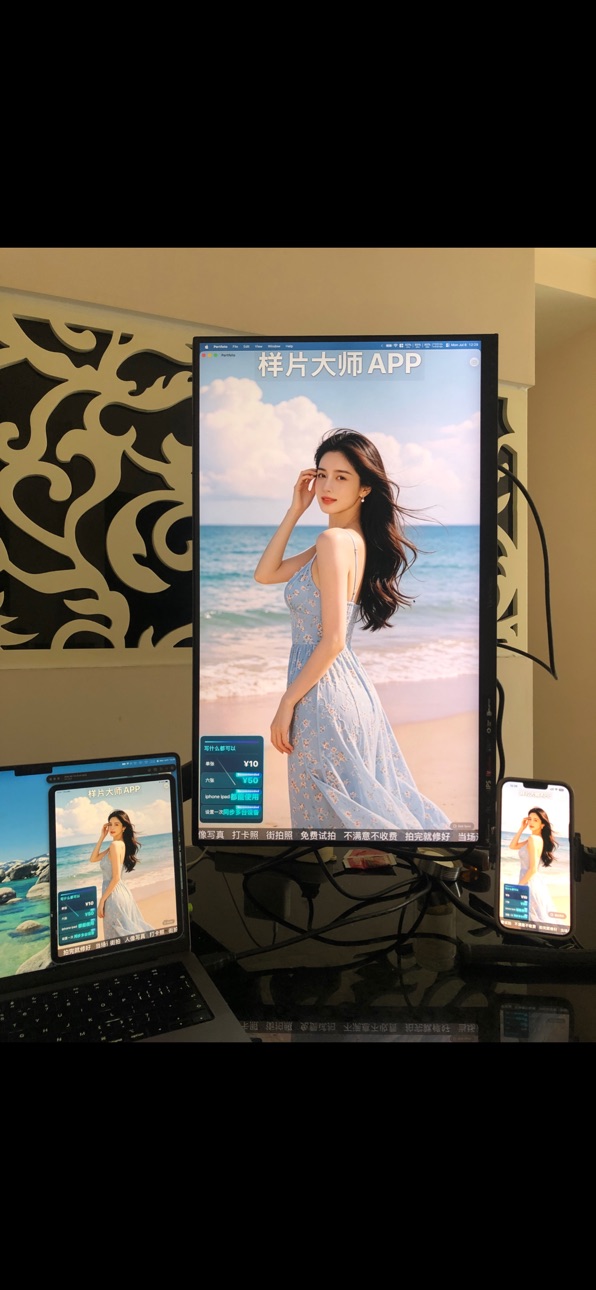
One set of content, three ways to present — iPad, external display, and multi-device sync. Perfect for photo studios, retail stores, restaurants, exhibitions, and event signage.
Three Screens, One Show
- iPad — Edit and present on the go; triple-tap for immersive mode
- HDMI External Display — Plug and play, auto fullscreen slideshow
- Sync Playback — Multiple iPads in sync across storefront, window, and booth
Key Features
- Multiple visual templates with flexible layout of photos, text, and price cards
- Photo transitions (fade/slide/zoom) with adjustable intervals
- Top promo text + bottom marquee for full-coverage messaging
- Smart QR code display with auto-switch by time slot
- Drag-and-drop editor, real-time preview
- Works offline, ready instantly
Pro unlocks unlimited templates and advanced features.
In-App Purchases CA pricing
One-Time Purchases
完整版—
Capabilities
In-App Purchases
Accessibility
ipadiphonemacrealityDevicetvoswatch
Version history 17 versions
Build 888081315v1.1.0092026-07-10 21:59:20
Sync Playback Improvements
- More precise multi-device synchronization with consistent timing
- Transition animations now play fully without interruption
- New exit button at bottom-right; host exit broadcasts to all devices
Bug Fixes
- Fixed background photo not updating during vertical swipe
- Fixed freeze after rapid consecutive swipes
- Fixed host exiting unexpectedly when slave disconnects
Build 887981205v1.1.0082026-07-08 17:20:05
- Triple-tap to enter/exit immersive fullscreen playback
- One-tap delete all photos in ad editor
- Live preview now reflects all user settings
- Toolbar auto-collapses on scroll
- Bug fixes and stability improvements
Build 887855016v1.1.0072026-07-07 03:43:24
- Sync Group Playback (Pro): Host controls synchronized playback across multiple devices with seamless transitions
- Slaves can exit anytime and rejoin with one tap
- Improved connection stability for multi-device sync
- Smoother performance with reduced device heating
Build 887767361v1.1.0062026-07-03 15:54:13
Sample Copy Bug Fix
Build 887711373v1.1.0052026-07-02 18:46:46
- Multiple new static poster templates are now available
- Support for exporting sample reel videos
- Various bug fixes and performance improvements
Build 887543399v1.1.0032026-06-28 16:57:44
Added full-featured sample copy functionality, including a copy button in the context menu.
Optimized sample editor performance: implemented LazyVStack, conditional rendering for previews, and collapsed photo cards by default.
Fixed the template count statistics (including preset templates).
Scan-to-import is now exclusive to the full version.
Redesigned the upgrade popup: features a liquid glass background, animated glow, and a centered layout.
Rewrote the bottom marquee with Core Animation (CA) for seamless, glitch-free looping.
Raised the bottom ad indicator by 34pt for easier tapping.
Fixed an issue where marquee text would disappear after hiding and showing the view.
Build 887248985v1.1.0022026-06-27 21:36:26
Price List Interaction Optimization: Added two-finger gesture support for zooming, allowing users to freely adjust the display size of the price list view.
Feature Removal: Removed the scheduled full-screen display feature for the price list.
Swipe Interaction Optimization: Optimized the switching logic and smoothness of up/down swipes.
Slogan Customization: Added support for custom color selection for the text of the top and bottom advertising slogans.
Bug Fixes: Fixed various other known issues.
Build 887230099v1.1.0012026-06-20 21:22:54
Added three new sets of default sample videos/prompts.
Simplified the workflow for adding/editing sample videos/prompts.
Optimized transition animations and improved the pricing table skin.
Build 886934780v1.0.92026-06-14 15:35:06
• Simplified the process for adding new sample photos.
• Import your customer cases and use them right away — zero setup required.
• On the sample showcase page, tap the top or bottom banner to hide the pricing info and tagline.
• Quickly browse through customer cases by swiping up and down — no need to open your photo gallery.
• Bug fixes and stability improvements.
Build 886661972v1.0.82026-06-10 18:39:06
Price List – Full-screen display
Sample Editing – Sample detail page adjustments
Sample Display Page – Quickly switch and locate desired samples by swiping up and down
Detail Optimization – Memory usage optimization
QR Code Sharing – Optimized sample link sharing via QR code
Build 886592207v1.0.72026-06-06 21:41:16
• Brand new UI design — fresh look & feel
• Real-time preview when editing samples
• Optimized display page with smoother playback
• 5 new beautiful styles to choose from
• Smart default values, ready out of the box
• Scan QR code to sync samples across devices
• Major performance boost — 50%+ smoother
Build 886406998v1.0.62026-06-03 13:43:45
1. Brand New Price Card System
Added price card functionality with support for multiple pricing items
Full-screen drag-and-drop placement, smartly avoids top/bottom ad areas and QR codes
5 beautiful visual styles (Classic Orange, Aurora Blue, Night Purple, Gold Luxury, Minimal White), each with unique animations
Clockwise flowing border animation effect
Recommended tag animations (glowing, bouncing, and more)
Long-press drag to reorder price items
2. Increased Photo Limit
Free version photo limit raised from 3 to 5 photos per template
3. Experience Improvements
Disabled swipe-back gesture on edit/add template pages to prevent accidental data loss
4. Upgrade Page Upgrade
Added privacy & statement section
Thank-you card displayed for Pro users
5. Localization Complete
Full English localization support — switch system language to experience
6. Bug Fixes
Various error messages now support localization
Unified terminology: "Background Photos" → "Background Samples"
Build 886244532v1.0.52026-06-01 11:59:38
Bug fixes and performance improvements
Build 881811452v1.0.32026-01-24 21:27:36
Changed paper-folding animation to book-page-turning animation
Fixed some bugs
Build 881661273v1.0.22026-01-20 19:00:46
Enhanced user experience.
New feature: Add customizable tags to every photo.
Siri support: Wake up, play ads, and end ads.
Build 881483042v1.0.12026-01-15 00:35:47
Adapt to iPhone screen sizes, optimize the home page layout, and update the transition animations.
Build 881308775v1.02026-01-12 07:25:25
Price history by region
Currency
Show
Columns
Search
Availability 28 of 28 storefronts
| Region | Language | Price | Ratings | Avg | Version |
|---|---|---|---|---|---|
 AT AT | de-DE | Free | 0 | — | 1.1.009 |
 AU AU | en-AU | Free | 0 | — | 1.1.009 |
 BA BA | en-GB | Free | 0 | — | 1.1.009 |
 BG BG | en-GB | Free | 0 | — | 1.1.009 |
 BY BY | en-GB | Free | 0 | — | 1.1.009 |
 CA CA | en-CA | Free | 0 | — | 1.1.009 |
 CZ CZ | en-GB | Free | 0 | — | 1.1.009 |
 DK DK | en-GB | Free | 0 | — | 1.1.009 |
 EE EE | en-GB | Free | 0 | — | 1.1.009 |
 FI FI | en-GB | Free | 0 | — | 1.1.009 |
 GB GB | en-GB | Free | 0 | — | 1.1.009 |
 GR GR | en-GB | Free | 0 | — | 1.1.009 |
 HR HR | en-GB | Free | 0 | — | 1.1.009 |
 HU HU | en-GB | Free | 0 | — | 1.1.009 |
 IS IS | en-GB | Free | 0 | — | 1.1.009 |
 LT LT | en-GB | Free | 0 | — | 1.1.009 |
 LV LV | en-GB | Free | 0 | — | 1.1.009 |
 NO NO | en-GB | Free | 0 | — | 1.1.009 |
 NZ NZ | en-AU | Free | 0 | — | 1.1.009 |
 PL PL | en-GB | Free | 0 | — | 1.1.009 |
 RO RO | en-GB | Free | 0 | — | 1.1.009 |
 RS RS | en-GB | Free | 0 | — | 1.1.009 |
 RU RU | ru | Free | 0 | — | 1.1.009 |
 SE SE | sv | Free | 0 | — | 1.1.009 |
 SI SI | en-GB | Free | 0 | — | 1.1.009 |
 SK SK | en-GB | Free | 0 | — | 1.1.009 |
 UA UA | en-GB | Free | 0 | — | 1.1.009 |
 US US | en-US | Free | 0 | — | 1.1.009 |
Change log 21 changes · CA
✎
releaseNotes updated
Sync Playback Improvements
- More precise multi-device synchronization with consistent timing
- Transition animations now play fully without interruption
- New
✎
description updated
Portfoto — Three Screens, One Show
One set of content, three ways to present — iPad, external display, and multi-device sync. Perfect for photo studios, retail
✎
subtitle updated
Create stunning portfolios
✎
name updated
Portfoto
◆
Version 1.1.009 released
Sync Playback Improvements
- More precise multi-device synchronization with consistent timing
- Transition animations now play fully without interruption
- New exit button at bottom-right; host exit broadcasts to all devices
Bug Fixes
- F
◆
Version 1.1.008 released
- Triple-tap to enter/exit immersive fullscreen playback
- One-tap delete all photos in ad editor
- Live preview now reflects all user settings
- Toolbar auto-collapses on scroll
- Bug fixes and stability improvements
◆
Version 1.1.007 released
- Sync Group Playback (Pro): Host controls synchronized playback across multiple devices with seamless transitions
- Slaves can exit anytime and rejoin with one tap
- Improved connection stability for multi-device sync
- Smoother performanc
◆
Version 1.1.006 released
Sample Copy Bug Fix
◆
Version 1.1.005 released
- Multiple new static poster templates are now available
- Support for exporting sample reel videos
- Various bug fixes and performance improvements
◆
Version 1.1.003 released
Added full-featured sample copy functionality, including a copy button in the context menu.
Optimized sample editor performance: implemented LazyVStack, conditional rendering for previews, and collapsed photo cards by default.
Fixed the tem
◆
Version 1.1.002 released
Price List Interaction Optimization: Added two-finger gesture support for zooming, allowing users to freely adjust the display size of the price list view.
Feature Removal: Removed the scheduled full-screen display feature for the price li
◆
Version 1.1.001 released
Added three new sets of default sample videos/prompts.
Simplified the workflow for adding/editing sample videos/prompts.
Optimized transition animations and improved the pricing table skin.
◆
Version 1.0.9 released
• Simplified the process for adding new sample photos.
• Import your customer cases and use them right away — zero setup required.
• On the sample showcase page, tap the top or bottom banner to hide the pricing info and tagline.
• Quickly b
◆
Version 1.0.8 released
Price List – Full-screen display
Sample Editing – Sample detail page adjustments
Sample Display Page – Quickly switch and locate desired samples by swiping up and down
Detail Optimization – Memory usage optimization
QR Code Sharing – Optimi
◆
Version 1.0.7 released
• Brand new UI design — fresh look & feel
• Real-time preview when editing samples
• Optimized display page with smoother playback
• 5 new beautiful styles to choose from
• Smart default values, ready out of the box
• Scan QR code to sync s
◆
Version 1.0.6 released
1. Brand New Price Card System
Added price card functionality with support for multiple pricing items
Full-screen drag-and-drop placement, smartly avoids top/bottom ad areas and QR codes
5 beautiful visual styles (Classic Orange, Aurora Bl
◆
Version 1.0.5 released
Bug fixes and performance improvements
◆
Version 1.0.3 released
Changed paper-folding animation to book-page-turning animation
Fixed some bugs
◆
Version 1.0.2 released
Enhanced user experience.
New feature: Add customizable tags to every photo.
Siri support: Wake up, play ads, and end ads.
◆
Version 1.0.1 released
Adapt to iPhone screen sizes, optimize the home page layout, and update the transition animations.
◆
Version 1.0 released