Home › Entertainment

 ZM
ZM
 FRfr-FR
 USen-US
 GBen-GB
 AUen-AU
 BRpt-BR
 CHde-CH
 DEde-DE
 ESes-ES
 ITit
ITit NLnl
NLnl AEen-GB
 AFen-GB
 AGen-GB
 AIen-GB
 ALen-GB
 AMen-GB
 AOen-GB
 ARes-MX
 ATde-DE
 AZen-GB
 BAen-GB
 BBen-GB
 BEen-GB
 BFen-GB
 BGen-GB
 BHen-GB
 BJen-GB
 BMen-GB
 BNen-GB
 BOes-MX
 BSen-GB
 BTen-GB
 BWen-GB
 BYen-GB
 BZen-GB
 CAen-CA
 CDen-GB
 CGen-GB
 CIfr-FR
 CLes-MX
 CMfr-FR
 CNzh-Hans-CN
 COes-MX
 CRes-MX
 CVen-GB
 CYen-GB
 CZen-GB
 DKen-GB
 DMen-GB
 DOes-MX
 DZen-GB
 ECes-MX
 EEen-GB
 EGen-GB
 FIen-GB
 FJen-GB
 FMen-GB
 GAfr-FR
 GDen-GB
 GEen-GB
 GHen-GB
 GMen-GB
 GRen-GB
 GTes-MX
 GWen-GB
 GYen-GB
 HKzh-Hant-HK
 HNes-MX
 HRen-GB
 HUen-GB
 IDen-GB
 IEen-GB
 ILen-GB
 INen-GB
 IQen-GB
 ISen-GB
 JMen-GB
 JOen-GB
 JPja
JPja KEen-GB
 KGen-GB
 KHen-GB
 KNen-GB
 KRko
KRko KWen-GB
 KYen-GB
 KZen-GB
 LAen-GB
 LBen-GB
 LCen-GB
 LKen-GB
 LRen-GB
 LTen-GB
 LUen-GB
 LVen-GB
 LYen-GB
 MAen-GB
 MDen-GB
 MEen-GB
 MGen-GB
 MKen-GB
 MLen-GB
 MMen-GB
 MNen-GB
 MOzh-Hant-HK
 MRen-GB
 MSen-GB
 MTen-GB
 MUen-GB
 MVen-GB
 MWen-GB
 MXes-MX
 MYen-GB
 MZen-GB
 NAen-GB
 NEen-GB
 NGen-GB
 NIes-MX
 NOen-GB
 NPen-GB
 NRen-GB
 NZen-AU
 OMen-GB
 PAes-MX
 PEes-MX
 PGen-GB
 PHen-GB
 PKen-GB
 PLen-GB
 PTpt-PT
 PWen-GB
 PYes-MX
 QAen-GB
 ROen-GB
 RSen-GB
 RUru
RUru RWen-GB
 SAen-GB
 SBen-GB
 SCen-GB
 SEsv
SEsv SGen-GB
 SIen-GB
 SKen-GB
 SLen-GB
 SNen-GB
 SRen-GB
 STen-GB
 SVes-MX
 SZen-GB
 TCen-GB
 TDen-GB
 THen-GB
 TJen-GB
 TMen-GB
 TNen-GB
 TOen-GB
 TRen-GB
 TTen-GB
 TWzh-Hant-TW
 TZen-GB
 UAen-GB
 UGen-GB
 UYen-GB
 UZen-GB
 VCen-GB
 VEes-MX
 VGen-GB
 VNen-GB
 VUen-GB
 XKen-GB
 YEen-GB
 ZAen-GBZMen-GB
 ZWen-GB
175 of 175 storefronts
Content in en-US
Content in en-US
Information
Icon history 2 versions
Current←
 Previous
Preview 3 platforms
iPhone 9 images


iPad 4 images


Apple TV 6 images


What’s New Version 2.3
New
• (PRO) Sport Center adds featured banners for more sports: basketball, tennis, golf, cycling, ice hockey, rugby, baseball, American football, cricket and billiards, with stadium backdrops and a styled VS emblem.
• (PRO) Open a movie, series or episode in Infuse from the detail page or player; add-on links are debrided first, with nothing played in the app.
• (PRO) Add-ons now support TorBox and Real-Debrid alongside AllDebrid, including files that aren't cached yet.
Improvements
• Seeking by sliding the timeline now shows a Loading pill while the player buffers the new position, instead of a frozen bar.
• (PRO) An add-on whose server changed address updates in place when you paste its new URL, without losing your settings or duplicating it.
• (PRO) An Unreachable badge in Settings flags add-ons whose server no longer responds.
• (PRO) Refined Sport Center banners: full-bleed background, a larger VS emblem and consistent sizing everywhere, World Cup 2026 included.
• (PRO) Your Trakt watchlists on the dashboard now load in batches of 20 posters and fetch the next ones as you reach the end of the row.
• The live and video playback overlays on iPhone and iPad are redesigned, with cleaner controls, EPG and quality info, and a More options menu.
• Diagnostics gains a link scrubber to seek and test playback on every player, and on Apple TV you can refresh the URL and browse all stream details with the remote.
Fixes
• No more slowdown while watching a movie or series: progress-bar preview thumbnails are now generated only when you scrub.
• In Diagnostics, testing a Dolby Vision Profile 5 link with AVPlayer now shows a clear incompatibility message instead of a failed playback attempt.
• Audio keeps playing in the background when Picture-in-Picture is on during a live channel, instead of cutting out when you leave the app.
• (PRO) Launching a movie or episode on the Apple TV from the remote now works for add-on, Plex, Emby, Jellyfin and network-share sources.
• MKV movies and series from an add-on now play with AVPlayer, and the fallback to KSPlayer is near-instant instead of a long wait.
• Movies cut off midway by the server now resume automatically at the same position instead of showing an error or jumping to the end.
• The first category divider in Live no longer expands then collapses on its own when first shown.
• The Stream Information sheet now shows the real details with AVPlayer instead of Unknown.
• (PRO) The Apple TV remote no longer connects on its own at launch: you now pick the device to control manually.
• (PRO) In History, a movie or show no longer appears several times under items to resume: duplicates merge into a single poster that opens the correct page.
• (PRO) Sport Center: banner logos load instantly when you return, the page stays clear of the sidebar on Apple TV, and combat-sport banners work again on iPad.
• (PRO) Add-ons: the source you pick always plays, playback resumes where you left off, and adding an add-on handles temporary server rate-limits with a clear message.
• Seeking works again in movies and series with VLC, MPV and AVPlayer, including Xtream links that redirect to a CDN.
• No crash after a stream switch or a resume, and on resume the progress bar no longer jumps from the start to the saved position.
• On iPhone and iPad, the time readout now fits on one line, and AVPlayer Chromecast handling is fixed.
Stability and improvements
Description
OneTV Connect — The most beautiful way to watch your IPTV on Apple
Designed natively for iPhone and iPad by an independent developer who cares deeply about how things look and feel. Clean, fast, and genuinely pleasant to use.
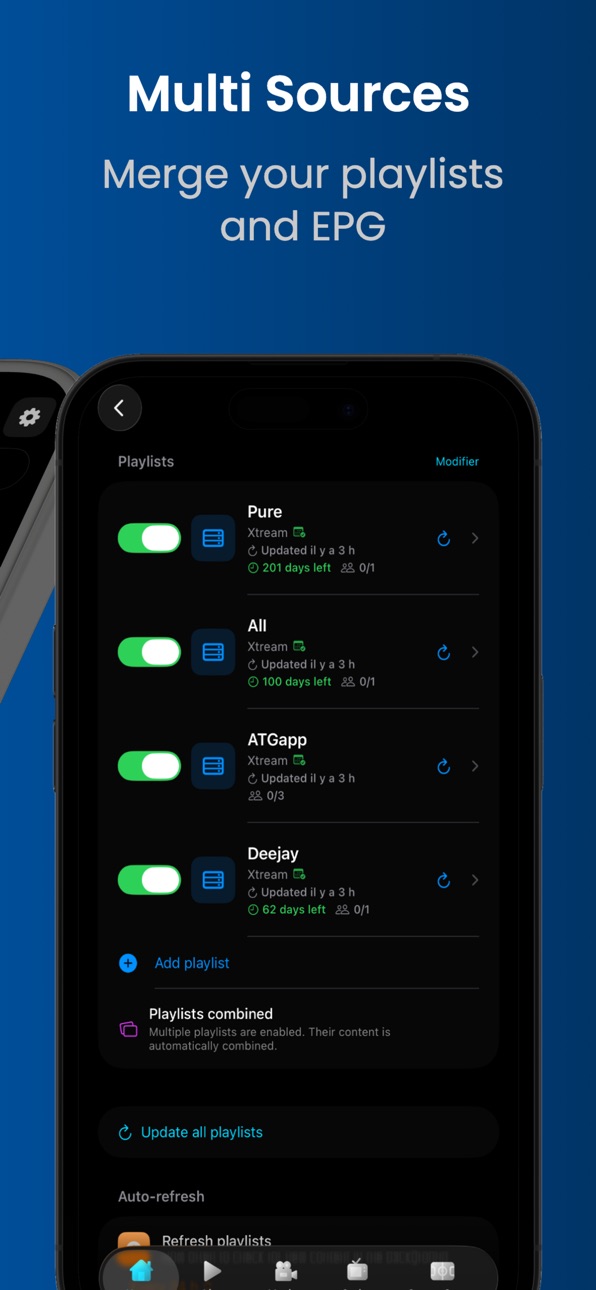
ALL YOUR PLAYLISTS, ONE APP
M3U playlists, Xtream Codes accounts, Stalker portals — all handled in one place, with categories, program guide, on-demand movies and series included.
STUNNING PLAYBACK, UP TO 4K DOLBY VISION
Multiple high-performance playback engines, with the best one picked automatically for every stream. Dolby Vision and HDR10 support, instant channel switching, and a one-tap selector to jump between SD, HD, FHD and 4K versions of the same channel. AirPlay 2 ready.
PLEX, EMBY AND JELLYFIN
Connect your media servers and browse your personal library inside the app. Resume where you left off across devices, skip intros automatically, and choose the exact version and quality you want.
MULTI-SCREEN MOSAIC
Watch several channels at once in a split-screen mosaic on your iPad. Sports, news, events — all at the same time.
LIVE SPORT, REIMAGINED
A full Sport Center with real-time scores, lineups, statistics and standings. An in-playback stats panel lets you follow the action without leaving the stream. Dedicated tournament hubs, including FIFA World Cup 2026 with fixtures, bracket, live scores and highlights. Live Activities keep the score on your Lock Screen and in the Dynamic Island. Your iPhone even becomes a second screen with live match stats while the game plays on your TV.
A TRUE TV GUIDE
A clean and complete program guide for every channel — 7 days ahead. Set reminders, search any program, and watch catch-up TV with full replay access.
EXTEND YOUR CONTENT
Search and load online subtitles for any title. Connect AllDebrid for instant cloud streams. Browse add-on catalogs for extended movie and series content. Access your network drives via SMB, WebDAV or SFTP. Watch trailers before you press play.
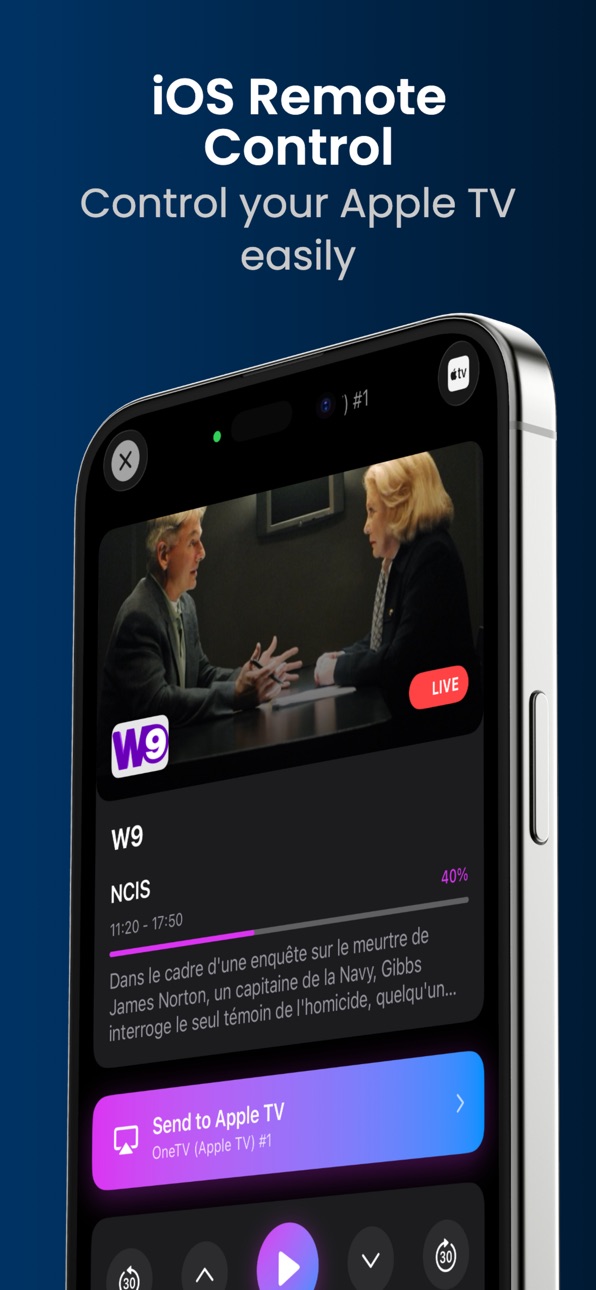
IPHONE AS APPLE TV REMOTE
Control the Apple TV app directly from your iPhone — channel changes, playback, search — and send any channel, movie or episode straight to the big screen.
YOUR CHANNELS, YOUR WAY
Create dividers, reorder categories, hide sections, browse in list or grid view. Adjustable text size and beautiful themes.
PICTURE IN PICTURE
Keep watching while you use other apps — Picture in Picture works with every playback engine.
ICLOUD SYNC & BACKUP
Everything follows you across iPhone, iPad and Apple TV — automatically. Full iCloud backup and one-tap restore, so a new device feels like home from day one.
PRIVATE BY DESIGN
No tracking. No ads. No third-party analytics. Your playlists and your watching history stay on your devices and in your private iCloud.
TRY IT FREE
Try OneTV Connect free for 7 days, then choose a monthly, quarterly or annual subscription, or buy it once for life. Cancel anytime — no questions asked.
LEGAL NOTICE
OneTV Connect is an IPTV player. The application does not provide any audiovisual content. Users must supply their own playlists from legal sources for which they hold valid access rights. Any unlawful use is the sole responsibility of the user.
Privacy Policy: https://onetvconnect.com/privacy
Terms of Use (EULA): https://onetvconnect.com/terms
Made with care by an independent developer.
support@onetvconnect.com
In-App Purchases ZM pricing
One TV Pro Subscription
One month · Monthly—
Three months Pro · 3 months—
One year Pro · Yearly—
One-Time Purchases
OneTV Pro Lifetime—
Capabilities
In-App Purchases
Accessibility
ipadiphonemacrealityDevicetvoswatch
Version history 20 versions
Build 887976222v2.52026-07-11 23:15:29
New
• (PRO) Sport Center adds featured banners for more sports: basketball, tennis, golf, cycling, ice hockey, rugby, baseball, American football, cricket and billiards, with stadium backdrops and a styled VS emblem.
• (PRO) Open a movie, series or episode in Infuse from the detail page or player; add-on links are debrided first, with nothing played in the app.
• (PRO) Add-ons now support TorBox and Real-Debrid alongside AllDebrid, including files that aren't cached yet.
Improvements
• Seeking by sliding the timeline now shows a Loading pill while the player buffers the new position, instead of a frozen bar.
• (PRO) An add-on whose server changed address updates in place when you paste its new URL, without losing your settings or duplicating it.
• (PRO) An Unreachable badge in Settings flags add-ons whose server no longer responds.
• (PRO) Refined Sport Center banners: full-bleed background, a larger VS emblem and consistent sizing everywhere, World Cup 2026 included.
• (PRO) Your Trakt watchlists on the dashboard now load in batches of 20 posters and fetch the next ones as you reach the end of the row.
• The live and video playback overlays on iPhone and iPad are redesigned, with cleaner controls, EPG and quality info, and a More options menu.
• Diagnostics gains a link scrubber to seek and test playback on every player, and on Apple TV you can refresh the URL and browse all stream details with the remote.
Fixes
• No more slowdown while watching a movie or series: progress-bar preview thumbnails are now generated only when you scrub.
• In Diagnostics, testing a Dolby Vision Profile 5 link with AVPlayer now shows a clear incompatibility message instead of a failed playback attempt.
• Audio keeps playing in the background when Picture-in-Picture is on during a live channel, instead of cutting out when you leave the app.
• (PRO) Launching a movie or episode on the Apple TV from the remote now works for add-on, Plex, Emby, Jellyfin and network-share sources.
• MKV movies and series from an add-on now play with AVPlayer, and the fallback to KSPlayer is near-instant instead of a long wait.
• Movies cut off midway by the server now resume automatically at the same position instead of showing an error or jumping to the end.
• The first category divider in Live no longer expands then collapses on its own when first shown.
• The Stream Information sheet now shows the real details with AVPlayer instead of Unknown.
• (PRO) The Apple TV remote no longer connects on its own at launch: you now pick the device to control manually.
• (PRO) In History, a movie or show no longer appears several times under items to resume: duplicates merge into a single poster that opens the correct page.
• (PRO) Sport Center: banner logos load instantly when you return, the page stays clear of the sidebar on Apple TV, and combat-sport banners work again on iPad.
• (PRO) Add-ons: the source you pick always plays, playback resumes where you left off, and adding an add-on handles temporary server rate-limits with a clear message.
• Seeking works again in movies and series with VLC, MPV and AVPlayer, including Xtream links that redirect to a CDN.
• No crash after a stream switch or a resume, and on resume the progress bar no longer jumps from the start to the saved position.
• On iPhone and iPad, the time readout now fits on one line, and AVPlayer Chromecast handling is fixed.
Stability and improvements
Build 887901744v2.42026-07-07 16:00:23
- The in-player episode selector for series played through an add-on now correctly lists all episodes. (Pro)
- Playlists no longer disappear after restoring from iCloud. (Pro)
- EPG sources and deleted items are now properly saved to your iCloud backup and no longer reappear after a restore. (Pro)
- Deleting a playlist no longer reloads every other playlist and the TV guide; it is now nearly instant.
- Xtream playlists with a portal path in the address (like "/c/") now correctly play live channels and show the TV guide.
- Refreshing an Xtream playlist no longer gets stuck partway through; it now always completes.
- Reduced unnecessary connections to Xtream servers to lower the risk of temporary blocking, especially on single-connection subscriptions.
- Redesigned the Search in catalog window with a cinematic backdrop, rating, year, genres, synopsis, and source results shown as cards.
- Redesigned the Manifest add-ons tab with premium cards, real quality badges, and per-add-on filters. (Pro)
- The Instant badge now reflects the real debrid cache; no more false Instant labels on files still downloading. (Pro)
- Added a close button to the Search in catalog window.
- The last search result is no longer hidden by the bar, and the list now scrolls all the way down.
- Fixed a black screen on some Dolby Vision Profile 7 BluRay REMUX movies; video now displays correctly in HDR10.
- In the Live channel list, tapping anywhere on a row now opens the channel.
- Trakt sync now retrieves your full watchlists and watched history, no longer capped at 100 items. (Pro)
Stability and improvements.
Build 887835329v2.32026-07-05 00:44:13
What's New — iOS
iCloud sync reliability overhaul across the app: deletions (EPG sources and mappings, favorites, history, hidden channels, order, My List, Plex/Emby/Jellyfin servers, categories, followed teams/players/leagues) no longer reappear after sync, and re-adding a deleted item works again.
Multi playlist merge mode for Live: categories filed under the correct divider, categories with no divider shown separately, showing and hiding a category is instant and persists across devices.
Major performance and memory optimizations: Home and TV Guide data computed in the background and cached, 7 day guide loaded on demand, duplicate EPG channels merged, much smoother navigation and scrolling, less heat.
Big CPU and heat reduction: live previews stop when idle or in the background, much faster launch even with large channel lists, smoother app overall.
Playback: HD/4K version picker on Plex, Emby and Jellyfin, Direct Play 4K on Emby and Jellyfin, Dolby Vision Profile 5/8/8.1 fixed, hardware 4K decoding from the first play, new automatic deinterlacing option, reliable resume position, uncached add on movies now playable, reworked scrub bar with a larger touch area, long press Play to search for a better version.
MPV 4K player stability: automatically pauses in the background instead of crashing.
Sport Center: the correct live match now shows in the banner, Dynamic Island and match pages, channel search excludes hidden categories, matches stay visible past midnight, the TV Channels tab stays available throughout the match.
Missing posters and titles in My List, History, Continue Watching and Trakt Watchlist are now auto fetched from TMDB, including by name search.
Your personal Trakt lists now appear as rows on Home, choose which ones in Settings.
Settings descriptions: internal codes replaced with readable names in every language.
Stability and improvements.
Build 887430819v2.22026-06-25 22:53:56
What's New
(PRO) While watching a live match, tap the new stats button to open a panel with score, match timeline, lineups, and standings
(PRO) Add your own add-ons, now fully integrated
Improvements
(PRO) Larger, face-centered fighter images in the Sport Center fight banner
Larger, more readable subtitles across all players (KSPlayer, VLC, MPV, AVPlayer)
Stalker sources now show the subscription expiry date and connection count (when the portal provides it), just like Xtream
The "Text size" setting now applies everywhere in the app (titles, lists, detail pages, overlays, badges, search)
Bug Fixes
Movie and series detail pages now link to the correct TMDB title — no more wrong matches (e.g. "Spider-Man" showing "Spider")
The minute shown on the Sport Center banner is now synced with the real match time
No more freeze or crash in the Live grid view when switching quickly between channel previews
Build 887196218v2.12026-06-19 23:40:09
What's New
NEW
• (Pro) Network provider pills (Netflix, Disney+, Prime Video, Apple TV+, HBO Max, BBC, Paramount+, Hulu, Peacock, Canal+, Crunchyroll) with branded logos to filter the Smart Catalog by streaming provider.
• Live channel version switcher (SD/HD/FHD/4K) to change quality in one tap.
• Refresh button in the live player to reload a channel without leaving it.
• (Pro) Network Shares (SMB) added to the cloud services in Movies & Series.
• (Pro) Erase all iCloud data to start fresh, and choose what gets synced.
IMPROVEMENTS
• Faster, more reliable startup: Movies, Series and channels appear on first launch, even with thousands of channels.
• Smoother live playback: 4K and 50/60fps better synced, fewer stutters and freezes.
• (Pro) Movies & Series: redesigned Smart Filter (Genre, Decade, Rating, Sort) with quick category access.
• (Pro) More reliable online subtitles, now also available with AVPlayer.
• Polished navigation and interface across Settings, TV Guide and bars.
FIXES
• (Pro) Reliable iCloud backup & restore: full settings import, detailed progress and instant confirmation.
• Reliable "Live" category management: hide or re-enable a category, with dividers and playlists kept across sync.
• More robust TV Guide: no more freezes or crashes, instant loading, and EPG synced across your devices.
• More reliable live channels: MPV, Xtream and Stalker relaunch correctly, including via an external player.
• Improved stability: no more restart loops or crashes (large EPG guides, iPad multitasking).
• Sport Center: correct fight detail and banner, sports bar loads, and World Cup scores.
• (Pro) My List: your saved movies and series reappear with poster and title.
• (Pro) Plex: "Recently added" artwork now shows, with a TMDB image fallback.
• Automatic playlist refresh every 24 hours in "All" merge mode.
Build 886856774v2.0.12026-06-12 19:57:23
WHAT'S NEW
• Time format: automatic (by region), 12-hour or 24-hour — applied everywhere
• New internal database: faster, lighter and far more stable
• World Cup 2026: live scores, all 48 team badges, channel to watch each match
• Redesigned fight sheets (UFC, boxing): fighters, records, full card, broadcast channels
• [PRO] "For You" page with personalized recommendations — now on iPad too
• [PRO] iPad: My List, History & Catch-up sections + customizable sidebar
• [PRO] Network Shares: movies & series from your NAS (SMB, SFTP, FTP, WebDAV)
IMPROVEMENTS
• Choose what to refresh: everything, channels, movies or series
• TV guide extended to 7 days
• Smoother browsing through movies and series
• Playback pauses in the background and resumes at the exact position
FIXES
• No more crashes at startup, during playback or while updating playlists
• "Refresh playlists" truly reloads all your content
• Search covers your entire catalog — no duplicates, no disabled-playlist content
• Dolby Vision movies play correctly with true colors
• A movie frozen while loading resumes automatically at the right position
• Interface texts better translated
Build 886792700v2.02026-06-11 20:39:17
WHAT'S NEW
• Time format: automatic (by region), 12-hour or 24-hour — applied everywhere
• New internal database: faster, lighter and far more stable
• World Cup 2026: live scores, all 48 team badges, channel to watch each match
• Redesigned fight sheets (UFC, boxing): fighters, records, full card, broadcast channels
• [PRO] "For You" page with personalized recommendations — now on iPad too
• [PRO] iPad: My List, History & Catch-up sections + customizable sidebar
• [PRO] Network Shares: movies & series from your NAS (SMB, SFTP, FTP, WebDAV)
IMPROVEMENTS
• Choose what to refresh: everything, channels, movies or series
• TV guide extended to 7 days
• Smoother browsing through movies and series
• Playback pauses in the background and resumes at the exact position
FIXES
• No more crashes at startup, during playback or while updating playlists
• "Refresh playlists" truly reloads all your content
• Search covers your entire catalog — no duplicates, no disabled-playlist content
• Dolby Vision movies play correctly with true colors
• A movie frozen while loading resumes automatically at the right position
• Interface texts better translated
Build 886473395v1.92026-06-03 16:31:28
NEW
- [PRO] Access all your Replays directly from "Live", with a dedicated page offering playlist and category filters, global search, and colored playlist badges
IMPROVEMENTS
- Diagnostics: before sending a report, you must now describe the problem and can check the relevant categories; a protection prevents repeated submissions, and the developer is notified by email for each report received
- On a channel's Replay page, the playlist name is shown as a colored badge and the category displays its real name instead of a technical code
- The term "Replay" replaces all previous translations throughout the app, in all languages
- Replay programme images now show for all past programmes, even days old, not just the last 2 hours
FIXES
- Changing channel from iPhone while streaming to Apple TV no longer plays the sound on the iPhone as well; only the Apple TV plays the stream
- Fast forward and rewind now work correctly in the Replay player
- Fixed a display bug in Replay that caused content to appear shifted or clipped after exiting the fullscreen player
Build 886384772v1.82026-06-01 23:41:28
NEW
- Tap the "On Apple TV" banner to see the current programme of the channel playing on your Apple TV (title, synopsis, schedule, image and progress)
- When the app goes to background while a channel plays on Apple TV, the channel logo, current programme and countdown appear in the Dynamic Island and on the Lock Screen
- Trailers now play in full screen directly inside the app, with a beautiful loading screen, instead of opening YouTube
IMPROVEMENTS
- The remote has been greatly improved: "My List" shows real posters and titles, search the catalog for a playable version, launching a movie no longer plays over what's already on, "Now Playing" correctly shows what plays on your Apple TV
- In "All playlists" mode, the Multi Screen picker shows categories from all enabled playlists
- Movie & series detail: progress bar on the "Resume" button redesigned for better readability across all screen sizes
- Sport Center: featured event banners stay visible during the entire match and show "LIVE" with elapsed time
- "Clear cache" now actually frees all the space, including images and temporary video files; unused space is also cleaned automatically on launch
- App translations fully reviewed and corrected across all 28 supported languages
FIXES
- While watching live, going back to the categories list no longer makes the video stutter, even with very large channel lists
- When a channel's picture cuts out but the sound keeps playing, the app detects it and automatically reloads the stream
- The "Resume" button works correctly even when the playback source is no longer available in the catalog
- Movies and series open the correct details page: no more mix-ups between similar titles
- Launching a channel on Apple TV: the local player no longer starts in the background
- In Settings, the expiry date of Stalker/MAC portals now displays correctly
- The frame rate (fps) shown in stream info is now correct for 60 fps channels
Build 886241848v1.72026-05-28 18:56:18
NEW
- Switch episodes during series playback with the new in-player episode picker and season navigation
- Days remaining until expiration shown for Stalker/MAC playlists
- Playlists and EPG sources added on one device automatically appear on other devices via iCloud
- In Sport Center, all leagues automatically collapsed when entering the tab
IMPROVEMENTS
- Major performance and smoothness improvements — faster scrolling, faster launch, less stuttering
- Movies and Series tabs: correct playlist immediately on startup, improved image loading, initial focus on "Recently Added"
- More reliable playback for Dolby Vision and other formats, with automatic catalog search suggestion when a movie can't be played
- On series detail pages, "Resume" button automatically updates to next episode when marking a season as watched
- Hiding a movie/series from "Continue Watching" also removes it from Trakt and all your devices, keeping watch history on Trakt
- In "All playlists" mode, the Multi Screen picker shows categories from all enabled playlists
- In Category Management, Total / Visible / Hidden counters are tappable to quickly filter the list
FIXES
- Some movies got stuck on a "Format incompatible" error screen at player launch
- Categories hidden from "Live TV" menu could reappear after time, network change, restart or playlist refresh
- Categories shown as hidden in "All" now also correctly appear hidden on specific playlists
- Channel favorites, history and custom order in "Live TV" could disappear on restart and fail to sync between devices
- In "Live TV", the category no longer changes by itself after adding a channel to favorites
- Fixed the "Channel unavailable" screen remaining displayed after switching to another working channel
- Fixed a crash on iPhone/iPad when launching a channel while remote-controlling the Apple TV
- On iPhone/iPad with a multi-connection Xtream playlist, the Multi Screen button now stays visible at all times
- Fixed a player issue preventing resuming playback of a movie or episode after stopping
- Dividers deleted in "Live TV" now stay deleted after restarting the app
- Tapping a series/movie in "Continue Watching" could open the wrong title with multiple playlists active
Build 885814103v1.62026-05-22 20:32:34
NEW
- NEW — Multi Screen, ready for the 2026 World Cup: watch up to 4 matches at once on iPhone and iPad! MatchDay Director mode automatically switches audio to the match that just scored (Pro only)
- You can now fully reset the progress of a movie, series or episode in one click (with propagation to Trakt, Plex, Jellyfin and Emby, a safety confirmation, and instant removal from the "Continue Watching" rail)
- When you watch a match on Apple TV, your iPhone now automatically displays the live score, timeline and stats (Pro only), with Live Activity and Dynamic Island support
- New Sport Center banner highlighting big upcoming matches (Champions League, French Cup, cup finals, F1, 2026 World Cup…) with live countdown, swipe navigation, and option to hide a match
- "Now playing on Apple TV" banner now appears automatically on iPhone with no setup needed
- Sport Centre now shows all available countries for the selected sport, with a new blue badge showing the count of broadcasted matches on each collapsed league
IMPROVEMENTS
- Catalog search from a movie/series detail is now more complete and reliable: all active playlists are properly queried, accents ("Shōgun" = "Shogun") and multiple versions of the same content are correctly handled
- Country prefixes like "FR|" are now correctly hidden in channel names
- iCloud backup and restore entirely revamped: dividers, EPG sources, favorites and preferences now sync correctly between iPhone and Apple TV
- "Continue Watching" rail sorted by actual watch date and includes your Trakt, Plex, Jellyfin and Emby progress
- Sport match detection on iPhone now supports more program title formats (US notation "Team1 @ Team2", titles ending with "LIVE", emojis)
- "Resume" button on a movie's detail page now appears even if you started on another device (via Trakt), with an accurate remaining time
- Resetting progress preserves the "watched" status from Trakt / Plex / Jellyfin / Emby (new dedicated button)
- When a movie isn't compatible with AVPlayer (e.g. HDR on an SDR display), the switch to another player is nearly instant
- "Skip Intro / Recap" button now also works with the AVPlayer player
- Live sports scores no longer slow down fullscreen playback
- Hiding a category from the Live screen is now instant
FIXES
- No more startup freezes: the app opens quickly even when your movies and series need updating
- Episodes watched on iPhone and iPad are once again correctly marked as watched on Trakt
- More reliable playback: automatic switching to a backup player no longer loops back to the failing one
- Catalog search no longer hangs forever when a Plex/Jellyfin/Emby server is unreachable
- Switching from a channel preview to fullscreen no longer incorrectly triggers the connection limit warning
- Changing the EPG source of a playlist is now properly saved across app restarts
- Channels running at 50 frames per second now correctly display as "50 fps" (instead of "60 fps")
- The World Cup page no longer closes on its own while you're using it
Build 885698171v1.52026-05-15 16:05:59
NEW
- New "Advanced player settings" panel (KSPlayer / MPV / VLC / AVPlayer) with quick presets Performance / Balanced / Stability and iCloud sync
- New alert shown during playback when your Xtream subscription connection limit is exceeded
IMPROVEMENTS
- More accurate and responsive Xtream connection counter
- Memory optimizations during playback for better stability (especially in 4K)
Build 885487850v1.42026-05-13 21:21:13
NEW
- Full Emby integration: movies, shows, live TV, global search, downloadable subtitles
- New AVPlayer (Apple native) engine for movies and shows, with direct access to audio tracks and subtitles
- Automatic background playlist refresh (6h, 12h, 24h, or never)
- Live display of active Xtream connections during playback
- Export/import your full configuration to another iPhone via an encrypted file
IMPROVEMENTS
- Improved live playback: no more audio cracking, better 4K/UHD stability, smoother network reconnections
- Faster app: accelerated startup, more responsive navigation in Movies, Series, and Sport Center
- Watched-episodes counter in "Continue Watching" now includes Plex, Jellyfin, and Emby
- More reliable subtitle downloads with automatic retries
- Tidier top bar in Movies/Series with multiple cloud sources connected
- Cleaner paywall: Dolby Vision hidden (Apple TV only) and Pro labels no longer truncated
FIXES
- In-progress episode rows in series seasons now render correctly (no empty gap or overflowing text)
- KSPlayer crash on quick open/close
- KSPlayer audio/video desync, better 4K stability
- Favorites category in Live TV now displays correctly
- Episodes resume at the correct position when tapped from the list
- Disabled categories now hide immediately from Dashboard, Movies, and Series
- Movies and shows in progress now appear correctly in Movies and Series sections
- Category display in "All" mode in Movies & Series
- Plex and Jellyfin shortcuts visible again for Pro users
Build 885155599v1.3.12026-05-06 20:15:13
What's new:
• Schedule reminders on upcoming Guide programs (15 min, 5 min before, or at start time), with iPhone notifications and iCloud sync across your devices.
• Brand-new welcome experience: hello screen, 11-step guided tour, and a shortcut in Settings → About to replay the tour anytime.
• Stalker (MAC portals) now works with VLC and MPV.
Improvements:
• Live channel playback is now much faster: instant start, no loading time when zapping.
• The channel list under the player no longer lags, even with thousands of channels.
• Resume playback for movies and series fixed with KSPlayer.
Fixes:
• Continue Watching: correct progress (real percentage, real episodes watched count); correct posters and previews for movies.
• No more black screen with KSPlayer or wrong episode at series startup.
• Search no longer stays empty after a long playback session.
• Fixed display bug where some episodes appeared as empty boxes in a season list.
• League notifications now respect unsubscriptions.
• Clear error message when a channel doesn't work, instead of a frozen black screen.
• Video playback engine updated: many stability and audio/video sync fixes.
Build 885074137v1.22026-04-29 23:37:26
- Full Jellyfin integration: fast connection, automatic discovery on your local network, unified favorites and progress tracking with Plex and Trakt.
- Extended iCloud sync for Plex and Jellyfin: connect your server once, and all your devices are instantly ready. Deleting a server is propagated to all devices.
- Option to enable or disable iCloud sync for Plex and Jellyfin servers from Settings.
- Movies and TV Shows: view all your Plex and Jellyfin libraries with sorting, filters, and search.
- Dashboard: new "Recently Added" Plex and Jellyfin rails with a design aligned with Trending.
- Global search extended to Jellyfin content.
- Home Assistant — completely redesigned integration: display of currently playing content (channel, movie, or episode) with its image, automatic selections by category to control your channels, preservation of categories and hidden channels in your settings, much faster and lighter on large playlists.
- Sport Center is now open to all sports: follow your teams (NBA, NFL, NHL, MLB, Rugby…), your UFC/Boxing fighters, your F1 drivers, and your tennis players, with live notifications.
- iOS Remote: more reliable detection of your Apple TV on the network.
- Searching the catalog (movie/series details) now respects categories hidden in the settings.
- Continue Watching: movies and series are now correctly sorted by last viewed date (most recent first).
- Trakt: movies and series removed from your watchlist no longer reappear the next time you launch it, and deletions made from trakt.tv or another device are correctly reflected everywhere (local + iCloud).
- Fixed a display issue on the stream format selection screen (MPEG-TS / HLS / RTMP) when adding a playlist: on smaller iPhones, the cards are now properly aligned and the text no longer overflows. Improved compatibility with certain IPTV playlists: channels launch correctly and faster.
- Performance: background optimizations, perfectly smooth playback even when Home Assistant is connected.
- Stability improvements and various bug fixes.
- Automatic EPG when adding an Xtream playlist
- Automatic URL correction — if the Xtream server address is not responding, the app automatically tests common variations and uses the one that works
- Reliable EPG loading — all TV guide channels are now correctly detected on the first import
Build 884987956v1.1.22026-04-28 13:38:55
- Deleting episode progress is now permanent and will not reappear (iOS and Apple TV).
- Fixed a bug where the "OneTV Pro" paywall was incorrectly displayed on Sports Centre even though the subscription was already active.
Build 884906624v1.1.12026-04-25 00:05:51
**What's New**
- Full Plex integration on iPhone and iPad: movies, shows, seasons, episodes, search and automatic resume.
- New "Recently Added on Plex" row on the dashboard.
- New subscription plans: Monthly, Quarterly, Yearly and Lifetime, with savings of up to 16% on the yearly plan.
- Redesigned paywall with prices and savings shown at a glance.
- Automatic next-episode playback with a configurable countdown (5 to 20 s).
- Trakt watched episodes displayed instantly when opening a show.
- External subtitles kept active across episodes.
- Long-press with haptic feedback to mark a movie, season or episode as watched or unwatched, with automatic Trakt sync.
- "Mark all up to here" option to catch up on a series in one tap.
- Sport Center: timeline terminology adapted to each sport (Touchdown, Try, Run, Point…) with matching icon.
- Sport Center: dates and times displayed in local format.
- Multilingual search, parent category shown under each poster and title displayed over the artwork.
- Improved iPad layout with uniform cards and denser presentation.
**Fixes**
- Fast-forward and rewind now working on VLC for movies and shows.
- Subtitles disabled by default on VLC: they no longer turn on automatically at startup.
- Trailer audio properly stopped during playback (MPV, KSPlayer, VLC).
- Series resume picks the correct episode, even when Trakt history has gaps.
- VOD playback now starts correctly in freemium mode.
- Channel search restored in landscape mode on iPhone.
- Strictly uniform poster sizes on iPad.
- Hidden categories excluded from search and no longer downloaded.
- Trakt "My List" sorted by last watched date.
- Fixed infinite loading indicator in the Series tab.
- Movie and show details render even when the metadata service is unavailable.
- "Retry" button working reliably again.
- Automatic failover to a backup server, with server capacity increased 50-fold.
- Category language picker now consistent with hidden categories.
- Font size setting respected throughout the app.
- Reliable "Recently Added" sorting for movies and shows.
- Faster launch with the search index ready at startup.
Build 884897873v1.12026-04-24 17:38:18
**What's New**
- Full Plex integration on iPhone and iPad: movies, shows, seasons, episodes, search and automatic resume.
- New "Recently Added on Plex" row on the dashboard.
- New subscription plans: Monthly, Quarterly, Yearly and Lifetime, with savings of up to 16% on the yearly plan.
- Redesigned paywall with prices and savings shown at a glance.
- Automatic next-episode playback with a configurable countdown (5 to 20 s).
- Trakt watched episodes displayed instantly when opening a show.
- External subtitles kept active across episodes.
- Long-press with haptic feedback to mark a movie, season or episode as watched or unwatched, with automatic Trakt sync.
- "Mark all up to here" option to catch up on a series in one tap.
- Sport Center: timeline terminology adapted to each sport (Touchdown, Try, Run, Point…) with matching icon.
- Sport Center: dates and times displayed in local format.
- Multilingual search, parent category shown under each poster and title displayed over the artwork.
- Improved iPad layout with uniform cards and denser presentation.
**Fixes**
- Fast-forward and rewind now working on VLC for movies and shows.
- Subtitles disabled by default on VLC: they no longer turn on automatically at startup.
- Trailer audio properly stopped during playback (MPV, KSPlayer, VLC).
- Series resume picks the correct episode, even when Trakt history has gaps.
- VOD playback now starts correctly in freemium mode.
- Channel search restored in landscape mode on iPhone.
- Strictly uniform poster sizes on iPad.
- Hidden categories excluded from search and no longer downloaded.
- Trakt "My List" sorted by last watched date.
- Fixed infinite loading indicator in the Series tab.
- Movie and show details render even when the metadata service is unavailable.
- "Retry" button working reliably again.
- Automatic failover to a backup server, with server capacity increased 50-fold.
- Category language picker now consistent with hidden categories.
- Font size setting respected throughout the app.
- Reliable "Recently Added" sorting for movies and shows.
- Faster launch with the search index ready at startup.
Build 884733559v1.0.12026-04-21 18:22:22
Fixed an infinite loading bug on players
Fixed a ghost poster issue with Trakt
Build 881665228v1.02026-04-20 13:38:01
Price history by region
Currency
Show
Columns
Search
Availability 175 of 175 storefronts
| Region | Language | Price | Ratings | Avg | Version |
|---|---|---|---|---|---|
| FR | fr-FR | Free | 4 | 5.0 | 2.3 |
| US | en-US | Free | 4 | 4.0 | 2.5 |
| GB | en-GB | Free | 3 | 3.7 | 2.3 |
| AU | en-AU | Free | 1 | 5.0 | 2.3 |
| BR | pt-BR | Free | 1 | 5.0 | 2.3 |
| CH | de-CH | Free | 1 | 5.0 | 2.3 |
| DE | de-DE | Free | 1 | 5.0 | 2.3 |
| ES | es-ES | Free | 1 | 5.0 | 2.3 |
| IT | it | Free | 1 | 5.0 | 2.3 |
| NL | nl | Free | 1 | 2.0 | 2.3 |
| AE | en-GB | Free | 0 | — | 2.3 |
| AF | en-GB | Free | 0 | — | 2.3 |
| AG | en-GB | Free | 0 | — | 2.3 |
| AI | en-GB | Free | 0 | — | 2.3 |
| AL | en-GB | Free | 0 | — | 2.3 |
| AM | en-GB | Free | 0 | — | 2.3 |
| AO | en-GB | Free | 0 | — | 2.3 |
| AR | es-MX | Free | 0 | — | 2.3 |
| AT | de-DE | Free | 0 | — | 2.3 |
| AZ | en-GB | Free | 0 | — | 2.3 |
| BA | en-GB | Free | 0 | — | 2.3 |
| BB | en-GB | Free | 0 | — | 2.3 |
| BE | en-GB | Free | 0 | — | 2.3 |
| BF | en-GB | Free | 0 | — | 2.3 |
| BG | en-GB | Free | 0 | — | 2.3 |
| BH | en-GB | Free | 0 | — | 2.3 |
| BJ | en-GB | Free | 0 | — | 2.3 |
| BM | en-GB | Free | 0 | — | 2.3 |
| BN | en-GB | Free | 0 | — | 2.3 |
| BO | es-MX | Free | 0 | — | 2.3 |
| BS | en-GB | Free | 0 | — | 2.3 |
| BT | en-GB | Free | 0 | — | 2.3 |
| BW | en-GB | Free | 0 | — | 2.3 |
| BY | en-GB | Free | 0 | — | 2.3 |
| BZ | en-GB | Free | 0 | — | 2.3 |
| CA | en-CA | Free | 0 | — | 2.3 |
| CD | en-GB | Free | 0 | — | 2.3 |
| CG | en-GB | Free | 0 | — | 2.3 |
| CI | fr-FR | Free | 0 | — | 2.3 |
| CL | es-MX | Free | 0 | — | 2.3 |
| CM | fr-FR | Free | 0 | — | 2.3 |
| CN | zh-Hans-CN | Free | 0 | — | 2.3 |
| CO | es-MX | Free | 0 | — | 2.3 |
| CR | es-MX | Free | 0 | — | 2.3 |
| CV | en-GB | Free | 0 | — | 2.3 |
| CY | en-GB | Free | 0 | — | 2.3 |
| CZ | en-GB | Free | 0 | — | 2.3 |
| DK | en-GB | Free | 0 | — | 2.3 |
| DM | en-GB | Free | 0 | — | 2.3 |
| DO | es-MX | Free | 0 | — | 2.3 |
| DZ | en-GB | Free | 0 | — | 2.3 |
| EC | es-MX | Free | 0 | — | 2.3 |
| EE | en-GB | Free | 0 | — | 2.3 |
| EG | en-GB | Free | 0 | — | 2.3 |
| FI | en-GB | Free | 0 | — | 2.3 |
| FJ | en-GB | Free | 0 | — | 2.3 |
| FM | en-GB | Free | 0 | — | 2.3 |
| GA | fr-FR | Free | 0 | — | 2.3 |
| GD | en-GB | Free | 0 | — | 2.3 |
| GE | en-GB | Free | 0 | — | 2.3 |
| GH | en-GB | Free | 0 | — | 2.3 |
| GM | en-GB | Free | 0 | — | 2.3 |
| GR | en-GB | Free | 0 | — | 2.3 |
| GT | es-MX | Free | 0 | — | 2.3 |
| GW | en-GB | Free | 0 | — | 2.3 |
| GY | en-GB | Free | 0 | — | 2.3 |
| HK | zh-Hant-HK | Free | 0 | — | 2.3 |
| HN | es-MX | Free | 0 | — | 2.3 |
| HR | en-GB | Free | 0 | — | 2.3 |
| HU | en-GB | Free | 0 | — | 2.3 |
| ID | en-GB | Free | 0 | — | 2.3 |
| IE | en-GB | Free | 0 | — | 2.3 |
| IL | en-GB | Free | 0 | — | 2.3 |
| IN | en-GB | Free | 0 | — | 2.3 |
| IQ | en-GB | Free | 0 | — | 2.3 |
| IS | en-GB | Free | 0 | — | 2.3 |
| JM | en-GB | Free | 0 | — | 2.3 |
| JO | en-GB | Free | 0 | — | 2.3 |
| JP | ja | Free | 0 | — | 2.3 |
| KE | en-GB | Free | 0 | — | 2.3 |
| KG | en-GB | Free | 0 | — | 2.3 |
| KH | en-GB | Free | 0 | — | 2.3 |
| KN | en-GB | Free | 0 | — | 2.3 |
| KR | ko | Free | 0 | — | 2.3 |
| KW | en-GB | Free | 0 | — | 2.3 |
| KY | en-GB | Free | 0 | — | 2.3 |
| KZ | en-GB | Free | 0 | — | 2.3 |
| LA | en-GB | Free | 0 | — | 2.3 |
| LB | en-GB | Free | 0 | — | 2.3 |
| LC | en-GB | Free | 0 | — | 2.3 |
| LK | en-GB | Free | 0 | — | 2.3 |
| LR | en-GB | Free | 0 | — | 2.3 |
| LT | en-GB | Free | 0 | — | 2.3 |
| LU | en-GB | Free | 0 | — | 2.3 |
| LV | en-GB | Free | 0 | — | 2.3 |
| LY | en-GB | Free | 0 | — | 2.3 |
| MA | en-GB | Free | 0 | — | 2.3 |
| MD | en-GB | Free | 0 | — | 2.3 |
| ME | en-GB | Free | 0 | — | 2.3 |
| MG | en-GB | Free | 0 | — | 2.3 |
| MK | en-GB | Free | 0 | — | 2.3 |
| ML | en-GB | Free | 0 | — | 2.3 |
| MM | en-GB | Free | 0 | — | 2.3 |
| MN | en-GB | Free | 0 | — | 2.3 |
| MO | zh-Hant-HK | Free | 0 | — | 2.3 |
| MR | en-GB | Free | 0 | — | 2.3 |
| MS | en-GB | Free | 0 | — | 2.3 |
| MT | en-GB | Free | 0 | — | 2.3 |
| MU | en-GB | Free | 0 | — | 2.3 |
| MV | en-GB | Free | 0 | — | 2.3 |
| MW | en-GB | Free | 0 | — | 2.3 |
| MX | es-MX | Free | 0 | — | 2.3 |
| MY | en-GB | Free | 0 | — | 2.3 |
| MZ | en-GB | Free | 0 | — | 2.3 |
| NA | en-GB | Free | 0 | — | 2.3 |
| NE | en-GB | Free | 0 | — | 2.3 |
| NG | en-GB | Free | 0 | — | 2.3 |
| NI | es-MX | Free | 0 | — | 2.3 |
| NO | en-GB | Free | 0 | — | 2.3 |
| NP | en-GB | Free | 0 | — | 2.3 |
| NR | en-GB | Free | 0 | — | 2.3 |
| NZ | en-AU | Free | 0 | — | 2.3 |
| OM | en-GB | Free | 0 | — | 2.3 |
| PA | es-MX | Free | 0 | — | 2.3 |
| PE | es-MX | Free | 0 | — | 2.3 |
| PG | en-GB | Free | 0 | — | 2.3 |
| PH | en-GB | Free | 0 | — | 2.3 |
| PK | en-GB | Free | 0 | — | 2.3 |
| PL | en-GB | Free | 0 | — | 2.3 |
| PT | pt-PT | Free | 0 | — | 2.3 |
| PW | en-GB | Free | 0 | — | 2.3 |
| PY | es-MX | Free | 0 | — | 2.3 |
| QA | en-GB | Free | 0 | — | 2.3 |
| RO | en-GB | Free | 0 | — | 2.3 |
| RS | en-GB | Free | 0 | — | 2.3 |
| RU | ru | Free | 0 | — | 2.3 |
| RW | en-GB | Free | 0 | — | 2.3 |
| SA | en-GB | Free | 0 | — | 2.3 |
| SB | en-GB | Free | 0 | — | 2.3 |
| SC | en-GB | Free | 0 | — | 2.3 |
| SE | sv | Free | 0 | — | 2.3 |
| SG | en-GB | Free | 0 | — | 2.3 |
| SI | en-GB | Free | 0 | — | 2.3 |
| SK | en-GB | Free | 0 | — | 2.3 |
| SL | en-GB | Free | 0 | — | 2.3 |
| SN | en-GB | Free | 0 | — | 2.3 |
| SR | en-GB | Free | 0 | — | 2.3 |
| ST | en-GB | Free | 0 | — | 2.3 |
| SV | es-MX | Free | 0 | — | 2.3 |
| SZ | en-GB | Free | 0 | — | 2.3 |
| TC | en-GB | Free | 0 | — | 2.3 |
| TD | en-GB | Free | 0 | — | 2.3 |
| TH | en-GB | Free | 0 | — | 2.3 |
| TJ | en-GB | Free | 0 | — | 2.3 |
| TM | en-GB | Free | 0 | — | 2.3 |
| TN | en-GB | Free | 0 | — | 2.3 |
| TO | en-GB | Free | 0 | — | 2.3 |
| TR | en-GB | Free | 0 | — | 2.3 |
| TT | en-GB | Free | 0 | — | 2.3 |
| TW | zh-Hant-TW | Free | 0 | — | 2.3 |
| TZ | en-GB | Free | 0 | — | 2.3 |
| UA | en-GB | Free | 0 | — | 2.3 |
| UG | en-GB | Free | 0 | — | 2.3 |
| UY | en-GB | Free | 0 | — | 2.3 |
| UZ | en-GB | Free | 0 | — | 2.3 |
| VC | en-GB | Free | 0 | — | 2.3 |
| VE | es-MX | Free | 0 | — | 2.3 |
| VG | en-GB | Free | 0 | — | 2.3 |
| VN | en-GB | Free | 0 | — | 2.3 |
| VU | en-GB | Free | 0 | — | 2.3 |
| XK | en-GB | Free | 0 | — | 2.3 |
| YE | en-GB | Free | 0 | — | 2.3 |
| ZA | en-GB | Free | 0 | — | 2.3 |
| ZM | en-GB | Free | 0 | — | 2.3 |
| ZW | en-GB | Free | 0 | — | 2.3 |
Change log 28 changes · ZM
✎
releaseNotes updated
New
• (PRO) Sport Center adds featured banners for more sports: basketball, tennis, golf, cycling, ice hockey, rugby, baseball, American football, cricket and b
✎
description updated
OneTV Connect — The most beautiful way to watch your IPTV on Apple
Designed natively for iPhone and iPad by an independent developer who cares deeply about how
▣
App icon changed
◆
Version changed
2.3 → 2.5
◆
Version 2.5 released
New
• (PRO) Sport Center adds featured banners for more sports: basketball, tennis, golf, cycling, ice hockey, rugby, baseball, American football, cricket and billiards, with stadium backdrops and a styled VS emblem.
• (PRO) Open a movie, s
◆
Version 2.4 released
- The in-player episode selector for series played through an add-on now correctly lists all episodes. (Pro)
- Playlists no longer disappear after restoring from iCloud. (Pro)
- EPG sources and deleted items are now properly saved to your i
✎
releaseNotes updated
What's New — iOS
iCloud sync reliability overhaul across the app: deletions (EPG sources and mappings, favorites, history, hidden channels, order, My List, Ple
✎
description updated
OneTV Connect — The most beautiful way to watch your IPTV on Apple
Designed natively for iPhone, iPad and Apple TV by an independent developer who cares deeply
✎
subtitle updated
IPTV, Plex, Jellyfin & Sport
✎
name updated
OneTV Connect: IPTV Player
◆
Version 2.3 released
What's New — iOS
iCloud sync reliability overhaul across the app: deletions (EPG sources and mappings, favorites, history, hidden channels, order, My List, Plex/Emby/Jellyfin servers, categories, followed teams/players/leagues) no longer r
◆
Version 2.2 released
What's New
(PRO) While watching a live match, tap the new stats button to open a panel with score, match timeline, lineups, and standings
(PRO) Add your own add-ons, now fully integrated
Improvements
(PRO) Larger, face-centered fighter ima
◆
Version 2.1 released
What's New
NEW
• (Pro) Network provider pills (Netflix, Disney+, Prime Video, Apple TV+, HBO Max, BBC, Paramount+, Hulu, Peacock, Canal+, Crunchyroll) with branded logos to filter the Smart Catalog by streaming provider.
• Live channel ver
◆
Version 2.0.1 released
WHAT'S NEW
• Time format: automatic (by region), 12-hour or 24-hour — applied everywhere
• New internal database: faster, lighter and far more stable
• World Cup 2026: live scores, all 48 team badges, channel to watch each match
• Redesigne
◆
Version 2.0 released
WHAT'S NEW
• Time format: automatic (by region), 12-hour or 24-hour — applied everywhere
• New internal database: faster, lighter and far more stable
• World Cup 2026: live scores, all 48 team badges, channel to watch each match
• Redesigne
◆
Version 1.9 released
NEW
- [PRO] Access all your Replays directly from "Live", with a dedicated page offering playlist and category filters, global search, and colored playlist badges
IMPROVEMENTS
- Diagnostics: before sending a report, you must now describe t
◆
Version 1.8 released
NEW
- Tap the "On Apple TV" banner to see the current programme of the channel playing on your Apple TV (title, synopsis, schedule, image and progress)
- When the app goes to background while a channel plays on Apple TV, the channel logo, c
◆
Version 1.7 released
NEW
- Switch episodes during series playback with the new in-player episode picker and season navigation
- Days remaining until expiration shown for Stalker/MAC playlists
- Playlists and EPG sources added on one device automatically appear
◆
Version 1.6 released
NEW
- NEW — Multi Screen, ready for the 2026 World Cup: watch up to 4 matches at once on iPhone and iPad! MatchDay Director mode automatically switches audio to the match that just scored (Pro only)
- You can now fully reset the progress of
◆
Version 1.5 released
NEW
- New "Advanced player settings" panel (KSPlayer / MPV / VLC / AVPlayer) with quick presets Performance / Balanced / Stability and iCloud sync
- New alert shown during playback when your Xtream subscription connection limit is exceeded
◆
Version 1.4 released
NEW
- Full Emby integration: movies, shows, live TV, global search, downloadable subtitles
- New AVPlayer (Apple native) engine for movies and shows, with direct access to audio tracks and subtitles
- Automatic background playlist refresh (
◆
Version 1.3.1 released
What's new:
• Schedule reminders on upcoming Guide programs (15 min, 5 min before, or at start time), with iPhone notifications and iCloud sync across your devices.
• Brand-new welcome experience: hello screen, 11-step guided tour, and a s
◆
Version 1.2 released
- Full Jellyfin integration: fast connection, automatic discovery on your local network, unified favorites and progress tracking with Plex and Trakt.
- Extended iCloud sync for Plex and Jellyfin: connect your server once, and all your devic
◆
Version 1.1.2 released
- Deleting episode progress is now permanent and will not reappear (iOS and Apple TV).
- Fixed a bug where the "OneTV Pro" paywall was incorrectly displayed on Sports Centre even though the subscription was already active.
◆
Version 1.1.1 released
**What's New**
- Full Plex integration on iPhone and iPad: movies, shows, seasons, episodes, search and automatic resume.
- New "Recently Added on Plex" row on the dashboard.
- New subscription plans: Monthly, Quarterly, Yearly and Lifetim
◆
Version 1.1 released
**What's New**
- Full Plex integration on iPhone and iPad: movies, shows, seasons, episodes, search and automatic resume.
- New "Recently Added on Plex" row on the dashboard.
- New subscription plans: Monthly, Quarterly, Yearly and Lifetim
◆
Version 1.0.1 released
Fixed an infinite loading bug on players
Fixed a ghost poster issue with Trakt
◆
Version 1.0 released