Home › Photo & Video

 ZW
ZW
 USen-US
 DEde-DE
 JPja
JPja MXes-MX
 AEen-GB
 AFen-GB
 AGen-GB
 AIen-GB
 ALen-GB
 AMen-GB
 AOen-GB
 ARes-MX
 ATde-DE
 AUen-AU
 AZen-GB
 BAen-GB
 BBen-GB
 BEen-GB
 BFen-GB
 BGen-GB
 BHen-GB
 BJen-GB
 BMen-GB
 BNen-GB
 BOes-MX
 BRpt-BR
 BSen-GB
 BTen-GB
 BWen-GB
 BYen-GB
 BZen-GB
 CAen-CA
 CDen-GB
 CGen-GB
 CHde-CH
 CIfr-FR
 CLes-MX
 CMfr-FR
 CNzh-Hans-CN
 COes-MX
 CRes-MX
 CVen-GB
 CYen-GB
 CZen-GB
 DKen-GB
 DMen-GB
 DOes-MX
 DZen-GB
 ECes-MX
 EEen-GB
 EGen-GB
 ESes-ES
 FIen-GB
 FJen-GB
 FMen-GB
 FRfr-FR
 GAfr-FR
 GBen-GB
 GDen-GB
 GEen-GB
 GHen-GB
 GMen-GB
 GRen-GB
 GTes-MX
 GWen-GB
 GYen-GB
 HKzh-Hant-HK
 HNes-MX
 HRen-GB
 HUen-GB
 IDen-GB
 IEen-GB
 ILen-GB
 INen-GB
 IQen-GB
 ISen-GB
 ITit
ITit JMen-GB
 JOen-GB
 KEen-GB
 KGen-GB
 KHen-GB
 KNen-GB
 KRko
KRko KWen-GB
 KYen-GB
 KZen-GB
 LAen-GB
 LBen-GB
 LCen-GB
 LKen-GB
 LRen-GB
 LTen-GB
 LUen-GB
 LVen-GB
 LYen-GB
 MAen-GB
 MDen-GB
 MEen-GB
 MGen-GB
 MKen-GB
 MLen-GB
 MMen-GB
 MNen-GB
 MOzh-Hant-HK
 MRen-GB
 MSen-GB
 MTen-GB
 MUen-GB
 MVen-GB
 MWen-GB
 MYen-GB
 MZen-GB
 NAen-GB
 NEen-GB
 NGen-GB
 NIes-MX
 NLnl
NLnl NOen-GB
 NPen-GB
 NRen-GB
 NZen-AU
 OMen-GB
 PAes-MX
 PEes-MX
 PGen-GB
 PHen-GB
 PKen-GB
 PLen-GB
 PTpt-PT
 PWen-GB
 PYes-MX
 QAen-GB
 ROen-GB
 RSen-GB
 RUru
RUru RWen-GB
 SAen-GB
 SBen-GB
 SCen-GB
 SEsv
SEsv SGen-GB
 SIen-GB
 SKen-GB
 SLen-GB
 SNen-GB
 SRen-GB
 STen-GB
 SVes-MX
 SZen-GB
 TCen-GB
 TDen-GB
 THen-GB
 TJen-GB
 TMen-GB
 TNen-GB
 TOen-GB
 TRen-GB
 TTen-GB
 TWzh-Hant-TW
 TZen-GB
 UAen-GB
 UGen-GB
 UYen-GB
 UZen-GB
 VCen-GB
 VEes-MX
 VGen-GB
 VNen-GB
 VUen-GB
 XKen-GB
 YEen-GB
 ZAen-GB
 ZMen-GBZWen-GB
175 of 175 storefronts
Content in en-US
Content in en-US
Information
Apple ID6756500864
Bundle IDapertura-procam
SellerSeller
Min iOS17.0
Min macOS14.0
Device familiesiphone
Released2026-01-07
Copyright© @ Michael Davis 2025
Privacy policyLink ↗
Preview 1 platform
iPhone 8 images



What’s New Version 1.7
-paywall removed
-all features free
Description
Developed by a photographer, for photographers.
Your iPhone can shoot like a cinema camera. Apertura unlocks its full potential — professional camera, video recorder, photo editor, and video editor in one seamless workflow.
Everything included. No subscriptions. No paywalls. Just shoot.
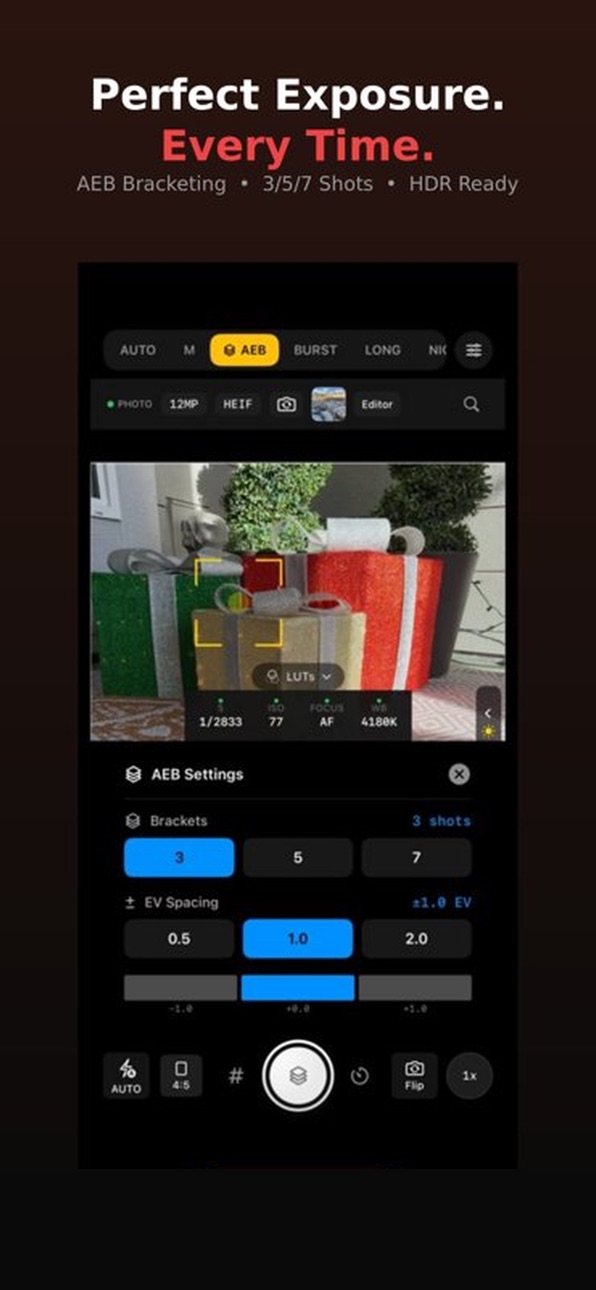
10 SHOOTING MODES
AUTO — Intelligent automatic settings for quick, stunning shots
MANUAL — Full control over ISO, shutter speed, white balance, and focus
PORTRAIT — Depth-aware shooting with background separation
VIDEO — Up to 4K 60fps with ProRes SDR, HDR, and Log
AEB — Auto Exposure Bracketing for perfect HDR composites
BURST — High-speed continuous shooting for action and movement
FOCUS STACK — Multiple focus points combined for infinite depth of field
LONG EXPOSURE — Light trails, silky water, and artistic motion blur
NIGHT — Multi-frame capture for stunning low-light photography
TIMELAPSE — Capture hours in seconds with automated shooting
SHOOT WITH LUTs IN REAL-TIME
Why wait until post? See your cinematic look while you shoot. Apertura overlays your chosen LUT directly on the live viewfinder — compose and expose for your final grade, not a flat image.
50+ PROFESSIONAL LUTs
Film Stock — Kodak Portra, Fuji Pro 400H, Cinestill 800T
Cinema — Teal & Orange, Blockbuster, Bleach Bypass
Vintage — 70s Warm, 80s Neon, Faded Film, Polaroid
Black & White — Classic Noir, High Contrast, Sepia
Creative — Cyberpunk, Golden Hour, Moody Blue, Nordic Cool
New LUTs added with updates
PRO CAPTURE
48MP RAW and ProRAW photos
HEIF & JPEG
4K video up to 60fps
ProRes SDR, HDR, and Log recording
PRO OVERLAYS
Live RGB and Luminance Histogram
Focus Peaking for precise manual focus
Zebra Stripes for exposure monitoring
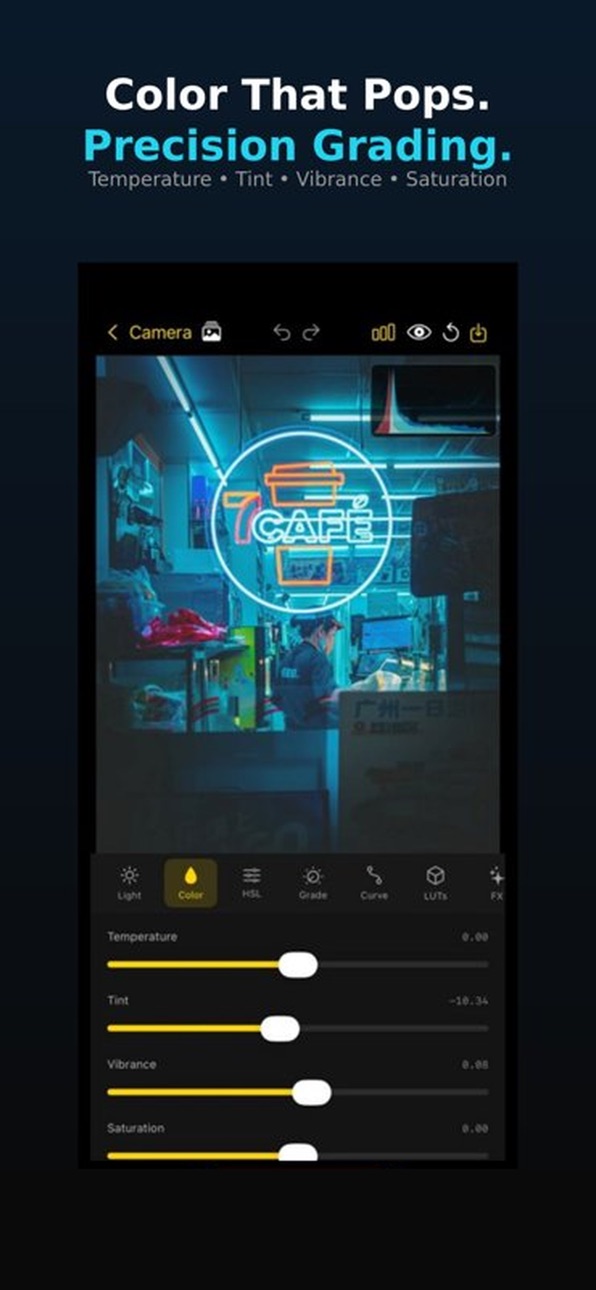
FULL PHOTO EDITOR
Light — Exposure, Contrast, Highlights, Shadows, Whites, Blacks
Color — Temperature, Tint, Vibrance, Saturation
HSL — Fine-tune individual color channels
Curves — Precise tonal control
Color Grade — Cinema-style 3-way wheels
Detail — Sharpness and noise reduction
FX — Clarity, Dehaze, Vignette, Fade, Bloom, Grain
Crop & Transform — Rotation, perspective correction, aspect ratios
VIDEO EDITOR
Trim, color grade, and apply LUTs
Export with custom settings
INTUITIVE DRAG-TO-FOCUS
Tap anywhere to focus, then drag your finger to smoothly pull focus to any point in the frame. Just like a cinema camera's follow focus.
WHY PHOTOGRAPHERS CHOOSE APERTURA
Most apps make you juggle separate camera, editor, and LUT apps. Apertura is one complete system — shoot, edit, and share without leaving the app.
Built by a small team of photographers making the camera app we always wanted.
Accessibility
ipadiphonemacrealityDevicetvoswatch
Version history 8 versions
Build 882871901v1.72026-03-02 16:10:04
-paywall removed
-all features free
Build 882478405v1.62026-02-15 19:47:36
User Interface improvements
Editor improvements
Build 882259434v1.52026-02-12 09:03:01
-performance optimization
Build 881819259v1.42026-01-30 19:47:21
What's New in Apertura...
Improved Focus Controls
Curve Editor - Lightroom-style curve overlay with fine grid. Tap to add control points, long press to remove. Adjust RGB channels independently for precise tonal control.
Color Grading Wheels - Three-way color wheels for Shadows, Midtones, and Highlights. Tap any wheel to expand with Hue, Saturation, and Luminance sliders for professional color grading.
Improved curve transparency lets you see your photo while making adjustments.
Tap to Focus (Default) - Tap anywhere on the preview to instantly focus at that point. The focus indicator appears briefly to confirm your selection.
Drag to Focus (Optional) - Enable in Settings to drag the focus box around the screen instead of tapping. The focus box stays visible so you can precisely position it. Great for video and macro work.
Quick Settings Drawer
Resolution Selector - Quickly switch between available photo resolutions (12MP, 48MP) directly from the quick settings panel. Available options adjust based on your selected format (HEIF, RAW, ProRAW).
Gallery Improvements
Thumbnail Sync - The camera roll thumbnail now properly updates when you delete photos from the gallery.
Photo import button added to editor and gallery
Build 881682730v1.32026-01-21 05:43:34
-Improved Interface
-Improved Pinch to Zoom
-Portrait Mode, Focus Stacking
-Improved Editor Features
Build 881544114v1.22026-01-20 09:17:22
NEW: Apertura is now free to download and use!
• Free tier with Auto, Manual & Video modes
• Full manual camera controls at no cost
• Basic photo editing included free
• 7-day trial of all Pro features for new users
Subscribe to Pro for RAW capture, 4K ProRes, specialty modes, and 50+ LUTs.
• Focus Stack Mode - Capture multiple images at different focus distances for incredible depth-of-field control. Choose from 3 to 15 shots with customizable focus ranges (Near, Mid, Far, Full, or Custom).
• Portrait Mode with Aperture Simulation - Beautiful background blur with adjustable aperture from f/1.4 to f/16. Real-time depth effect preview.
• Face Detection - Automatic face detection with visual indicators for perfect portrait shots.
• Swipe Between Modes - Quickly switch shooting modes with a horizontal swipe gesture on the camera preview.
• Draggable Histogram - Live histogram overlay that you can position anywhere on screen. Tap to cycle between Luminance, RGB, and Parade views.
Build 881292576v1.12026-01-08 02:26:36
- Fine-tune adjustments with new +/- buttons on all editing sliders
- Photo info viewer - tap ⓘ to see format, megapixels, location & more
- Auto Edit presets - one-tap enhancements for portraits, landscapes & more
- Performance improvements
Build 880620428v1.02026-01-07 16:18:09
No pricing data captured yet — comparisons appear once the app has paid storefronts or in-app purchases.
Availability 175 of 175 storefronts
| Region | Language | Price | Ratings | Avg | Version |
|---|---|---|---|---|---|
| US | en-US | Free | 2 | 5.0 | 1.7 |
| DE | de-DE | Free | 1 | 1.0 | 1.7 |
| JP | ja | Free | 1 | 5.0 | 1.7 |
| MX | es-MX | Free | 1 | 5.0 | 1.7 |
| AE | en-GB | Free | 0 | — | 1.7 |
| AF | en-GB | Free | 0 | — | 1.7 |
| AG | en-GB | Free | 0 | — | 1.7 |
| AI | en-GB | Free | 0 | — | 1.7 |
| AL | en-GB | Free | 0 | — | 1.7 |
| AM | en-GB | Free | 0 | — | 1.7 |
| AO | en-GB | Free | 0 | — | 1.7 |
| AR | es-MX | Free | 0 | — | 1.7 |
| AT | de-DE | Free | 0 | — | 1.7 |
| AU | en-AU | Free | 0 | — | 1.7 |
| AZ | en-GB | Free | 0 | — | 1.7 |
| BA | en-GB | Free | 0 | — | 1.7 |
| BB | en-GB | Free | 0 | — | 1.7 |
| BE | en-GB | Free | 0 | — | 1.7 |
| BF | en-GB | Free | 0 | — | 1.7 |
| BG | en-GB | Free | 0 | — | 1.7 |
| BH | en-GB | Free | 0 | — | 1.7 |
| BJ | en-GB | Free | 0 | — | 1.7 |
| BM | en-GB | Free | 0 | — | 1.7 |
| BN | en-GB | Free | 0 | — | 1.7 |
| BO | es-MX | Free | 0 | — | 1.7 |
| BR | pt-BR | Free | 0 | — | 1.7 |
| BS | en-GB | Free | 0 | — | 1.7 |
| BT | en-GB | Free | 0 | — | 1.7 |
| BW | en-GB | Free | 0 | — | 1.7 |
| BY | en-GB | Free | 0 | — | 1.7 |
| BZ | en-GB | Free | 0 | — | 1.7 |
| CA | en-CA | Free | 0 | — | 1.7 |
| CD | en-GB | Free | 0 | — | 1.7 |
| CG | en-GB | Free | 0 | — | 1.7 |
| CH | de-CH | Free | 0 | — | 1.7 |
| CI | fr-FR | Free | 0 | — | 1.7 |
| CL | es-MX | Free | 0 | — | 1.7 |
| CM | fr-FR | Free | 0 | — | 1.7 |
| CN | zh-Hans-CN | Free | 0 | — | 1.7 |
| CO | es-MX | Free | 0 | — | 1.7 |
| CR | es-MX | Free | 0 | — | 1.7 |
| CV | en-GB | Free | 0 | — | 1.7 |
| CY | en-GB | Free | 0 | — | 1.7 |
| CZ | en-GB | Free | 0 | — | 1.7 |
| DK | en-GB | Free | 0 | — | 1.7 |
| DM | en-GB | Free | 0 | — | 1.7 |
| DO | es-MX | Free | 0 | — | 1.7 |
| DZ | en-GB | Free | 0 | — | 1.7 |
| EC | es-MX | Free | 0 | — | 1.7 |
| EE | en-GB | Free | 0 | — | 1.7 |
| EG | en-GB | Free | 0 | — | 1.7 |
| ES | es-ES | Free | 0 | — | 1.7 |
| FI | en-GB | Free | 0 | — | 1.7 |
| FJ | en-GB | Free | 0 | — | 1.7 |
| FM | en-GB | Free | 0 | — | 1.7 |
| FR | fr-FR | Free | 0 | — | 1.7 |
| GA | fr-FR | Free | 0 | — | 1.7 |
| GB | en-GB | Free | 0 | — | 1.7 |
| GD | en-GB | Free | 0 | — | 1.7 |
| GE | en-GB | Free | 0 | — | 1.7 |
| GH | en-GB | Free | 0 | — | 1.7 |
| GM | en-GB | Free | 0 | — | 1.7 |
| GR | en-GB | Free | 0 | — | 1.7 |
| GT | es-MX | Free | 0 | — | 1.7 |
| GW | en-GB | Free | 0 | — | 1.7 |
| GY | en-GB | Free | 0 | — | 1.7 |
| HK | zh-Hant-HK | Free | 0 | — | 1.7 |
| HN | es-MX | Free | 0 | — | 1.7 |
| HR | en-GB | Free | 0 | — | 1.7 |
| HU | en-GB | Free | 0 | — | 1.7 |
| ID | en-GB | Free | 0 | — | 1.7 |
| IE | en-GB | Free | 0 | — | 1.7 |
| IL | en-GB | Free | 0 | — | 1.7 |
| IN | en-GB | Free | 0 | — | 1.7 |
| IQ | en-GB | Free | 0 | — | 1.7 |
| IS | en-GB | Free | 0 | — | 1.7 |
| IT | it | Free | 0 | — | 1.7 |
| JM | en-GB | Free | 0 | — | 1.7 |
| JO | en-GB | Free | 0 | — | 1.7 |
| KE | en-GB | Free | 0 | — | 1.7 |
| KG | en-GB | Free | 0 | — | 1.7 |
| KH | en-GB | Free | 0 | — | 1.7 |
| KN | en-GB | Free | 0 | — | 1.7 |
| KR | ko | Free | 0 | — | 1.7 |
| KW | en-GB | Free | 0 | — | 1.7 |
| KY | en-GB | Free | 0 | — | 1.7 |
| KZ | en-GB | Free | 0 | — | 1.7 |
| LA | en-GB | Free | 0 | — | 1.7 |
| LB | en-GB | Free | 0 | — | 1.7 |
| LC | en-GB | Free | 0 | — | 1.7 |
| LK | en-GB | Free | 0 | — | 1.7 |
| LR | en-GB | Free | 0 | — | 1.7 |
| LT | en-GB | Free | 0 | — | 1.7 |
| LU | en-GB | Free | 0 | — | 1.7 |
| LV | en-GB | Free | 0 | — | 1.7 |
| LY | en-GB | Free | 0 | — | 1.7 |
| MA | en-GB | Free | 0 | — | 1.7 |
| MD | en-GB | Free | 0 | — | 1.7 |
| ME | en-GB | Free | 0 | — | 1.7 |
| MG | en-GB | Free | 0 | — | 1.7 |
| MK | en-GB | Free | 0 | — | 1.7 |
| ML | en-GB | Free | 0 | — | 1.7 |
| MM | en-GB | Free | 0 | — | 1.7 |
| MN | en-GB | Free | 0 | — | 1.7 |
| MO | zh-Hant-HK | Free | 0 | — | 1.7 |
| MR | en-GB | Free | 0 | — | 1.7 |
| MS | en-GB | Free | 0 | — | 1.7 |
| MT | en-GB | Free | 0 | — | 1.7 |
| MU | en-GB | Free | 0 | — | 1.7 |
| MV | en-GB | Free | 0 | — | 1.7 |
| MW | en-GB | Free | 0 | — | 1.7 |
| MY | en-GB | Free | 0 | — | 1.7 |
| MZ | en-GB | Free | 0 | — | 1.7 |
| NA | en-GB | Free | 0 | — | 1.7 |
| NE | en-GB | Free | 0 | — | 1.7 |
| NG | en-GB | Free | 0 | — | 1.7 |
| NI | es-MX | Free | 0 | — | 1.7 |
| NL | nl | Free | 0 | — | 1.7 |
| NO | en-GB | Free | 0 | — | 1.7 |
| NP | en-GB | Free | 0 | — | 1.7 |
| NR | en-GB | Free | 0 | — | 1.7 |
| NZ | en-AU | Free | 0 | — | 1.7 |
| OM | en-GB | Free | 0 | — | 1.7 |
| PA | es-MX | Free | 0 | — | 1.7 |
| PE | es-MX | Free | 0 | — | 1.7 |
| PG | en-GB | Free | 0 | — | 1.7 |
| PH | en-GB | Free | 0 | — | 1.7 |
| PK | en-GB | Free | 0 | — | 1.7 |
| PL | en-GB | Free | 0 | — | 1.7 |
| PT | pt-PT | Free | 0 | — | 1.7 |
| PW | en-GB | Free | 0 | — | 1.7 |
| PY | es-MX | Free | 0 | — | 1.7 |
| QA | en-GB | Free | 0 | — | 1.7 |
| RO | en-GB | Free | 0 | — | 1.7 |
| RS | en-GB | Free | 0 | — | 1.7 |
| RU | ru | Free | 0 | — | 1.7 |
| RW | en-GB | Free | 0 | — | 1.7 |
| SA | en-GB | Free | 0 | — | 1.7 |
| SB | en-GB | Free | 0 | — | 1.7 |
| SC | en-GB | Free | 0 | — | 1.7 |
| SE | sv | Free | 0 | — | 1.7 |
| SG | en-GB | Free | 0 | — | 1.7 |
| SI | en-GB | Free | 0 | — | 1.7 |
| SK | en-GB | Free | 0 | — | 1.7 |
| SL | en-GB | Free | 0 | — | 1.7 |
| SN | en-GB | Free | 0 | — | 1.7 |
| SR | en-GB | Free | 0 | — | 1.7 |
| ST | en-GB | Free | 0 | — | 1.7 |
| SV | es-MX | Free | 0 | — | 1.7 |
| SZ | en-GB | Free | 0 | — | 1.7 |
| TC | en-GB | Free | 0 | — | 1.7 |
| TD | en-GB | Free | 0 | — | 1.7 |
| TH | en-GB | Free | 0 | — | 1.7 |
| TJ | en-GB | Free | 0 | — | 1.7 |
| TM | en-GB | Free | 0 | — | 1.7 |
| TN | en-GB | Free | 0 | — | 1.7 |
| TO | en-GB | Free | 0 | — | 1.7 |
| TR | en-GB | Free | 0 | — | 1.7 |
| TT | en-GB | Free | 0 | — | 1.7 |
| TW | zh-Hant-TW | Free | 0 | — | 1.7 |
| TZ | en-GB | Free | 0 | — | 1.7 |
| UA | en-GB | Free | 0 | — | 1.7 |
| UG | en-GB | Free | 0 | — | 1.7 |
| UY | en-GB | Free | 0 | — | 1.7 |
| UZ | en-GB | Free | 0 | — | 1.7 |
| VC | en-GB | Free | 0 | — | 1.7 |
| VE | es-MX | Free | 0 | — | 1.7 |
| VG | en-GB | Free | 0 | — | 1.7 |
| VN | en-GB | Free | 0 | — | 1.7 |
| VU | en-GB | Free | 0 | — | 1.7 |
| XK | en-GB | Free | 0 | — | 1.7 |
| YE | en-GB | Free | 0 | — | 1.7 |
| ZA | en-GB | Free | 0 | — | 1.7 |
| ZM | en-GB | Free | 0 | — | 1.7 |
| ZW | en-GB | Free | 0 | — | 1.7 |
Change log 12 changes · ZW
✎
releaseNotes updated
-paywall removed
-all features free
✎
description updated
Developed by a photographer, for photographers.
Your iPhone can shoot like a cinema camera. Apertura unlocks its full potential — professional camera, video re
✎
subtitle updated
Pro Camera, Video & Editor
✎
name updated
Apertura - Pro Cam
◆
Version 1.7 released
-paywall removed
-all features free
◆
Version 1.6 released
User Interface improvements
Editor improvements
◆
Version 1.5 released
-performance optimization
◆
Version 1.4 released
What's New in Apertura...
Improved Focus Controls
Curve Editor - Lightroom-style curve overlay with fine grid. Tap to add control points, long press to remove. Adjust RGB channels independently for precise tonal control.
Color Grading Wh
◆
Version 1.3 released
-Improved Interface
-Improved Pinch to Zoom
-Portrait Mode, Focus Stacking
-Improved Editor Features
◆
Version 1.2 released
NEW: Apertura is now free to download and use!
• Free tier with Auto, Manual & Video modes
• Full manual camera controls at no cost
• Basic photo editing included free
• 7-day trial of all Pro features for new users
Subscribe to Pro for R
◆
Version 1.1 released
- Fine-tune adjustments with new +/- buttons on all editing sliders
- Photo info viewer - tap ⓘ to see format, megapixels, location & more
- Auto Edit presets - one-tap enhancements for portraits, landscapes & more
- Performance improveme
◆
Version 1.0 released