Home › Lifestyle

 MO
MO
 JPja
JPja AEen-GB
 AFen-GB
 ALen-GB
 AMen-GB
 ATde-DE
 AZen-GB
 BAen-GB
 BEen-GB
 BGen-GB
 BHen-GB
 BMen-GB
 BNen-GB
 BTen-GB
 BYen-GB
 CAen-CA
 CHde-CH
 CNzh-Hans-CN
 CYen-GB
 CZen-GB
 DKen-GB
 EEen-GB
 EGen-GB
 ESes-ES
 FIen-GB
 FJen-GB
 FMen-GB
 GBen-GB
 GEen-GB
 GRen-GB
 HKzh-Hant-HK
 HRen-GB
 HUen-GB
 IDen-GB
 IEen-GB
 ILen-GB
 INen-GB
 IQen-GB
 ISen-GB
 ITit
ITit JOen-GB
 KGen-GB
 KHen-GB
 KRko
KRko KWen-GB
 KZen-GB
 LAen-GB
 LBen-GB
 LKen-GB
 LTen-GB
 LUen-GB
 LVen-GB
 MDen-GB
 MEen-GB
 MKen-GB
 MMen-GB
 MNen-GBMOzh-Hant-HK
 MRen-GB
 MTen-GB
 MVen-GB
 MYen-GB
 NLnl
NLnl NOen-GB
 NPen-GB
 NRen-GB
 NZen-AU
 OMen-GB
 PGen-GB
 PHen-GB
 PKen-GB
 PLen-GB
 PTpt-PT
 PWen-GB
 QAen-GB
 ROen-GB
 RUru
RUru SAen-GB
 SBen-GB
 SEsv
SEsv SGen-GB
 SIen-GB
 SKen-GB
 THen-GB
 TJen-GB
 TMen-GB
 TOen-GB
 TRen-GB
 TWzh-Hant-TW
 UAen-GB
 USen-US
 UZen-GB
 VNen-GB
 VUen-GB
 XKen-GB
 YEen-GB
 ZAen-GB
97 of 97 storefronts
Content in en-US
Content in en-US
Information
Preview 2 platforms
iPhone 6 images


iPad 6 images



What’s New Version 4.3
Update Description Fixed a bug in the book search functionality.
Issues Fixed
- Book cover images not displaying when scanning a barcode
- Book prices showing as ¥0 when scanning a barcode
- Fixed the colors of the premium icons
Improved the premium feature experience.
- Made it easier to access premium pages and reports from Home
- Added quick navigation between Monthly Report and Yearly Report
- Polished UI and made minor flow improvements
Added new Premium features.
-Detailed monthly and yearly reports
-PDF export for monthly/yearly reports and reading passbook
-Minor UI and usability improvements
2026.6
• Monthly Reading Log: calendar, monthly summary, category breakdown, and daily book lists
• Redesigned home screen monthly summary
• Improved Search Books design and search speed
• Various UI and display improvements
2026.5
We’ve added support for retrieving book information from Google Books, making it easier to find foreign-language books and titles that were previously harder to search for.
You can also now edit reading dates directly by typing them in, making it easier to update your records.
This update also includes improvements to book search behavior and stability.
Description
Reading Passbook – A reading log app where the books you read turn into “savings.”
What is Reading Passbook?
When you log a book you borrowed from the library or read through an unlimited-reading service, the book’s retail price is added as “Reading Savings.”
It turns your reading activity into a visible, motivating habit — great for children building reading routines and adults who want to track their reading in a fun way.
Main Features
・Book Registration
Scan barcodes to register books instantly
Search by title to find books
Add books manually when needed
・Reading Savings
Track the price of books you read from libraries or unlimited services
View savings in a clean passbook-style log
See how much you “saved” by reading instead of buying
・Bookshelf View
Manage all the books you’ve read in one place
Display book covers in a visual bookshelf layout
Rate each book and add notes to remember your impressions
・Profile Management
Create separate bookshelves for each family member
Perfect for households where parents track children’s reading
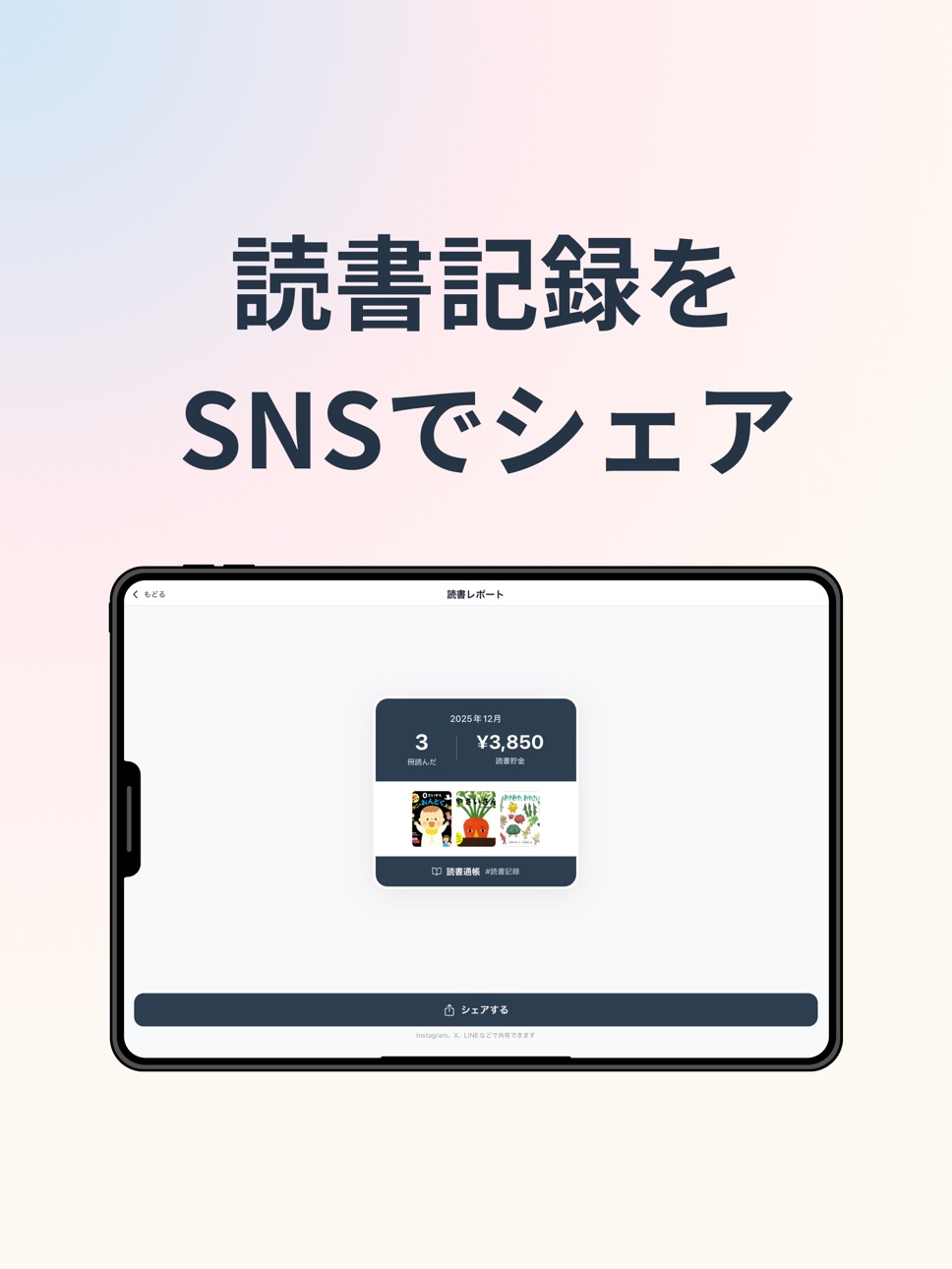
・Share Your Reading
Share monthly reading reports as images
Create stylish cards showing the book covers you’ve read
Who is this app for?
Parents who want to support their child’s reading habit
People who frequently use libraries
Users of unlimited-reading services such as Kindle Unlimited
Anyone who wants a fun, motivating way to keep a reading log
Reading becomes more enjoyable when you can see your progress and savings.
Start your Reading Passbook today!
In-App Purchases MO pricing
One-Time Purchases
読書貯金プレミアム—
Capabilities
In-App Purchases
Accessibility
ipadiphonemacrealityDevicetvoswatch
Version history 25 versions
Build 887925227v4.32026-07-07 16:01:57
Update Description Fixed a bug in the book search functionality.
Issues Fixed
- Book cover images not displaying when scanning a barcode
- Book prices showing as ¥0 when scanning a barcode
- Fixed the colors of the premium icons
Improved the premium feature experience.
- Made it easier to access premium pages and reports from Home
- Added quick navigation between Monthly Report and Yearly Report
- Polished UI and made minor flow improvements
Added new Premium features.
-Detailed monthly and yearly reports
-PDF export for monthly/yearly reports and reading passbook
-Minor UI and usability improvements
2026.6
• Monthly Reading Log: calendar, monthly summary, category breakdown, and daily book lists
• Redesigned home screen monthly summary
• Improved Search Books design and search speed
• Various UI and display improvements
2026.5
We’ve added support for retrieving book information from Google Books, making it easier to find foreign-language books and titles that were previously harder to search for.
You can also now edit reading dates directly by typing them in, making it easier to update your records.
This update also includes improvements to book search behavior and stability.
Build 887736248v4.22026-07-02 18:47:20
- Fixed the colors of the premium icons
Improved the premium feature experience.
- Made it easier to access premium pages and reports from Home
- Added quick navigation between Monthly Report and Yearly Report
- Polished UI and made minor flow improvements
Added new Premium features.
-Detailed monthly and yearly reports
-PDF export for monthly/yearly reports and reading passbook
-Minor UI and usability improvements
2026.6
• Monthly Reading Log: calendar, monthly summary, category breakdown, and daily book lists
• Redesigned home screen monthly summary
• Improved Search Books design and search speed
• Various UI and display improvements
2026.5
We’ve added support for retrieving book information from Google Books, making it easier to find foreign-language books and titles that were previously harder to search for.
You can also now edit reading dates directly by typing them in, making it easier to update your records.
This update also includes improvements to book search behavior and stability.
Build 887524125v4.02026-07-01 01:01:32
Added new Premium features.
-Detailed monthly and yearly reports
-PDF export for monthly/yearly reports and reading passbook
-Minor UI and usability improvements
2026.6
• Monthly Reading Log: calendar, monthly summary, category breakdown, and daily book lists
• Redesigned home screen monthly summary
• Improved Search Books design and search speed
• Various UI and display improvements
2026.5
We’ve added support for retrieving book information from Google Books, making it easier to find foreign-language books and titles that were previously harder to search for.
You can also now edit reading dates directly by typing them in, making it easier to update your records.
This update also includes improvements to book search behavior and stability.
Build 887671775v4.12026-07-01 16:26:36
Improved the premium feature experience.
- Made it easier to access premium pages and reports from Home
- Added quick navigation between Monthly Report and Yearly Report
- Polished UI and made minor flow improvements
Added new Premium features.
-Detailed monthly and yearly reports
-PDF export for monthly/yearly reports and reading passbook
-Minor UI and usability improvements
2026.6
• Monthly Reading Log: calendar, monthly summary, category breakdown, and daily book lists
• Redesigned home screen monthly summary
• Improved Search Books design and search speed
• Various UI and display improvements
2026.5
We’ve added support for retrieving book information from Google Books, making it easier to find foreign-language books and titles that were previously harder to search for.
You can also now edit reading dates directly by typing them in, making it easier to update your records.
This update also includes improvements to book search behavior and stability.
Build 886894798v3.22026-06-13 00:26:32
2026.6
• Monthly Reading Log: calendar, monthly summary, category breakdown, and daily book lists
• Redesigned home screen monthly summary
• Improved Search Books design and search speed
• Various UI and display improvements
2026.5
We’ve added support for retrieving book information from Google Books, making it easier to find foreign-language books and titles that were previously harder to search for.
You can also now edit reading dates directly by typing them in, making it easier to update your records.
This update also includes improvements to book search behavior and stability.
Build 885694802v3.12026-05-15 18:25:55
We’ve added support for retrieving book information from Google Books, making it easier to find foreign-language books and titles that were previously harder to search for.
You can also now edit reading dates directly by typing them in, making it easier to update your records.
This update also includes improvements to book search behavior and stability.
Build 883821342v3.02026-03-27 16:12:51
・Added a "View on Rakuten Books" button to the book detail screen. You can now quickly look up books on Rakuten Books.
・Minor design improvements to the book detail screen.
March 2025: Various updates based on user feedback!
* Expanded the number of book search results! It is now easier to register books.
* Added "Other" to acquisition sources. You can now register books received as gifts separately!
* Your "Want to Read" list can now be viewed from the bookshelf.
Due to the expansion of book search, the same book may appear multiple times in search results, but this will be improved in future updates.
Build 883602370v2.92026-03-21 17:14:54
March 2025: Various updates based on user feedback!
* Expanded the number of book search results! It is now easier to register books.
* Added "Other" to acquisition sources. You can now register books received as gifts separately!
* Your "Want to Read" list can now be viewed from the bookshelf.
Due to the expansion of book search, the same book may appear multiple times in search results, but this will be improved in future updates.
Build 883326609v2.82026-03-18 20:10:19
March 2025: Various updates based on user feedback!
* Expanded the number of book search results! It is now easier to register books.
* Added "Other" to acquisition sources. You can now register books received as gifts separately!
* Your "Want to Read" list can now be viewed from the bookshelf.
Due to the expansion of book search, the same book may appear multiple times in search results, but this will be improved in future updates.
Build 883085418v2.72026-03-10 20:13:33
Now you can see how many times you've borrowed the same book!
- If you register the same book multiple times, "2nd time," "3rd time," etc., will automatically appear as count tags on the book list and detail screens.
- A "Borrowing History" section has been added to the book detail screen. You can view a list of past registration dates and tap them to switch to the review from that time.
Build 882866360v2.52026-02-27 19:57:23
### What's New
Export reading records as CSV
- You can now export your reading records as a CSV file from the Settings screen.
- The file can be opened directly in Excel or Google Sheets.
- Share via AirDrop, Files, Drive, and more.
Restore from CSV
- Restore your reading records from an exported CSV file.
- Useful for transferring data when switching devices.
- Duplicate entries are automatically skipped.
Import CSV from the Add Book screen
- You can now import books directly from a CSV file on the Add Book screen.
- Great for adding multiple books at once.
Note: Cover images are not included in export or restore.
Build 882670700v2.42026-02-22 17:54:18
What's New
・Sample books are no longer added on first install. Your bookshelf now starts empty.
・Book detail screen has been improved: larger cover, title/author/publisher in a vertical layout and center-aligned, review section on one line, and the review input is always visible.
Build 882588785v2.32026-02-19 17:03:03
・Improved cover visibility in list views
・Enabled editing of book prices
・Fixed an issue where cover images could disappear
Build 882457084v2.22026-02-14 17:08:00
Added date-based navigation from the Record Log calendar to the search screen
Added a registration date picker to the manual entry form
Enabled changing the registration date from the book detail screen via calendar
Build 882219157v2.12026-02-06 09:43:05
Minor internal improvements and stability enhancements.
Build 882205146v2.02026-02-05 23:23:47
Updated for better visibility.
- Added monthly pages
- Added transition graph to home
- Updated each theme color
- Addressed the issue of manual capture cover disappearing
Build 881817667v1.92026-01-25 18:01:34
We have improved the crash errors that occurred during startup.
Build 881785542v1.82026-01-24 22:33:22
Fixed an issue where the “Add a book” (+) on the Home screen did not respond
Build 881526059v1.72026-01-15 18:59:17
[Update Contents]
- CSV bulk import support (add to Want to Read list at once): Title is required, Author/Publisher/Price are optional.
- Added a "Delete All" button (trash can icon) to the Want to Read list.
- Changed the default display of the bookshelf to "Bookshelf (Cover Grid)".
- Improved the display of SNS share images.
- Fixed an issue where covers manually entered were disappearing.
- Improved by saving images within the app to prevent them from disappearing.
Build 880712059v1.62025-12-17 06:03:12
• App Renamed: The app has been renamed from "Reading Passbook" to "Reading Savings" (読書貯金)
• The concept remains the same: Track your reading and visualize the value of books you've read through libraries and unlimited reading services as "Reading Savings"
Build 880645571v1.52025-12-13 23:38:11
Update
Child-Friendly UI Improvements
Enlarged the back button for easier tapping
Made share screen navigation buttons bigger and added swipe gesture support
Added furigana (reading aid) to the "Reading Passbook" title on home screen
Usability Enhancements
Tap the "Reading Savings" card to go directly to the passbook page, or tap the "Purchase" card to view your purchased books
Bookshelf view mode (card/list/shelf) is now preserved after viewing book details
Easily switch to keyword search when barcode scanning fails
Choose to continue searching or view your bookshelf after adding a book
Other Improvements
Renamed "Library/Subscription" to "Reading Savings" for clarity
Minor bug fixes and performance improvements
Build 880561028v1.32025-12-12 01:51:05
new icon
Build 880602380v1.42025-12-12 17:14:25
■ Home Screen Redesigned
・Improved "This Month's Reading" card layout
・Side-by-side comparison of Library/Subscription vs. Purchases
・Clear display of book counts and savings at a glance
■ New "Total Stats" Section
・Large display of cumulative reading savings
・Shows book count and total amount for Library, Subscription, and Purchases
■ Other Improvements
・Share screen now supports multiple pages for many books
・Option to continue searching after adding a book
・Added barcode button on search screen
・Various UI improvements and bug fixes
Build 880499927v1.22025-12-10 23:51:47
-Share button position change
-FAB (+ button) added
-Wishlist UI improvements (batch add feature)
-Barcode scan bug fixes
Build 880403155v1.02025-12-09 12:01:39
Price history by region
Currency
Show
Columns
Search
Availability 97 of 97 storefronts
| Region | Language | Price | Ratings | Avg | Version |
|---|---|---|---|---|---|
| JP | ja | Free | 29 | 4.7 | 4.3 |
| AE | en-GB | Free | 0 | — | 4.3 |
| AF | en-GB | Free | 0 | — | 4.3 |
| AL | en-GB | Free | 0 | — | 4.3 |
| AM | en-GB | Free | 0 | — | 4.3 |
| AT | de-DE | Free | 0 | — | 4.3 |
| AZ | en-GB | Free | 0 | — | 4.3 |
| BA | en-GB | Free | 0 | — | 4.3 |
| BE | en-GB | Free | 0 | — | 4.3 |
| BG | en-GB | Free | 0 | — | 4.3 |
| BH | en-GB | Free | 0 | — | 4.3 |
| BM | en-GB | Free | 0 | — | 4.3 |
| BN | en-GB | Free | 0 | — | 4.3 |
| BT | en-GB | Free | 0 | — | 4.3 |
| BY | en-GB | Free | 0 | — | 4.3 |
| CA | en-CA | Free | 0 | — | 4.3 |
| CH | de-CH | Free | 0 | — | 4.3 |
| CN | zh-Hans-CN | Free | 0 | — | 4.3 |
| CY | en-GB | Free | 0 | — | 4.3 |
| CZ | en-GB | Free | 0 | — | 4.3 |
| DK | en-GB | Free | 0 | — | 4.3 |
| EE | en-GB | Free | 0 | — | 4.3 |
| EG | en-GB | Free | 0 | — | 4.3 |
| ES | es-ES | Free | 0 | — | 4.3 |
| FI | en-GB | Free | 0 | — | 4.3 |
| FJ | en-GB | Free | 0 | — | 4.3 |
| FM | en-GB | Free | 0 | — | 4.3 |
| GB | en-GB | Free | 0 | — | 4.3 |
| GE | en-GB | Free | 0 | — | 4.3 |
| GR | en-GB | Free | 0 | — | 4.3 |
| HK | zh-Hant-HK | Free | 0 | — | 4.3 |
| HR | en-GB | Free | 0 | — | 4.3 |
| HU | en-GB | Free | 0 | — | 4.3 |
| ID | en-GB | Free | 0 | — | 4.3 |
| IE | en-GB | Free | 0 | — | 4.3 |
| IL | en-GB | Free | 0 | — | 4.3 |
| IN | en-GB | Free | 0 | — | 4.3 |
| IQ | en-GB | Free | 0 | — | 4.3 |
| IS | en-GB | Free | 0 | — | 4.3 |
| IT | it | Free | 0 | — | 4.3 |
| JO | en-GB | Free | 0 | — | 4.3 |
| KG | en-GB | Free | 0 | — | 4.3 |
| KH | en-GB | Free | 0 | — | 4.3 |
| KR | ko | Free | 0 | — | 4.3 |
| KW | en-GB | Free | 0 | — | 4.3 |
| KZ | en-GB | Free | 0 | — | 4.3 |
| LA | en-GB | Free | 0 | — | 4.3 |
| LB | en-GB | Free | 0 | — | 4.3 |
| LK | en-GB | Free | 0 | — | 4.3 |
| LT | en-GB | Free | 0 | — | 4.3 |
| LU | en-GB | Free | 0 | — | 4.3 |
| LV | en-GB | Free | 0 | — | 4.3 |
| MD | en-GB | Free | 0 | — | 4.3 |
| ME | en-GB | Free | 0 | — | 4.3 |
| MK | en-GB | Free | 0 | — | 4.3 |
| MM | en-GB | Free | 0 | — | 4.3 |
| MN | en-GB | Free | 0 | — | 4.3 |
| MO | zh-Hant-HK | Free | 0 | — | 4.3 |
| MR | en-GB | Free | 0 | — | 4.3 |
| MT | en-GB | Free | 0 | — | 4.3 |
| MV | en-GB | Free | 0 | — | 4.3 |
| MY | en-GB | Free | 0 | — | 4.3 |
| NL | nl | Free | 0 | — | 4.3 |
| NO | en-GB | Free | 0 | — | 4.3 |
| NP | en-GB | Free | 0 | — | 4.3 |
| NR | en-GB | Free | 0 | — | 4.3 |
| NZ | en-AU | Free | 0 | — | 4.3 |
| OM | en-GB | Free | 0 | — | 4.3 |
| PG | en-GB | Free | 0 | — | 4.3 |
| PH | en-GB | Free | 0 | — | 4.3 |
| PK | en-GB | Free | 0 | — | 4.3 |
| PL | en-GB | Free | 0 | — | 4.3 |
| PT | pt-PT | Free | 0 | — | 4.3 |
| PW | en-GB | Free | 0 | — | 4.3 |
| QA | en-GB | Free | 0 | — | 4.3 |
| RO | en-GB | Free | 0 | — | 4.3 |
| RU | ru | Free | 0 | — | 4.3 |
| SA | en-GB | Free | 0 | — | 4.3 |
| SB | en-GB | Free | 0 | — | 4.3 |
| SE | sv | Free | 0 | — | 4.3 |
| SG | en-GB | Free | 0 | — | 4.3 |
| SI | en-GB | Free | 0 | — | 4.3 |
| SK | en-GB | Free | 0 | — | 4.3 |
| TH | en-GB | Free | 0 | — | 4.3 |
| TJ | en-GB | Free | 0 | — | 4.3 |
| TM | en-GB | Free | 0 | — | 4.3 |
| TO | en-GB | Free | 0 | — | 4.3 |
| TR | en-GB | Free | 0 | — | 4.3 |
| TW | zh-Hant-TW | Free | 0 | — | 4.3 |
| UA | en-GB | Free | 0 | — | 4.3 |
| US | en-US | Free | 0 | — | 4.3 |
| UZ | en-GB | Free | 0 | — | 4.3 |
| VN | en-GB | Free | 0 | — | 4.3 |
| VU | en-GB | Free | 0 | — | 4.3 |
| XK | en-GB | Free | 0 | — | 4.3 |
| YE | en-GB | Free | 0 | — | 4.3 |
| ZA | en-GB | Free | 0 | — | 4.3 |
Change log 29 changes · MO
✎
releaseNotes updated
Update Description Fixed a bug in the book search functionality.
Issues Fixed
- Book cover images not displaying when scanning a barcode
- Book prices showing
✎
description updated
Reading Passbook – A reading log app where the books you read turn into “savings.”
What is Reading Passbook?
When you log a book you borrowed from the library
✎
subtitle updated
通帳風の読書記録・本棚・本管理|図書館の本を読書貯金に
✎
name updated
読書貯金|読んだ本が資産になる読書記録アプリ
◆
Version 4.3 released
Update Description Fixed a bug in the book search functionality.
Issues Fixed
- Book cover images not displaying when scanning a barcode
- Book prices showing as ¥0 when scanning a barcode
- Fixed the colors of the premium icons
Improved
◆
Version 4.2 released
- Fixed the colors of the premium icons
Improved the premium feature experience.
- Made it easier to access premium pages and reports from Home
- Added quick navigation between Monthly Report and Yearly Report
- Polished UI and made minor
◆
Version 4.1 released
Improved the premium feature experience.
- Made it easier to access premium pages and reports from Home
- Added quick navigation between Monthly Report and Yearly Report
- Polished UI and made minor flow improvements
Added new Premium fea
◆
Version 4.0 released
Added new Premium features.
-Detailed monthly and yearly reports
-PDF export for monthly/yearly reports and reading passbook
-Minor UI and usability improvements
2026.6
• Monthly Reading Log: calendar, monthly summary, category breakdown,
◆
Version 3.2 released
2026.6
• Monthly Reading Log: calendar, monthly summary, category breakdown, and daily book lists
• Redesigned home screen monthly summary
• Improved Search Books design and search speed
• Various UI and display improvements
2026.5
We’ve a
◆
Version 3.1 released
We’ve added support for retrieving book information from Google Books, making it easier to find foreign-language books and titles that were previously harder to search for.
You can also now edit reading dates directly by typing them in, mak
◆
Version 3.0 released
・Added a "View on Rakuten Books" button to the book detail screen. You can now quickly look up books on Rakuten Books.
・Minor design improvements to the book detail screen.
March 2025: Various updates based on user feedback!
* Expanded th
◆
Version 2.9 released
March 2025: Various updates based on user feedback!
* Expanded the number of book search results! It is now easier to register books.
* Added "Other" to acquisition sources. You can now register books received as gifts separately!
* Your "
◆
Version 2.8 released
March 2025: Various updates based on user feedback!
* Expanded the number of book search results! It is now easier to register books.
* Added "Other" to acquisition sources. You can now register books received as gifts separately!
* Your "
◆
Version 2.7 released
Now you can see how many times you've borrowed the same book!
- If you register the same book multiple times, "2nd time," "3rd time," etc., will automatically appear as count tags on the book list and detail screens.
- A "Borrowing History"
◆
Version 2.5 released
### What's New
Export reading records as CSV
- You can now export your reading records as a CSV file from the Settings screen.
- The file can be opened directly in Excel or Google Sheets.
- Share via AirDrop, Files, Drive, and more.
Resto
◆
Version 2.4 released
What's New
・Sample books are no longer added on first install. Your bookshelf now starts empty.
・Book detail screen has been improved: larger cover, title/author/publisher in a vertical layout and center-aligned, review section on one line,
◆
Version 2.3 released
・Improved cover visibility in list views
・Enabled editing of book prices
・Fixed an issue where cover images could disappear
◆
Version 2.2 released
Added date-based navigation from the Record Log calendar to the search screen
Added a registration date picker to the manual entry form
Enabled changing the registration date from the book detail screen via calendar
◆
Version 2.1 released
Minor internal improvements and stability enhancements.
◆
Version 2.0 released
Updated for better visibility.
- Added monthly pages
- Added transition graph to home
- Updated each theme color
- Addressed the issue of manual capture cover disappearing
◆
Version 1.9 released
We have improved the crash errors that occurred during startup.
◆
Version 1.8 released
Fixed an issue where the “Add a book” (+) on the Home screen did not respond
◆
Version 1.7 released
[Update Contents]
- CSV bulk import support (add to Want to Read list at once): Title is required, Author/Publisher/Price are optional.
- Added a "Delete All" button (trash can icon) to the Want to Read list.
- Changed the default display o
◆
Version 1.6 released
• App Renamed: The app has been renamed from "Reading Passbook" to "Reading Savings" (読書貯金)
• The concept remains the same: Track your reading and visualize the value of books you've read through libraries and unlimited reading services as
◆
Version 1.5 released
Update
Child-Friendly UI Improvements
Enlarged the back button for easier tapping
Made share screen navigation buttons bigger and added swipe gesture support
Added furigana (reading aid) to the "Reading Passbook" title on home screen
Usabil
◆
Version 1.4 released
■ Home Screen Redesigned
・Improved "This Month's Reading" card layout
・Side-by-side comparison of Library/Subscription vs. Purchases
・Clear display of book counts and savings at a glance
■ New "Total Stats" Section
・Large display of cumula
◆
Version 1.3 released
new icon
◆
Version 1.2 released
-Share button position change
-FAB (+ button) added
-Wishlist UI improvements (batch add feature)
-Barcode scan bug fixes
◆
Version 1.0 released