Home › Productivity

 BB
BB
 NGen-GB
 USen-US
 AGen-GB
 AIen-GB
 AOen-GB
 ARes-MXBBen-GB
 BFen-GB
 BJen-GB
 BOes-MX
 BRpt-BR
 BSen-GB
 BWen-GB
 BZen-GB
 CDen-GB
 CGen-GB
 CIfr-FR
 CLes-MX
 CMfr-FR
 COes-MX
 CRes-MX
 CVen-GB
 DMen-GB
 DOes-MX
 DZen-GB
 ECes-MX
 GAfr-FR
 GDen-GB
 GHen-GB
 GMen-GB
 GTes-MX
 GWen-GB
 GYen-GB
 HNes-MX
 JMen-GB
 KEen-GB
 KNen-GB
 KYen-GB
 LCen-GB
 LRen-GB
 LYen-GB
 MAen-GB
 MGen-GB
 MLen-GB
 MSen-GB
 MUen-GB
 MWen-GB
 MXes-MX
 MZen-GB
 NAen-GB
 NEen-GB
 NIes-MX
 PAes-MX
 PEes-MX
 PYes-MX
 RWen-GB
 SCen-GB
 SLen-GB
 SNen-GB
 SRen-GB
 STen-GB
 SVes-MX
 SZen-GB
 TCen-GB
 TDen-GB
 TNen-GB
 TTen-GB
 TZen-GB
 UGen-GB
 UYen-GB
 VCen-GB
 VEes-MX
 VGen-GB
 ZMen-GB
 ZWen-GB
75 of 75 storefronts
Content in en-US
Content in en-US
Information
Apple ID6756202820
Bundle IDcom.libin.paste.master
SellerSeller
Min iOS14
Min macOS11.0
Device familiesiphone, ipad, ipod
Released2026-05-08
Copyright© KeySnip
Privacy policyLink ↗
Preview 2 platforms
iPhone 3 images


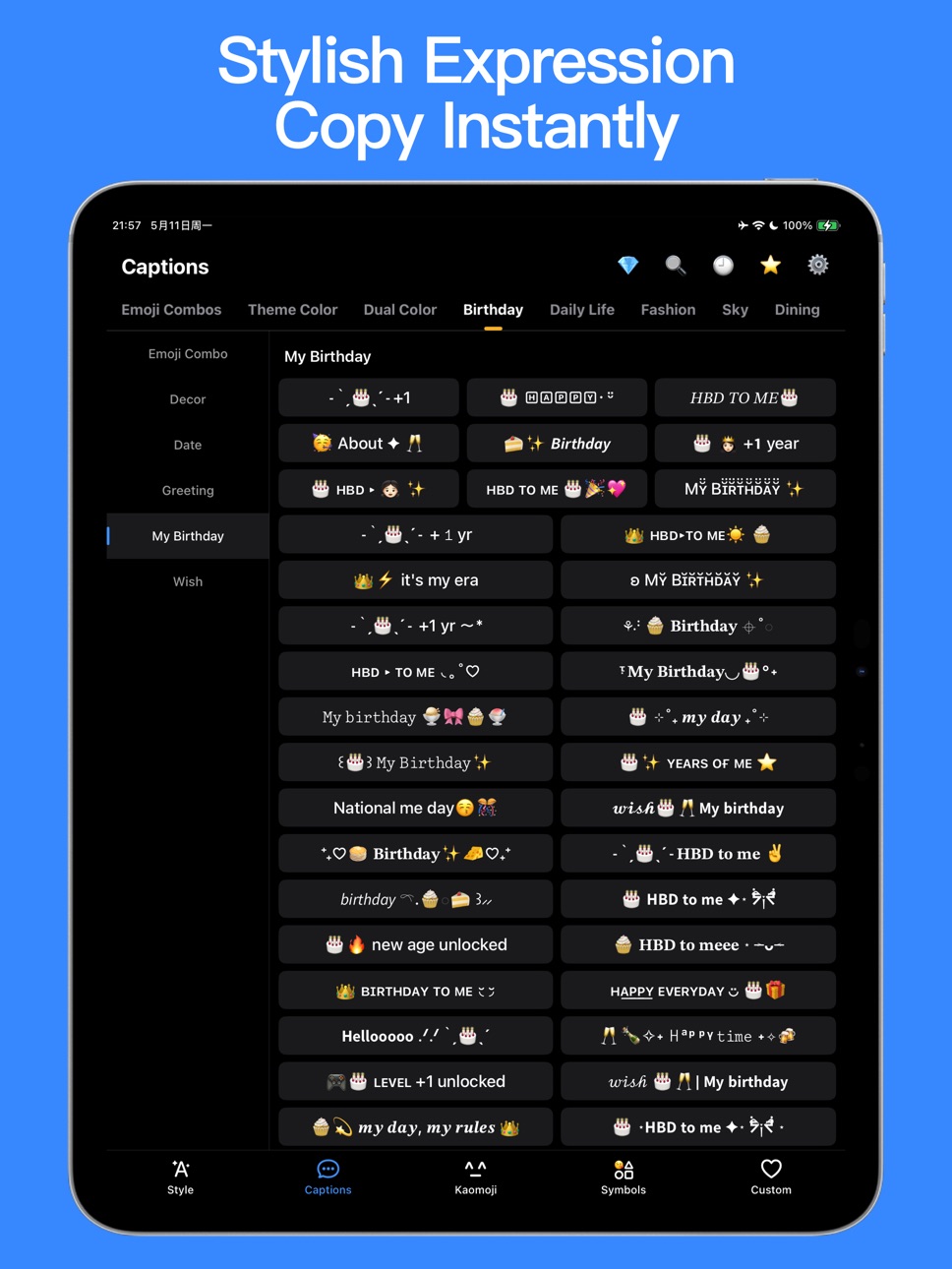
iPad 10 images


What’s New Version 1.0.3
- Bug fixes and performance optimization
Description
KeySnip is an input assistant that makes your expressions faster and more beautiful.
No more repetitive editing or switching apps — artistic fonts, captions, kaomojis, and symbols, all ready in one tap.
Whether it's chat, social media, or everyday messaging — say it fast, say it beautifully.
——————
Why KeySnip?
• Want more visual impact? Elevate with one tap.
Curated templates ready to copy — every message with more style and depth.
• Too plain? Transform text into stunning styles instantly.
70+ font styles and 600+ decoration templates to make your words stand out.
• Want more fun? Kaomojis at your fingertips.
From cute to quirky — add warmth and personality to every conversation.
• Running out of special symbols? Find what you need instantly.
A full collection of decorative symbols, organized and ready to use.
• Tired of retyping the same content? Save once, use anytime.
Manage texts, snippets, and phrases with categories and tags. Privacy lock keeps everything secure.
Download KeySnip now — type faster, express better.
——————
Core Features
• Artistic Font Generator
Type any text and instantly preview a wide range of font styles and decoration templates. One tap to copy and use. (Continuously updated)
• Curated Expression Templates
A rich library of text, stylized fonts, emojis, and symbol combinations — no formatting needed, just find and use.
• Kaomoji Collection
A vast, categorized kaomoji library — tap to copy and make every chat more expressive and fun.
• Symbol Library
Decorative, graphic, numeric, and iconic symbols — organized by category so you always find what you need.
• Favorites & Recent
Save frequently used content with one tap. Auto-recorded history for quick access anytime.
• Custom Content Library
Save texts, links, and phrases. Organize with custom categories and tags. Import and export supported.
• Keyboard Extension
Add the KeySnip keyboard and access all your content directly in any app — no switching required. Perfect for chat and social platforms.
——————
Continuously Updated
• New fonts and templates added regularly — always fresh content to express yourself
• Holiday and trending expressions updated in real time
• More expression scenarios covered with every update
Privacy & Security
KeySnip does not collect or upload any content you type or save via the keyboard.
All data is stored locally on your device. We cannot access your personal data.
——————
Auto-Renewal Subscription Notice
• Subscription periods: 1 week, 1 month, or 12 months.
• Payment: Charged to your Apple Account upon purchase confirmation.
• Auto-Renewal: Subscriptions renew automatically unless canceled at least 24 hours before the end of the current period. Your Apple Account will be charged within 24 hours before expiration, and the membership period will be extended by one cycle upon success.
• Cancellation: To cancel, go to iPhone Settings → tap your Apple ID → Subscriptions → KeySnip → Cancel Subscription.
• Free Trial: Canceling or re-subscribing during a free trial will not forfeit your trial benefits. You may continue using the trial until the trial period ends.
Terms & Policies
• Privacy Policy: https://photoswift.github.io/about/KeySnipPrivacyPolicy.html
• Terms of Service: https://photoswift.github.io/about/KeySnipTermsOfService.html
Contact Us
• Email: keysnipapp@icloud.com
• In-App Feedback: Tap the icon in the top-right corner of the Home screen → Settings → Feedback
In-App Purchases BB pricing
PasteGo - Subscribe Subscription
Premium Membership(Yearly) · Yearly—
Premium Membership(Monthly) · Monthly—
Premium Membership(Weekly) · 7 days—
Capabilities
In-App Purchases
Accessibility
ipadiphonemacrealityDevicetvoswatch
Version history 4 versions
Build 886012377v1.0.32026-05-27 12:17:09
- Bug fixes and performance optimization
Build 885716558v1.0.22026-05-18 13:10:30
- Bug fixes and performance improvements
Build 885526544v1.0.12026-05-12 19:17:31
- iPad support
- Bug fixes and performance improvements
Build 880399381v1.0.02026-05-08 17:26:25
Price history by region
Currency
Show
Columns
Search
Availability 75 of 75 storefronts
| Region | Language | Price | Ratings | Avg | Version |
|---|---|---|---|---|---|
| NG | en-GB | Free | 2 | 5.0 | 1.0.3 |
| US | en-US | Free | 1 | 5.0 | 1.0.3 |
| AG | en-GB | Free | 0 | — | 1.0.3 |
| AI | en-GB | Free | 0 | — | 1.0.3 |
| AO | en-GB | Free | 0 | — | 1.0.3 |
| AR | es-MX | Free | 0 | — | 1.0.3 |
| BB | en-GB | Free | 0 | — | 1.0.3 |
| BF | en-GB | Free | 0 | — | 1.0.3 |
| BJ | en-GB | Free | 0 | — | 1.0.3 |
| BO | es-MX | Free | 0 | — | 1.0.3 |
| BR | pt-BR | Free | 0 | — | 1.0.3 |
| BS | en-GB | Free | 0 | — | 1.0.3 |
| BW | en-GB | Free | 0 | — | 1.0.3 |
| BZ | en-GB | Free | 0 | — | 1.0.3 |
| CD | en-GB | Free | 0 | — | 1.0.3 |
| CG | en-GB | Free | 0 | — | 1.0.3 |
| CI | fr-FR | Free | 0 | — | 1.0.3 |
| CL | es-MX | Free | 0 | — | 1.0.3 |
| CM | fr-FR | Free | 0 | — | 1.0.3 |
| CO | es-MX | Free | 0 | — | 1.0.3 |
| CR | es-MX | Free | 0 | — | 1.0.3 |
| CV | en-GB | Free | 0 | — | 1.0.3 |
| DM | en-GB | Free | 0 | — | 1.0.3 |
| DO | es-MX | Free | 0 | — | 1.0.3 |
| DZ | en-GB | Free | 0 | — | 1.0.3 |
| EC | es-MX | Free | 0 | — | 1.0.3 |
| GA | fr-FR | Free | 0 | — | 1.0.3 |
| GD | en-GB | Free | 0 | — | 1.0.3 |
| GH | en-GB | Free | 0 | — | 1.0.3 |
| GM | en-GB | Free | 0 | — | 1.0.3 |
| GT | es-MX | Free | 0 | — | 1.0.3 |
| GW | en-GB | Free | 0 | — | 1.0.3 |
| GY | en-GB | Free | 0 | — | 1.0.3 |
| HN | es-MX | Free | 0 | — | 1.0.3 |
| JM | en-GB | Free | 0 | — | 1.0.3 |
| KE | en-GB | Free | 0 | — | 1.0.3 |
| KN | en-GB | Free | 0 | — | 1.0.3 |
| KY | en-GB | Free | 0 | — | 1.0.3 |
| LC | en-GB | Free | 0 | — | 1.0.3 |
| LR | en-GB | Free | 0 | — | 1.0.3 |
| LY | en-GB | Free | 0 | — | 1.0.3 |
| MA | en-GB | Free | 0 | — | 1.0.3 |
| MG | en-GB | Free | 0 | — | 1.0.3 |
| ML | en-GB | Free | 0 | — | 1.0.3 |
| MS | en-GB | Free | 0 | — | 1.0.3 |
| MU | en-GB | Free | 0 | — | 1.0.3 |
| MW | en-GB | Free | 0 | — | 1.0.3 |
| MX | es-MX | Free | 0 | — | 1.0.3 |
| MZ | en-GB | Free | 0 | — | 1.0.3 |
| NA | en-GB | Free | 0 | — | 1.0.3 |
| NE | en-GB | Free | 0 | — | 1.0.3 |
| NI | es-MX | Free | 0 | — | 1.0.3 |
| PA | es-MX | Free | 0 | — | 1.0.3 |
| PE | es-MX | Free | 0 | — | 1.0.3 |
| PY | es-MX | Free | 0 | — | 1.0.3 |
| RW | en-GB | Free | 0 | — | 1.0.3 |
| SC | en-GB | Free | 0 | — | 1.0.3 |
| SL | en-GB | Free | 0 | — | 1.0.3 |
| SN | en-GB | Free | 0 | — | 1.0.3 |
| SR | en-GB | Free | 0 | — | 1.0.3 |
| ST | en-GB | Free | 0 | — | 1.0.3 |
| SV | es-MX | Free | 0 | — | 1.0.3 |
| SZ | en-GB | Free | 0 | — | 1.0.3 |
| TC | en-GB | Free | 0 | — | 1.0.3 |
| TD | en-GB | Free | 0 | — | 1.0.3 |
| TN | en-GB | Free | 0 | — | 1.0.3 |
| TT | en-GB | Free | 0 | — | 1.0.3 |
| TZ | en-GB | Free | 0 | — | 1.0.3 |
| UG | en-GB | Free | 0 | — | 1.0.3 |
| UY | en-GB | Free | 0 | — | 1.0.3 |
| VC | en-GB | Free | 0 | — | 1.0.3 |
| VE | es-MX | Free | 0 | — | 1.0.3 |
| VG | en-GB | Free | 0 | — | 1.0.3 |
| ZM | en-GB | Free | 0 | — | 1.0.3 |
| ZW | en-GB | Free | 0 | — | 1.0.3 |
Change log 8 changes · BB
✎
releaseNotes updated
- Bug fixes and performance optimization
✎
description updated
KeySnip is an input assistant that makes your expressions faster and more beautiful.
No more repetitive editing or switching apps — artistic fonts, captions, ka
✎
subtitle updated
Copy Paste, Kaomoji & Bio
✎
name updated
KeySnip: Fonts & Snippets
◆
Version 1.0.3 released
- Bug fixes and performance optimization
◆
Version 1.0.2 released
- Bug fixes and performance improvements
◆
Version 1.0.1 released
- iPad support
- Bug fixes and performance improvements
◆
Version 1.0.0 released