Home › Productivity

 ZM
ZM
 CAen-CA
 DEde-DE
 AEen-GB
 AFen-GB
 AGen-GB
 AIen-GB
 ALen-GB
 AMen-GB
 AOen-GB
 ARes-MX
 ATde-DE
 AUen-AU
 AZen-GB
 BAen-GB
 BBen-GB
 BEen-GB
 BFen-GB
 BHen-GB
 BJen-GB
 BMen-GB
 BOes-MX
 BRpt-BR
 BSen-GB
 BWen-GB
 BYen-GB
 BZen-GB
 CDen-GB
 CGen-GB
 CHde-CH
 CIfr-FR
 CLes-MX
 CMfr-FR
 CNzh-Hans-CN
 COes-MX
 CRes-MX
 CVen-GB
 CYen-GB
 DKen-GB
 DMen-GB
 DOes-MX
 DZen-GB
 ECes-MX
 EEen-GB
 EGen-GB
 ESes-ES
 FRfr-FR
 GAfr-FR
 GBen-GB
 GDen-GB
 GEen-GB
 GHen-GB
 GMen-GB
 GTes-MX
 GWen-GB
 GYen-GB
 HKzh-Hant-HK
 HNes-MX
 HRen-GB
 IDen-GB
 IEen-GB
 ILen-GB
 INen-GB
 IQen-GB
 ITit
ITit JMen-GB
 JOen-GB
 JPja
JPja KEen-GB
 KGen-GB
 KNen-GB
 KRko
KRko KWen-GB
 KYen-GB
 KZen-GB
 LBen-GB
 LCen-GB
 LRen-GB
 LTen-GB
 LUen-GB
 LVen-GB
 LYen-GB
 MAen-GB
 MDen-GB
 MEen-GB
 MGen-GB
 MKen-GB
 MLen-GB
 MNen-GB
 MOzh-Hant-HK
 MRen-GB
 MSen-GB
 MTen-GB
 MUen-GB
 MWen-GB
 MXes-MX
 MYen-GB
 MZen-GB
 NAen-GB
 NEen-GB
 NGen-GB
 NIes-MX
 NLnl
NLnl NPen-GB
 NZen-AU
 OMen-GB
 PAes-MX
 PEes-MX
 PHen-GB
 PKen-GB
 PTpt-PT
 PYes-MX
 QAen-GB
 RSen-GB
 RUru
RUru RWen-GB
 SAen-GB
 SCen-GB
 SEsv
SEsv SGen-GB
 SIen-GB
 SLen-GB
 SNen-GB
 SRen-GB
 STen-GB
 SVes-MX
 SZen-GB
 TCen-GB
 TDen-GB
 THen-GB
 TJen-GB
 TMen-GB
 TNen-GB
 TRen-GB
 TTen-GB
 TWzh-Hant-TW
 TZen-GB
 UAen-GB
 UGen-GB
 USen-US
 UYen-GB
 VEes-MX
 VGen-GB
 VNen-GB
 XKen-GB
 YEen-GBZMen-GB
 ZWen-GB
147 of 147 storefronts
Content in en-US
Content in en-US
Information
Apple ID6756133878
Bundle IDcom.keeplys.app
SellerSeller
Min iOS15.1
Min macOS12.0
Device familiesiphone, ipad, ipod
Released2025-12-09
Copyright© 2025 Keeplys
Privacy policyLink ↗
Preview 2 platforms
iPhone 5 images



iPad 3 images


What’s New Version 1.2.4
– Bug fixes.
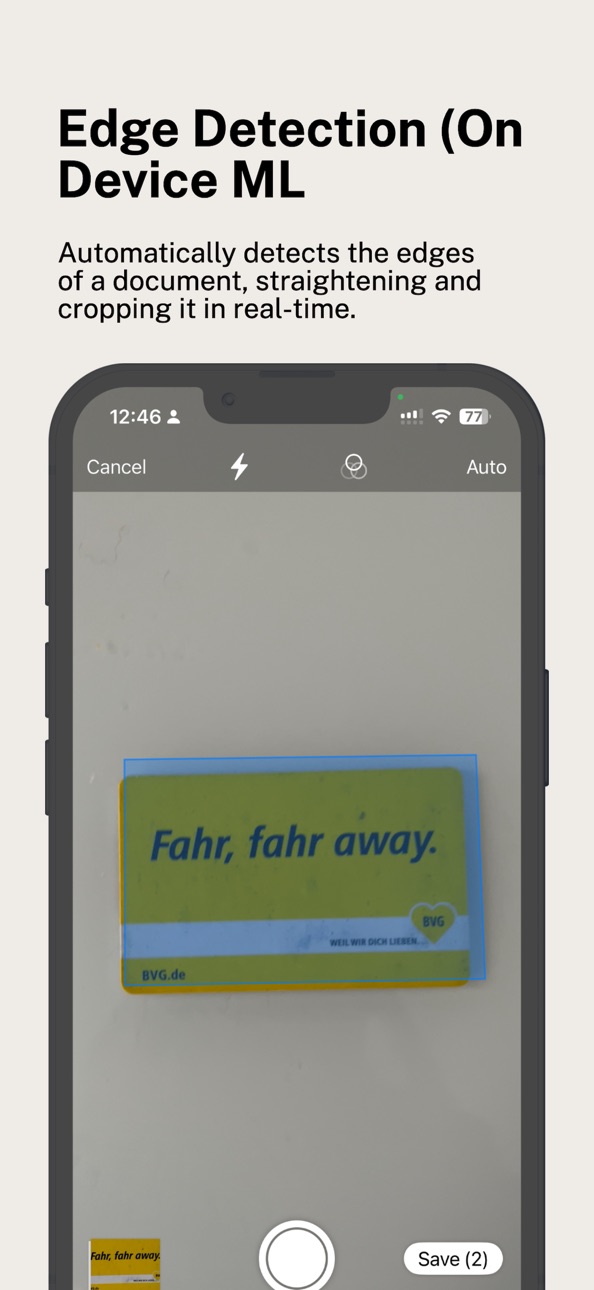
- Document is uploaded and scanned into the folder selected. When no folder is selected, ML auto-classification kicks-in
– Also you can now monitor document upload history in connected service
Description
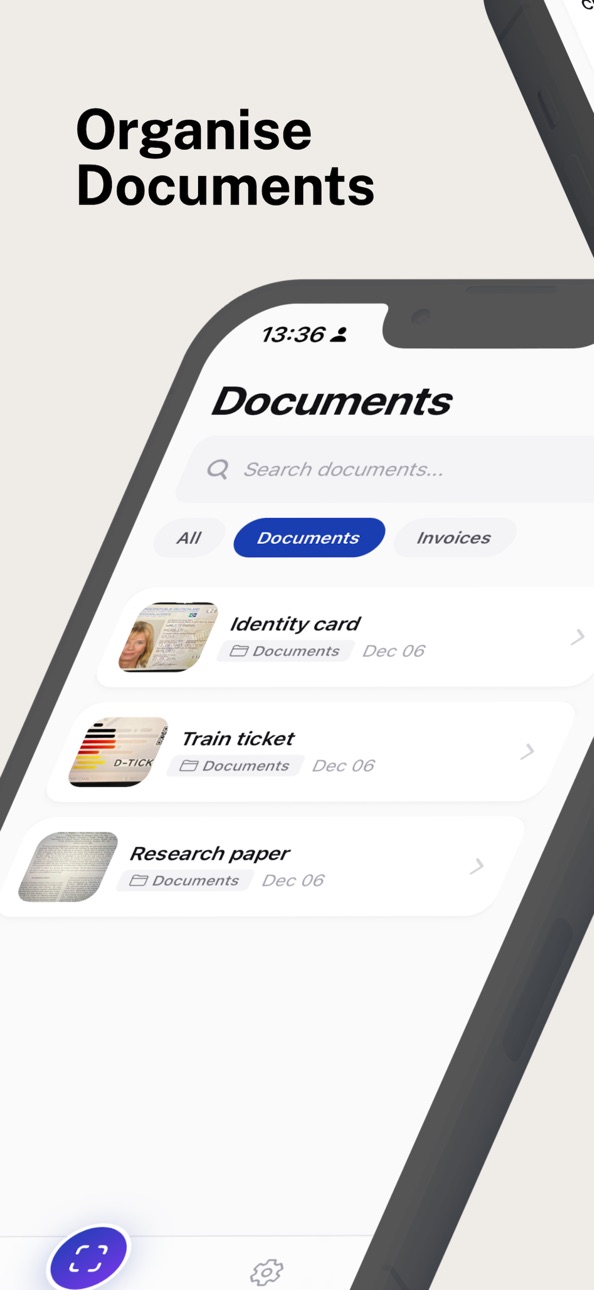
Keeplys makes document management effortless. Whether it’s receipts, invoices, contracts, ID, or any important paperwork, digitize them in seconds and access them anytime on your device.
Accessibility
ipadiphonemacrealityDevicetvoswatch
Version history 7 versions
Build 882261160v1.2.32026-02-08 03:40:13
– Folders now display as recognizable folder icons with user-selected colors
- New "+" button to quickly create folders
- Documents displayed with thumbnails, page counts, and file sizes
- Easy access to share and scan directly from the list
- Cloud backup and integrations are now distinct settings for clarity
- Support for next cloud integration
Build 882275241v1.2.42026-02-08 22:00:54
– Bug fixes.
- Document is uploaded and scanned into the folder selected. When no folder is selected, ML auto-classification kicks-in
– Also you can now monitor document upload history in connected service
Build 881940254v1.2.12026-01-29 02:00:16
- You can now automatically upload your scanned documents to your self-hosted Nextcloud instance.
- Better UI
- Improved UI
Build 881161694v1.2.02026-01-21 06:47:38
- Added an integration to support paperless-ngx which connect to your self-hosted Paperless-NGX instance
– Documents are automatically queued for upload after scanning
- Configure default tags to apply to all uploaded documents
- Choose to upload from all folders or select specific folders
- Track the status of all your uploads
- Bug fixes
Build 880767298v1.0.32025-12-17 21:27:17
– Folder Selector in Scanner: See all your folders right in the scanner view.
– Swipe to Switch: Swipe left or right on the camera view to quickly cycle through folders.
– Visual Feedback: Each folder shows its custom color and icon, making it easy to identify at a glance.
– ID Cards Default Folder: We've added ID Cards as a built-in default folder alongside Documents and Invoices.
– Smart Frame Switching: The scanner now automatically adjusts its capture frame based on the selected folder.
Build 880635689v1.0.22025-12-14 06:18:24
• Cloud Sync: Automatically backup documents to Google Drive or iCloud Drive
• Background Sync: Documents sync even when the app is closed
• Document Upload: Import existing photos and PDFs from your library
• Multi-language: Now available in English, Spanish, French, German, and Italian
• Redesigned Settings: Cleaner interface for managing sync and storage
• Bug fixes and performance improvements
Build 880355219v1.0.02025-12-09 18:07:52
No pricing data captured yet — comparisons appear once the app has paid storefronts or in-app purchases.
Availability 147 of 147 storefronts
| Region | Language | Price | Ratings | Avg | Version |
|---|---|---|---|---|---|
| CA | en-CA | Free | 1 | 1.0 | 1.2.4 |
| DE | de-DE | Free | 1 | 5.0 | 1.2.4 |
| AE | en-GB | Free | 0 | — | 1.2.4 |
| AF | en-GB | Free | 0 | — | 1.2.4 |
| AG | en-GB | Free | 0 | — | 1.2.4 |
| AI | en-GB | Free | 0 | — | 1.2.4 |
| AL | en-GB | Free | 0 | — | 1.2.4 |
| AM | en-GB | Free | 0 | — | 1.2.4 |
| AO | en-GB | Free | 0 | — | 1.2.4 |
| AR | es-MX | Free | 0 | — | 1.2.4 |
| AT | de-DE | Free | 0 | — | 1.2.4 |
| AU | en-AU | Free | 0 | — | 1.2.4 |
| AZ | en-GB | Free | 0 | — | 1.2.4 |
| BA | en-GB | Free | 0 | — | 1.2.4 |
| BB | en-GB | Free | 0 | — | 1.2.4 |
| BE | en-GB | Free | 0 | — | 1.2.4 |
| BF | en-GB | Free | 0 | — | 1.2.4 |
| BH | en-GB | Free | 0 | — | 1.2.4 |
| BJ | en-GB | Free | 0 | — | 1.2.4 |
| BM | en-GB | Free | 0 | — | 1.2.4 |
| BO | es-MX | Free | 0 | — | 1.2.4 |
| BR | pt-BR | Free | 0 | — | 1.2.4 |
| BS | en-GB | Free | 0 | — | 1.2.4 |
| BW | en-GB | Free | 0 | — | 1.2.4 |
| BY | en-GB | Free | 0 | — | 1.2.4 |
| BZ | en-GB | Free | 0 | — | 1.2.4 |
| CD | en-GB | Free | 0 | — | 1.2.4 |
| CG | en-GB | Free | 0 | — | 1.2.4 |
| CH | de-CH | Free | 0 | — | 1.2.4 |
| CI | fr-FR | Free | 0 | — | 1.2.4 |
| CL | es-MX | Free | 0 | — | 1.2.4 |
| CM | fr-FR | Free | 0 | — | 1.2.4 |
| CN | zh-Hans-CN | Free | 0 | — | 1.2.4 |
| CO | es-MX | Free | 0 | — | 1.2.4 |
| CR | es-MX | Free | 0 | — | 1.2.4 |
| CV | en-GB | Free | 0 | — | 1.2.4 |
| CY | en-GB | Free | 0 | — | 1.2.4 |
| DK | en-GB | Free | 0 | — | 1.2.4 |
| DM | en-GB | Free | 0 | — | 1.2.4 |
| DO | es-MX | Free | 0 | — | 1.2.4 |
| DZ | en-GB | Free | 0 | — | 1.2.4 |
| EC | es-MX | Free | 0 | — | 1.2.4 |
| EE | en-GB | Free | 0 | — | 1.2.4 |
| EG | en-GB | Free | 0 | — | 1.2.4 |
| ES | es-ES | Free | 0 | — | 1.2.4 |
| FR | fr-FR | Free | 0 | — | 1.2.4 |
| GA | fr-FR | Free | 0 | — | 1.2.4 |
| GB | en-GB | Free | 0 | — | 1.2.4 |
| GD | en-GB | Free | 0 | — | 1.2.4 |
| GE | en-GB | Free | 0 | — | 1.2.4 |
| GH | en-GB | Free | 0 | — | 1.2.4 |
| GM | en-GB | Free | 0 | — | 1.2.4 |
| GT | es-MX | Free | 0 | — | 1.2.4 |
| GW | en-GB | Free | 0 | — | 1.2.4 |
| GY | en-GB | Free | 0 | — | 1.2.4 |
| HK | zh-Hant-HK | Free | 0 | — | 1.2.4 |
| HN | es-MX | Free | 0 | — | 1.2.4 |
| HR | en-GB | Free | 0 | — | 1.2.4 |
| ID | en-GB | Free | 0 | — | 1.2.4 |
| IE | en-GB | Free | 0 | — | 1.2.4 |
| IL | en-GB | Free | 0 | — | 1.2.4 |
| IN | en-GB | Free | 0 | — | 1.2.4 |
| IQ | en-GB | Free | 0 | — | 1.2.4 |
| IT | it | Free | 0 | — | 1.2.4 |
| JM | en-GB | Free | 0 | — | 1.2.4 |
| JO | en-GB | Free | 0 | — | 1.2.4 |
| JP | ja | Free | 0 | — | 1.2.4 |
| KE | en-GB | Free | 0 | — | 1.2.4 |
| KG | en-GB | Free | 0 | — | 1.2.4 |
| KN | en-GB | Free | 0 | — | 1.2.4 |
| KR | ko | Free | 0 | — | 1.2.4 |
| KW | en-GB | Free | 0 | — | 1.2.4 |
| KY | en-GB | Free | 0 | — | 1.2.4 |
| KZ | en-GB | Free | 0 | — | 1.2.4 |
| LB | en-GB | Free | 0 | — | 1.2.4 |
| LC | en-GB | Free | 0 | — | 1.2.4 |
| LR | en-GB | Free | 0 | — | 1.2.4 |
| LT | en-GB | Free | 0 | — | 1.2.4 |
| LU | en-GB | Free | 0 | — | 1.2.4 |
| LV | en-GB | Free | 0 | — | 1.2.4 |
| LY | en-GB | Free | 0 | — | 1.2.4 |
| MA | en-GB | Free | 0 | — | 1.2.4 |
| MD | en-GB | Free | 0 | — | 1.2.4 |
| ME | en-GB | Free | 0 | — | 1.2.4 |
| MG | en-GB | Free | 0 | — | 1.2.4 |
| MK | en-GB | Free | 0 | — | 1.2.4 |
| ML | en-GB | Free | 0 | — | 1.2.4 |
| MN | en-GB | Free | 0 | — | 1.2.4 |
| MO | zh-Hant-HK | Free | 0 | — | 1.2.4 |
| MR | en-GB | Free | 0 | — | 1.2.4 |
| MS | en-GB | Free | 0 | — | 1.2.4 |
| MT | en-GB | Free | 0 | — | 1.2.4 |
| MU | en-GB | Free | 0 | — | 1.2.4 |
| MW | en-GB | Free | 0 | — | 1.2.4 |
| MX | es-MX | Free | 0 | — | 1.2.4 |
| MY | en-GB | Free | 0 | — | 1.2.4 |
| MZ | en-GB | Free | 0 | — | 1.2.4 |
| NA | en-GB | Free | 0 | — | 1.2.4 |
| NE | en-GB | Free | 0 | — | 1.2.4 |
| NG | en-GB | Free | 0 | — | 1.2.4 |
| NI | es-MX | Free | 0 | — | 1.2.4 |
| NL | nl | Free | 0 | — | 1.2.4 |
| NP | en-GB | Free | 0 | — | 1.2.4 |
| NZ | en-AU | Free | 0 | — | 1.2.4 |
| OM | en-GB | Free | 0 | — | 1.2.4 |
| PA | es-MX | Free | 0 | — | 1.2.4 |
| PE | es-MX | Free | 0 | — | 1.2.4 |
| PH | en-GB | Free | 0 | — | 1.2.4 |
| PK | en-GB | Free | 0 | — | 1.2.4 |
| PT | pt-PT | Free | 0 | — | 1.2.4 |
| PY | es-MX | Free | 0 | — | 1.2.4 |
| QA | en-GB | Free | 0 | — | 1.2.4 |
| RS | en-GB | Free | 0 | — | 1.2.4 |
| RU | ru | Free | 0 | — | 1.2.4 |
| RW | en-GB | Free | 0 | — | 1.2.4 |
| SA | en-GB | Free | 0 | — | 1.2.4 |
| SC | en-GB | Free | 0 | — | 1.2.4 |
| SE | sv | Free | 0 | — | 1.2.4 |
| SG | en-GB | Free | 0 | — | 1.2.4 |
| SI | en-GB | Free | 0 | — | 1.2.4 |
| SL | en-GB | Free | 0 | — | 1.2.4 |
| SN | en-GB | Free | 0 | — | 1.2.4 |
| SR | en-GB | Free | 0 | — | 1.2.4 |
| ST | en-GB | Free | 0 | — | 1.2.4 |
| SV | es-MX | Free | 0 | — | 1.2.4 |
| SZ | en-GB | Free | 0 | — | 1.2.4 |
| TC | en-GB | Free | 0 | — | 1.2.4 |
| TD | en-GB | Free | 0 | — | 1.2.4 |
| TH | en-GB | Free | 0 | — | 1.2.4 |
| TJ | en-GB | Free | 0 | — | 1.2.4 |
| TM | en-GB | Free | 0 | — | 1.2.4 |
| TN | en-GB | Free | 0 | — | 1.2.4 |
| TR | en-GB | Free | 0 | — | 1.2.4 |
| TT | en-GB | Free | 0 | — | 1.2.4 |
| TW | zh-Hant-TW | Free | 0 | — | 1.2.4 |
| TZ | en-GB | Free | 0 | — | 1.2.4 |
| UA | en-GB | Free | 0 | — | 1.2.4 |
| UG | en-GB | Free | 0 | — | 1.2.4 |
| US | en-US | Free | 0 | — | 1.2.4 |
| UY | en-GB | Free | 0 | — | 1.2.4 |
| VE | es-MX | Free | 0 | — | 1.2.4 |
| VG | en-GB | Free | 0 | — | 1.2.4 |
| VN | en-GB | Free | 0 | — | 1.2.4 |
| XK | en-GB | Free | 0 | — | 1.2.4 |
| YE | en-GB | Free | 0 | — | 1.2.4 |
| ZM | en-GB | Free | 0 | — | 1.2.4 |
| ZW | en-GB | Free | 0 | — | 1.2.4 |
Change log 11 changes · ZM
✎
releaseNotes updated
– Bug fixes.
- Document is uploaded and scanned into the folder selected. When no folder is selected, ML auto-classification kicks-in
– Also you can now monito
✎
description updated
Keeplys makes document management effortless. Whether it’s receipts, invoices, contracts, ID, or any important paperwork, digitize them in seconds and access th
✎
subtitle updated
Document management made easy.
✎
name updated
Keeplys
◆
Version 1.2.4 released
– Bug fixes.
- Document is uploaded and scanned into the folder selected. When no folder is selected, ML auto-classification kicks-in
– Also you can now monitor document upload history in connected service
◆
Version 1.2.3 released
– Folders now display as recognizable folder icons with user-selected colors
- New "+" button to quickly create folders
- Documents displayed with thumbnails, page counts, and file sizes
- Easy access to share and scan directly from the li
◆
Version 1.2.1 released
- You can now automatically upload your scanned documents to your self-hosted Nextcloud instance.
- Better UI
- Improved UI
◆
Version 1.2.0 released
- Added an integration to support paperless-ngx which connect to your self-hosted Paperless-NGX instance
– Documents are automatically queued for upload after scanning
- Configure default tags to apply to all uploaded documents
- Choose t
◆
Version 1.0.3 released
– Folder Selector in Scanner: See all your folders right in the scanner view.
– Swipe to Switch: Swipe left or right on the camera view to quickly cycle through folders.
– Visual Feedback: Each folder shows its custom color and icon, making
◆
Version 1.0.2 released
• Cloud Sync: Automatically backup documents to Google Drive or iCloud Drive
• Background Sync: Documents sync even when the app is closed
• Document Upload: Import existing photos and PDFs from your library
• Multi-language: Now available
◆
Version 1.0.0 released