Home › Utilities

 BM
BM
 AUen-AU
 CAen-CA
 GBen-GB
 AEen-GB
 AFen-GB
 ALen-GB
 ATde-DE
 AZen-GB
 BAen-GB
 BEen-GB
 BGen-GB
 BHen-GBBMen-GB
 BNen-GB
 BTen-GB
 BYen-GB
 CHde-CH
 CYen-GB
 CZen-GB
 DEde-DE
 DKen-GB
 EEen-GB
 EGen-GB
 ESes-ES
 FIen-GB
 FJen-GB
 FRfr-FR
 GEen-GB
 GRen-GB
 HRen-GB
 HUen-GB
 IDen-GB
 IEen-GB
 ILen-GB
 INen-GB
 IQen-GB
 ISen-GB
 ITit
ITit JOen-GB
 KGen-GB
 KHen-GB
 KRko
KRko KWen-GB
 KZen-GB
 LAen-GB
 LBen-GB
 LKen-GB
 LTen-GB
 LUen-GB
 LVen-GB
 MDen-GB
 MEen-GB
 MKen-GB
 MMen-GB
 MNen-GB
 MOzh-Hant-HK
 MRen-GB
 MTen-GB
 MVen-GB
 MYen-GB
 NLnl
NLnl NOen-GB
 NPen-GB
 NZen-AU
 OMen-GB
 PGen-GB
 PHen-GB
 PKen-GB
 PLen-GB
 PTpt-PT
 QAen-GB
 ROen-GB
 RSen-GB
 RUru
RUru SAen-GB
 SBen-GB
 SEsv
SEsv SGen-GB
 SIen-GB
 SKen-GB
 THen-GB
 TJen-GB
 TMen-GB
 TOen-GB
 TRen-GB
 UAen-GB
 USen-US
 UZen-GB
 VNen-GB
 VUen-GB
 XKen-GB
 YEen-GB
92 of 92 storefronts
Content in en-US
Content in en-US
Information
Preview 3 platforms
iPhone 7 images




iPad 6 images



Apple Watch 3 images


What’s New Version 2.6.1
This release brings major improvements to iPad layout and introduces Home Screen widgets for quick device control.
Widgets
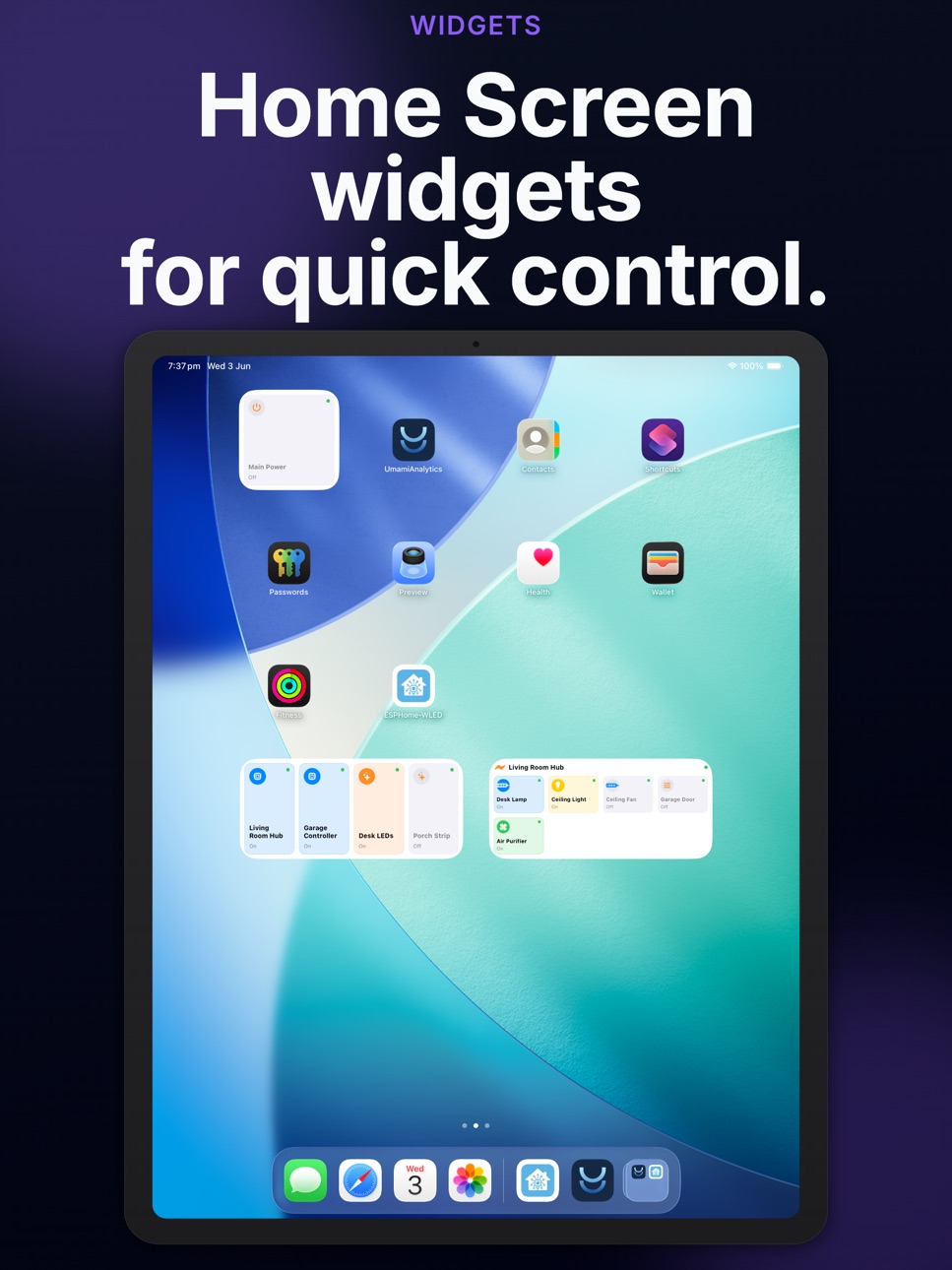
• New Device Hub widget — displays up to 8 ESPHome and WLED devices in an Apple Home-style grid with online/offline status and tap-to-toggle
• New Device Control widget — shows specific components or WLED segments with interactive toggle via AppIntents
• Both widgets support small and medium sizes
• Configure widget content directly from the widget configuration sheet
iPad Layout
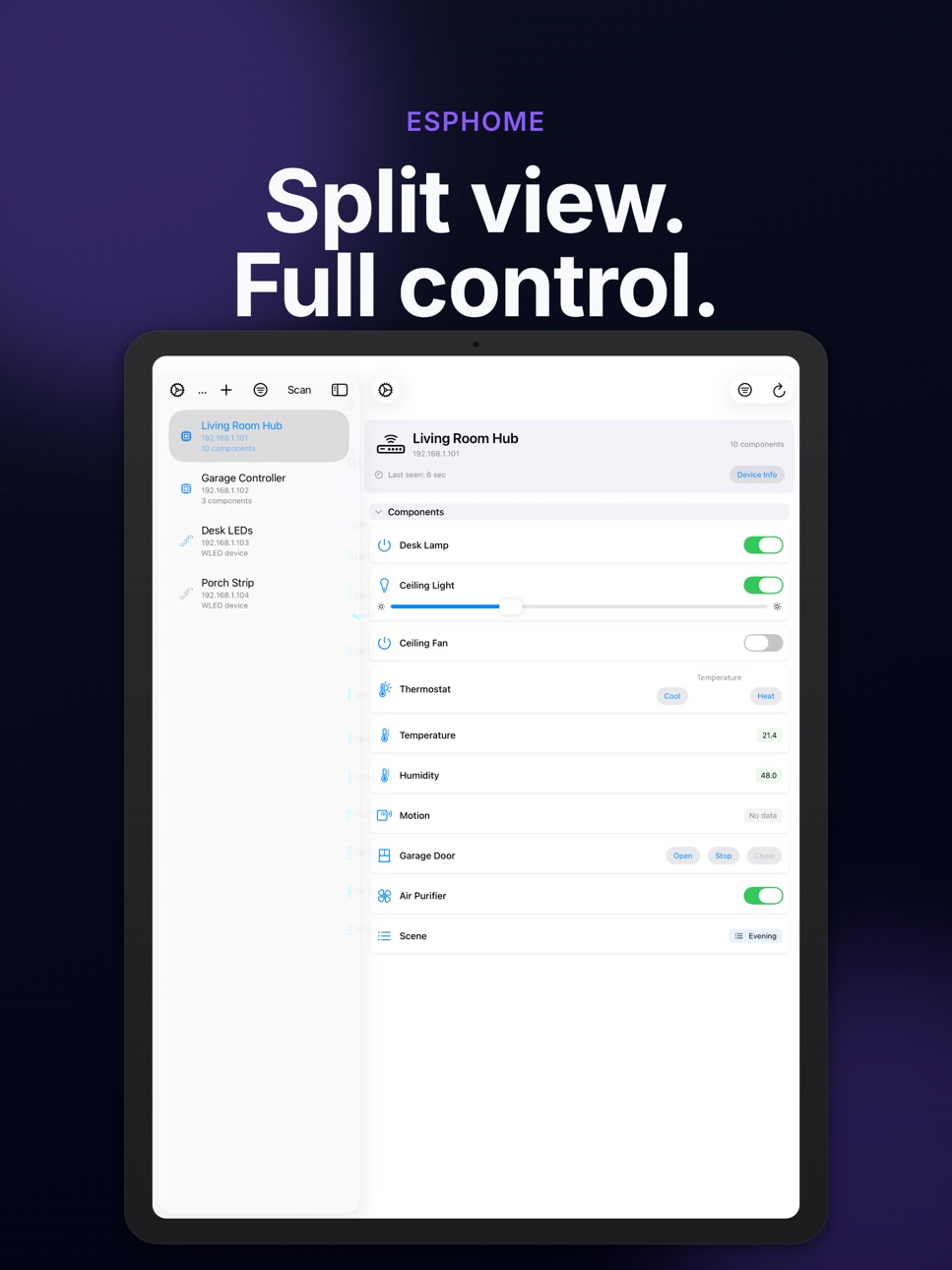
• Redesigned two-column split-view with a sidebar device list and detail pane
• Collapsible device groups with shadow card styling in the sidebar
• Content unavailable view when no device is selected
• Adaptive layout that responds to regular and compact size classes
• Improved selection state management across orientation changes
Improvements & Fixes
• Enhanced WLED segment management with extended state fetching and blend mode support
• PixelForge tools for WLED 0.16+ devices
• Better entity-name URL path encoding for current ESPHome firmware versions
• Performance improvements for device discovery and state refresh
Description
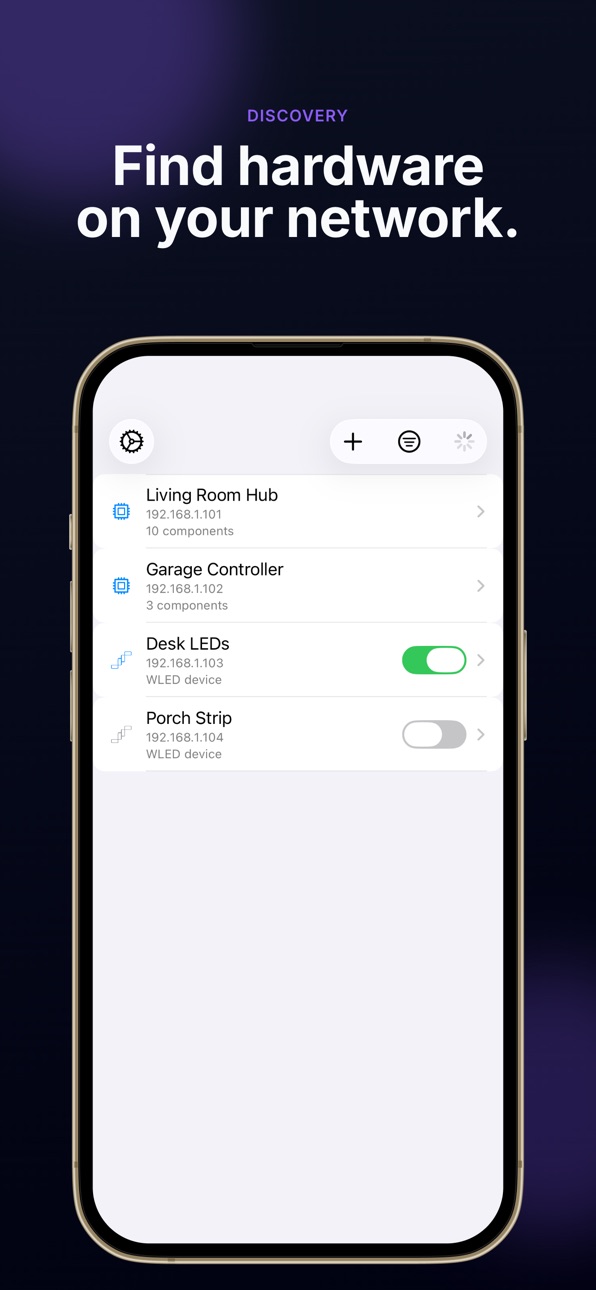
ESPHome-WLED Device Manager is a powerful native iOS, iPad, and Apple Watch app for discovering and controlling your smart home devices on your local network.
Recommended ESPHome Component
For the best experience, add the webserver_listcomponents (https://github.com/domgrimm/esphome-webserver-listcomponents) external component to your ESPHome config. It enables fast, reliable entity discovery with full metadata support.
ESPHome Device Control
• Automatic network discovery via Bonjour/mDNS
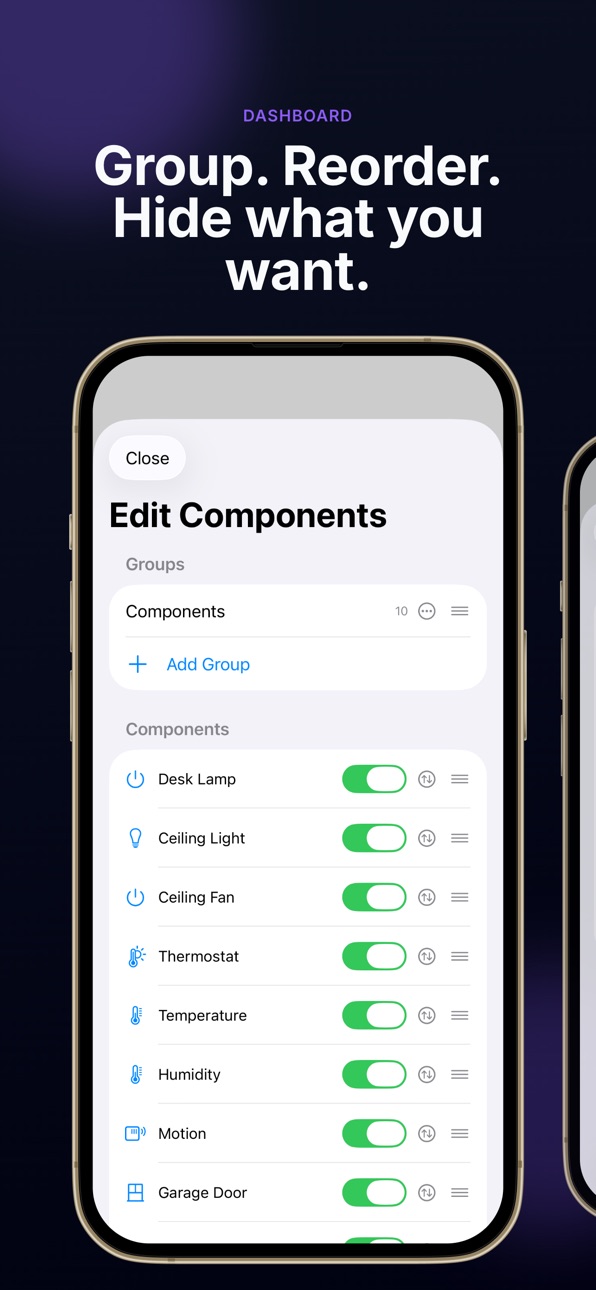
• Full component support: switches, lights, fans, covers, sensors, climate, numbers, selects, buttons, text, time, and alarm control panels
• Native API with Noise encryption for secure, real-time communication
• Live log streaming and Server-Sent Events for instant state updates
• HTTP Basic authentication support
• Manual device addition for devices outside your local network
WLED Advanced Control
• Power, brightness, and full effect/palette management
• Segment management with blend modes and transition styles
• Live LED preview via WebSocket for 1D strips and 2D matrices
• Native gradient palette editor with WLED JSON codec
• PixelForge tools for WLED 0.16+: Pixel Paint, Image Tool, and Scrolling Text
• LittleFS file browser and custom palette management
Widgets
• Device Hub widget shows multiple ESPHome and WLED devices in an Apple Home-style layout
• Device Control widget displays individual components or WLED segments with interactive toggle
• Both widgets support small and medium sizes with AppIntent-driven configuration
iPad Optimized
• Two-column NavigationSplitView with sidebar device list
• Balanced split-view layout for efficient device browsing and control
• Adaptive interface that responds to size class changes
Apple Watch
• Full watchOS companion app with device discovery and control
• Digital Crown brightness control with haptic feedback for WLED
• Effect and palette wheel pickers with live color preview
• Manual device sync from your iPhone via App Groups
ESPHome-WLED Device Manager runs entirely on your local network — no cloud services, no accounts, and no tracking. Your devices stay under your control.
Requires ESPHome or WLED devices on your local network. Supports current ESPHome firmware with entity-name-based URL paths and API 1.14+ native handshake.
In-App Purchases BM pricing
One-Time Purchases
Small Tip—
Medium Tip—
Large Tip—
Extra Large Tip—
Massive Tip—
Capabilities
In-App Purchases
Accessibility
ipadiphonemacrealityDevicetvoswatch
Version history 16 versions
Build 886470911v2.6.12026-06-03 18:57:16
This release brings major improvements to iPad layout and introduces Home Screen widgets for quick device control.
Widgets
• New Device Hub widget — displays up to 8 ESPHome and WLED devices in an Apple Home-style grid with online/offline status and tap-to-toggle
• New Device Control widget — shows specific components or WLED segments with interactive toggle via AppIntents
• Both widgets support small and medium sizes
• Configure widget content directly from the widget configuration sheet
iPad Layout
• Redesigned two-column split-view with a sidebar device list and detail pane
• Collapsible device groups with shadow card styling in the sidebar
• Content unavailable view when no device is selected
• Adaptive layout that responds to regular and compact size classes
• Improved selection state management across orientation changes
Improvements & Fixes
• Enhanced WLED segment management with extended state fetching and blend mode support
• PixelForge tools for WLED 0.16+ devices
• Better entity-name URL path encoding for current ESPHome firmware versions
• Performance improvements for device discovery and state refresh
Build 885307136v2.5.02026-05-06 10:38:05
WLED PixelForge — paint on-device, image uploads, scrolling text.
• Native Pixel Paint — brush, lines, circles, squares, smear, optional rainbow strokes; live LED updates on the selected segment; preview shapes before you release; save a GIF to LittleFS and auto-apply the Image effect when your firmware supports it.
• Image Tool — choose a photo, scale to your strip or matrix, upload as GIF with the same auto-apply flow.
• Scrolling Text — edit segment text from the app and apply the Scrolling Text effect when available.
• LittleFS file editor — browse, edit, upload, and delete files on the controller (including palette JSON); open from Device Settings or when managing palettes.
Bug fixes and polish throughout.
Build 885225779v2.4.02026-05-05 00:57:17
WLED controls get a big usability upgrade - WLED v16.0 support!.
• Native custom palette editor: build gradients like WLED’s web palette tool: color picker, draggable stops, generate/distribute, preview on selected segments, and download the curated CPT-city palette library.
• Native device file editor: list, edit, upload, and delete files on the controller’s filesystem (including palette JSON). Open it from Device Settings or when managing palette files.
• Clearer device detail: Live View, Current Effect, Color Palette, and Segments are collapsible; effect and preset palette names sit in the headers as tappable links. PixelForge remains one tap away in Safari when you need the full web toolkit.
Bug fixes and polish throughout.
Build 885005976v2.3.02026-04-28 17:05:57
WLED Live View
• Turn on Live View on any WLED device to see a real-time preview of your strip or panel—right in the app, with your layout filling the on-screen area.
ESPHome
• Smoother ESPHome connections – The app now uses the current ESPHome device API, so you should see fewer warnings in device logs and better long-term compatibility.
• Up-to-date control URLs – Requests use each entity’s proper name in the path (as newer ESPHome versions expect), which matches current web/REST behavior and upcoming ESPHome changes.
Build 882768480v2.2.12026-02-25 19:13:12
- Fixed minor UI bugs
- Fixed intermittent issue with unencrypted ESPHome API connections
Build 882727830v2.2.02026-02-24 20:37:38
- Updated device group UX
- Fixed device ordering bugs
Build 882315270v2.1.02026-02-10 20:43:13
- Added option to cache devices across sessions/networks
Build 882101163v2.0.02026-02-05 15:30:39
Huge update for version 2.0.0!
- Added WLED device support
- Toggle lights, change brightness, select effects, and choose colors!
- Added companion watchOS app
- Interact with your ESPHome and WLED devices right from your wrist!
- New shortcut component for ESPHome device - control or view an entity from the device list
Build 881807479v1.6.22026-01-30 10:36:38
- Added device log viewer (requires native API to be enabled, and API encryption key if enabled)
- Devices can now be re-ordered and grouped
Build 881767723v1.5.02026-01-23 23:24:45
- Added support for devices using encrypted API (copy+paste the encryption key into the device settings)
- Minor UI tweaks
Build 881723709v1.4.22026-01-22 04:28:54
- Added ESPHome 2026.1 compatibility
Build 881650424v1.4.12026-01-20 21:11:05
- Added native API compatibility to manually added devices
Build 881564108v1.4.02026-01-18 08:07:57
- Improved native ESPHome API compatibility
- Added support for custom API port
- Improved web server scraping fallback
- Added Bonjour scanning idle timeout
Build 881134720v1.3.02026-01-02 02:44:37
Added toggle to disable Bonjour scanning.
Small UI tweaks.
Build 879566494v1.2.02025-11-07 18:01:04
- Now connect & control ESPHome devices in AP mode!
- Automatically find web servers running on non-standard ports
- Better compatibility with devices running Arduino framework
- Other minor bug fixes & tweaks
Build 879359803v1.0.12025-11-06 21:56:14
Price history by region
Currency
Show
Columns
Search
Availability 92 of 92 storefronts
| Region | Language | Price | Ratings | Avg | Version |
|---|---|---|---|---|---|
| AU | en-AU | Free | 1 | 5.0 | 2.6.1 |
| CA | en-CA | Free | 1 | 4.0 | 2.6.1 |
| GB | en-GB | Free | 1 | 5.0 | 2.6.1 |
| AE | en-GB | Free | 0 | — | 2.6.1 |
| AF | en-GB | Free | 0 | — | 2.6.1 |
| AL | en-GB | Free | 0 | — | 2.6.1 |
| AT | de-DE | Free | 0 | — | 2.6.1 |
| AZ | en-GB | Free | 0 | — | 2.6.1 |
| BA | en-GB | Free | 0 | — | 2.6.1 |
| BE | en-GB | Free | 0 | — | 2.6.1 |
| BG | en-GB | Free | 0 | — | 2.6.1 |
| BH | en-GB | Free | 0 | — | 2.6.1 |
| BM | en-GB | Free | 0 | — | 2.6.1 |
| BN | en-GB | Free | 0 | — | 2.6.1 |
| BT | en-GB | Free | 0 | — | 2.6.1 |
| BY | en-GB | Free | 0 | — | 2.6.1 |
| CH | de-CH | Free | 0 | — | 2.6.1 |
| CY | en-GB | Free | 0 | — | 2.6.1 |
| CZ | en-GB | Free | 0 | — | 2.6.1 |
| DE | de-DE | Free | 0 | — | 2.6.1 |
| DK | en-GB | Free | 0 | — | 2.6.1 |
| EE | en-GB | Free | 0 | — | 2.6.1 |
| EG | en-GB | Free | 0 | — | 2.6.1 |
| ES | es-ES | Free | 0 | — | 2.6.1 |
| FI | en-GB | Free | 0 | — | 2.6.1 |
| FJ | en-GB | Free | 0 | — | 2.6.1 |
| FR | fr-FR | Free | 0 | — | 2.6.1 |
| GE | en-GB | Free | 0 | — | 2.6.1 |
| GR | en-GB | Free | 0 | — | 2.6.1 |
| HR | en-GB | Free | 0 | — | 2.6.1 |
| HU | en-GB | Free | 0 | — | 2.6.1 |
| ID | en-GB | Free | 0 | — | 2.6.1 |
| IE | en-GB | Free | 0 | — | 2.6.1 |
| IL | en-GB | Free | 0 | — | 2.6.1 |
| IN | en-GB | Free | 0 | — | 2.6.1 |
| IQ | en-GB | Free | 0 | — | 2.6.1 |
| IS | en-GB | Free | 0 | — | 2.6.1 |
| IT | it | Free | 0 | — | 2.6.1 |
| JO | en-GB | Free | 0 | — | 2.6.1 |
| KG | en-GB | Free | 0 | — | 2.6.1 |
| KH | en-GB | Free | 0 | — | 2.6.1 |
| KR | ko | Free | 0 | — | 2.6.1 |
| KW | en-GB | Free | 0 | — | 2.6.1 |
| KZ | en-GB | Free | 0 | — | 2.6.1 |
| LA | en-GB | Free | 0 | — | 2.6.1 |
| LB | en-GB | Free | 0 | — | 2.6.1 |
| LK | en-GB | Free | 0 | — | 2.6.1 |
| LT | en-GB | Free | 0 | — | 2.6.1 |
| LU | en-GB | Free | 0 | — | 2.6.1 |
| LV | en-GB | Free | 0 | — | 2.6.1 |
| MD | en-GB | Free | 0 | — | 2.6.1 |
| ME | en-GB | Free | 0 | — | 2.6.1 |
| MK | en-GB | Free | 0 | — | 2.6.1 |
| MM | en-GB | Free | 0 | — | 2.6.1 |
| MN | en-GB | Free | 0 | — | 2.6.1 |
| MO | zh-Hant-HK | Free | 0 | — | 2.6.1 |
| MR | en-GB | Free | 0 | — | 2.6.1 |
| MT | en-GB | Free | 0 | — | 2.6.1 |
| MV | en-GB | Free | 0 | — | 2.6.1 |
| MY | en-GB | Free | 0 | — | 2.6.1 |
| NL | nl | Free | 0 | — | 2.6.1 |
| NO | en-GB | Free | 0 | — | 2.6.1 |
| NP | en-GB | Free | 0 | — | 2.6.1 |
| NZ | en-AU | Free | 0 | — | 2.6.1 |
| OM | en-GB | Free | 0 | — | 2.6.1 |
| PG | en-GB | Free | 0 | — | 2.6.1 |
| PH | en-GB | Free | 0 | — | 2.6.1 |
| PK | en-GB | Free | 0 | — | 2.6.1 |
| PL | en-GB | Free | 0 | — | 2.6.1 |
| PT | pt-PT | Free | 0 | — | 2.6.1 |
| QA | en-GB | Free | 0 | — | 2.6.1 |
| RO | en-GB | Free | 0 | — | 2.6.1 |
| RS | en-GB | Free | 0 | — | 2.6.1 |
| RU | ru | Free | 0 | — | 2.6.1 |
| SA | en-GB | Free | 0 | — | 2.6.1 |
| SB | en-GB | Free | 0 | — | 2.6.1 |
| SE | sv | Free | 0 | — | 2.6.1 |
| SG | en-GB | Free | 0 | — | 2.6.1 |
| SI | en-GB | Free | 0 | — | 2.6.1 |
| SK | en-GB | Free | 0 | — | 2.6.1 |
| TH | en-GB | Free | 0 | — | 2.6.1 |
| TJ | en-GB | Free | 0 | — | 2.6.1 |
| TM | en-GB | Free | 0 | — | 2.6.1 |
| TO | en-GB | Free | 0 | — | 2.6.1 |
| TR | en-GB | Free | 0 | — | 2.6.1 |
| UA | en-GB | Free | 0 | — | 2.6.1 |
| US | en-US | Free | 0 | — | 2.6.1 |
| UZ | en-GB | Free | 0 | — | 2.6.1 |
| VN | en-GB | Free | 0 | — | 2.6.1 |
| VU | en-GB | Free | 0 | — | 2.6.1 |
| XK | en-GB | Free | 0 | — | 2.6.1 |
| YE | en-GB | Free | 0 | — | 2.6.1 |
Change log 20 changes · BM
✎
releaseNotes updated
This release brings major improvements to iPad layout and introduces Home Screen widgets for quick device control.
Widgets
• New Device Hub widget — displays
✎
description updated
ESPHome-WLED Device Manager is a powerful native iOS, iPad, and Apple Watch app for discovering and controlling your smart home devices on your local network.
✎
subtitle updated
Control ESPHome + WLED devices
✎
name updated
ESPHome-WLED Device Manager
◆
Version 2.6.1 released
This release brings major improvements to iPad layout and introduces Home Screen widgets for quick device control.
Widgets
• New Device Hub widget — displays up to 8 ESPHome and WLED devices in an Apple Home-style grid with online/offline
◆
Version 2.5.0 released
WLED PixelForge — paint on-device, image uploads, scrolling text.
• Native Pixel Paint — brush, lines, circles, squares, smear, optional rainbow strokes; live LED updates on the selected segment; preview shapes before you release; save a G
◆
Version 2.4.0 released
WLED controls get a big usability upgrade - WLED v16.0 support!.
• Native custom palette editor: build gradients like WLED’s web palette tool: color picker, draggable stops, generate/distribute, preview on selected segments, and download t
◆
Version 2.3.0 released
WLED Live View
• Turn on Live View on any WLED device to see a real-time preview of your strip or panel—right in the app, with your layout filling the on-screen area.
ESPHome
• Smoother ESPHome connections – The app now uses the current ES
◆
Version 2.2.1 released
- Fixed minor UI bugs
- Fixed intermittent issue with unencrypted ESPHome API connections
◆
Version 2.2.0 released
- Updated device group UX
- Fixed device ordering bugs
◆
Version 2.1.0 released
- Added option to cache devices across sessions/networks
◆
Version 2.0.0 released
Huge update for version 2.0.0!
- Added WLED device support
- Toggle lights, change brightness, select effects, and choose colors!
- Added companion watchOS app
- Interact with your ESPHome and WLED devices right from your wrist!
- Ne
◆
Version 1.6.2 released
- Added device log viewer (requires native API to be enabled, and API encryption key if enabled)
- Devices can now be re-ordered and grouped
◆
Version 1.5.0 released
- Added support for devices using encrypted API (copy+paste the encryption key into the device settings)
- Minor UI tweaks
◆
Version 1.4.2 released
- Added ESPHome 2026.1 compatibility
◆
Version 1.4.1 released
- Added native API compatibility to manually added devices
◆
Version 1.4.0 released
- Improved native ESPHome API compatibility
- Added support for custom API port
- Improved web server scraping fallback
- Added Bonjour scanning idle timeout
◆
Version 1.3.0 released
Added toggle to disable Bonjour scanning.
Small UI tweaks.
◆
Version 1.2.0 released
- Now connect & control ESPHome devices in AP mode!
- Automatically find web servers running on non-standard ports
- Better compatibility with devices running Arduino framework
- Other minor bug fixes & tweaks
◆
Version 1.0.1 released