Home › Productivity

 US
US
1 of 1 storefronts
Content in en-US
Content in en-US
Information
Apple ID6753971155
Bundle IDcom.markhan.IDScan
SellerSeller
Min iOS16.0
Min macOS13.0
Device familiesiphone, ipad
Released2025-12-18
Copyright© 2025 Mark Han
Privacy policyLink ↗
Preview 2 platforms
iPhone 5 images


iPad 3 images


What’s New Version 1.8.3
Experience Optimization
Description
CardScan is a professional, privacy-first document scanning app that works fully offline.
It helps you securely scan, organize, and manage IDs and important documents.
Scan and store ID cards, passports, bank cards, driver’s licenses, student IDs, household documents, and more.
All processing is performed locally on your device to ensure privacy and security.
【KEY FEATURES】
Smart Scanning
· Supports ID cards, passports, driver’s licenses, bank cards, and more.
OCR Text Recognition
· Automatically extracts text for fast and accurate data input.
Document Organization
· Group-based management with automatic front and back association.
Image Enhancement
· Crop, filter, and enhance images using professional document tools.
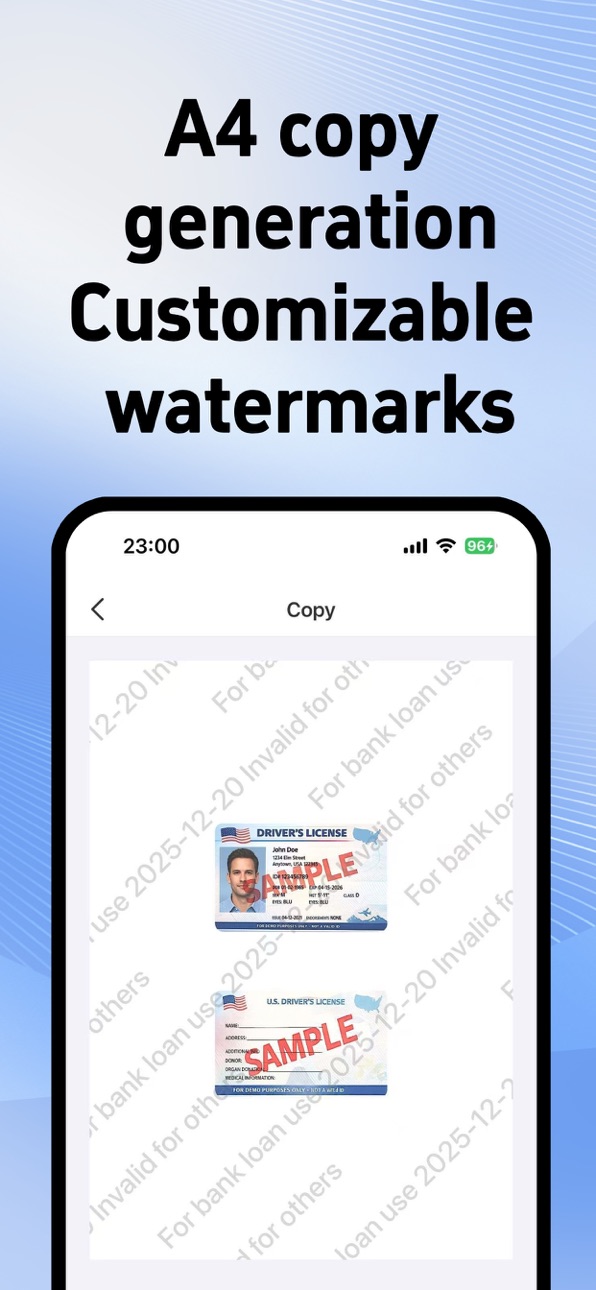
Watermark Protection
· Add customizable watermarks to help prevent document misuse.
Copy Creation
· Generate standard-size document copies with one tap.
Security Protection
· Face ID and Touch ID encryption.
· All data is stored locally on your device.
【PRIVACY PROTECTION】
· 100% on-device processing with no document uploads.
· Biometric protection is supported.
· You have full control over your data at all times.
【PREMIUM FEATURES】
· Remove watermarks.
· Tiled watermark effects.
· Advanced image processing options.
· OCR, batch scanning, and collage mode.
· Continuous feature updates.
【PRIVACY & TERMS】
Privacy Policy:
https://mark-pen.github.io/idscan-privacy/privacy_cardscan_en.html
Terms of Service:
https://mark-pen.github.io/idscan-privacy/support_cardscan_en.html
In-App Purchases US pricing
CardScan – Membership Subscription Subscription
Monthly Subscription · Monthly$3.99
Yearly Subscription · Yearly$9.99
One-Time Purchases
Lifetime Premium Access$9.99
Lifetime Membership$12.99
Capabilities
In-App Purchases
Accessibility
ipadiphonemacrealityDevicetvoswatch
Version history 25 versions
Build 886290724v1.8.32026-05-30 02:56:44
Experience Optimization
Build 885970465v1.8.22026-05-23 10:23:37
Experience Optimization
Build 885916112v1.8.12026-05-20 20:24:20
Experience Optimization
Build 885756353v1.8.02026-05-18 05:38:40
What’s New:
1. Added list view on the home screen for clearer browsing
2. Added support for changing the theme color
3. Improved the overall user experience
Build 884854435v1.7.62026-04-24 03:33:58
UX Improvements
Build 884769799v1.7.52026-04-22 08:32:42
Performance Optimization
Build 884714515v1.7.42026-04-21 03:47:48
Performance Optimization
Build 884639429v1.7.32026-04-19 06:29:22
Share Feature Optimization
Build 884236334v1.7.22026-04-08 03:07:13
iOS26 visual update
Build 883292988v1.7.12026-03-31 11:44:07
Experience improvements.
Build 882813524v1.72026-02-27 06:29:20
What’s New in This Version:
1.New iCloud Backup: Supports static backups to iCloud, so you can restore with one tap after switching devices or reinstalling.
2.Improved Search: You can now search within ID/document details for faster, more accurate results.
3.Experience improvements.
Build 882338269v1.6.12026-02-14 10:18:50
1. Change other modes to Custom, allowing users to add and edit document tags
2. Add new sorting options
3. User experience improvements
Build 881589876v1.62026-01-18 04:38:15
1. New ID Photo Feature Released!
Supports multiple sizes with adjustable background colors and outfits
2. UI Improvements
3. Added Time Buffer for Security Authentication
4. Other Minor Improvements
Build 880800240v1.52026-01-02 14:22:49
• Added local backup and import support for data transfer between devices.
• Improved rotation behavior.
• Minor improvements and bug fixes.
Build 880483401v1.42025-12-10 07:52:24
Build 879972800v1.3.52025-11-22 04:10:00
Build 879949339v1.3.42025-11-20 22:14:08
Build 879768428v1.3.32025-11-14 19:54:38
Build 879740453v1.3.22025-11-13 20:32:31
Build 879709699v1.3.12025-11-12 16:32:48
Build 879648665v1.32025-11-10 23:06:41
Build 879622057v1.2.12025-11-09 23:32:36
Build 879610738v1.22025-11-08 23:42:33
Build 879553286v1.12025-11-07 02:10:58
Build 878913532v1.02025-11-05 07:35:24
Price history by region
Currency
Show
Columns
Search
Availability 1 of 1 storefronts
| Region | Language | Price | Ratings | Avg | Version |
|---|---|---|---|---|---|
| US | en-US | Free | 11 | 4.9 | 1.8.3 |
Change log 29 changes · US
✎
releaseNotes updated
Experience Optimization
✎
description updated
CardScan is a professional, privacy-first document scanning app that works fully offline.
It helps you securely scan, organize, and manage IDs and important doc
✎
subtitle updated
Offline ID & license storage
✎
name updated
CardScan: ID Scanner Wallet
◆
Version 1.8.3 released
Experience Optimization
◆
Version 1.8.2 released
Experience Optimization
◆
Version 1.8.1 released
Experience Optimization
◆
Version 1.8.0 released
What’s New:
1. Added list view on the home screen for clearer browsing
2. Added support for changing the theme color
3. Improved the overall user experience
◆
Version 1.7.6 released
UX Improvements
◆
Version 1.7.5 released
Performance Optimization
◆
Version 1.7.4 released
Performance Optimization
◆
Version 1.7.3 released
Share Feature Optimization
◆
Version 1.7.2 released
iOS26 visual update
◆
Version 1.7.1 released
Experience improvements.
◆
Version 1.7 released
What’s New in This Version:
1.New iCloud Backup: Supports static backups to iCloud, so you can restore with one tap after switching devices or reinstalling.
2.Improved Search: You can now search within ID/document details for faster, more a
◆
Version 1.6.1 released
1. Change other modes to Custom, allowing users to add and edit document tags
2. Add new sorting options
3. User experience improvements
◆
Version 1.6 released
1. New ID Photo Feature Released!
Supports multiple sizes with adjustable background colors and outfits
2. UI Improvements
3. Added Time Buffer for Security Authentication
4. Other Minor Improvements
◆
Version 1.5 released
• Added local backup and import support for data transfer between devices.
• Improved rotation behavior.
• Minor improvements and bug fixes.
◆
Version 1.4 released
◆
Version 1.3.5 released
◆
Version 1.3.4 released
◆
Version 1.3.3 released
◆
Version 1.3.2 released
◆
Version 1.3.1 released
◆
Version 1.3 released
◆
Version 1.2.1 released
◆
Version 1.2 released
◆
Version 1.1 released
◆
Version 1.0 released