Home › Music

 PY
PY
 USen-US
 CAen-CA
 NLnl
NLnl NZen-AU
 AEen-GB
 AFen-GB
 AGen-GB
 AIen-GB
 ALen-GB
 AMen-GB
 AOen-GB
 ARes-MX
 ATde-DE
 AUen-AU
 AZen-GB
 BAen-GB
 BBen-GB
 BEen-GB
 BFen-GB
 BGen-GB
 BHen-GB
 BJen-GB
 BMen-GB
 BNen-GB
 BOes-MX
 BRpt-BR
 BSen-GB
 BTen-GB
 BWen-GB
 BYen-GB
 BZen-GB
 CDen-GB
 CGen-GB
 CHde-CH
 CIfr-FR
 CLes-MX
 CMfr-FR
 CNzh-Hans-CN
 COes-MX
 CRes-MX
 CVen-GB
 CYen-GB
 CZen-GB
 DEde-DE
 DKen-GB
 DMen-GB
 DOes-MX
 DZen-GB
 ECes-MX
 EEen-GB
 EGen-GB
 ESes-ES
 FIen-GB
 FJen-GB
 FMen-GB
 FRfr-FR
 GAfr-FR
 GBen-GB
 GDen-GB
 GEen-GB
 GHen-GB
 GMen-GB
 GRen-GB
 GTes-MX
 GWen-GB
 GYen-GB
 HKzh-Hant-HK
 HNes-MX
 HRen-GB
 HUen-GB
 IDen-GB
 IEen-GB
 ILen-GB
 INen-GB
 IQen-GB
 ISen-GB
 ITit
ITit JMen-GB
 JOen-GB
 JPja
JPja KEen-GB
 KGen-GB
 KHen-GB
 KNen-GB
 KRko
KRko KWen-GB
 KYen-GB
 KZen-GB
 LAen-GB
 LBen-GB
 LCen-GB
 LKen-GB
 LRen-GB
 LTen-GB
 LUen-GB
 LVen-GB
 LYen-GB
 MAen-GB
 MDen-GB
 MEen-GB
 MGen-GB
 MKen-GB
 MLen-GB
 MMen-GB
 MNen-GB
 MOzh-Hant-HK
 MRen-GB
 MSen-GB
 MTen-GB
 MUen-GB
 MVen-GB
 MWen-GB
 MXes-MX
 MYen-GB
 MZen-GB
 NAen-GB
 NEen-GB
 NGen-GB
 NIes-MX
 NOen-GB
 NPen-GB
 NRen-GB
 OMen-GB
 PAes-MX
 PEes-MX
 PGen-GB
 PHen-GB
 PKen-GB
 PLen-GB
 PTpt-PT
 PWen-GBPYes-MX
 QAen-GB
 ROen-GB
 RSen-GB
 RUru
RUru RWen-GB
 SAen-GB
 SBen-GB
 SCen-GB
 SEsv
SEsv SGen-GB
 SIen-GB
 SKen-GB
 SLen-GB
 SNen-GB
 SRen-GB
 STen-GB
 SVes-MX
 SZen-GB
 TCen-GB
 TDen-GB
 THen-GB
 TJen-GB
 TMen-GB
 TNen-GB
 TOen-GB
 TRen-GB
 TTen-GB
 TWzh-Hant-TW
 TZen-GB
 UAen-GB
 UGen-GB
 UYen-GB
 UZen-GB
 VCen-GB
 VEes-MX
 VGen-GB
 VNen-GB
 VUen-GB
 XKen-GB
 YEen-GB
 ZAen-GB
 ZMen-GB
 ZWen-GB
175 of 175 storefronts
Content in en-US
Content in en-US
Information
Preview 2 platforms
iPhone 7 images



iPad 5 images


What’s New Version 1.9.1
v1.9.1 Patch release
- Fixed issue where default font selector wouldn't display on some devices
- GigScroll can now open .cho (ChordPro) files via share sheet etc.
- Create and read chord charts from new app group for upcoming companion practice app TBA
v1.9.0 — Big update for chord-playing musicians, plus a few quality-of-life wins.
CHORDPRO LYRIC FORMATTING (NEW)
- Add chord names with [Am][G][C] brackets and they render above the right syllable - just like a real chord sheet
- Section directives ({soc} chorus, {sov} verse, {sob} bridge, plus pre-chorus, intro, outro, solo, and custom sections) render as muted small-caps headers above each block
- New "Show Section Headers" toggle in Settings (default ON)
- New "Highlight Chorus" toggle in Settings (default OFF) tints chorus body text with your theme's chorus color: pastel blue in Light, warm amber in Dark, pastel green in Stage, muted teal in Cream
- Performance comments ({c: kick in band}, {c: softer here}) render in muted italic for stage cues
- Capo and key info displayed as a subtle badge below the song title
- Plain-text songs render exactly as before - ChordPro is opt-in per song, no migration needed
TRANSPOSITION (NEW)
- Transpose pill in the Performance control panel, next to the Speed pill
- Tap to open a stable sheet with - and + buttons, an editable numeric field (numeric keyboard for direct entry), Reset, and Choose Key…
- Proper enharmonic spelling based on the destination key's signature (C transposed up one semitone becomes Db in flat keys, C# in sharp keys)
- Slash chords (G/B, F/A) transposed correctly
- Your transposition is saved per song
EDITOR TOOLBAR
- New "ChordPro" button on the keyboard toolbar with a menu of insert actions: Chord, Comment, Section ▸ (Chorus/Pre-Chorus/Verse/Bridge/Intro/Outro/Solo/Custom), Set Song Key, Set Capo Position
- Section actions wrap your text selection or insert empty markers at the cursor
- Set Key / Set Capo insert (or replace) the directive at the top of the lyrics and scroll the editor back to top so you can see what changed
- No syntax to memorize - every directive is one tap behind a clear menu
OTHER PERFORMANCE IMPROVEMENTS
- Per-song play buttons on each setlist row - start the setlist on any song (perfect when an interruption mid-set means you need to resume on song 7)
- Drag the lyrics to reposition mid-song without tapping first, even when controls are auto-hidden
- New Left-Align Lyrics setting under Performance Defaults (default OFF, preserves the existing center alignment)
- Sample songs converted to ChordPro so new users can see the new section header and chorus highlight features immediately
UNDER THE HOOD
- Parser now tolerates Windows-style (CRLF) and old-Mac-style (CR) line endings - useful when pasting lyrics from external sources
- Trailing chord placements (like [F][C] at the end of a line) no longer overlap
- ChordPro renderer uses NSLayoutManager glyph positioning - chords stay aligned across font and size changes, rotation, and any Unicode content
- Core Data lightweight migration for the new transposeOffset field; existing songs and setlists are unchanged
Found a bug or have a feature request? Email me via the settings support feature - I read every message.
Description
Forget fumbling with paper lyrics on stage. GigScroll is the hands-free lyric teleprompter designed for live performers, worship leaders, and gigging musicians who need their lyrics to flow as smoothly as their performance.
WHAT MAKES GIGSCROLL DIFFERENT
• INSTANT LYRIC SEARCH - Find any song from millions of tracks and save lyrics in seconds. No manual typing. No copying and pasting.
• TRUE AUTO-SCROLL - Set your tempo and let GigScroll do the work. Adjustable speed controls keep lyrics flowing at the perfect pace.
• CHORDS ABOVE LYRICS (NEW) - Add chord names with simple [Am][G][C] brackets and they render above the right syllable - the way real chord sheets look. Color-coded section labels (CHORUS, VERSE, BRIDGE) make navigation effortless mid-song.
• PER-SONG TRANSPOSITION (NEW) - Shift every chord up or down in real time with proper enharmonic spelling. Your choice is saved per song.
• VIDEO RECORDING - Record video with the iOS camera while seeing the lyric teleprompter during performance.
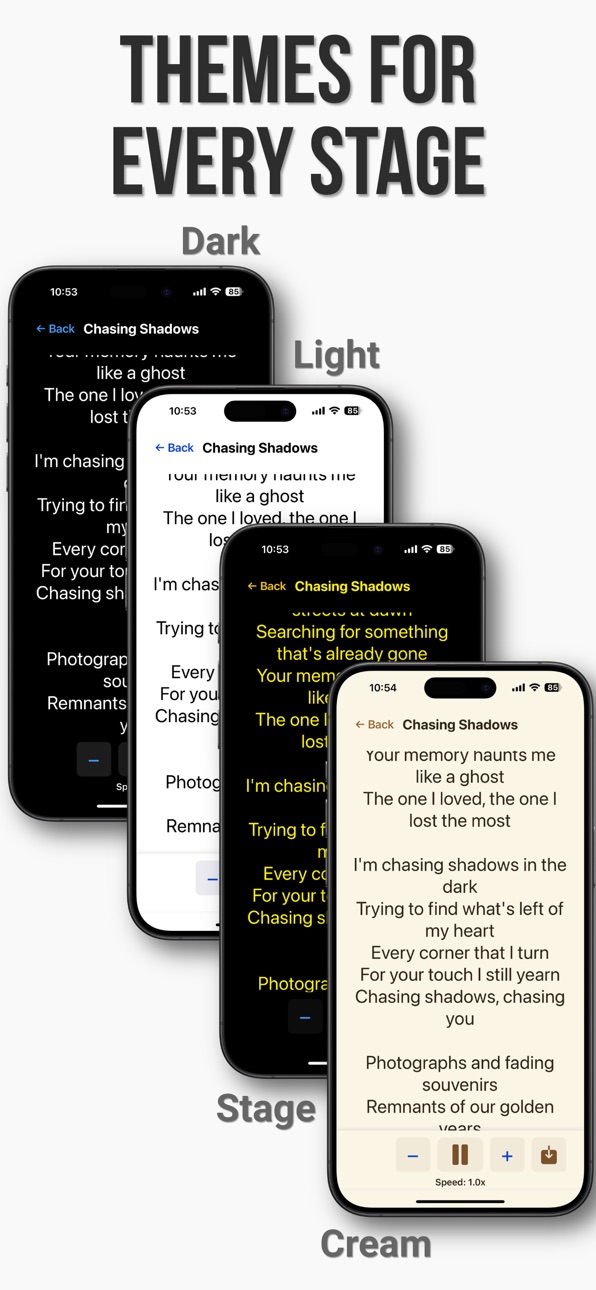
• STAGE-READY THEMES - High-contrast Stage Mode cuts through stage lights. Plus Cream, Dark, and Light themes for any lighting condition.
• PROFESSIONAL SETLIST MANAGEMENT - Organize songs by gig or venue. Navigate between songs with one tap. Per-song play buttons let you start the setlist on any song.
• BLUETOOTH FOOT PEDAL SUPPORT - Connect any Bluetooth remote pedal to control scrolling, change speed, and move between songs - hands free.
• BACKUP & SHARING - Export your library or share individual setlists with bandmates.
FEATURES MUSICIANS LOVE
ChordPro Formatting (Optional, Opt-In Per Song)
→ Industry-standard ChordPro markup, edited via a tap-friendly menu - no syntax to memorize
→ Inline chord brackets render above the lyric syllable they belong to
→ Section directives shown as muted small-caps headers
→ Per-theme chorus highlighting (toggle on in Settings)
→ Performance comments ({c: kick in band}) shown in muted italic
→ Plain-text songs still work exactly as before
Transposition
→ Semitone +/− buttons, editable numeric field, and key picker
→ Enharmonic spelling follows the destination key signature
→ Slash chords (G/B) transposed correctly
→ Capo and key info shown as badges in Performance
Performance Mode
→ Drag the lyrics to reposition mid-song without tapping first, even when controls are auto-hidden
→ Large text, adjustable per-song font sizes
→ Auto-scroll with +/- speed controls; save custom speeds per song
→ Left-align or center-align lyrics (Settings)
→ Foot pedal control for hands-free operation
Setlist Organization
→ Unlimited setlists, drag-and-drop song ordering
→ Per-song play buttons (no more tapping Next ten times when something interrupts your set)
→ Song position tracking, one-tap song navigation
Customization & Data
→ 4 themes (Light, Dark, Stage, Cream); 5 font choices
→ Export/import .gigscroll backup files
→ Share setlists with band members
→ All data stays on your device - full privacy
PERFECT FOR
• Live Performers - Eyes on the audience, not on paper
• Worship Leaders - Lead with lyrics and chords flowing at your pace
• Cover Bands - Organized setlists per venue; transpose to any singer's range
• Solo Artists & Songwriters - Never miss a lyric; record performances in-app
• Guitar / Piano Players - Real ChordPro with chord-above-lyric rendering
• Content Creators - Lyrics or video script on screen while you record
DESIGNED FOR PERFORMERS
GigScroll was built by musicians, for musicians. Every feature serves one purpose: helping you deliver flawless performances without the distraction of managing paper lyrics or fumbling with complicated apps.
GET STARTED IN SECONDS
1. Search for a song
2. Tap to save the lyrics
3. (Optional) Add chord brackets and section markers via the editor's ChordPro menu
4. Create a setlist
5. Hit play and perform
Download GigScroll and transform how you perform live.
In-App Purchases PY pricing
One-Time Purchases
GigScroll Pro—
Capabilities
In-App Purchases
Accessibility
ipadiphonemacrealityDevicetvoswatch
Version history 11 versions
Build 887541818v1.9.12026-06-28 16:56:26
v1.9.1 Patch release
- Fixed issue where default font selector wouldn't display on some devices
- GigScroll can now open .cho (ChordPro) files via share sheet etc.
- Create and read chord charts from new app group for upcoming companion practice app TBA
v1.9.0 — Big update for chord-playing musicians, plus a few quality-of-life wins.
CHORDPRO LYRIC FORMATTING (NEW)
- Add chord names with [Am][G][C] brackets and they render above the right syllable - just like a real chord sheet
- Section directives ({soc} chorus, {sov} verse, {sob} bridge, plus pre-chorus, intro, outro, solo, and custom sections) render as muted small-caps headers above each block
- New "Show Section Headers" toggle in Settings (default ON)
- New "Highlight Chorus" toggle in Settings (default OFF) tints chorus body text with your theme's chorus color: pastel blue in Light, warm amber in Dark, pastel green in Stage, muted teal in Cream
- Performance comments ({c: kick in band}, {c: softer here}) render in muted italic for stage cues
- Capo and key info displayed as a subtle badge below the song title
- Plain-text songs render exactly as before - ChordPro is opt-in per song, no migration needed
TRANSPOSITION (NEW)
- Transpose pill in the Performance control panel, next to the Speed pill
- Tap to open a stable sheet with - and + buttons, an editable numeric field (numeric keyboard for direct entry), Reset, and Choose Key…
- Proper enharmonic spelling based on the destination key's signature (C transposed up one semitone becomes Db in flat keys, C# in sharp keys)
- Slash chords (G/B, F/A) transposed correctly
- Your transposition is saved per song
EDITOR TOOLBAR
- New "ChordPro" button on the keyboard toolbar with a menu of insert actions: Chord, Comment, Section ▸ (Chorus/Pre-Chorus/Verse/Bridge/Intro/Outro/Solo/Custom), Set Song Key, Set Capo Position
- Section actions wrap your text selection or insert empty markers at the cursor
- Set Key / Set Capo insert (or replace) the directive at the top of the lyrics and scroll the editor back to top so you can see what changed
- No syntax to memorize - every directive is one tap behind a clear menu
OTHER PERFORMANCE IMPROVEMENTS
- Per-song play buttons on each setlist row - start the setlist on any song (perfect when an interruption mid-set means you need to resume on song 7)
- Drag the lyrics to reposition mid-song without tapping first, even when controls are auto-hidden
- New Left-Align Lyrics setting under Performance Defaults (default OFF, preserves the existing center alignment)
- Sample songs converted to ChordPro so new users can see the new section header and chorus highlight features immediately
UNDER THE HOOD
- Parser now tolerates Windows-style (CRLF) and old-Mac-style (CR) line endings - useful when pasting lyrics from external sources
- Trailing chord placements (like [F][C] at the end of a line) no longer overlap
- ChordPro renderer uses NSLayoutManager glyph positioning - chords stay aligned across font and size changes, rotation, and any Unicode content
- Core Data lightweight migration for the new transposeOffset field; existing songs and setlists are unchanged
Found a bug or have a feature request? Email me via the settings support feature - I read every message.
Build 886657954v1.9.02026-06-10 15:12:03
v1.9.0 — Big update for chord-playing musicians, plus a few quality-of-life wins.
CHORDPRO LYRIC FORMATTING (NEW)
- Add chord names with [Am][G][C] brackets and they render above the right syllable - just like a real chord sheet
- Section directives ({soc} chorus, {sov} verse, {sob} bridge, plus pre-chorus, intro, outro, solo, and custom sections) render as muted small-caps headers above each block
- New "Show Section Headers" toggle in Settings (default ON)
- New "Highlight Chorus" toggle in Settings (default OFF) tints chorus body text with your theme's chorus color: pastel blue in Light, warm amber in Dark, pastel green in Stage, muted teal in Cream
- Performance comments ({c: kick in band}, {c: softer here}) render in muted italic for stage cues
- Capo and key info displayed as a subtle badge below the song title
- Plain-text songs render exactly as before - ChordPro is opt-in per song, no migration needed
TRANSPOSITION (NEW)
- Transpose pill in the Performance control panel, next to the Speed pill
- Tap to open a stable sheet with - and + buttons, an editable numeric field (numeric keyboard for direct entry), Reset, and Choose Key…
- Proper enharmonic spelling based on the destination key's signature (C transposed up one semitone becomes Db in flat keys, C# in sharp keys)
- Slash chords (G/B, F/A) transposed correctly
- Your transposition is saved per song
EDITOR TOOLBAR
- New "ChordPro" button on the keyboard toolbar with a menu of insert actions: Chord, Comment, Section ▸ (Chorus/Pre-Chorus/Verse/Bridge/Intro/Outro/Solo/Custom), Set Song Key, Set Capo Position
- Section actions wrap your text selection or insert empty markers at the cursor
- Set Key / Set Capo insert (or replace) the directive at the top of the lyrics and scroll the editor back to top so you can see what changed
- No syntax to memorize - every directive is one tap behind a clear menu
OTHER PERFORMANCE IMPROVEMENTS
- Per-song play buttons on each setlist row - start the setlist on any song (perfect when an interruption mid-set means you need to resume on song 7)
- Drag the lyrics to reposition mid-song without tapping first, even when controls are auto-hidden
- New Left-Align Lyrics setting under Performance Defaults (default OFF, preserves the existing center alignment)
- Sample songs converted to ChordPro so new users can see the new section header and chorus highlight features immediately
UNDER THE HOOD
- Parser now tolerates Windows-style (CRLF) and old-Mac-style (CR) line endings - useful when pasting lyrics from external sources
- Trailing chord placements (like [F][C] at the end of a line) no longer overlap
- ChordPro renderer uses NSLayoutManager glyph positioning - chords stay aligned across font and size changes, rotation, and any Unicode content
- Core Data lightweight migration for the new transposeOffset field; existing songs and setlists are unchanged
Found a bug or have a feature request? Email me via the settings support feature - I read every message.
Build 883770978v1.8.12026-03-26 23:09:54
- Remove end of song pop-up in setlist performance view
- Fix issue where font size and scroll speed jog wheels took up entire screen in landscape mode in lyric edit view.
Build 883024387v1.8.02026-03-04 21:22:36
BLUETOOTH REMOTE PEDAL SUPPORT
- Connect to any bluetooth remote pedal / page turner / foot controller
- Control teleprompter scrolling start/stop, increase or decrease scrolling speed, and change to next/previous set list song
- Map any control to any remote button — just tap the Gigscroll control in the controller mapping settings and then tap the foot controller button and it's instantly mapped
Build 882372565v1.7.02026-02-12 21:36:55
What's New
- Silky-smooth 60fps scrolling — no more jitter or stutter
- Controls auto-hide during playback so you can focus on the lyrics
- Improved landscape mode with compact controls
- Camera preview fixes for all orientationsGIGSCROLL - THE TELEPROMPTER FOR MUSICIANS
Build 881816869v1.62026-01-26 06:31:23
What's New in Version 1.6
Redesigned Song Edit View
- Cleaner, more modern layout with controls at the top
- Tap the song title to edit title and artist in a popup
- Speed and font size controls now open jog wheel pickers
- New keyboard dismiss button for easier editing
- More space for lyrics editing
New Default Scroll Speed Setting
- Set your preferred scroll speed for new songs in Settings
- No more adjusting speed for every new song
Rebuilt Video Recording Engine
- Completely rewritten recording system for rock-solid reliability
- Audio and video now guaranteed to stay in sync
- No more blank videos or missing audio
- Smoother 4K recording on supported devices
- Faster recording startup with no dropped frames
- Video recording now off by default (enable in Settings if needed)
iOS 26 Improvements
- Updated layouts for the new iOS design
- Better setlist detail view
- Improved tab bar compatibility
Other Improvements
- Scroll speed picker uses a more comfortable sheet size on iPhone
- Various bug fixes and stability improvements
Build 881713538v1.52026-01-22 00:21:13
Improved search results
- Lyrics from primary source are fetched much quicker
- Lyrics that are available from new lyric source show icon indicating such in the search result.
Build 881547164v1.42026-01-19 22:55:32
New Features
Audio Input Selection
- Choose your microphone source when recording video (built-in mic, USB audio interface, Bluetooth headset)
- Your preferred audio input is remembered between sessions
New Additional Lyrics Source to Power Search
- Search for song lyrics online directly in the app
- Automatic device registration with secure API
Improved Lens Selection
- Smooth lens switching on rear camera (0.5x, 1x, 2x, 3x, 5x depending on device)
- Lens buttons now overlay the video preview with liquid glass styling
- Correct lens automatically selected when switching cameras
Camera Focus
- Tap anywhere on the video preview to set focus and exposure point
- Improved auto-focus on rear cameras
Bug Fixes & Stability
Crash Fixes
- Fixed crashes when quickly swiping through search results
- Fixed crashes when adding songs to set lists under certain conditions
- Improved stability with CoreData operations
Audio Recording Reliability
- Fixed intermittent issue where videos would record without audio
- Fixed audio recording with USB audio interfaces
- Fixed audio issues when HDMI monitors are connected
UI Improvements
- Camera preview now opens expanded by default
- Added loading indicator when camera is starting up
- Recording timer now correctly shows in maximized view
- Added hour support for long recordings
- Fixed various button layout issues
- Added "Beta" label to video recording in Settings
Build 879314695v1.32025-10-29 19:19:15
- Added back button in set list detail view
- Moved edit and delete buttons to secondary tool bar in set list list view
- Added ability to rename setlist after creating it
Build 879249172v1.22025-10-28 06:41:09
Added link to an online User Guide
Build 878859371v1.02025-10-21 15:08:10
Price history by region
Currency
Show
Columns
Search
Availability 175 of 175 storefronts
| Region | Language | Price | Ratings | Avg | Version |
|---|---|---|---|---|---|
| US | en-US | Free | 2 | 5.0 | 1.9.1 |
| CA | en-CA | Free | 1 | 5.0 | 1.9.1 |
| NL | nl | Free | 1 | 5.0 | 1.9.1 |
| NZ | en-AU | Free | 1 | 4.0 | 1.9.1 |
| AE | en-GB | Free | 0 | — | 1.9.1 |
| AF | en-GB | Free | 0 | — | 1.9.1 |
| AG | en-GB | Free | 0 | — | 1.9.1 |
| AI | en-GB | Free | 0 | — | 1.9.1 |
| AL | en-GB | Free | 0 | — | 1.9.1 |
| AM | en-GB | Free | 0 | — | 1.9.1 |
| AO | en-GB | Free | 0 | — | 1.9.1 |
| AR | es-MX | Free | 0 | — | 1.9.1 |
| AT | de-DE | Free | 0 | — | 1.9.1 |
| AU | en-AU | Free | 0 | — | 1.9.1 |
| AZ | en-GB | Free | 0 | — | 1.9.1 |
| BA | en-GB | Free | 0 | — | 1.9.1 |
| BB | en-GB | Free | 0 | — | 1.9.1 |
| BE | en-GB | Free | 0 | — | 1.9.1 |
| BF | en-GB | Free | 0 | — | 1.9.1 |
| BG | en-GB | Free | 0 | — | 1.9.1 |
| BH | en-GB | Free | 0 | — | 1.9.1 |
| BJ | en-GB | Free | 0 | — | 1.9.1 |
| BM | en-GB | Free | 0 | — | 1.9.1 |
| BN | en-GB | Free | 0 | — | 1.9.1 |
| BO | es-MX | Free | 0 | — | 1.9.1 |
| BR | pt-BR | Free | 0 | — | 1.9.1 |
| BS | en-GB | Free | 0 | — | 1.9.1 |
| BT | en-GB | Free | 0 | — | 1.9.1 |
| BW | en-GB | Free | 0 | — | 1.9.1 |
| BY | en-GB | Free | 0 | — | 1.9.1 |
| BZ | en-GB | Free | 0 | — | 1.9.1 |
| CD | en-GB | Free | 0 | — | 1.9.1 |
| CG | en-GB | Free | 0 | — | 1.9.1 |
| CH | de-CH | Free | 0 | — | 1.9.1 |
| CI | fr-FR | Free | 0 | — | 1.9.1 |
| CL | es-MX | Free | 0 | — | 1.9.1 |
| CM | fr-FR | Free | 0 | — | 1.9.1 |
| CN | zh-Hans-CN | Free | 0 | — | 1.9.1 |
| CO | es-MX | Free | 0 | — | 1.9.1 |
| CR | es-MX | Free | 0 | — | 1.9.1 |
| CV | en-GB | Free | 0 | — | 1.9.1 |
| CY | en-GB | Free | 0 | — | 1.9.1 |
| CZ | en-GB | Free | 0 | — | 1.9.1 |
| DE | de-DE | Free | 0 | — | 1.9.1 |
| DK | en-GB | Free | 0 | — | 1.9.1 |
| DM | en-GB | Free | 0 | — | 1.9.1 |
| DO | es-MX | Free | 0 | — | 1.9.1 |
| DZ | en-GB | Free | 0 | — | 1.9.1 |
| EC | es-MX | Free | 0 | — | 1.9.1 |
| EE | en-GB | Free | 0 | — | 1.9.1 |
| EG | en-GB | Free | 0 | — | 1.9.1 |
| ES | es-ES | Free | 0 | — | 1.9.1 |
| FI | en-GB | Free | 0 | — | 1.9.1 |
| FJ | en-GB | Free | 0 | — | 1.9.1 |
| FM | en-GB | Free | 0 | — | 1.9.1 |
| FR | fr-FR | Free | 0 | — | 1.9.1 |
| GA | fr-FR | Free | 0 | — | 1.9.1 |
| GB | en-GB | Free | 0 | — | 1.9.1 |
| GD | en-GB | Free | 0 | — | 1.9.1 |
| GE | en-GB | Free | 0 | — | 1.9.1 |
| GH | en-GB | Free | 0 | — | 1.9.1 |
| GM | en-GB | Free | 0 | — | 1.9.1 |
| GR | en-GB | Free | 0 | — | 1.9.1 |
| GT | es-MX | Free | 0 | — | 1.9.1 |
| GW | en-GB | Free | 0 | — | 1.9.1 |
| GY | en-GB | Free | 0 | — | 1.9.1 |
| HK | zh-Hant-HK | Free | 0 | — | 1.9.1 |
| HN | es-MX | Free | 0 | — | 1.9.1 |
| HR | en-GB | Free | 0 | — | 1.9.1 |
| HU | en-GB | Free | 0 | — | 1.9.1 |
| ID | en-GB | Free | 0 | — | 1.9.1 |
| IE | en-GB | Free | 0 | — | 1.9.1 |
| IL | en-GB | Free | 0 | — | 1.9.1 |
| IN | en-GB | Free | 0 | — | 1.9.1 |
| IQ | en-GB | Free | 0 | — | 1.9.1 |
| IS | en-GB | Free | 0 | — | 1.9.1 |
| IT | it | Free | 0 | — | 1.9.1 |
| JM | en-GB | Free | 0 | — | 1.9.1 |
| JO | en-GB | Free | 0 | — | 1.9.1 |
| JP | ja | Free | 0 | — | 1.9.1 |
| KE | en-GB | Free | 0 | — | 1.9.1 |
| KG | en-GB | Free | 0 | — | 1.9.1 |
| KH | en-GB | Free | 0 | — | 1.9.1 |
| KN | en-GB | Free | 0 | — | 1.9.1 |
| KR | ko | Free | 0 | — | 1.9.1 |
| KW | en-GB | Free | 0 | — | 1.9.1 |
| KY | en-GB | Free | 0 | — | 1.9.1 |
| KZ | en-GB | Free | 0 | — | 1.9.1 |
| LA | en-GB | Free | 0 | — | 1.9.1 |
| LB | en-GB | Free | 0 | — | 1.9.1 |
| LC | en-GB | Free | 0 | — | 1.9.1 |
| LK | en-GB | Free | 0 | — | 1.9.1 |
| LR | en-GB | Free | 0 | — | 1.9.1 |
| LT | en-GB | Free | 0 | — | 1.9.1 |
| LU | en-GB | Free | 0 | — | 1.9.1 |
| LV | en-GB | Free | 0 | — | 1.9.1 |
| LY | en-GB | Free | 0 | — | 1.9.1 |
| MA | en-GB | Free | 0 | — | 1.9.1 |
| MD | en-GB | Free | 0 | — | 1.9.1 |
| ME | en-GB | Free | 0 | — | 1.9.1 |
| MG | en-GB | Free | 0 | — | 1.9.1 |
| MK | en-GB | Free | 0 | — | 1.9.1 |
| ML | en-GB | Free | 0 | — | 1.9.1 |
| MM | en-GB | Free | 0 | — | 1.9.1 |
| MN | en-GB | Free | 0 | — | 1.9.1 |
| MO | zh-Hant-HK | Free | 0 | — | 1.9.1 |
| MR | en-GB | Free | 0 | — | 1.9.1 |
| MS | en-GB | Free | 0 | — | 1.9.1 |
| MT | en-GB | Free | 0 | — | 1.9.1 |
| MU | en-GB | Free | 0 | — | 1.9.1 |
| MV | en-GB | Free | 0 | — | 1.9.1 |
| MW | en-GB | Free | 0 | — | 1.9.1 |
| MX | es-MX | Free | 0 | — | 1.9.1 |
| MY | en-GB | Free | 0 | — | 1.9.1 |
| MZ | en-GB | Free | 0 | — | 1.9.1 |
| NA | en-GB | Free | 0 | — | 1.9.1 |
| NE | en-GB | Free | 0 | — | 1.9.1 |
| NG | en-GB | Free | 0 | — | 1.9.1 |
| NI | es-MX | Free | 0 | — | 1.9.1 |
| NO | en-GB | Free | 0 | — | 1.9.1 |
| NP | en-GB | Free | 0 | — | 1.9.1 |
| NR | en-GB | Free | 0 | — | 1.9.1 |
| OM | en-GB | Free | 0 | — | 1.9.1 |
| PA | es-MX | Free | 0 | — | 1.9.1 |
| PE | es-MX | Free | 0 | — | 1.9.1 |
| PG | en-GB | Free | 0 | — | 1.9.1 |
| PH | en-GB | Free | 0 | — | 1.9.1 |
| PK | en-GB | Free | 0 | — | 1.9.1 |
| PL | en-GB | Free | 0 | — | 1.9.1 |
| PT | pt-PT | Free | 0 | — | 1.9.1 |
| PW | en-GB | Free | 0 | — | 1.9.1 |
| PY | es-MX | Free | 0 | — | 1.9.1 |
| QA | en-GB | Free | 0 | — | 1.9.1 |
| RO | en-GB | Free | 0 | — | 1.9.1 |
| RS | en-GB | Free | 0 | — | 1.9.1 |
| RU | ru | Free | 0 | — | 1.9.1 |
| RW | en-GB | Free | 0 | — | 1.9.1 |
| SA | en-GB | Free | 0 | — | 1.9.1 |
| SB | en-GB | Free | 0 | — | 1.9.1 |
| SC | en-GB | Free | 0 | — | 1.9.1 |
| SE | sv | Free | 0 | — | 1.9.1 |
| SG | en-GB | Free | 0 | — | 1.9.1 |
| SI | en-GB | Free | 0 | — | 1.9.1 |
| SK | en-GB | Free | 0 | — | 1.9.1 |
| SL | en-GB | Free | 0 | — | 1.9.1 |
| SN | en-GB | Free | 0 | — | 1.9.1 |
| SR | en-GB | Free | 0 | — | 1.9.1 |
| ST | en-GB | Free | 0 | — | 1.9.1 |
| SV | es-MX | Free | 0 | — | 1.9.1 |
| SZ | en-GB | Free | 0 | — | 1.9.1 |
| TC | en-GB | Free | 0 | — | 1.9.1 |
| TD | en-GB | Free | 0 | — | 1.9.1 |
| TH | en-GB | Free | 0 | — | 1.9.1 |
| TJ | en-GB | Free | 0 | — | 1.9.1 |
| TM | en-GB | Free | 0 | — | 1.9.1 |
| TN | en-GB | Free | 0 | — | 1.9.1 |
| TO | en-GB | Free | 0 | — | 1.9.1 |
| TR | en-GB | Free | 0 | — | 1.9.1 |
| TT | en-GB | Free | 0 | — | 1.9.1 |
| TW | zh-Hant-TW | Free | 0 | — | 1.9.1 |
| TZ | en-GB | Free | 0 | — | 1.9.1 |
| UA | en-GB | Free | 0 | — | 1.9.1 |
| UG | en-GB | Free | 0 | — | 1.9.1 |
| UY | en-GB | Free | 0 | — | 1.9.1 |
| UZ | en-GB | Free | 0 | — | 1.9.1 |
| VC | en-GB | Free | 0 | — | 1.9.1 |
| VE | es-MX | Free | 0 | — | 1.9.1 |
| VG | en-GB | Free | 0 | — | 1.9.1 |
| VN | en-GB | Free | 0 | — | 1.9.1 |
| VU | en-GB | Free | 0 | — | 1.9.1 |
| XK | en-GB | Free | 0 | — | 1.9.1 |
| YE | en-GB | Free | 0 | — | 1.9.1 |
| ZA | en-GB | Free | 0 | — | 1.9.1 |
| ZM | en-GB | Free | 0 | — | 1.9.1 |
| ZW | en-GB | Free | 0 | — | 1.9.1 |
Change log 15 changes · PY
✎
releaseNotes updated
v1.9.1 Patch release
- Fixed issue where default font selector wouldn't display on some devices
- GigScroll can now open .cho (ChordPro) files via share sheet e
✎
description updated
Forget fumbling with paper lyrics on stage. GigScroll is the hands-free lyric teleprompter designed for live performers, worship leaders, and gigging musicians
✎
subtitle updated
Teleprompter for musicians
✎
name updated
GigScroll
◆
Version 1.9.1 released
v1.9.1 Patch release
- Fixed issue where default font selector wouldn't display on some devices
- GigScroll can now open .cho (ChordPro) files via share sheet etc.
- Create and read chord charts from new app group for upcoming companion pr
◆
Version 1.9.0 released
v1.9.0 — Big update for chord-playing musicians, plus a few quality-of-life wins.
CHORDPRO LYRIC FORMATTING (NEW)
- Add chord names with [Am][G][C] brackets and they render above the right syllable - just like a real chord sheet
- Section
◆
Version 1.8.1 released
- Remove end of song pop-up in setlist performance view
- Fix issue where font size and scroll speed jog wheels took up entire screen in landscape mode in lyric edit view.
◆
Version 1.8.0 released
BLUETOOTH REMOTE PEDAL SUPPORT
- Connect to any bluetooth remote pedal / page turner / foot controller
- Control teleprompter scrolling start/stop, increase or decrease scrolling speed, and change to next/previous set list song
- Map any
◆
Version 1.7.0 released
What's New
- Silky-smooth 60fps scrolling — no more jitter or stutter
- Controls auto-hide during playback so you can focus on the lyrics
- Improved landscape mode with compact controls
- Camera preview fixes for all orientations
◆
Version 1.6 released
What's New in Version 1.6
Redesigned Song Edit View
- Cleaner, more modern layout with controls at the top
- Tap the song title to edit title and artist in a popup
- Speed and font size controls now open jog wheel pickers
- New keyboard di
◆
Version 1.5 released
Improved search results
- Lyrics from primary source are fetched much quicker
- Lyrics that are available from new lyric source show icon indicating such in the search result.
◆
Version 1.4 released
New Features
Audio Input Selection
- Choose your microphone source when recording video (built-in mic, USB audio interface, Bluetooth headset)
- Your preferred audio input is remembered between sessions
New Additional Lyrics Source to Pow
◆
Version 1.3 released
- Added back button in set list detail view
- Moved edit and delete buttons to secondary tool bar in set list list view
- Added ability to rename setlist after creating it
◆
Version 1.2 released
Added link to an online User Guide
◆
Version 1.0 released