Home › Finance

Information
Apple ID6753129253
Bundle IDco.spnding.app
SellerSeller
Min iOS15.1
Min macOS12.0
Device familiesiphone, ipod
Released2025-10-21
Copyright© 2025 Adri Johari
Privacy policyLink ↗
Preview 1 platform
iPhone 6 images




What’s New Version 2.5
• Edit and delete guests from your guest list
• Added invoice number support for expenses
• Invoice numbers can now be automatically extracted from receipts
• Refreshed group avatar background colors for a cleaner look
• Minor improvements and bug fixes
Description
Spnding makes it easy to track shared and personal expenses in one place.
Scan receipts, organize spending by group, split costs with friends, and see who owes what, without messy notes or manual calculations.
Key Features:
• Scan Receipts Instantly
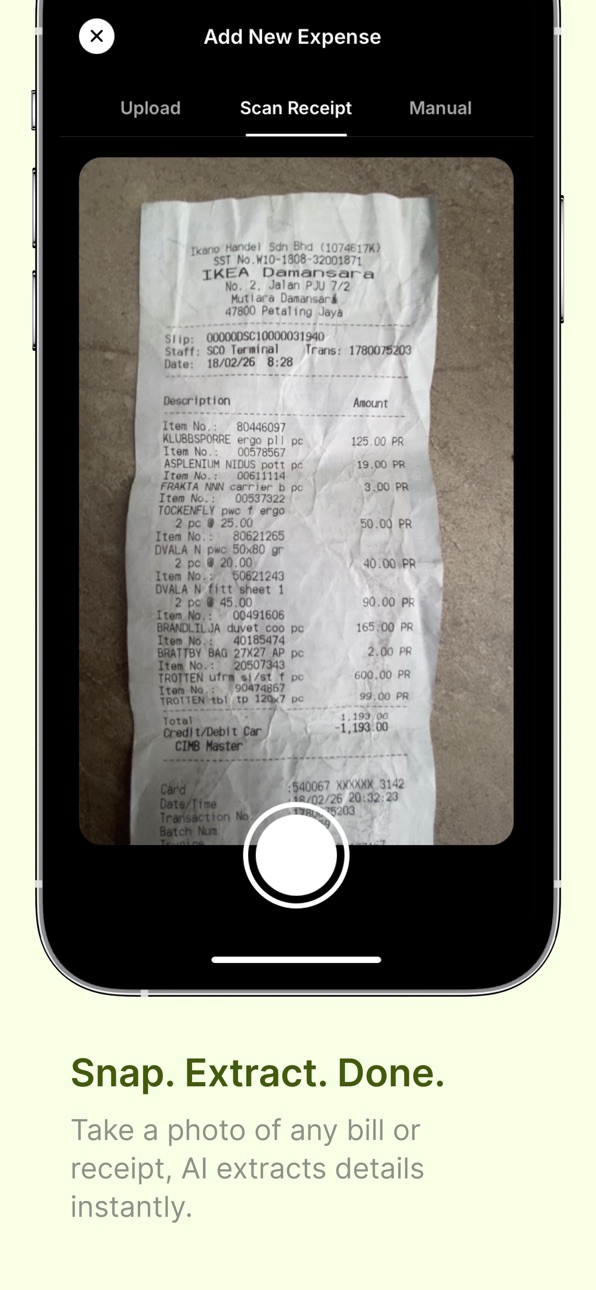
Snap a receipt or upload a screenshot, and AI will automatically extract items, prices, dates, totals, and currency.
• Track Shared & Personal Expenses
Create groups for trips, meals, sports, housemates, monthly spending, or any expense you want to organize.
• Know Who Owes What
Automatically calculate balances between members so everyone knows who paid and who owes whom.
• Assign Guest Expenses
Need to track someone who does not have an account? Assign expenses to guests and keep your group balances accurate.
• Export Expenses to CSV
Export your expenses into a CSV file and receive it by email for easier reporting, tracking, or personal records.
• Clear Spending Insights
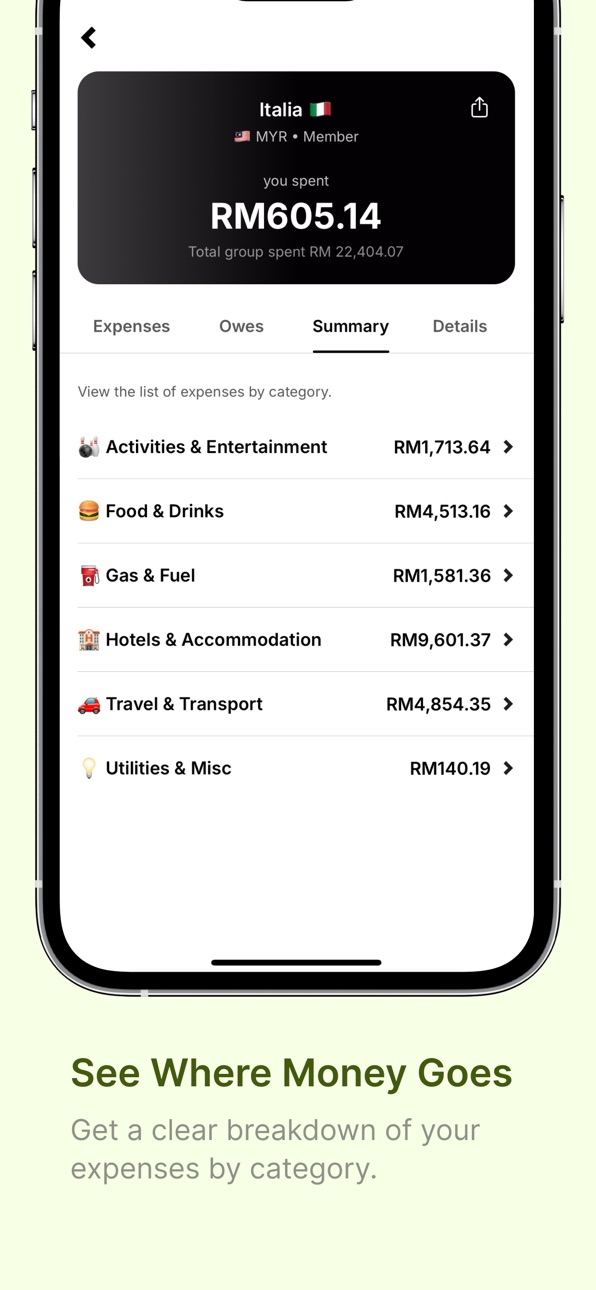
View summaries by category to better understand where your money goes.
• Find Expenses Quickly
Filter expenses by payer or date to locate any transaction in seconds.
• Organize with Multiple Groups
Keep expenses separated by trip, event, month, activity, or group of friends.
Whether you are splitting dinner, tracking a trip, managing housemate expenses, or organizing your own spending, Spnding helps keep everything clear and easy to manage.
Terms of Use (EULA): https://www.apple.com/legal/internet-services/itunes/dev/stdeula/
Spnding App Terms of Service & Privacy Policy: https://www.spnding.app/terms-and-privacy
Capabilities
In-App Purchases
Accessibility
ipadiphonemacrealityDevicetvoswatch
Version history 16 versions
Build 887270316v2.52026-06-22 23:41:53
• Edit and delete guests from your guest list
• Added invoice number support for expenses
• Invoice numbers can now be automatically extracted from receipts
• Refreshed group avatar background colors for a cleaner look
• Minor improvements and bug fixes
Build 886390135v2.42026-06-04 06:29:54
• Export your expenses to CSV for easier reporting and record keeping
• Assign “paid by” to a guest in single-user groups
• Improved loading time for group lists, group details, and expense details
• General performance improvements and bug fixes
Build 885248505v2.32026-05-05 16:35:11
• New scan counter to track your free usage more clearly
• Faster flow for creating groups and adding expenses
• Improved receipt scanning experience
• Smoother navigation and overall performance improvements
• Minor bug fixes and UI refinements
Build 884924479v2.22026-04-27 04:08:57
• Improved app performance and overall stability
• Enhanced purchase and upgrade experience
• Better deep linking from email campaigns into the app
• Smoother navigation and user flow improvements
• Minor bug fixes and UI polish
Build 884844259v2.12026-04-23 23:38:45
This update includes major improvements behind the scenes to make Spnding faster and more reliable:
• Improved image upload speed
• Better receipt image handling
• Smoother profile photo updates
• General bug fixes and stability improvements
Build 884707234v2.02026-04-21 00:18:00
• Added support for zero-amount items in expense
• Fixed keyboard overlay issue so UI remains easier to interact with
• Re-added PDF upload for bulk expense creation from statements
• Added premium status display in Profile / Settings
• General bug fixes and improvements
Build 884417377v1.92026-04-12 23:57:14
• Redesigned Expense Details and Add/Edit Expense screens for a cleaner, more intuitive experience
• New ways to split expenses:
– Split by items
– Split equally
– Split by exact amount
– Split by percentage
• Improved overall UI/UX for smoother expense tracking
Build 884113126v1.82026-04-04 04:55:37
• Redesigned Expense Details and Add/Edit Expense screens for a cleaner, more intuitive experience
• New ways to split expenses:
– Split by items
– Split equally
– Split by exact amount
– Split by percentage
• Improved overall UI/UX for smoother expense tracking
Build 883298587v1.72026-03-13 05:34:27
Redesigned App Experience
• We’ve refreshed Spnding with a cleaner and more intuitive interface to make tracking expenses even easier.
Build 881391256v1.62026-01-12 08:26:28
• View expenses grouped by category for clearer insights
• Improved automatic expense categorization
• Enhanced transaction extraction accuracy from PDF statements
Build 880073830v1.52025-11-26 17:03:38
- Profile Updates: You can now update your profile picture and username directly in the app.
- Bulk Expense Import (PDF): Save time by uploading your bank statements or e-wallet transaction PDFs (TnG, Grab, etc.). We’ll extract the transactions for you instantly.
Your PDFs are not stored, they’re deleted right after extraction.
Build 879802422v1.42025-11-16 02:41:51
• Added guests feature for splitting expenses with non-Spnding users
• You can now share guest payment details with an optional QR code to any chat app
• Added support for uploading receipt images directly from the gallery
• Bug fixes and performance improvements
Build 879452081v1.32025-11-03 22:28:50
• You can now split expenses with people who don’t use Spnding
• More currencies are now supported
• Added date filter to the expense list for easier tracking
Build 879260370v1.22025-10-28 08:46:03
• Improved receipt scanning speed and accuracy
• Enhanced performance for a smoother experience
• Minor UI fixes and stability improvements
Build 879162171v1.12025-10-25 00:21:41
What’s New
• Added support for tracking personal expenses (single-user groups)
• Introduced search functionality to quickly find expenses
• Improved loading speed on the Group Details page
• Added a new category summary to view spending breakdowns
Build 878499515v1.02025-10-22 00:19:07
No pricing data captured yet — comparisons appear once the app has paid storefronts or in-app purchases.
Availability 23 of 23 storefronts
| Region | Language | Price | Ratings | Avg | Version |
|---|---|---|---|---|---|
 AE AE | en-GB | Free | 0 | — | 2.5 |
 AT AT | de-DE | Free | 0 | — | 2.5 |
 BH BH | en-GB | Free | 0 | — | 2.5 |
 CH CH | de-CH | Free | 0 | — | 2.5 |
 DK DK | en-GB | Free | 0 | — | 2.5 |
 FI FI | en-GB | Free | 0 | — | 2.5 |
 GA GA | fr-FR | Free | 0 | — | 2.5 |
 GE GE | en-GB | Free | 0 | — | 2.5 |
 GM GM | en-GB | Free | 0 | — | 2.5 |
 JP JP | ja | Free | 0 | — | 2.5 |
 KW KW | en-GB | Free | 0 | — | 2.5 |
 LK LK | en-GB | Free | 0 | — | 2.5 |
 LR LR | en-GB | Free | 0 | — | 2.5 |
 MS MS | en-GB | Free | 0 | — | 2.5 |
 MW MW | en-GB | Free | 0 | — | 2.5 |
 NO NO | en-GB | Free | 0 | — | 2.5 |
 NP NP | en-GB | Free | 0 | — | 2.5 |
 QA QA | en-GB | Free | 0 | — | 2.5 |
 SE SE | sv | Free | 0 | — | 2.5 |
 SL SL | en-GB | Free | 0 | — | 2.5 |
 TC TC | en-GB | Free | 0 | — | 2.5 |
 US US | en-US | Free | 0 | — | 2.5 |
 ZM ZM | en-GB | Free | 0 | — | 2.5 |
Change log 20 changes · QA
✎
releaseNotes updated
• Edit and delete guests from your guest list
• Added invoice number support for expenses
• Invoice numbers can now be automatically extracted from receipts
• R
✎
description updated
Spnding makes it easy to track shared and personal expenses in one place.
Scan receipts, organize spending by group, split costs with friends, and see who owes
✎
subtitle updated
Track and split trip expenses
✎
name updated
Spnding
◆
Version 2.5 released
• Edit and delete guests from your guest list
• Added invoice number support for expenses
• Invoice numbers can now be automatically extracted from receipts
• Refreshed group avatar background colors for a cleaner look
• Minor improvements
◆
Version 2.4 released
• Export your expenses to CSV for easier reporting and record keeping
• Assign “paid by” to a guest in single-user groups
• Improved loading time for group lists, group details, and expense details
• General performance improvements and bug
◆
Version 2.3 released
• New scan counter to track your free usage more clearly
• Faster flow for creating groups and adding expenses
• Improved receipt scanning experience
• Smoother navigation and overall performance improvements
• Minor bug fixes and UI refine
◆
Version 2.2 released
• Improved app performance and overall stability
• Enhanced purchase and upgrade experience
• Better deep linking from email campaigns into the app
• Smoother navigation and user flow improvements
• Minor bug fixes and UI polish
◆
Version 2.1 released
This update includes major improvements behind the scenes to make Spnding faster and more reliable:
• Improved image upload speed
• Better receipt image handling
• Smoother profile photo updates
• General bug fixes and stability improvemen
◆
Version 2.0 released
• Added support for zero-amount items in expense
• Fixed keyboard overlay issue so UI remains easier to interact with
• Re-added PDF upload for bulk expense creation from statements
• Added premium status display in Profile / Settings
• Gen
◆
Version 1.9 released
• Redesigned Expense Details and Add/Edit Expense screens for a cleaner, more intuitive experience
• New ways to split expenses:
– Split by items
– Split equally
– Split by exact amount
– Split by percentage
• Improved overall UI/UX for
◆
Version 1.8 released
• Redesigned Expense Details and Add/Edit Expense screens for a cleaner, more intuitive experience
• New ways to split expenses:
– Split by items
– Split equally
– Split by exact amount
– Split by percentage
• Improved overall UI/UX for
◆
Version 1.7 released
Redesigned App Experience
• We’ve refreshed Spnding with a cleaner and more intuitive interface to make tracking expenses even easier.
◆
Version 1.6 released
• View expenses grouped by category for clearer insights
• Improved automatic expense categorization
• Enhanced transaction extraction accuracy from PDF statements
◆
Version 1.5 released
- Profile Updates: You can now update your profile picture and username directly in the app.
- Bulk Expense Import (PDF): Save time by uploading your bank statements or e-wallet transaction PDFs (TnG, Grab, etc.). We’ll extract the transac
◆
Version 1.4 released
• Added guests feature for splitting expenses with non-Spnding users
• You can now share guest payment details with an optional QR code to any chat app
• Added support for uploading receipt images directly from the gallery
• Bug fixes and p
◆
Version 1.3 released
• You can now split expenses with people who don’t use Spnding
• More currencies are now supported
• Added date filter to the expense list for easier tracking
◆
Version 1.2 released
• Improved receipt scanning speed and accuracy
• Enhanced performance for a smoother experience
• Minor UI fixes and stability improvements
◆
Version 1.1 released
What’s New
• Added support for tracking personal expenses (single-user groups)
• Introduced search functionality to quickly find expenses
• Improved loading speed on the Group Details page
• Added a new category summary to view spending bre
◆
Version 1.0 released