Home › Utilities

HashWatcher-Miner Dashboard
Full Hardware Control
 BB
BB
 USen-US
 GBen-GB
 CAen-CA
 DEde-DE
 AUen-AU
 FRfr-FR
 NLnl
NLnl BRpt-BR
 SEsv
SEsv NOen-GB
 PTpt-PT
 THen-GB
 ESes-ES
 HUen-GB
 ITit
ITit MYen-GB
 CHde-CH
 CZen-GB
 ZAen-GB
 KRko
KRko AEen-GB
 ATde-DE
 BEen-GB
 BGen-GB
 CYen-GB
 DKen-GB
 ECes-MX
 GRen-GB
 KHen-GB
 MKen-GB
 MXes-MX
 NZen-AU
 PLen-GB
 PYes-MX
 ROen-GB
 RSen-GB
 RUru
RUru SGen-GB
 SIen-GB
 AFen-GB
 AGen-GB
 AIen-GB
 ALen-GB
 AMen-GB
 AOen-GB
 ARes-MX
 AZen-GB
 BAen-GBBBen-GB
 BFen-GB
 BHen-GB
 BJen-GB
 BMen-GB
 BNen-GB
 BOes-MX
 BSen-GB
 BTen-GB
 BWen-GB
 BYen-GB
 BZen-GB
 CDen-GB
 CGen-GB
 CIfr-FR
 CLes-MX
 CMfr-FR
 COes-MX
 CRes-MX
 DMen-GB
 DOes-MX
 DZen-GB
 EEen-GB
 EGen-GB
 FIen-GB
 FJen-GB
 FMen-GB
 GAfr-FR
 GDen-GB
 GEen-GB
 GHen-GB
 GMen-GB
 GTes-MX
 GWen-GB
 GYen-GB
 HNes-MX
 HRen-GB
 IDen-GB
 IEen-GB
 ILen-GB
 INen-GB
 IQen-GB
 ISen-GB
 JMen-GB
 JOen-GB
 KEen-GB
 KGen-GB
 KNen-GB
 KWen-GB
 KZen-GB
 LAen-GB
 LBen-GB
 LCen-GB
 LKen-GB
 LRen-GB
 LTen-GB
 LUen-GB
 LVen-GB
 LYen-GB
 MAen-GB
 MDen-GB
 MEen-GB
 MGen-GB
 MLen-GB
 MMen-GB
 MNen-GB
 MOzh-Hant-HK
 MRen-GB
 MSen-GB
 MTen-GB
 MVen-GB
 MWen-GB
 MZen-GB
 NEen-GB
 NGen-GB
 NIes-MX
 NPen-GB
 NRen-GB
 OMen-GB
 PAes-MX
 PEes-MX
 PGen-GB
 PHen-GB
 PKen-GB
 PWen-GB
 QAen-GB
 RWen-GB
 SAen-GB
 SBen-GB
 SCen-GB
 SKen-GB
 SLen-GB
 SNen-GB
 SRen-GB
 STen-GB
 SVes-MX
 SZen-GB
 TCen-GB
 TDen-GB
 TJen-GB
 TMen-GB
 TNen-GB
 TOen-GB
 TRen-GB
 TTen-GB
 TZen-GB
 UAen-GB
 UGen-GB
 UYen-GB
 UZen-GB
 VEes-MX
 VNen-GB
 VUen-GB
 XKen-GB
 YEen-GB
 ZMen-GB
 ZWen-GB
 CNNot Available
 HKNot Available
 JPNot Available
 TWNot Available
165 of 169 storefronts
Content in en-US
Content in en-US
Information
Preview 3 platforms
iPhone 10 images


iPad 9 images


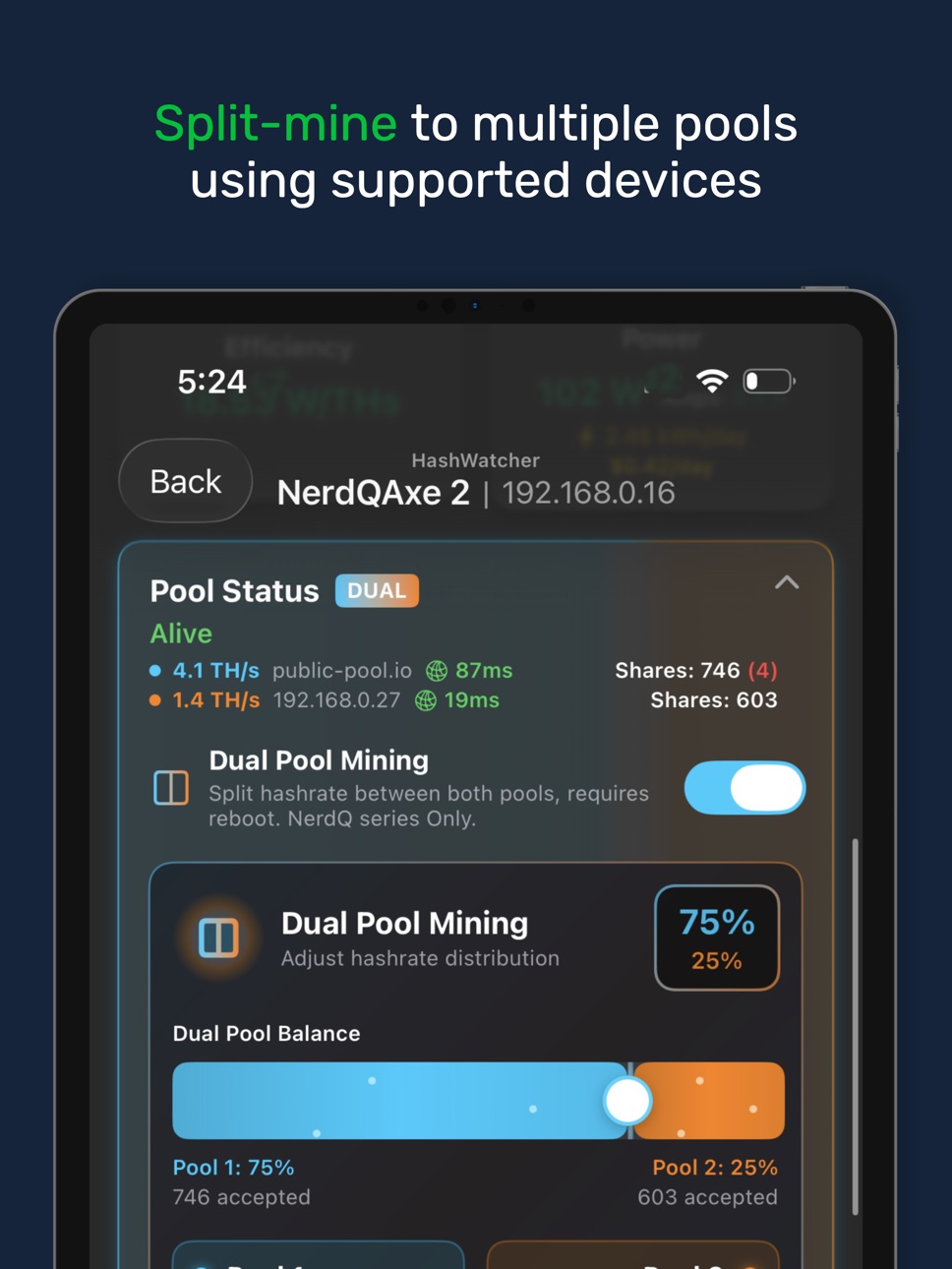


Mac 3 images


What’s New Version 1.7.1
Our Independence Day theme is here. Celebrate the 4th of July with an Electric New Theme. Watch Fireworks explode in the Neural Network View and more.
- Choose if block found notifications trigger a normal notification or Critical Notification. HashWatcher>Settings>Notification Preferences.
-Circuit Monitoring improvements that allow for more accurate measuring and control via Smart Plugs. Inspiration by Eric from HashBoard
Other Recent Changes:
-18% faster app launches and loads
-Mining with Solar Comes to HashWatcher!
New SolarWatcher Dashboard brings solar production, battery state, grid usage, household load, and miner activity into HashWatcher
Set solar-first automation rules to run miners harder when production is strong, reduce or pause when battery levels drop, and resume when conditions recover. SolarWatcher can also estimate expected solar output and compare it with real production. Only want to mine with excess solar? Want to mine until your battery hits a certain SOC? Now you can do that.
Supports Home Assistant, Enphase, APsystems EZ1, Solar Assistant, Victron Energy, SolarEdge, and EcoFlow. HashWatcher Premium required.
-Apple Home / Matter
Use Matter smart plugs and room sensors for real power readings and temperature/humidity-based miner automation.
Settings > Smart Home
-New App Icons
New icons include BM1373 chip, Crypto Cat, fan icon, and @SoloSatoshi logo.
Settings > Theme Settings
-New Customization Options
Users can now customize what HashWatcher features appear to the left and right of the dashboard. Swipe right or left to see charts, leaderboards or the unified controls screen. Any option is yours. (Beta)
Settings>Customize Dashboard>Swipe Screens
Users can now swap the scrolling totals summary with a larger widget style summary.
Settings>Customize Dashboard>Widget Style Totals Summary
-Compact Miner Dashboard
We now offer 3 different compactness settings for the dashboard. The more compact, the more miners that fit! Settings>Customize Dashboard>Grid Layout
-Game Center
Weekly Game Center competitions are here with achievements, leaderboards, friend challenges, and three modes: Sprint, Endurance, and Block Hunter.
-Vnishfirmware and Lucky Miner support
-Big Subspace relay attack animation improvements
-Popcorn theme improvements
-Bug fixes and other improvements
Description
HashWatcher is a fast, local-first dashboard for monitoring and controlling Bitcoin mining hardware from one clean view.
Track your entire fleet without filling your Home Screen with IP shortcuts. See hashrate, power, temperature, efficiency, uptime, pool status, and alerts across all supported miners.
NEW: SolarWatcher
Use solar, battery, grid, and home-load data to run miners smarter. SolarWatcher can help supported miners follow available surplus power, protect battery reserve, and automatically step between Low Power, Eco, Standard, and Super modes.
Supported SolarWatcher integrations include Victron VRM, Home Assistant, Enphase IQ Gateway, APsystems EZ1, EcoFlow, Solar Assistant, and SolarEdge where configured.
Fleet Monitoring
-Bird’s-eye view of all miners
-Real-time hashrate, power, temp, efficiency, uptime, and status
-Charts and local telemetry history
-Miner detail dashboards for troubleshooting
-Temperature, VR temp, anomaly, block-found, and best-difficulty alerts
Miner Controls
-Overclocking and performance modes for supported solo miners
-Braiins OS, LuxOS, VNish, BitAxe-family, NMMiner/NerdQaxe, Canaan, FutureBit, Lucky Miner, Hammer, and Bitdsk support
-Supported Canaan controls including work modes, fan controls, LED/LCD options, and scheduling
-Supported Antminer-class devices when running compatible firmware such as Braiins OS, LuxOS, or VNish
Remote Monitoring
-HashWatcher Hub/Gateway lets you monitor miners away from home through a private remote-access path. No port forwarding or dynamic DNS required.
-Reports and Tools
-Daily PDF reports
-Maintenance planning and reminders
-Energy and output tracking
-Leaderboards and performance comparison
-iOS widgets, Lock Screen widgets, Apple Watch support, and Mac menu bar stats
Supported examples include BitAxe Max, Ultra, Supra, Gamma, Gamma Turbo, Supra Hex, NerdQAxe+, NerdQAxe++, NerdQAxe+ Hydro running ESP-Miner, LuckyMiner LV06/LV08, Canaan Avalon Nano 3/Nano 3S, Avalon Q, Avalon Mini 3, Antminer S21/S19/S17-series devices on supported firmware, and more.
Privacy
HashWatcher reads miner data directly from devices you configure. Optional cloud-backed features are used only for services such as Hub connectivity, alerts, leaderboards, and app features that need them.
HashWatcher does not mine cryptocurrency. It monitors and manages supported mining hardware.
Terms of Use: https://www.apple.com/legal/internet-services/itunes/dev/stdeula/
Capabilities
In-App PurchasesGame Center
Accessibility
ipadiphonemacrealityDevicetvoswatch
Version history 25 versions
Build 887802031v1.7.12026-07-07 21:19:27
Our Independence Day theme is here. Celebrate the 4th of July with an Electric New Theme. Watch Fireworks explode in the Neural Network View and more.
- Choose if block found notifications trigger a normal notification or Critical Notification. HashWatcher>Settings>Notification Preferences.
-Circuit Monitoring improvements that allow for more accurate measuring and control via Smart Plugs. Inspiration by Eric from HashBoard
Other Recent Changes:
-18% faster app launches and loads
-Mining with Solar Comes to HashWatcher!
New SolarWatcher Dashboard brings solar production, battery state, grid usage, household load, and miner activity into HashWatcher
Set solar-first automation rules to run miners harder when production is strong, reduce or pause when battery levels drop, and resume when conditions recover. SolarWatcher can also estimate expected solar output and compare it with real production. Only want to mine with excess solar? Want to mine until your battery hits a certain SOC? Now you can do that.
Supports Home Assistant, Enphase, APsystems EZ1, Solar Assistant, Victron Energy, SolarEdge, and EcoFlow. HashWatcher Premium required.
-Apple Home / Matter
Use Matter smart plugs and room sensors for real power readings and temperature/humidity-based miner automation.
Settings > Smart Home
-New App Icons
New icons include BM1373 chip, Crypto Cat, fan icon, and @SoloSatoshi logo.
Settings > Theme Settings
-New Customization Options
Users can now customize what HashWatcher features appear to the left and right of the dashboard. Swipe right or left to see charts, leaderboards or the unified controls screen. Any option is yours. (Beta)
Settings>Customize Dashboard>Swipe Screens
Users can now swap the scrolling totals summary with a larger widget style summary.
Settings>Customize Dashboard>Widget Style Totals Summary
-Compact Miner Dashboard
We now offer 3 different compactness settings for the dashboard. The more compact, the more miners that fit! Settings>Customize Dashboard>Grid Layout
-Game Center
Weekly Game Center competitions are here with achievements, leaderboards, friend challenges, and three modes: Sprint, Endurance, and Block Hunter.
-Vnishfirmware and Lucky Miner support
-Big Subspace relay attack animation improvements
-Popcorn theme improvements
-Bug fixes and other improvements
Build 887737946v1.72026-07-02 19:51:59
Our Independence Day theme is here. Celebrate the 4th of July with an Electric New Theme. Watch Fireworks explode in the Neural Network View and more.
- Choose if block found notifications trigger a normal notification or Critical Notification. HashWatcher>Settings>Notification Preferences.
-Circuit Monitoring improvements that allow for more accurate measuring and control via Smart Plugs. Inspiration by Eric from HashBoard
Other Recent Changes:
-18% faster app launches and loads
-Mining with Solar Comes to HashWatcher!
New SolarWatcher Dashboard brings solar production, battery state, grid usage, household load, and miner activity into HashWatcher
Set solar-first automation rules to run miners harder when production is strong, reduce or pause when battery levels drop, and resume when conditions recover. SolarWatcher can also estimate expected solar output and compare it with real production. Only want to mine with excess solar? Want to mine until your battery hits a certain SOC? Now you can do that.
Supports Home Assistant, Enphase, APsystems EZ1, Solar Assistant, Victron Energy, SolarEdge, and EcoFlow. HashWatcher Premium required.
-Apple Home / Matter
Use Matter smart plugs and room sensors for real power readings and temperature/humidity-based miner automation.
Settings > Smart Home
-New App Icons
New icons include BM1373 chip, Crypto Cat, fan icon, and @SoloSatoshi logo.
Settings > Theme Settings
-New Customization Options
Users can now customize what HashWatcher features appear to the left and right of the dashboard. Swipe right or left to see charts, leaderboards or the unified controls screen. Any option is yours. (Beta)
Settings>Customize Dashboard>Swipe Screens
Users can now swap the scrolling totals summary with a larger widget style summary.
Settings>Customize Dashboard>Widget Style Totals Summary
-Compact Miner Dashboard
We now offer 3 different compactness settings for the dashboard. The more compact, the more miners that fit! Settings>Customize Dashboard>Grid Layout
-Game Center
Weekly Game Center competitions are here with achievements, leaderboards, friend challenges, and three modes: Sprint, Endurance, and Block Hunter.
-Vnishfirmware and Lucky Miner support
-Big Subspace relay attack animation improvements
-Popcorn theme improvements
-Bug fixes and other improvements
Build 887616223v1.6.92026-06-30 20:38:23
The worlds best Mining App is back with another update.
- Choose if block found notifications trigger a normal notification or Critical Notification. HashWatcher>Settings>Notification Preferences.
-18% faster app launches and loads
-Mining with Solar Comes to HashWatcher!
New SolarWatcher Dashboard brings solar production, battery state, grid usage, household load, and miner activity into HashWatcher
Set solar-first automation rules to run miners harder when production is strong, reduce or pause when battery levels drop, and resume when conditions recover. SolarWatcher can also estimate expected solar output and compare it with real production. Only want to mine with excess solar? Want to mine until your battery hits a certain SOC? Now you can do that.
Supports Home Assistant, Enphase, APsystems EZ1, Solar Assistant, Victron Energy, SolarEdge, and EcoFlow. HashWatcher Premium required.
-Apple Home / Matter
Use Matter smart plugs and room sensors for real power readings and temperature/humidity-based miner automation.
Settings > Smart Home
-New App Icons
New icons include BM1373 chip, Crypto Cat, fan icon, and @SoloSatoshi logo.
Settings > Theme Settings
-New Customization Options
Users can now customize what HashWatcher features appear to the left and right of the dashboard. Swipe right or left to see charts, leaderboards or the unified controls screen. Any option is yours. (Beta)
Settings>Customize Dashboard>Swipe Screens
Users can now swap the scrolling totals summary with a larger widget style summary.
Settings>Customize Dashboard>Widget Style Totals Summary
-Compact Miner Dashboard
We now offer 3 different compactness settings for the dashboard. The more compact, the more miners that fit! Settings>Customize Dashboard>Grid Layout
-Game Center
Weekly Game Center competitions are here with achievements, leaderboards, friend challenges, and three modes: Sprint, Endurance, and Block Hunter.
-Vnishfirmware and Lucky Miner support
-Big Subspace relay attack animation improvements
-Popcorn theme improvements
-Bug fixes and other improvements
Build 887530744v1.6.82026-06-29 18:45:36
The worlds best Mining App is back with another update.
-18% faster app launches and loads
-Mining with Solar Comes to HashWatcher!
New SolarWatcher Dashboard brings solar production, battery state, grid usage, household load, and miner activity into HashWatcher
Set solar-first automation rules to run miners harder when production is strong, reduce or pause when battery levels drop, and resume when conditions recover. SolarWatcher can also estimate expected solar output and compare it with real production. Only want to mine with excess solar? Want to mine until your battery hits a certain SOC? Now you can do that.
Supports Home Assistant, Enphase, APsystems EZ1, Solar Assistant, Victron Energy, SolarEdge, and EcoFlow. HashWatcher Premium required.
-Apple Home / Matter
Use Matter smart plugs and room sensors for real power readings and temperature/humidity-based miner automation.
Settings > Smart Home
-New App Icons
New icons include BM1373 chip, Crypto Cat, fan icon, and @SoloSatoshi logo.
Settings > Theme Settings
-New Customization Options
Users can now customize what HashWatcher features appear to the left and right of the dashboard. Swipe right or left to see charts, leaderboards or the unified controls screen. Any option is yours. (Beta)
Settings>Customize Dashboard>Swipe Screens
Users can now swap the scrolling totals summary with a larger widget style summary.
Settings>Customize Dashboard>Widget Style Totals Summary
-Compact Miner Dashboard
We now offer 3 different compactness settings for the dashboard. The more compact, the more miners that fit! Settings>Customize Dashboard>Grid Layout
-Game Center
Weekly Game Center competitions are here with achievements, leaderboards, friend challenges, and three modes: Sprint, Endurance, and Block Hunter.
-Vnishfirmware and Lucky Miner support
-Big Subspace relay attack animation improvements
-Popcorn theme improvements
-Bug fixes and other improvements
Build 886076569v1.6.72026-06-21 13:22:18
The worlds best Mining App is back with another update.
-18% faster app launches and loads
-Mining with Solar Comes to HashWatcher!
New SolarWatcher Dashboard brings solar production, battery state, grid usage, household load, and miner activity into HashWatcher
Set solar-first automation rules to run miners harder when production is strong, reduce or pause when battery levels drop, and resume when conditions recover. SolarWatcher can also estimate expected solar output and compare it with real production. Only want to mine with excess solar? Want to mine until your battery hits a certain SOC? Now you can do that.
Supports Home Assistant, Enphase, APsystems EZ1, Solar Assistant, Victron Energy, SolarEdge, and EcoFlow. HashWatcher Premium required.
-Apple Home / Matter
Use Matter smart plugs and room sensors for real power readings and temperature/humidity-based miner automation.
Settings > Smart Home
-New App Icons
New icons include BM1373 chip, Crypto Cat, fan icon, and @SoloSatoshi logo.
Settings > Theme Settings
-New Customization Options
Users can now customize what HashWatcher features appear to the left and right of the dashboard. Swipe right or left to see charts, leaderboards or the unified controls screen. Any option is yours. (Beta)
Settings>Customize Dashboard>Swipe Screens
Users can now swap the scrolling totals summary with a larger widget style summary.
Settings>Customize Dashboard>Widget Style Totals Summary
-Compact Miner Dashboard
We now offer 3 different compactness settings for the dashboard. The more compact, the more miners that fit! Settings>Customize Dashboard>Grid Layout
-Game Center
Weekly Game Center competitions are here with achievements, leaderboards, friend challenges, and three modes: Sprint, Endurance, and Block Hunter.
-Vnishfirmware and Lucky Miner support
-Big Subspace relay attack animation improvements
-Popcorn theme improvements
-Bug fixes and other improvements
Build 885887088v1.6.62026-05-20 13:32:34
Often imitated, but never duplicated, the number one mining app is back with another big update.
* New Warp Core theme. Fire up the Neural view for a fresh new look inspired by sci-fi command center energy.
* Schedules are here. Automatically change pools, tunes, and even power levels based on the time of day, so your setup can adapt to your routine without constant manual changes. And as always, bulk tune changes are available in the Unified Controls view.
* Fully customize your dashboard layout with drag-and-drop. Move charts to the top, bring overclock tunes front and center, and organize your HomeView exactly the way you want it.
* New HashWatcher widgets are now available inside the app. Previously, only the Overlook widget was available, but now you can add full fleet controls and more for faster access to the tools you use most.
* Control your entire fleet with a single tap. Quickly change power modes across compatible devices and build a dashboard that puts your most important actions right up front in Settings > Customize Dashboard.
* Added GBP price units. Track pricing in the format that makes the most sense for you and your region.
* Weekly and monthly leaderboards are here. Compete with miners around the world and see how your devices rank based on their best difficulty each week and month.
* You can now sort miners by total hash rate from Settings > Customize Dashboard, making it easier to surface your top performers at a glance.
* Added new notification preferences. Fine-tune what you want to hear about and stay informed without getting overwhelmed.
* Improved Wi‑Fi scanning for a smoother setup experience and better reliability when discovering nearby devices.
* Fixed a bug where some error percentages were not displaying correctly, so your stats and monitoring data are now clearer and more accurate.
Build 884689129v1.6.52026-04-19 16:01:55
-Chart Improvements
-Leaderboard Improvements
-Bug Fixes
Build 884561431v1.6.42026-04-16 13:19:02
-Redesigned Leaderboard experience: rebuilt for clearer ranking hierarchy and better visual consistency across screen sizes.
-Chart improvements: Now you can hold your finger on a chart to read the point in time, clearer labeling, and smoother overall data visualizations.
-Visual improvements across the app: refined spacing, alignment, and UI consistency for a cleaner look.
Build 884319754v1.6.32026-04-09 17:42:07
-New Unified Controls Page. Manage your entire fleet from one screen. Apply pool changes across Bitaxe and LuxOS in one action (with URL preview and confirmation), sync Canaan modes and fan speeds together, and adjust tune settings across supported devices without jumping between pages.
-More solo chances and coin prices for premium users
-Chart Improvements
-Leaderboard Improvements
-NMMiner improvements
-Block Found Fixes
Build 884019939v1.6.12026-04-01 14:44:55
The evolution of HashWatcher has been epic. What started as a dashboard monitor for 2 Braiins S19J Pros has grown into much more.
With almost 10+ different hardware variations supported its become peoples favorite way to monitor their devices. Now we are adding even more.
Today we are releasing another big update with several improvements that even focus on Mining Safety. The most important one is Circuit Monitoring.
Miners pull a lot of juice aka Amps or Current. The circuits in your home are only rated for so much. Amp ratings depend on your homes wire size, breaker/fuse size and other factors. It's important to know what those ratings are. They're usually listed in your homes fuse panel.
Running equipment and exceeding those ratings can pose a SERIOUS fire risk. Continuous and Noncontinuous Loads (like bitcoin solo miners) require that overcurrent protection devices, such as fuses or circuit breakers, be rated for 100% of non-continuous loads plus 125% of continuous loads.NEC Section 210.20(A).
The 80% Rule Calculation: Because you must size the fuse/breaker at 125% of the continuous load, this effectively means the continuous load cannot exceed 80% of the fuse's rating.
So today we're introducing a way to track this and trigger alerts if you exceed this value. From the app, it will display and calculate the load on your breaker or plug. Easily see how in range you are and get notifications when they exceed the 80% safety rule. Never rely on just the app to provide feedback or alerts on how you're loading your system.
Next Up: A redesigned HashWatcher experience. As HashWatcher evolves and becomes the all in one mining app, so must its offerings. The new layout makes it easy to access all of these new features. We previously launched a chat feature, with over 3,000 active users who love talking about all things home mining, a informational hub by @SoloSatoshi with their great products and knowledge articles. Our Gear and Hardware Section has several trusted companies well known by the community. Previously we've partnered with @SoloSatoshi to bring your some of the best solo mining hardware. We've partnering with even more hardware manufacturers and sellers. Starting today you'll be able to purchase @PlebSource, @altair_tech, @luckyminer and other products right inside the app. We are also rolling out a media and content section to watch your favorite YouTubers and others right from our app. Like podcasts or video content? Theres a spot for that inside HashWatcher. Our Podcasts section even has the @HomeMiningPod so you can catch up on all their podcasts with your favorite guests!!
Next Up: Our Data Logger and Chart Feature. Interact and observe trends in your devices with charts that show multiple time frames. Each device will have its own dedicated chart view or an entirely new Charts App inside HashWatcher. See trends on how your device is behaving and get notifications when your pool goes down or hashrate drops. With our HashWatcher Hub you unlock even more powerful data logging and analytical features.
Next Up: Luxor Support: Now you can add @luxor devices in HashWatcher. LuxOS is the first ASIC Firmware to achieve SOC 2 Type 2 certification, and the only Antminer Firmware developed, owned, and maintained by a US-based company. LuxOS also dynamically adjusts operations—shifting to ultra-efficient mode when hashprice falls and enabling overclocking when it rises to optimize margins.
-Temperature Management: LuxOS monitors and controls hardware temperatures to prevent overheating, ensure safe operation in extreme conditions, and extend your miners’ lifespan. All configurable from the app.
-Custom Tuning Profiles: Prebuilt and editable presets help you dial in optimal performance for any power, hashprice or temperature environment.
NMMiner Support is here. MNAxe, NMAxeGamme, NMQAxe++ are supported. Requires NMNiner version 3.0+ which is releasing soon.
Build 884030323v1.6.22026-04-01 21:46:01
The evolution of HashWatcher has been epic. What started as a dashboard monitor for 2 Braiins S19J Pros has grown into much more.
With almost 10+ different hardware variations supported its become peoples favorite way to monitor their devices. Now we are adding even more.
Today we are releasing another big update with several improvements that even focus on Mining Safety. The most important one is Circuit Monitoring.
Miners pull a lot of juice aka Amps or Current. The circuits in your home are only rated for so much. Amp ratings depend on your homes wire size, breaker/fuse size and other factors. It's important to know what those ratings are. They're usually listed in your homes fuse panel.
Running equipment and exceeding those ratings can pose a SERIOUS fire risk. Continuous and Noncontinuous Loads (like bitcoin solo miners) require that overcurrent protection devices, such as fuses or circuit breakers, be rated for 100% of non-continuous loads plus 125% of continuous loads.NEC Section 210.20(A).
The 80% Rule Calculation: Because you must size the fuse/breaker at 125% of the continuous load, this effectively means the continuous load cannot exceed 80% of the fuse's rating.
So today we're introducing a way to track this and trigger alerts if you exceed this value. From the app, it will display and calculate the load on your breaker or plug. Easily see how in range you are and get notifications when they exceed the 80% safety rule. Never rely on just the app to provide feedback or alerts on how you're loading your system.
Next Up: A redesigned HashWatcher experience. As HashWatcher evolves and becomes the all in one mining app, so must its offerings. The new layout makes it easy to access all of these new features. We previously launched a chat feature, with over 3,000 active users who love talking about all things home mining, a informational hub by @SoloSatoshi with their great products and knowledge articles. Our Gear and Hardware Section has several trusted companies well known by the community. Previously we've partnered with @SoloSatoshi to bring your some of the best solo mining hardware. We've partnering with even more hardware manufacturers and sellers. Starting today you'll be able to purchase @PlebSource, @altair_tech, @luckyminer and other products right inside the app. We are also rolling out a media and content section to watch your favorite YouTubers and others right from our app. Like podcasts or video content? Theres a spot for that inside HashWatcher. Our Podcasts section even has the @HomeMiningPod so you can catch up on all their podcasts with your favorite guests!!
Next Up: Our Data Logger and Chart Feature. Interact and observe trends in your devices with charts that show multiple time frames. Each device will have its own dedicated chart view or an entirely new Charts App inside HashWatcher. See trends on how your device is behaving and get notifications when your pool goes down or hashrate drops. With our HashWatcher Hub you unlock even more powerful data logging and analytical features.
Next Up: Luxor Support: Now you can add @luxor devices in HashWatcher. LuxOS is the first ASIC Firmware to achieve SOC 2 Type 2 certification, and the only Antminer Firmware developed, owned, and maintained by a US-based company. LuxOS also dynamically adjusts operations—shifting to ultra-efficient mode when hashprice falls and enabling overclocking when it rises to optimize margins.
-Temperature Management: LuxOS monitors and controls hardware temperatures to prevent overheating, ensure safe operation in extreme conditions, and extend your miners’ lifespan. All configurable from the app.
-Custom Tuning Profiles: Prebuilt and editable presets help you dial in optimal performance for any power, hashprice or temperature environment.
NMMiner Support is here. MNAxe, NMAxeGamme, NMQAxe++ are supported. Requires NMNiner version 3.0+ which is releasing soon.
Build 883955380v1.62026-03-31 15:25:27
The evolution of HashWatcher has been epic. What started as a dashboard monitor for 2 Braiins S19J Pros has grown into much more.
With almost 10+ different hardware variations supported its become peoples favorite way to monitor their devices. Now we are adding even more.
Today we are releasing another big update with several improvements that even focus on Mining Safety. The most important one is Circuit Monitoring.
Miners pull a lot of juice aka Amps or Current. The circuits in your home are only rated for so much. Amp ratings depend on your homes wire size, breaker/fuse size and other factors. It's important to know what those ratings are. They're usually listed in your homes fuse panel.
Running equipment and exceeding those ratings can pose a SERIOUS fire risk. Continuous and Noncontinuous Loads (like bitcoin solo miners) require that overcurrent protection devices, such as fuses or circuit breakers, be rated for 100% of non-continuous loads plus 125% of continuous loads.NEC Section 210.20(A).
The 80% Rule Calculation: Because you must size the fuse/breaker at 125% of the continuous load, this effectively means the continuous load cannot exceed 80% of the fuse's rating.
So today we're introducing a way to track this and trigger alerts if you exceed this value. From the app, it will display and calculate the load on your breaker or plug. Easily see how in range you are and get notifications when they exceed the 80% safety rule. Never rely on just the app to provide feedback or alerts on how you're loading your system.
Next Up: A redesigned HashWatcher experience. As HashWatcher evolves and becomes the all in one mining app, so must its offerings. The new layout makes it easy to access all of these new features. We previously launched a chat feature, with over 3,000 active users who love talking about all things home mining, a informational hub by @SoloSatoshi with their great products and knowledge articles. Our Gear and Hardware Section has several trusted companies well known by the community. Previously we've partnered with @SoloSatoshi to bring your some of the best solo mining hardware. We've partnering with even more hardware manufacturers and sellers. Starting today you'll be able to purchase @PlebSource, @altair_tech, @luckyminer and other products right inside the app. We are also rolling out a media and content section to watch your favorite YouTubers and others right from our app. Like podcasts or video content? Theres a spot for that inside HashWatcher. Our Podcasts section even has the @HomeMiningPod so you can catch up on all their podcasts with your favorite guests!!
Next Up: Our Data Logger and Chart Feature. Interact and observe trends in your devices with charts that show multiple time frames. Each device will have its own dedicated chart view or an entirely new Charts App inside HashWatcher. See trends on how your device is behaving and get notifications when your pool goes down or hashrate drops. With our HashWatcher Hub you unlock even more powerful data logging and analytical features.
Next Up: Luxor Support: Now you can add @luxor devices in HashWatcher. LuxOS is the first ASIC Firmware to achieve SOC 2 Type 2 certification, and the only Antminer Firmware developed, owned, and maintained by a US-based company. LuxOS also dynamically adjusts operations—shifting to ultra-efficient mode when hashprice falls and enabling overclocking when it rises to optimize margins.
-Temperature Management: LuxOS monitors and controls hardware temperatures to prevent overheating, ensure safe operation in extreme conditions, and extend your miners’ lifespan. All configurable from the app.
-Custom Tuning Profiles: Prebuilt and editable presets help you dial in optimal performance for any power, hashprice or temperature environment.
NMMiner Support is here. MNAxe, NMAxeGamme, NMQAxe++ are supported. Requires NMNiner version 3.0+ which is releasing soon.
Build 883765814v1.5.52026-03-26 16:55:42
-Users can now switch between primary or secondary pools and can even add/edit pool info directly.
-Added Scan feature for Canaan devices.
-Hub improvements
-Bug Fixes
Build 883365063v1.5.42026-03-15 15:32:39
-NEW THEME: Transform your phone into the Upside Down.
Falling ash drifts across the screen, deep shadows swallow the background, and sudden red lightning tears through the darkness like a warning from another world. Every glance feels eerie, cinematic, and alive, like stepping straight into the upside down.
-NEW Hub: The HashWatcher Hub is here, it provides remote access to your miners anywhere in the world. Order now in the settings.
Bug Fixes:
-Leaderboards. Head to Leaderboard settings and click Resubmit score if you had previous issues.
-User can now turn off best difficulty notifications.
Enjoying the app? Please leave us a review.
Build 882927697v1.5.22026-03-03 11:09:22
NEW: The HashWatcher Umbrel app is here — monitor your miners from anywhere in the world.
Pair the HashWatcher Gateway with Umbrel to get fully remote access to your entire mining fleet, secured by Tailscale. No port forwarding and no VPN setup headaches. Free for all users.
Getting started is easy:
Add the Umbrel Community App Store URL into Umbrel (found in HashWatcher Settings)
Install the app on Umbrel
Download Tailscale on your phone
Follow the on-screen setup guide in the Umbrel app
Need help? Email us directly from within the app.
NEW: HashWatcher Groups are here.
Share and import tunes: Send a tune to another user or import one they’ve shared. You can now exchange tuning profiles with other members and load them directly onto your device.
Live Snapshots: Share a live snapshot of any of your devices right in the chat. Show off your efficiency, hash rate, and more in real time.
In-app miner chat: Connect with other miners directly in the app. Get insights on what mods are working for others, or jump into dedicated rooms for overclocking, tech questions, pools, and more.
Note: A tune that works well for one user may not be safe or stable for your setup. Make sure your power supply and device can handle it before saving.
2 new themes: 5tratumOS and Popcorn
Users can now set temperature alerts for VR temperatures
Users can now choose their temperature units: C, F, etc.
Scrypt miner improvements
Hashrate error percentage is now displayed for each device
Added GBP currency
Fixed an issue where some maintenance schedules were not fully deleted
Build 882988679v1.5.32026-03-03 18:58:44
-The device with the highest best diff now shows a border glow that matches the users theme.
NEW: The HashWatcher Umbrel app is here — monitor your miners from anywhere in the world.
Pair the HashWatcher Gateway with Umbrel to get fully remote access to your entire mining fleet, secured by Tailscale. No port forwarding and no VPN setup headaches. Free for all users.
Getting started is easy:
Add the Umbrel Community App Store URL into Umbrel (found in HashWatcher Settings)
Install the app on Umbrel
Download Tailscale on your phone
Follow the on-screen setup guide in the Umbrel app
Need help? Email us directly from within the app.
NEW: HashWatcher Groups are here.
Share and import tunes: Send a tune to another user or import one they’ve shared. You can now exchange tuning profiles with other members and load them directly onto your device.
Live Snapshots: Share a live snapshot of any of your devices right in the chat. Show off your efficiency, hash rate, and more in real time.
In-app miner chat: Connect with other miners directly in the app. Get insights on what mods are working for others, or jump into dedicated rooms for overclocking, tech questions, pools, and more.
Note: A tune that works well for one user may not be safe or stable for your setup. Make sure your power supply and device can handle it before saving.
2 new themes: 5tratumOS and Popcorn
Users can now set temperature alerts for VR temperatures
Users can now choose their temperature units: C, F, etc.
Scrypt miner improvements
Hashrate error percentage is now displayed for each device
Added GBP currency
Fixed an issue where some maintenance schedules were not fully deleted
Build 882617695v1.5.12026-02-20 22:23:44
HashWatcher now displays hash error percentage as reported by the ASIC. A small amount of errors is normal. Frequency changes, aggressive overclocking, undervoltage or a bad power supply can significantly increase the error rate.
Build 882283439v1.52026-02-13 20:10:47
-New Alert section with Notifications
Choose your Notification levels. Hashrate drop offs, temperature spikes or pool disconnection notifications
NEW: Swipe left to see the new Neural Blockchain for HashWatcher. This one is a work in progress so please be patient.
-New Nueral Net Visual.
A living, breathing visualization of your entire fleet. Each miner appears as a glowing node orbiting a central nucleus that displays your total hashrate. The size of each node reflects its hashrate contribution — bigger nodes are doing more work. Pulsing gently to show your fleet is alive and hashing.
-Users can now tap on the SoloChance results to change the result to Daily/Monthly odds ect
-Now you can choose a 2x1 grid layout for a wider device view instead of the default 1x1 on the main dashboard. Toggle it in settings.
-New Notifications if your device drops to a fallback pool.
-Reduced app CPU usage by 30%
-The dashboard now shows which device holds the best difficulty for your fleet
-Users can now select their currency
-Leaderboard data improvements. Please let me know if you see leaderboard issues.
-New setting to keep the falling blocks on screen
-Users can now upgrade their membership as they please
-Bug fixes for leaderboard submissions.
Like what you see? Spread the HashWatcher love and tell a friend.
Build 881946757v1.4.82026-01-29 05:50:31
This build contains bug fixes for Nano3 work mode changes. Work mode changes should now work 100% for the Nano3.
Other Changes:
-Fan Speed improvements! You asked, we listened. Many of you wanted finer control of your fan speeds. Now you can change speeds in 1% increments.
Build 881647588v1.4.72026-01-20 02:29:27
NOTE: Home routers use DHCP to hand out IP addresses automatically. This means your miner's IP (e.g., 192.168.1.105) can change anytime the device restarts, router reboots, or the lease expires.
Result: HashWatcher may show the miner as "Offline" or "No Connection" even when it's running fine — the old IP no longer works. If this happens update the device IP inside of HashWatcher.
Best prevention
Set a DHCP reservation (or static IP) in your router for each miner's MAC address. This locks the IP forever — highly recommended for stable mining.
New Features:
* I am pumped to introduce a new Solo Satoshi theme—built to match the look & spirit of Solo Satoshi, arguably the best in Bitcoin Home Mining! Head to Settings to visit the HashWatcher and Solo Satoshi hub to see guides, podcasts, get support for their products and even get access to Solo Satoshi hardware.
* Best Difficulty notifications – now get pushed alerts when your miner achieves a new personal best difficulty (perfect for tracking solo/lottery mining luck).
* Redesigned the Overclock tune customization screen with additional prominent notices/warnings to clearly inform users of the risks and dangers involved in overclocking (critical for safety and hardware longevity).
* The custom theme screen now shows a preview of how the theme will look.
* Devoted/per-device temperature alerts – each miner can now have independent temperature monitoring and notifications.
* Canaan devices with multiple fans now display individual fan RPM values in the hardware info section.
* Added DigiByte (DGB) support to the SoloChance Calculator and Coin Price list for premium users.
* Privacy improvements: Device IP addresses and coin wallet addresses are now blurred by default when viewing/screenshotting; tap to reveal.
* Network Difficulty display now dynamically shows the relevant difficulty for the specific coin a Bitaxe/miner is currently mining.
* More comprehensive pool information available at a glance for Bitaxe devices.
* Nano3S LED settings now default to off (reduces unnecessary light pollution).
* Visibility improvements (general UI/UX enhancements for better readability).
* Drag-and-drop support to reorganize miners in your list. Tip: Organize by model.
* Daily cost estimation for all miners now displayed in the scrolling top bar (can be disabled in settings).
* Avalon Q specific: Fan failure detection – advisees when a fan shows signs of failure or has stopped.
* Avalon Q specific: Remote Power ON/OFF buttons – allows you to turn the device on/off remotely through the app.
Bug Fixes & Stability Improvements:
* Fixed deleted schedule notifications (prevents ghost/missing alerts).
* Leaderboard score submit fixes.
* Mini3 Power fixes.
* Difficulty display bug fixes.
* Port number bug fixes.
* Dual Pool visual bug fixes.
* Major reliability improvement: Miner information is now persistently stored and paired with the device's MAC address instead of IP address (tried to prevent data loss when IP changes due to network reconnects, DHCP lease changes, etc.).
Build 881597743v1.4.62026-01-19 06:13:12
NOTE: Home routers use DHCP to hand out IP addresses automatically. This means your miner's IP (e.g., 192.168.1.105) can change anytime the device restarts, router reboots, or the lease expires.
Result: HashWatcher may show the miner as "Offline" or "No Connection" even when it's running fine — the old IP no longer works. If this happens update the device IP inside of HashWatcher.
Best prevention
Set a DHCP reservation (or static IP) in your router for each miner's MAC address. This locks the IP forever — highly recommended for stable mining.
New Features:
* I am pumped to introduce a new Solo Satoshi theme—built to match the look & spirit of Solo Satoshi, arguably the best in Bitcoin Home Mining! Head to Settings to visit the HashWatcher and Solo Satoshi hub to see guides, podcasts, get support for their products and even get access to Solo Satoshi hardware.
* Best Difficulty notifications – now get pushed alerts when your miner achieves a new personal best difficulty (perfect for tracking solo/lottery mining luck).
* Redesigned the Overclock tune customization screen with additional prominent notices/warnings to clearly inform users of the risks and dangers involved in overclocking (critical for safety and hardware longevity).
* The custom theme screen now shows a preview of how the theme will look.
* Devoted/per-device temperature alerts – each miner can now have independent temperature monitoring and notifications.
* Canaan devices with multiple fans now display individual fan RPM values in the hardware info section.
* Added DigiByte (DGB) support to the SoloChance Calculator and Coin Price list for premium users.
* Privacy improvements: Device IP addresses and coin wallet addresses are now blurred by default when viewing/screenshotting; tap to reveal.
* Network Difficulty display now dynamically shows the relevant difficulty for the specific coin a Bitaxe/miner is currently mining.
* More comprehensive pool information available at a glance for Bitaxe devices.
* Nano3S LED settings now default to off (reduces unnecessary light pollution).
* Visibility improvements (general UI/UX enhancements for better readability).
* Drag-and-drop support to reorganize miners in your list. Tip: Organize by model.
* Daily cost estimation for all miners now displayed in the scrolling top bar (can be disabled in settings).
* Avalon Q specific: Fan failure detection – advisees when a fan shows signs of failure or has stopped.
* Avalon Q specific: Remote Power ON/OFF buttons – allows you to turn the device on/off remotely through the app.
Bug Fixes & Stability Improvements:
* Fixed deleted schedule notifications (prevents ghost/missing alerts).
* Leaderboard score submit fixes.
* Mini3 Power fixes.
* Difficulty display bug fixes.
* Port number bug fixes.
* Dual Pool visual bug fixes.
* Major reliability improvement: Miner information is now persistently stored and paired with the device's MAC address instead of IP address (tried to prevent data loss when IP changes due to network reconnects, DHCP lease changes, etc.).
Build 881132997v1.4.52026-01-02 01:22:16
-Nano3s LED bug fix
-Revamped overclock default values to be more safe for new users.
If you are an experienced user, you may need to readjust your presets.
Build 881102764v1.4.32025-12-30 14:59:23
Another BIG update is here. Thank you for making HashWatcher the number one app to monitor your mining equipment!
** Avalon Nano 3S LED Enhancements
-Share submitted Pulse: The Nano3S LED now briefly pulses orange when the app detects a new share submitted from any miner in your inventory. (Disable in Settings)
-Work Mode Sync: LED color automatically syncs with the selected work mode (e.g., green for Low Power, red for High Performance). (Disable in Settings)
-Block Found Party Effect: When any miner finds a block, the Nano3S LED activates a celebratory "Block Found" light effect.
-LED Controls: New "LED Controls" dialog added to the Miner Detail screen for Nano3S, enabling real-time adjustment of LED effect, brightness, temperature, and RGB color.
**Widget Upgrades
-Massive widget overhaul: Select a specific miner to display key info directly on your Home Screen without opening the app.
-Instant control for Bitaxe and Canaan devices: Change work mode, adjust fan speeds, and monitor stats right from the Widget.
**Avalon Q Fan Filter Reset: New action available under Actions → Device Info.
**Siri Shortcuts Integration(Beta)
-Go to Settings → Siri & Search → Shortcuts
-Shortcuts appear automatically
-Example commands:
-"Turn up the fan on Miner XYZ using HashWatcher" (replace with your miner's name)
-"Set fan speed on Miner XYZ to 75 percent using HashWatcher"
**Bug Fixes & Improvements
-Fixed "Connecting" hang for some devices.
-Fixed a bug where Difficulty would display as 0 in Pool Info.
**Notes & Upcoming Changes
Recommendation: If your device is not showing the best difficulty, update to a more recent Axe-OS version.
Build 881104074v1.4.42025-12-30 16:41:11
Another BIG update is here. Thank you for making HashWatcher the number one app to monitor your mining equipment!
**Canaan Work Mode Scheduling!
-Take advantage of cheaper electricity at night, or excess solar with Canaan work mode schedules.
-Pick your Mode, Fan Speed and time of day for a device to automatically change its mode. Turn up the work mode during peak solar output, or at night when cheap electricity is plentiful.
** Avalon Nano 3S LED Enhancements
-Share submitted Pulse: The Nano3S LED now briefly pulses orange when the app detects a new share submitted from any miner in your inventory. (Disable in Settings)
-Work Mode Sync: LED color automatically syncs with the selected work mode (e.g., green for Low Power, red for High Performance). (Disable in Settings)
-Block Found Party Effect: When any miner finds a block, the Nano3S LED activates a celebratory "Block Found" light effect.
-LED Controls: New "LED Controls" dialog added to the Miner Detail screen for Nano3S, enabling real-time adjustment of LED effect, brightness, temperature, and RGB color.
**Widget Upgrades
-Massive widget overhaul: Select a specific miner to display key info directly on your Home Screen without opening the app.
-Instant control for Bitaxe and Canaan devices: Change work mode, adjust fan speeds, and monitor stats right from the Widget.
**Avalon Q Fan Filter Reset: New action available under Actions → Device Info.
**Siri Shortcuts Integration(Beta)
-Go to Settings → Siri & Search → Shortcuts
-Shortcuts appear automatically
-Example commands:
-"Turn up the fan on Miner XYZ using HashWatcher" (replace with your miner's name)
-"Set fan speed on Miner XYZ to 75 percent using HashWatcher"
**Bug Fixes & Improvements
-Fixed "Connecting" hang for some devices.
-Fixed a bug where Difficulty would display as 0 in Pool Info.
Recommendation: If your device is not showing the best difficulty, update to a more recent Axe-OS version.
Build 880958579v1.4.22025-12-24 06:34:51
This update is PACKED with new features!
New: Folders/Saved Locations + faster loading!
* Group miners into Locations (Home / Work / Remote Site) and swipe between them in main view by swiping between pages, just like on your phones Home Screen.
* Massive performance improvement: the app now refreshes only the current Location; other Locations get lightweight background checks for important alerts (temps / blocks / status)
* Easy management: create/rename Locations and assign miners from Settings → Locations, plus pick a Location while adding/editing a miner.
Widget improvements!
More data, and better options to choose from.
No pricing data captured yet — comparisons appear once the app has paid storefronts or in-app purchases.
Availability 165 of 169 storefronts
| Region | Language | Price | Ratings | Avg | Version |
|---|---|---|---|---|---|
| US | en-US | Free | 393 | 4.9 | 1.7.1 |
| GB | en-GB | Free | 42 | 4.6 | 1.7.1 |
| CA | en-CA | Free | 37 | 4.9 | 1.7.1 |
| DE | de-DE | Free | 36 | 4.8 | 1.7.1 |
| AU | en-AU | Free | 14 | 4.9 | 1.7.1 |
| FR | fr-FR | Free | 9 | 4.9 | 1.7.1 |
| NL | nl | Free | 8 | 4.5 | 1.7.1 |
| BR | pt-BR | Free | 6 | 5.0 | 1.7.1 |
| SE | sv | Free | 6 | 5.0 | 1.7.1 |
| NO | en-GB | Free | 5 | 5.0 | 1.7.1 |
| PT | pt-PT | Free | 5 | 4.2 | 1.7.1 |
| TH | en-GB | Free | 5 | 5.0 | 1.7.1 |
| ES | es-ES | Free | 4 | 5.0 | 1.7.1 |
| HU | en-GB | Free | 4 | 4.5 | 1.7.1 |
| IT | it | Free | 4 | 4.5 | 1.7.1 |
| MY | en-GB | Free | 4 | 4.0 | 1.7.1 |
| CH | de-CH | Free | 3 | 4.7 | 1.7.1 |
| CZ | en-GB | Free | 3 | 5.0 | 1.7.1 |
| ZA | en-GB | Free | 3 | 5.0 | 1.7.1 |
| KR | ko | Free | 2 | 5.0 | 1.7.1 |
| AE | en-GB | Free | 1 | 5.0 | 1.7.1 |
| AT | de-DE | Free | 1 | 1.0 | 1.7.1 |
| BE | en-GB | Free | 1 | 5.0 | 1.7.1 |
| BG | en-GB | Free | 1 | 5.0 | 1.7.1 |
| CY | en-GB | Free | 1 | 2.0 | 1.7.1 |
| DK | en-GB | Free | 1 | 4.0 | 1.7.1 |
| EC | es-MX | Free | 1 | 5.0 | 1.7.1 |
| GR | en-GB | Free | 1 | 5.0 | 1.7.1 |
| KH | en-GB | Free | 1 | 5.0 | 1.7.1 |
| MK | en-GB | Free | 1 | 5.0 | 1.7.1 |
| MX | es-MX | Free | 1 | 5.0 | 1.7.1 |
| NZ | en-AU | Free | 1 | 5.0 | 1.7.1 |
| PL | en-GB | Free | 1 | 4.0 | 1.7.1 |
| PY | es-MX | Free | 1 | 5.0 | 1.7.1 |
| RO | en-GB | Free | 1 | 5.0 | 1.7.1 |
| RS | en-GB | Free | 1 | 5.0 | 1.7.1 |
| RU | ru | Free | 1 | 5.0 | 1.7.1 |
| SG | en-GB | Free | 1 | 5.0 | 1.7.1 |
| SI | en-GB | Free | 1 | 5.0 | 1.7.1 |
| AF | en-GB | Free | 0 | — | 1.7.1 |
| AG | en-GB | Free | 0 | — | 1.7.1 |
| AI | en-GB | Free | 0 | — | 1.7.1 |
| AL | en-GB | Free | 0 | — | 1.7.1 |
| AM | en-GB | Free | 0 | — | 1.7.1 |
| AO | en-GB | Free | 0 | — | 1.7.1 |
| AR | es-MX | Free | 0 | — | 1.7.1 |
| AZ | en-GB | Free | 0 | — | 1.7.1 |
| BA | en-GB | Free | 0 | — | 1.7.1 |
| BB | en-GB | Free | 0 | — | 1.7.1 |
| BF | en-GB | Free | 0 | — | 1.7.1 |
| BH | en-GB | Free | 0 | — | 1.7.1 |
| BJ | en-GB | Free | 0 | — | 1.7.1 |
| BM | en-GB | Free | 0 | — | 1.7.1 |
| BN | en-GB | Free | 0 | — | 1.7.1 |
| BO | es-MX | Free | 0 | — | 1.7.1 |
| BS | en-GB | Free | 0 | — | 1.7.1 |
| BT | en-GB | Free | 0 | — | 1.7.1 |
| BW | en-GB | Free | 0 | — | 1.7.1 |
| BY | en-GB | Free | 0 | — | 1.7.1 |
| BZ | en-GB | Free | 0 | — | 1.7.1 |
| CD | en-GB | Free | 0 | — | 1.7.1 |
| CG | en-GB | Free | 0 | — | 1.7.1 |
| CI | fr-FR | Free | 0 | — | 1.7.1 |
| CL | es-MX | Free | 0 | — | 1.7.1 |
| CM | fr-FR | Free | 0 | — | 1.7.1 |
| CO | es-MX | Free | 0 | — | 1.7.1 |
| CR | es-MX | Free | 0 | — | 1.7.1 |
| DM | en-GB | Free | 0 | — | 1.7.1 |
| DO | es-MX | Free | 0 | — | 1.7.1 |
| DZ | en-GB | Free | 0 | — | 1.7.1 |
| EE | en-GB | Free | 0 | — | 1.7.1 |
| EG | en-GB | Free | 0 | — | 1.7.1 |
| FI | en-GB | Free | 0 | — | 1.7.1 |
| FJ | en-GB | Free | 0 | — | 1.7.1 |
| FM | en-GB | Free | 0 | — | 1.7.1 |
| GA | fr-FR | Free | 0 | — | 1.7.1 |
| GD | en-GB | Free | 0 | — | 1.7.1 |
| GE | en-GB | Free | 0 | — | 1.7.1 |
| GH | en-GB | Free | 0 | — | 1.7.1 |
| GM | en-GB | Free | 0 | — | 1.7.1 |
| GT | es-MX | Free | 0 | — | 1.7.1 |
| GW | en-GB | Free | 0 | — | 1.7.1 |
| GY | en-GB | Free | 0 | — | 1.7.1 |
| HN | es-MX | Free | 0 | — | 1.7.1 |
| HR | en-GB | Free | 0 | — | 1.7.1 |
| ID | en-GB | Free | 0 | — | 1.7.1 |
| IE | en-GB | Free | 0 | — | 1.7.1 |
| IL | en-GB | Free | 0 | — | 1.7.1 |
| IN | en-GB | Free | 0 | — | 1.7.1 |
| IQ | en-GB | Free | 0 | — | 1.7.1 |
| IS | en-GB | Free | 0 | — | 1.7.1 |
| JM | en-GB | Free | 0 | — | 1.7.1 |
| JO | en-GB | Free | 0 | — | 1.7.1 |
| KE | en-GB | Free | 0 | — | 1.7.1 |
| KG | en-GB | Free | 0 | — | 1.7.1 |
| KN | en-GB | Free | 0 | — | 1.7.1 |
| KW | en-GB | Free | 0 | — | 1.7.1 |
| KZ | en-GB | Free | 0 | — | 1.7.1 |
| LA | en-GB | Free | 0 | — | 1.7.1 |
| LB | en-GB | Free | 0 | — | 1.7.1 |
| LC | en-GB | Free | 0 | — | 1.7.1 |
| LK | en-GB | Free | 0 | — | 1.7.1 |
| LR | en-GB | Free | 0 | — | 1.7.1 |
| LT | en-GB | Free | 0 | — | 1.7.1 |
| LU | en-GB | Free | 0 | — | 1.7.1 |
| LV | en-GB | Free | 0 | — | 1.7.1 |
| LY | en-GB | Free | 0 | — | 1.7.1 |
| MA | en-GB | Free | 0 | — | 1.7.1 |
| MD | en-GB | Free | 0 | — | 1.7.1 |
| ME | en-GB | Free | 0 | — | 1.7.1 |
| MG | en-GB | Free | 0 | — | 1.7.1 |
| ML | en-GB | Free | 0 | — | 1.7.1 |
| MM | en-GB | Free | 0 | — | 1.7.1 |
| MN | en-GB | Free | 0 | — | 1.7.1 |
| MO | zh-Hant-HK | Free | 0 | — | 1.7.1 |
| MR | en-GB | Free | 0 | — | 1.7.1 |
| MS | en-GB | Free | 0 | — | 1.7.1 |
| MT | en-GB | Free | 0 | — | 1.7.1 |
| MV | en-GB | Free | 0 | — | 1.7.1 |
| MW | en-GB | Free | 0 | — | 1.7.1 |
| MZ | en-GB | Free | 0 | — | 1.7.1 |
| NE | en-GB | Free | 0 | — | 1.7.1 |
| NG | en-GB | Free | 0 | — | 1.7.1 |
| NI | es-MX | Free | 0 | — | 1.7.1 |
| NP | en-GB | Free | 0 | — | 1.7.1 |
| NR | en-GB | Free | 0 | — | 1.7.1 |
| OM | en-GB | Free | 0 | — | 1.7.1 |
| PA | es-MX | Free | 0 | — | 1.7.1 |
| PE | es-MX | Free | 0 | — | 1.7.1 |
| PG | en-GB | Free | 0 | — | 1.7.1 |
| PH | en-GB | Free | 0 | — | 1.7.1 |
| PK | en-GB | Free | 0 | — | 1.7.1 |
| PW | en-GB | Free | 0 | — | 1.7.1 |
| QA | en-GB | Free | 0 | — | 1.7.1 |
| RW | en-GB | Free | 0 | — | 1.7.1 |
| SA | en-GB | Free | 0 | — | 1.7.1 |
| SB | en-GB | Free | 0 | — | 1.7.1 |
| SC | en-GB | Free | 0 | — | 1.7.1 |
| SK | en-GB | Free | 0 | — | 1.7.1 |
| SL | en-GB | Free | 0 | — | 1.7.1 |
| SN | en-GB | Free | 0 | — | 1.7.1 |
| SR | en-GB | Free | 0 | — | 1.7.1 |
| ST | en-GB | Free | 0 | — | 1.7.1 |
| SV | es-MX | Free | 0 | — | 1.7.1 |
| SZ | en-GB | Free | 0 | — | 1.7.1 |
| TC | en-GB | Free | 0 | — | 1.7.1 |
| TD | en-GB | Free | 0 | — | 1.7.1 |
| TJ | en-GB | Free | 0 | — | 1.7.1 |
| TM | en-GB | Free | 0 | — | 1.7.1 |
| TN | en-GB | Free | 0 | — | 1.7.1 |
| TO | en-GB | Free | 0 | — | 1.7.1 |
| TR | en-GB | Free | 0 | — | 1.7.1 |
| TT | en-GB | Free | 0 | — | 1.7.1 |
| TZ | en-GB | Free | 0 | — | 1.7.1 |
| UA | en-GB | Free | 0 | — | 1.7.1 |
| UG | en-GB | Free | 0 | — | 1.7.1 |
| UY | en-GB | Free | 0 | — | 1.7.1 |
| UZ | en-GB | Free | 0 | — | 1.7.1 |
| VE | es-MX | Free | 0 | — | 1.7.1 |
| VN | en-GB | Free | 0 | — | 1.7.1 |
| VU | en-GB | Free | 0 | — | 1.7.1 |
| XK | en-GB | Free | 0 | — | 1.7.1 |
| YE | en-GB | Free | 0 | — | 1.7.1 |
| ZM | en-GB | Free | 0 | — | 1.7.1 |
| ZW | en-GB | Free | 0 | — | 1.7.1 |
Not available in: CN, HK, JP, TW
Change log 29 changes · BB
✎
releaseNotes updated
Our Independence Day theme is here. Celebrate the 4th of July with an Electric New Theme. Watch Fireworks explode in the Neural Network View and more.
- Choos
✎
description updated
HashWatcher is a fast, local-first dashboard for monitoring and controlling Bitcoin mining hardware from one clean view.
Track your entire fleet without filling
✎
subtitle updated
Full Hardware Control
✎
name updated
HashWatcher-Miner Dashboard
◆
Version 1.7.1 released
Our Independence Day theme is here. Celebrate the 4th of July with an Electric New Theme. Watch Fireworks explode in the Neural Network View and more.
- Choose if block found notifications trigger a normal notification or Critical Notific
◆
Version 1.7 released
Our Independence Day theme is here. Celebrate the 4th of July with an Electric New Theme. Watch Fireworks explode in the Neural Network View and more.
- Choose if block found notifications trigger a normal notification or Critical Notific
◆
Version 1.6.9 released
The worlds best Mining App is back with another update.
- Choose if block found notifications trigger a normal notification or Critical Notification. HashWatcher>Settings>Notification Preferences.
-18% faster app launches and loads
-Min
◆
Version 1.6.8 released
The worlds best Mining App is back with another update.
-18% faster app launches and loads
-Mining with Solar Comes to HashWatcher!
New SolarWatcher Dashboard brings solar production, battery state, grid usage, household load, and miner
◆
Version 1.6.7 released
The worlds best Mining App is back with another update.
-18% faster app launches and loads
-Mining with Solar Comes to HashWatcher!
New SolarWatcher Dashboard brings solar production, battery state, grid usage, household load, and miner
◆
Version 1.6.6 released
Often imitated, but never duplicated, the number one mining app is back with another big update.
* New Warp Core theme. Fire up the Neural view for a fresh new look inspired by sci-fi command center energy.
* Schedules are here. Automati
◆
Version 1.6.5 released
-Chart Improvements
-Leaderboard Improvements
-Bug Fixes
◆
Version 1.6.4 released
-Redesigned Leaderboard experience: rebuilt for clearer ranking hierarchy and better visual consistency across screen sizes.
-Chart improvements: Now you can hold your finger on a chart to read the point in time, clearer labeling, and smoo
◆
Version 1.6.3 released
-New Unified Controls Page. Manage your entire fleet from one screen. Apply pool changes across Bitaxe and LuxOS in one action (with URL preview and confirmation), sync Canaan modes and fan speeds together, and adjust tune settings across
◆
Version 1.6.2 released
The evolution of HashWatcher has been epic. What started as a dashboard monitor for 2 Braiins S19J Pros has grown into much more.
With almost 10+ different hardware variations supported its become peoples favorite way to monitor their dev
◆
Version 1.6.1 released
The evolution of HashWatcher has been epic. What started as a dashboard monitor for 2 Braiins S19J Pros has grown into much more.
With almost 10+ different hardware variations supported its become peoples favorite way to monitor their dev
◆
Version 1.6 released
The evolution of HashWatcher has been epic. What started as a dashboard monitor for 2 Braiins S19J Pros has grown into much more.
With almost 10+ different hardware variations supported its become peoples favorite way to monitor their dev
◆
Version 1.5.5 released
-Users can now switch between primary or secondary pools and can even add/edit pool info directly.
-Added Scan feature for Canaan devices.
-Hub improvements
-Bug Fixes
◆
Version 1.5.4 released
-NEW THEME: Transform your phone into the Upside Down.
Falling ash drifts across the screen, deep shadows swallow the background, and sudden red lightning tears through the darkness like a warning from another world. Every glance feels eeri
◆
Version 1.5.3 released
-The device with the highest best diff now shows a border glow that matches the users theme.
NEW: The HashWatcher Umbrel app is here — monitor your miners from anywhere in the world.
Pair the HashWatcher Gateway with Umbrel to get fully rem
◆
Version 1.5.2 released
NEW: The HashWatcher Umbrel app is here — monitor your miners from anywhere in the world.
Pair the HashWatcher Gateway with Umbrel to get fully remote access to your entire mining fleet, secured by Tailscale. No port forwarding and no VPN s
◆
Version 1.5.1 released
HashWatcher now displays hash error percentage as reported by the ASIC. A small amount of errors is normal. Frequency changes, aggressive overclocking, undervoltage or a bad power supply can significantly increase the error rate.
◆
Version 1.5 released
-New Alert section with Notifications
Choose your Notification levels. Hashrate drop offs, temperature spikes or pool disconnection notifications
NEW: Swipe left to see the new Neural Blockchain for HashWatcher. This one is a work in pr
◆
Version 1.4.8 released
This build contains bug fixes for Nano3 work mode changes. Work mode changes should now work 100% for the Nano3.
Other Changes:
-Fan Speed improvements! You asked, we listened. Many of you wanted finer control of your fan speeds. Now you
◆
Version 1.4.7 released
NOTE: Home routers use DHCP to hand out IP addresses automatically. This means your miner's IP (e.g., 192.168.1.105) can change anytime the device restarts, router reboots, or the lease expires.
Result: HashWatcher may show the miner as "Of
◆
Version 1.4.6 released
NOTE: Home routers use DHCP to hand out IP addresses automatically. This means your miner's IP (e.g., 192.168.1.105) can change anytime the device restarts, router reboots, or the lease expires.
Result: HashWatcher may show the miner as "Of
◆
Version 1.4.5 released
-Nano3s LED bug fix
-Revamped overclock default values to be more safe for new users.
If you are an experienced user, you may need to readjust your presets.
◆
Version 1.4.4 released
Another BIG update is here. Thank you for making HashWatcher the number one app to monitor your mining equipment!
**Canaan Work Mode Scheduling!
-Take advantage of cheaper electricity at night, or excess solar with Canaan work mode schedu
◆
Version 1.4.3 released
Another BIG update is here. Thank you for making HashWatcher the number one app to monitor your mining equipment!
** Avalon Nano 3S LED Enhancements
-Share submitted Pulse: The Nano3S LED now briefly pulses orange when the app detects a ne
◆
Version 1.4.2 released
This update is PACKED with new features!
New: Folders/Saved Locations + faster loading!
* Group miners into Locations (Home / Work / Remote Site) and swipe between them in main view by swiping between pages, just like on your phones Home S