Home › Graphics & Design

 BB
BB
 AGen-GB
 AIen-GB
 AOen-GB
 ARes-MXBBen-GB
 BFen-GB
 BJen-GB
 BOes-MX
 BRpt-BR
 BSen-GB
 BWen-GB
 BZen-GB
 CDen-GB
 CGen-GB
 CIfr-FR
 CLes-MX
 CMfr-FR
 COes-MX
 CRes-MX
 CVen-GB
 DMen-GB
 DOes-MX
 DZen-GB
 ECes-MX
 GAfr-FR
 GDen-GB
 GHen-GB
 GMen-GB
 GTes-MX
 GWen-GB
 GYen-GB
 HNes-MX
 JMen-GB
 KEen-GB
 KNen-GB
 KYen-GB
 LCen-GB
 LRen-GB
 LYen-GB
 MAen-GB
 MGen-GB
 MLen-GB
 MSen-GB
 MUen-GB
 MWen-GB
 MXes-MX
 MZen-GB
 NAen-GB
 NEen-GB
 NGen-GB
 NIes-MX
 PAes-MX
 PEes-MX
 PYes-MX
 RWen-GB
 SCen-GB
 SLen-GB
 SNen-GB
 SRen-GB
 STen-GB
 SVes-MX
 SZen-GB
 TCen-GB
 TDen-GB
 TNen-GB
 TTen-GB
 TZen-GB
 UGen-GB
 USen-US
 UYen-GB
 VCen-GB
 VEes-MX
 VGen-GB
 ZMen-GB
 ZWen-GB
75 of 75 storefronts
Content in en-US
Content in en-US
Information
Preview 3 platforms
iPhone 8 images


iPad 8 images


Mac 7 images


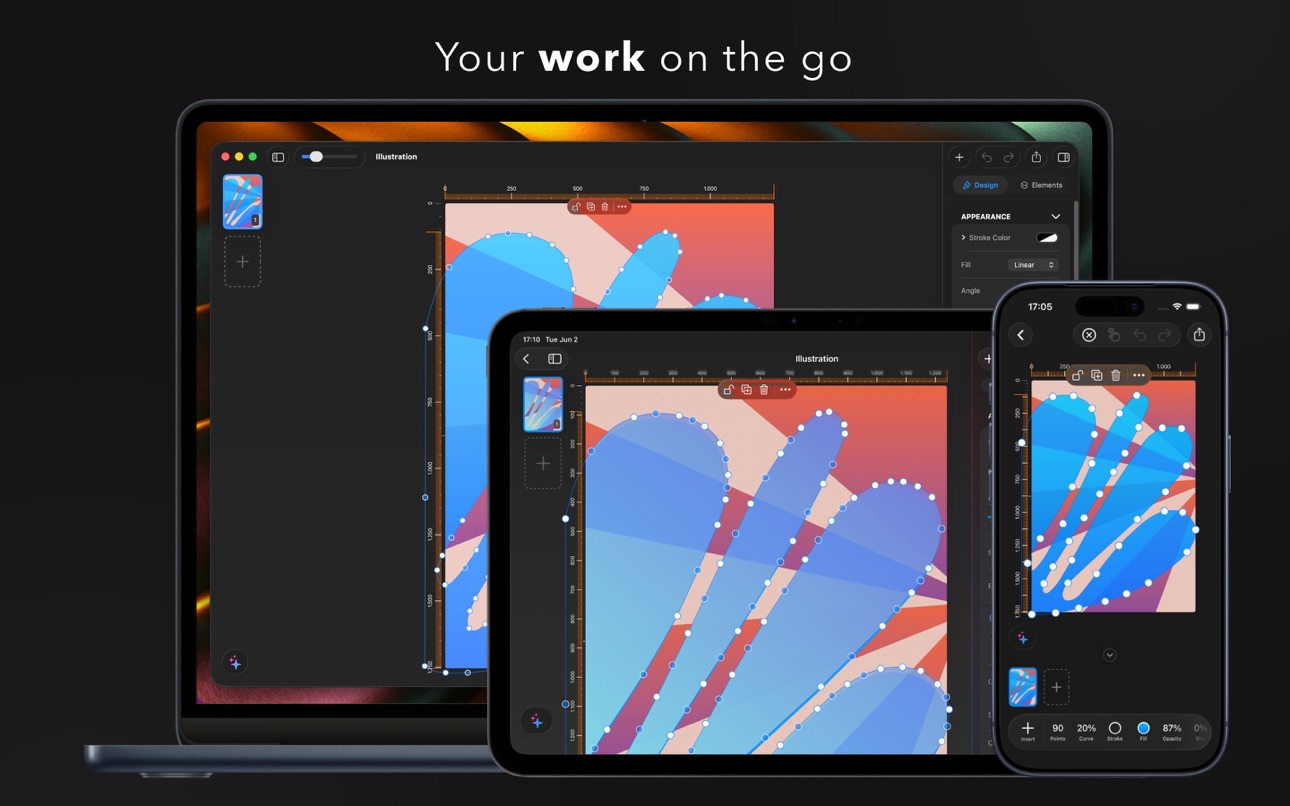
What’s New Version 26.2.0
- Rulers that read your mind — they appear when you need precision and vanish when you don't.
- Resize without losing your place — on Mac & iPad, your design stays perfectly in view.
- Effortless rotation — spin any object with a single tap-and-drag knob that snaps to the perfect angle.
- A toolbar that adapts to you — the right controls, right when you select.
- Text editing that just flows — your cursor always stays in sight.
- Polished everywhere — smarter freeform shapes, refreshed colors, and a snappier, smoother feel throughout.
Description
Create stunning designs across all your Apple devices with Pixara Studio — the complete native design app for iPhone, iPad, and Mac.
A powerful all-in-one design tool, built natively for Apple. From social media posts to presentations, logos to illustrations — everything in one intuitive app.
▶ MEET ARA — YOUR AI DESIGN COPILOT
Describe what you want, and ARA builds it for you. Add elements, adjust layouts, change colors, edit text — all through natural conversation. ARA understands your design and helps you create faster, smarter, and with zero learning curve.
▶ HUNDREDS OF TEMPLATES
Ready-to-customize designs for Instagram stories, posters, flyers, book covers, business cards, logos, collages, presentations, newsletters, and more.
▶ ADVANCED VECTOR TOOLS
Create illustrations and edit paths with precision. Add points, adjust curves, customize strokes and fills. Convert text and shapes into editable paths. Merge, combine, and transform — vector editing made easy.
▶ MULTI-LAYER DRAWING
Create multiple drawing layers, each independently movable and resizable. Adjust depth, combine with other elements, and build complex illustrations with full control.
▶ SMART TRANSITIONS
Bring your designs to life. Elements smoothly animate, scale, and glide between pages — perfect for presentations and motion graphics. Shared objects move automatically; new ones fade in, removed ones fade out. No keyframes, no timeline — just place, duplicate, and play.
▶ AI-POWERED WRITING
Select any text and instantly correct grammar, rephrase, elaborate, or summarize — without leaving your design.
▶ SCAN & DIGITIZE
Capture documents with your camera, extract text using OCR, edit directly in your designs, and export as PDF.
▶ SEAMLESS SYNC
Start on iPhone, refine on iPad, finish on Mac. iCloud keeps everything in sync.
▶ PRO EXPORTS
Export in SVG, PDF, PNG, JPEG, HEIC, or WebP — high resolution, no watermarks with PRO.
Terms & Conditions: https://pixara.studio/terms/
In-App Purchases BB pricing
AI Copilot PRO Subscription
AI Copilot Weekly · 7 days—
AI Copilot Weekly · Monthly—
PRO Subscription Subscription
Yearly · Yearly—
Monthly · Monthly—
Weekly · 7 days—
One-Time Purchases
50 credits—
25 credits—
100 credits—
10 credits—
Lifetime—
Capabilities
In-App Purchases
Accessibility
ipadiphonemacrealityDevicetvoswatch
Version history 4 versions
Build 886819296v26.2.02026-06-19 09:49:28
- Rulers that read your mind — they appear when you need precision and vanish when you don't.
- Resize without losing your place — on Mac & iPad, your design stays perfectly in view.
- Effortless rotation — spin any object with a single tap-and-drag knob that snaps to the perfect angle.
- A toolbar that adapts to you — the right controls, right when you select.
- Text editing that just flows — your cursor always stays in sight.
- Polished everywhere — smarter freeform shapes, refreshed colors, and a snappier, smoother feel throughout.
Build 881497494v26.1.02026-06-08 07:04:30
- Meet ARA — your AI design copilot. Just describe what you want, and ARA builds it.
- Smart Transitions — animate elements between pages for eye-catching videos & presentations.
- SVG export — take your vector designs anywhere.
- Improved document export.
- Refreshed, faster interface.
- Lifetime purchase — unlock PRO once, keep it forever.
Plus bug fixes and performance improvements.
Build 881334733v26.0.12026-01-09 11:10:43
• Improved text editing toolbar - Quick access to font size presets directly from the keyboard toolbar. Tap the size button to choose from common sizes or use +/- for fine adjustments.
• Bug fixes - Fixed an issue where font size changes from the toolbar sometimes didn't respond.
• Performance improvements - General optimizations for a smoother experience.
Build 878165576v26.02026-01-08 19:54:14
Price history by region
Currency
Show
Columns
Search
Availability 75 of 75 storefronts
| Region | Language | Price | Ratings | Avg | Version |
|---|---|---|---|---|---|
| AG | en-GB | Free | 0 | — | 26.2.0 |
| AI | en-GB | Free | 0 | — | 26.2.0 |
| AO | en-GB | Free | 0 | — | 26.2.0 |
| AR | es-MX | Free | 0 | — | 26.2.0 |
| BB | en-GB | Free | 0 | — | 26.2.0 |
| BF | en-GB | Free | 0 | — | 26.2.0 |
| BJ | en-GB | Free | 0 | — | 26.2.0 |
| BO | es-MX | Free | 0 | — | 26.2.0 |
| BR | pt-BR | Free | 0 | — | 26.2.0 |
| BS | en-GB | Free | 0 | — | 26.2.0 |
| BW | en-GB | Free | 0 | — | 26.2.0 |
| BZ | en-GB | Free | 0 | — | 26.2.0 |
| CD | en-GB | Free | 0 | — | 26.2.0 |
| CG | en-GB | Free | 0 | — | 26.2.0 |
| CI | fr-FR | Free | 0 | — | 26.2.0 |
| CL | es-MX | Free | 0 | — | 26.2.0 |
| CM | fr-FR | Free | 0 | — | 26.2.0 |
| CO | es-MX | Free | 0 | — | 26.2.0 |
| CR | es-MX | Free | 0 | — | 26.2.0 |
| CV | en-GB | Free | 0 | — | 26.2.0 |
| DM | en-GB | Free | 0 | — | 26.2.0 |
| DO | es-MX | Free | 0 | — | 26.2.0 |
| DZ | en-GB | Free | 0 | — | 26.2.0 |
| EC | es-MX | Free | 0 | — | 26.2.0 |
| GA | fr-FR | Free | 0 | — | 26.2.0 |
| GD | en-GB | Free | 0 | — | 26.2.0 |
| GH | en-GB | Free | 0 | — | 26.2.0 |
| GM | en-GB | Free | 0 | — | 26.2.0 |
| GT | es-MX | Free | 0 | — | 26.2.0 |
| GW | en-GB | Free | 0 | — | 26.2.0 |
| GY | en-GB | Free | 0 | — | 26.2.0 |
| HN | es-MX | Free | 0 | — | 26.2.0 |
| JM | en-GB | Free | 0 | — | 26.2.0 |
| KE | en-GB | Free | 0 | — | 26.2.0 |
| KN | en-GB | Free | 0 | — | 26.2.0 |
| KY | en-GB | Free | 0 | — | 26.2.0 |
| LC | en-GB | Free | 0 | — | 26.2.0 |
| LR | en-GB | Free | 0 | — | 26.2.0 |
| LY | en-GB | Free | 0 | — | 26.2.0 |
| MA | en-GB | Free | 0 | — | 26.2.0 |
| MG | en-GB | Free | 0 | — | 26.2.0 |
| ML | en-GB | Free | 0 | — | 26.2.0 |
| MS | en-GB | Free | 0 | — | 26.2.0 |
| MU | en-GB | Free | 0 | — | 26.2.0 |
| MW | en-GB | Free | 0 | — | 26.2.0 |
| MX | es-MX | Free | 0 | — | 26.2.0 |
| MZ | en-GB | Free | 0 | — | 26.2.0 |
| NA | en-GB | Free | 0 | — | 26.2.0 |
| NE | en-GB | Free | 0 | — | 26.2.0 |
| NG | en-GB | Free | 0 | — | 26.2.0 |
| NI | es-MX | Free | 0 | — | 26.2.0 |
| PA | es-MX | Free | 0 | — | 26.2.0 |
| PE | es-MX | Free | 0 | — | 26.2.0 |
| PY | es-MX | Free | 0 | — | 26.2.0 |
| RW | en-GB | Free | 0 | — | 26.2.0 |
| SC | en-GB | Free | 0 | — | 26.2.0 |
| SL | en-GB | Free | 0 | — | 26.2.0 |
| SN | en-GB | Free | 0 | — | 26.2.0 |
| SR | en-GB | Free | 0 | — | 26.2.0 |
| ST | en-GB | Free | 0 | — | 26.2.0 |
| SV | es-MX | Free | 0 | — | 26.2.0 |
| SZ | en-GB | Free | 0 | — | 26.2.0 |
| TC | en-GB | Free | 0 | — | 26.2.0 |
| TD | en-GB | Free | 0 | — | 26.2.0 |
| TN | en-GB | Free | 0 | — | 26.2.0 |
| TT | en-GB | Free | 0 | — | 26.2.0 |
| TZ | en-GB | Free | 0 | — | 26.2.0 |
| UG | en-GB | Free | 0 | — | 26.2.0 |
| US | en-US | Free | 0 | — | 26.2.0 |
| UY | en-GB | Free | 0 | — | 26.2.0 |
| VC | en-GB | Free | 0 | — | 26.2.0 |
| VE | es-MX | Free | 0 | — | 26.2.0 |
| VG | en-GB | Free | 0 | — | 26.2.0 |
| ZM | en-GB | Free | 0 | — | 26.2.0 |
| ZW | en-GB | Free | 0 | — | 26.2.0 |
Change log 8 changes · BB
✎
releaseNotes updated
- Rulers that read your mind — they appear when you need precision and vanish when you don't.
- Resize without losing your place — on Mac & iPad, your design st
✎
description updated
Create stunning designs across all your Apple devices with Pixara Studio — the complete native design app for iPhone, iPad, and Mac.
A powerful all-in-one desi
✎
subtitle updated
Logo, Poster & Vector Maker
✎
name updated
Pixara: AI Design & Docs
◆
Version 26.2.0 released
- Rulers that read your mind — they appear when you need precision and vanish when you don't.
- Resize without losing your place — on Mac & iPad, your design stays perfectly in view.
- Effortless rotation — spin any object with a single tap
◆
Version 26.1.0 released
- Meet ARA — your AI design copilot. Just describe what you want, and ARA builds it.
- Smart Transitions — animate elements between pages for eye-catching videos & presentations.
- SVG export — take your vector designs anywhere.
- Improved
◆
Version 26.0.1 released
• Improved text editing toolbar - Quick access to font size presets directly from the keyboard toolbar. Tap the size button to choose from common sizes or use +/- for fine adjustments.
• Bug fixes - Fixed an issue where font size changes fr
◆
Version 26.0 released