Home › Photo & Video

Photo & Video Collage Editor
Collage, Grid & Reel Maker
 PG
PG
 TWzh-Hant-TW
 USen-US
 HKzh-Hant-HK
 CNzh-Hans-CN
 DEde-DE
 ROen-GB
 CAen-CA
 EGen-GB
 INen-GB
 MYen-GB
 AUen-AU
 GBen-GB
 AEen-GB
 FRfr-FR
 ITit
ITit BEen-GB
 BGen-GB
 DKen-GB
 GHen-GB
 IEen-GB
 JPja
JPja KHen-GB
 KRko
KRko MDen-GB
 MXes-MX
 NLnl
NLnl NPen-GB
 PEes-MX
 PHen-GB
 PKen-GB
 PLen-GB
 SAen-GB
 SGen-GB
 THen-GB
 TRen-GB
 UZen-GB
 VNen-GB
 AFen-GB
 AGen-GB
 ALen-GB
 AMen-GB
 AOen-GB
 ARes-MX
 ATde-DE
 AZen-GB
 BAen-GB
 BBen-GB
 BFen-GB
 BHen-GB
 BJen-GB
 BMen-GB
 BNen-GB
 BOes-MX
 BRpt-BR
 BSen-GB
 BTen-GB
 BWen-GB
 BYen-GB
 BZen-GB
 CDen-GB
 CGen-GB
 CHde-CH
 CIfr-FR
 CLes-MX
 CMfr-FR
 COes-MX
 CRes-MX
 CVen-GB
 CYen-GB
 CZen-GB
 DMen-GB
 DOes-MX
 DZen-GB
 ECes-MX
 EEen-GB
 ESes-ES
 FIen-GB
 FJen-GB
 FMen-GB
 GAfr-FR
 GEen-GB
 GMen-GB
 GRen-GB
 GTes-MX
 GWen-GB
 GYen-GB
 HNes-MX
 HRen-GB
 HUen-GB
 IDen-GB
 ILen-GB
 IQen-GB
 ISen-GB
 JMen-GB
 JOen-GB
 KEen-GB
 KGen-GB
 KWen-GB
 KZen-GB
 LAen-GB
 LBen-GB
 LKen-GB
 LRen-GB
 LTen-GB
 LUen-GB
 LVen-GB
 LYen-GB
 MAen-GB
 MEen-GB
 MGen-GB
 MKen-GB
 MLen-GB
 MMen-GB
 MNen-GB
 MOzh-Hant-HK
 MRen-GB
 MSen-GB
 MTen-GB
 MUen-GB
 MVen-GB
 MWen-GB
 MZen-GB
 NAen-GB
 NEen-GB
 NGen-GB
 NIes-MX
 NOen-GB
 NRen-GB
 NZen-AU
 OMen-GB
 PAes-MXPGen-GB
 PTpt-PT
 PWen-GB
 PYes-MX
 QAen-GB
 RSen-GB
 RUru
RUru RWen-GB
 SBen-GB
 SCen-GB
 SEsv
SEsv SIen-GB
 SKen-GB
 SLen-GB
 SNen-GB
 SRen-GB
 STen-GB
 SVes-MX
 SZen-GB
 TDen-GB
 TJen-GB
 TMen-GB
 TNen-GB
 TOen-GB
 TTen-GB
 TZen-GB
 UAen-GB
 UGen-GB
 UYen-GB
 VEes-MX
 VUen-GB
 XKen-GB
 YEen-GB
 ZAen-GB
 ZMen-GB
 ZWen-GB
167 of 167 storefronts
Content in en-US
Content in en-US
Information
Preview 2 platforms
iPhone 10 images






iPad 10 images




What’s New Version 2.0.8
Video Collages Are Here!
You can now add videos to your collages using the same 100+ grids and layouts as photo collages.
What’s new:
• Create collages with photos and videos together
• Add up to 6 videos per collage
• Choose how videos play: all at once or one after another
• Set a custom playback order for sequential mode
• Control volume for each video
• Preview videos live with play and pause controls
• Export your video collage with text, stickers, and photo overlays
Limits:
• Up to 5 minutes per video
• Up to 10 minutes total collage duration
Turn your memories into dynamic video collages.
Added multilingual support.
Description
Transform Your Photos & Videos Into Stunning Collages
Photo & Video Collage Editor is the ultimate collage maker and photo editor that turns your memories into beautiful, share-worthy creations. With 100+ professional layouts, AI beauty filters, and 4K export, you can design magazine-quality collages with full creative control—perfect for Instagram, scrapbooks, family albums, weddings, holidays, or your dog’s cutest moments.
COMPLETE FEATURE SET
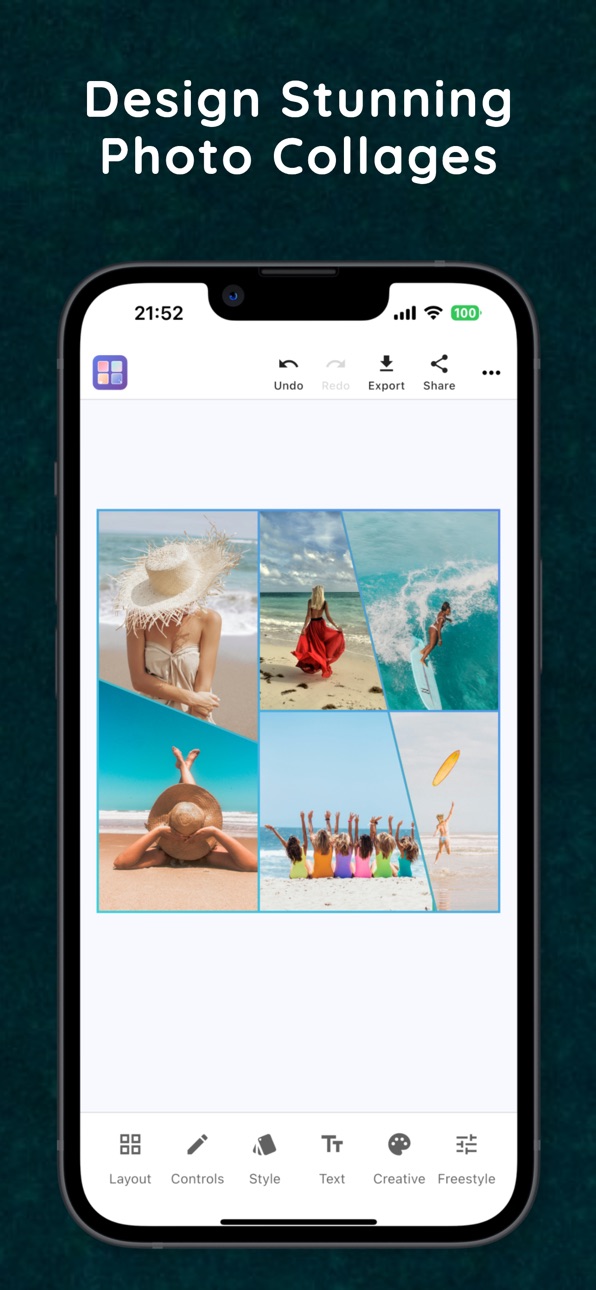
- 100+ Professional Templates – From simple grids to creative shapes (hearts, stars, circles, triangles, and more).
- Slanted Layouts – Modern angled frames with 50+ variations, including horizontal, vertical, cross, and multi-section designs.
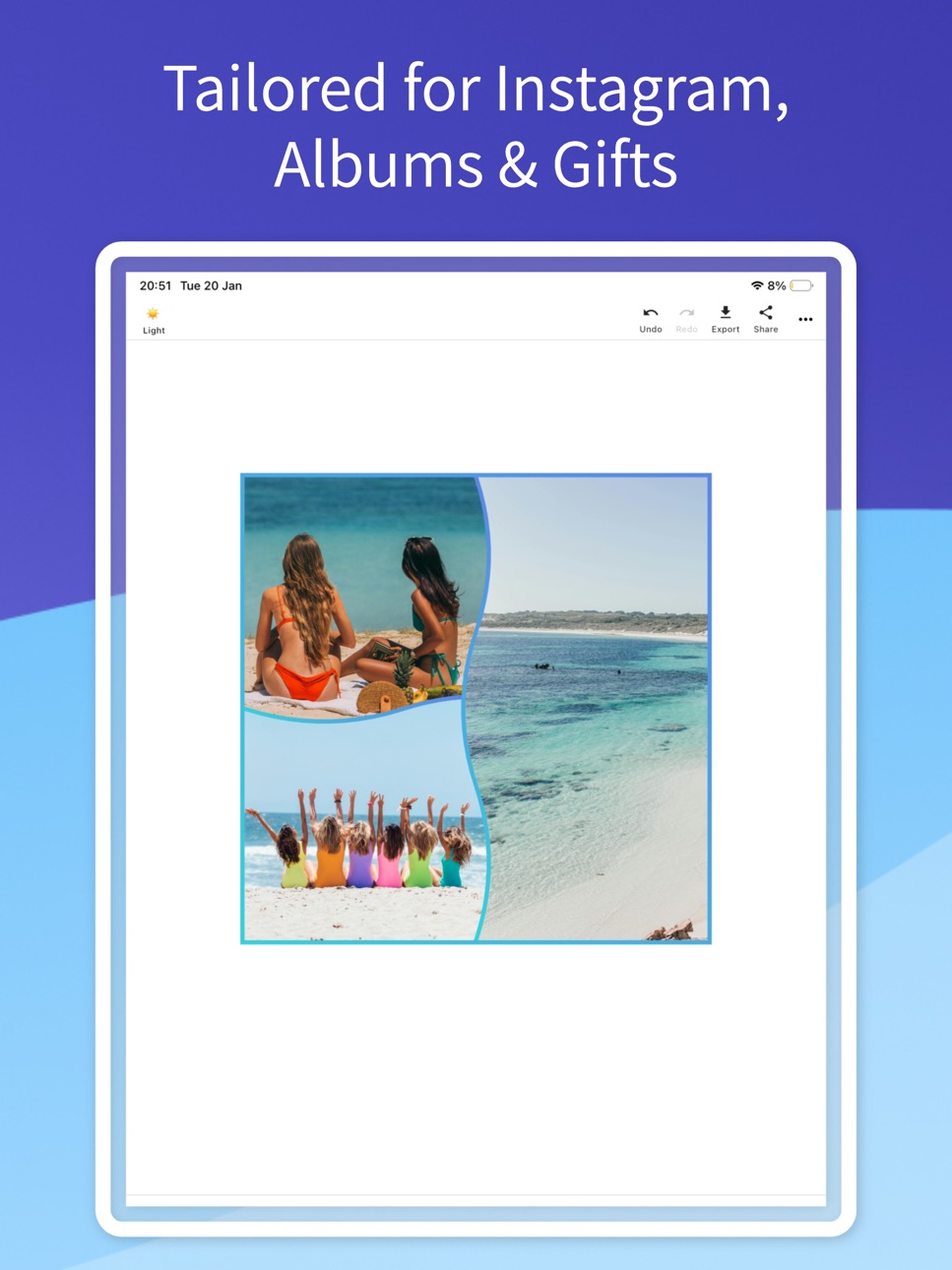
- Wave Layouts – Smooth flowing frames with layered edges for organic, dynamic collages.
- Advanced Layout Filtering – Instantly find templates that match your photo count for faster editing.
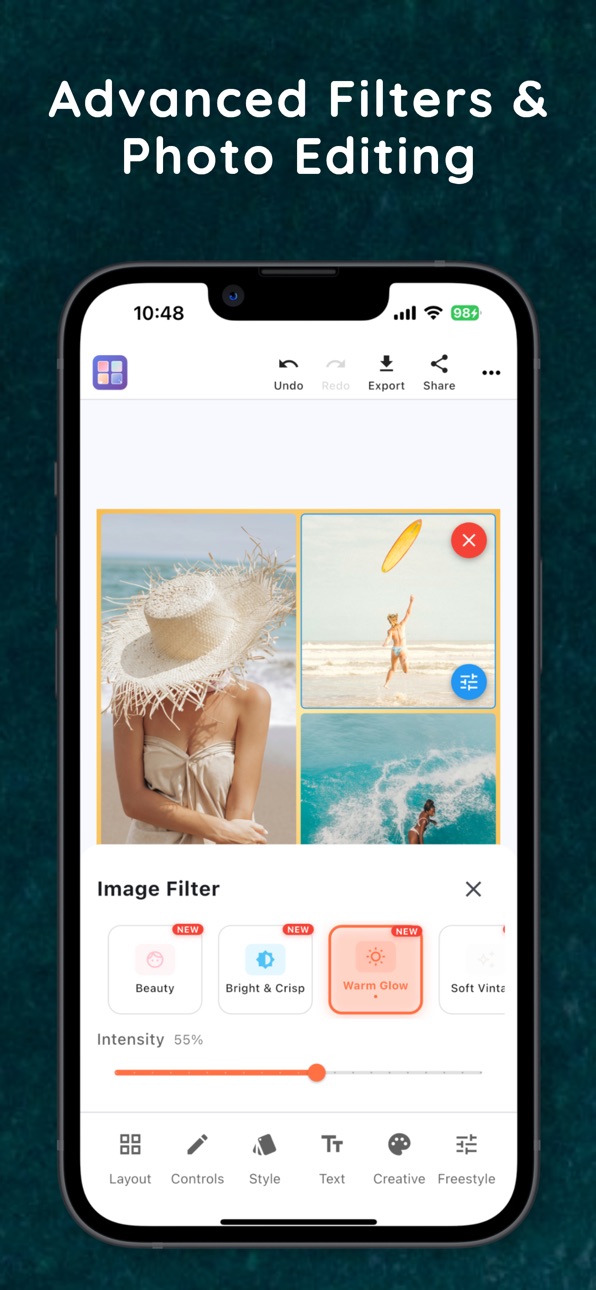
- AI Beauty Filter – Smart face detection with natural skin smoothing.
- Advanced Photo Editing – Brightness, contrast, saturation, and 8 premium filters.
- Creative Drawing Tools – Brush, eraser, and full color picker for custom art.
- Sticker Library – 90+ emojis, seasonal decorations, and fun extras.
- Rich Text Overlays – 10 Fonts with customizable colors and styles.
- Professional Export – Save in 4K resolution
- Intuitive Controls – Pinch, zoom, rotate, and drag-and-drop editing.
PROFESSIONAL FEATURES
- Free-Style Canvas – Unlimited creativity beyond standard grids.
- Instagram-Ready Formats – Square, portrait, and landscape layouts.
- Filter Presets – Vintage, Cinematic, Black & White, Vibrant, Warm, Dramatic, and more.
- Layer Management – Arrange photos, stickers, and text with precision.
- Decorative Frames – 10 stylish frames to highlight your best shots.
- Offline First – No internet required; all editing works locally.
PERFECT FOR
- Social media posts (Instagram, Facebook, TikTok, Twitter)
- Family albums, scrapbooking, and memory books
- Weddings, anniversaries, birthdays, and holiday collages
- Pets and dogs – capture every adorable moment
- Business flyers, posters, and marketing materials
- Creative projects, event invitations, and greeting cards
SMOOTH USER EXPERIENCE
- Guided Tutorial – 9-step onboarding for new users.
- 60fps Animations – Smooth, professional interface.
- Smart Grid Selection – Add photos instantly with one tap.
- Dark and Light Themes – Customizable editing experience.
- Haptic Feedback – Premium touch response.
WHY CHOOSE Photo & Video Collage Editor
- Professional Quality – Export collages in full 4K resolution.
- Privacy Focused – No cloud uploads; your photos stay on your device.
- Lightweight and Fast – Optimized for all phones and tablets.
- One-Time Purchase – Full access, no hidden subscriptions.
- Regular Updates – New features added often.
IMPORT AND EXPORT
- Import from camera, gallery, or existing projects.
- Batch select photos and reorder with drag-and-drop.
- Save to Photos app in perfect quality.
- Share directly to Instagram, TikTok, Facebook, and WhatsApp.
CREATIVE TOOLS
- Drawing Mode – Add doodles or artistic sketches.
- Custom Brushes – Adjustable size with full color spectrum picker.
- Eraser Tool – Precise corrections with instant feedback.
- Sticker Categories – Emojis, decorations, and seasonal collections.
PERFORMANCE OPTIMIZED
- Advanced image caching for instant loading.
- Memory management for large photo libraries.
- Background processing for smooth editing.
- Battery-efficient performance.
Create Beautiful Memories Today
Whether you’re a social media creator, pet lover, wedding photographer, or scrapbook enthusiast, Photo & Video Collage Editor makes it easy to design collages that capture your story. With AI-powered tools, 100+ unique layouts (including slanted, wave, and triangle frames), and professional 4K export, you have everything you need to make your photos stand out.
Download Photo & Video Collage Editor now and start creating stunning photo collages.
Capabilities
In-App Purchases
Accessibility
ipadiphonemacrealityDevicetvoswatch
Version history 24 versions
Build 883394748v2.0.82026-03-15 16:00:21
Video Collages Are Here!
You can now add videos to your collages using the same 100+ grids and layouts as photo collages.
What’s new:
• Create collages with photos and videos together
• Add up to 6 videos per collage
• Choose how videos play: all at once or one after another
• Set a custom playback order for sequential mode
• Control volume for each video
• Preview videos live with play and pause controls
• Export your video collage with text, stickers, and photo overlays
Limits:
• Up to 5 minutes per video
• Up to 10 minutes total collage duration
Turn your memories into dynamic video collages.
Added multilingual support.
Build 881815898v2.0.72026-01-25 21:08:46
Video Collages Are Here!
You can now add videos to your collages using the same 100+ grids and layouts as photo collages.
What’s new:
• Create collages with photos and videos together
• Add up to 6 videos per collage
• Choose how videos play: all at once or one after another
• Set a custom playback order for sequential mode
• Control volume for each video
• Preview videos live with play and pause controls
• Export your video collage with text, stickers, and photo overlays
Limits:
• Up to 5 minutes per video
• Up to 10 minutes total collage duration
Turn your memories into dynamic video collages.
Added multilingual support.
Build 881669072v2.0.62026-01-21 13:50:52
Video Collages Are Here!
You can now add videos to your collages using the same 100+ grids and layouts as photo collages.
What’s new:
• Create collages with photos and videos together
• Add up to 6 videos per collage
• Choose how videos play: all at once or one after another
• Set a custom playback order for sequential mode
• Control volume for each video
• Preview videos live with play and pause controls
• Export your video collage with text, stickers, and photo overlays
Limits:
• Up to 5 minutes per video
• Up to 10 minutes total collage duration
Turn your memories into dynamic video collages.
Added multilingual support.
Build 881612080v2.0.52026-01-18 18:51:59
Video Collages Are Here!
You can now add videos to your collages using the same 100+ grids and layouts as photo collages.
What’s new:
• Create collages with photos and videos together
• Add up to 6 videos per collage
• Choose how videos play: all at once or one after another
• Set a custom playback order for sequential mode
• Control volume for each video
• Preview videos live with play and pause controls
• Export your video collage with text, stickers, and photo overlays
Limits:
• Up to 5 minutes per video
• Up to 10 minutes total collage duration
Turn your memories into dynamic video collages.
Added multilingual support.
Build 881595646v2.0.42026-01-17 19:00:37
Video Collages Are Here!
You can now add videos to your collages using the same 100+ grids and layouts as photo collages.
What’s new:
• Create collages with photos and videos together
• Add up to 6 videos per collage
• Choose how videos play: all at once or one after another
• Set a custom playback order for sequential mode
• Control volume for each video
• Preview videos live with play and pause controls
• Export your video collage with text, stickers, and photo overlays
Limits:
• Up to 5 minutes per video
• Up to 10 minutes total collage duration
Turn your memories into dynamic video collages.
Added multilingual support.
Build 881474203v2.0.32026-01-14 13:43:00
Video Collages Are Here!
You can now add videos to your collages using the same 100+ grids and layouts as photo collages.
What’s new:
• Create collages with photos and videos together
• Add up to 6 videos per collage
• Choose how videos play: all at once or one after another
• Set a custom playback order for sequential mode
• Control volume for each video
• Preview videos live with play and pause controls
• Export your video collage with text, stickers, and photo overlays
Limits:
• Up to 5 minutes per video
• Up to 10 minutes total collage duration
Turn your memories into dynamic video collages.
Build 881423146v2.0.12026-01-12 16:43:36
Video Collages Are Here!
You can now add videos to your collages using the same 100+ grids and layouts as photo collages.
What’s new:
• Create collages with photos and videos together
• Add up to 6 videos per collage
• Choose how videos play: all at once or one after another
• Set a custom playback order for sequential mode
• Control volume for each video
• Preview videos live with play and pause controls
• Export your video collage with text, stickers, and photo overlays
Limits:
• Up to 5 minutes per video
• Up to 10 minutes total collage duration
Turn your memories into dynamic video collages.
Build 881430432v2.0.22026-01-12 19:44:51
Video Collages Are Here!
You can now add videos to your collages using the same 100+ grids and layouts as photo collages.
What’s new:
• Create collages with photos and videos together
• Add up to 6 videos per collage
• Choose how videos play: all at once or one after another
• Set a custom playback order for sequential mode
• Control volume for each video
• Preview videos live with play and pause controls
• Export your video collage with text, stickers, and photo overlays
Limits:
• Up to 5 minutes per video
• Up to 10 minutes total collage duration
Turn your memories into dynamic video collages.
Build 881364281v2.0.02026-01-11 20:49:19
Video Collages Are Here!
You can now add videos to your collages using the same 100+ grids and layouts as photo collages.
What’s new:
• Create collages with photos and videos together
• Add up to 6 videos per collage
• Choose how videos play: all at once or one after another
• Set a custom playback order for sequential mode
• Control volume for each video
• Preview videos live with play and pause controls
• Export your video collage with text, stickers, and photo overlays
Limits:
• Up to 5 minutes per video
• Up to 10 minutes total collage duration
Turn your memories into dynamic video collages.
Build 881147437v1.162026-01-02 14:15:21
New Features
- Dark/Light Mode Support: The app now adapts to your device theme for a more comfortable viewing experience
- Slanted Layouts – Revolutionary parallelogram frames with dynamic angled edges, featuring 48+ variations including horizontal, vertical, cross patterns, and complex multi-section combinations.
- Wave Layouts – 7 brand-new wave patterns with smooth curves and layered edges that flow seamlessly together.
- Custom Backdrops – Use your own photos as canvas backgrounds for personalized collages with unlimited creative freedom.
- Triangle Shapes – Refined diagonal split triangles with precise borders and perfect geometric alignment.
- New app icon
- Improved Export Quality – Enhanced image rendering engine delivers sharper, higher-resolution exports for professional-grade results.
- Tip Jar – Support the ongoing development through the new Tip Jar feature.
Improvements
- Advanced layout filtering by photo count to instantly find templates matching your image collection.
- Smarter photo selection with smoother filter timing and enhanced responsiveness.
- Enhanced drag & drop for easier photo positioning with improved visual feedback.
- Expanded library of 108 layout templates including grids, L-shapes, circles, hearts, stars, slanted frames, and advanced geometric patterns.
- Faster performance with optimized transitions, memory management, and smooth 60fps animations.
Bug Fixes
- Fixed photo selection glitches when applying filters and switching between modes.
- Resolved canvas positioning issues and improved gesture recognition accuracy.
- Corrected wave layering for proper photo stacking and overlap handling.
- Cleaner triangle edges with fixed border radius and precise geometric rendering.
Create more freely with custom backdrops, revolutionary slanted layouts, and a comprehensively polished editing experience designed for professional results.
Build 881079148v1.152025-12-30 16:40:34
New Features
- Dark/Light Mode Support: The app now adapts to your device theme for a more comfortable viewing experience
- Slanted Layouts – Revolutionary parallelogram frames with dynamic angled edges, featuring 48+ variations including horizontal, vertical, cross patterns, and complex multi-section combinations.
- Wave Layouts – 7 brand-new wave patterns with smooth curves and layered edges that flow seamlessly together.
- Custom Backdrops – Use your own photos as canvas backgrounds for personalized collages with unlimited creative freedom.
- Triangle Shapes – Refined diagonal split triangles with precise borders and perfect geometric alignment.
- New app icon
- Improved Export Quality – Enhanced image rendering engine delivers sharper, higher-resolution exports for professional-grade results.
- Tip Jar – Support the ongoing development through the new Tip Jar feature.
Improvements
- Advanced layout filtering by photo count to instantly find templates matching your image collection.
- Smarter photo selection with smoother filter timing and enhanced responsiveness.
- Enhanced drag & drop for easier photo positioning with improved visual feedback.
- Expanded library of 108 layout templates including grids, L-shapes, circles, hearts, stars, slanted frames, and advanced geometric patterns.
- Faster performance with optimized transitions, memory management, and smooth 60fps animations.
Bug Fixes
- Fixed photo selection glitches when applying filters and switching between modes.
- Resolved canvas positioning issues and improved gesture recognition accuracy.
- Corrected wave layering for proper photo stacking and overlap handling.
- Cleaner triangle edges with fixed border radius and precise geometric rendering.
Create more freely with custom backdrops, revolutionary slanted layouts, and a comprehensively polished editing experience designed for professional results.
Build 880451480v1.142025-12-09 09:55:01
New Features
- Dark/Light Mode Support: The app now adapts to your device theme for a more comfortable viewing experience
- Slanted Layouts – Revolutionary parallelogram frames with dynamic angled edges, featuring 48+ variations including horizontal, vertical, cross patterns, and complex multi-section combinations.
- Wave Layouts – 7 brand-new wave patterns with smooth curves and layered edges that flow seamlessly together.
- Custom Backdrops – Use your own photos as canvas backgrounds for personalized collages with unlimited creative freedom.
- Triangle Shapes – Refined diagonal split triangles with precise borders and perfect geometric alignment.
- New app icon
- Improved Export Quality – Enhanced image rendering engine delivers sharper, higher-resolution exports for professional-grade results.
- Tip Jar – Support the ongoing development through the new Tip Jar feature.
Improvements
- Advanced layout filtering by photo count to instantly find templates matching your image collection.
- Smarter photo selection with smoother filter timing and enhanced responsiveness.
- Enhanced drag & drop for easier photo positioning with improved visual feedback.
- Expanded library of 108 layout templates including grids, L-shapes, circles, hearts, stars, slanted frames, and advanced geometric patterns.
- Faster performance with optimized transitions, memory management, and smooth 60fps animations.
Bug Fixes
- Fixed photo selection glitches when applying filters and switching between modes.
- Resolved canvas positioning issues and improved gesture recognition accuracy.
- Corrected wave layering for proper photo stacking and overlap handling.
- Cleaner triangle edges with fixed border radius and precise geometric rendering.
Create more freely with custom backdrops, revolutionary slanted layouts, and a comprehensively polished editing experience designed for professional results.
Build 880188948v1.132025-11-29 21:27:16
New Features
- Slanted Layouts – Revolutionary parallelogram frames with dynamic angled edges, featuring 48+ variations including horizontal, vertical, cross patterns, and complex multi-section combinations.
- Wave Layouts – 7 brand-new wave patterns with smooth curves and layered edges that flow seamlessly together.
- Custom Backdrops – Use your own photos as canvas backgrounds for personalized collages with unlimited creative freedom.
- Triangle Shapes – Refined diagonal split triangles with precise borders and perfect geometric alignment.
- New app icon
- Improved Export Quality – Enhanced image rendering engine delivers sharper, higher-resolution exports for professional-grade results.
- Tip Jar – Support the ongoing development through the new Tip Jar feature.
Improvements
- Advanced layout filtering by photo count to instantly find templates matching your image collection.
- Smarter photo selection with smoother filter timing and enhanced responsiveness.
- Enhanced drag & drop for easier photo positioning with improved visual feedback.
- Expanded library of 108 layout templates including grids, L-shapes, circles, hearts, stars, slanted frames, and advanced geometric patterns.
- Faster performance with optimized transitions, memory management, and smooth 60fps animations.
Bug Fixes
- Fixed photo selection glitches when applying filters and switching between modes.
- Resolved canvas positioning issues and improved gesture recognition accuracy.
- Corrected wave layering for proper photo stacking and overlap handling.
- Cleaner triangle edges with fixed border radius and precise geometric rendering.
Create more freely with custom backdrops, revolutionary slanted layouts, and a comprehensively polished editing experience designed for professional results.
Build 879864463v1.122025-11-18 22:34:49
New Features
- Slanted Layouts – Revolutionary parallelogram frames with dynamic angled edges, featuring 48+ variations including horizontal, vertical, cross patterns, and complex multi-section combinations.
- Wave Layouts – 7 brand-new wave patterns with smooth curves and layered edges that flow seamlessly together.
- Custom Backdrops – Use your own photos as canvas backgrounds for personalized collages with unlimited creative freedom.
- Triangle Shapes – Refined diagonal split triangles with precise borders and perfect geometric alignment.
- New app icon
- Improved Export Quality – Enhanced image rendering engine delivers sharper, higher-resolution exports for professional-grade results.
- Tip Jar – Support the ongoing development through the new Tip Jar feature.
Improvements
- Advanced layout filtering by photo count to instantly find templates matching your image collection.
- Smarter photo selection with smoother filter timing and enhanced responsiveness.
- Enhanced drag & drop for easier photo positioning with improved visual feedback.
- Expanded library of 108 layout templates including grids, L-shapes, circles, hearts, stars, slanted frames, and advanced geometric patterns.
- Faster performance with optimized transitions, memory management, and smooth 60fps animations.
Bug Fixes
- Fixed photo selection glitches when applying filters and switching between modes.
- Resolved canvas positioning issues and improved gesture recognition accuracy.
- Corrected wave layering for proper photo stacking and overlap handling.
- Cleaner triangle edges with fixed border radius and precise geometric rendering.
Create more freely with custom backdrops, revolutionary slanted layouts, and a comprehensively polished editing experience designed for professional results.
Build 879499940v1.112025-11-06 09:41:39
New Features
- Slanted Layouts – Revolutionary parallelogram frames with dynamic angled edges, featuring 48+ variations including horizontal, vertical, cross patterns, and complex multi-section combinations.
- Wave Layouts – 7 brand-new wave patterns with smooth curves and layered edges that flow seamlessly together.
- Custom Backdrops – Use your own photos as canvas backgrounds for personalized collages with unlimited creative freedom.
- Triangle Shapes – Refined diagonal split triangles with precise borders and perfect geometric alignment.
- New app icon
- Improved Export Quality – Enhanced image rendering engine delivers sharper, higher-resolution exports for professional-grade results.
- Tip Jar – Support the ongoing development through the new Tip Jar feature.
Improvements
- Advanced layout filtering by photo count to instantly find templates matching your image collection.
- Smarter photo selection with smoother filter timing and enhanced responsiveness.
- Enhanced drag & drop for easier photo positioning with improved visual feedback.
- Expanded library of 108 layout templates including grids, L-shapes, circles, hearts, stars, slanted frames, and advanced geometric patterns.
- Faster performance with optimized transitions, memory management, and smooth 60fps animations.
Bug Fixes
- Fixed photo selection glitches when applying filters and switching between modes.
- Resolved canvas positioning issues and improved gesture recognition accuracy.
- Corrected wave layering for proper photo stacking and overlap handling.
- Cleaner triangle edges with fixed border radius and precise geometric rendering.
Create more freely with custom backdrops, revolutionary slanted layouts, and a comprehensively polished editing experience designed for professional results.
Build 879058401v1.102025-10-21 03:07:09
New Features
- Slanted Layouts – Revolutionary parallelogram frames with dynamic angled edges, featuring 48+ variations including horizontal, vertical, cross patterns, and complex multi-section combinations.
- Wave Layouts – 7 brand-new wave patterns with smooth curves and layered edges that flow seamlessly together.
- Custom Backdrops – Use your own photos as canvas backgrounds for personalized collages with unlimited creative freedom.
- Triangle Shapes – Refined diagonal split triangles with precise borders and perfect geometric alignment.
- New app icon
Improvements
- Advanced layout filtering by photo count to instantly find templates matching your image collection.
- Smarter photo selection with smoother filter timing and enhanced responsiveness.
- Enhanced drag & drop for easier photo positioning with improved visual feedback.
- Expanded library of 108 layout templates including grids, L-shapes, circles, hearts, stars, slanted frames, and advanced geometric patterns.
- Faster performance with optimized transitions, memory management, and smooth 60fps animations.
Bug Fixes
- Fixed photo selection glitches when applying filters and switching between modes.
- Resolved canvas positioning issues and improved gesture recognition accuracy.
- Corrected wave layering for proper photo stacking and overlap handling.
- Cleaner triangle edges with fixed border radius and precise geometric rendering.
Create more freely with custom backdrops, revolutionary slanted layouts, and a comprehensively polished editing experience designed for professional results.
Build 878887089v1.0.92025-10-14 13:57:41
New Features
- Slanted Layouts – Revolutionary parallelogram frames with dynamic angled edges, featuring 48+ variations including horizontal, vertical, cross patterns, and complex multi-section combinations.
- Wave Layouts – 7 brand-new wave patterns with smooth curves and layered edges that flow seamlessly together.
- Custom Backdrops – Use your own photos as canvas backgrounds for personalized collages with unlimited creative freedom.
- Triangle Shapes – Refined diagonal split triangles with precise borders and perfect geometric alignment.
- New app icon
Improvements
- Advanced layout filtering by photo count to instantly find templates matching your image collection.
- Smarter photo selection with smoother filter timing and enhanced responsiveness.
- Enhanced drag & drop for easier photo positioning with improved visual feedback.
- Expanded library of 108 layout templates including grids, L-shapes, circles, hearts, stars, slanted frames, and advanced geometric patterns.
- Faster performance with optimized transitions, memory management, and smooth 60fps animations.
Bug Fixes
- Fixed photo selection glitches when applying filters and switching between modes.
- Resolved canvas positioning issues and improved gesture recognition accuracy.
- Corrected wave layering for proper photo stacking and overlap handling.
- Cleaner triangle edges with fixed border radius and precise geometric rendering.
Create more freely with custom backdrops, revolutionary slanted layouts, and a comprehensively polished editing experience designed for professional results.
Build 877855773v1.0.82025-09-05 20:31:51
New Features
- Slanted Layouts – Revolutionary parallelogram frames with dynamic angled edges, featuring 48+ variations including horizontal, vertical, cross patterns, and complex multi-section combinations.
- Wave Layouts – 7 brand-new wave patterns with smooth curves and layered edges that flow seamlessly together.
- Custom Backdrops – Use your own photos as canvas backgrounds for personalized collages with unlimited creative freedom.
- Triangle Shapes – Refined diagonal split triangles with precise borders and perfect geometric alignment.
- New app icon
Improvements
- Advanced layout filtering by photo count to instantly find templates matching your image collection.
- Smarter photo selection with smoother filter timing and enhanced responsiveness.
- Enhanced drag & drop for easier photo positioning with improved visual feedback.
- Expanded library of 108 layout templates including grids, L-shapes, circles, hearts, stars, slanted frames, and advanced geometric patterns.
- Faster performance with optimized transitions, memory management, and smooth 60fps animations.
Bug Fixes
- Fixed photo selection glitches when applying filters and switching between modes.
- Resolved canvas positioning issues and improved gesture recognition accuracy.
- Corrected wave layering for proper photo stacking and overlap handling.
- Cleaner triangle edges with fixed border radius and precise geometric rendering.
Create more freely with custom backdrops, revolutionary slanted layouts, and a comprehensively polished editing experience designed for professional results.
Build 877720934v1.0.72025-09-03 22:16:49
New Features
- Slanted Layouts – Revolutionary parallelogram frames with dynamic angled edges, featuring 48+ variations including horizontal, vertical, cross patterns, and complex multi-section combinations.
- Wave Layouts – 7 brand-new wave patterns with smooth curves and layered edges that flow seamlessly together.
- Custom Backdrops – Use your own photos as canvas backgrounds for personalized collages with unlimited creative freedom.
- Triangle Shapes – Refined diagonal split triangles with precise borders and perfect geometric alignment.
Improvements
- Advanced layout filtering by photo count to instantly find templates matching your image collection.
- Smarter photo selection with smoother filter timing and enhanced responsiveness.
- Enhanced drag & drop for easier photo positioning with improved visual feedback.
- Expanded library of 108 layout templates including grids, L-shapes, circles, hearts, stars, slanted frames, and advanced geometric patterns.
- Faster performance with optimized transitions, memory management, and smooth 60fps animations.
Bug Fixes
- Fixed photo selection glitches when applying filters and switching between modes.
- Resolved canvas positioning issues and improved gesture recognition accuracy.
- Corrected wave layering for proper photo stacking and overlap handling.
- Cleaner triangle edges with fixed border radius and precise geometric rendering.
Create more freely with custom backdrops, revolutionary slanted layouts, and a comprehensively polished editing experience designed for professional results.
Build 877639221v1.0.62025-08-28 20:17:41
New Features
- Custom Backdrops – Use your own photos as canvas backgrounds for personalized collages.
- Wave Layouts – 7 brand-new wave patterns with smooth curves and layered edges.
- Triangle Shapes – Refined diagonal split triangles with precise borders and alignment.
Improvements
- Smarter photo selection with smoother filter timing.
- Enhanced drag & drop for easier photo positioning.
- Expanded library of 78 layout templates (grids, L-shapes, circles, mosaics & more).
- Faster performance with optimized transitions and memory use.
Bug Fixes
- Corrected wave layering for proper stacking.
- Cleaner triangle edges with fixed border radius.
- Fixed photo selection glitches when applying filters.
Create more freely with custom backdrops, smoother layouts, and a polished editing experience.
Build 877479203v1.0.52025-08-22 19:22:02
What’s New in the Latest Version
Revolutionary Wave Layouts
Wave 2x2: Full wave clipper implementation with custom selection borders
Wave Horizontal and Vertical: Dynamic wave-shaped photo arrangements
Interlocking Waves: Composite multi-wave patterns for advanced designs
Wave Separator Painter: Custom drawing for smooth wave boundaries
Advanced Geometric Shapes
Triangle Over Square: New layered geometric layouts
Diagonal Cross: Complex intersecting grid patterns
Enhanced Hearts and Stars: Fixed shapes with 2x2 and 3x3 grids
New Diamond, Hexagon, and Pentagon templates
Layout System Improvements
Expanded to 74 layout templates
Dedicated clippers for each shape type
Shape-specific selection border visualization
Improved placeholder previews for all layouts
User Experience Enhancements
New “What’s New” dialog with update highlights
Review pop-up for App Store ratings
Faster filter performance when adding photos
Fixed sticker placement accuracy
Better layout spacing and border handling
Technical Improvements
Enhanced gesture detection for shape-specific editing
Consistent border colors across all templates
Landscape and portrait support for all overlays
Optimized rendering for complex shapes
Refactored codebase for stability and maintainability
The biggest advancement in this release is the Wave Layout System—a completely new type of organic, flowing collage design that moves beyond traditional grid-based layouts. This update brings more creative possibilities than ever before.
Build 877213974v1.0.42025-08-19 11:42:39
New Features
Loading indicators during export/share
Animated guidance for new users
Smooth spring & bounce animations
Bottom-positioned toast notifications
UI Improvements
Labels added under toolbar icons
Cleaner, minimalist grid previews
Centered layout spacing
Layout spacing now remembered
Bug Fixes
Fixed app icon corner flash on close
Color picker now closes correctly
Undo/redo batches layout changes
Photos stay within bounds when changing layouts
Clearer 1×1 layout empty state
Performance
Faster export with progress feedback
Smoother animations & better memory use
Faster layout switching
Quality of Life
More padding between toolbar buttons
Haptic feedback on all actions
Shimmer loading effects
Extended 50-step undo/redo history
Build 877161414v1.0.32025-08-13 07:56:54
AI Beauty Filter - AI-powered face detection with selective skin smoothing
21 New Filters - Instagram-style presets including Bright & Crisp, Warm Glow & more
22 Advanced Layouts - Geometric shapes: circles, hearts, stars, hexagons
Enhanced UI - Improved filter selection with better label visibility
Bug Fixes - Fixed clipping issues, smoother performance
Build 876814011v1.02025-08-05 19:15:47
No pricing data captured yet — comparisons appear once the app has paid storefronts or in-app purchases.
Availability 167 of 167 storefronts
| Region | Language | Price | Ratings | Avg | Version |
|---|---|---|---|---|---|
| TW | zh-Hant-TW | Free | 45 | 5.0 | 2.0.8 |
| US | en-US | Free | 31 | 5.0 | 2.0.8 |
| HK | zh-Hant-HK | Free | 24 | 4.8 | 2.0.8 |
| CN | zh-Hans-CN | Free | 17 | 5.0 | 2.0.8 |
| DE | de-DE | Free | 12 | 3.8 | 2.0.8 |
| RO | en-GB | Free | 7 | 5.0 | 2.0.8 |
| CA | en-CA | Free | 6 | 4.5 | 2.0.8 |
| EG | en-GB | Free | 5 | 5.0 | 2.0.8 |
| IN | en-GB | Free | 4 | 4.5 | 2.0.8 |
| MY | en-GB | Free | 4 | 5.0 | 2.0.8 |
| AU | en-AU | Free | 3 | 5.0 | 2.0.8 |
| GB | en-GB | Free | 3 | 5.0 | 2.0.8 |
| AE | en-GB | Free | 2 | 5.0 | 2.0.8 |
| FR | fr-FR | Free | 2 | 5.0 | 2.0.8 |
| IT | it | Free | 2 | 5.0 | 2.0.8 |
| BE | en-GB | Free | 1 | 5.0 | 2.0.8 |
| BG | en-GB | Free | 1 | 5.0 | 2.0.8 |
| DK | en-GB | Free | 1 | 5.0 | 2.0.8 |
| GH | en-GB | Free | 1 | 5.0 | 2.0.8 |
| IE | en-GB | Free | 1 | 5.0 | 2.0.8 |
| JP | ja | Free | 1 | 5.0 | 2.0.8 |
| KH | en-GB | Free | 1 | 5.0 | 2.0.8 |
| KR | ko | Free | 1 | 4.0 | 2.0.8 |
| MD | en-GB | Free | 1 | 5.0 | 2.0.8 |
| MX | es-MX | Free | 1 | 5.0 | 2.0.8 |
| NL | nl | Free | 1 | 1.0 | 2.0.8 |
| NP | en-GB | Free | 1 | 5.0 | 2.0.8 |
| PE | es-MX | Free | 1 | 4.0 | 2.0.8 |
| PH | en-GB | Free | 1 | 4.0 | 2.0.8 |
| PK | en-GB | Free | 1 | 5.0 | 2.0.8 |
| PL | en-GB | Free | 1 | 5.0 | 2.0.8 |
| SA | en-GB | Free | 1 | 5.0 | 2.0.8 |
| SG | en-GB | Free | 1 | 5.0 | 2.0.8 |
| TH | en-GB | Free | 1 | 5.0 | 2.0.8 |
| TR | en-GB | Free | 1 | 5.0 | 2.0.8 |
| UZ | en-GB | Free | 1 | 5.0 | 2.0.8 |
| VN | en-GB | Free | 1 | 5.0 | 2.0.8 |
| AF | en-GB | Free | 0 | — | 2.0.8 |
| AG | en-GB | Free | 0 | — | 2.0.8 |
| AL | en-GB | Free | 0 | — | 2.0.8 |
| AM | en-GB | Free | 0 | — | 2.0.8 |
| AO | en-GB | Free | 0 | — | 2.0.8 |
| AR | es-MX | Free | 0 | — | 2.0.8 |
| AT | de-DE | Free | 0 | — | 2.0.8 |
| AZ | en-GB | Free | 0 | — | 2.0.8 |
| BA | en-GB | Free | 0 | — | 2.0.8 |
| BB | en-GB | Free | 0 | — | 2.0.8 |
| BF | en-GB | Free | 0 | — | 2.0.8 |
| BH | en-GB | Free | 0 | — | 2.0.8 |
| BJ | en-GB | Free | 0 | — | 2.0.8 |
| BM | en-GB | Free | 0 | — | 2.0.8 |
| BN | en-GB | Free | 0 | — | 2.0.8 |
| BO | es-MX | Free | 0 | — | 2.0.8 |
| BR | pt-BR | Free | 0 | — | 2.0.8 |
| BS | en-GB | Free | 0 | — | 2.0.8 |
| BT | en-GB | Free | 0 | — | 2.0.8 |
| BW | en-GB | Free | 0 | — | 2.0.8 |
| BY | en-GB | Free | 0 | — | 2.0.8 |
| BZ | en-GB | Free | 0 | — | 2.0.8 |
| CD | en-GB | Free | 0 | — | 2.0.8 |
| CG | en-GB | Free | 0 | — | 2.0.8 |
| CH | de-CH | Free | 0 | — | 2.0.8 |
| CI | fr-FR | Free | 0 | — | 2.0.8 |
| CL | es-MX | Free | 0 | — | 2.0.8 |
| CM | fr-FR | Free | 0 | — | 2.0.8 |
| CO | es-MX | Free | 0 | — | 2.0.8 |
| CR | es-MX | Free | 0 | — | 2.0.8 |
| CV | en-GB | Free | 0 | — | 2.0.8 |
| CY | en-GB | Free | 0 | — | 2.0.8 |
| CZ | en-GB | Free | 0 | — | 2.0.8 |
| DM | en-GB | Free | 0 | — | 2.0.8 |
| DO | es-MX | Free | 0 | — | 2.0.8 |
| DZ | en-GB | Free | 0 | — | 2.0.8 |
| EC | es-MX | Free | 0 | — | 2.0.8 |
| EE | en-GB | Free | 0 | — | 2.0.8 |
| ES | es-ES | Free | 0 | — | 2.0.8 |
| FI | en-GB | Free | 0 | — | 2.0.8 |
| FJ | en-GB | Free | 0 | — | 2.0.8 |
| FM | en-GB | Free | 0 | — | 2.0.8 |
| GA | fr-FR | Free | 0 | — | 2.0.8 |
| GE | en-GB | Free | 0 | — | 2.0.8 |
| GM | en-GB | Free | 0 | — | 2.0.8 |
| GR | en-GB | Free | 0 | — | 2.0.8 |
| GT | es-MX | Free | 0 | — | 2.0.8 |
| GW | en-GB | Free | 0 | — | 2.0.8 |
| GY | en-GB | Free | 0 | — | 2.0.8 |
| HN | es-MX | Free | 0 | — | 2.0.8 |
| HR | en-GB | Free | 0 | — | 2.0.8 |
| HU | en-GB | Free | 0 | — | 2.0.8 |
| ID | en-GB | Free | 0 | — | 2.0.8 |
| IL | en-GB | Free | 0 | — | 2.0.8 |
| IQ | en-GB | Free | 0 | — | 2.0.8 |
| IS | en-GB | Free | 0 | — | 2.0.8 |
| JM | en-GB | Free | 0 | — | 2.0.8 |
| JO | en-GB | Free | 0 | — | 2.0.8 |
| KE | en-GB | Free | 0 | — | 2.0.8 |
| KG | en-GB | Free | 0 | — | 2.0.8 |
| KW | en-GB | Free | 0 | — | 2.0.8 |
| KZ | en-GB | Free | 0 | — | 2.0.8 |
| LA | en-GB | Free | 0 | — | 2.0.8 |
| LB | en-GB | Free | 0 | — | 2.0.8 |
| LK | en-GB | Free | 0 | — | 2.0.8 |
| LR | en-GB | Free | 0 | — | 2.0.8 |
| LT | en-GB | Free | 0 | — | 2.0.8 |
| LU | en-GB | Free | 0 | — | 2.0.8 |
| LV | en-GB | Free | 0 | — | 2.0.8 |
| LY | en-GB | Free | 0 | — | 2.0.8 |
| MA | en-GB | Free | 0 | — | 2.0.8 |
| ME | en-GB | Free | 0 | — | 2.0.8 |
| MG | en-GB | Free | 0 | — | 2.0.8 |
| MK | en-GB | Free | 0 | — | 2.0.8 |
| ML | en-GB | Free | 0 | — | 2.0.8 |
| MM | en-GB | Free | 0 | — | 2.0.8 |
| MN | en-GB | Free | 0 | — | 2.0.8 |
| MO | zh-Hant-HK | Free | 0 | — | 2.0.8 |
| MR | en-GB | Free | 0 | — | 2.0.8 |
| MS | en-GB | Free | 0 | — | 2.0.8 |
| MT | en-GB | Free | 0 | — | 2.0.8 |
| MU | en-GB | Free | 0 | — | 2.0.8 |
| MV | en-GB | Free | 0 | — | 2.0.8 |
| MW | en-GB | Free | 0 | — | 2.0.8 |
| MZ | en-GB | Free | 0 | — | 2.0.8 |
| NA | en-GB | Free | 0 | — | 2.0.8 |
| NE | en-GB | Free | 0 | — | 2.0.8 |
| NG | en-GB | Free | 0 | — | 2.0.8 |
| NI | es-MX | Free | 0 | — | 2.0.8 |
| NO | en-GB | Free | 0 | — | 2.0.8 |
| NR | en-GB | Free | 0 | — | 2.0.8 |
| NZ | en-AU | Free | 0 | — | 2.0.8 |
| OM | en-GB | Free | 0 | — | 2.0.8 |
| PA | es-MX | Free | 0 | — | 2.0.8 |
| PG | en-GB | Free | 0 | — | 2.0.8 |
| PT | pt-PT | Free | 0 | — | 2.0.8 |
| PW | en-GB | Free | 0 | — | 2.0.8 |
| PY | es-MX | Free | 0 | — | 2.0.8 |
| QA | en-GB | Free | 0 | — | 2.0.8 |
| RS | en-GB | Free | 0 | — | 2.0.8 |
| RU | ru | Free | 0 | — | 2.0.8 |
| RW | en-GB | Free | 0 | — | 2.0.8 |
| SB | en-GB | Free | 0 | — | 2.0.8 |
| SC | en-GB | Free | 0 | — | 2.0.8 |
| SE | sv | Free | 0 | — | 2.0.8 |
| SI | en-GB | Free | 0 | — | 2.0.8 |
| SK | en-GB | Free | 0 | — | 2.0.8 |
| SL | en-GB | Free | 0 | — | 2.0.8 |
| SN | en-GB | Free | 0 | — | 2.0.8 |
| SR | en-GB | Free | 0 | — | 2.0.8 |
| ST | en-GB | Free | 0 | — | 2.0.8 |
| SV | es-MX | Free | 0 | — | 2.0.8 |
| SZ | en-GB | Free | 0 | — | 2.0.8 |
| TD | en-GB | Free | 0 | — | 2.0.8 |
| TJ | en-GB | Free | 0 | — | 2.0.8 |
| TM | en-GB | Free | 0 | — | 2.0.8 |
| TN | en-GB | Free | 0 | — | 2.0.8 |
| TO | en-GB | Free | 0 | — | 2.0.8 |
| TT | en-GB | Free | 0 | — | 2.0.8 |
| TZ | en-GB | Free | 0 | — | 2.0.8 |
| UA | en-GB | Free | 0 | — | 2.0.8 |
| UG | en-GB | Free | 0 | — | 2.0.8 |
| UY | en-GB | Free | 0 | — | 2.0.8 |
| VE | es-MX | Free | 0 | — | 2.0.8 |
| VU | en-GB | Free | 0 | — | 2.0.8 |
| XK | en-GB | Free | 0 | — | 2.0.8 |
| YE | en-GB | Free | 0 | — | 2.0.8 |
| ZA | en-GB | Free | 0 | — | 2.0.8 |
| ZM | en-GB | Free | 0 | — | 2.0.8 |
| ZW | en-GB | Free | 0 | — | 2.0.8 |
Change log 28 changes · PG
✎
releaseNotes updated
Video Collages Are Here!
You can now add videos to your collages using the same 100+ grids and layouts as photo collages.
What’s new:
• Create collages with p
✎
description updated
Transform Your Photos & Videos Into Stunning Collages
Photo & Video Collage Editor is the ultimate collage maker and photo editor that turns your memories into
✎
subtitle updated
Collage, Grid & Reel Maker
✎
name updated
Photo & Video Collage Editor
◆
Version 2.0.8 released
Video Collages Are Here!
You can now add videos to your collages using the same 100+ grids and layouts as photo collages.
What’s new:
• Create collages with photos and videos together
• Add up to 6 videos per collage
• Choose how videos p
◆
Version 2.0.7 released
Video Collages Are Here!
You can now add videos to your collages using the same 100+ grids and layouts as photo collages.
What’s new:
• Create collages with photos and videos together
• Add up to 6 videos per collage
• Choose how videos p
◆
Version 2.0.6 released
Video Collages Are Here!
You can now add videos to your collages using the same 100+ grids and layouts as photo collages.
What’s new:
• Create collages with photos and videos together
• Add up to 6 videos per collage
• Choose how v
◆
Version 2.0.5 released
Video Collages Are Here!
You can now add videos to your collages using the same 100+ grids and layouts as photo collages.
What’s new:
• Create collages with photos and videos together
• Add up to 6 videos per collage
• Choose how videos p
◆
Version 2.0.4 released
Video Collages Are Here!
You can now add videos to your collages using the same 100+ grids and layouts as photo collages.
What’s new:
• Create collages with photos and videos together
• Add up to 6 videos per collage
• Choose how videos p
◆
Version 2.0.3 released
Video Collages Are Here!
You can now add videos to your collages using the same 100+ grids and layouts as photo collages.
What’s new:
• Create collages with photos and videos together
• Add up to 6 videos per collage
• Choose how videos p
◆
Version 2.0.2 released
Video Collages Are Here!
You can now add videos to your collages using the same 100+ grids and layouts as photo collages.
What’s new:
• Create collages with photos and videos together
• Add up to 6 videos per collage
• Choose how videos p
◆
Version 2.0.1 released
Video Collages Are Here!
You can now add videos to your collages using the same 100+ grids and layouts as photo collages.
What’s new:
• Create collages with photos and videos together
• Add up to 6 videos per collage
• Choose how videos p
◆
Version 2.0.0 released
Video Collages Are Here!
You can now add videos to your collages using the same 100+ grids and layouts as photo collages.
What’s new:
• Create collages with photos and videos together
• Add up to 6 videos per collage
• Choose how videos p
◆
Version 1.16 released
New Features
- Dark/Light Mode Support: The app now adapts to your device theme for a more comfortable viewing experience
- Slanted Layouts – Revolutionary parallelogram frames with dynamic angled edges, featuring 48+ variations including h
◆
Version 1.15 released
New Features
- Dark/Light Mode Support: The app now adapts to your device theme for a more comfortable viewing experience
- Slanted Layouts – Revolutionary parallelogram frames with dynamic angled edges, featuring 48+ variations including h
◆
Version 1.14 released
New Features
- Dark/Light Mode Support: The app now adapts to your device theme for a more comfortable viewing experience
- Slanted Layouts – Revolutionary parallelogram frames with dynamic angled edges, featuring 48+ variations including h
◆
Version 1.13 released
New Features
- Slanted Layouts – Revolutionary parallelogram frames with dynamic angled edges, featuring 48+ variations including horizontal, vertical, cross patterns, and complex multi-section combinations.
- Wave Layouts – 7 brand-new wav
◆
Version 1.12 released
New Features
- Slanted Layouts – Revolutionary parallelogram frames with dynamic angled edges, featuring 48+ variations including horizontal, vertical, cross patterns, and complex multi-section combinations.
- Wave Layouts – 7 brand-new wav
◆
Version 1.11 released
New Features
- Slanted Layouts – Revolutionary parallelogram frames with dynamic angled edges, featuring 48+ variations including horizontal, vertical, cross patterns, and complex multi-section combinations.
- Wave Layouts – 7 brand-new wav
◆
Version 1.10 released
New Features
- Slanted Layouts – Revolutionary parallelogram frames with dynamic angled edges, featuring 48+ variations including horizontal, vertical, cross patterns, and complex multi-section combinations.
- Wave Layouts – 7 brand-new wav
◆
Version 1.0.9 released
New Features
- Slanted Layouts – Revolutionary parallelogram frames with dynamic angled edges, featuring 48+ variations including horizontal, vertical, cross patterns, and complex multi-section combinations.
- Wave Layouts – 7 brand-new wav
◆
Version 1.0.8 released
New Features
- Slanted Layouts – Revolutionary parallelogram frames with dynamic angled edges, featuring 48+ variations including horizontal, vertical, cross patterns, and complex multi-section combinations.
- Wave Layouts – 7 brand-new wav
◆
Version 1.0.7 released
New Features
- Slanted Layouts – Revolutionary parallelogram frames with dynamic angled edges, featuring 48+ variations including horizontal, vertical, cross patterns, and complex multi-section combinations.
- Wave Layouts – 7 brand-new wav
◆
Version 1.0.6 released
New Features
- Custom Backdrops – Use your own photos as canvas backgrounds for personalized collages.
- Wave Layouts – 7 brand-new wave patterns with smooth curves and layered edges.
- Triangle Shapes – Refined diagonal split triangles wit
◆
Version 1.0.5 released
What’s New in the Latest Version
Revolutionary Wave Layouts
Wave 2x2: Full wave clipper implementation with custom selection borders
Wave Horizontal and Vertical: Dynamic wave-shaped photo arrangements
Interlocking Waves: Composite multi-
◆
Version 1.0.4 released
New Features
Loading indicators during export/share
Animated guidance for new users
Smooth spring & bounce animations
Bottom-positioned toast notifications
UI Improvements
Labels added under toolbar icons
Cleaner, minimalist grid preview
◆
Version 1.0.3 released
AI Beauty Filter - AI-powered face detection with selective skin smoothing
21 New Filters - Instagram-style presets including Bright & Crisp, Warm Glow & more
22 Advanced Layouts - Geometric shapes: circles, hearts, stars, hexagons
Enhanced
◆
Version 1.0 released