Home › Photo & Video

 KN
KN
 CNzh-Hans-CN
 SAen-GB
 AEen-GB
 AFen-GB
 ALen-GB
 AMen-GB
 AOen-GB
 ATde-DE
 AUen-AU
 AZen-GB
 BAen-GB
 BEen-GB
 BFen-GB
 BGen-GB
 BHen-GB
 BJen-GB
 BMen-GB
 BNen-GB
 BOes-MX
 BRpt-BR
 BTen-GB
 BWen-GB
 BYen-GB
 CAen-CA
 CDen-GB
 CGen-GB
 CHde-CH
 CIfr-FR
 CLes-MX
 CVen-GB
 CYen-GB
 CZen-GB
 DEde-DE
 DKen-GB
 DOes-MX
 DZen-GB
 EEen-GB
 EGen-GB
 ESes-ES
 FIen-GB
 FJen-GB
 FMen-GB
 FRfr-FR
 GBen-GB
 GEen-GB
 GRen-GB
 HKzh-Hant-HK
 HNes-MX
 HRen-GB
 HUen-GB
 IDen-GB
 IEen-GB
 ILen-GB
 INen-GB
 IQen-GB
 ISen-GB
 ITit
ITit JMen-GB
 JOen-GB
 JPja
JPja KGen-GB
 KHen-GBKNen-GB
 KRko
KRko KWen-GB
 KYen-GB
 KZen-GB
 LAen-GB
 LBen-GB
 LCen-GB
 LKen-GB
 LTen-GB
 LUen-GB
 LVen-GB
 MDen-GB
 MEen-GB
 MKen-GB
 MMen-GB
 MNen-GB
 MOzh-Hant-HK
 MRen-GB
 MTen-GB
 MUen-GB
 MVen-GB
 MWen-GB
 MXes-MX
 MYen-GB
 MZen-GB
 NIes-MX
 NLnl
NLnl NOen-GB
 NPen-GB
 NRen-GB
 NZen-AU
 OMen-GB
 PEes-MX
 PGen-GB
 PHen-GB
 PKen-GB
 PLen-GB
 PTpt-PT
 PWen-GB
 QAen-GB
 ROen-GB
 RSen-GB
 RUru
RUru SBen-GB
 SCen-GB
 SEsv
SEsv SGen-GB
 SIen-GB
 SKen-GB
 SRen-GB
 STen-GB
 SVes-MX
 THen-GB
 TJen-GB
 TMen-GB
 TOen-GB
 TRen-GB
 TWzh-Hant-TW
 UAen-GB
 UGen-GB
 USen-US
 UZen-GB
 VCen-GB
 VNen-GB
 VUen-GB
 XKen-GB
 YEen-GB
 ZAen-GB
 ZWen-GB
132 of 132 storefronts
Content in en-US
Content in en-US
Information
Apple ID6748809095
Bundle IDshanpian.xqys.videomake
SellerSeller
Min iOS12.0
Min macOS11.0
Device familiesiphone, ipod
Released2025-07-23
Copyright© 片头
Privacy policyLink ↗
Icon history 2 versions
Current←
 Previous
Preview 1 platform
iPhone 7 images




What’s New Version 1.2.0
- Optimized some content and fixed some issues
Description
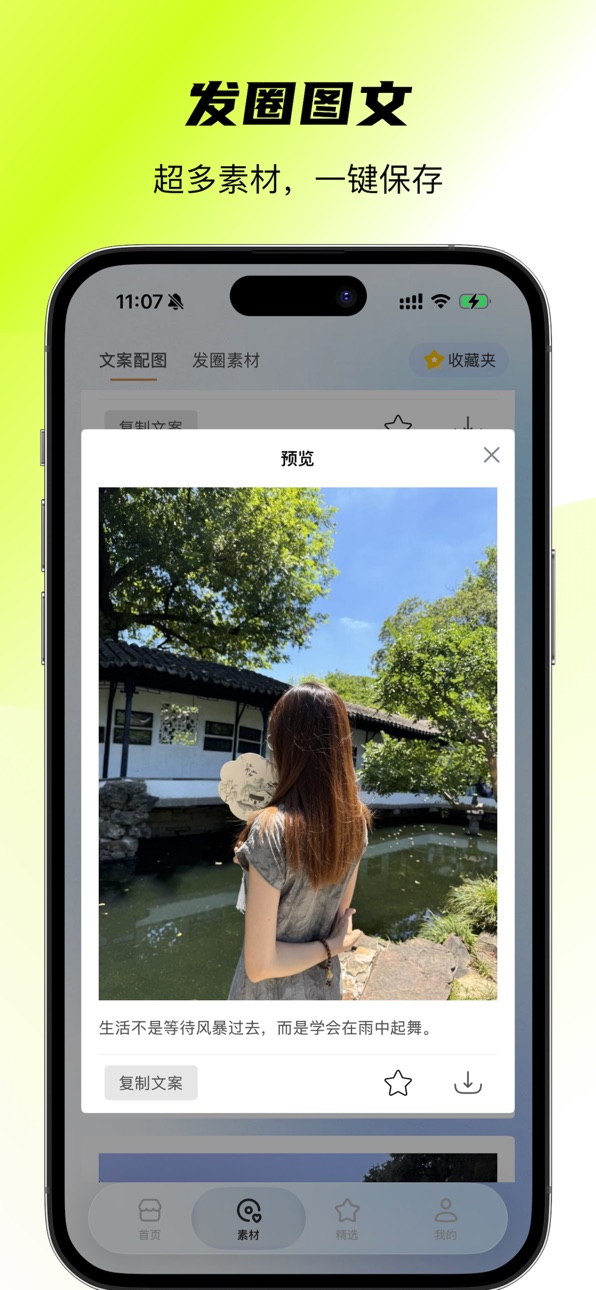
PianTou App is a mobile-first video and image creation tool designed to help users with zero experience create high-quality videos and images effortlessly. Packed with thousands of templates, 3D effects, and HD output capabilities, PianTou covers a wide range of scenarios — from love confessions and weddings to baby milestones, product promotions, and emotional storytelling. Simply import your photos and video clips, and with one tap, generate professional-grade short videos. With abundant graphic materials available, you can save them directly to your device and say goodbye to the struggle of finding perfect visuals for your social media posts.
Video Features
Beginner-Friendly & Easy to Use
No prior skills needed. Intuitive interface makes it easy for beginners to create high-quality videos and dive into short video creation.
Vast Collection of Premium Templates
Featuring diverse themes such as romance, marketing, weddings, and personal growth, our rich template library offers various styles. Just pick one and apply it instantly to meet all your creative needs.
Professional-Grade Visual Effects
Equipped with built-in 3D effects and exclusive motion designs, each effect is meticulously crafted by designers to deliver an immersive visual experience.
HD & Smooth Output
Supports 1080P high-definition resolution and 30fps high frame rate for clearer, smoother playback across all devices.
Real-Time Preview for Efficient Editing
See exactly what you’re creating as you edit. Real-time preview allows instant adjustments, streamlining your workflow and boosting productivity.
Image Features
One-Tap Long Image Stitching – Horizontal or Vertical Layouts
Select your photos freely, preview in real time, then save and share with ease.
Smart Grid Cutting – Multiple Layouts to Choose From
Pick your image and preferred grid style, generate instantly, and save directly to your photo album.
Frame Extraction from Videos
Preview video frames and extract still images with precision.
Subscription Information
Please note that this app may include paid subscription features.
Subscription Plans: Recurring subscriptions (weekly or annual membership).
Payment: Upon confirmation of purchase, payment will be charged to your iTunes account. Your subscription will automatically renew within 24 hours before the end of the current period unless auto-renewal is turned off at least 24 hours prior.
Renewal: The renewal fee will be charged to your Apple ID account within 24 hours before the subscription expires. Upon successful payment, your subscription will extend for another billing cycle.
Contact Us
Feedback Email: 767474@qq.com
User QQ Group: 1057542960
Privacy Policy: https://www.aipiantou.com/html/PrivacyPolicys.html
Terms of Use: https://www.aipiantou.com/html/UserAgreements.html
Capabilities
In-App Purchases
Accessibility
ipadiphonemacrealityDevicetvoswatch
Version history 9 versions
Build 881448087v1.2.02026-01-16 01:30:04
- Optimized some content and fixed some issues
Build 880938030v1.1.92025-12-24 11:48:50
- Optimized some content and fixed some issues
Build 880135745v1.1.82025-11-28 06:49:05
- Optimized some content and fixed some issues
Build 879414231v1.1.72025-11-03 22:30:40
- Optimized some content and fixed some issues
Build 877604834v1.1.62025-10-02 22:30:11
- Fixed some display issues
- Added frame-by-frame video screenshot feature
- Added some effects and content
- Fixed an issue with photo selection
- Optimize UI experience
- Compatible with iOS 26
Build 877475478v1.1.12025-08-25 20:34:27
- Added new content and improved the user experience
Build 876728636v1.1.02025-08-11 14:16:24
1. Add some image processing functions
2. Add more templates
3. Optimize user experience
4. Fix some issues
Build 876679002v1.0.12025-07-24 17:57:22
1. Fix some problems in the app
2. Update more stencil effects
3. Improve user experience
Build 876497942v1.0.02025-07-23 20:19:32
No pricing data captured yet — comparisons appear once the app has paid storefronts or in-app purchases.
Availability 132 of 132 storefronts
| Region | Language | Price | Ratings | Avg | Version |
|---|---|---|---|---|---|
| CN | zh-Hans-CN | Free | 16 | 5.0 | 1.2.0 |
| SA | en-GB | Free | 1 | 5.0 | 1.2.0 |
| AE | en-GB | Free | 0 | — | 1.2.0 |
| AF | en-GB | Free | 0 | — | 1.2.0 |
| AL | en-GB | Free | 0 | — | 1.2.0 |
| AM | en-GB | Free | 0 | — | 1.2.0 |
| AO | en-GB | Free | 0 | — | 1.2.0 |
| AT | de-DE | Free | 0 | — | 1.2.0 |
| AU | en-AU | Free | 0 | — | 1.2.0 |
| AZ | en-GB | Free | 0 | — | 1.2.0 |
| BA | en-GB | Free | 0 | — | 1.2.0 |
| BE | en-GB | Free | 0 | — | 1.2.0 |
| BF | en-GB | Free | 0 | — | 1.2.0 |
| BG | en-GB | Free | 0 | — | 1.2.0 |
| BH | en-GB | Free | 0 | — | 1.2.0 |
| BJ | en-GB | Free | 0 | — | 1.2.0 |
| BM | en-GB | Free | 0 | — | 1.2.0 |
| BN | en-GB | Free | 0 | — | 1.2.0 |
| BO | es-MX | Free | 0 | — | 1.2.0 |
| BR | pt-BR | Free | 0 | — | 1.2.0 |
| BT | en-GB | Free | 0 | — | 1.2.0 |
| BW | en-GB | Free | 0 | — | 1.2.0 |
| BY | en-GB | Free | 0 | — | 1.2.0 |
| CA | en-CA | Free | 0 | — | 1.2.0 |
| CD | en-GB | Free | 0 | — | 1.2.0 |
| CG | en-GB | Free | 0 | — | 1.2.0 |
| CH | de-CH | Free | 0 | — | 1.2.0 |
| CI | fr-FR | Free | 0 | — | 1.2.0 |
| CL | es-MX | Free | 0 | — | 1.2.0 |
| CV | en-GB | Free | 0 | — | 1.2.0 |
| CY | en-GB | Free | 0 | — | 1.2.0 |
| CZ | en-GB | Free | 0 | — | 1.2.0 |
| DE | de-DE | Free | 0 | — | 1.2.0 |
| DK | en-GB | Free | 0 | — | 1.2.0 |
| DO | es-MX | Free | 0 | — | 1.2.0 |
| DZ | en-GB | Free | 0 | — | 1.2.0 |
| EE | en-GB | Free | 0 | — | 1.2.0 |
| EG | en-GB | Free | 0 | — | 1.2.0 |
| ES | es-ES | Free | 0 | — | 1.2.0 |
| FI | en-GB | Free | 0 | — | 1.2.0 |
| FJ | en-GB | Free | 0 | — | 1.2.0 |
| FM | en-GB | Free | 0 | — | 1.2.0 |
| FR | fr-FR | Free | 0 | — | 1.2.0 |
| GB | en-GB | Free | 0 | — | 1.2.0 |
| GE | en-GB | Free | 0 | — | 1.2.0 |
| GR | en-GB | Free | 0 | — | 1.2.0 |
| HK | zh-Hant-HK | Free | 0 | — | 1.2.0 |
| HN | es-MX | Free | 0 | — | 1.2.0 |
| HR | en-GB | Free | 0 | — | 1.2.0 |
| HU | en-GB | Free | 0 | — | 1.2.0 |
| ID | en-GB | Free | 0 | — | 1.2.0 |
| IE | en-GB | Free | 0 | — | 1.2.0 |
| IL | en-GB | Free | 0 | — | 1.2.0 |
| IN | en-GB | Free | 0 | — | 1.2.0 |
| IQ | en-GB | Free | 0 | — | 1.2.0 |
| IS | en-GB | Free | 0 | — | 1.2.0 |
| IT | it | Free | 0 | — | 1.2.0 |
| JM | en-GB | Free | 0 | — | 1.2.0 |
| JO | en-GB | Free | 0 | — | 1.2.0 |
| JP | ja | Free | 0 | — | 1.2.0 |
| KG | en-GB | Free | 0 | — | 1.2.0 |
| KH | en-GB | Free | 0 | — | 1.2.0 |
| KN | en-GB | Free | 0 | — | 1.2.0 |
| KR | ko | Free | 0 | — | 1.2.0 |
| KW | en-GB | Free | 0 | — | 1.2.0 |
| KY | en-GB | Free | 0 | — | 1.2.0 |
| KZ | en-GB | Free | 0 | — | 1.2.0 |
| LA | en-GB | Free | 0 | — | 1.2.0 |
| LB | en-GB | Free | 0 | — | 1.2.0 |
| LC | en-GB | Free | 0 | — | 1.2.0 |
| LK | en-GB | Free | 0 | — | 1.2.0 |
| LT | en-GB | Free | 0 | — | 1.2.0 |
| LU | en-GB | Free | 0 | — | 1.2.0 |
| LV | en-GB | Free | 0 | — | 1.2.0 |
| MD | en-GB | Free | 0 | — | 1.2.0 |
| ME | en-GB | Free | 0 | — | 1.2.0 |
| MK | en-GB | Free | 0 | — | 1.2.0 |
| MM | en-GB | Free | 0 | — | 1.2.0 |
| MN | en-GB | Free | 0 | — | 1.2.0 |
| MO | zh-Hant-HK | Free | 0 | — | 1.2.0 |
| MR | en-GB | Free | 0 | — | 1.2.0 |
| MT | en-GB | Free | 0 | — | 1.2.0 |
| MU | en-GB | Free | 0 | — | 1.2.0 |
| MV | en-GB | Free | 0 | — | 1.2.0 |
| MW | en-GB | Free | 0 | — | 1.2.0 |
| MX | es-MX | Free | 0 | — | 1.2.0 |
| MY | en-GB | Free | 0 | — | 1.2.0 |
| MZ | en-GB | Free | 0 | — | 1.2.0 |
| NI | es-MX | Free | 0 | — | 1.2.0 |
| NL | nl | Free | 0 | — | 1.2.0 |
| NO | en-GB | Free | 0 | — | 1.2.0 |
| NP | en-GB | Free | 0 | — | 1.2.0 |
| NR | en-GB | Free | 0 | — | 1.2.0 |
| NZ | en-AU | Free | 0 | — | 1.2.0 |
| OM | en-GB | Free | 0 | — | 1.2.0 |
| PE | es-MX | Free | 0 | — | 1.2.0 |
| PG | en-GB | Free | 0 | — | 1.2.0 |
| PH | en-GB | Free | 0 | — | 1.2.0 |
| PK | en-GB | Free | 0 | — | 1.2.0 |
| PL | en-GB | Free | 0 | — | 1.2.0 |
| PT | pt-PT | Free | 0 | — | 1.2.0 |
| PW | en-GB | Free | 0 | — | 1.2.0 |
| QA | en-GB | Free | 0 | — | 1.2.0 |
| RO | en-GB | Free | 0 | — | 1.2.0 |
| RS | en-GB | Free | 0 | — | 1.2.0 |
| RU | ru | Free | 0 | — | 1.2.0 |
| SB | en-GB | Free | 0 | — | 1.2.0 |
| SC | en-GB | Free | 0 | — | 1.2.0 |
| SE | sv | Free | 0 | — | 1.2.0 |
| SG | en-GB | Free | 0 | — | 1.2.0 |
| SI | en-GB | Free | 0 | — | 1.2.0 |
| SK | en-GB | Free | 0 | — | 1.2.0 |
| SR | en-GB | Free | 0 | — | 1.2.0 |
| ST | en-GB | Free | 0 | — | 1.2.0 |
| SV | es-MX | Free | 0 | — | 1.2.0 |
| TH | en-GB | Free | 0 | — | 1.2.0 |
| TJ | en-GB | Free | 0 | — | 1.2.0 |
| TM | en-GB | Free | 0 | — | 1.2.0 |
| TO | en-GB | Free | 0 | — | 1.2.0 |
| TR | en-GB | Free | 0 | — | 1.2.0 |
| TW | zh-Hant-TW | Free | 0 | — | 1.2.0 |
| UA | en-GB | Free | 0 | — | 1.2.0 |
| UG | en-GB | Free | 0 | — | 1.2.0 |
| US | en-US | Free | 0 | — | 1.2.0 |
| UZ | en-GB | Free | 0 | — | 1.2.0 |
| VC | en-GB | Free | 0 | — | 1.2.0 |
| VN | en-GB | Free | 0 | — | 1.2.0 |
| VU | en-GB | Free | 0 | — | 1.2.0 |
| XK | en-GB | Free | 0 | — | 1.2.0 |
| YE | en-GB | Free | 0 | — | 1.2.0 |
| ZA | en-GB | Free | 0 | — | 1.2.0 |
| ZW | en-GB | Free | 0 | — | 1.2.0 |
Change log 16 changes · KN
✎
releaseNotes updated
- Optimized some content and fixed some issues
✎
description updated
PianTou App is a mobile-first video and image creation tool designed to help users with zero experience create high-quality videos and images effortlessly. Pack
✎
subtitle updated
Tons of video templates
✎
name updated
PianTou - video template maker
▣
App icon changed
✎
Privacy labels 0 → 1 categories
✎
Added: In App Purchases
◆
Version 1.2.0 released
- Optimized some content and fixed some issues
◆
Version 1.1.9 released
- Optimized some content and fixed some issues
◆
Version 1.1.8 released
- Optimized some content and fixed some issues
◆
Version 1.1.7 released
- Optimized some content and fixed some issues
◆
Version 1.1.6 released
- Fixed some display issues
- Added frame-by-frame video screenshot feature
- Added some effects and content
- Fixed an issue with photo selection
- Optimize UI experience
- Compatible with iOS 26
◆
Version 1.1.1 released
- Added new content and improved the user experience
◆
Version 1.1.0 released
1. Add some image processing functions
2. Add more templates
3. Optimize user experience
4. Fix some issues
◆
Version 1.0.1 released
1. Fix some problems in the app
2. Update more stencil effects
3. Improve user experience
◆
Version 1.0.0 released