Home › Finance

WealthTrunk: Net Worth Tracker
Personal Finance & Money Goals
 ZW
ZW
 USen-US
 CAen-CA
 GBen-GB
 INen-GB
 TWzh-Hant-TW
 AUen-AU
 LKen-GB
 NLnl
NLnl ROen-GB
 AEen-GB
 AFen-GB
 AGen-GB
 AIen-GB
 ALen-GB
 AMen-GB
 AOen-GB
 ARes-MX
 ATde-DE
 AZen-GB
 BAen-GB
 BBen-GB
 BEen-GB
 BFen-GB
 BGen-GB
 BHen-GB
 BJen-GB
 BMen-GB
 BNen-GB
 BOes-MX
 BRpt-BR
 BSen-GB
 BTen-GB
 BWen-GB
 BYen-GB
 BZen-GB
 CDen-GB
 CGen-GB
 CHde-CH
 CIfr-FR
 CLes-MX
 CMfr-FR
 CNzh-Hans-CN
 COes-MX
 CRes-MX
 CVen-GB
 CYen-GB
 CZen-GB
 DEde-DE
 DKen-GB
 DMen-GB
 DOes-MX
 DZen-GB
 ECes-MX
 EEen-GB
 EGen-GB
 ESes-ES
 FIen-GB
 FJen-GB
 FMen-GB
 FRfr-FR
 GAfr-FR
 GDen-GB
 GEen-GB
 GHen-GB
 GMen-GB
 GRen-GB
 GTes-MX
 GWen-GB
 GYen-GB
 HKzh-Hant-HK
 HNes-MX
 HRen-GB
 HUen-GB
 IDen-GB
 IEen-GB
 ILen-GB
 IQen-GB
 ISen-GB
 ITit
ITit JMen-GB
 JOen-GB
 JPja
JPja KEen-GB
 KGen-GB
 KHen-GB
 KNen-GB
 KRko
KRko KWen-GB
 KYen-GB
 KZen-GB
 LAen-GB
 LBen-GB
 LCen-GB
 LRen-GB
 LTen-GB
 LUen-GB
 LVen-GB
 LYen-GB
 MAen-GB
 MDen-GB
 MEen-GB
 MGen-GB
 MKen-GB
 MLen-GB
 MMen-GB
 MNen-GB
 MOzh-Hant-HK
 MRen-GB
 MSen-GB
 MTen-GB
 MUen-GB
 MVen-GB
 MWen-GB
 MXes-MX
 MYen-GB
 MZen-GB
 NAen-GB
 NEen-GB
 NGen-GB
 NIes-MX
 NOen-GB
 NPen-GB
 NRen-GB
 NZen-AU
 OMen-GB
 PAes-MX
 PEes-MX
 PGen-GB
 PHen-GB
 PKen-GB
 PLen-GB
 PTpt-PT
 PWen-GB
 PYes-MX
 QAen-GB
 RSen-GB
 RUru
RUru RWen-GB
 SAen-GB
 SBen-GB
 SCen-GB
 SEsv
SEsv SGen-GB
 SIen-GB
 SKen-GB
 SLen-GB
 SNen-GB
 SRen-GB
 STen-GB
 SVes-MX
 SZen-GB
 TCen-GB
 TDen-GB
 THen-GB
 TJen-GB
 TMen-GB
 TNen-GB
 TOen-GB
 TRen-GB
 TTen-GB
 TZen-GB
 UAen-GB
 UGen-GB
 UYen-GB
 UZen-GB
 VCen-GB
 VEes-MX
 VGen-GB
 VNen-GB
 VUen-GB
 XKen-GB
 YEen-GB
 ZAen-GB
 ZMen-GBZWen-GB
175 of 175 storefronts
Content in en-US
Content in en-US
Information
Preview 3 platforms
iPhone 8 images




iPad 8 images



Mac 8 images


What’s New Version 1.3.9
Update balances with Siri, Spotlight & Shortcuts
-Just say "Update my balance in WealthTrunk" or use Spotlight or a Shortcut to record a new balance without opening the app, like from your banking app.
Create your own account and tax types right where you pick them, no trip to Settings needed
Tap a shared backup file and import it straight into the app
Backups now carry your profile photos and custom logos over to a new device
Plus standard improvements and bug fixes.
If you think WealthTrunk is a helpful tool, please leave us a positive review in the App Store. It helps the app continue to improve!
Description
WealthTrunk is a purpose-built tool to manually track your net worth. Built for simplicity, updating account balances takes just a few seconds so you can spend less time managing your finances and more time understanding them. Organize all of your accounts by family member, track your wealth journey over time, generate professional reports, and project your financial future. Perfect for individuals, couples, or families who want complete financial clarity and easy communication without compromising privacy. WealthTrunk is packed with features not typically found in a spreadsheet or budgeting app.
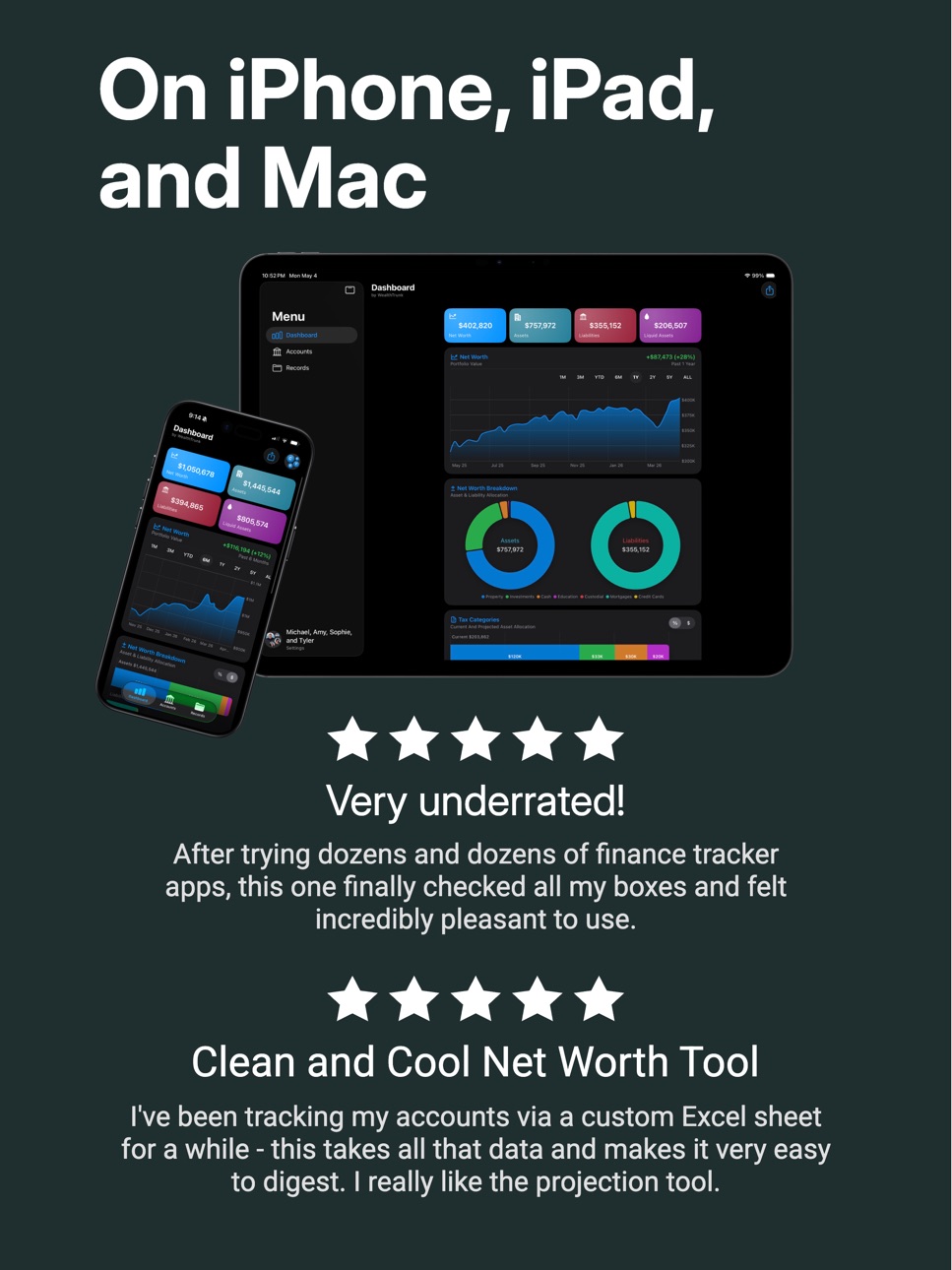
Getting started is simple. Add a personal profile and tell us about your first financial account, and WealthTrunk creates a personalized dashboard showing net worth, account growth, and future projections. And since it's purposefully built for Apple devices, your data syncs seamlessly across iPhone, iPad, or Mac.
Track
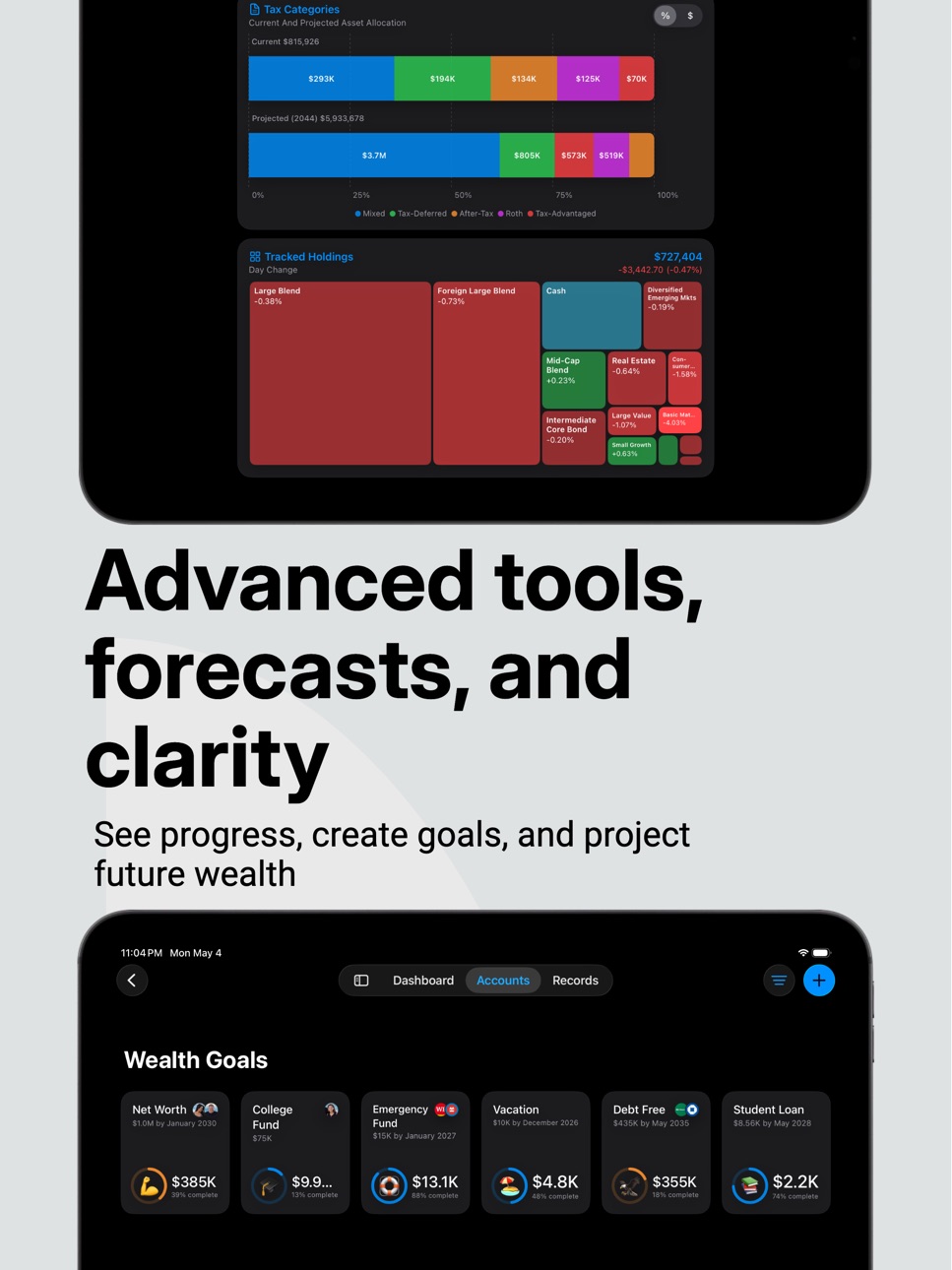
- Beautiful charts show your net worth and account growth over time.
- Manually record balances to chart your financial journey, no external connections or bank data.
- Create Goals that automatically keep your net worth, savings, or debt payoff front and center.
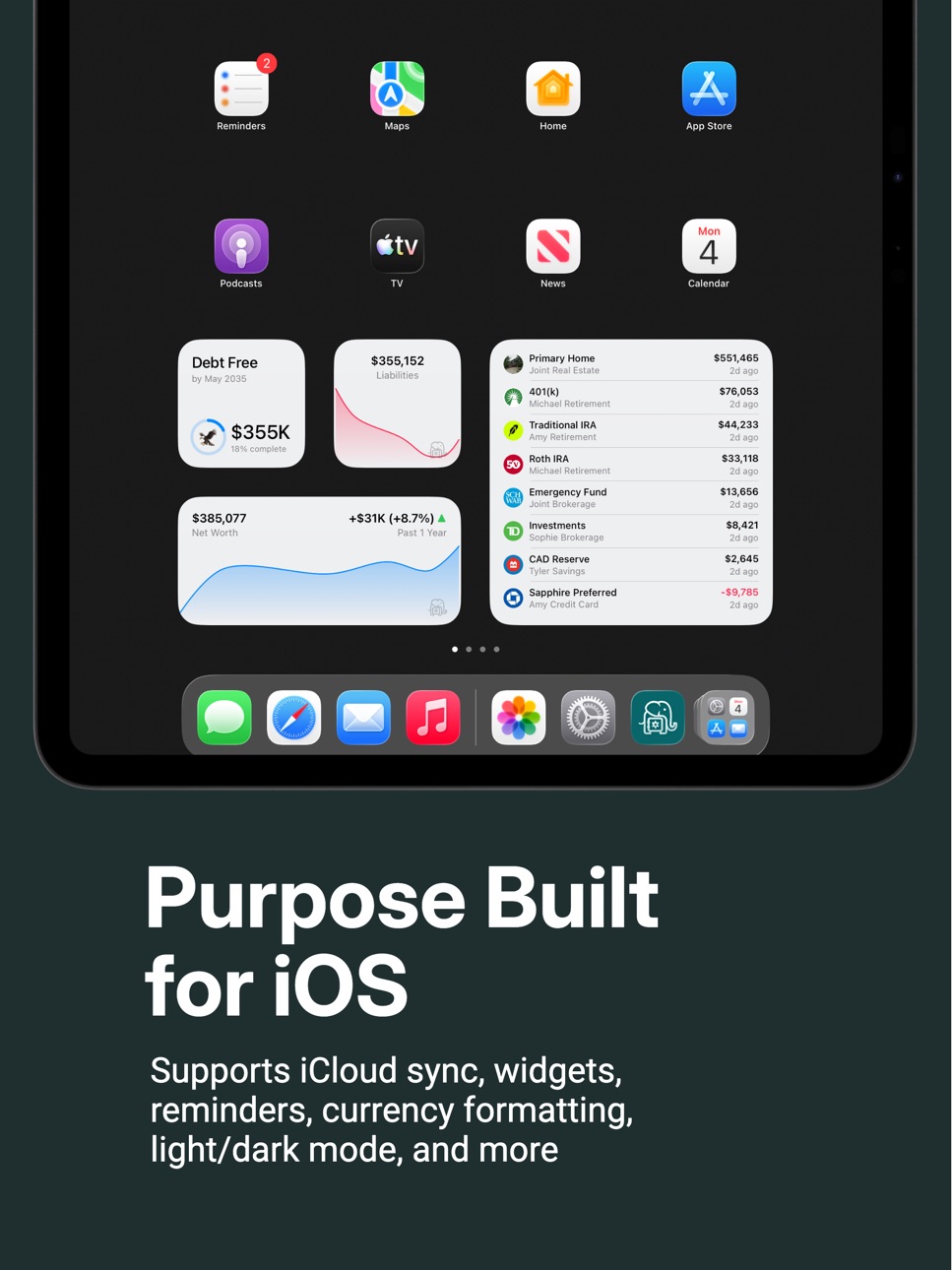
- Home screen widgets help you stay on track.
- Optionally track Stocks, ETFs, Crypto, and other assets with live market data.
- Supports multiple currencies across accounts.
Organize
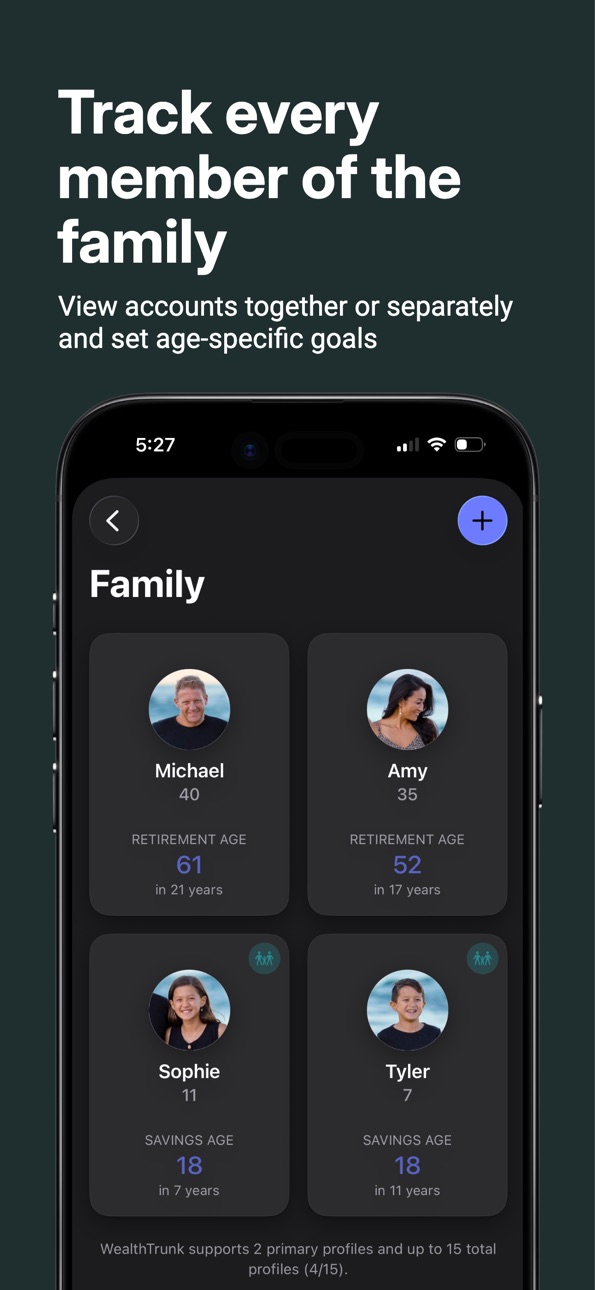
- Create separate profiles for each family member and organize accounts by person.
- Generate professional PDF Net Worth Statements with charts, account details, and important records.
- Control privacy with show/hide options for sensitive information.
- Store financial records, contacts, and notes in one place.
- Filter view by individual or family members to see everything together.
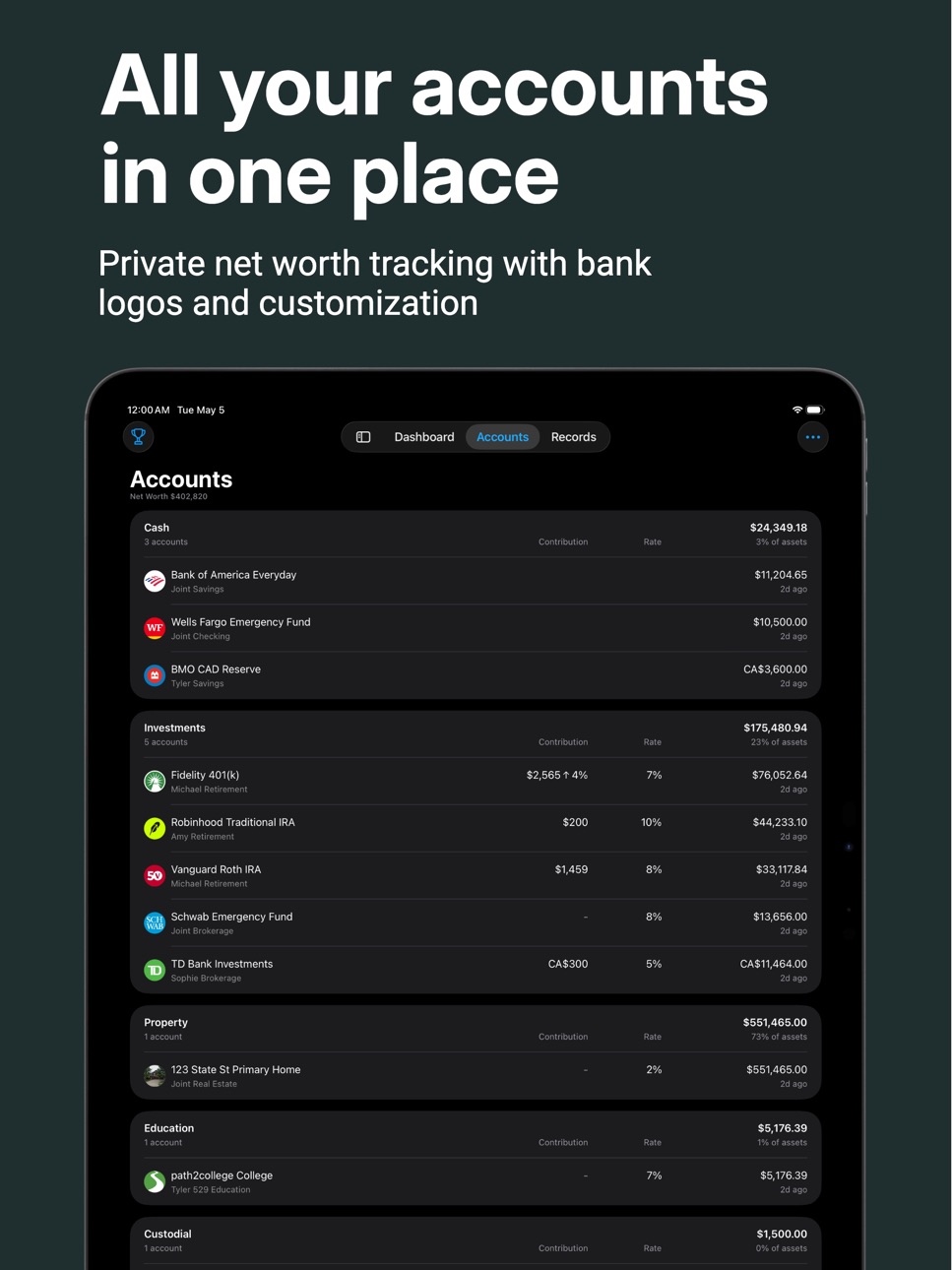
- Add account nicknames and notes to keep everything clearly organized.
Share & Communicate
- Generate professional PDF reports perfect for financial discussions with your partner.
- Create financial summaries for trusted contacts or family members in case of emergency.
- Import or Export data via CSV.
- Perfect for annual financial reviews, estate planning, or teaching kids about money.
Project
- Set retirement timelines and see projected future net worth.
- Add monthly contributions and expected returns for forward-looking insights.
- Adjust scenarios to see how different strategies impact your future.
Privacy by Design
WealthTrunk stores everything in your personal iCloud account using Apple's CloudKit technology. We never see, access, or collect your financial information. No third-party connections, external servers, or data harvesting. Enjoy a seamless experience built for Apple’s ecosystem.
No Ads
WealthTrunk is designed with the sole purpose of helping you organize and track your finances. We'll never interrupt your experience with ads or try to sell you products you don't need.
Subscription Details
WealthTrunk offers a free tier with most features included. Get started and completely test drive the app. If you have a simple financial picture, this is all you will need. Pro membership removes account limits so it can grow with you. This also supports development and keeps an ad-free experience. If you cancel your subscription, you keep all your data. View it, export it, and resubscribe at any time to add more accounts or update balances.
Music by: Bensound.com/royalty-free-music
License code: XSCF94MLJYGCALBB
Artist: : Benjamin Tissot
Terms of Use: https://wealthtrunk.app/Terms_of_Service.html
Privacy Policy: https://wealthtrunk.app/Privacy_Policy.html
In-App Purchases ZW pricing
Pro Subscription
Yearly · Yearly—
Monthly · Monthly—
Capabilities
In-App Purchases
Accessibility
ipadiphonemacrealityDevicetvoswatch
Version history 25 versions
Build 887927894v1.3.92026-07-07 18:41:57
Update balances with Siri, Spotlight & Shortcuts
-Just say "Update my balance in WealthTrunk" or use Spotlight or a Shortcut to record a new balance without opening the app, like from your banking app.
Create your own account and tax types right where you pick them, no trip to Settings needed
Tap a shared backup file and import it straight into the app
Backups now carry your profile photos and custom logos over to a new device
Plus standard improvements and bug fixes.
If you think WealthTrunk is a helpful tool, please leave us a positive review in the App Store. It helps the app continue to improve!
Build 887526711v1.3.82026-06-30 20:13:02
New in-app tips help you discover key features, plus visual improvements, bug fixes, and optimizations.
If you think WealthTrunk is a helpful tool, please leave us a positive review in the App Store. It helps the app continue to improve!
Build 887418125v1.3.72026-06-26 17:18:17
Adding new accounts now starts with a bank name search to quickly find and attach names and logos.
Property accounts (homes, vehicles, collectibles) are simpler, using their own name instead of a bank name.
Onboarding has been redesigned to help new users get up to speed.
If you think WealthTrunk is a helpful tool, please leave us a positive review in the App Store. It helps the app continue to improve!
Build 887053035v1.3.62026-06-18 16:37:46
Money Market Funds are now supported in portfolio tracking, plus a few touch-ups and interactions to make everything feel smoother.
If you think WealthTrunk is a helpful tool, please leave us a positive review in the App Store. It helps the app continue to improve!
Build 886506918v1.3.52026-06-04 18:05:15
Run WealthTrunk as a native Mac app. The Mac version adds a full menu bar with keyboard shortcuts for recording balances, adding accounts, creating PDF statements, and more.
This release also refines the Accounts and Records screens so you're never left staring at an empty list, plus standard improvements.
If you think WealthTrunk is a helpful tool, please leave us a positive review in the App Store. It helps the app continue to improve!
Build 886364499v1.3.42026-06-01 23:34:46
Performance enhancements
"Estimate Month-End Value" setting available for the Monthly Net Worth chart
Other bug fixes and optimizations
If you think WealthTrunk is a helpful tool, please leave us a positive review in the App Store. It helps the app continue to improve!
Build 886171937v1.3.22026-05-28 16:57:43
Hotfix for onboarding field validation
If you think WealthTrunk is a helpful tool, please leave us a positive review in the App Store. It helps the app continue to improve!
Build 886254737v1.3.32026-05-28 21:19:17
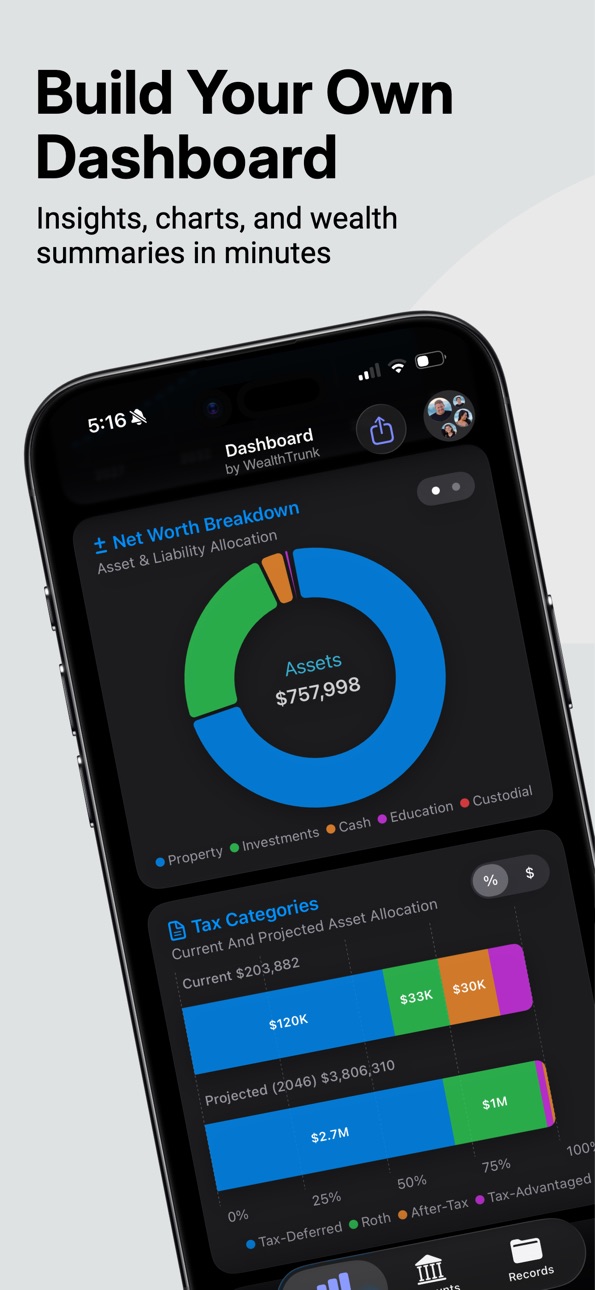
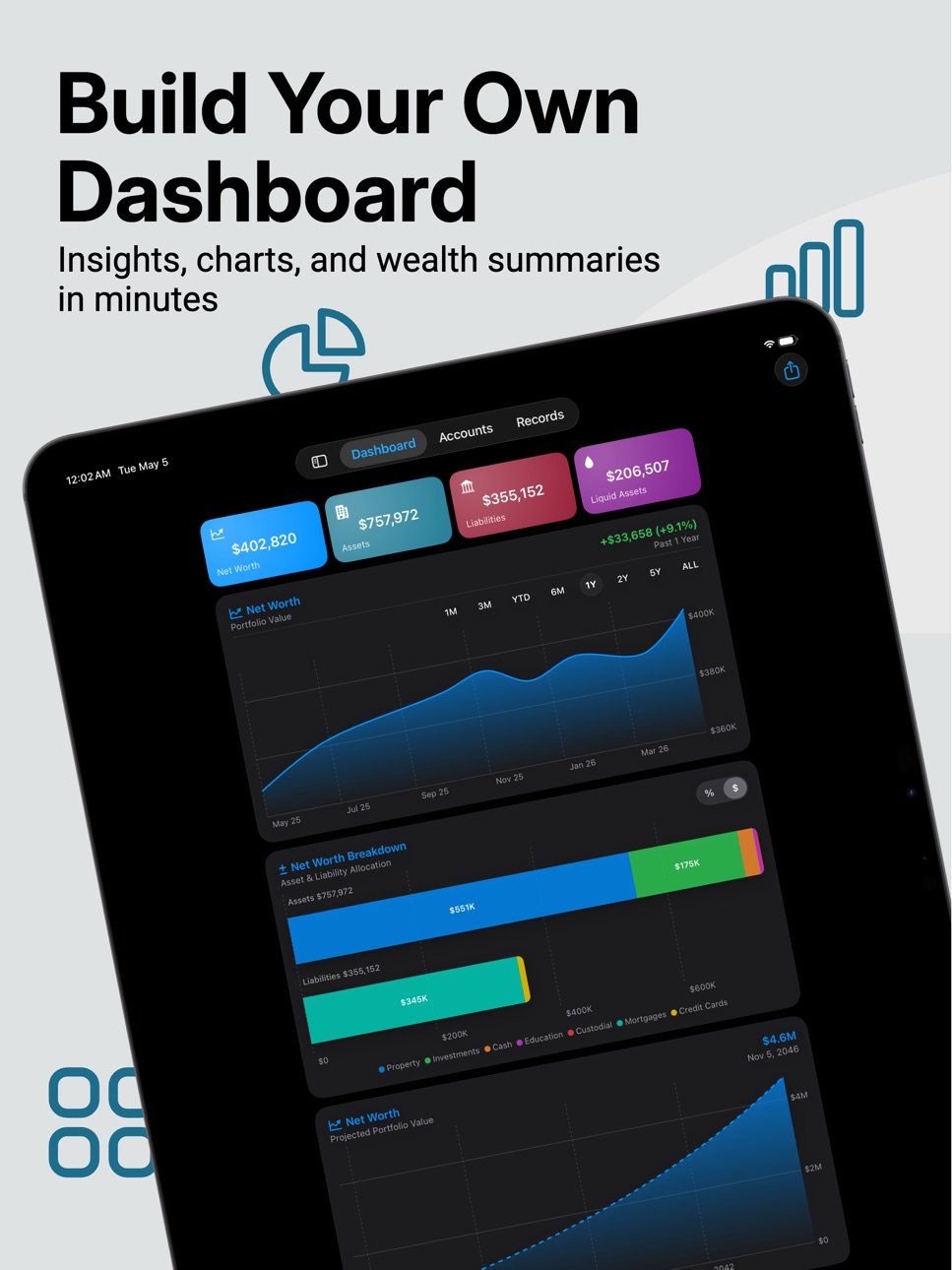
Redesigned Dashboard
- A cleaner, more customizable dashboard
- More dynamic chart details, tap to discover new insights
- Resize charts (Small/Medium/Large/XL)
- Reorder everything within a streamlined Customize window
- Switch the Net Worth Breakdown and Tax Categories charts between bar and donut
Monthly Net Worth Chart
- A new chart shows your assets and liabilities side by side each month with your net worth trend layered on top
- Scroll or pinch to change the range from 1 to 12 months
Projection Insights
- Helpful insights you can toggle through like age, safe withdrawal, wealth multiplier, total contributions, and interest paid
Family Name
- Now add your family name to personalize the app
You can now also tap a goal to jump straight to editing it, tap any holding to see its details at a glance, and find a few more configuration options under Settings → Charts. Plus a multitude of other fixes and refinements.
If you think WealthTrunk is a helpful tool, please leave us a positive review in the App Store. It helps the app continue to improve!
Build 885841197v1.3.12026-05-19 19:30:28
Future Income Accounts: New group to add pensions, annuities, and lifetime payouts to your net worth
Built-in present-value calculator to estimate the lump sum from your monthly income and term
Pro users can also customize the footer text on PDF statements
If you think WealthTrunk is a helpful tool, please leave us a positive review in the App Store. It helps the app continue to improve!
Build 884993120v1.3.02026-05-15 16:00:51
Money Goals:
- Create and track your Net Worth targets, Savings goals, and Debt payoff plans all in one place.
- Link accounts to each goal so your progress updates automatically
- Visualize your history with a balance chart, and see when you’re expected to hit your target.
- Dashboard card to see favorite goals on the Dashboard
- Widgets to track goal progress at a glance
Other Updates:
- New currency entry field with ATM-style input
- Visual polish and a few bug fixes
If you think WealthTrunk is a helpful tool, please leave us a positive review in the App Store. It helps the app continue to improve!
Build 884656395v1.2.212026-04-18 20:58:19
Emojis are now available to assign as account logos.
New Charts settings menu allows for smoothing balance history charts.
Pie charts now show a tappable page indicator.
Fixed a bug where contribution amounts were clearing on save.
Button to download CSV import templates is working again.
The usual bug fixes to keep things running smoothly.
If you think WealthTrunk is a helpful tool, please leave us a positive review in the App Store. It helps the app continue to improve!
Build 883827210v1.2.202026-03-27 19:04:46
Onboarding now shows video previews
A few more toggles on the PDF net worth statement tool
The usual bug fixes to keep things running smoothly.
If you think WealthTrunk is a helpful tool, please leave us a positive review in the App Store. It helps the app continue to improve!
Build 883365041v1.2.192026-03-15 19:42:23
Home Screen & Lock Screen Widgets
- Add your account balances and net worth directly to your Home Screen or glanceable on the Lock Screen, with trend charts, logo support, and per-member filtering.
The usual bug fixes to keep things running smoothly.
If you think WealthTrunk is a helpful tool, please leave us a positive review in the App Store. It helps the app continue to improve!
Build 883271986v1.2.182026-03-11 23:27:41
Bug fixes and optimizations
If you think WealthTrunk is a helpful tool, please leave us a positive review in the App Store. It helps the app continue to improve!
Build 882844917v1.2.172026-03-05 09:28:29
PDF Net Worth Statement Overhauled
- Cleaner layouts, full/muted color options, and a 4 or 5 chart layout picker
- PDF Statements now include whichever charts you have on your dashboard
Improved dashboard loading performance
The usual bug fixes and performance improvements to keep everything running smoothly.
Prior update
-Be sure to check out the new portfolio tracking feature with live market data
If you think WealthTrunk is a helpful tool, please leave us a positive review in the App Store. It helps the app continue to improve!
Build 882496933v1.2.162026-02-18 02:51:10
Track Your Portfolios:
- Optionally monitor stocks, ETFs, funds, and crypto within your accounts with live market data.
- Allocation charts visualize your portfolio on the Dashboard.
- Sync your holdings market value to your account balance with one tap.
The usual bug fixes and performance improvements to keep everything running smoothly.
If you think WealthTrunk is a useful tool, please leave us a positive review in the App Store. It helps the app continue to improve!
Build 882019808v1.2.152026-01-31 12:21:54
Easier Returns Input: Tap the expected return field to enter any value up to 100%, or use the slider for quick adjustments
YTD chart option now shows up in January so you can track your progress from the start of the year
The usual bug fixes and performance improvements to keep everything running smoothly
If you think WealthTrunk is a useful tool, please leave us a positive review in the App Store. It helps the app continue to improve!
Build 881336851v1.2.142026-01-12 07:22:23
Backup & Restore: Fully backup your data and restore it on new devices, perfect for cloning data to a partner's device
Smoother Experience: Improved animations, more swipe actions, and better controls
Interface Refinements: Cleaner layouts on profile list and settings menus
The usual bug fixes and performance improvements to keep everything running smoothly.
If you think WealthTrunk is a useful tool, please leave us a positive review in the App Store. It helps the app continue to improve!
Build 881116642v1.2.132026-01-06 07:28:53
Account views are now cleaner and more focused, providing dedicated paths to your full balance history and projection tools
The recently added pie charts are now in dedicated cards you can add from the Dashboard Settings, improving performance and flexibility
For any accounts, a dedicated Projection Simulator lets you experiment with growth scenarios or debt paydown via an interactive, slider-driven interface
Under the hood enhancements to make saving records and loading lists more snappy
UI polish across the app, including colors, buttons, and filters
The usual bug fixes and performance improvements to keep everything running smoothly.
Build 880929678v1.2.122025-12-23 23:51:51
Added a new Help & FAQ section in Settings covers everything from privacy to calculation methodology.
Language support for German (de) and Japanese (ja).
Fixed an issue where dependent forecast ages wouldn't persist.
Improved performance when using sliders in account projection scenarios.
The usual bug fixes and performance improvements to keep everything running smoothly.
Build 880857599v1.2.112025-12-22 19:18:00
Visual Polish & Improvements
- The Account Tab gets more robust grouping options so you can view data however you prefer.
- Updated icons and headers with softer colors and consistent shadows.
- Resolved a bug where the "Expected Return" sliders were unresponsive on iOS 18 devices.
Balance Entry Overhaul
- Added a progress bar so you can easily see if you've logged all your balances for a selected day.
- Collapsible Groups: Tap group headers to hide or expand sections. Collapsed groups now show group totals and a green checkmark once every account in that section is finished.
- An overhauled backend to make viewing and updating balances more responsive.
- Account rows are now easier to read, featuring larger balance input fields.
- Consistent experience whether updating one account or many.
The usual bug fixes and performance improvements to keep everything running smoothly.
Build 880710083v1.2.102025-12-17 22:11:27
Celebrate the New Year
- Ring in the new year with a financial review! We’ve added a festive pop-up to help you celebrate the turning of the year in style.
- Look out for other seasonal celebrations and animations for future holidays and milestones.
A More Immersive Dashboard
- We’ve added new Pie Charts! Simply swipe on any bar chart to switch views and visualize your data your way.
- Bar chart labels are now smartly displayed based on the space available, so you can see more of the data you care about.
Visual Polish
- Enhanced profile images to better support larger text sizes (Dynamic Type).
- Adjusting your Expected Return is now more intuitive. We’ve replaced text inputs with precise sliders that include a dynamic risk guide, indicating "Low Risk" to "High Risk" as you adjust the percentages.
The usual bug fixes and performance improvements to keep everything running smoothly.
Build 880414577v1.2.92025-12-09 17:49:55
Better Clarity
- You can now assign accounts growing contribution amounts, perfect if your contributions grow with your salary.
- A touch of animations and optimizations to make charts and numbers load smoother.
- Added Contribution/Payment and Rate columns for quicker insights on wider screens. Try landscape mode on your account list!
- Logos now search as you type for a more responsive experience.
A More Helpful Onboarding Experience
- Now a “Returning User” button to restore iCloud data whenever you need.
The usual bug fixes and performance improvements to keep everything running smoothly.
Build 880217199v1.2.82025-12-01 17:09:22
Better Dashboard and Charts:
- Charts have cleaner scaling, full currency values when interacting, better alignment, and softer gradients for enhanced readability
- Better date filter handling. The history chart calculates intelligent values to create a full data picture when you filter by limited data ranges.
The usual bug fixes and performance improvements to keep everything running smoothly.
Build 879954501v1.2.72025-11-26 02:26:13
More beauty all around:
- iPad & Mac Users get an upgrade. Everything syncs across all devices, and the app scales perfectly for larger screen sizes or during multitasking.
- The Dashboard has seen a few charts get enhanced with toggles to view them by $ or %.
- The usual bug squashing and speed boosts, because a smooth experience is everything.
- The Feedback button bug has been fixed. Email us! We want to hear from you.
And in case you missed the previous update:
- Update balances quickly by date and add logos to all of your accounts and records.
Price history by region
Currency
Show
Columns
Search
Availability 175 of 175 storefronts
| Region | Language | Price | Ratings | Avg | Version |
|---|---|---|---|---|---|
| US | en-US | Free | 24 | 5.0 | 1.3.9 |
| CA | en-CA | Free | 3 | 5.0 | 1.3.9 |
| GB | en-GB | Free | 2 | 5.0 | 1.3.9 |
| IN | en-GB | Free | 2 | 5.0 | 1.3.9 |
| TW | zh-Hant-TW | Free | 2 | 5.0 | 1.3.9 |
| AU | en-AU | Free | 1 | 5.0 | 1.3.9 |
| LK | en-GB | Free | 1 | 5.0 | 1.3.9 |
| NL | nl | Free | 1 | 5.0 | 1.3.9 |
| RO | en-GB | Free | 1 | 5.0 | 1.3.9 |
| AE | en-GB | Free | 0 | — | 1.3.9 |
| AF | en-GB | Free | 0 | — | 1.3.9 |
| AG | en-GB | Free | 0 | — | 1.3.9 |
| AI | en-GB | Free | 0 | — | 1.3.9 |
| AL | en-GB | Free | 0 | — | 1.3.9 |
| AM | en-GB | Free | 0 | — | 1.3.9 |
| AO | en-GB | Free | 0 | — | 1.3.9 |
| AR | es-MX | Free | 0 | — | 1.3.9 |
| AT | de-DE | Free | 0 | — | 1.3.9 |
| AZ | en-GB | Free | 0 | — | 1.3.9 |
| BA | en-GB | Free | 0 | — | 1.3.9 |
| BB | en-GB | Free | 0 | — | 1.3.9 |
| BE | en-GB | Free | 0 | — | 1.3.9 |
| BF | en-GB | Free | 0 | — | 1.3.9 |
| BG | en-GB | Free | 0 | — | 1.3.9 |
| BH | en-GB | Free | 0 | — | 1.3.9 |
| BJ | en-GB | Free | 0 | — | 1.3.9 |
| BM | en-GB | Free | 0 | — | 1.3.9 |
| BN | en-GB | Free | 0 | — | 1.3.9 |
| BO | es-MX | Free | 0 | — | 1.3.9 |
| BR | pt-BR | Free | 0 | — | 1.3.9 |
| BS | en-GB | Free | 0 | — | 1.3.9 |
| BT | en-GB | Free | 0 | — | 1.3.9 |
| BW | en-GB | Free | 0 | — | 1.3.9 |
| BY | en-GB | Free | 0 | — | 1.3.9 |
| BZ | en-GB | Free | 0 | — | 1.3.9 |
| CD | en-GB | Free | 0 | — | 1.3.9 |
| CG | en-GB | Free | 0 | — | 1.3.9 |
| CH | de-CH | Free | 0 | — | 1.3.9 |
| CI | fr-FR | Free | 0 | — | 1.3.9 |
| CL | es-MX | Free | 0 | — | 1.3.9 |
| CM | fr-FR | Free | 0 | — | 1.3.9 |
| CN | zh-Hans-CN | Free | 0 | — | 1.3.9 |
| CO | es-MX | Free | 0 | — | 1.3.9 |
| CR | es-MX | Free | 0 | — | 1.3.9 |
| CV | en-GB | Free | 0 | — | 1.3.9 |
| CY | en-GB | Free | 0 | — | 1.3.9 |
| CZ | en-GB | Free | 0 | — | 1.3.9 |
| DE | de-DE | Free | 0 | — | 1.3.9 |
| DK | en-GB | Free | 0 | — | 1.3.9 |
| DM | en-GB | Free | 0 | — | 1.3.9 |
| DO | es-MX | Free | 0 | — | 1.3.9 |
| DZ | en-GB | Free | 0 | — | 1.3.9 |
| EC | es-MX | Free | 0 | — | 1.3.9 |
| EE | en-GB | Free | 0 | — | 1.3.9 |
| EG | en-GB | Free | 0 | — | 1.3.9 |
| ES | es-ES | Free | 0 | — | 1.3.9 |
| FI | en-GB | Free | 0 | — | 1.3.9 |
| FJ | en-GB | Free | 0 | — | 1.3.9 |
| FM | en-GB | Free | 0 | — | 1.3.9 |
| FR | fr-FR | Free | 0 | — | 1.3.9 |
| GA | fr-FR | Free | 0 | — | 1.3.9 |
| GD | en-GB | Free | 0 | — | 1.3.9 |
| GE | en-GB | Free | 0 | — | 1.3.9 |
| GH | en-GB | Free | 0 | — | 1.3.9 |
| GM | en-GB | Free | 0 | — | 1.3.9 |
| GR | en-GB | Free | 0 | — | 1.3.9 |
| GT | es-MX | Free | 0 | — | 1.3.9 |
| GW | en-GB | Free | 0 | — | 1.3.9 |
| GY | en-GB | Free | 0 | — | 1.3.9 |
| HK | zh-Hant-HK | Free | 0 | — | 1.3.9 |
| HN | es-MX | Free | 0 | — | 1.3.9 |
| HR | en-GB | Free | 0 | — | 1.3.9 |
| HU | en-GB | Free | 0 | — | 1.3.9 |
| ID | en-GB | Free | 0 | — | 1.3.9 |
| IE | en-GB | Free | 0 | — | 1.3.9 |
| IL | en-GB | Free | 0 | — | 1.3.9 |
| IQ | en-GB | Free | 0 | — | 1.3.9 |
| IS | en-GB | Free | 0 | — | 1.3.9 |
| IT | it | Free | 0 | — | 1.3.9 |
| JM | en-GB | Free | 0 | — | 1.3.9 |
| JO | en-GB | Free | 0 | — | 1.3.9 |
| JP | ja | Free | 0 | — | 1.3.9 |
| KE | en-GB | Free | 0 | — | 1.3.9 |
| KG | en-GB | Free | 0 | — | 1.3.9 |
| KH | en-GB | Free | 0 | — | 1.3.9 |
| KN | en-GB | Free | 0 | — | 1.3.9 |
| KR | ko | Free | 0 | — | 1.3.9 |
| KW | en-GB | Free | 0 | — | 1.3.9 |
| KY | en-GB | Free | 0 | — | 1.3.9 |
| KZ | en-GB | Free | 0 | — | 1.3.9 |
| LA | en-GB | Free | 0 | — | 1.3.9 |
| LB | en-GB | Free | 0 | — | 1.3.9 |
| LC | en-GB | Free | 0 | — | 1.3.9 |
| LR | en-GB | Free | 0 | — | 1.3.9 |
| LT | en-GB | Free | 0 | — | 1.3.9 |
| LU | en-GB | Free | 0 | — | 1.3.9 |
| LV | en-GB | Free | 0 | — | 1.3.9 |
| LY | en-GB | Free | 0 | — | 1.3.9 |
| MA | en-GB | Free | 0 | — | 1.3.9 |
| MD | en-GB | Free | 0 | — | 1.3.9 |
| ME | en-GB | Free | 0 | — | 1.3.9 |
| MG | en-GB | Free | 0 | — | 1.3.9 |
| MK | en-GB | Free | 0 | — | 1.3.9 |
| ML | en-GB | Free | 0 | — | 1.3.9 |
| MM | en-GB | Free | 0 | — | 1.3.9 |
| MN | en-GB | Free | 0 | — | 1.3.9 |
| MO | zh-Hant-HK | Free | 0 | — | 1.3.9 |
| MR | en-GB | Free | 0 | — | 1.3.9 |
| MS | en-GB | Free | 0 | — | 1.3.9 |
| MT | en-GB | Free | 0 | — | 1.3.9 |
| MU | en-GB | Free | 0 | — | 1.3.9 |
| MV | en-GB | Free | 0 | — | 1.3.9 |
| MW | en-GB | Free | 0 | — | 1.3.9 |
| MX | es-MX | Free | 0 | — | 1.3.9 |
| MY | en-GB | Free | 0 | — | 1.3.9 |
| MZ | en-GB | Free | 0 | — | 1.3.9 |
| NA | en-GB | Free | 0 | — | 1.3.9 |
| NE | en-GB | Free | 0 | — | 1.3.9 |
| NG | en-GB | Free | 0 | — | 1.3.9 |
| NI | es-MX | Free | 0 | — | 1.3.9 |
| NO | en-GB | Free | 0 | — | 1.3.9 |
| NP | en-GB | Free | 0 | — | 1.3.9 |
| NR | en-GB | Free | 0 | — | 1.3.9 |
| NZ | en-AU | Free | 0 | — | 1.3.9 |
| OM | en-GB | Free | 0 | — | 1.3.9 |
| PA | es-MX | Free | 0 | — | 1.3.9 |
| PE | es-MX | Free | 0 | — | 1.3.9 |
| PG | en-GB | Free | 0 | — | 1.3.9 |
| PH | en-GB | Free | 0 | — | 1.3.9 |
| PK | en-GB | Free | 0 | — | 1.3.9 |
| PL | en-GB | Free | 0 | — | 1.3.9 |
| PT | pt-PT | Free | 0 | — | 1.3.9 |
| PW | en-GB | Free | 0 | — | 1.3.9 |
| PY | es-MX | Free | 0 | — | 1.3.9 |
| QA | en-GB | Free | 0 | — | 1.3.9 |
| RS | en-GB | Free | 0 | — | 1.3.9 |
| RU | ru | Free | 0 | — | 1.3.9 |
| RW | en-GB | Free | 0 | — | 1.3.9 |
| SA | en-GB | Free | 0 | — | 1.3.9 |
| SB | en-GB | Free | 0 | — | 1.3.9 |
| SC | en-GB | Free | 0 | — | 1.3.9 |
| SE | sv | Free | 0 | — | 1.3.9 |
| SG | en-GB | Free | 0 | — | 1.3.9 |
| SI | en-GB | Free | 0 | — | 1.3.9 |
| SK | en-GB | Free | 0 | — | 1.3.9 |
| SL | en-GB | Free | 0 | — | 1.3.9 |
| SN | en-GB | Free | 0 | — | 1.3.9 |
| SR | en-GB | Free | 0 | — | 1.3.9 |
| ST | en-GB | Free | 0 | — | 1.3.9 |
| SV | es-MX | Free | 0 | — | 1.3.9 |
| SZ | en-GB | Free | 0 | — | 1.3.9 |
| TC | en-GB | Free | 0 | — | 1.3.9 |
| TD | en-GB | Free | 0 | — | 1.3.9 |
| TH | en-GB | Free | 0 | — | 1.3.9 |
| TJ | en-GB | Free | 0 | — | 1.3.9 |
| TM | en-GB | Free | 0 | — | 1.3.9 |
| TN | en-GB | Free | 0 | — | 1.3.9 |
| TO | en-GB | Free | 0 | — | 1.3.9 |
| TR | en-GB | Free | 0 | — | 1.3.9 |
| TT | en-GB | Free | 0 | — | 1.3.9 |
| TZ | en-GB | Free | 0 | — | 1.3.9 |
| UA | en-GB | Free | 0 | — | 1.3.9 |
| UG | en-GB | Free | 0 | — | 1.3.9 |
| UY | en-GB | Free | 0 | — | 1.3.9 |
| UZ | en-GB | Free | 0 | — | 1.3.9 |
| VC | en-GB | Free | 0 | — | 1.3.9 |
| VE | es-MX | Free | 0 | — | 1.3.9 |
| VG | en-GB | Free | 0 | — | 1.3.9 |
| VN | en-GB | Free | 0 | — | 1.3.9 |
| VU | en-GB | Free | 0 | — | 1.3.9 |
| XK | en-GB | Free | 0 | — | 1.3.9 |
| YE | en-GB | Free | 0 | — | 1.3.9 |
| ZA | en-GB | Free | 0 | — | 1.3.9 |
| ZM | en-GB | Free | 0 | — | 1.3.9 |
| ZW | en-GB | Free | 0 | — | 1.3.9 |
Change log 29 changes · ZW
✎
releaseNotes updated
Update balances with Siri, Spotlight & Shortcuts
-Just say "Update my balance in WealthTrunk" or use Spotlight or a Shortcut to record a new balance without ope
✎
description updated
WealthTrunk is a purpose-built tool to manually track your net worth. Built for simplicity, updating account balances takes just a few seconds so you can spend
✎
subtitle updated
Personal Finance & Money Goals
✎
name updated
WealthTrunk: Net Worth Tracker
◆
Version 1.3.9 released
Update balances with Siri, Spotlight & Shortcuts
-Just say "Update my balance in WealthTrunk" or use Spotlight or a Shortcut to record a new balance without opening the app, like from your banking app.
Create your own account and tax types
◆
Version 1.3.8 released
New in-app tips help you discover key features, plus visual improvements, bug fixes, and optimizations.
If you think WealthTrunk is a helpful tool, please leave us a positive review in the App Store. It helps the app continue to improve!
◆
Version 1.3.7 released
Adding new accounts now starts with a bank name search to quickly find and attach names and logos.
Property accounts (homes, vehicles, collectibles) are simpler, using their own name instead of a bank name.
Onboarding has been redesigned
◆
Version 1.3.6 released
Money Market Funds are now supported in portfolio tracking, plus a few touch-ups and interactions to make everything feel smoother.
If you think WealthTrunk is a helpful tool, please leave us a positive review in the App Store. It helps th
◆
Version 1.3.5 released
Run WealthTrunk as a native Mac app. The Mac version adds a full menu bar with keyboard shortcuts for recording balances, adding accounts, creating PDF statements, and more.
This release also refines the Accounts and Records screens so you
◆
Version 1.3.4 released
Performance enhancements
"Estimate Month-End Value" setting available for the Monthly Net Worth chart
Other bug fixes and optimizations
If you think WealthTrunk is a helpful tool, please leave us a positive review in the App Store. It help
◆
Version 1.3.3 released
Redesigned Dashboard
- A cleaner, more customizable dashboard
- More dynamic chart details, tap to discover new insights
- Resize charts (Small/Medium/Large/XL)
- Reorder everything within a streamlined Customize window
- Switch the Net Wo
◆
Version 1.3.2 released
Hotfix for onboarding field validation
If you think WealthTrunk is a helpful tool, please leave us a positive review in the App Store. It helps the app continue to improve!
◆
Version 1.3.1 released
Future Income Accounts: New group to add pensions, annuities, and lifetime payouts to your net worth
Built-in present-value calculator to estimate the lump sum from your monthly income and term
Pro users can also customize the footer text o
◆
Version 1.3.0 released
Money Goals:
- Create and track your Net Worth targets, Savings goals, and Debt payoff plans all in one place.
- Link accounts to each goal so your progress updates automatically
- Visualize your history with a balance chart, and see when y
◆
Version 1.2.21 released
Emojis are now available to assign as account logos.
New Charts settings menu allows for smoothing balance history charts.
Pie charts now show a tappable page indicator.
Fixed a bug where contribution amounts were clearing on save.
Button t
◆
Version 1.2.20 released
Onboarding now shows video previews
A few more toggles on the PDF net worth statement tool
The usual bug fixes to keep things running smoothly.
If you think WealthTrunk is a helpful tool, please leave us a positive review in the App Store
◆
Version 1.2.19 released
Home Screen & Lock Screen Widgets
- Add your account balances and net worth directly to your Home Screen or glanceable on the Lock Screen, with trend charts, logo support, and per-member filtering.
The usual bug fixes to keep things runnin
◆
Version 1.2.18 released
Bug fixes and optimizations
If you think WealthTrunk is a helpful tool, please leave us a positive review in the App Store. It helps the app continue to improve!
◆
Version 1.2.17 released
PDF Net Worth Statement Overhauled
- Cleaner layouts, full/muted color options, and a 4 or 5 chart layout picker
- PDF Statements now include whichever charts you have on your dashboard
Improved dashboard loading performance
The usual bug
◆
Version 1.2.16 released
Track Your Portfolios:
- Optionally monitor stocks, ETFs, funds, and crypto within your accounts with live market data.
- Allocation charts visualize your portfolio on the Dashboard.
- Sync your holdings market value to your account balance
◆
Version 1.2.15 released
Easier Returns Input: Tap the expected return field to enter any value up to 100%, or use the slider for quick adjustments
YTD chart option now shows up in January so you can track your progress from the start of the year
The usual bug fix
◆
Version 1.2.14 released
Backup & Restore: Fully backup your data and restore it on new devices, perfect for cloning data to a partner's device
Smoother Experience: Improved animations, more swipe actions, and better controls
Interface Refinements: Cleaner layouts
◆
Version 1.2.13 released
Account views are now cleaner and more focused, providing dedicated paths to your full balance history and projection tools
The recently added pie charts are now in dedicated cards you can add from the Dashboard Settings, improving performa
◆
Version 1.2.12 released
Added a new Help & FAQ section in Settings covers everything from privacy to calculation methodology.
Language support for German (de) and Japanese (ja).
Fixed an issue where dependent forecast ages wouldn't persist.
Improved performance wh
◆
Version 1.2.11 released
Visual Polish & Improvements
- The Account Tab gets more robust grouping options so you can view data however you prefer.
- Updated icons and headers with softer colors and consistent shadows.
- Resolved a bug where the "Expected Return" sl
◆
Version 1.2.10 released
Celebrate the New Year
- Ring in the new year with a financial review! We’ve added a festive pop-up to help you celebrate the turning of the year in style.
- Look out for other seasonal celebrations and animations for future holidays and mi
◆
Version 1.2.9 released
Better Clarity
- You can now assign accounts growing contribution amounts, perfect if your contributions grow with your salary.
- A touch of animations and optimizations to make charts and numbers load smoother.
- Added Contribution/Payment
◆
Version 1.2.8 released
Better Dashboard and Charts:
- Charts have cleaner scaling, full currency values when interacting, better alignment, and softer gradients for enhanced readability
- Better date filter handling. The history chart calculates intelligent value
◆
Version 1.2.7 released
More beauty all around:
- iPad & Mac Users get an upgrade. Everything syncs across all devices, and the app scales perfectly for larger screen sizes or during multitasking.
- The Dashboard has seen a few charts get enhanced with toggles to