Home › Music

 QA
QA
 AUen-AU
 USen-US
 NLnl
NLnl NZen-AU
 PTpt-PT
 THen-GB
 AEen-GB
 AFen-GB
 AGen-GB
 AIen-GB
 ALen-GB
 AMen-GB
 AOen-GB
 ARes-MX
 ATde-DE
 AZen-GB
 BAen-GB
 BBen-GB
 BEen-GB
 BFen-GB
 BGen-GB
 BHen-GB
 BJen-GB
 BMen-GB
 BNen-GB
 BOes-MX
 BRpt-BR
 BSen-GB
 BTen-GB
 BWen-GB
 BYen-GB
 BZen-GB
 CAen-CA
 CDen-GB
 CGen-GB
 CHde-CH
 CIfr-FR
 CLes-MX
 CMfr-FR
 CNzh-Hans-CN
 COes-MX
 CRes-MX
 CVen-GB
 CYen-GB
 CZen-GB
 DEde-DE
 DKen-GB
 DMen-GB
 DOes-MX
 DZen-GB
 ECes-MX
 EEen-GB
 EGen-GB
 ESes-ES
 FIen-GB
 FJen-GB
 FMen-GB
 FRfr-FR
 GAfr-FR
 GBen-GB
 GDen-GB
 GEen-GB
 GHen-GB
 GMen-GB
 GRen-GB
 GTes-MX
 GWen-GB
 GYen-GB
 HKzh-Hant-HK
 HNes-MX
 HRen-GB
 HUen-GB
 IDen-GB
 IEen-GB
 ILen-GB
 INen-GB
 IQen-GB
 ISen-GB
 ITit
ITit JMen-GB
 JOen-GB
 JPja
JPja KEen-GB
 KGen-GB
 KHen-GB
 KNen-GB
 KRko
KRko KWen-GB
 KYen-GB
 KZen-GB
 LAen-GB
 LBen-GB
 LCen-GB
 LKen-GB
 LRen-GB
 LTen-GB
 LUen-GB
 LVen-GB
 LYen-GB
 MAen-GB
 MDen-GB
 MEen-GB
 MGen-GB
 MKen-GB
 MLen-GB
 MMen-GB
 MNen-GB
 MOzh-Hant-HK
 MRen-GB
 MSen-GB
 MTen-GB
 MUen-GB
 MVen-GB
 MWen-GB
 MXes-MX
 MYen-GB
 MZen-GB
 NAen-GB
 NEen-GB
 NGen-GB
 NIes-MX
 NOen-GB
 NPen-GB
 NRen-GB
 OMen-GB
 PAes-MX
 PEes-MX
 PGen-GB
 PHen-GB
 PKen-GB
 PLen-GB
 PWen-GB
 PYes-MXQAen-GB
 ROen-GB
 RSen-GB
 RUru
RUru RWen-GB
 SAen-GB
 SBen-GB
 SCen-GB
 SEsv
SEsv SGen-GB
 SIen-GB
 SKen-GB
 SLen-GB
 SNen-GB
 SRen-GB
 STen-GB
 SVes-MX
 SZen-GB
 TCen-GB
 TDen-GB
 TJen-GB
 TMen-GB
 TNen-GB
 TOen-GB
 TRen-GB
 TTen-GB
 TWzh-Hant-TW
 TZen-GB
 UAen-GB
 UGen-GB
 UYen-GB
 UZen-GB
 VCen-GB
 VEes-MX
 VGen-GB
 VNen-GB
 VUen-GB
 XKen-GB
 YEen-GB
 ZAen-GB
 ZMen-GB
 ZWen-GB
175 of 175 storefronts
Content in en-US
Content in en-US
Information
Preview 3 platforms
iPhone 10 images



iPad 10 images


Apple Watch 6 images


What’s New Version 5.1
Cadance 5.1 makes it easier to get started, easier to bring in your own material, and gives you more control the moment you tap a track.
Visual Tour
A new Visual Tour on the Favorites tab walks you through Cadance one short topic at a time, so new teachers can get up and running quickly.
No Autostart
The repeat menu now offers "No Autostart" alongside "No Repeat". With No Autostart, tapping a track loads it paused at the beginning so you can set the tempo before the music starts — ideal when you want a moment to prepare. Play All and Shuffle still start playing immediately. Your choice is remembered.
More of your own material in the Syllabus
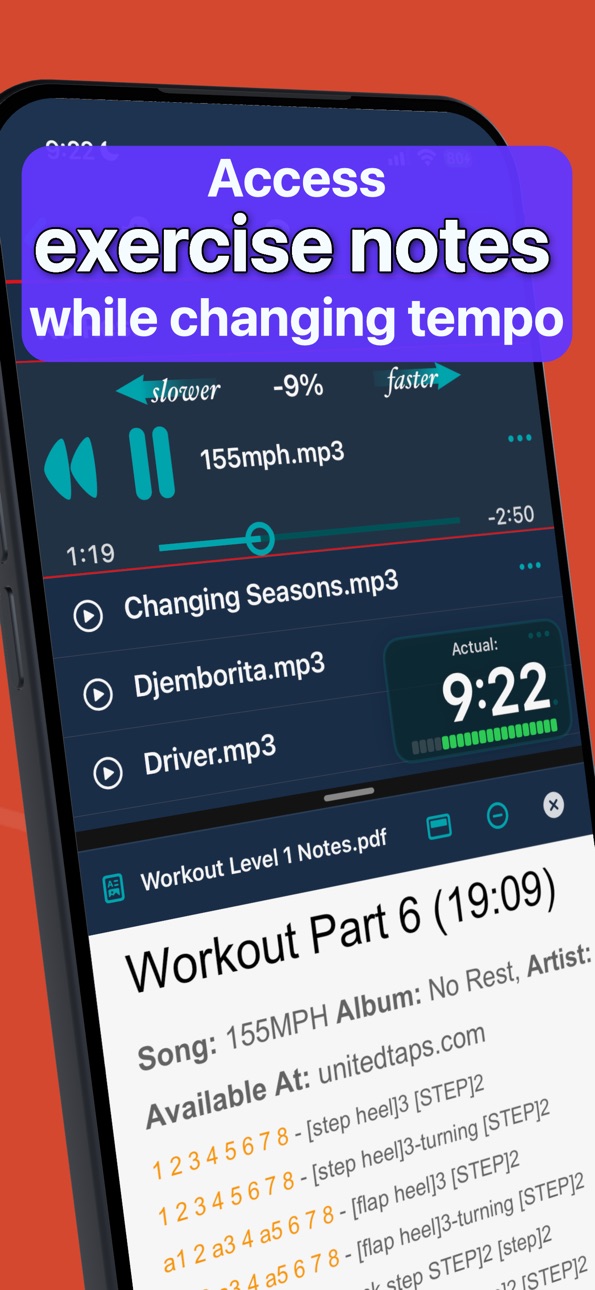
You can now import loose PDFs, images, text notes, and videos into your Syllabus, not just audio and folders. When you import, Cadance asks "Music or Syllabus?" up front and routes each item directly — no extra steps.
Imported Items
A new "Imported Items" area gathers everything that's been shared to Cadance, AirDropped, or dropped in via the Files app, and lets you send each item to Music or the Syllabus yourself. Nothing is filed away automatically.
A smoother scrubber
The playback position now glides smoothly between updates instead of stepping, with a refreshed position thumb and loop markers shared across the inline and Focus players.
Fixes and improvements
• Fixed an iPad crash when resizing the PDF pane in split view.
• Improved layouts on narrow iPad windows and split view.
• Stability and reliability improvements across playback and the library.
Description
The ultimate music player designed for ballet, jazz, hip‑hop, and any dance class. Adjust tempo on the fly, create class‑specific playlists, and control with Apple Watch or bluetooth remote from across the room.
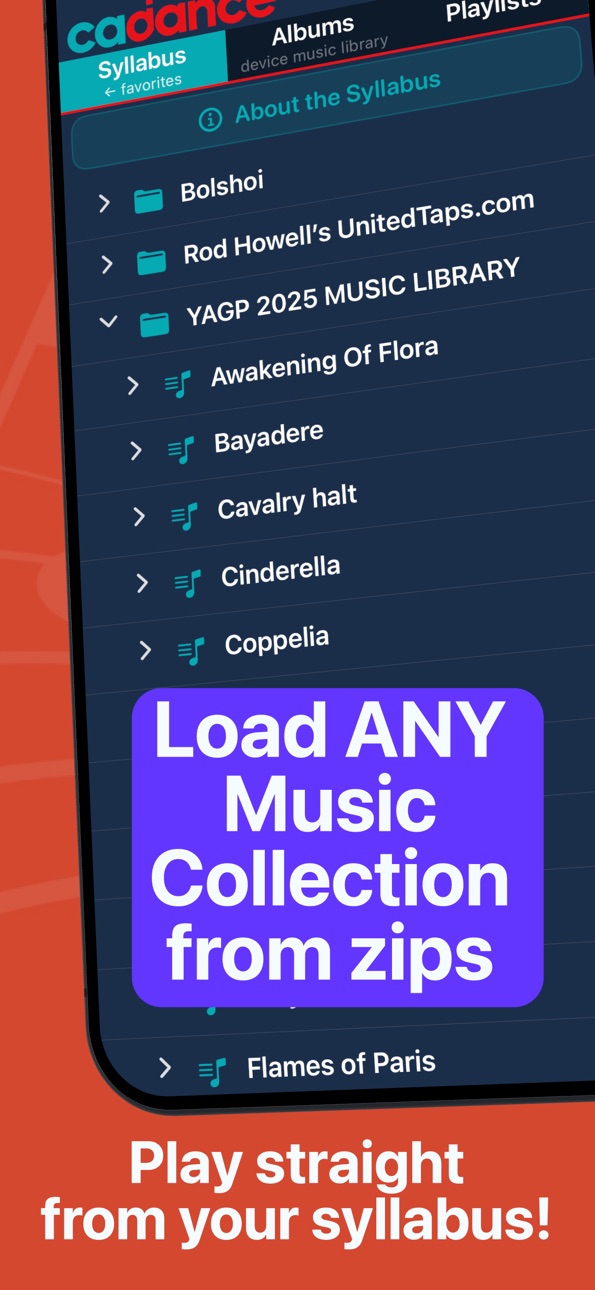
With Cadance you can fix the tempo of the 'almost perfect' songs. Dancers can rehearse, with loop and tempo control. Dance society and technique teachers can load specialist music libraries and perfectly navigate the folder structure and play tracks - all in-place and with full tempo and looping control.
YOUR CLASS, YOUR TEMPO
• Perfect Your Dancers' Technique: Slow down the tempo to clean up a routine. Ideal for ballet class music, tap dance classes, and detailed choreography work.
• Challenge and Upskill Your Dancers: Speed up the tempo to challenge your students and help them master complex and fast-paced routines.
TOOLS FOR EFFORTLESS TEACHING
• Nail Every Entrance: Use the Delay Start for songs with short intros, giving you time to start together or record video.
• Master Repetitive Drills: Use the repeat function for repetitions and drills, so you can focus on your dancers, not the music player.
• Discover New Music: Find more songs similar to the one being player. Our powerful keyword search saves you precious class time.
• Talk Without Interrupting the Flow: The Duck button, while held, conveniently lowers the music volume so you can avoid shouting. This is also useful to see if your dancers can stay on the beat.
YOUR MUSIC, PERFECTLY ORGANIZED
• All Your Music in One Place: Play music from your device Music Library, local files, your syllabus music collection, and your Apple Music subscription, all seamlessly integrated into Cadance.
• Organize Your Classes Effortlessly: Create custom playlists and folders to organize your music, giving you quick and easy access to the right songs at the right time.
FLEXIBLE ACCESS FOR EVERY TEACHER
Cadance is designed to fit how you teach. Use our free Class Planning mode to build your playlists and preview any track for 15 seconds. When it is time to teach, choose the access level that works for you:
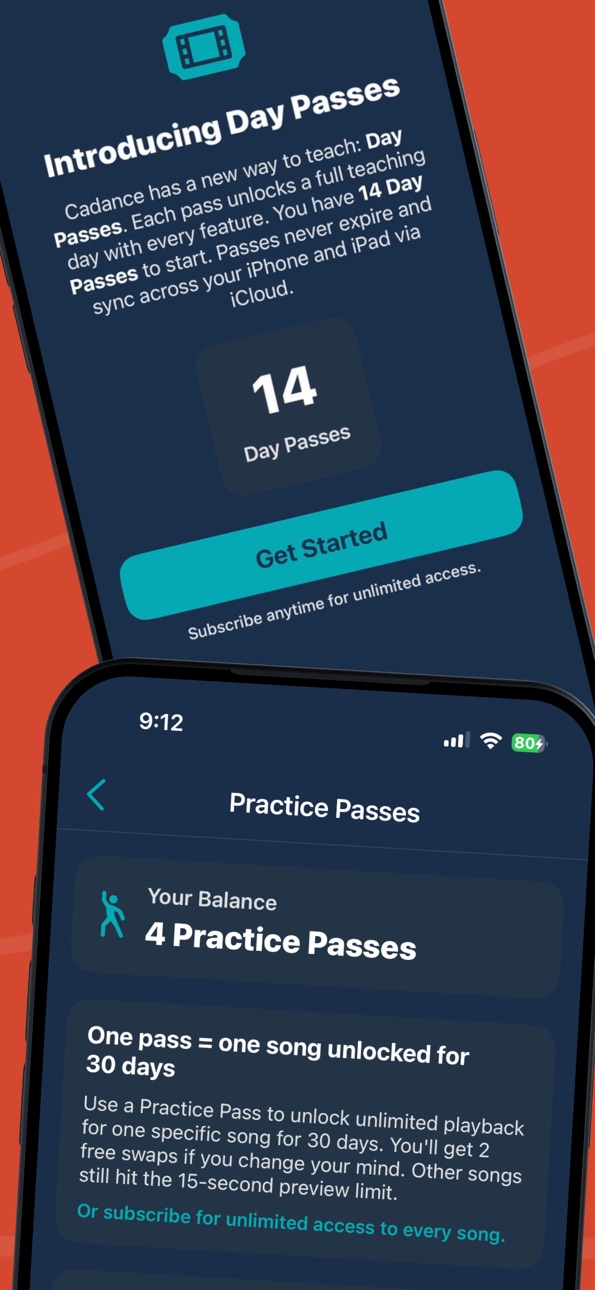
DAY PASSES (14 free with the first installation):
Activate a Day Pass at the start of your first class and you are covered until midnight with the full power of Cadance — nothing held back. You'll find great value in your Apple Music subscription, since it is now streamable. Day Passes never expire, so use them only on the days you teach. Additional Day Passes are available for purchase in-app.
PERFECT PRACTICE PASS designed for Dancers
• Focus Player: distraction-free, full-screen practice for one track with full tempo control
• A/B loop markers: repeat just the section you're working on
• Repeat ladder with delay-start and pauses between runs
• A free pass for new users; Patrons get direct Focus Player access and endless Practice Passes
• Practice Pass supports 30 days of full feature access
SUBSCRIPTION LEVELS (optional)
- Spark (for occasional teaching):
Unlocks full playback of your local files, Metronome, Delay Start, Apple Watch, and Bluetooth remote support.
- Artist (for regular instruction):
Unlocks support for DRM-protected music and playback of downloaded Apple Music tracks.
- Patron (for pro teachers and rehearsal directors):
The ultimate frictionless experience. Direct streaming of Apple Music albums and playlists without downloading. Limitless Practice Passes.
Spark, Artist, and Patron are auto-renewing subscriptions available on a monthly or annual basis. You can cancel at any time — your access continues until the end of the current billing period. To check eligibility and actual pricing for your region including discounted introductory rates, see the in-app subscription screen.
NOTES:
Cadance is not bundled with music and doesn't sell music, so bring your own or use our playlists with your Apple Music account.
Standard Apple Terms of Use apply to Cadance: https://www.apple.com/legal/internet-services/itunes/dev/stdeula/
In-App Purchases QA pricing
cadance Subscription Group Subscription
Artist Annual · Yearly—
Artist Monthly · Monthly—
One-Time Purchases
Day Pass (10 pack)—
Day Pass (5 pack)—
Day Pass (20 pack)—
Perfect Practice Pass (1 pass)—
Perfect Practice Pass (3 pack)—
Perfect Practice Pass (5 pack)—
Capabilities
In-App Purchases
Accessibility
ipadiphonemacrealityDevicetvoswatch
Version history 23 versions
Build 886713463v5.12026-06-20 12:51:51
Cadance 5.1 makes it easier to get started, easier to bring in your own material, and gives you more control the moment you tap a track.
Visual Tour
A new Visual Tour on the Favorites tab walks you through Cadance one short topic at a time, so new teachers can get up and running quickly.
No Autostart
The repeat menu now offers "No Autostart" alongside "No Repeat". With No Autostart, tapping a track loads it paused at the beginning so you can set the tempo before the music starts — ideal when you want a moment to prepare. Play All and Shuffle still start playing immediately. Your choice is remembered.
More of your own material in the Syllabus
You can now import loose PDFs, images, text notes, and videos into your Syllabus, not just audio and folders. When you import, Cadance asks "Music or Syllabus?" up front and routes each item directly — no extra steps.
Imported Items
A new "Imported Items" area gathers everything that's been shared to Cadance, AirDropped, or dropped in via the Files app, and lets you send each item to Music or the Syllabus yourself. Nothing is filed away automatically.
A smoother scrubber
The playback position now glides smoothly between updates instead of stepping, with a refreshed position thumb and loop markers shared across the inline and Focus players.
Fixes and improvements
• Fixed an iPad crash when resizing the PDF pane in split view.
• Improved layouts on narrow iPad windows and split view.
• Stability and reliability improvements across playback and the library.
Build 886577184v5.02026-06-05 22:38:19
Cadance 5.0 introduces the Syllabus browser — a faster way to teach from your own structured material.
• Syllabus browser: import zipped syllabus and exercise collections and browse them by section on the Favorites tab. Cadance automatically organizes folders into clean, playable track lists.
• Play any syllabus track with real-time tempo change (no pitch shift), and control it from your Apple Watch or a Bluetooth remote.
• Open in Focus Player from anywhere: Patrons and Day Pass users can now open any track in the distraction-free Focus Player without using a Practice slot.
• Unified track menu: a single, consistent track-actions menu across albums, playlists, files, and the Syllabus.
• Practice Pass improvements: a Practice Pass summary in Settings, more reliable cross-device slot syncing, and "Open in source" now jumps straight to the right album or syllabus.
• Playlist import: streamlined Apple Music playlist importing that preserves the original owner and stays in sync across renames and folder moves.
• Refreshed app icon and Apple Watch complication, plus assorted layout, stability, and clarity fixes.
Thank you for teaching with Cadance. Questions or feedback are always welcome.
Build 886316387v4.92026-05-31 07:24:05
Perfect Practice Pass is here.
• Focus Player: a distraction-free, full-screen practice view built for repeating and drilling a single track over 30 days. Designed for dancers, not just teachers.
• A/B loop markers: set two points on the timeline and loop just that section — perfect for nailing a tricky passage. These look like hearts with a down arrow (think needle down on a vinyl record track, and up arrow (think of the playback needle on a vinyl record being lifted off the track).
• Repeat ladder with optional delay-start and pause-between-repeats, so you can set up and reset between runs.
• Unlock any track for focused practice with a Practice Pass. New users get one free pass to try it out.
• Activate the wrong track? You can swap it out twice.
• Need more time with the track? Extend it at any time.
• Patron subscribers can now open tracks directly in the Focus Player and get endless Practice Passes.
Plus reliability improvements to library loading and a smoother start of playback over Bluetooth. BT Remote Overlay on iPad now supports Playlists.
We've received a few reports of content (artwork, track lists, songs) not loading and the app showing endless busy indicator on several screens. This build has significant changes to fix this and new debugging tools to help us squash anything that remains. If any such problems linger after the 4.9 update, contact support so that we can help.
Build 885621411v4.82026-05-17 00:01:29
Cadance 4.8 brings a major reliability and pricing update.
Quick Fix in 1143 to make Apple Music preview banner overlap on iPad dismissible.
• New Day Pass system — your Day Pass balance now syncs reliably across iPhone, iPad, and Apple Watch using your Apple ID. Buying a pack of passes shows up everywhere within seconds.
• 14 free Day Passes for new users on first launch.
• Fixed: iPhone freezes after rapid Apple Watch track navigation that could leave the play button disabled. The app now recovers within seconds even on slow networks or when Apple Music is mid-sync.
• Fixed: tab bar dead zones on iPhone 17 — Library, Playlists, and Favorites tabs are now fully tappable across the entire tab.
• Fixed: imported playlists from Apple Music or your Music Library now correctly preserve the original curator and mark themselves "(syncable copy)" — they no longer look like Cadance-authored playlists.
• Fixed: buying a Day Pass pack no longer occasionally inflates the balance.
• Fixed: stalled iOS Music library no longer leaves Albums, Artists, or Music Playlists spinning forever. You'll now see a clear "Library unavailable" message with a Retry button.
• Customer Center is now accessible from Settings → Manage Subscription even without an active subscription, so Day Pass users have full account access.
• Apple Watch active-row controls now disable correctly while a track is loading, preventing accidental impatient taps.
Smaller fixes, performance improvements, and behind-the-scenes refactoring throughout.
Build 885382681v4.72026-05-08 20:08:12
Stability and polish pass, with a focus on reliability on iPhones that are low on free storage.
• Fixed a rare freeze when opening Custom Playlists on iPhones running low on free space. Opening a playlist now always produces a usable screen — or a clear retry option — within a few seconds, even when Apple Music is being slow in the background.
• Music Playlist artwork that got stuck on a placeholder will now load correctly after the next app launch, and on iPad will try again automatically when you open the playlist.
• Switching between the Favorites, Library, and Playlists tabs now keeps your scroll position in each tab, so returning to a tab after a detour no longer snaps back to the top.
• Fixed a background crash that could occur when running Cadance on an Apple Silicon Mac ("Designed for iPad") while the Music app was syncing.
• Apple Watch: opening a different album or playlist on iPhone now reliably scrolls the Watch tracklist to the first track instead of inheriting the previous container's scroll position.
Thanks to everyone who reported issues — please keep the feedback coming.
Build 885327417v4.62026-05-06 18:54:23
- Faster startup — eliminated a launch-time delay caused by oversized artwork.
- Bluetooth remote controls now route to Cadance reliably even after using Apple Music on the same device.
- Smoother track changes on Apple Watch — no more ghost play/pause flash or stale progress.
- Better tempo handling on Apple Music tracks — your set tempo is preserved across pause, scrub, and repeat.
- Album release year now shows on Albums, Artist pages, and album detail.
- Music import now runs in the background — keep using the app while files copy.
- Many improvements for Cadance running on Mac (Designed for iPad).
- Various reliability fixes and polish.
Build 885285300v4.52026-05-05 19:06:25
Version 4.5
• Imports from iCloud, OneDrive, and Google Drive now run in the background — you can keep using Cadance while your music copies over, with a progress banner showing filenames and a cancel button.
• New: When an album's track numbers are missing or scrambled, Cadance can now restore the correct order using Apple Music as a reference. A one-tap toggle lets you switch back to the original order any time.
• Fixed a bug where tempo on DRM / Apple Music tracks silently reverted to normal speed on repeat.
• Fixed a bug where tapping "Go to Album" from a playlist could show a blank black page on iPhone.
• Smoother, more natural slide animation when tapping an artist to see their albums.
• Apple Watch: fixed accidental misfires between rewind, play/pause, and tempo on the inline player — taps now land where you expect.
• Apple Watch: track changes are now instant and clean — no more brief flash of the previous track's progress or a stuttering play/pause icon.
• Apple Watch: rapid-fire tapping through tracks on flaky connections no longer "unwinds" back through earlier selections.
• Apple Watch: if the Cadance iPhone app needs updating to match your Watch, you'll now see a clear banner with guidance.
• Many smaller playback, audio, and Apple Music preview fixes.
Build 885155620v4.42026-05-02 20:45:32
Cadance 4.4 — Stability & Polish
This release focuses on making your teaching experience smoother, especially on Apple Watch and with large music libraries.
Apple Watch improvements
- Easier-to-read track rows with the new rotated, wrist-aware tempo display
- More reliable play/pause — no more accidentally jumping to the next track when tapping pause
- Cleaner volume and tempo control from the Digital Crown
- Watch now follows the "Show Full Album" toggle from your iPhone
- Repeat mode honored correctly when starting a track from the Watch
- Brighter row separators in Music Playlists for clearer separation
Scrolling & performance
- Much smoother scrolling through large libraries of thousands of albums or artists
- Faster load for large Music Playlists (fewer background checks)
- No more stale tempo numbers showing on playlists you're only browsing
Crash fixes
- Fixed an iPad crash when opening a playlist or album that contained the same track more than once
- Fixed playability icons (cloud / DRM / unplayable) disappearing after activating a Custom Playlist track
- Fixed a rare loop when a playlist description was open while playback continued
Small but nice
- Playlist description overlay no longer gets clipped at the screen edges on iPhone
Build 885008240v4.32026-04-28 16:48:39
Cadance 4 is a massive upgrade, completely rebuilt to be faster and more reliable for the studio. This 4.3 update includes important bug fixes to Settings screen on silicone Macs and performance improvements.
• 14 Free Day Passes: Every user gets 14 days of unrestricted premium access to use whenever you teach.
• 33 Curated Playlists: Pre-installed music for Extraordinary Groups (Autism, Parkinson's, Senior Health), kids' Hip-hop, and more.
• Class Planning Mode: The free tier now allows unlimited playlist creation and 15-second previews of the entire Apple Music catalog.
• Studio Upgrades: Massive iPad remote overlay, new Teacher Lock to prevent accidental taps, and enhanced Apple Watch control.
• Frictionless Discovery: Explore artist catalogs instantly without leaving the app.
Build 884966898v4.22026-04-27 14:54:10
Cadance 4 is a massive upgrade, completely rebuilt to be faster and more reliable for the studio. This 4.2 update includes important bug fixes and performance improvements.
• 14 Free Day Passes: Every user gets 14 days of unrestricted premium access to use whenever you teach.
• 33 Curated Playlists: Pre-installed music for Extraordinary Groups (Autism, Parkinson's, Senior Health), kids' Hip-hop, and more.
• Class Planning Mode: The free tier now allows unlimited playlist creation and 15-second previews of the entire Apple Music catalog.
• Studio Upgrades: Massive iPad remote overlay, new Teacher Lock to prevent accidental taps, and enhanced Apple Watch control.
• Frictionless Discovery: Explore artist catalogs instantly without leaving the app.
Build 884528560v4.12026-04-26 07:53:58
First native iOS version, build 1127 is mostly better at everything than v3.x. Much better playlist support, integration with Apple Music catalog, auto lock, remote overlay, and Day Pass support.
Build 882696808v3.52026-03-03 23:06:15
Fixes mp3 and wav playability from playlists (free tier). Added support for Bluetooth remote (Satechi R2 tested) for Spark tier and only really useful on owned albums / tracks. Improvements to make active track visible. Fix bottom button height on iPad. Simplified 'restore subscription' after reinstall. Fixed volume picker sizing.
Build 882567544v3.42026-02-18 22:43:01
Favorites tab will refresh all popularity scores during the startup for the first session of the day. These had been static until you played the album or playlist again.
Your music is now more likely to be playable if not downloaded while remaining in the cloud. Playlist import, syncing and repair fixes to solve track playability issues.
Paywall is shown if you never had an account and click into Customer Center.
Build 882175734v3.32026-02-05 17:48:37
Minor update to the review nudge which should now happen after 7 containers rather than 30. I can't express strongly enough how important reviews are to the future of this app.
Build 882097226v3.22026-02-03 18:20:12
Useful tips added to the initial empty library, local files and playlists screens describing how the user can install music.
The Library / Files tab has been renamed with new subtext to provide better context to the user.
Watch app fixes to solve an issue with playability of cloud tracks of tracks exceeding 20.
A review nudge was added for users that have played 30 containers, which offers to show the App Store review page for the app. This can easily be dismissed and after 3 spaced out requests for reviews there will be a checkbox shown to let the user opt out of future reminders
Build 881765269v3.12026-01-29 09:07:19
Minor fix to tempo display during the dock / undock while scrolling. Artists now sorted while ignoring diacritics. Albums have leading spaces removed from title to fix that sort order as well. Removed obsolete onboarding videos. App compiled with modern Xcode and disabled app compatibility with Silicon based Macs to adhere to licensing restrictions.
Build 881591560v3.02026-01-23 02:17:11
New free tier to recreate BarreNotes functionality and pricing.
New support for DRM protected tracks found in your Apple Music Library, local files, and Apple Music subscriptions.
Build 881517483v2.12026-01-16 23:25:42
Added the ability to 'heart' albums and playlists to make them appear instantly on the Favorites tab (thanks to Cathie and Josephine for this!). Long press on the album or playlist under the Favorites tab to remove that item from Favorites without resetting everything. Great for cleaning up anything you need out of the way.
Collage rebuild fix and quick refresh of the display for improved UX.
Build 881301180v2.02026-01-13 17:14:41
Big update worthy of advancing the version to 2.0: MusicKit added to enable playing of previously locked DRM songs. Playability indicators moved to the left side of song titles, several updates to settings screen, playlist collage creation and refresh improvements, song delay improvements and the slider no longer gets orphaned and forgotten on screen.
Build 881085990v1.42026-01-07 16:59:37
Settings screen update to show RevenueCat UDID to user.
Build 881070177v1.32025-12-30 02:50:17
Allocate full raw audio buffer on tracks shorter than 5 minutes in length to reduce audio pop on circular buffer. This is switchable in Settings.
Add Settings link to standard App Review dialog (iPhone) or App Review (AppStore) on iPad.
Corrected tempo storage and retrieval for Playlist tracks.
Corrected Watch Tempo popover, play / pause button state.
Build 880784614v1.12025-12-19 07:59:47
Updated to enable subscriptions. Tweaked buffer handling to reduce occasional audio dropout in the first three seconds of playback.
Build 876274481v1.02025-12-17 19:48:09
Price history by region
Currency
Show
Columns
Search
Availability 175 of 175 storefronts
| Region | Language | Price | Ratings | Avg | Version |
|---|---|---|---|---|---|
| AU | en-AU | Free | 7 | 4.9 | 5.1 |
| US | en-US | Free | 5 | 5.0 | 5.1 |
| NL | nl | Free | 1 | 5.0 | 5.1 |
| NZ | en-AU | Free | 1 | 5.0 | 5.1 |
| PT | pt-PT | Free | 1 | 1.0 | 5.1 |
| TH | en-GB | Free | 1 | 5.0 | 5.1 |
| AE | en-GB | Free | 0 | — | 5.1 |
| AF | en-GB | Free | 0 | — | 5.1 |
| AG | en-GB | Free | 0 | — | 5.1 |
| AI | en-GB | Free | 0 | — | 5.1 |
| AL | en-GB | Free | 0 | — | 5.1 |
| AM | en-GB | Free | 0 | — | 5.1 |
| AO | en-GB | Free | 0 | — | 5.1 |
| AR | es-MX | Free | 0 | — | 5.1 |
| AT | de-DE | Free | 0 | — | 5.1 |
| AZ | en-GB | Free | 0 | — | 5.1 |
| BA | en-GB | Free | 0 | — | 5.1 |
| BB | en-GB | Free | 0 | — | 5.1 |
| BE | en-GB | Free | 0 | — | 5.1 |
| BF | en-GB | Free | 0 | — | 5.1 |
| BG | en-GB | Free | 0 | — | 5.1 |
| BH | en-GB | Free | 0 | — | 5.1 |
| BJ | en-GB | Free | 0 | — | 5.1 |
| BM | en-GB | Free | 0 | — | 5.1 |
| BN | en-GB | Free | 0 | — | 5.1 |
| BO | es-MX | Free | 0 | — | 5.1 |
| BR | pt-BR | Free | 0 | — | 5.1 |
| BS | en-GB | Free | 0 | — | 5.1 |
| BT | en-GB | Free | 0 | — | 5.1 |
| BW | en-GB | Free | 0 | — | 5.1 |
| BY | en-GB | Free | 0 | — | 5.1 |
| BZ | en-GB | Free | 0 | — | 5.1 |
| CA | en-CA | Free | 0 | — | 5.1 |
| CD | en-GB | Free | 0 | — | 5.1 |
| CG | en-GB | Free | 0 | — | 5.1 |
| CH | de-CH | Free | 0 | — | 5.1 |
| CI | fr-FR | Free | 0 | — | 5.1 |
| CL | es-MX | Free | 0 | — | 5.1 |
| CM | fr-FR | Free | 0 | — | 5.1 |
| CN | zh-Hans-CN | Free | 0 | — | 5.1 |
| CO | es-MX | Free | 0 | — | 5.1 |
| CR | es-MX | Free | 0 | — | 5.1 |
| CV | en-GB | Free | 0 | — | 5.1 |
| CY | en-GB | Free | 0 | — | 5.1 |
| CZ | en-GB | Free | 0 | — | 5.1 |
| DE | de-DE | Free | 0 | — | 5.1 |
| DK | en-GB | Free | 0 | — | 5.1 |
| DM | en-GB | Free | 0 | — | 5.1 |
| DO | es-MX | Free | 0 | — | 5.1 |
| DZ | en-GB | Free | 0 | — | 5.1 |
| EC | es-MX | Free | 0 | — | 5.1 |
| EE | en-GB | Free | 0 | — | 5.1 |
| EG | en-GB | Free | 0 | — | 5.1 |
| ES | es-ES | Free | 0 | — | 5.1 |
| FI | en-GB | Free | 0 | — | 5.1 |
| FJ | en-GB | Free | 0 | — | 5.1 |
| FM | en-GB | Free | 0 | — | 5.1 |
| FR | fr-FR | Free | 0 | — | 5.1 |
| GA | fr-FR | Free | 0 | — | 5.1 |
| GB | en-GB | Free | 0 | — | 5.1 |
| GD | en-GB | Free | 0 | — | 5.1 |
| GE | en-GB | Free | 0 | — | 5.1 |
| GH | en-GB | Free | 0 | — | 5.1 |
| GM | en-GB | Free | 0 | — | 5.1 |
| GR | en-GB | Free | 0 | — | 5.1 |
| GT | es-MX | Free | 0 | — | 5.1 |
| GW | en-GB | Free | 0 | — | 5.1 |
| GY | en-GB | Free | 0 | — | 5.1 |
| HK | zh-Hant-HK | Free | 0 | — | 5.1 |
| HN | es-MX | Free | 0 | — | 5.1 |
| HR | en-GB | Free | 0 | — | 5.1 |
| HU | en-GB | Free | 0 | — | 5.1 |
| ID | en-GB | Free | 0 | — | 5.1 |
| IE | en-GB | Free | 0 | — | 5.1 |
| IL | en-GB | Free | 0 | — | 5.1 |
| IN | en-GB | Free | 0 | — | 5.1 |
| IQ | en-GB | Free | 0 | — | 5.1 |
| IS | en-GB | Free | 0 | — | 5.1 |
| IT | it | Free | 0 | — | 5.1 |
| JM | en-GB | Free | 0 | — | 5.1 |
| JO | en-GB | Free | 0 | — | 5.1 |
| JP | ja | Free | 0 | — | 5.1 |
| KE | en-GB | Free | 0 | — | 5.1 |
| KG | en-GB | Free | 0 | — | 5.1 |
| KH | en-GB | Free | 0 | — | 5.1 |
| KN | en-GB | Free | 0 | — | 5.1 |
| KR | ko | Free | 0 | — | 5.1 |
| KW | en-GB | Free | 0 | — | 5.1 |
| KY | en-GB | Free | 0 | — | 5.1 |
| KZ | en-GB | Free | 0 | — | 5.1 |
| LA | en-GB | Free | 0 | — | 5.1 |
| LB | en-GB | Free | 0 | — | 5.1 |
| LC | en-GB | Free | 0 | — | 5.1 |
| LK | en-GB | Free | 0 | — | 5.1 |
| LR | en-GB | Free | 0 | — | 5.1 |
| LT | en-GB | Free | 0 | — | 5.1 |
| LU | en-GB | Free | 0 | — | 5.1 |
| LV | en-GB | Free | 0 | — | 5.1 |
| LY | en-GB | Free | 0 | — | 5.1 |
| MA | en-GB | Free | 0 | — | 5.1 |
| MD | en-GB | Free | 0 | — | 5.1 |
| ME | en-GB | Free | 0 | — | 5.1 |
| MG | en-GB | Free | 0 | — | 5.1 |
| MK | en-GB | Free | 0 | — | 5.1 |
| ML | en-GB | Free | 0 | — | 5.1 |
| MM | en-GB | Free | 0 | — | 5.1 |
| MN | en-GB | Free | 0 | — | 5.1 |
| MO | zh-Hant-HK | Free | 0 | — | 5.1 |
| MR | en-GB | Free | 0 | — | 5.1 |
| MS | en-GB | Free | 0 | — | 5.1 |
| MT | en-GB | Free | 0 | — | 5.1 |
| MU | en-GB | Free | 0 | — | 5.1 |
| MV | en-GB | Free | 0 | — | 5.1 |
| MW | en-GB | Free | 0 | — | 5.1 |
| MX | es-MX | Free | 0 | — | 5.1 |
| MY | en-GB | Free | 0 | — | 5.1 |
| MZ | en-GB | Free | 0 | — | 5.1 |
| NA | en-GB | Free | 0 | — | 5.1 |
| NE | en-GB | Free | 0 | — | 5.1 |
| NG | en-GB | Free | 0 | — | 5.1 |
| NI | es-MX | Free | 0 | — | 5.1 |
| NO | en-GB | Free | 0 | — | 5.1 |
| NP | en-GB | Free | 0 | — | 5.1 |
| NR | en-GB | Free | 0 | — | 5.1 |
| OM | en-GB | Free | 0 | — | 5.1 |
| PA | es-MX | Free | 0 | — | 5.1 |
| PE | es-MX | Free | 0 | — | 5.1 |
| PG | en-GB | Free | 0 | — | 5.1 |
| PH | en-GB | Free | 0 | — | 5.1 |
| PK | en-GB | Free | 0 | — | 5.1 |
| PL | en-GB | Free | 0 | — | 5.1 |
| PW | en-GB | Free | 0 | — | 5.1 |
| PY | es-MX | Free | 0 | — | 5.1 |
| QA | en-GB | Free | 0 | — | 5.1 |
| RO | en-GB | Free | 0 | — | 5.1 |
| RS | en-GB | Free | 0 | — | 5.1 |
| RU | ru | Free | 0 | — | 5.1 |
| RW | en-GB | Free | 0 | — | 5.1 |
| SA | en-GB | Free | 0 | — | 5.1 |
| SB | en-GB | Free | 0 | — | 5.1 |
| SC | en-GB | Free | 0 | — | 5.1 |
| SE | sv | Free | 0 | — | 5.1 |
| SG | en-GB | Free | 0 | — | 5.1 |
| SI | en-GB | Free | 0 | — | 5.1 |
| SK | en-GB | Free | 0 | — | 5.1 |
| SL | en-GB | Free | 0 | — | 5.1 |
| SN | en-GB | Free | 0 | — | 5.1 |
| SR | en-GB | Free | 0 | — | 5.1 |
| ST | en-GB | Free | 0 | — | 5.1 |
| SV | es-MX | Free | 0 | — | 5.1 |
| SZ | en-GB | Free | 0 | — | 5.1 |
| TC | en-GB | Free | 0 | — | 5.1 |
| TD | en-GB | Free | 0 | — | 5.1 |
| TJ | en-GB | Free | 0 | — | 5.1 |
| TM | en-GB | Free | 0 | — | 5.1 |
| TN | en-GB | Free | 0 | — | 5.1 |
| TO | en-GB | Free | 0 | — | 5.1 |
| TR | en-GB | Free | 0 | — | 5.1 |
| TT | en-GB | Free | 0 | — | 5.1 |
| TW | zh-Hant-TW | Free | 0 | — | 5.1 |
| TZ | en-GB | Free | 0 | — | 5.1 |
| UA | en-GB | Free | 0 | — | 5.1 |
| UG | en-GB | Free | 0 | — | 5.1 |
| UY | en-GB | Free | 0 | — | 5.1 |
| UZ | en-GB | Free | 0 | — | 5.1 |
| VC | en-GB | Free | 0 | — | 5.1 |
| VE | es-MX | Free | 0 | — | 5.1 |
| VG | en-GB | Free | 0 | — | 5.1 |
| VN | en-GB | Free | 0 | — | 5.1 |
| VU | en-GB | Free | 0 | — | 5.1 |
| XK | en-GB | Free | 0 | — | 5.1 |
| YE | en-GB | Free | 0 | — | 5.1 |
| ZA | en-GB | Free | 0 | — | 5.1 |
| ZM | en-GB | Free | 0 | — | 5.1 |
| ZW | en-GB | Free | 0 | — | 5.1 |
Change log 27 changes · QA
✎
releaseNotes updated
Cadance 5.1 makes it easier to get started, easier to bring in your own material, and gives you more control the moment you tap a track.
Visual Tour
A new Visu
✎
description updated
The ultimate music player designed for ballet, jazz, hip‑hop, and any dance class. Adjust tempo on the fly, create class‑specific playlists, and control with Ap
✎
subtitle updated
Studio music player with Watch
✎
name updated
Cadance Dance Syllabus Tempo
◆
Version 5.1 released
Cadance 5.1 makes it easier to get started, easier to bring in your own material, and gives you more control the moment you tap a track.
Visual Tour
A new Visual Tour on the Favorites tab walks you through Cadance one short topic at a time
◆
Version 5.0 released
Cadance 5.0 introduces the Syllabus browser — a faster way to teach from your own structured material.
• Syllabus browser: import zipped syllabus and exercise collections and browse them by section on the Favorites tab. Cadance automatical
◆
Version 4.9 released
Perfect Practice Pass is here.
• Focus Player: a distraction-free, full-screen practice view built for repeating and drilling a single track over 30 days. Designed for dancers, not just teachers.
• A/B loop markers: set two points on the ti
◆
Version 4.8 released
Cadance 4.8 brings a major reliability and pricing update.
Quick Fix in 1143 to make Apple Music preview banner overlap on iPad dismissible.
• New Day Pass system — your Day Pass balance now syncs reliably across iPhone, iPad, and Apple W
◆
Version 4.7 released
Stability and polish pass, with a focus on reliability on iPhones that are low on free storage.
• Fixed a rare freeze when opening Custom Playlists on iPhones running low on free space. Opening a playlist now always produces a usable scree
◆
Version 4.6 released
- Faster startup — eliminated a launch-time delay caused by oversized artwork.
- Bluetooth remote controls now route to Cadance reliably even after using Apple Music on the same device.
- Smoother track changes on Apple Watch — no more ghos
◆
Version 4.5 released
Version 4.5
• Imports from iCloud, OneDrive, and Google Drive now run in the background — you can keep using Cadance while your music copies over, with a progress banner showing filenames and a cancel button.
• New: When an album's track n
◆
Version 4.4 released
Cadance 4.4 — Stability & Polish
This release focuses on making your teaching experience smoother, especially on Apple Watch and with large music libraries.
Apple Watch improvements
- Easier-to-read track rows with the new rotated, wrist-a
◆
Version 4.3 released
Cadance 4 is a massive upgrade, completely rebuilt to be faster and more reliable for the studio. This 4.3 update includes important bug fixes to Settings screen on silicone Macs and performance improvements.
• 14 Free Day Passes: Every us
◆
Version 4.2 released
Cadance 4 is a massive upgrade, completely rebuilt to be faster and more reliable for the studio. This 4.2 update includes important bug fixes and performance improvements.
• 14 Free Day Passes: Every user gets 14 days of unrestricted prem
◆
Version 4.1 released
First native iOS version, build 1127 is mostly better at everything than v3.x. Much better playlist support, integration with Apple Music catalog, auto lock, remote overlay, and Day Pass support.
◆
Version 3.5 released
Fixes mp3 and wav playability from playlists (free tier). Added support for Bluetooth remote (Satechi R2 tested) for Spark tier and only really useful on owned albums / tracks. Improvements to make active track visible. Fix bottom button he
◆
Version 3.4 released
Favorites tab will refresh all popularity scores during the startup for the first session of the day. These had been static until you played the album or playlist again.
Your music is now more likely to be playable if not downloaded while
◆
Version 3.3 released
Minor update to the review nudge which should now happen after 7 containers rather than 30. I can't express strongly enough how important reviews are to the future of this app.
◆
Version 3.2 released
Useful tips added to the initial empty library, local files and playlists screens describing how the user can install music.
The Library / Files tab has been renamed with new subtext to provide better context to the user.
Watch app fixes
◆
Version 3.1 released
Minor fix to tempo display during the dock / undock while scrolling. Artists now sorted while ignoring diacritics. Albums have leading spaces removed from title to fix that sort order as well. Removed obsolete onboarding videos. App compile
◆
Version 3.0 released
New free tier to recreate BarreNotes functionality and pricing.
New support for DRM protected tracks found in your Apple Music Library, local files, and Apple Music subscriptions.
◆
Version 2.1 released
Added the ability to 'heart' albums and playlists to make them appear instantly on the Favorites tab (thanks to Cathie and Josephine for this!). Long press on the album or playlist under the Favorites tab to remove that item from Favorites
◆
Version 2.0 released
Big update worthy of advancing the version to 2.0: MusicKit added to enable playing of previously locked DRM songs. Playability indicators moved to the left side of song titles, several updates to settings screen, playlist collage creation
◆
Version 1.4 released
Settings screen update to show RevenueCat UDID to user.
◆
Version 1.3 released
Allocate full raw audio buffer on tracks shorter than 5 minutes in length to reduce audio pop on circular buffer. This is switchable in Settings.
Add Settings link to standard App Review dialog (iPhone) or App Review (AppStore) on iPad.
Cor
◆
Version 1.1 released
Updated to enable subscriptions. Tweaked buffer handling to reduce occasional audio dropout in the first three seconds of playback.
◆
Version 1.0 released