Home › Productivity

 DO
DO
 AGen-GB
 AIen-GB
 AOen-GB
 ARes-MX
 BBen-GB
 BFen-GB
 BJen-GB
 BOes-MX
 BRpt-BR
 BSen-GB
 BZen-GB
 CDen-GB
 CGen-GB
 CIfr-FR
 CLes-MX
 CMfr-FR
 COes-MX
 CRes-MX
 CVen-GB
 DMen-GBDOes-MX
 DZen-GB
 GAfr-FR
 GDen-GB
 GMen-GB
 GTes-MX
 GWen-GB
 GYen-GB
 HNes-MX
 JMen-GB
 KNen-GB
 KYen-GB
 LCen-GB
 LRen-GB
 LYen-GB
 MAen-GB
 MGen-GB
 MLen-GB
 MSen-GB
 MUen-GB
 MWen-GB
 MXes-MX
 MZen-GB
 NAen-GB
 NEen-GB
 NIes-MX
 PAes-MX
 PYes-MX
 RWen-GB
 SCen-GB
 SLen-GB
 SNen-GB
 SRen-GB
 STen-GB
 SVes-MX
 SZen-GB
 TCen-GB
 TDen-GB
 TNen-GB
 TTen-GB
 TZen-GB
 UGen-GB
 USen-US
 VCen-GB
 VGen-GB
 ZMen-GB
 ZWen-GB
67 of 67 storefronts
Content in en-US
Content in en-US
Information
Preview 2 platforms
iPhone 10 images




iPad 10 images
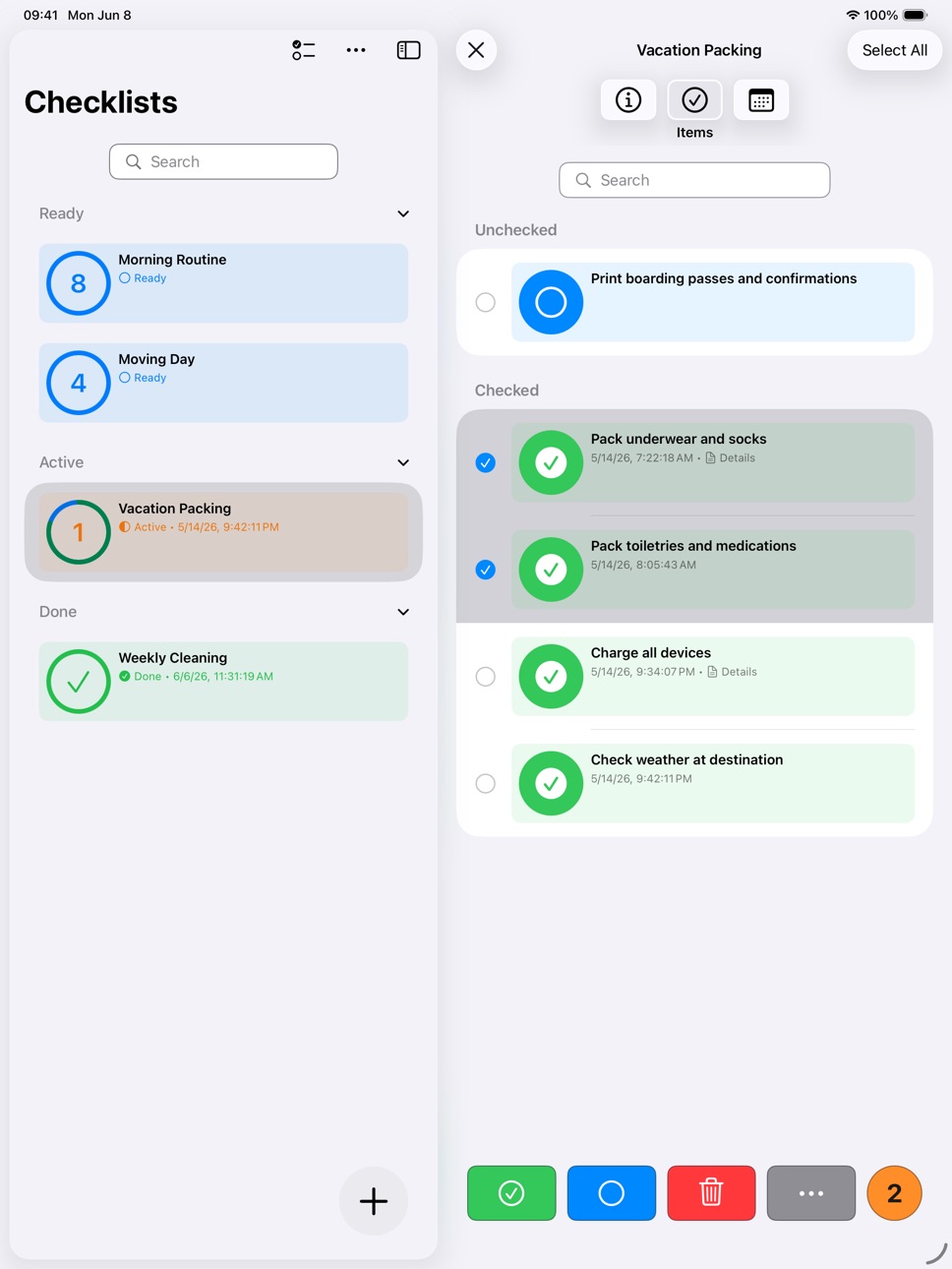


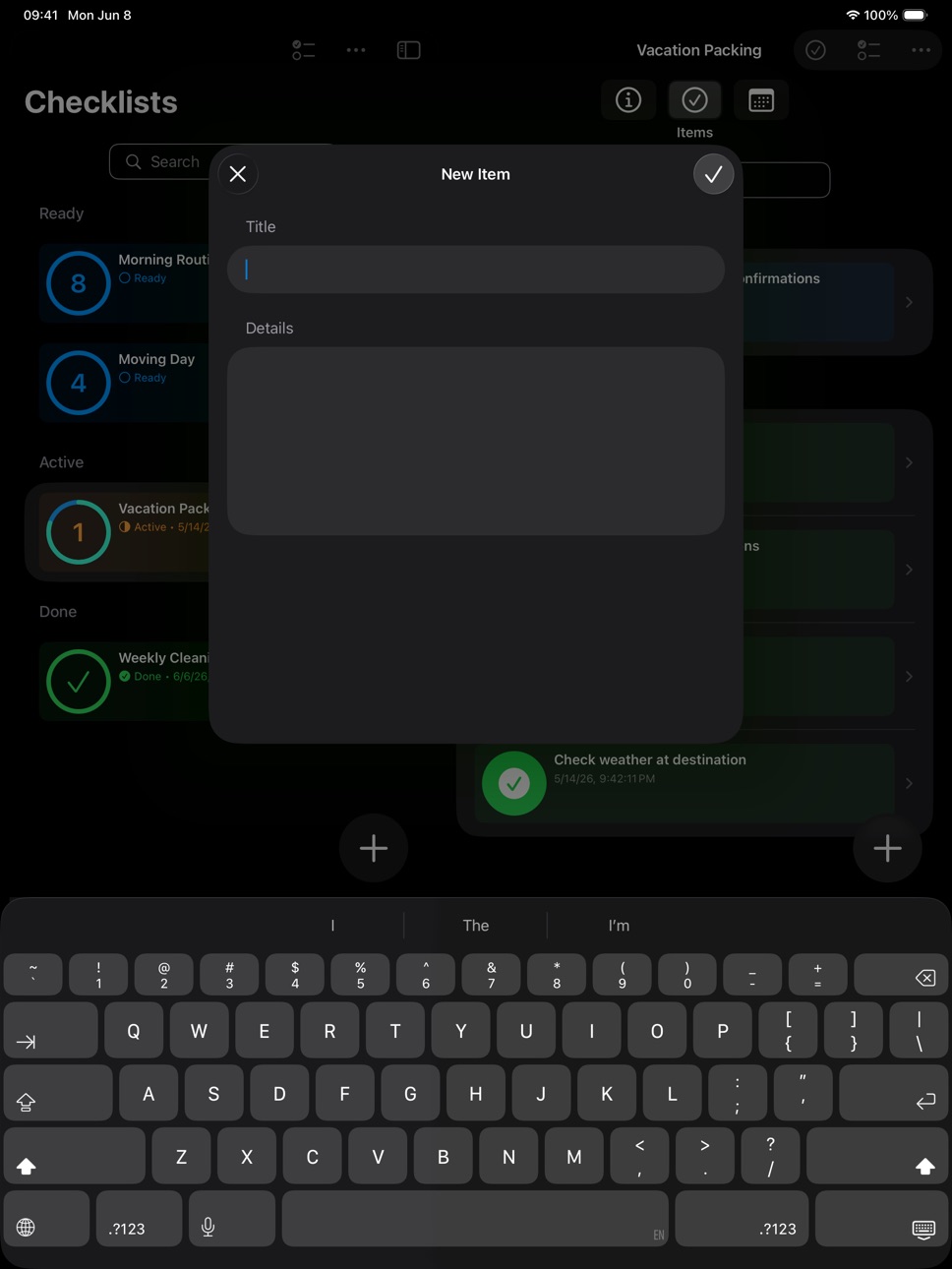

What’s New Version 1.5.0
OPTIONAL iCLOUD SYNC & A SMARTER INTERFACE
This is a major update bringing optional iCloud sync, a redesigned detail view, and a cleaner overall experience.
NEW — OPTIONAL iCLOUD SYNC
• Your Checklists, Everywhere — Checkomat now supports optional iCloud sync. Enable it in Settings and your checklists and items stay in sync across all your Apple devices automatically. Fully opt-in, 100% private, and always under your control.
UI IMPROVEMENTS
• Cleaner Settings — The Settings screen has been redesigned for a more unified and polished look.
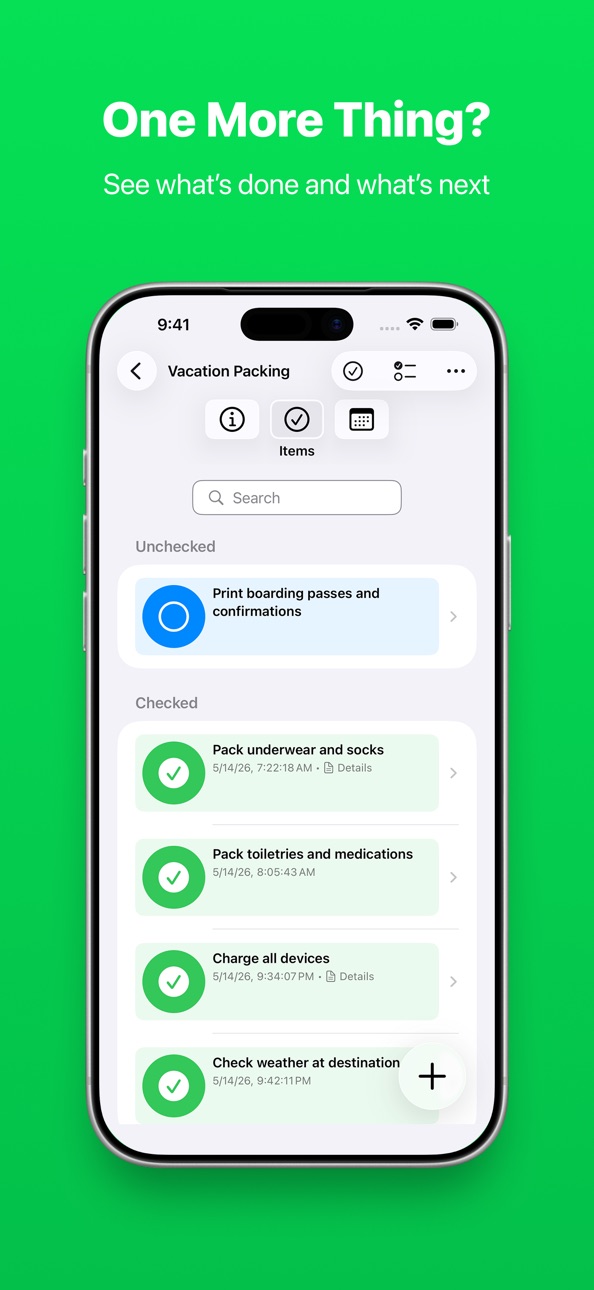
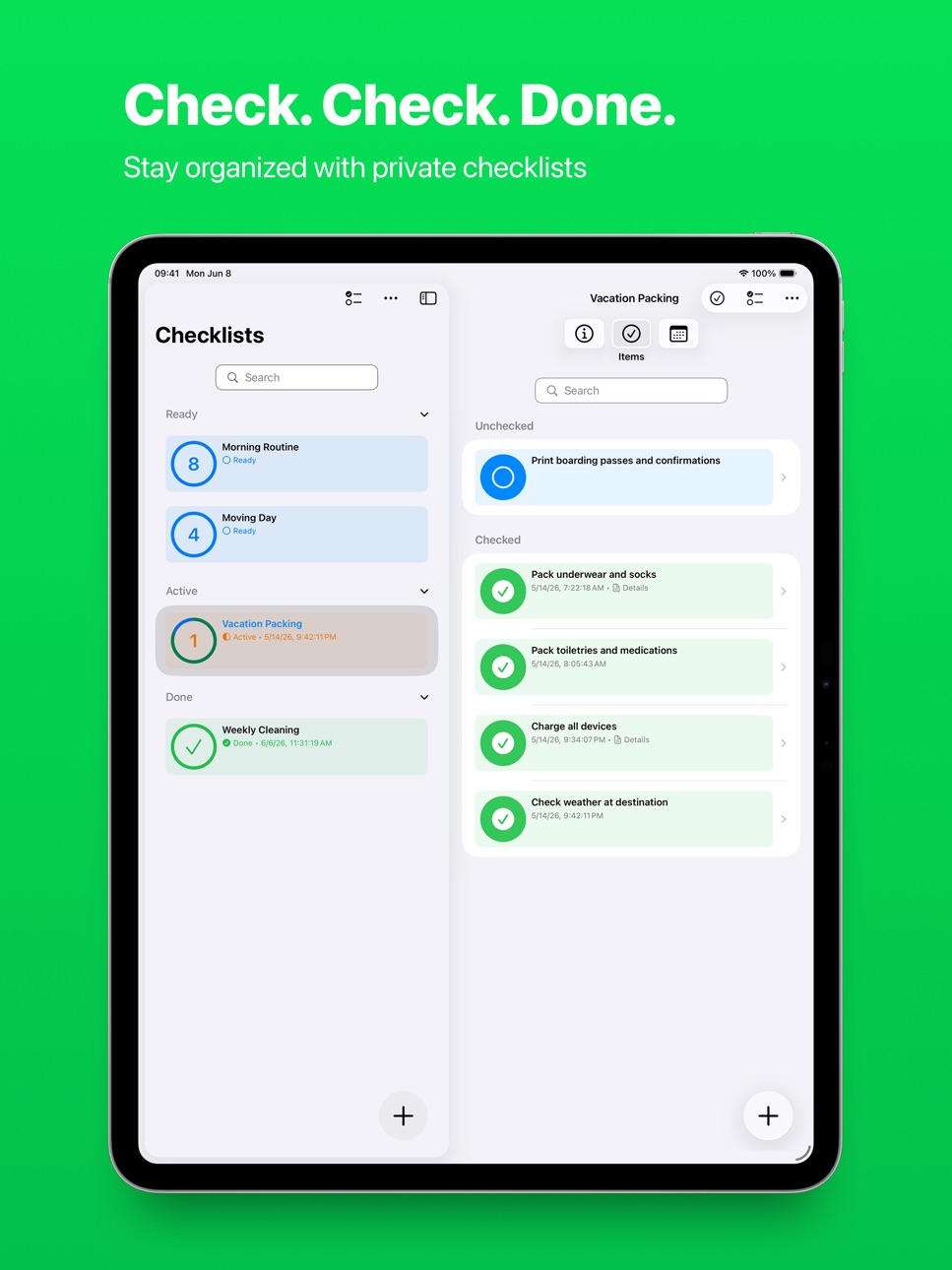
• Tab-Based Detail View — Checklists and items now open in a sleek tab-based layout, making it easier to navigate and manage your content.
• Completion History — A new tab in the detail view shows the full history of completion and check dates for checklists and items respectively.
• Sidebar (iPadOS) — The sidebar now stays open by default with a fixed width. You can still toggle its visibility whenever you like.
PRIVACY FIRST — Your data stays private. iCloud sync is fully opt-in and uses your personal, private iCloud container — only you can access it. No trackers, no third-party servers, no custom accounts. And if you don't want iCloud, your data stays offline, on your device — just as before, no action required.
Thank you for using Checkomat! If you enjoy the app, please consider leaving a rating or review in the App Store — it helps a lot!
Description
Your Private Checklist, Todo & Task Manager
Stay organized with Checkomat — the essential, private checklist app for your tasks, grocery shopping, travel, habits, and inspections. Create unlimited to-do lists, packing lists, and daily logs in one clean, distraction-free app that respects your privacy — with optional iCloud sync to keep your checklists across all your Apple devices.
From household inventory to recurring routines, Checkomat is designed for speed, simplicity, and complete data ownership.
WHY CHOOSE CHECKOMAT
• 100% Private & Your Control: No trackers, no third-party servers, no custom accounts. Your data stays on your device by default — and if you want it on all your Apple devices, optional iCloud sync keeps everything in sync automatically. Fully opt-in, using only your personal, private iCloud container — only you can access it.
• Minimalist & Simple: A fast, easy-to-use interface focused on one thing: ticking off items. No clutter, no complex menus.
• ADHD-Friendly: The clear structure and distraction-free design make it an ideal tool for maintaining focus and organizing routine tasks or daily habits.
• Fully Accessible: Comprehensive VoiceOver support ensures inclusive productivity for everyone.
KEY FEATURES TO ORGANIZE YOUR LIFE
• Optional iCloud Sync: Enable sync in Settings and your checklists stay up to date across all your Apple devices automatically. Fully opt-in — if you prefer to stay offline, nothing changes.
• Tab-Based Detail View & Completion History: Checklists and items open in a clean tab layout. A dedicated history tab tracks the full completion and check dates for every checklist and item.
• Unlimited Checklists: Plan and organize your life with dedicated lists for travel, events, grocery shopping, or home inventory.
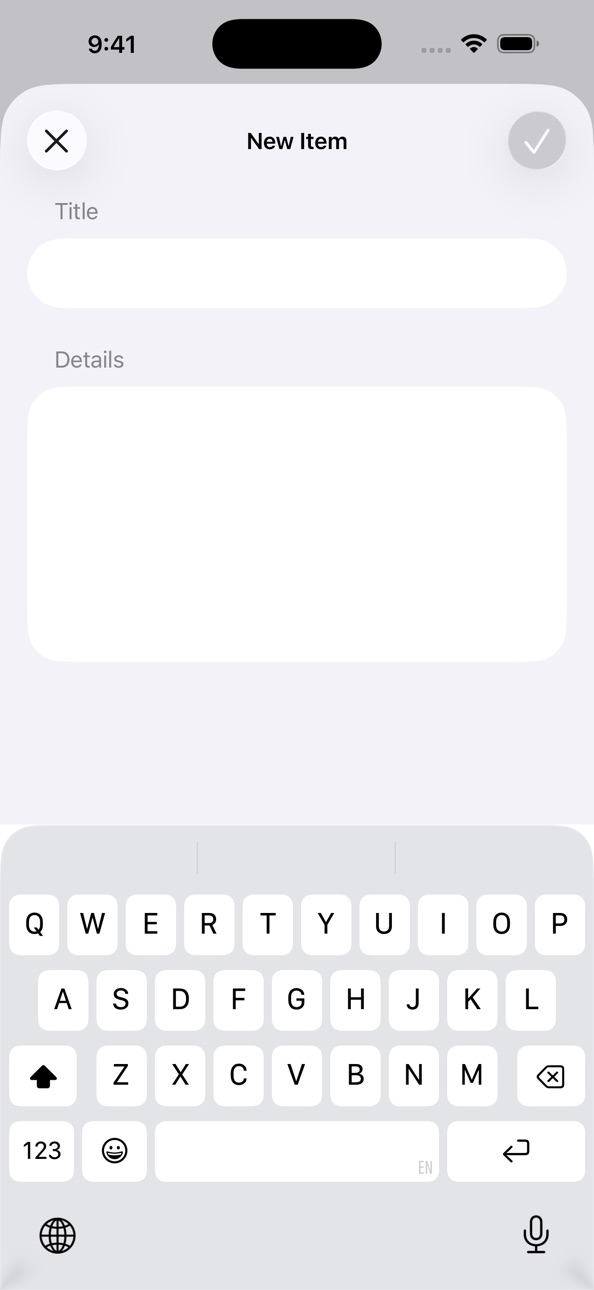
• Flexible List Management: Add items in any order, complete with optional details for added clarity.
• Precision Logging & Timestamps: Track exactly when tasks are ticked off. Perfect for inspections, maintenance logs, and audit trails.
• Smart Search & Filters: Refine your view instantly. Filter checklists and items by name/title and/or status to find exactly what you need.
• Grouping & Sorting: Group checklists and items by status and/or sort them alphabetically by name/title.
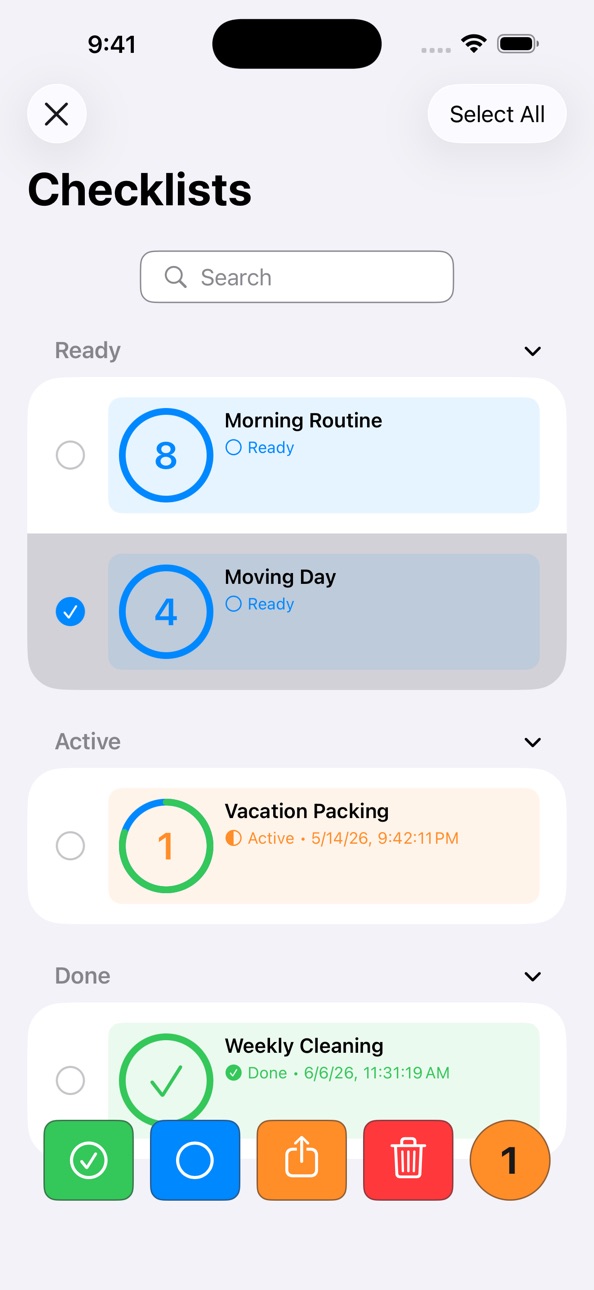
• Efficient Bulk Actions: Edit multiple checklists and items at once for a clean organization.
• Seamless Transfer: Move or copy items between different checklists effortlessly.
• Smart Item Import: Preview and selectively import specific items from external lists into your existing checklists.
• Effortless Sharing: Share your checklists via email, Messages, AirDrop, and other apps with friends or colleagues.
• Secure Backup: Export your data for external backup or import ready-to-use checklists from others whenever you need them.
VERSATILE USE CASES
• Grocery & Shopping: Build weekly shopping lists and track your pantry essentials.
• Travel & Packing: Use it as a reliable packing list manager and travel planner for your next vacation or holiday.
• Habits & Routines: Track daily habits and recurring activities to stay on top of your self-improvement goals.
• Inspection & Audit: Use the timestamp and log features for equipment checks, apartment handovers, or simple safety verifications.
• Moving & Relocation: Create a master inventory for your move to ensure every box is accounted for.
Whether you are managing daily chores, packing for a trip, or conducting an inspection, Checkomat is the ultimate checklist companion. It is the simple, private, and reliable way to track your tasks — on one device or all of them.
Download Checkomat today — the minimalist tool for your checklists, todos, and task plans.
Accessibility
ipadiphonemacrealityDevicetvoswatch
Version history 8 versions
Build 886189372v1.5.02026-06-14 22:06:16
OPTIONAL iCLOUD SYNC & A SMARTER INTERFACE
This is a major update bringing optional iCloud sync, a redesigned detail view, and a cleaner overall experience.
NEW — OPTIONAL iCLOUD SYNC
• Your Checklists, Everywhere — Checkomat now supports optional iCloud sync. Enable it in Settings and your checklists and items stay in sync across all your Apple devices automatically. Fully opt-in, 100% private, and always under your control.
UI IMPROVEMENTS
• Cleaner Settings — The Settings screen has been redesigned for a more unified and polished look.
• Tab-Based Detail View — Checklists and items now open in a sleek tab-based layout, making it easier to navigate and manage your content.
• Completion History — A new tab in the detail view shows the full history of completion and check dates for checklists and items respectively.
• Sidebar (iPadOS) — The sidebar now stays open by default with a fixed width. You can still toggle its visibility whenever you like.
PRIVACY FIRST — Your data stays private. iCloud sync is fully opt-in and uses your personal, private iCloud container — only you can access it. No trackers, no third-party servers, no custom accounts. And if you don't want iCloud, your data stays offline, on your device — just as before, no action required.
Thank you for using Checkomat! If you enjoy the app, please consider leaving a rating or review in the App Store — it helps a lot!
Build 884954256v1.4.22026-04-30 13:03:47
CLEANER INTERFACE & SMARTER IMPORTS
This update brings a more polished interface and fixes several edge cases for a smoother, more reliable experience.
UI IMPROVEMENTS
• Cleaner Toolbar — Common actions like confirm, add, and save now use standard icons instead of text labels, keeping the interface clean and consistent with Apple's design language.
• Smarter Imports — Checklists are now imported in your manual sort order, so your preferred sort order is always preserved.
BUG FIXES
• Stable Navigation — Fixed an issue where deleting a checklist while its detail view was open would leave the detail pane in a stale state. The app now correctly clears the selection in this case.
• Smoother Import View — Fixed a navigation title display issue in the checklist items import view where the title appeared with a delay and the large/inline transition behaved incorrectly.
PRIVACY FIRST — Your data remains 100% private and offline. No trackers, no cloud syncing — just your data, on your device, exactly where it belongs.
Thank you for using Checkomat! If you enjoy the app, please consider leaving a rating or review in the App Store — it helps a lot!
Build 884412246v1.4.12026-04-11 23:52:33
REFINED PRECISION & ENHANCED NAVIGATION
This update focuses on the finer details of the interface—bringing mathematical precision to our design and making data management more intuitive and guided.
UI/UX IMPROVEMENTS
• Geometric Precision — We have refined our UI elements to ensure perfectly concentric rounded corners where appropriate. This subtle mathematical adjustment creates a more harmonious and high-quality visual experience across the app.
• Intelligent Action Bars — Managing checklists and checklist items in multi-select list views is now smoother than ever before. The action bar now dynamically adapts its layout and button sizing to your screen width, ensuring the most important tools are always perfectly placed.
• Better Guidance — We have added instructional headers and a dedicated "Cancel" option to our import and copy/move screens. Managing your checklists is now more transparent and easier to navigate.
• Native Alerts — Updated our notification style to align with the latest system standards, providing a more familiar and seamless interaction feel.
• Tactile Confirmation — Added haptic feedback when importing data, giving you a satisfying physical confirmation that your checklists and checklist items have been successfully added.
• Smoother Undo — Polished the visual feedback when undoing actions to ensure a more fluid experience when managing your lists.
BUG FIXES
• Improved Reliability — Resolved an edge case where action buttons could shift unexpectedly when utilizing overflow menus.
• v1.4.1: Fix overlay blocking taps on add button and search field
PRIVACY FIRST — Your data remains 100% private and offline. No trackers, no cloud syncing—just your data, on your device, exactly where it belongs.
Thank you for using Checkomat! If you enjoy the app, please consider leaving a rating or review in the App Store — it helps a lot!
Build 882914014v1.4.02026-03-05 14:01:38
REFINED PRECISION & ENHANCED NAVIGATION
This update focuses on the finer details of the interface—bringing mathematical precision to our design and making data management more intuitive and guided.
UI/UX IMPROVEMENTS
• Geometric Precision — We have refined our UI elements to ensure perfectly concentric rounded corners where appropriate. This subtle mathematical adjustment creates a more harmonious and high-quality visual experience across the app.
• Intelligent Action Bars — Managing checklists and checklist items in multi-select list views is now smoother than ever before. The action bar now dynamically adapts its layout and button sizing to your screen width, ensuring the most important tools are always perfectly placed.
• Better Guidance — We have added instructional headers and a dedicated "Cancel" option to our import and copy/move screens. Managing your checklists is now more transparent and easier to navigate.
• Native Alerts — Updated our notification style to align with the latest system standards, providing a more familiar and seamless interaction feel.
• Tactile Confirmation — Added haptic feedback when importing data, giving you a satisfying physical confirmation that your checklists and checklist items have been successfully added.
• Smoother Undo — Polished the visual feedback when undoing actions to ensure a more fluid experience when managing your lists.
BUG FIXES
• Improved Reliability — Resolved an edge case where action buttons could shift unexpectedly when utilizing overflow menus.
PRIVACY FIRST — Your data remains 100% private and offline. No trackers, no cloud syncing—just your data, on your device, exactly where it belongs.
Thank you for using Checkomat! If you enjoy the app, please consider leaving a rating or review in the App Store — it helps a lot!
Build 881806141v1.3.02026-02-05 14:08:14
MORE PRECISE LOGGING & REFINED EXPERIENCE
This update focuses on the finer details—giving you more clarity on your progress and a smoother, more tactile way to manage your checklists and items.
NEW FEATURES
• Completion Timestamps — Gain better insight into your activity. Rows now display the exact date and time an item or checklist was last checked. For finished checklists, this serves as your official completion record.
UI/UX IMPROVEMENTS
• Unified Haptics — Feel the difference. We’ve polished and unified haptic feedback across the entire app, delivering a consistent, high-quality tactile experience.
• Enhanced Scannability — We’ve streamlined our status labels. By switching to "Done," the interface is now cleaner, faster to read, and minimizes the risk of text truncation.
• Accessibility First — Better support for Dynamic Type. Checklist and item titles now adapt more intelligently to larger text sizes, ensuring perfect readability for everyone.
BUG FIXES
• Reliable Data Portability — Resolved a versioning conflict to ensure seamless data migration and file imports across different app versions.
PRIVACY FIRST — Your data remains 100% private and offline. No trackers, no cloud syncing—just your data, on your device, exactly where it belongs.
Thank you for using Checkomat! If you enjoy the app, please consider leaving a rating or review in the App Store — it helps a lot!
Build 881169759v1.2.02026-01-08 14:07:38
OPTIMIZED FOR IOS/IPAD 26
This update brings full compatibility with the latest system features. We’ve migrated Checkomat to the latest iOS/iPadOS 26 features to ensure your checklists are faster, more reliable, and more secure than ever.
NEW FEATURES
• Search Facets — Filtering your checklists and items is now easier than ever. You can now refine your searches by status (filter for completed checklists or items, for example) with just a tap.
• Selective Item Import — Total control over your data. When importing an external checklist into one of your checklists, you can now preview the content and pick exactly which items you want to add.
UI/UX IMPROVEMENTS
• Modern App Icon — Look for our refreshed icon! We’ve adopted the new layered design for a cleaner look on your Home Screen.
• Polished Search Experience — Enjoy fluid animations and a visually enhanced search bar that integrates seamlessly into your everyday use of Checkomat.
• Smarter Keyboard Handling — We’ve refined how you work with your checklists and items. You can now dismiss the keyboard with a natural downward swipe crossing the upper edge of the keyboard. This "drag-to-dismiss" gesture is more reliable and prevents accidental taps than the previous "tap-to-dismiss" gesture.
• Better Continuity — Checkomat now remembers where you left off. The expansion state of your checklist groups is preserved even after closing the app.
• Cleaner List Layout — We’ve updated our list design to match the latest system standards for a more consistent and distraction-free visual experience.
BUG FIXES
• Better Sharing — Share Link URLs are now correctly localized to your language settings.
PRIVACY FIRST — As always, your data stays where it belongs: on your device. This update continues our commitment to a 100% private, offline experience without trackers or cloud syncing.
Build 876341555v1.1.02025-08-01 00:04:44
WHAT'S NEW IN VERSION 1.1
[New Features]
• Export & Import Checklists: Easily share your checklists with others or create backups for peace of mind.
• Move & Copy Checklist Items: Effortlessly move or copy individual or multiple checklist items between your checklists using the context menu or multi-select mode.
• Group Checklists: Organize your checklists by status, just like you group your checklist items.
• Select All: Quickly select all checklists and checklist items, respectively, in multi-select mode with a new toolbar option.
• Persistent Settings: Your grouping and sorting preferences for both checklists and checklist items are now automatically saved, so they're just how you like them every time you open the app.
[UI Changes]
• Improved Checklist Editing: Editing checklists is now more intuitive with a long-press context menu, replacing the leading swipe gesture.
• Enhanced Filtering Experience: Enjoy clearer visual indicators, more predictable clear icon behavior, and more reliable keyboard dismissal when tapping outside the filter text field.
[Bug Fixes]
• Visual Glitch Fixed: A minor visual bug that briefly showed an incorrect view when navigating back to your checklist root view has been resolved.
Build 875569104v1.0.02025-06-18 20:09:27
No pricing data captured yet — comparisons appear once the app has paid storefronts or in-app purchases.
Availability 67 of 67 storefronts
| Region | Language | Price | Ratings | Avg | Version |
|---|---|---|---|---|---|
| AG | en-GB | Free | 0 | — | 1.5.0 |
| AI | en-GB | Free | 0 | — | 1.5.0 |
| AO | en-GB | Free | 0 | — | 1.5.0 |
| AR | es-MX | Free | 0 | — | 1.5.0 |
| BB | en-GB | Free | 0 | — | 1.5.0 |
| BF | en-GB | Free | 0 | — | 1.5.0 |
| BJ | en-GB | Free | 0 | — | 1.5.0 |
| BO | es-MX | Free | 0 | — | 1.5.0 |
| BR | pt-BR | Free | 0 | — | 1.5.0 |
| BS | en-GB | Free | 0 | — | 1.5.0 |
| BZ | en-GB | Free | 0 | — | 1.5.0 |
| CD | en-GB | Free | 0 | — | 1.5.0 |
| CG | en-GB | Free | 0 | — | 1.5.0 |
| CI | fr-FR | Free | 0 | — | 1.5.0 |
| CL | es-MX | Free | 0 | — | 1.5.0 |
| CM | fr-FR | Free | 0 | — | 1.5.0 |
| CO | es-MX | Free | 0 | — | 1.5.0 |
| CR | es-MX | Free | 0 | — | 1.5.0 |
| CV | en-GB | Free | 0 | — | 1.5.0 |
| DM | en-GB | Free | 0 | — | 1.5.0 |
| DO | es-MX | Free | 0 | — | 1.5.0 |
| DZ | en-GB | Free | 0 | — | 1.5.0 |
| GA | fr-FR | Free | 0 | — | 1.5.0 |
| GD | en-GB | Free | 0 | — | 1.5.0 |
| GM | en-GB | Free | 0 | — | 1.5.0 |
| GT | es-MX | Free | 0 | — | 1.5.0 |
| GW | en-GB | Free | 0 | — | 1.5.0 |
| GY | en-GB | Free | 0 | — | 1.5.0 |
| HN | es-MX | Free | 0 | — | 1.5.0 |
| JM | en-GB | Free | 0 | — | 1.5.0 |
| KN | en-GB | Free | 0 | — | 1.5.0 |
| KY | en-GB | Free | 0 | — | 1.5.0 |
| LC | en-GB | Free | 0 | — | 1.5.0 |
| LR | en-GB | Free | 0 | — | 1.5.0 |
| LY | en-GB | Free | 0 | — | 1.5.0 |
| MA | en-GB | Free | 0 | — | 1.5.0 |
| MG | en-GB | Free | 0 | — | 1.5.0 |
| ML | en-GB | Free | 0 | — | 1.5.0 |
| MS | en-GB | Free | 0 | — | 1.5.0 |
| MU | en-GB | Free | 0 | — | 1.5.0 |
| MW | en-GB | Free | 0 | — | 1.5.0 |
| MX | es-MX | Free | 0 | — | 1.5.0 |
| MZ | en-GB | Free | 0 | — | 1.5.0 |
| NA | en-GB | Free | 0 | — | 1.5.0 |
| NE | en-GB | Free | 0 | — | 1.5.0 |
| NI | es-MX | Free | 0 | — | 1.5.0 |
| PA | es-MX | Free | 0 | — | 1.5.0 |
| PY | es-MX | Free | 0 | — | 1.5.0 |
| RW | en-GB | Free | 0 | — | 1.5.0 |
| SC | en-GB | Free | 0 | — | 1.5.0 |
| SL | en-GB | Free | 0 | — | 1.5.0 |
| SN | en-GB | Free | 0 | — | 1.5.0 |
| SR | en-GB | Free | 0 | — | 1.5.0 |
| ST | en-GB | Free | 0 | — | 1.5.0 |
| SV | es-MX | Free | 0 | — | 1.5.0 |
| SZ | en-GB | Free | 0 | — | 1.5.0 |
| TC | en-GB | Free | 0 | — | 1.5.0 |
| TD | en-GB | Free | 0 | — | 1.5.0 |
| TN | en-GB | Free | 0 | — | 1.5.0 |
| TT | en-GB | Free | 0 | — | 1.5.0 |
| TZ | en-GB | Free | 0 | — | 1.5.0 |
| UG | en-GB | Free | 0 | — | 1.5.0 |
| US | en-US | Free | 0 | — | 1.5.0 |
| VC | en-GB | Free | 0 | — | 1.5.0 |
| VG | en-GB | Free | 0 | — | 1.5.0 |
| ZM | en-GB | Free | 0 | — | 1.5.0 |
| ZW | en-GB | Free | 0 | — | 1.5.0 |
Change log 12 changes · DO
✎
releaseNotes updated
OPTIONAL iCLOUD SYNC & A SMARTER INTERFACE
This is a major update bringing optional iCloud sync, a redesigned detail view, and a cleaner overall experience.
N
✎
description updated
Your Private Checklist, Todo & Task Manager
Stay organized with Checkomat — the essential, private checklist app for your tasks, grocery shopping, travel, habi
✎
subtitle updated
Track Tasks, To-Dos & Routines
✎
name updated
Checkomat: Private Checklists
◆
Version 1.5.0 released
OPTIONAL iCLOUD SYNC & A SMARTER INTERFACE
This is a major update bringing optional iCloud sync, a redesigned detail view, and a cleaner overall experience.
NEW — OPTIONAL iCLOUD SYNC
• Your Checklists, Everywhere — Checkomat now support
◆
Version 1.4.2 released
CLEANER INTERFACE & SMARTER IMPORTS
This update brings a more polished interface and fixes several edge cases for a smoother, more reliable experience.
UI IMPROVEMENTS
• Cleaner Toolbar — Common actions like confirm, add, and save now us
◆
Version 1.4.1 released
REFINED PRECISION & ENHANCED NAVIGATION
This update focuses on the finer details of the interface—bringing mathematical precision to our design and making data management more intuitive and guided.
UI/UX IMPROVEMENTS
• Geometric Precisio
◆
Version 1.4.0 released
REFINED PRECISION & ENHANCED NAVIGATION
This update focuses on the finer details of the interface—bringing mathematical precision to our design and making data management more intuitive and guided.
UI/UX IMPROVEMENTS
• Geometric Precisio
◆
Version 1.3.0 released
MORE PRECISE LOGGING & REFINED EXPERIENCE
This update focuses on the finer details—giving you more clarity on your progress and a smoother, more tactile way to manage your checklists and items.
NEW FEATURES
• Completion Timestamps — Gain
◆
Version 1.2.0 released
OPTIMIZED FOR IOS/IPAD 26
This update brings full compatibility with the latest system features. We’ve migrated Checkomat to the latest iOS/iPadOS 26 features to ensure your checklists are faster, more reliable, and more secure than ever.
◆
Version 1.1.0 released
WHAT'S NEW IN VERSION 1.1
◆
Version 1.0.0 released