Home › Lifestyle

 ZM
ZM
 CNzh-Hans-CN
 TRen-GB
 USen-US
 AEen-GB
 AFen-GB
 AGen-GB
 AIen-GB
 ALen-GB
 AMen-GB
 AOen-GB
 ARes-MX
 ATde-DE
 AUen-AU
 AZen-GB
 BAen-GB
 BBen-GB
 BEen-GB
 BFen-GB
 BGen-GB
 BHen-GB
 BJen-GB
 BMen-GB
 BNen-GB
 BOes-MX
 BRpt-BR
 BSen-GB
 BTen-GB
 BWen-GB
 BYen-GB
 BZen-GB
 CAen-CA
 CDen-GB
 CGen-GB
 CHde-CH
 CIfr-FR
 CLes-MX
 CMfr-FR
 COes-MX
 CRes-MX
 CVen-GB
 CYen-GB
 CZen-GB
 DEde-DE
 DKen-GB
 DMen-GB
 DOes-MX
 DZen-GB
 ECes-MX
 EEen-GB
 EGen-GB
 ESes-ES
 FIen-GB
 FJen-GB
 FMen-GB
 FRfr-FR
 GAfr-FR
 GBen-GB
 GDen-GB
 GEen-GB
 GHen-GB
 GMen-GB
 GRen-GB
 GTes-MX
 GWen-GB
 GYen-GB
 HKzh-Hant-HK
 HNes-MX
 HRen-GB
 HUen-GB
 IDen-GB
 IEen-GB
 ILen-GB
 INen-GB
 IQen-GB
 ISen-GB
 ITit
ITit JMen-GB
 JOen-GB
 JPja
JPja KEen-GB
 KGen-GB
 KHen-GB
 KNen-GB
 KRko
KRko KWen-GB
 KYen-GB
 KZen-GB
 LAen-GB
 LBen-GB
 LCen-GB
 LKen-GB
 LRen-GB
 LTen-GB
 LUen-GB
 LVen-GB
 LYen-GB
 MAen-GB
 MDen-GB
 MEen-GB
 MGen-GB
 MKen-GB
 MLen-GB
 MMen-GB
 MNen-GB
 MOzh-Hant-HK
 MRen-GB
 MSen-GB
 MTen-GB
 MUen-GB
 MVen-GB
 MWen-GB
 MXes-MX
 MYen-GB
 MZen-GB
 NAen-GB
 NEen-GB
 NGen-GB
 NIes-MX
 NLnl
NLnl NOen-GB
 NPen-GB
 NRen-GB
 NZen-AU
 OMen-GB
 PAes-MX
 PEes-MX
 PGen-GB
 PHen-GB
 PKen-GB
 PLen-GB
 PTpt-PT
 PWen-GB
 PYes-MX
 QAen-GB
 ROen-GB
 RSen-GB
 RUru
RUru RWen-GB
 SAen-GB
 SBen-GB
 SCen-GB
 SEsv
SEsv SGen-GB
 SIen-GB
 SKen-GB
 SLen-GB
 SNen-GB
 SRen-GB
 STen-GB
 SVes-MX
 SZen-GB
 TCen-GB
 TDen-GB
 THen-GB
 TJen-GB
 TMen-GB
 TNen-GB
 TOen-GB
 TTen-GB
 TWzh-Hant-TW
 TZen-GB
 UAen-GB
 UGen-GB
 UYen-GB
 UZen-GB
 VCen-GB
 VEes-MX
 VGen-GB
 VNen-GB
 VUen-GB
 XKen-GB
 YEen-GB
 ZAen-GBZMen-GB
 ZWen-GB
175 of 175 storefronts
Content in en-US
Content in en-US
Information
Apple ID6742869548
Bundle IDio.impawsible.TimeMemoir
SellerSeller
Min iOS17.1
Min macOS14.1
Device familiesiphone, ipad
Released2025-03-11
Copyright© 2025 Memodori
Privacy policyLink ↗
Preview 2 platforms
iPhone 10 images


iPad 9 images






What’s New Version 1.21
This update makes Memodori feel of a piece on every device you own — your timeline keeps itself up to date, a warmer welcome greets you, and we ask less of you up front.
# Live iCloud sync
• Notes you add or edit on one device now appear on the others on their own — no need to leave and reopen the app
• A quiet indicator at the top lets you know while syncing is in progress
• Fixed duplicate tutorial notes that could appear when setting up a second device
# A warmer welcome
• The empty timeline has been redesigned and centered, with clear next steps — start a new note, or view the tutorial
• When a search or filter finds nothing, it now reads clearly, with a one-tap way to clear
# App Lock keeps your place
• With App Lock on, unlocking returns you exactly where you were — the same note or edit, the same spot on your timeline
# We ask only when it matters
• Memodori no longer asks for notification permission at first launch
• You'll be asked only when you turn on a reminder yourself
As always, thank you for your support. If you're enjoying Memodori, a kind review on the App Store means the world to us.
Description
Memodori — A Journal Along Your Timeline
Some things are worth keeping in order. Memodori lays your notes, memories, and the thoughts that pass through along a single timeline you can wander — back through the years, or forward to what's still to come. Like a slip of fine paper, written upon time itself.
# A TIMELINE YOU CAN WANDER
• Browse your notes as dots along time — the bigger the dot, the more a moment mattered
• Group by day, week, month, or year, or let Smart and Adaptive modes shape the view around your note density and the distance in time (Premium can fine-tune the rules)
• Write freely with titles, dates, categories, importance, custom icons, and tags
# MEMORIES THAT FIND YOU
• On This Day surfaces what you wrote on this date in years past — a month, six months, a year ago — as a quiet daily card, with an optional reminder at a time you choose
• Daily Reflection brings a gentle once-a-day prompt; tap it and a new note opens with the question already at the top
• Every reflection is tagged on its own, so you can gather them all whenever you'd like to look back
# CAPTURED THE MOMENT IT LANDS
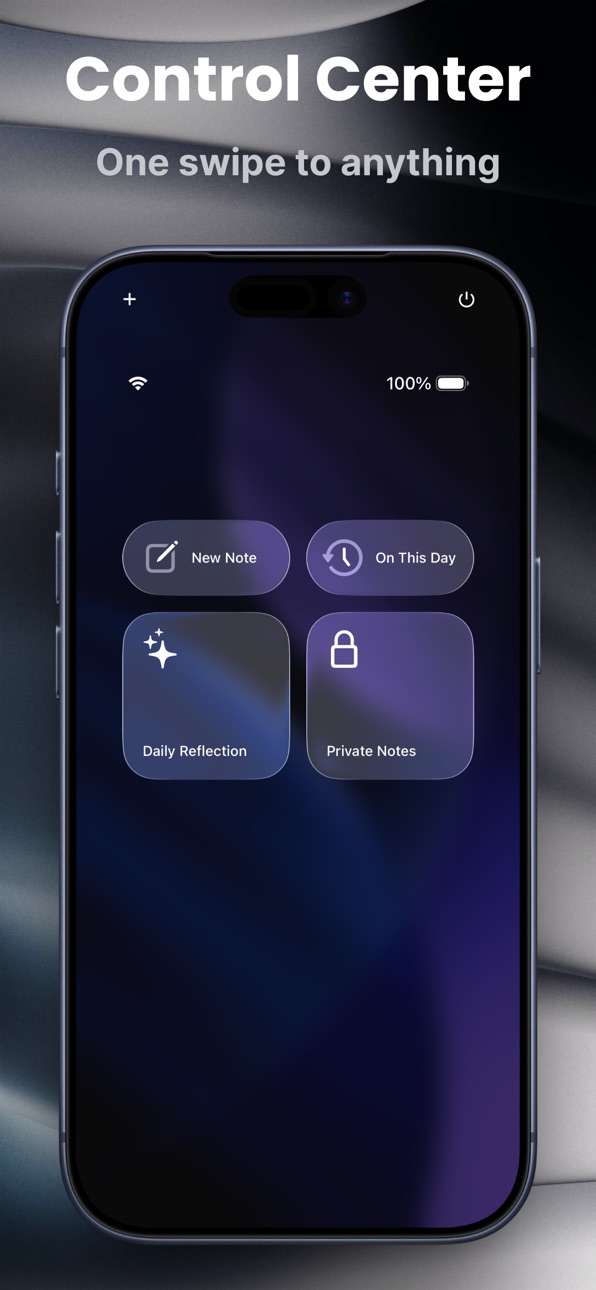
• Quick Capture opens a fresh note in a single tap — from a Home or Lock Screen widget, or from Control Center, which also reaches On This Day, Daily Reflection, and Private Mode (iOS 18)
• Or simply ask Siri, or run a Shortcut, to start a note without opening the app
• A Streak widget keeps a quiet count of the days you've shown up, refreshing on its own at midnight
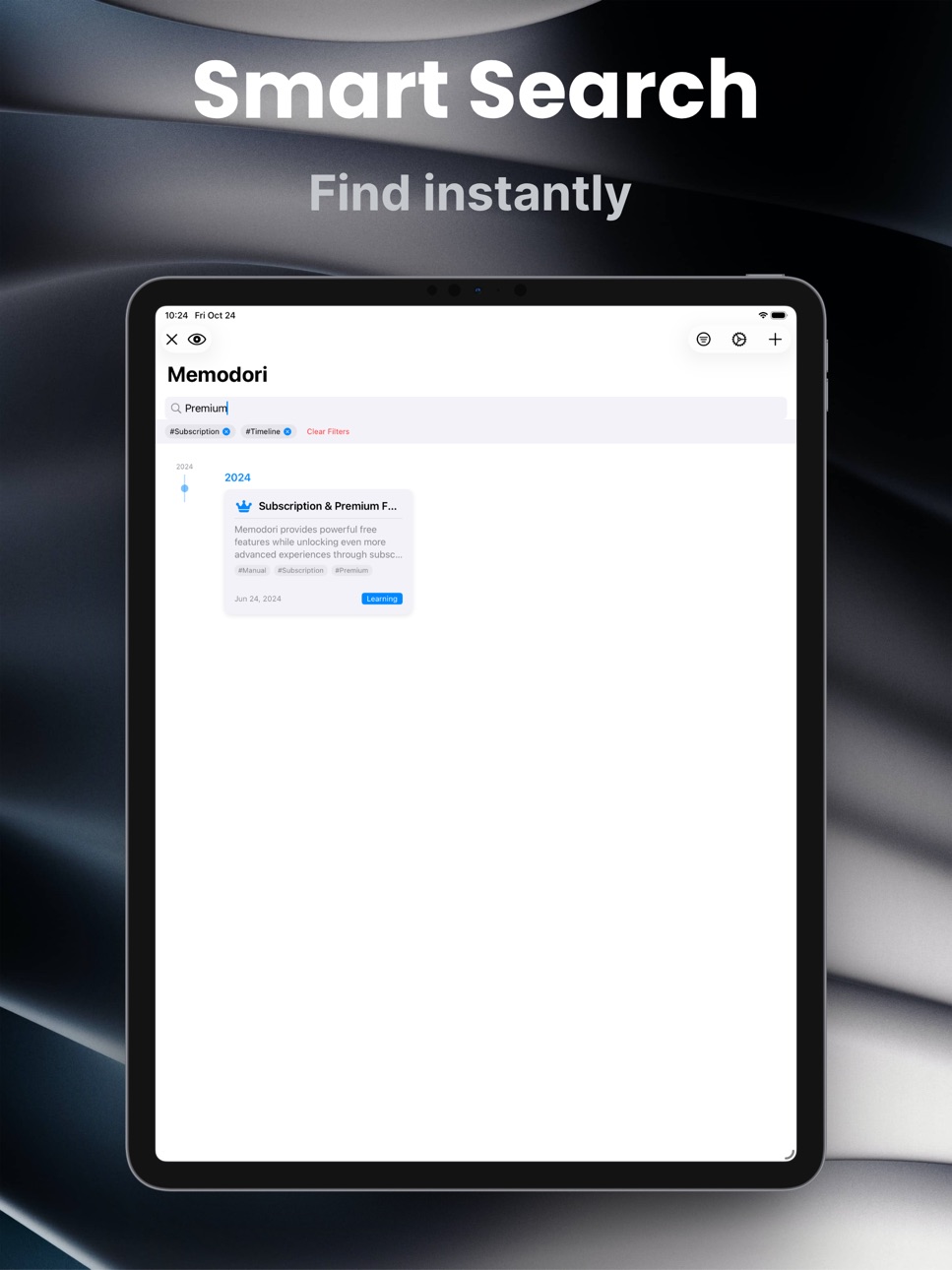
# FIND ANYTHING, FAST
• Search across everything, and filter by category, tag, importance, or date range
• Keep it all tidy with custom tags built for easy retrieval
• Personalize each note from a library of thousands of icons — smart categories, bilingual search, and several rendering styles
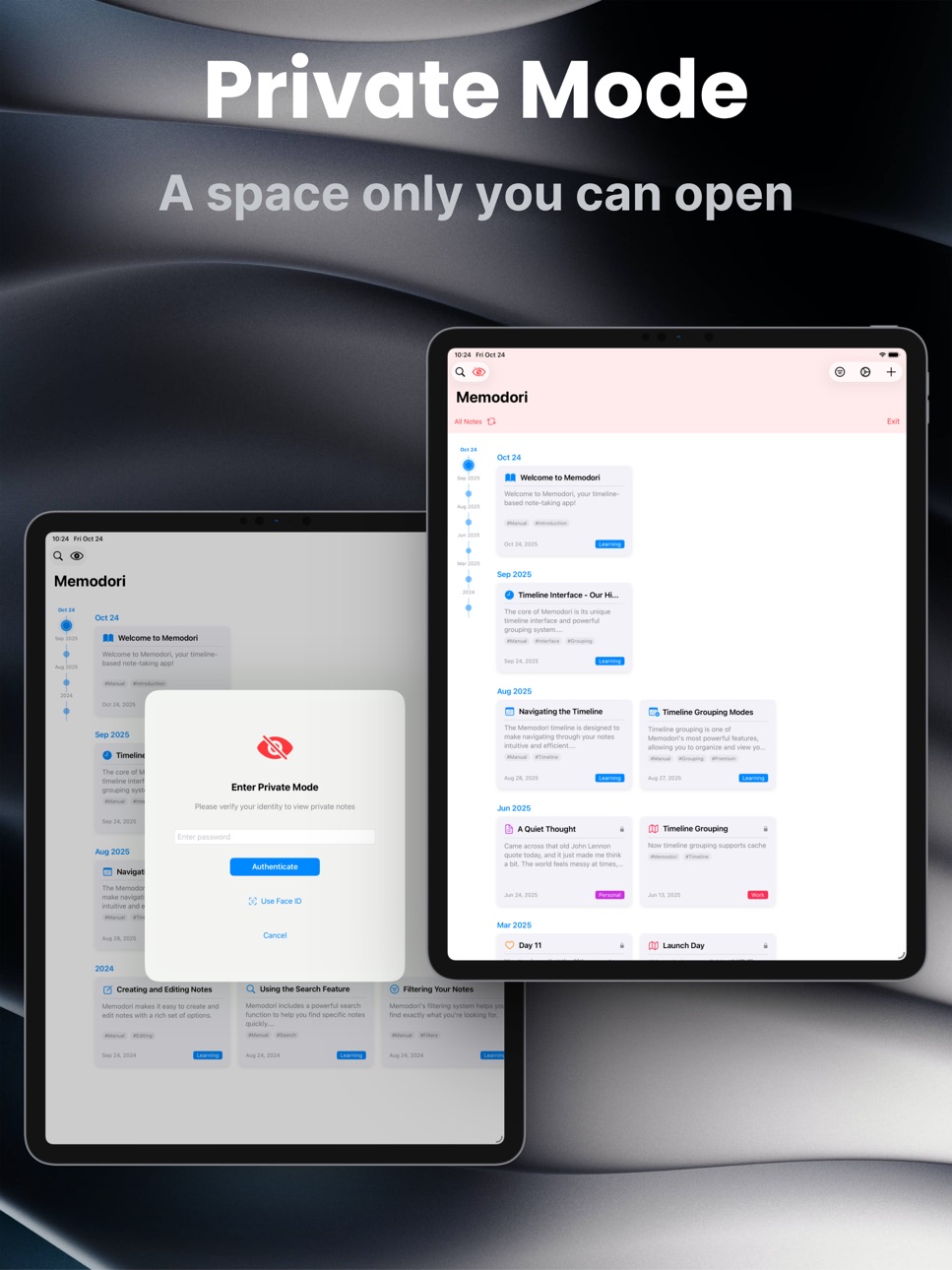
# PRIVATE, BY CHOICE
• Keep sensitive notes in a separate private space that asks for authentication to open
• Private notes stay fully apart from your timeline until you step into Private Mode
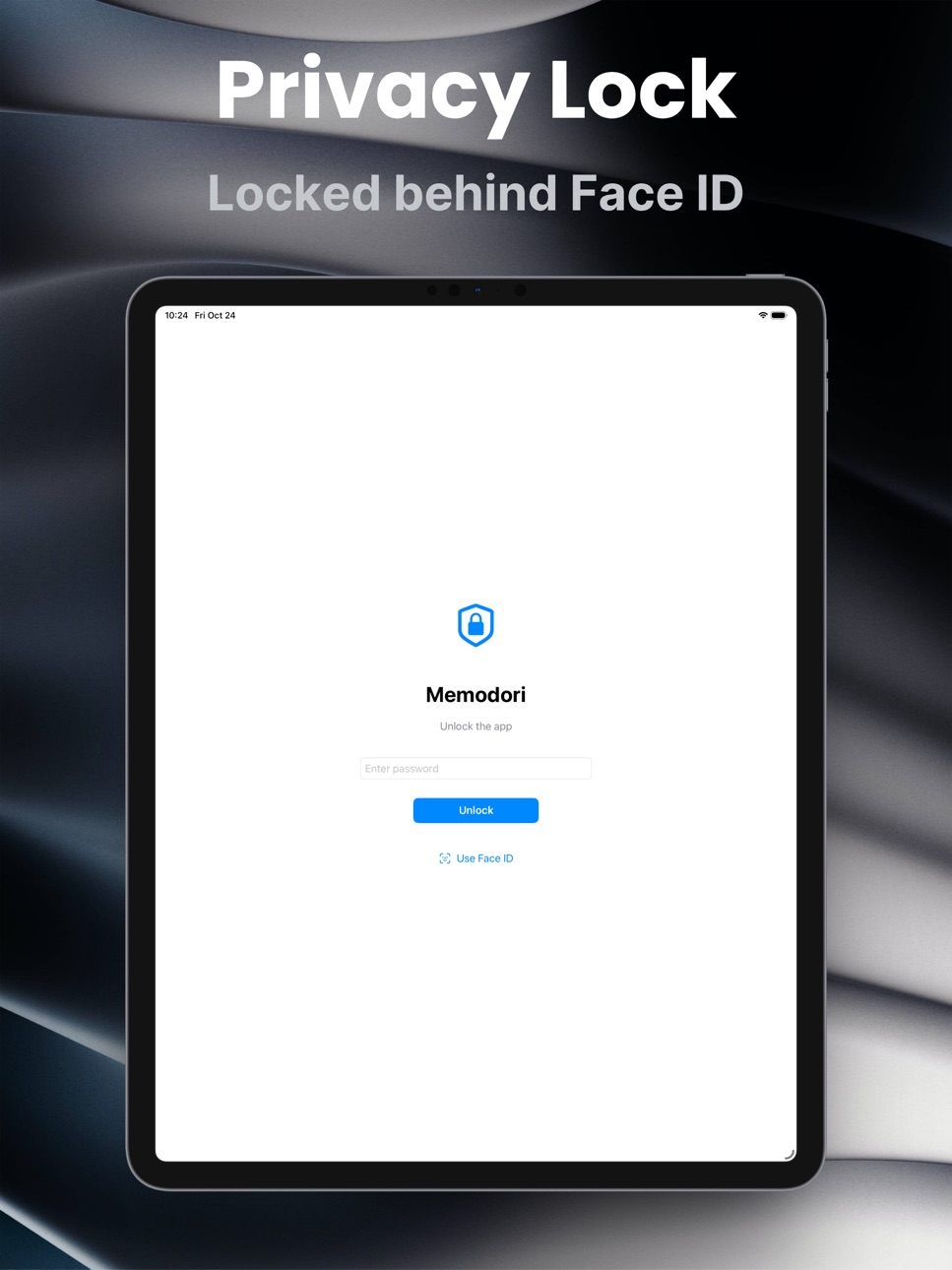
• Lock the whole journal behind Face ID / Touch ID and an app lock
# YOURS, EVERYWHERE, MADE YOURS
• Sync seamlessly across your Apple devices with iCloud — offline-first, catching up the moment you reconnect
• Choose your accent color, timeline style, and font size; settle into light or dark
• Enjoy 10+ languages, switched on the fly, with a layout fully at home on iPad
Whether you're keeping personal memories, following a project, or collecting the places you've been, Memodori helps it all settle gently into place — along a timeline that is yours.
We hope you enjoy writing with Memodori.
Terms of Use: https://www.apple.com/legal/internet-services/itunes/dev/stdeula/
In-App Purchases ZM pricing
Memodori Pro Subscription
Monthly · Monthly—
Yearly · Yearly—
One-Time Purchases
Memodori Pro Lifetime—
Capabilities
In-App Purchases
Accessibility
ipadiphonemacrealityDevicetvoswatch
Version history 22 versions
Build 887016801v1.212026-06-16 17:56:25
This update makes Memodori feel of a piece on every device you own — your timeline keeps itself up to date, a warmer welcome greets you, and we ask less of you up front.
# Live iCloud sync
• Notes you add or edit on one device now appear on the others on their own — no need to leave and reopen the app
• A quiet indicator at the top lets you know while syncing is in progress
• Fixed duplicate tutorial notes that could appear when setting up a second device
# A warmer welcome
• The empty timeline has been redesigned and centered, with clear next steps — start a new note, or view the tutorial
• When a search or filter finds nothing, it now reads clearly, with a one-tap way to clear
# App Lock keeps your place
• With App Lock on, unlocking returns you exactly where you were — the same note or edit, the same spot on your timeline
# We ask only when it matters
• Memodori no longer asks for notification permission at first launch
• You'll be asked only when you turn on a reminder yourself
As always, thank you for your support. If you're enjoying Memodori, a kind review on the App Store means the world to us.
Build 886964870v1.202026-06-15 17:17:13
Now you can simply ask.
This update adds the quickest beginning yet — just ask Siri — and brings the day's reflection out where you'll see it. Your widgets have a new look to match.
# Begin with Siri
• Ask Siri to start a new note, and Memodori opens ready for your first word
• Prefer a Shortcut, or a search in Spotlight? Those work too — whichever falls to hand
• Available in every language Memodori speaks
# Daily Reflection, now on your Home Screen
• A new widget keeps today's reflection question in plain sight
• A glance to read it; a tap opens a note with the question already at the top
• It changes day by day, in step with your reminder
• Small or medium — whichever sits better on your screen
# A fresh look for your widgets
• Every Memodori widget now wears a calm, brand-toned backdrop with the app mark in the corner
• Light or dark, they feel of a piece — unmistakably Memodori at a glance
As always, thank you for your support. If you're enjoying Memodori, a kind review on the App Store means the world to us.
Build 886762923v1.192026-06-12 17:54:38
The shortest path from a thought to the page.
This update is about getting in quickly — and being gently invited back. There are new ways to start a note without taking the long way round, and a quiet daily prompt for the days you'd welcome a little nudge to reflect.
# Daily Reflection
• A gentle once-a-day prompt arrives at a time you choose, with a question worth sitting with
• Tap it and a new note opens with that question already at the top — just start writing
• Turn it on, and pick the hour, in Settings — entirely separate from On This Day
• The questions rotate day by day, so each one feels like its own small invitation
• Every reflection is quietly tagged "Reflection," so you can gather them all from Filter or search whenever you'd like to look back
# Control Center
• Add Memodori's controls to Control Center and reach for them the moment a thought lands
• Four to choose from: New Note, On This Day, Daily Reflection, and Private Notes
• Each one opens Memodori straight to where you're headed
• Available on iOS 18 and later
# Quick Capture, on your Home & Lock Screen
• A new widget that opens a fresh note in a single tap
• Small size for your Home Screen, circular for your Lock Screen
• Follows the language you've chosen for Memodori
# Notifications, in one place
• On This Day's card and its daily notification now live under a single Notifications area, each with its own switch
• Keep the card visible while muting the alert, or the other way round
• Clearer, calmer settings — so the app only speaks up the way you've asked it to
As always, thank you for writing with us. If Memodori has earned a place in your day, a kind review on the App Store means the world to us.
Build 885802518v1.182026-05-25 21:18:34
What's New in Version 1.18
Showing up, day after day, deserves to be seen.
This update is about the quiet rhythm of writing — the days you turn up, even briefly. We've given that rhythm a place on your Home Screen and Lock Screen, and smoothed a few rough edges along the way.
# Streak Widget
• A new widget shows how many days in a row you've added a note, with your most recent days laid out as circles at a glance
• Available in small and medium sizes for your Home Screen, and circular and rectangular layouts for your Lock Screen
• Updates on its own at midnight — the new day appears without opening the app
• Follows the language you've chosen for Memodori
# On This Day, refined
• The card and the daily notification now have separate switches — keep the card visible while muting the alert, or the other way round
• Notifications keep arriving on days you don't open the app, scheduled two weeks ahead
• Private notes stay private — On This Day still respects your privacy settings
# Polish
• Search: the Cancel button now appears reliably with the keyboard, and tapping it keeps your search text so you can return to your results
• The Date Range filter chip now follows your language
• Switching language now refreshes timeline date headings straight away, without waiting for another change
• If your subscription has lapsed, the timeline picker shows the mode actually in use, instead of a higher tier you can't access
• VoiceOver reads meaningful labels for the toolbar buttons, filter chips, and the private / importance icons
As always, thank you for your support. If Memodori has earned a place in your week, a kind review on the App Store means the world to us.
Build 885558861v1.172026-05-12 20:23:54
What's New in Version 1.17
Some moments are worth revisiting.
This update is about remembering — not just what happened, but what it felt like. Your notes carry the weight of the days you lived. Now, they find their way back to you.
# On This Day
• A card appears at the top of your timeline when you have notes from the same date in a past year — one month ago, three months ago, half a year, a full year
• Tap the card to see all your memories from that date, grouped by year and shown in full
• Dismiss the card with the × button or a swipe up — it won't reappear until the next day
• A daily notification can remind you at the time you choose — open Settings to set it
• One toggle in Settings controls everything: the card and the notification together
• Private notes stay private — On This Day respects your privacy settings
As always, thank you for your support. If you're enjoying Memodori, a kind review on the App Store means the world to us.
Build 883168484v1.162026-03-20 04:25:08
What's New in Version 1.16
The small things have a way of mattering more than we expect.
This update is about making your notes feel more complete — seeing their importance at a glance, exporting them when you want to hold onto something a little more permanently, and keeping your timeline clean from the start.
# Export to PDF & Image
• Notes can now be exported as a PDF file or saved as an image directly from the note menu
• Exports use a clean, print-ready layout — title, date, tags, and content — with a subtle Memodori watermark
• PDF files can be saved to Files, shared via email, or sent anywhere you like
• Images go straight to your Photos library or any app that accepts them
# Importance Indicator
• The importance level you set on a note is now visible — a flag icon appears on the note card, detail view, and edit screen
• Medium importance shows an orange flag; high importance shows a red flag; low importance stays quietly out of the way
• What you set now means something you can actually see
# Tutorial Notes Control
• A new toggle in Settings lets you choose whether tutorial notes appear in your timeline
• Tutorial notes are shown by default — turn them off anytime once you're settled in
As always, thank you for your support. If you're enjoying Memodori, a kind review on the App Store means the world to us.
Build 881948306v1.152026-01-30 14:28:06
What's New in Version 1.15
Fixed: Voice input now displays in your selected language instead of always showing English
Yours, Memodori
Build 880936877v1.142025-12-24 08:25:48
Another year has flown by, hasn't it?
Thanks for letting Memodori be part of your 2025. This update brings voice input and proper iPad support—hopefully making it a bit easier to capture what matters. With the year winding down, maybe take a moment to look back through your notes, or jot down what you're looking forward to in 2026. Both are worth holding onto.
# Voice Input Functionality
• Voice input now available for both note titles and content, making note-taking more convenient and efficient
• Intelligent speech recognition with continuous input support, freeing your hands
# Full iPad Optimisation
• Timeline display optimised for iPad's larger screen, providing a broader viewing experience
• Adaptive card sizing and spacing to make full use of iPad screen real estate
• Note editing and settings interfaces use optimised sheet presentations on iPad
• Timeline style intelligently adapts to screen width for optimal reading experience
# Private Mode Enhancement
• Added private mode filtering options to quickly toggle between "All Notes" and "Private Notes Only"
• Improved private mode banner interface with more intuitive controls
• One-tap filter switching for more flexible privacy content management
Your timeline, your story. See you in 2026.
Build 880475806v1.132025-12-10 16:49:40
# Redesigned Settings - Easier to Navigate, Faster to Use
We've completely redesigned the Settings page to make customization more intuitive and efficient.
### Redesigned Settings Interface
- Tabbed Navigation: Settings are now organized into three clear tabs - General, Timeline, and Notes
- Flattened Structure: All settings are directly accessible without drilling into sub-pages
- Instant Switching: Tap between tabs with no lag or animation delays
- Streamlined Design: Cleaner interface with better visual hierarchy
### Tab Organization:
- General Tab: Subscription, appearance, language, support links, and developer apps
- Timeline Tab: Timeline style and grouping settings all in one place
- Notes Tab: Statistics, organization tools, security settings, and manual
### Performance Improvements:
- Faster Tab Switching: Optimized picker implementation for instant response
- Smoother Scrolling: Enhanced list rendering for better performance
- Reduced UI Clutter: Removed redundant navigation elements for cleaner interface
### Other Refinements:
- Simplified dismiss gesture - swipe down to close settings
- Improved visual consistency across all setting sections
- Better spacing and alignment for easier reading
- Fixed duplicate title issue in Adaptive Mode configuration
# A Small Favor
By the way, App Store reviews are very helpful to us. If you think Memodori is worthy, would you mind taking a moment to write a nice review? We'd greatly appreciate it. Thanks for using Memodori! :)
Build 880365186v1.122025-12-05 14:17:35
Squashed some bugs and improved the overall experience.
Yours,
Memodori
Build 879433343v1.112025-11-04 08:04:46
Improved performance, reliability, and overall experience.
Yours, Memodori
Build 879352003v1.102025-10-31 04:55:29
Squashed some bugs and improved the overall experience.
Yours, Memodori
Build 878847870v1.92025-10-12 15:49:27
This update brings performance enhancements and bug fixes to make Memodori better for you.
By the way, App Store reviews are very helpful to us. If you think Memodori is worthy, would you mind taking a moment to write a nice review? We'd greatly appreciate it. Thanks for using Memodori! :)
Build 878497716v1.82025-09-30 06:28:43
# Enhanced Icon Selection Experience
We've completely redesigned the icon picker to make personalising your notes easier than ever. Now enjoy access to over 6,000 high-quality system icons with intuitive search and category filtering.
• Comprehensive Icon Library - Browse thousands of professionally designed icons organised by category
• Smart Search - Quickly find the perfect icon with intelligent search functionality (English only)
• Streamlined Interface - Cleaner, more intuitive modal design for effortless icon selection
• Enhanced Performance - Optimised codebase for faster, smoother interaction
This update maintains full compatibility with your existing notes whilst providing a significantly enhanced creative experience.
Build 876290418v1.72025-07-11 16:15:30
# Global Language Expansion
Memodori continues to grow worldwide! This update brings native language support to even more users across the globe:
• Portuguese (Português) - Comprehensive support for users in Brazil, Portugal, and beyond
• Russian (Русский) - Complete Russian language experience
• Arabic (العربية) - Full right-to-left interface with authentic Arabic localization
• Vietnamese (Tiếng Việt) - Native Vietnamese language support
Your timeline-based journaling experience is now available in your preferred language. Simply visit Settings to switch languages and discover how Memodori adapts beautifully to your native tongue.
Whether you're documenting daily thoughts or preserving precious memories, Memodori now connects with users in more languages than ever before, making your personal storytelling feel truly at home.
Build 876021734v1.62025-07-01 17:16:11
# Enhanced Multilingual Support
Memodori now speaks your language! We've expanded our language support to welcome users from around the globe:
• Traditional Chinese - Tailored experience for users in Hong Kong, Taiwan, and Macau
• Japanese (日本語) - Beautiful localization for our Japanese users
• Korean (한국어) - Complete Korean language support
• Italian (Italiano) - Native Italian interface experience
• German (Deutsch) - Comprehensive German localization
• French (Français) - Elegant French language support
• Spanish (Español) - Full Spanish language experience
Switch to your preferred language in Settings and enjoy a more personalized journaling experience. No matter where you are in the world, Memodori is now ready to help you capture and organize your memories in the language that feels like home.
Build 875864966v1.52025-06-27 13:15:40
# iCloud Sync - Your Notes, Everywhere
We're excited to introduce seamless iCloud synchronization to Memodori! Your memories and thoughts are now securely synced across all your Apple devices.
## Key Features:
- Automatic CloudKit Integration: All your notes automatically sync to iCloud
- Real-time Status Monitoring: Track sync progress with detailed status indicators
- Account Management: Clear visibility of your iCloud account status
- Comprehensive Sync Statistics: Monitor local notes count and data size
# Advanced Timeline Grouping - See Your Journey in New Ways
Transform how you view your timeline with our revolutionary grouping system that adapts to your needs.
## Free Features:
- Daily Grouping: Detailed daily view for precise note organization
## Premium Features:
- Weekly Grouping: Perfect for weekly reviews and planning cycles
- Monthly Grouping: Ideal for project milestones and monthly reflections
- Yearly Grouping: Macro perspective for annual reviews and goal tracking
- Smart Grouping: Intelligent automatic adjustment based on note density
- Adaptive Grouping: Time-distance sensitive grouping with customizable rules
## Smart Algorithm Features:
- Intelligent Auto-Selection: Automatically chooses the best grouping based on your data patterns
- Density-Aware Switching: Busy periods show daily detail, sparse periods group by months
- Customizable Adaptive Rules: Configure how recent vs. historical notes are grouped
- Time-Sensitive Granularity: Finer detail for recent periods, broader view for older content
## Fully Customizable Experience:
Configure adaptive grouping for different time periods:
- Historical Years: Choose yearly or monthly grouping for past years
- Current Year Past Months: Set monthly, weekly, or yearly grouping
- Current Month Past Weeks: Select weekly, daily, or monthly grouping
- Current Week: Choose daily or weekly granularity
We believe these features will revolutionize how you organize and access your memories. The combination of iCloud sync and advanced grouping transforms Memodori into a truly powerful, cross-device timeline experience.
# For Existing Users
We recommend that existing users go to Settings > Manual > Delete Manual, then Generate Manual again to see detailed introductions of these new features.
# A Small Favor
By the way, App Store reviews are very helpful to us. If you think Memodori is worthy, would you mind taking a moment to write a nice review? We'd greatly appreciate it. Thanks for using Memodori! :)
Build 874824900v1.42025-05-17 23:09:49
This update brings performance enhancements and bug fixes to make Memodori better for you.
By the way, App Store reviews are very helpful to us. If you think Memodori is worthy, would you mind taking a moment to write a nice review? We'd greatly appreciate it. Thanks for using Memodori! :)
Build 874729889v1.32025-05-14 02:34:58
- New Data Storage System: Introduced SwiftData integration for more robust note storage
- Seamless Data Migration: Your notes are automatically and safely migrated from the old system with no action required
- Future-Ready: This update lays the groundwork for upcoming iCloud sync features
- Performance Improvements: Enhanced app responsiveness and stability
- Better Error Handling: Improved recovery options during data processing
Thank you for your continued support and feedback! This update builds a more reliable foundation and prepares for upcoming cloud sync features. Update now to enjoy a smoother Memodori experience!
Build 874539361v1.22025-05-06 12:23:34
- Added "OUR APPS" section in Settings where you can discover our other applications
- Performance improvements and bug fixes for a smoother experience
- Minor UI enhancements for better usability
Thanks for using Memodori! We appreciate your feedback.
Build 874408512v1.12025-04-30 13:42:52
This update brings performance enhancements and bug fixes to make Memodori better for you.
Build 873013277v1.02025-03-11 14:43:18
Price history by region
Currency
Show
Columns
Search
Availability 175 of 175 storefronts
| Region | Language | Price | Ratings | Avg | Version |
|---|---|---|---|---|---|
| CN | zh-Hans-CN | Free | 4 | 5.0 | 1.21 |
| TR | en-GB | Free | 1 | 5.0 | 1.21 |
| US | en-US | Free | 1 | 5.0 | 1.21 |
| AE | en-GB | Free | 0 | — | 1.21 |
| AF | en-GB | Free | 0 | — | 1.21 |
| AG | en-GB | Free | 0 | — | 1.21 |
| AI | en-GB | Free | 0 | — | 1.21 |
| AL | en-GB | Free | 0 | — | 1.21 |
| AM | en-GB | Free | 0 | — | 1.21 |
| AO | en-GB | Free | 0 | — | 1.21 |
| AR | es-MX | Free | 0 | — | 1.21 |
| AT | de-DE | Free | 0 | — | 1.21 |
| AU | en-AU | Free | 0 | — | 1.21 |
| AZ | en-GB | Free | 0 | — | 1.21 |
| BA | en-GB | Free | 0 | — | 1.21 |
| BB | en-GB | Free | 0 | — | 1.21 |
| BE | en-GB | Free | 0 | — | 1.21 |
| BF | en-GB | Free | 0 | — | 1.21 |
| BG | en-GB | Free | 0 | — | 1.21 |
| BH | en-GB | Free | 0 | — | 1.21 |
| BJ | en-GB | Free | 0 | — | 1.21 |
| BM | en-GB | Free | 0 | — | 1.21 |
| BN | en-GB | Free | 0 | — | 1.21 |
| BO | es-MX | Free | 0 | — | 1.21 |
| BR | pt-BR | Free | 0 | — | 1.21 |
| BS | en-GB | Free | 0 | — | 1.21 |
| BT | en-GB | Free | 0 | — | 1.21 |
| BW | en-GB | Free | 0 | — | 1.21 |
| BY | en-GB | Free | 0 | — | 1.21 |
| BZ | en-GB | Free | 0 | — | 1.21 |
| CA | en-CA | Free | 0 | — | 1.21 |
| CD | en-GB | Free | 0 | — | 1.21 |
| CG | en-GB | Free | 0 | — | 1.21 |
| CH | de-CH | Free | 0 | — | 1.21 |
| CI | fr-FR | Free | 0 | — | 1.21 |
| CL | es-MX | Free | 0 | — | 1.21 |
| CM | fr-FR | Free | 0 | — | 1.21 |
| CO | es-MX | Free | 0 | — | 1.21 |
| CR | es-MX | Free | 0 | — | 1.21 |
| CV | en-GB | Free | 0 | — | 1.21 |
| CY | en-GB | Free | 0 | — | 1.21 |
| CZ | en-GB | Free | 0 | — | 1.21 |
| DE | de-DE | Free | 0 | — | 1.21 |
| DK | en-GB | Free | 0 | — | 1.21 |
| DM | en-GB | Free | 0 | — | 1.21 |
| DO | es-MX | Free | 0 | — | 1.21 |
| DZ | en-GB | Free | 0 | — | 1.21 |
| EC | es-MX | Free | 0 | — | 1.21 |
| EE | en-GB | Free | 0 | — | 1.21 |
| EG | en-GB | Free | 0 | — | 1.21 |
| ES | es-ES | Free | 0 | — | 1.21 |
| FI | en-GB | Free | 0 | — | 1.21 |
| FJ | en-GB | Free | 0 | — | 1.21 |
| FM | en-GB | Free | 0 | — | 1.21 |
| FR | fr-FR | Free | 0 | — | 1.21 |
| GA | fr-FR | Free | 0 | — | 1.21 |
| GB | en-GB | Free | 0 | — | 1.21 |
| GD | en-GB | Free | 0 | — | 1.21 |
| GE | en-GB | Free | 0 | — | 1.21 |
| GH | en-GB | Free | 0 | — | 1.21 |
| GM | en-GB | Free | 0 | — | 1.21 |
| GR | en-GB | Free | 0 | — | 1.21 |
| GT | es-MX | Free | 0 | — | 1.21 |
| GW | en-GB | Free | 0 | — | 1.21 |
| GY | en-GB | Free | 0 | — | 1.21 |
| HK | zh-Hant-HK | Free | 0 | — | 1.21 |
| HN | es-MX | Free | 0 | — | 1.21 |
| HR | en-GB | Free | 0 | — | 1.21 |
| HU | en-GB | Free | 0 | — | 1.21 |
| ID | en-GB | Free | 0 | — | 1.21 |
| IE | en-GB | Free | 0 | — | 1.21 |
| IL | en-GB | Free | 0 | — | 1.21 |
| IN | en-GB | Free | 0 | — | 1.21 |
| IQ | en-GB | Free | 0 | — | 1.21 |
| IS | en-GB | Free | 0 | — | 1.21 |
| IT | it | Free | 0 | — | 1.21 |
| JM | en-GB | Free | 0 | — | 1.21 |
| JO | en-GB | Free | 0 | — | 1.21 |
| JP | ja | Free | 0 | — | 1.21 |
| KE | en-GB | Free | 0 | — | 1.21 |
| KG | en-GB | Free | 0 | — | 1.21 |
| KH | en-GB | Free | 0 | — | 1.21 |
| KN | en-GB | Free | 0 | — | 1.21 |
| KR | ko | Free | 0 | — | 1.21 |
| KW | en-GB | Free | 0 | — | 1.21 |
| KY | en-GB | Free | 0 | — | 1.21 |
| KZ | en-GB | Free | 0 | — | 1.21 |
| LA | en-GB | Free | 0 | — | 1.21 |
| LB | en-GB | Free | 0 | — | 1.21 |
| LC | en-GB | Free | 0 | — | 1.21 |
| LK | en-GB | Free | 0 | — | 1.21 |
| LR | en-GB | Free | 0 | — | 1.21 |
| LT | en-GB | Free | 0 | — | 1.21 |
| LU | en-GB | Free | 0 | — | 1.21 |
| LV | en-GB | Free | 0 | — | 1.21 |
| LY | en-GB | Free | 0 | — | 1.21 |
| MA | en-GB | Free | 0 | — | 1.21 |
| MD | en-GB | Free | 0 | — | 1.21 |
| ME | en-GB | Free | 0 | — | 1.21 |
| MG | en-GB | Free | 0 | — | 1.21 |
| MK | en-GB | Free | 0 | — | 1.21 |
| ML | en-GB | Free | 0 | — | 1.21 |
| MM | en-GB | Free | 0 | — | 1.21 |
| MN | en-GB | Free | 0 | — | 1.21 |
| MO | zh-Hant-HK | Free | 0 | — | 1.21 |
| MR | en-GB | Free | 0 | — | 1.21 |
| MS | en-GB | Free | 0 | — | 1.21 |
| MT | en-GB | Free | 0 | — | 1.21 |
| MU | en-GB | Free | 0 | — | 1.21 |
| MV | en-GB | Free | 0 | — | 1.21 |
| MW | en-GB | Free | 0 | — | 1.21 |
| MX | es-MX | Free | 0 | — | 1.21 |
| MY | en-GB | Free | 0 | — | 1.21 |
| MZ | en-GB | Free | 0 | — | 1.21 |
| NA | en-GB | Free | 0 | — | 1.21 |
| NE | en-GB | Free | 0 | — | 1.21 |
| NG | en-GB | Free | 0 | — | 1.21 |
| NI | es-MX | Free | 0 | — | 1.21 |
| NL | nl | Free | 0 | — | 1.21 |
| NO | en-GB | Free | 0 | — | 1.21 |
| NP | en-GB | Free | 0 | — | 1.21 |
| NR | en-GB | Free | 0 | — | 1.21 |
| NZ | en-AU | Free | 0 | — | 1.21 |
| OM | en-GB | Free | 0 | — | 1.21 |
| PA | es-MX | Free | 0 | — | 1.21 |
| PE | es-MX | Free | 0 | — | 1.21 |
| PG | en-GB | Free | 0 | — | 1.21 |
| PH | en-GB | Free | 0 | — | 1.21 |
| PK | en-GB | Free | 0 | — | 1.21 |
| PL | en-GB | Free | 0 | — | 1.21 |
| PT | pt-PT | Free | 0 | — | 1.21 |
| PW | en-GB | Free | 0 | — | 1.21 |
| PY | es-MX | Free | 0 | — | 1.21 |
| QA | en-GB | Free | 0 | — | 1.21 |
| RO | en-GB | Free | 0 | — | 1.21 |
| RS | en-GB | Free | 0 | — | 1.21 |
| RU | ru | Free | 0 | — | 1.21 |
| RW | en-GB | Free | 0 | — | 1.21 |
| SA | en-GB | Free | 0 | — | 1.21 |
| SB | en-GB | Free | 0 | — | 1.21 |
| SC | en-GB | Free | 0 | — | 1.21 |
| SE | sv | Free | 0 | — | 1.21 |
| SG | en-GB | Free | 0 | — | 1.21 |
| SI | en-GB | Free | 0 | — | 1.21 |
| SK | en-GB | Free | 0 | — | 1.21 |
| SL | en-GB | Free | 0 | — | 1.21 |
| SN | en-GB | Free | 0 | — | 1.21 |
| SR | en-GB | Free | 0 | — | 1.21 |
| ST | en-GB | Free | 0 | — | 1.21 |
| SV | es-MX | Free | 0 | — | 1.21 |
| SZ | en-GB | Free | 0 | — | 1.21 |
| TC | en-GB | Free | 0 | — | 1.21 |
| TD | en-GB | Free | 0 | — | 1.21 |
| TH | en-GB | Free | 0 | — | 1.21 |
| TJ | en-GB | Free | 0 | — | 1.21 |
| TM | en-GB | Free | 0 | — | 1.21 |
| TN | en-GB | Free | 0 | — | 1.21 |
| TO | en-GB | Free | 0 | — | 1.21 |
| TT | en-GB | Free | 0 | — | 1.21 |
| TW | zh-Hant-TW | Free | 0 | — | 1.21 |
| TZ | en-GB | Free | 0 | — | 1.21 |
| UA | en-GB | Free | 0 | — | 1.21 |
| UG | en-GB | Free | 0 | — | 1.21 |
| UY | en-GB | Free | 0 | — | 1.21 |
| UZ | en-GB | Free | 0 | — | 1.21 |
| VC | en-GB | Free | 0 | — | 1.21 |
| VE | es-MX | Free | 0 | — | 1.21 |
| VG | en-GB | Free | 0 | — | 1.21 |
| VN | en-GB | Free | 0 | — | 1.21 |
| VU | en-GB | Free | 0 | — | 1.21 |
| XK | en-GB | Free | 0 | — | 1.21 |
| YE | en-GB | Free | 0 | — | 1.21 |
| ZA | en-GB | Free | 0 | — | 1.21 |
| ZM | en-GB | Free | 0 | — | 1.21 |
| ZW | en-GB | Free | 0 | — | 1.21 |
Change log 26 changes · ZM
✎
releaseNotes updated
This update makes Memodori feel of a piece on every device you own — your timeline keeps itself up to date, a warmer welcome greets you, and we ask less of you
✎
description updated
Memodori — A Journal Along Your Timeline
Some things are worth keeping in order. Memodori lays your notes, memories, and the thoughts that pass through along a
✎
subtitle updated
Timeline·Journal·Notes & Diary
✎
name updated
Memodori
◆
Version 1.21 released
This update makes Memodori feel of a piece on every device you own — your timeline keeps itself up to date, a warmer welcome greets you, and we ask less of you up front.
# Live iCloud sync
• Notes you add or edit on one device now appear o
◆
Version 1.20 released
Now you can simply ask.
This update adds the quickest beginning yet — just ask Siri — and brings the day's reflection out where you'll see it. Your widgets have a new look to match.
# Begin with Siri
• Ask Siri to start a new note, and Me
◆
Version 1.19 released
The shortest path from a thought to the page.
This update is about getting in quickly — and being gently invited back. There are new ways to start a note without taking the long way round, and a quiet daily prompt for the days you'd welcom
◆
Version 1.18 released
What's New in Version 1.18
Showing up, day after day, deserves to be seen.
This update is about the quiet rhythm of writing — the days you turn up, even briefly. We've given that rhythm a place on your Home Screen and Lock Screen, and smo
◆
Version 1.17 released
What's New in Version 1.17
Some moments are worth revisiting.
This update is about remembering — not just what happened, but what it felt like. Your notes carry the weight of the days you lived. Now, they find their way back to you.
# On
◆
Version 1.16 released
What's New in Version 1.16
The small things have a way of mattering more than we expect.
This update is about making your notes feel more complete — seeing their importance at a glance, exporting them when you want to hold onto something
◆
Version 1.15 released
What's New in Version 1.15
Fixed: Voice input now displays in your selected language instead of always showing English
Yours, Memodori
◆
Version 1.14 released
Another year has flown by, hasn't it?
Thanks for letting Memodori be part of your 2025. This update brings voice input and proper iPad support—hopefully making it a bit easier to capture what matters. With the year winding down, maybe take
◆
Version 1.13 released
# Redesigned Settings - Easier to Navigate, Faster to Use
We've completely redesigned the Settings page to make customization more intuitive and efficient.
### Redesigned Settings Interface
- Tabbed Navigation: Settings are now organized
◆
Version 1.12 released
Squashed some bugs and improved the overall experience.
Yours,
Memodori
◆
Version 1.11 released
Improved performance, reliability, and overall experience.
Yours, Memodori
◆
Version 1.10 released
Squashed some bugs and improved the overall experience.
Yours, Memodori
◆
Version 1.9 released
This update brings performance enhancements and bug fixes to make Memodori better for you.
By the way, App Store reviews are very helpful to us. If you think Memodori is worthy, would you mind taking a moment to write a nice review? We'd g
◆
Version 1.8 released
# Enhanced Icon Selection Experience
We've completely redesigned the icon picker to make personalising your notes easier than ever. Now enjoy access to over 6,000 high-quality system icons with intuitive search and category filtering.
• C
◆
Version 1.7 released
# Global Language Expansion
Memodori continues to grow worldwide! This update brings native language support to even more users across the globe:
• Portuguese (Português) - Comprehensive support for users in Brazil, Portugal, and beyond
•
◆
Version 1.6 released
# Enhanced Multilingual Support
Memodori now speaks your language! We've expanded our language support to welcome users from around the globe:
• Traditional Chinese - Tailored experience for users in Hong Kong, Taiwan, and Macau
• Japane
◆
Version 1.5 released
# iCloud Sync - Your Notes, Everywhere
We're excited to introduce seamless iCloud synchronization to Memodori! Your memories and thoughts are now securely synced across all your Apple devices.
## Key Features:
- Automatic CloudKit Integr
◆
Version 1.4 released
This update brings performance enhancements and bug fixes to make Memodori better for you.
By the way, App Store reviews are very helpful to us. If you think Memodori is worthy, would you mind taking a moment to write a nice review? We'd g
◆
Version 1.3 released
- New Data Storage System: Introduced SwiftData integration for more robust note storage
- Seamless Data Migration: Your notes are automatically and safely migrated from the old system with no action required
- Future-Ready: This update lay
◆
Version 1.2 released
- Added "OUR APPS" section in Settings where you can discover our other applications
- Performance improvements and bug fixes for a smoother experience
- Minor UI enhancements for better usability
Thanks for using Memodori! We appreciate y
◆
Version 1.1 released
This update brings performance enhancements and bug fixes to make Memodori better for you.
◆
Version 1.0 released