Home › Graphics & Design

 US
US
1 of 1 storefronts
Content in en-US
Content in en-US
Information
Apple ID6742316732
Bundle IDcom.xunhua.xunhuaref
SellerSeller
Min iOS15.6
Device familiesmac, iphone, ipad, ipod
Released2025-03-03
Copyright© 李文荣
Privacy policyLink ↗
Preview 3 platforms
iPhone 6 images



iPad 6 images


Mac 5 images

What’s New Version 4.12.0
- Added canvas R/G/B single-channel preview to help inspect color distribution, tonal layers, and detail differences.
- Added brush support for multiple presets, with color, thickness, and opacity adjustment.
- Added a layer type filter in playback mode.
- Improved the eyedropper: the color display area now supports picking colors via double-click.
- Optimized adaptive features and layer panel display issues.
- Fixed email feedback and other known issues.
Description
「App Store Editor's Choice」 「98% 5-Star Ratings」 「Cross-Platform for iPhone/iPad/MacOS」
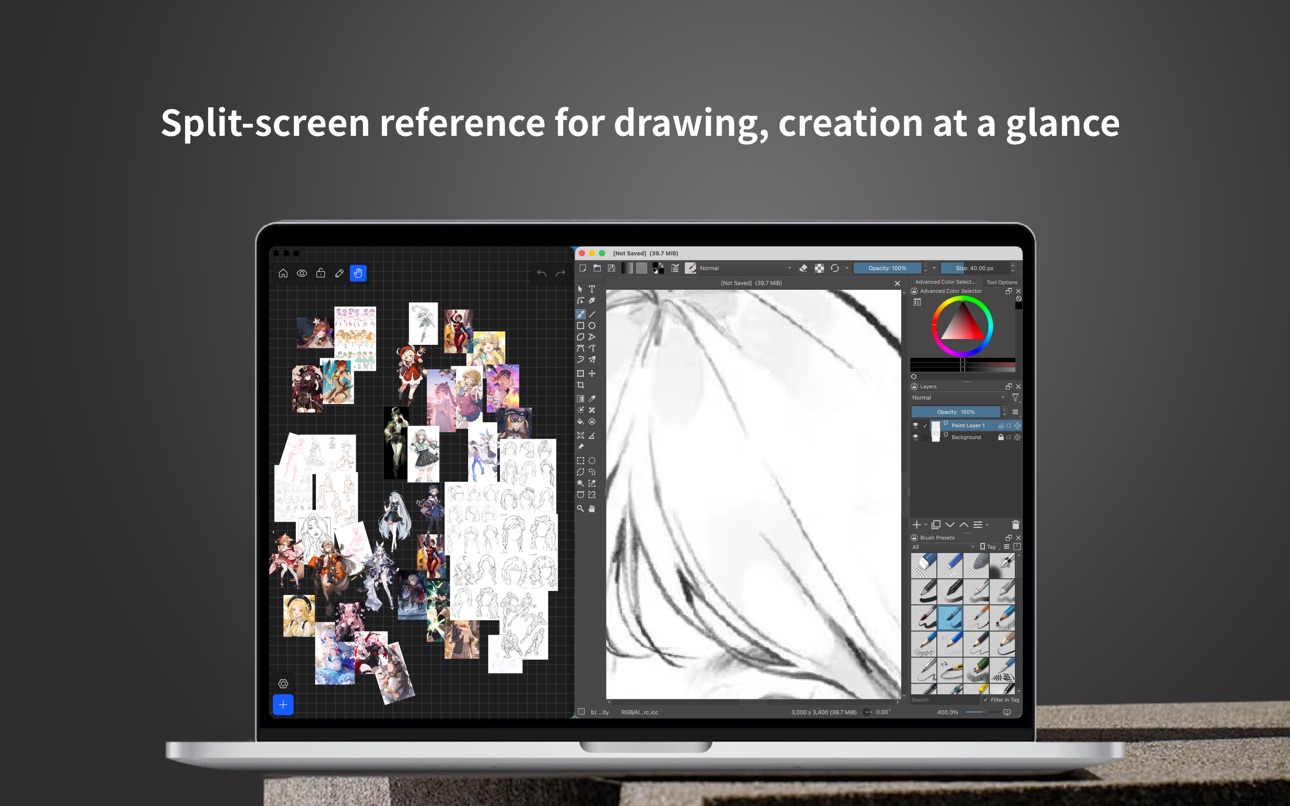
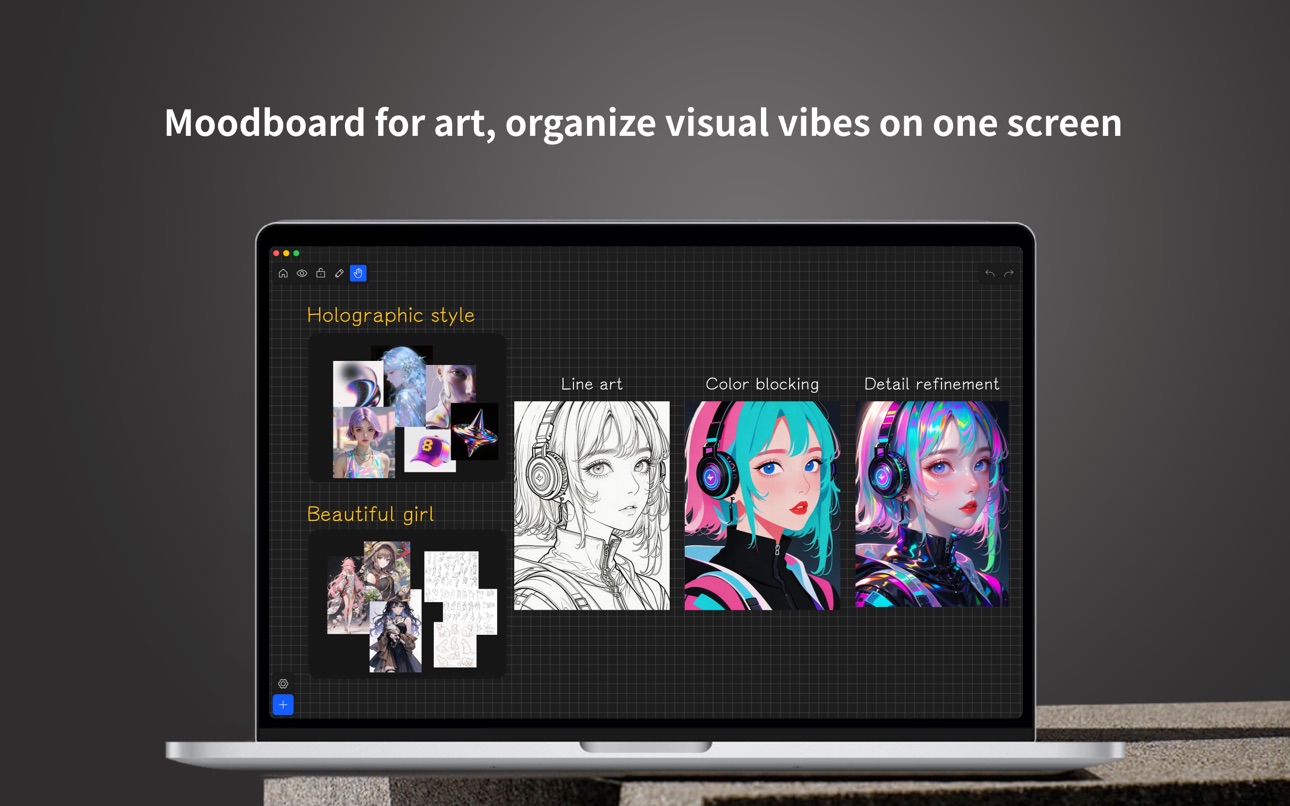
Redefine your creative workflow - an all-in-one tool combining mood boards, reference images, smart asset management, precise color picking, and free-form collaging across devices.
Designed for UI/brand/illustration/photography/architecture/video storyboard and other creative scenarios, this is your professional reference image and inspiration board on iPhone / iPad / macOS.
Core Features:
1. Unlimited Canvas: Smart caching and image management for large long-term libraries and smooth browsing.
2. Multi-Select Batch Processing: Select multiple images for adaptive scaling, smart layout, uniform size, copy, and alignment.
3. Professional Workflow: Full keyboard shortcuts (Mac / iPad keyboard) for faster frequent actions.
4. Image Editing: Rotate, crop, desaturate, flip, adjust opacity, layers, scale, and more.
5. Dynamic Color Picker: Pick any canvas color in real time and get common color codes.
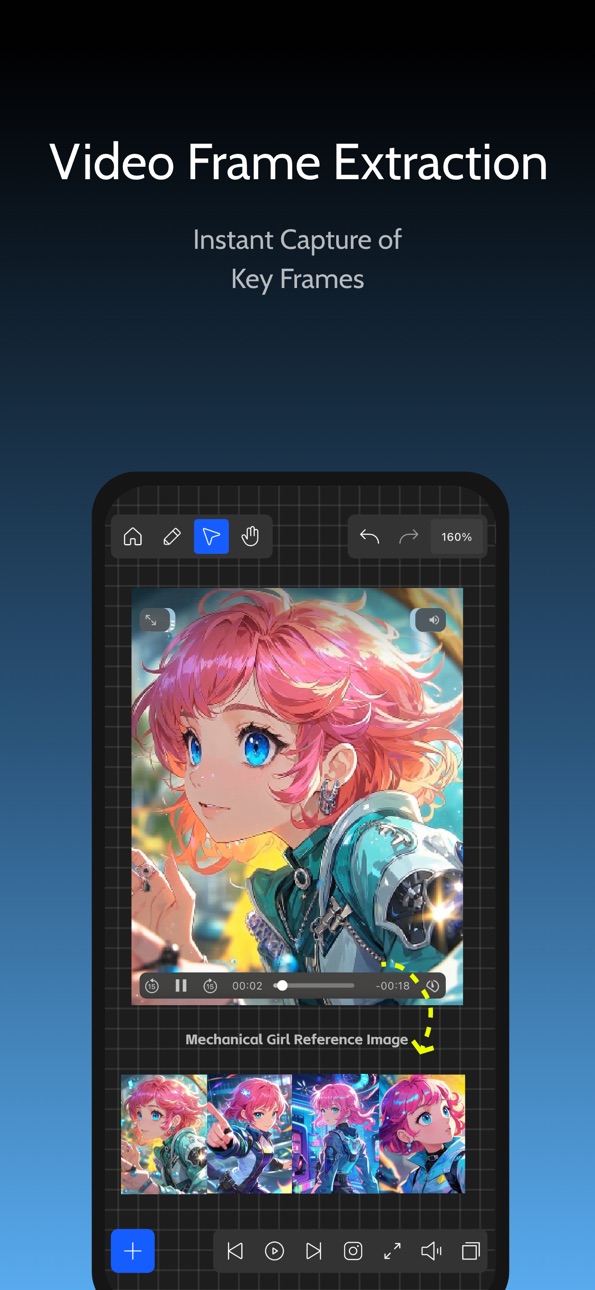
6. Video Processing: MP4 playback and 4K still extraction for faster storyboards, covers, and video references.
7. Stylized Text: Built-in fonts and styles make notes, titles, and labels clearer on the canvas.
8. Magnetic Guides: Alignment hints and smart snapping for precise layouts.
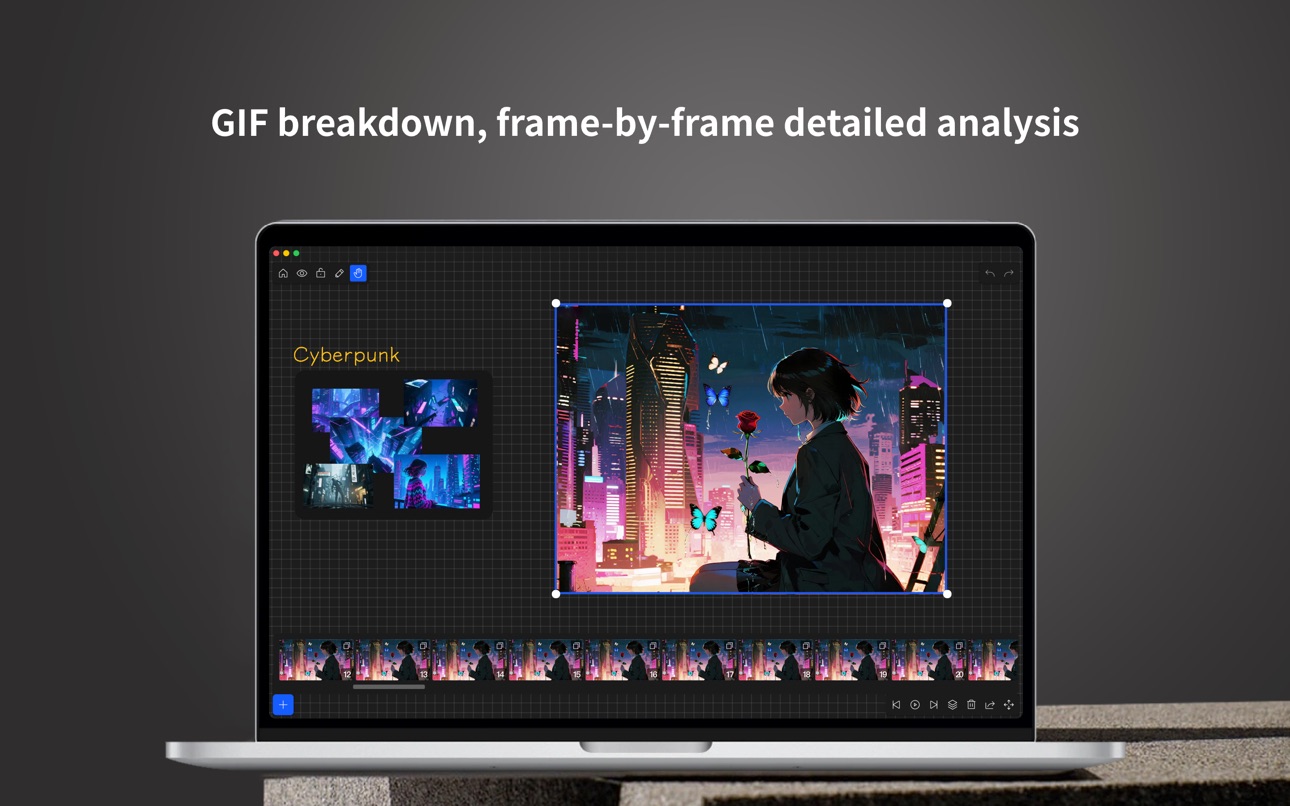
9. GIF Decomposition: Break animations into frames for clearer detail references.
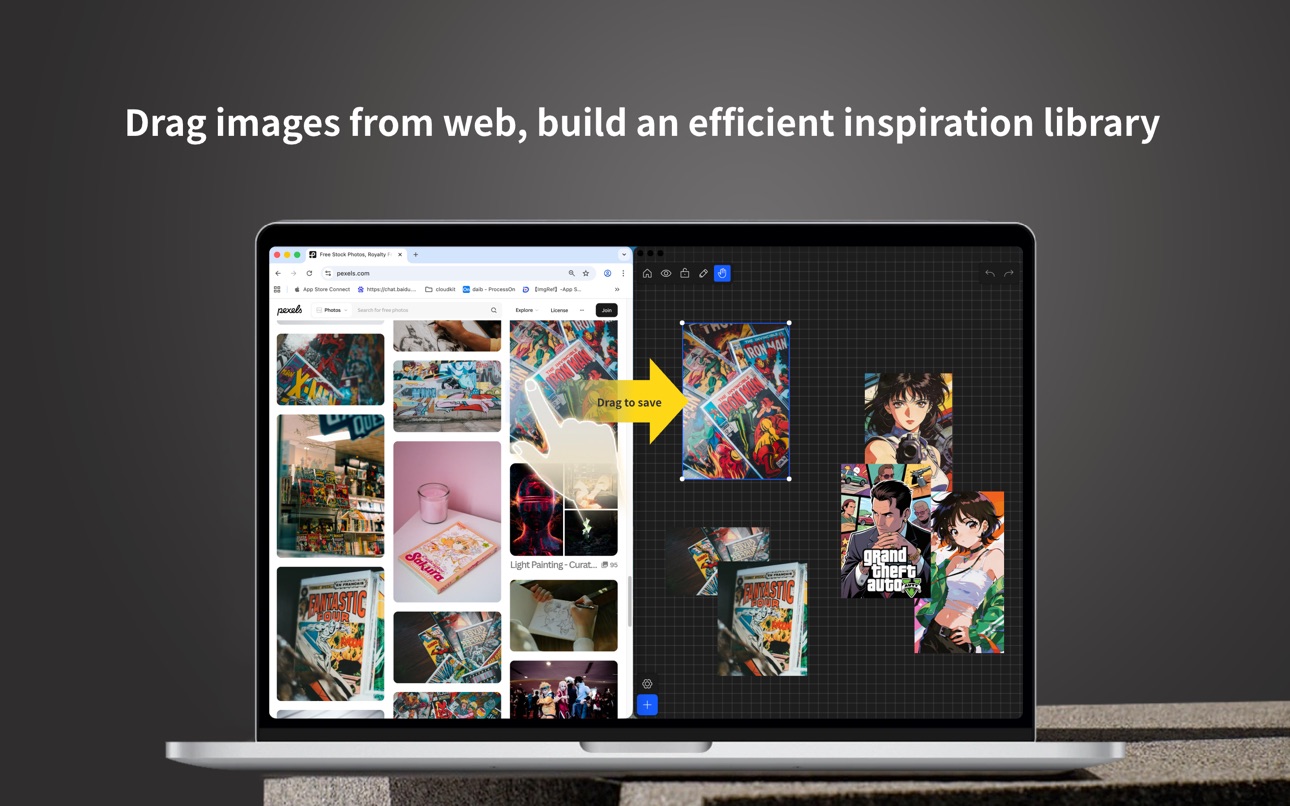
10. Import Methods: Clipboard, photo library, folders, camera, drag & drop (iPad / Mac).
11. Export Methods: Scene export and image group export for sharing and delivery.
12. Web Drag & Drop: Drag images from Pinterest / ArtStation / Midjourney / Pixiv / Instagram and more.
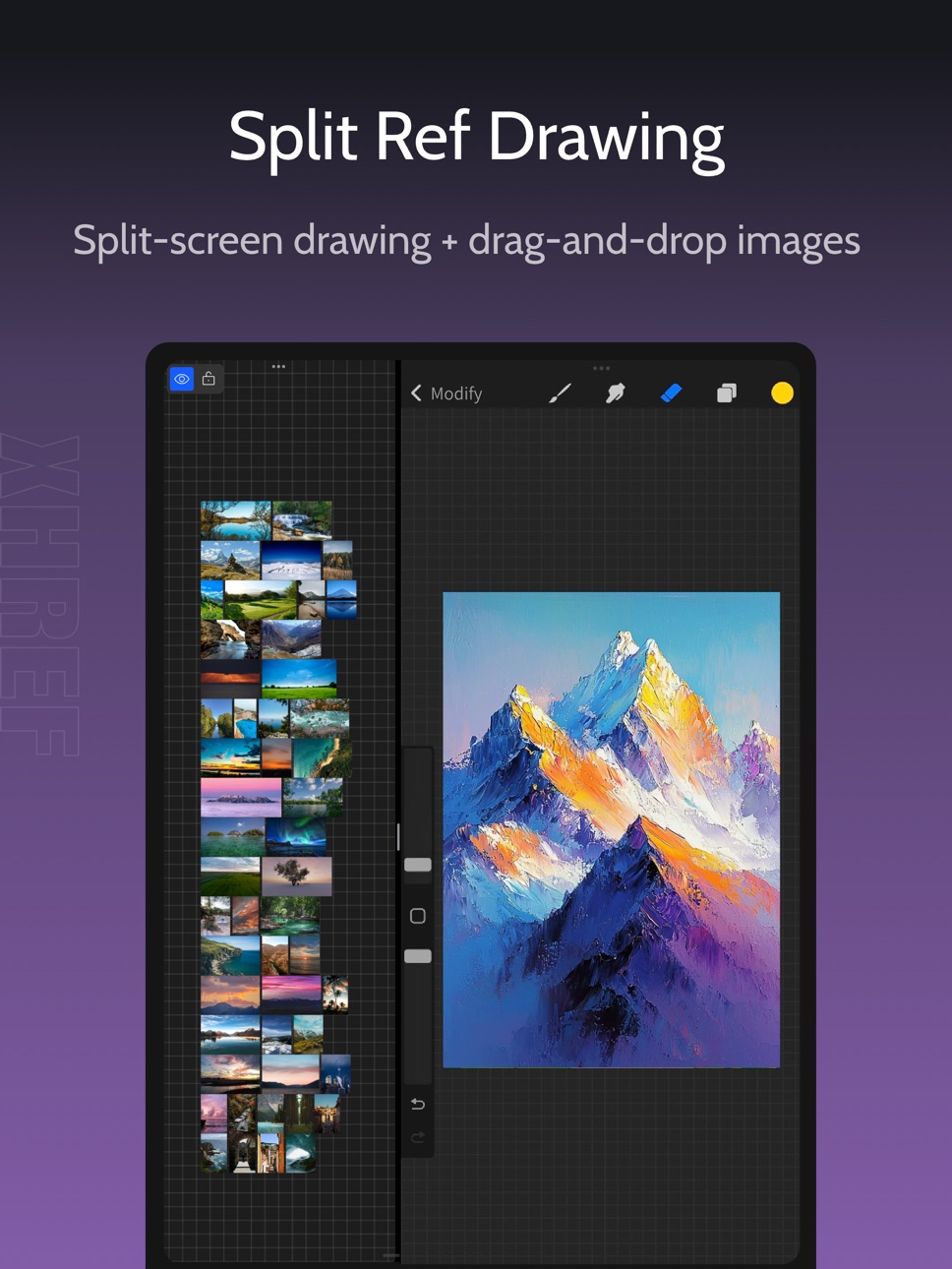
13. Multiple Modes: View, lock, and edit modes keep browsing and editing separate.
14. Brush Tools: Annotate and highlight key areas for more intuitive communication.
15. File Management: Grid/list views with multiple sorting options.
16. Canvas Zoom: Smooth zoom and pan for comfortable detail viewing.
17. Multi-Select Quick Alignment: Quick alignment/distribution after multi-select.
18. Backup & Import: Full backup and package import for migration and recovery.
19. File Search: Search by keyword to find target files fast.
Pro Enhancements:
1. Image/GIF/Video Notes: Add notes to capture ideas and key points.
2. Preview Mode: Switch to a clean preview for focused viewing and presentations.
3. Advanced Crop: Fit different aspect ratios and compositions faster for cleaner output.
4. Image Blur: Blur images for privacy protection and richer visual layering.
5. High-Resolution Scene Export (PNG): Export full scenes as HD PNG for sharing and delivery.
6. File Favorites: Save frequent files for quick access to key references.
7. Category Tags: Tag files by use, project, or status for faster filtering.
8. Dotted Background: Toggle a dotted background for clearer edge contrast.
9. Canvas Grayscale: Focus on tone and composition with grayscale view.
10. Image Color Analysis: Extract dominant colors to understand palette relationships.
11. Layer Panel: Preview names, reorder, and quick select for efficient layer management.
12. Scheduled Playback: Timed switching, playback controls, and countdown.
13. Layer Search: Filter by type and keyword to quickly locate target content among many layers.
14. Brush Presets: Switch stroke width, color, and opacity for annotation, highlighting, and sketching.
15. Canvas RGB Single-Channel Preview: View R/G/B channels separately to analyze color distribution, tone, and detail.
You can subscribe to ImgRef Pro. Charged to your iTunes account on confirmation. Auto-renews unless canceled 24+ hours before period end. Manage in iTunes Store.
Privacy Policy: https://xunhuaref.cn/index.php/privacypolicy/
Terms of Use: https://xunhuaref.cn/index.php/privacypolicy/eula-en/
Download now and experience the smoothest creative tool in the Apple ecosystem!
Thank you for reading. Contact us:
Email: xunhuaref@163.com
Capabilities
In-App Purchases
Accessibility
ipadiphonemacrealityDevicetvoswatch
Version history 25 versions
Build 887902491v4.11.32026-07-08 04:50:31
- Added brush support for multiple presets, with color, thickness, and opacity adjustment.
- Added a layer type filter in playback mode.
- Improved the eyedropper: the color display area now supports picking colors via double-click.
- Optimized adaptive features and layer panel display issues.
- Fixed email feedback and other known issues.
Build 887992537v4.12.02026-07-08 22:11:31
- Added canvas R/G/B single-channel preview to help inspect color distribution, tonal layers, and detail differences.
- Added brush support for multiple presets, with color, thickness, and opacity adjustment.
- Added a layer type filter in playback mode.
- Improved the eyedropper: the color display area now supports picking colors via double-click.
- Optimized adaptive features and layer panel display issues.
- Fixed email feedback and other known issues.
Build 887571589v4.11.02026-07-01 13:09:00
- Added brush support for multiple presets, with color, thickness, and opacity adjustment.
- Added a layer type filter in playback mode.
- Improved the eyedropper: the color display area now supports picking colors via double-click.
- Optimized adaptive features and layer panel display issues.
- Fixed email feedback and other known issues.
Build 887332439v4.10.52026-06-24 05:01:45
- Added multi-select copy and paste, supporting cross-file transfer.
- Added layer search with type filtering and keyword matching.
- Added a layer menu with rename and delete support.
- Added scheduled playback with timed switching, countdown, and related controls.
- Added a layer panel with preview, order adjustment, quick selection, and focus controls.
- Added a preview mode controller with sequential/random switching and other controls.
- Fixed email feedback and other known issues.
Build 887123213v4.10.12026-06-18 14:25:14
- Added layer search with type filtering and keyword matching.
- Added a layer menu with rename and delete support.
- Added scheduled playback with timed switching, countdown, and related controls.
- Added a layer panel with preview, order adjustment, quick selection, and focus controls.
- Added a preview mode controller with sequential/random switching and other controls.
- Fixed email feedback and other known issues.
Build 886707016v4.10.02026-06-09 07:43:17
- Added layer search with type filtering and keyword matching.
- Added a layer menu with rename and delete support.
- Added scheduled playback with timed switching, countdown, and related controls.
- Added a layer panel with preview, order adjustment, quick selection, and focus controls.
- Added a preview mode controller with sequential/random switching and other controls.
- Fixed email feedback and other known issues.
Build 886657955v4.9.52026-06-08 14:22:47
- Added scheduled playback with timed switching, countdown, and related controls.
- Added a layer panel with preview, order adjustment, quick selection, and focus controls.
- Added a preview mode controller with sequential/random switching and other controls.
- Fixed email feedback and other known issues.
- Go out for a walk and experience the mountains, rivers, lakes, seas, and freedom.
Build 886599812v4.9.32026-06-06 15:22:29
- Added scheduled playback with timed switching, countdown, and related controls.
- Added a layer panel with preview, order adjustment, quick selection, and focus controls.
- Added a preview mode controller with sequential/random switching and other controls.
- Fixed email feedback and other known issues.
- Go out for a walk and experience the mountains, rivers, lakes, seas, and freedom.
Build 886554259v4.9.12026-06-05 03:56:16
- Added scheduled playback with timed switching, countdown, and related controls.
- Added a layer panel with preview, order adjustment, quick selection, and focus controls.
- Added a preview mode controller with sequential/random switching and other controls.
- Fixed email feedback and other known issues.
- Go out for a walk and experience the mountains, rivers, lakes, seas, and freedom.
Build 886513218v4.9.02026-06-04 13:16:48
- Added scheduled playback with timed switching, countdown, and related controls.
- Added a layer panel with preview, order adjustment, quick selection, and focus controls.
- Added a preview mode controller with sequential/random switching and other controls.
- Fixed email feedback and other known issues.
Build 886457147v4.8.12026-06-03 14:09:36
- Added an in-canvas layer panel, supporting preview/order adjustment/quick selection and focus controls.
- Added a preview mode controller, supporting sequential/random switching and other controls.
- Added linkage between preview mode and the layer panel.
- Fixed email feedback and other known issues.
Build 886264367v4.6.32026-05-29 07:49:01
- Added an image color analysis feature.
- Added an Uncategorized filter option.
- Added a canvas grayscale setting option.
- Added a dotted background toggle option.
- Added a left-side management panel for categories.
- Added support for setting icons for category tags.
- Fixed email feedback and other known issues.
Build 885769807v4.6.02026-05-18 13:10:29
- Added an image color analysis feature.
- Added an Uncategorized filter option.
- Added a canvas grayscale setting option.
- Added a dotted background toggle option.
- Added a left-side management panel for categories.
- Added support for setting icons for category tags.
- Fixed email feedback and other known issues.
Build 885660612v4.5.52026-05-14 14:43:20
- Added a canvas grayscale setting option.
- Added a dotted background toggle option.
- Added a left-side management panel for categories.
- Added support for setting icons for category tags.
- Fixed other known issues.
Build 885605440v4.5.32026-05-13 16:28:03
- Added a left-side management panel for categories.
- Added support for setting icons for category tags.
- Fixed other known issues.
Build 885508649v4.5.22026-05-11 14:26:02
- Added a left-side management panel for categories.
- Added support for setting icons for category tags.
- Fixed other known issues.
Build 885055633v4.3.12026-04-29 13:31:22
- Added multi-tag categorization for files.
- Fixed other known issues.
Build 885010690v4.3.02026-04-28 13:32:45
- Added multi-tag categorization for files.
- Fixed other known issues.
Build 884839183v4.2.02026-04-23 14:11:09
- Added file search.
- Fixed other known issues.
Build 884705833v4.1.22026-04-20 16:01:40
- Added the following Pro enhancements:
- File Favorites
- Image/GIF/Video Notes
- Preview Mode
- Advanced Cropping
- Image Blur
- High-Resolution Scene Export (PNG)
- Fixed other known issues.
Build 884570952v4.0.102026-04-16 10:28:20
- 新增以下 Pro 增强功能:
- 图片/GIF/视频备注
- 预览模式
- 高级裁剪
- 图片模糊
- 场景高清导出(PNG)
- 修复了其他已知问题。
Build 884038037v4.0.82026-04-15 16:19:39
- 新增以下 Pro 增强功能:
- 图片/GIF/视频备注
- 预览模式
- 高级裁剪
- 图片模糊
- 场景高清导出(PNG)
- 修复了其他已知问题。
Build 883392618v3.10.12026-04-01 05:38:06
- Special thanks: 리뷰하는 프릭. Sincere thanks for the professional promotional videos on YouTube and other video platforms.
- Full backup and whole-package import: data can be fully migrated and restored.
- Text menu: added font color settings.
- Web drag & drop: added drag import support for Midjourney Explore.
- Fixed other known issues.
Build 883262417v3.9.32026-03-11 16:05:42
- Special thanks: Amber. Many thanks to Amber for her help with suggestions, issue reports, shortcuts, testing, and more.
- Reduced long-press multi-select response time for smoother multi-select.
- Crop: canvas can be moved and zoomed during cropping
- Web drag & drop: Added support for drag import from Instagram.
- Apple Pencil: Now supports swipe gestures on the file page and image menu.
- Fixed abnormal display when loading video for the first time.
- Fixed duplicate images when pasting from clipboard after taking an iOS screenshot.
- Fixed other known issues.
Build 882691976v3.9.22026-02-25 19:07:51
- Special thanks: Amber. Many thanks to Amber for her help with suggestions, issue reports, shortcuts, testing, and more.
- Reduced long-press multi-select response time for smoother multi-select.
- Crop: canvas can be moved and zoomed during cropping.
- Web drag & drop: Added support for drag import from Instagram.
- Apple Pencil: Now supports swipe gestures on the file page and image menu.
- Fixed abnormal display when loading video for the first time.
- Fixed duplicate images when pasting from clipboard after taking an iOS screenshot.
- Fixed other known issues.
No pricing data captured yet — comparisons appear once the app has paid storefronts or in-app purchases.
Availability 1 of 1 storefronts
| Region | Language | Price | Ratings | Avg | Version |
|---|---|---|---|---|---|
| US | en-US | Free | 136 | 4.7 | 4.12.0 |
Change log 29 changes · US
✎
releaseNotes updated
- Added canvas R/G/B single-channel preview to help inspect color distribution, tonal layers, and detail differences.
- Added brush support for multiple presets
✎
description updated
「App Store Editor's Choice」 「98% 5-Star Ratings」 「Cross-Platform for iPhone/iPad/MacOS」
Redefine your creative workflow - an all-in-one tool combining mood bo
✎
subtitle updated
Reference board & ColorPicker
✎
name updated
ImgRef
◆
Version 4.12.0 released
- Added canvas R/G/B single-channel preview to help inspect color distribution, tonal layers, and detail differences.
- Added brush support for multiple presets, with color, thickness, and opacity adjustment.
- Added a layer type filter in
◆
Version 4.11.3 released
- Added brush support for multiple presets, with color, thickness, and opacity adjustment.
- Added a layer type filter in playback mode.
- Improved the eyedropper: the color display area now supports picking colors via double-click.
- Optim
◆
Version 4.11.0 released
- Added brush support for multiple presets, with color, thickness, and opacity adjustment.
- Added a layer type filter in playback mode.
- Improved the eyedropper: the color display area now supports picking colors via double-click.
- Optim
◆
Version 4.10.5 released
- Added multi-select copy and paste, supporting cross-file transfer.
- Added layer search with type filtering and keyword matching.
- Added a layer menu with rename and delete support.
- Added scheduled playback with timed switching, countd
◆
Version 4.10.1 released
- Added layer search with type filtering and keyword matching.
- Added a layer menu with rename and delete support.
- Added scheduled playback with timed switching, countdown, and related controls.
- Added a layer panel with preview, order
◆
Version 4.10.0 released
- Added layer search with type filtering and keyword matching.
- Added a layer menu with rename and delete support.
- Added scheduled playback with timed switching, countdown, and related controls.
- Added a layer panel with preview, order
◆
Version 4.9.5 released
- Added scheduled playback with timed switching, countdown, and related controls.
- Added a layer panel with preview, order adjustment, quick selection, and focus controls.
- Added a preview mode controller with sequential/random switching
◆
Version 4.9.3 released
- Added scheduled playback with timed switching, countdown, and related controls.
- Added a layer panel with preview, order adjustment, quick selection, and focus controls.
- Added a preview mode controller with sequential/random switching
◆
Version 4.9.1 released
- Added scheduled playback with timed switching, countdown, and related controls.
- Added a layer panel with preview, order adjustment, quick selection, and focus controls.
- Added a preview mode controller with sequential/random switching
◆
Version 4.9.0 released
- Added scheduled playback with timed switching, countdown, and related controls.
- Added a layer panel with preview, order adjustment, quick selection, and focus controls.
- Added a preview mode controller with sequential/random switching
◆
Version 4.8.1 released
- Added an in-canvas layer panel, supporting preview/order adjustment/quick selection and focus controls.
- Added a preview mode controller, supporting sequential/random switching and other controls.
- Added linkage between preview mode and
◆
Version 4.6.3 released
- Added an image color analysis feature.
- Added an Uncategorized filter option.
- Added a canvas grayscale setting option.
- Added a dotted background toggle option.
- Added a left-side management panel for categories.
- Added support for
◆
Version 4.6.0 released
- Added an image color analysis feature.
- Added an Uncategorized filter option.
- Added a canvas grayscale setting option.
- Added a dotted background toggle option.
- Added a left-side management panel for categories.
- Added support for
◆
Version 4.5.5 released
- Added a canvas grayscale setting option.
- Added a dotted background toggle option.
- Added a left-side management panel for categories.
- Added support for setting icons for category tags.
- Fixed other known issues.
◆
Version 4.5.3 released
- Added a left-side management panel for categories.
- Added support for setting icons for category tags.
- Fixed other known issues.
◆
Version 4.5.2 released
- Added a left-side management panel for categories.
- Added support for setting icons for category tags.
- Fixed other known issues.
◆
Version 4.3.1 released
- Added multi-tag categorization for files.
- Fixed other known issues.
◆
Version 4.3.0 released
- Added multi-tag categorization for files.
- Fixed other known issues.
◆
Version 4.2.0 released
- Added file search.
- Fixed other known issues.
◆
Version 4.1.2 released
- Added the following Pro enhancements:
- File Favorites
- Image/GIF/Video Notes
- Preview Mode
- Advanced Cropping
- Image Blur
- High-Resolution Scene Export (PNG)
- Fixed other known issues.
◆
Version 4.0.10 released
- 新增以下 Pro 增强功能:
- 图片/GIF/视频备注
- 预览模式
- 高级裁剪
- 图片模糊
- 场景高清导出(PNG)
- 修复了其他已知问题。
◆
Version 4.0.8 released
- 新增以下 Pro 增强功能:
- 图片/GIF/视频备注
- 预览模式
- 高级裁剪
- 图片模糊
- 场景高清导出(PNG)
- 修复了其他已知问题。
◆
Version 3.10.1 released
- Special thanks: 리뷰하는 프릭. Sincere thanks for the professional promotional videos on YouTube and other video platforms.
- Full backup and whole-package import: data can be fully migrated and restored.
- Text menu: added font color settings.
◆
Version 3.9.3 released
- Special thanks: Amber. Many thanks to Amber for her help with suggestions, issue reports, shortcuts, testing, and more.
- Reduced long-press multi-select response time for smoother multi-select.
- Crop: canvas can be moved and zoomed duri
◆
Version 3.9.2 released
- Special thanks: Amber. Many thanks to Amber for her help with suggestions, issue reports, shortcuts, testing, and more.
- Reduced long-press multi-select response time for smoother multi-select.
- Crop: canvas can be moved and zoomed duri