Home › Dienstprogramme

 DK
DK
 ATde-DE
 BEen-GB
 BGen-GB
 BRpt-BR
 CHde-CH
 CLes-MX
 CZen-GB
 DEde-DEDKen-GB
 ESes-ES
 FIen-GB
 FRfr-FR
 GRen-GB
 HRen-GB
 HUen-GB
 IEen-GB
 ITit
ITit LUen-GB
 NLnl
NLnl NOen-GB
 PLen-GB
 PTpt-PT
 SEsv
SEsv SGen-GB
 SIen-GB
 SKen-GB
 AENot Available
 AFNot Available
 AGNot Available
 AINot Available
 ALNot Available
 AMNot Available
 AONot Available
 ARNot Available
 AUNot Available
 AZNot Available
 BANot Available
 BBNot Available
 BFNot Available
 BHNot Available
 BJNot Available
 BMNot Available
 BNNot Available
 BONot Available
 BSNot Available
 BTNot Available
 BWNot Available
 BYNot Available
 BZNot Available
 CANot Available
 CDNot Available
 CGNot Available
 CINot Available
 CMNot Available
 CNNot Available
 CONot Available
 CRNot Available
 CVNot Available
 CYNot Available
 DMNot Available
 DONot Available
 DZNot Available
 ECNot Available
 EENot Available
 EGNot Available
 FJNot Available
 FMNot Available
 GANot Available
 GBNot Available
 GDNot Available
 GENot Available
 GHNot Available
 GMNot Available
 GTNot Available
 GWNot Available
 GYNot Available
 HKNot Available
 HNNot Available
 IDNot Available
 ILNot Available
 INNot Available
 IQNot Available
 ISNot Available
 JMNot Available
 JONot Available
 JPNot Available
 KENot Available
 KGNot Available
 KHNot Available
 KNNot Available
 KRNot Available
 KWNot Available
 KYNot Available
 KZNot Available
 LANot Available
 LBNot Available
 LCNot Available
 LKNot Available
 LRNot Available
 LTNot Available
 LVNot Available
 LYNot Available
 MANot Available
 MDNot Available
 MENot Available
 MGNot Available
 MKNot Available
 MLNot Available
 MMNot Available
 MNNot Available
 MONot Available
 MRNot Available
 MSNot Available
 MTNot Available
 MUNot Available
 MVNot Available
 MWNot Available
 MXNot Available
 MYNot Available
 MZNot Available
 NANot Available
 NENot Available
 NGNot Available
 NINot Available
 NPNot Available
 NRNot Available
 NZNot Available
 OMNot Available
 PANot Available
 PENot Available
 PGNot Available
 PHNot Available
 PKNot Available
 PWNot Available
 PYNot Available
 QANot Available
 RONot Available
 RSNot Available
 RUNot Available
 RWNot Available
 SANot Available
 SBNot Available
 SCNot Available
 SLNot Available
 SNNot Available
 SRNot Available
 STNot Available
 SVNot Available
 SZNot Available
 TCNot Available
 TDNot Available
 THNot Available
 TJNot Available
 TMNot Available
 TNNot Available
 TONot Available
 TRNot Available
 TTNot Available
 TWNot Available
 TZNot Available
 UANot Available
 UGNot Available
 UYNot Available
 UZNot Available
 VCNot Available
 VENot Available
 VGNot Available
 VNNot Available
 VUNot Available
 XKNot Available
 YENot Available
 ZANot Available
 ZMNot Available
 ZWNot Available
26 of 174 storefronts
Content in en-US
Content in en-US
Information
Preview 2 platforms
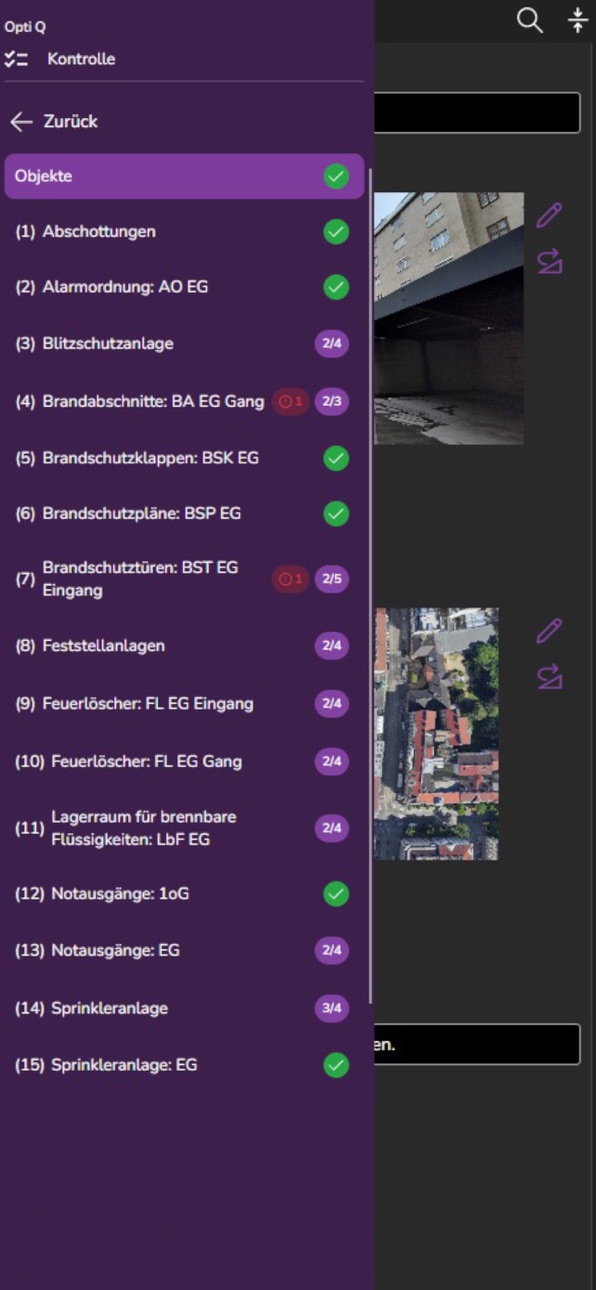
iPhone 7 images


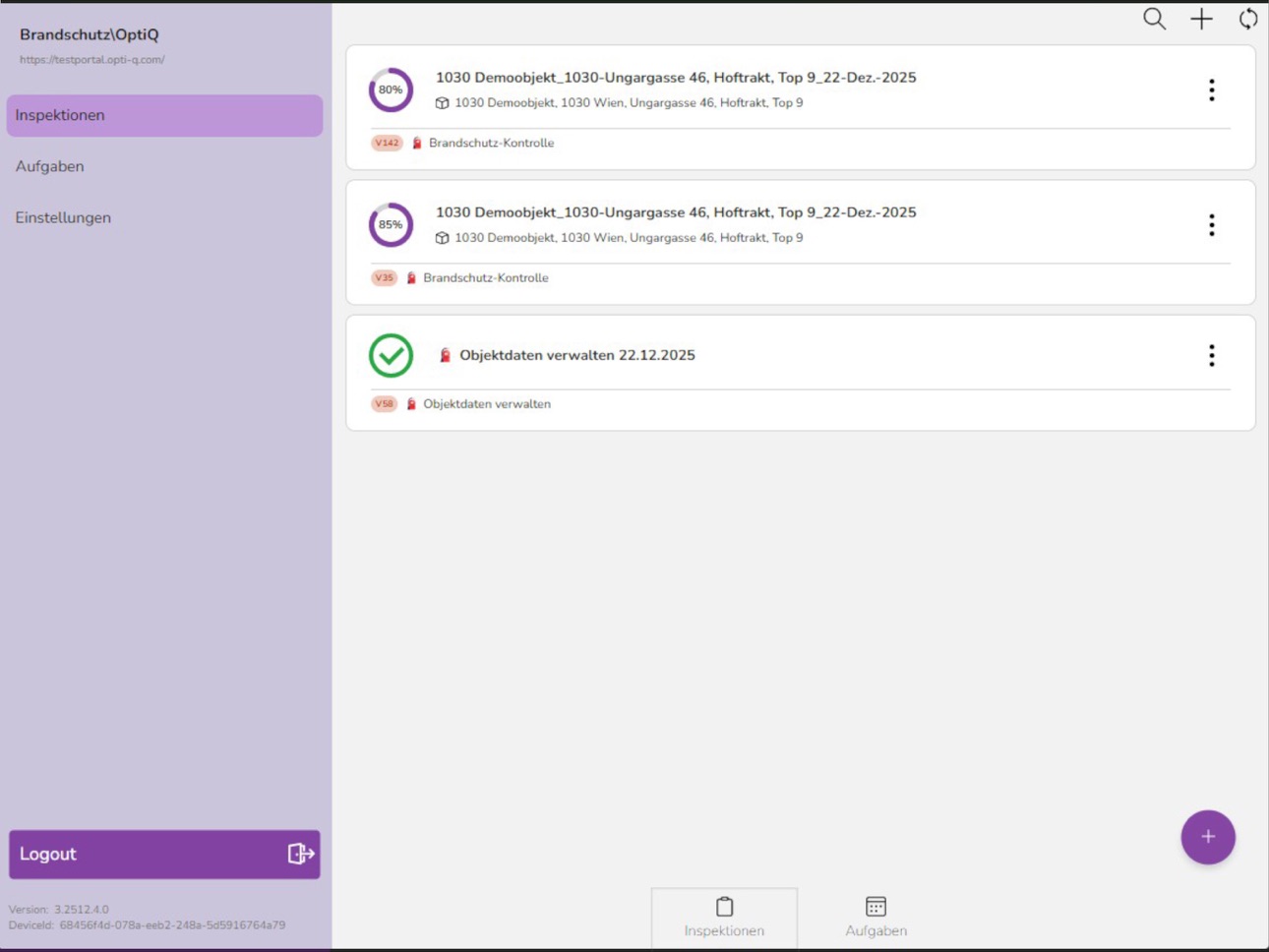
iPad 7 images



What’s New Version 3.2026063003
- new background task view
- reports and their creation progress are shown in inspectionview
- various text field improvements
- content item referenced fileentries are purged if not used anymore
- image editor saves last color and text size
Description
Carry out inspections conveniently using your smartphone or tablet and create individual reports at the touch of a button.
With iCL-Filler, you can access your assigned workbooks (digital checklists), complete them directly on site, and document results efficiently and in a structured manner.
The required workbooks can either be created independently using the iCL-Designer or professionally developed by the experts at Opti-Q.
Accessibility
ipadiphonemacrealityDevicetvoswatch
Version history 7 versions
Build 887728627v3.20260630032026-07-03 07:26:29
- new background task view
- reports and their creation progress are shown in inspectionview
- various text field improvements
- content item referenced fileentries are purged if not used anymore
- image editor saves last color and text size
Build 886831860v3.20260611012026-06-12 13:30:28
Bugfixes and imrovements
Build 886138147v3.20260528012026-06-01 06:50:44
Many bug fixes and UI improvements
Build 885434084v20260508012026-05-11 04:47:44
Bug fixes and stability improvements
Build 885239458v20260422012026-05-05 05:11:50
Verbesserungen an Performance und Stabilität
Build 884234801v20260409012026-04-10 08:18:25
Improved handling of OAuth session losses
Build 872658489v 20260306012026-03-30 16:47:43
No pricing data captured yet — comparisons appear once the app has paid storefronts or in-app purchases.
Availability 26 of 174 storefronts
| Region | Language | Price | Ratings | Avg | Version |
|---|---|---|---|---|---|
| AT | de-DE | Free | 0 | — | 3.2026063003 |
| BE | en-GB | Free | 0 | — | 3.2026063003 |
| BG | en-GB | Free | 0 | — | 3.2026063003 |
| BR | pt-BR | Free | 0 | — | 3.2026063003 |
| CH | de-CH | Free | 0 | — | 3.2026063003 |
| CL | es-MX | Free | 0 | — | 3.2026063003 |
| CZ | en-GB | Free | 0 | — | 3.2026063003 |
| DE | de-DE | Free | 0 | — | 3.2026063003 |
| DK | en-GB | Free | 0 | — | 3.2026063003 |
| ES | es-ES | Free | 0 | — | 3.2026063003 |
| FI | en-GB | Free | 0 | — | 3.2026063003 |
| FR | fr-FR | Free | 0 | — | 3.2026063003 |
| GR | en-GB | Free | 0 | — | 3.2026063003 |
| HR | en-GB | Free | 0 | — | 3.2026063003 |
| HU | en-GB | Free | 0 | — | 3.2026063003 |
| IE | en-GB | Free | 0 | — | 3.2026063003 |
| IT | it | Free | 0 | — | 3.2026063003 |
| LU | en-GB | Free | 0 | — | 3.2026063003 |
| NL | nl | Free | 0 | — | 3.2026063003 |
| NO | en-GB | Free | 0 | — | 3.2026063003 |
| PL | en-GB | Free | 0 | — | 3.2026063003 |
| PT | pt-PT | Free | 0 | — | 3.2026063003 |
| SE | sv | Free | 0 | — | 3.2026063003 |
| SG | en-GB | Free | 0 | — | 3.2026063003 |
| SI | en-GB | Free | 0 | — | 3.2026063003 |
| SK | en-GB | Free | 0 | — | 3.2026063003 |
Not available in: AE, AF, AG, AI, AL, AM, AO, AR, AU, AZ, BA, BB, BF, BH, BJ, BM, BN, BO, BS, BT, BW, BY, BZ, CA, CD, CG, CI, CM, CN, CO, CR, CV, CY, DM, DO, DZ, EC, EE, EG, FJ, FM, GA, GB, GD, GE, GH, GM, GT, GW, GY, HK, HN, ID, IL, IN, IQ, IS, JM, JO, JP, KE, KG, KH, KN, KR, KW, KY, KZ, LA, LB, LC, LK, LR, LT, LV, LY, MA, MD, ME, MG, MK, ML, MM, MN, MO, MR, MS, MT, MU, MV, MW, MX, MY, MZ, NA, NE, NG, NI, NP, NR, NZ, OM, PA, PE, PG, PH, PK, PW, PY, QA, RO, RS, RU, RW, SA, SB, SC, SL, SN, SR, ST, SV, SZ, TC, TD, TH, TJ, TM, TN, TO, TR, TT, TW, TZ, UA, UG, UY, UZ, VC, VE, VG, VN, VU, XK, YE, ZA, ZM, ZW
Change log 10 changes · DK
✎
releaseNotes updated
- new background task view
- reports and their creation progress are shown in inspectionview
- various text field improvements
- content item referenced fileent
✎
description updated
Carry out inspections conveniently using your smartphone or tablet and create individual reports at the touch of a button.
With iCL-Filler, you can access your
✎
name updated
iCL Filler 3
◆
Version 3.2026063003 released
- new background task view
- reports and their creation progress are shown in inspectionview
- various text field improvements
- content item referenced fileentries are purged if not used anymore
- image editor saves last color and text siz
◆
Version 3.2026061101 released
Bugfixes and imrovements
◆
Version 3.2026052801 released
Many bug fixes and UI improvements
◆
Version 2026050801 released
Bug fixes and stability improvements
◆
Version 2026042201 released
Verbesserungen an Performance und Stabilität
◆
Version 2026040901 released
Improved handling of OAuth session losses
◆
Version 2026030601 released