Home › Photo & Video

 ZM
ZM
 DEde-DE
 CAen-CA
 ITit
ITit NGen-GB
 RUru
RUru USen-US
 ATde-DE
 GBen-GB
 HKzh-Hant-HK
 MAen-GB
 MYen-GB
 SGen-GB
 SKen-GB
 AEen-GB
 AFen-GB
 AGen-GB
 AIen-GB
 ALen-GB
 AMen-GB
 ARes-MX
 AUen-AU
 AZen-GB
 BAen-GB
 BEen-GB
 BGen-GB
 BHen-GB
 BMen-GB
 BOes-MX
 BRpt-BR
 BYen-GB
 CDen-GB
 CGen-GB
 CHde-CH
 CLes-MX
 CNzh-Hans-CN
 COes-MX
 CRes-MX
 CVen-GB
 CYen-GB
 CZen-GB
 DKen-GB
 DMen-GB
 DOes-MX
 DZen-GB
 ECes-MX
 EEen-GB
 EGen-GB
 ESes-ES
 FIen-GB
 FRfr-FR
 GAfr-FR
 GDen-GB
 GEen-GB
 GHen-GB
 GMen-GB
 GRen-GB
 GTes-MX
 GWen-GB
 HNes-MX
 HRen-GB
 HUen-GB
 IDen-GB
 IEen-GB
 ILen-GB
 INen-GB
 IQen-GB
 ISen-GB
 JMen-GB
 JOen-GB
 JPja
JPja KEen-GB
 KGen-GB
 KHen-GB
 KNen-GB
 KRko
KRko KWen-GB
 KYen-GB
 LAen-GB
 LBen-GB
 LCen-GB
 LKen-GB
 LRen-GB
 LTen-GB
 LUen-GB
 LVen-GB
 LYen-GB
 MDen-GB
 MEen-GB
 MGen-GB
 MKen-GB
 MOzh-Hant-HK
 MRen-GB
 MSen-GB
 MTen-GB
 MWen-GB
 MXes-MX
 NEen-GB
 NIes-MX
 NLnl
NLnl NOen-GB
 NPen-GB
 NZen-AU
 OMen-GB
 PAes-MX
 PEes-MX
 PHen-GB
 PKen-GB
 PLen-GB
 PTpt-PT
 PWen-GB
 PYes-MX
 QAen-GB
 ROen-GB
 RSen-GB
 RWen-GB
 SAen-GB
 SCen-GB
 SEsv
SEsv SIen-GB
 SLen-GB
 SNen-GB
 STen-GB
 SVes-MX
 SZen-GB
 TCen-GB
 TDen-GB
 THen-GB
 TJen-GB
 TNen-GB
 TRen-GB
 TZen-GB
 UAen-GB
 UGen-GB
 UYen-GB
 VCen-GB
 VEes-MX
 VGen-GB
 VNen-GB
 XKen-GB
 YEen-GBZMen-GB
 ZWen-GB
142 of 142 storefronts
Content in en-US
Content in en-US
Information
Preview 3 platforms
iPhone 10 images




iPad 9 images


Apple Watch 2 images


What’s New Version 1.0.37
Camera Controls are back. Use the Camera Control to adjust Exposure, Contrast, Brightness, Focus, and Zoom, and to choose your capture mode without leaving the screen. It is faster to dial in the look you want, whether you are shooting something bright, adding contrast, or locking focus on a subject.
We also fixed a bug where the app could rotate your orientation when launching Blark from the lock screen, Control Centre, or the action button.
We also fixed a bug that caused the orientation to be rotated when you had the phone in landscape and switched cameras
Description
Blark is an Apple featured, beautifully designed, easy-to-use, black & white/monochrome camera app for iPhone. It’s the best and most pro way to take black and white pictures & videos on the iPhone for everyone. Blark elevates your black and white photography and videography.
Whether you are a casual or pro photographer, Blark packs full of features to help you take incredible black & white photos as well as videos.
The Right Tools
All you need to take the best black & white pictures and video on the iPhone. Adjust your CONTRAST, BRIGHTNESS, HIGHLIGHTS, SHADOW & SATURATION in real time, right before you take your shot.
Manual focus lets you set your focus just where you want it. Use the grid overlay and spirit level to compose your shots precisely.
_
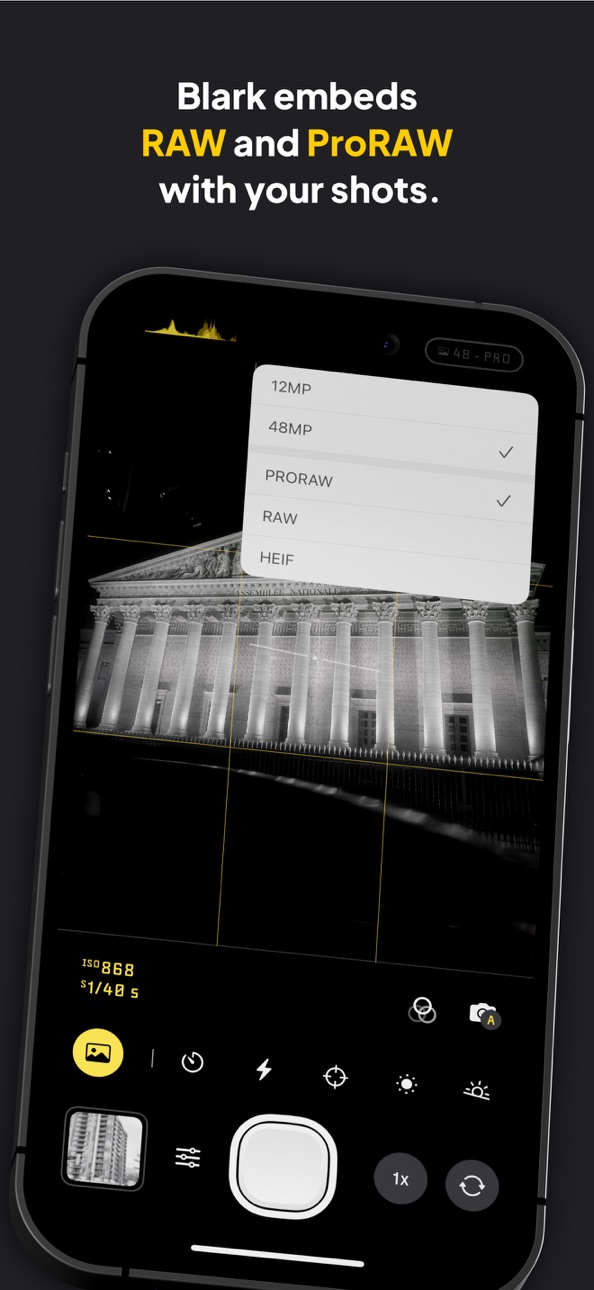
RAW & ProRAW Capture
Blark lets you shot in RAW or ProRAW and embeds the raw data in the capture. Giving you the ability to access the raw data later if you want to. You can also shoot straight to JPEG (HEIF)
_
Manual Or Auto Exposure
Gain complete control over exposure, whether you want to use auto exposure or manual exposure controls including shutter speed and ISO.
_
Color Tint
Add subtle tints to your images. Choose a tint using the tint slider, use with any of the Blark presets.
_
MonoChrome Magazine
Enjoy Monochrome, a Blark magazine featuring standout black and white photography from creators around the world along with thoughtful tips, guides, and perspectives to inspire, refocus, help you move through creative blocks, and shoot stronger black and white images.
_
Histogram
Never underexpose or overexpose your captures again. Use the histogram to get your exposures just right to avoid shadow or highlight clipping
_
Apple Watch Remote
Use the companion Apple Watch app as a remote, giving you quick access to snapping photos and recording videos from your wrist.
_
Camera Control & Lock Screen Capture
Launch Blark from your lock screen or with the camera control button, making sure you never miss that next shot
_
Presets
Use any of Blark’s gorgeous presets or create, save and reuse your own. Save CONTRAST, BRIGHTNESS, HIGHLIGHTS, SHADOW & SATURATION as presets, and reuse them in any of your captures. Presets sync across iCloud, so you never lose them unless deleted.
_
Beautifully Designed & Private
Blark doesn’t track you in any way or transits any of your information. Location data requested is solely used for tagging in your photos and never stored or shared. Neither is data also collected on any of your photos. Blark is beautifully designed to give you the best tools to create great black & white captures while also protecting your privacy
* Blark is not free. A 7-day free trial is available for all subscription plans. If you don’t like subscriptions, you can also buy a lifetime purchase with a single in-app purchase
* ProRAW requires iPhone 12 Pro/Pro Max or newer
Privacy Policy: https://blark.app/privacy
Terms Of Use: https://blark.app/terms
Capabilities
In-App Purchases
Accessibility
ipadiphonemacrealityDevicetvoswatch
Version history 25 versions
Build 888031348v1.0.372026-07-09 17:21:13
Camera Controls are back. Use the Camera Control to adjust Exposure, Contrast, Brightness, Focus, and Zoom, and to choose your capture mode without leaving the screen. It is faster to dial in the look you want, whether you are shooting something bright, adding contrast, or locking focus on a subject.
We also fixed a bug where the app could rotate your orientation when launching Blark from the lock screen, Control Centre, or the action button.
We also fixed a bug that caused the orientation to be rotated when you had the phone in landscape and switched cameras
Build 886856780v1.0.362026-06-12 18:01:39
Camera Controls are back. Use the Camera Control to adjust Exposure, Contrast, Brightness, Focus, and Zoom, and to choose your capture mode without leaving the screen. It is faster to dial in the look you want, whether you are shooting something bright, adding contrast, or locking focus on a subject.
We also fixed a bug where the app could rotate your orientation when launching Blark from the lock screen, Control Centre, or the action button.
We also fixed a bug that caused the orientation to be rotated when you had the phone in landscape and switched cameras
Build 886802955v1.0.352026-06-11 15:19:08
Camera Controls are back. Use the Camera Control to adjust Exposure, Contrast, Brightness, Focus, and Zoom, and to choose your capture mode without leaving the screen. It is faster to dial in the look you want, whether you are shooting something bright, adding contrast, or locking focus on a subject.
We also fixed a bug where the app could rotate your orientation when launching Blark from the lock screen, Control Centre, or the action button.
Build 885409272v1.0.342026-05-08 20:03:02
Improved camera reliability when taking photos, including fixes for rare issues with high-resolution captures and image processing.
Fix for proper handling of deleting photos from the Blark gallery.
Build 884335679v1.0.332026-04-09 22:01:53
Fix for proper handling of deleting photos from the Blark gallery.
Build 884159754v1.0.322026-04-05 19:51:59
Previously, opening the gallery would always take to you to the last picture. Now it did that only if you took a picture or shot a video prior.
Reworked two presets and added a new one named, Irony
Previously, playing videos would not play with the audio if your device was on silent. Fixed that
We made camera lens switching more consistent and smoother now
You can view your last taken photo faster
We are glad to bring to you, Monochrome, a new Blark magazine featuring standout black and white photography from creators around the world along with thoughtful tips, guides, and perspectives to inspire, refocus, help you move through creative blocks, and shoot stronger black and white images.
Blark now includes a companion Apple Watch app, giving you quick access to snapping photos and recording videos from your wrist.
Build 884078743v1.0.312026-04-03 14:42:49
Previously, opening the gallery would always take to you to the last picture. Now it did that only if you took a picture or shot a video prior.
Reworked two presets and added a new one named, Irony
Previously, playing videos would not play with the audio if your device was on silent. Fixed that
We made camera lens switching more consistent and smoother now
You can view your last taken photo faster
We are glad to bring to you, Monochrome, a new Blark magazine featuring standout black and white photography from creators around the world along with thoughtful tips, guides, and perspectives to inspire, refocus, help you move through creative blocks, and shoot stronger black and white images.
Blark now includes a companion Apple Watch app, giving you quick access to snapping photos and recording videos from your wrist.
Build 883239061v1.0.302026-03-11 18:02:33
A ton of speed improvements to make Blark faster to use. We are constantly working on making sure you never miss a shot.
Big bug fix for the crash affecting users on iPhone 12 Pro that made Blark quit on open
Bug fix for a crash when trying to shoot in RAW
Bug fix for presets not being displayed. Presets now work correctly
Bug fix the selfie camera having the wrong rotation on iPhone 17 and newer
Your shots now live in a Blark folder in your photo library as well
Did a lot of optimization to reduce Blark’s size on your device
Switching to photo/video is now faster
We made camera lens switching more consistent and smoother now
You can view your last taken photo faster
We are glad to bring to you, Monochrome, a new Blark magazine featuring standout black and white photography from creators around the world along with thoughtful tips, guides, and perspectives to inspire, refocus, help you move through creative blocks, and shoot stronger black and white images.
Blark now includes a companion Apple Watch app, giving you quick access to snapping photos and recording videos from your wrist.
Build 882720968v1.0.292026-02-24 18:46:10
A ton of speed improvements to make Blark faster to use. We are constantly working on making sure you never miss a shot.
Big bug fix for the crash affecting users on iPhone 12 Pro that made Blark quit on open
Bug fix for a crash when trying to shoot in RAW
Bug fix for presets not being displayed. Presets now work correctly
Bug fix the selfie camera having the wrong rotation on iPhone 17 and newer
Your shots now live in a Blark folder in your photo library as well
Did a lot of optimization to reduce Blark’s size on your device
Switching to photo/video is now faster
We made camera lens switching more consistent and smoother now
You can view your last taken photo faster
We are glad to bring to you, Monochrome, a new Blark magazine featuring standout black and white photography from creators around the world along with thoughtful tips, guides, and perspectives to inspire, refocus, help you move through creative blocks, and shoot stronger black and white images.
Blark now includes a companion Apple Watch app, giving you quick access to snapping photos and recording videos from your wrist.
Build 882265147v1.0.282026-02-11 23:09:11
A ton of speed improvements to make Blark faster to use. We are constantly working on making sure you never miss a shot.
Big bug fix for the crash affecting users on iPhone 12 Pro that made Blark quit on open
Bug fix for a crash when trying to shoot in RAW
Your shots now live in a Blark folder in your photo library as well
Did a lot of optimization to reduce Blark’s size on your device
Switching to photo/video is now faster
We made camera lens switching more consistent and smoother now
You can view your last taken photo faster
We are glad to bring to you, Monochrome, a new Blark magazine featuring standout black and white photography from creators around the world along with thoughtful tips, guides, and perspectives to inspire, refocus, help you move through creative blocks, and shoot stronger black and white images.
Blark now includes a companion Apple Watch app, giving you quick access to snapping photos and recording videos from your wrist.
Build 881359280v1.0.272026-01-20 21:18:59
A ton of speed improvements to make Blark faster to use. We are constantly working on making sure you never miss a shot.
Big bug fix for the crash affecting users on iPhone 12 Pro that made Blark quit on open
Bug fix for a crash when trying to shoot in RAW
We made camera lens switching more consistent and smoother now
We are glad to bring to you, Monochrome, a new Blark magazine featuring standout black and white photography from creators around the world along with thoughtful tips, guides, and perspectives to inspire, refocus, help you move through creative blocks, and shoot stronger black and white images.
Blark now includes a companion Apple Watch app, giving you quick access to snapping photos and recording videos from your wrist.
Build 879615396v1.0.262025-11-09 20:29:03
A quick fix for a crash that occurs when switching between photo and video
Build 879342309v1.0.252025-10-30 16:16:51
A quick fix for a crash that occurs when switching between photo and video
Build 878666338v1.0.242025-10-06 01:19:26
Speed improvements to make Blark spin up and shoot much much faster.
Bug fixes for crashes when trying to shoot pictures
------
Exciting new Liquid Glass update for iOS 26. Refreshed UI and new features!
Speed improvements to make Blark faster to use. Never miss a shot again.
Blark now lets you add subtle tints to your images. Choose a tint using the tint slider with any of the Blark presets.
Get daily prompts to go out and take photos. You learn and improve by showing up time and time again
Build 878476525v1.0.232025-10-02 11:47:09
Speed improvements to make Blark spin up and shoot much much faster.
Bug fixes for crashes when trying to shoot pictures
------
Exciting new Liquid Glass update for iOS 26. Refreshed UI and new features!
Speed improvements to make Blark faster to use. Never miss a shot again.
Blark now lets you add subtle tints to your images. Choose a tint using the tint slider with any of the Blark presets.
Get daily prompts to go out and take photos. You learn and improve by showing up time and time again
Build 878208738v1.0.222025-09-19 12:43:04
Exciting new Liquid Glass update for iOS 26. Refreshed UI and new features!
Speed improvements to make Blark faster to use. Never miss a shot again.
Blark now lets you add subtle tints to your images. Choose a tint using the tint slider with any of the Blark presets.
Get daily prompts to go out and take photos. You learn and improve by showing up time and time again
Build 878097448v1.0.212025-09-15 12:17:09
Exciting new Liquid Glass update for iOS 26. Refreshed UI and new features!
Speed improvements to make Blark faster to use. Never miss a shot again.
Blark now lets you add subtle tints to your images. Choose a tint using the tint slider with any of the Blark presets.
Get daily prompts to go out and take photos. You learn and improve by showing up time and time again
Build 877126305v1.0.202025-08-12 11:18:05
Bug fix for enlarged view when launching Blark from the lock screen or camera control
Bug fix for crash when switching lenses in video mode
Build 877063477v1.0.192025-08-08 10:44:58
Bug fix for enlarged view when launching Blark from the lock screen or camera control
Bug fix for crash when switching lenses in video mode
Build 876821682v1.0.182025-07-31 12:00:04
Hey Everyone! Thanks for the continuous support with using Blark, this update fixes two hug bugs, one that causes a crash when you use the Shutter slider and one that causes a crash when trying to focus.
We have gotten these out of the way, so you can get back to shooting great black and white photos with Blark.
Build 876460654v1.0.172025-07-17 11:30:43
Quick bug fix for a crash affecting users when switching to Portrait mode. This bug also fixes some memory leaks
Build 876454553v1.0.162025-07-16 20:48:41
Quick bug fix for a crash affecting users when switching to Portrait mode. This bug also fixes some memory leaks
Build 876345514v1.0.152025-07-14 04:16:42
Quick bug fix for a crash affecting users when switching to Portrait mode
Build 875674514v1.0.142025-06-21 22:17:02
Introducing Video Capture in Blark
Experience the art of storytelling with stunning black and white videos, now available in Blark. Our app, known for its distinctive film-inspired aesthetic, lets you seamlessly capture both photos and videos, preserving every motion and mood in evocative monochrome.
Update now to transform your everyday stories into cinematic moments, meticulously crafted frame by frame.
Additionally, we have resolved an issue that previously caused Blark to be invisible when launched from the Locked screen, a control center widget, or camera controls. This ensures you have uninterrupted access to your creative tools whenever inspiration strikes.
Build 875642503v1.0.132025-06-17 13:02:49
Introducing Video Capture in Blark
Experience the art of storytelling with stunning black and white videos, now available in Blark. Our app, known for its distinctive film-inspired aesthetic, lets you seamlessly capture both photos and videos, preserving every motion and mood in evocative monochrome.
Update now to transform your everyday stories into cinematic moments, meticulously crafted frame by frame.
Additionally, we have resolved an issue that previously caused Blark to be invisible when launched from the Locked screen, a control center widget, or camera controls. This ensures you have uninterrupted access to your creative tools whenever inspiration strikes.
No pricing data captured yet — comparisons appear once the app has paid storefronts or in-app purchases.
Availability 142 of 142 storefronts
| Region | Language | Price | Ratings | Avg | Version |
|---|---|---|---|---|---|
| DE | de-DE | Free | 4 | 4.8 | 1.0.37 |
| CA | en-CA | Free | 3 | 5.0 | 1.0.37 |
| IT | it | Free | 3 | 3.3 | 1.0.37 |
| NG | en-GB | Free | 2 | 5.0 | 1.0.37 |
| RU | ru | Free | 2 | 3.5 | 1.0.37 |
| US | en-US | Free | 2 | 4.5 | 1.0.37 |
| AT | de-DE | Free | 1 | 5.0 | 1.0.37 |
| GB | en-GB | Free | 1 | 5.0 | 1.0.37 |
| HK | zh-Hant-HK | Free | 1 | 5.0 | 1.0.37 |
| MA | en-GB | Free | 1 | 5.0 | 1.0.37 |
| MY | en-GB | Free | 1 | 5.0 | 1.0.37 |
| SG | en-GB | Free | 1 | 5.0 | 1.0.37 |
| SK | en-GB | Free | 1 | 5.0 | 1.0.37 |
| AE | en-GB | Free | 0 | — | 1.0.37 |
| AF | en-GB | Free | 0 | — | 1.0.37 |
| AG | en-GB | Free | 0 | — | 1.0.37 |
| AI | en-GB | Free | 0 | — | 1.0.37 |
| AL | en-GB | Free | 0 | — | 1.0.37 |
| AM | en-GB | Free | 0 | — | 1.0.37 |
| AR | es-MX | Free | 0 | — | 1.0.37 |
| AU | en-AU | Free | 0 | — | 1.0.37 |
| AZ | en-GB | Free | 0 | — | 1.0.37 |
| BA | en-GB | Free | 0 | — | 1.0.37 |
| BE | en-GB | Free | 0 | — | 1.0.37 |
| BG | en-GB | Free | 0 | — | 1.0.37 |
| BH | en-GB | Free | 0 | — | 1.0.37 |
| BM | en-GB | Free | 0 | — | 1.0.37 |
| BO | es-MX | Free | 0 | — | 1.0.37 |
| BR | pt-BR | Free | 0 | — | 1.0.37 |
| BY | en-GB | Free | 0 | — | 1.0.37 |
| CD | en-GB | Free | 0 | — | 1.0.37 |
| CG | en-GB | Free | 0 | — | 1.0.37 |
| CH | de-CH | Free | 0 | — | 1.0.37 |
| CL | es-MX | Free | 0 | — | 1.0.37 |
| CN | zh-Hans-CN | Free | 0 | — | 1.0.37 |
| CO | es-MX | Free | 0 | — | 1.0.37 |
| CR | es-MX | Free | 0 | — | 1.0.37 |
| CV | en-GB | Free | 0 | — | 1.0.37 |
| CY | en-GB | Free | 0 | — | 1.0.37 |
| CZ | en-GB | Free | 0 | — | 1.0.37 |
| DK | en-GB | Free | 0 | — | 1.0.37 |
| DM | en-GB | Free | 0 | — | 1.0.37 |
| DO | es-MX | Free | 0 | — | 1.0.37 |
| DZ | en-GB | Free | 0 | — | 1.0.37 |
| EC | es-MX | Free | 0 | — | 1.0.37 |
| EE | en-GB | Free | 0 | — | 1.0.37 |
| EG | en-GB | Free | 0 | — | 1.0.37 |
| ES | es-ES | Free | 0 | — | 1.0.37 |
| FI | en-GB | Free | 0 | — | 1.0.37 |
| FR | fr-FR | Free | 0 | — | 1.0.37 |
| GA | fr-FR | Free | 0 | — | 1.0.37 |
| GD | en-GB | Free | 0 | — | 1.0.37 |
| GE | en-GB | Free | 0 | — | 1.0.37 |
| GH | en-GB | Free | 0 | — | 1.0.37 |
| GM | en-GB | Free | 0 | — | 1.0.37 |
| GR | en-GB | Free | 0 | — | 1.0.37 |
| GT | es-MX | Free | 0 | — | 1.0.37 |
| GW | en-GB | Free | 0 | — | 1.0.37 |
| HN | es-MX | Free | 0 | — | 1.0.37 |
| HR | en-GB | Free | 0 | — | 1.0.37 |
| HU | en-GB | Free | 0 | — | 1.0.37 |
| ID | en-GB | Free | 0 | — | 1.0.37 |
| IE | en-GB | Free | 0 | — | 1.0.37 |
| IL | en-GB | Free | 0 | — | 1.0.37 |
| IN | en-GB | Free | 0 | — | 1.0.37 |
| IQ | en-GB | Free | 0 | — | 1.0.37 |
| IS | en-GB | Free | 0 | — | 1.0.37 |
| JM | en-GB | Free | 0 | — | 1.0.37 |
| JO | en-GB | Free | 0 | — | 1.0.37 |
| JP | ja | Free | 0 | — | 1.0.37 |
| KE | en-GB | Free | 0 | — | 1.0.37 |
| KG | en-GB | Free | 0 | — | 1.0.37 |
| KH | en-GB | Free | 0 | — | 1.0.37 |
| KN | en-GB | Free | 0 | — | 1.0.37 |
| KR | ko | Free | 0 | — | 1.0.37 |
| KW | en-GB | Free | 0 | — | 1.0.37 |
| KY | en-GB | Free | 0 | — | 1.0.37 |
| LA | en-GB | Free | 0 | — | 1.0.37 |
| LB | en-GB | Free | 0 | — | 1.0.37 |
| LC | en-GB | Free | 0 | — | 1.0.37 |
| LK | en-GB | Free | 0 | — | 1.0.37 |
| LR | en-GB | Free | 0 | — | 1.0.37 |
| LT | en-GB | Free | 0 | — | 1.0.37 |
| LU | en-GB | Free | 0 | — | 1.0.37 |
| LV | en-GB | Free | 0 | — | 1.0.37 |
| LY | en-GB | Free | 0 | — | 1.0.37 |
| MD | en-GB | Free | 0 | — | 1.0.37 |
| ME | en-GB | Free | 0 | — | 1.0.37 |
| MG | en-GB | Free | 0 | — | 1.0.37 |
| MK | en-GB | Free | 0 | — | 1.0.37 |
| MO | zh-Hant-HK | Free | 0 | — | 1.0.37 |
| MR | en-GB | Free | 0 | — | 1.0.37 |
| MS | en-GB | Free | 0 | — | 1.0.37 |
| MT | en-GB | Free | 0 | — | 1.0.37 |
| MW | en-GB | Free | 0 | — | 1.0.37 |
| MX | es-MX | Free | 0 | — | 1.0.37 |
| NE | en-GB | Free | 0 | — | 1.0.37 |
| NI | es-MX | Free | 0 | — | 1.0.37 |
| NL | nl | Free | 0 | — | 1.0.37 |
| NO | en-GB | Free | 0 | — | 1.0.37 |
| NP | en-GB | Free | 0 | — | 1.0.37 |
| NZ | en-AU | Free | 0 | — | 1.0.37 |
| OM | en-GB | Free | 0 | — | 1.0.37 |
| PA | es-MX | Free | 0 | — | 1.0.37 |
| PE | es-MX | Free | 0 | — | 1.0.37 |
| PH | en-GB | Free | 0 | — | 1.0.37 |
| PK | en-GB | Free | 0 | — | 1.0.37 |
| PL | en-GB | Free | 0 | — | 1.0.37 |
| PT | pt-PT | Free | 0 | — | 1.0.37 |
| PW | en-GB | Free | 0 | — | 1.0.37 |
| PY | es-MX | Free | 0 | — | 1.0.37 |
| QA | en-GB | Free | 0 | — | 1.0.37 |
| RO | en-GB | Free | 0 | — | 1.0.37 |
| RS | en-GB | Free | 0 | — | 1.0.37 |
| RW | en-GB | Free | 0 | — | 1.0.37 |
| SA | en-GB | Free | 0 | — | 1.0.37 |
| SC | en-GB | Free | 0 | — | 1.0.37 |
| SE | sv | Free | 0 | — | 1.0.37 |
| SI | en-GB | Free | 0 | — | 1.0.37 |
| SL | en-GB | Free | 0 | — | 1.0.37 |
| SN | en-GB | Free | 0 | — | 1.0.37 |
| ST | en-GB | Free | 0 | — | 1.0.37 |
| SV | es-MX | Free | 0 | — | 1.0.37 |
| SZ | en-GB | Free | 0 | — | 1.0.37 |
| TC | en-GB | Free | 0 | — | 1.0.37 |
| TD | en-GB | Free | 0 | — | 1.0.37 |
| TH | en-GB | Free | 0 | — | 1.0.37 |
| TJ | en-GB | Free | 0 | — | 1.0.37 |
| TN | en-GB | Free | 0 | — | 1.0.37 |
| TR | en-GB | Free | 0 | — | 1.0.37 |
| TZ | en-GB | Free | 0 | — | 1.0.37 |
| UA | en-GB | Free | 0 | — | 1.0.37 |
| UG | en-GB | Free | 0 | — | 1.0.37 |
| UY | en-GB | Free | 0 | — | 1.0.37 |
| VC | en-GB | Free | 0 | — | 1.0.37 |
| VE | es-MX | Free | 0 | — | 1.0.37 |
| VG | en-GB | Free | 0 | — | 1.0.37 |
| VN | en-GB | Free | 0 | — | 1.0.37 |
| XK | en-GB | Free | 0 | — | 1.0.37 |
| YE | en-GB | Free | 0 | — | 1.0.37 |
| ZM | en-GB | Free | 0 | — | 1.0.37 |
| ZW | en-GB | Free | 0 | — | 1.0.37 |
Change log 29 changes · ZM
✎
releaseNotes updated
Camera Controls are back. Use the Camera Control to adjust Exposure, Contrast, Brightness, Focus, and Zoom, and to choose your capture mode without leaving the
✎
description updated
Blark is an Apple featured, beautifully designed, easy-to-use, black & white/monochrome camera app for iPhone. It’s the best and most pro way to take black and
✎
subtitle updated
ProRAW, Black And White Photos
✎
name updated
Blark: Pro Black&White Camera
◆
Version 1.0.37 released
Camera Controls are back. Use the Camera Control to adjust Exposure, Contrast, Brightness, Focus, and Zoom, and to choose your capture mode without leaving the screen. It is faster to dial in the look you want, whether you are shooting some
◆
Version 1.0.36 released
Camera Controls are back. Use the Camera Control to adjust Exposure, Contrast, Brightness, Focus, and Zoom, and to choose your capture mode without leaving the screen. It is faster to dial in the look you want, whether you are shooting some
◆
Version 1.0.35 released
Camera Controls are back. Use the Camera Control to adjust Exposure, Contrast, Brightness, Focus, and Zoom, and to choose your capture mode without leaving the screen. It is faster to dial in the look you want, whether you are shooting some
◆
Version 1.0.34 released
Improved camera reliability when taking photos, including fixes for rare issues with high-resolution captures and image processing.
Fix for proper handling of deleting photos from the Blark gallery.
◆
Version 1.0.33 released
Fix for proper handling of deleting photos from the Blark gallery.
◆
Version 1.0.32 released
Previously, opening the gallery would always take to you to the last picture. Now it did that only if you took a picture or shot a video prior.
Reworked two presets and added a new one named, Irony
Previously, playing videos would not pla
◆
Version 1.0.31 released
Previously, opening the gallery would always take to you to the last picture. Now it did that only if you took a picture or shot a video prior.
Reworked two presets and added a new one named, Irony
Previously, playing videos would not pla
◆
Version 1.0.30 released
A ton of speed improvements to make Blark faster to use. We are constantly working on making sure you never miss a shot.
Big bug fix for the crash affecting users on iPhone 12 Pro that made Blark quit on open
Bug fix for a crash when tryi
◆
Version 1.0.29 released
A ton of speed improvements to make Blark faster to use. We are constantly working on making sure you never miss a shot.
Big bug fix for the crash affecting users on iPhone 12 Pro that made Blark quit on open
Bug fix for a crash when tryi
◆
Version 1.0.28 released
A ton of speed improvements to make Blark faster to use. We are constantly working on making sure you never miss a shot.
Big bug fix for the crash affecting users on iPhone 12 Pro that made Blark quit on open
Bug fix for a crash when tryi
◆
Version 1.0.27 released
A ton of speed improvements to make Blark faster to use. We are constantly working on making sure you never miss a shot.
Big bug fix for the crash affecting users on iPhone 12 Pro that made Blark quit on open
Bug fix for a crash when tryi
◆
Version 1.0.26 released
A quick fix for a crash that occurs when switching between photo and video
◆
Version 1.0.25 released
A quick fix for a crash that occurs when switching between photo and video
◆
Version 1.0.24 released
Speed improvements to make Blark spin up and shoot much much faster.
Bug fixes for crashes when trying to shoot pictures
------
Exciting new Liquid Glass update for iOS 26. Refreshed UI and new features!
Speed improvements to make B
◆
Version 1.0.23 released
Speed improvements to make Blark spin up and shoot much much faster.
Bug fixes for crashes when trying to shoot pictures
------
Exciting new Liquid Glass update for iOS 26. Refreshed UI and new features!
Speed improvements to make B
◆
Version 1.0.22 released
Exciting new Liquid Glass update for iOS 26. Refreshed UI and new features!
Speed improvements to make Blark faster to use. Never miss a shot again.
Blark now lets you add subtle tints to your images. Choose a tint using the tint slider
◆
Version 1.0.21 released
Exciting new Liquid Glass update for iOS 26. Refreshed UI and new features!
Speed improvements to make Blark faster to use. Never miss a shot again.
Blark now lets you add subtle tints to your images. Choose a tint using the tint slider
◆
Version 1.0.20 released
Bug fix for enlarged view when launching Blark from the lock screen or camera control
Bug fix for crash when switching lenses in video mode
◆
Version 1.0.19 released
Bug fix for enlarged view when launching Blark from the lock screen or camera control
Bug fix for crash when switching lenses in video mode
◆
Version 1.0.18 released
Hey Everyone! Thanks for the continuous support with using Blark, this update fixes two hug bugs, one that causes a crash when you use the Shutter slider and one that causes a crash when trying to focus.
We have gotten these out of the wa
◆
Version 1.0.17 released
Quick bug fix for a crash affecting users when switching to Portrait mode. This bug also fixes some memory leaks
◆
Version 1.0.16 released
Quick bug fix for a crash affecting users when switching to Portrait mode. This bug also fixes some memory leaks
◆
Version 1.0.15 released
Quick bug fix for a crash affecting users when switching to Portrait mode
◆
Version 1.0.14 released
Introducing Video Capture in Blark
Experience the art of storytelling with stunning black and white videos, now available in Blark. Our app, known for its distinctive film-inspired aesthetic, lets you seamlessly capture both photos and vid
◆
Version 1.0.13 released
Introducing Video Capture in Blark
Experience the art of storytelling with stunning black and white videos, now available in Blark. Our app, known for its distinctive film-inspired aesthetic, lets you seamlessly capture both photos and vid