Home › Photo & Video

 PY
PY
 CNzh-Hans-CN
 HKzh-Hant-HK
 BRpt-BR
 KRko
KRko MYen-GB
 VNen-GB
 AEen-GB
 AFen-GB
 AGen-GB
 AIen-GB
 ALen-GB
 AMen-GB
 AOen-GB
 ARes-MX
 ATde-DE
 AUen-AU
 AZen-GB
 BAen-GB
 BBen-GB
 BEen-GB
 BFen-GB
 BGen-GB
 BHen-GB
 BJen-GB
 BMen-GB
 BNen-GB
 BOes-MX
 BSen-GB
 BTen-GB
 BWen-GB
 BYen-GB
 BZen-GB
 CAen-CA
 CDen-GB
 CGen-GB
 CHde-CH
 CIfr-FR
 CLes-MX
 CMfr-FR
 COes-MX
 CRes-MX
 CVen-GB
 CYen-GB
 CZen-GB
 DEde-DE
 DKen-GB
 DMen-GB
 DOes-MX
 DZen-GB
 ECes-MX
 EEen-GB
 EGen-GB
 ESes-ES
 FIen-GB
 FJen-GB
 FMen-GB
 FRfr-FR
 GAfr-FR
 GBen-GB
 GDen-GB
 GEen-GB
 GHen-GB
 GMen-GB
 GRen-GB
 GTes-MX
 GWen-GB
 GYen-GB
 HNes-MX
 HRen-GB
 HUen-GB
 IDen-GB
 IEen-GB
 ILen-GB
 INen-GB
 IQen-GB
 ISen-GB
 ITit
ITit JMen-GB
 JOen-GB
 JPja
JPja KEen-GB
 KGen-GB
 KHen-GB
 KNen-GB
 KWen-GB
 KYen-GB
 KZen-GB
 LAen-GB
 LBen-GB
 LCen-GB
 LKen-GB
 LRen-GB
 LTen-GB
 LUen-GB
 LVen-GB
 LYen-GB
 MAen-GB
 MDen-GB
 MEen-GB
 MGen-GB
 MKen-GB
 MLen-GB
 MMen-GB
 MNen-GB
 MOzh-Hant-HK
 MRen-GB
 MSen-GB
 MTen-GB
 MUen-GB
 MVen-GB
 MWen-GB
 MXes-MX
 MZen-GB
 NAen-GB
 NEen-GB
 NGen-GB
 NIes-MX
 NLnl
NLnl NOen-GB
 NPen-GB
 NRen-GB
 NZen-AU
 OMen-GB
 PAes-MX
 PEes-MX
 PGen-GB
 PHen-GB
 PKen-GB
 PLen-GB
 PTpt-PT
 PWen-GBPYes-MX
 QAen-GB
 ROen-GB
 RSen-GB
 RUru
RUru RWen-GB
 SAen-GB
 SBen-GB
 SCen-GB
 SEsv
SEsv SGen-GB
 SIen-GB
 SKen-GB
 SLen-GB
 SNen-GB
 SRen-GB
 STen-GB
 SVes-MX
 SZen-GB
 TCen-GB
 TDen-GB
 THen-GB
 TJen-GB
 TMen-GB
 TNen-GB
 TOen-GB
 TRen-GB
 TTen-GB
 TWzh-Hant-TW
 TZen-GB
 UAen-GB
 UGen-GB
 USen-US
 UYen-GB
 UZen-GB
 VCen-GB
 VEes-MX
 VGen-GB
 VUen-GB
 XKen-GB
 YEen-GB
 ZAen-GB
 ZMen-GB
 ZWen-GB
175 of 175 storefronts
Content in en-US
Content in en-US
Information
Apple ID6741996416
Bundle IDcom.hunly.app.flowpic
SellerSeller
Min iOS14.0
Min macOS11.0
Device familiesiphone, ipod
Released2025-02-27
Copyright© Hanli Technology (Xi'an) Co., Ltd.
Privacy policyLink ↗
Preview 1 platform
iPhone 6 images


What’s New Version 2.5.2
Added one-click stroke brush and improved the stroke algorithm;
Fixed some minor issues.
Description
All-in-One Photo Editor: Fun & Powerful Tools
Transform photos with one tap! Packed with creative tools:
1. Frames – Polaroid, vintage, minimalist, 3D & hand-drawn borders
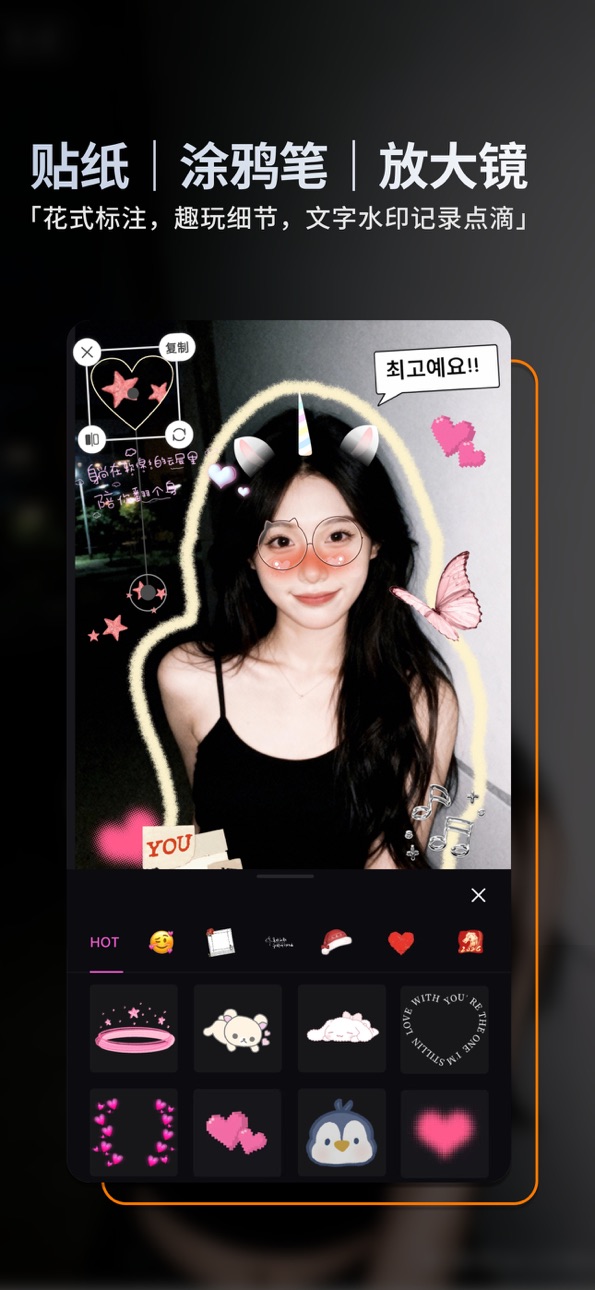
2. Stickers – Cute face covers, meme templates & precise cutouts
3. Double Exposure – Blend images for dreamy artistic effects
4. Sky Replacement – Swap skies with sunsets, rainbows & fantasy clouds
5. Light Effects – Glow, leaks, lens flares & weather overlays (snow/rain)
6. Color Grading – Gradients, dual-tone, vignette & selective exposure
7. Fun Tools – Magnifier, fisheye, doodles, pixelate & mini-planet effects
8. Filters – Vintage film, CCD, LOMO, cinematic & anime styles
9. Text & Backgrounds – Custom fonts, candy-colored BG & trendy patterns
Auto-Renewable VIP Membership Details
Subscription Plans:
Yearly VIP: 12-month subscription cycle
Monthly VIP: 1-month subscription cycle
Payment & Renewal:
Payment will be charged to your iTunes account upon confirmation.
Subscriptions automatically renew unless auto-renewal is turned off at least 24 hours before the current period ends.
Your account will be charged for renewal within 24 hours prior to the end of the current period, extending your membership accordingly.
How to Cancel:
To disable auto-renewal, go to your iPhone Settings → Tap [Apple ID] → Select Subscriptions → Choose Changtu and cancel.
• Terms of Service: https://res.hunly.cn/changpic/html/user_service_policy.html
• Privacy Policy: https://res.hunly.cn/changpic/html/privacy_policy.html
• VIP Subscription Terms: https://res.hunly.cn/changpic/html/vip_policy.html
In-App Purchases PY pricing
畅图-基础订阅 Subscription
连续包年 · Yearly—
连续包月 · Monthly—
Capabilities
In-App Purchases
Accessibility
ipadiphonemacrealityDevicetvoswatch
Version history 18 versions
Build 885649893v2.5.22026-05-14 16:30:41
Added one-click stroke brush and improved the stroke algorithm;
Fixed some minor issues.
Build 885033387v2.5.12026-04-30 19:10:18
1. Introducing "Match Color" - Get a Pro Look in One Tap!
(1)Replicate the style of any photo. Simply upload a reference image to automatically extract its color palette and create a stunning, professional-grade filter.
(2)Fine-tune your results. After applying the look, you can easily adjust the intensity of the color and tone with intuitive sliders.
Build 882772897v2.4.12026-02-25 19:11:38
Portrait - Slim & Reshape: Simply push and drag to slim any part of your face or body.
Portrait - Long Legs: Get longer legs with a more natural lengthening effect.
Portrait - Body Tuner: Manually resize body parts and contour your waist & legs.
Adjust - Curves: Professional color grading with one-tap preset scenes.
Experience Upgrade: Optimized editing workflow for smoother interaction.
Build 882366389v2.3.12026-02-11 17:42:27
1. Introducing "Natural Light":
Add stunning sunlight effects with just one tap! Choose from a variety of colors and shapes. You can customize the temperature and adjust the angle and opacity to blend perfectly with your photo, giving it a natural, airy, and professional finish.
2. Improved editing workflow and user experience.
Build 881521791v2.2.02026-01-15 18:55:09
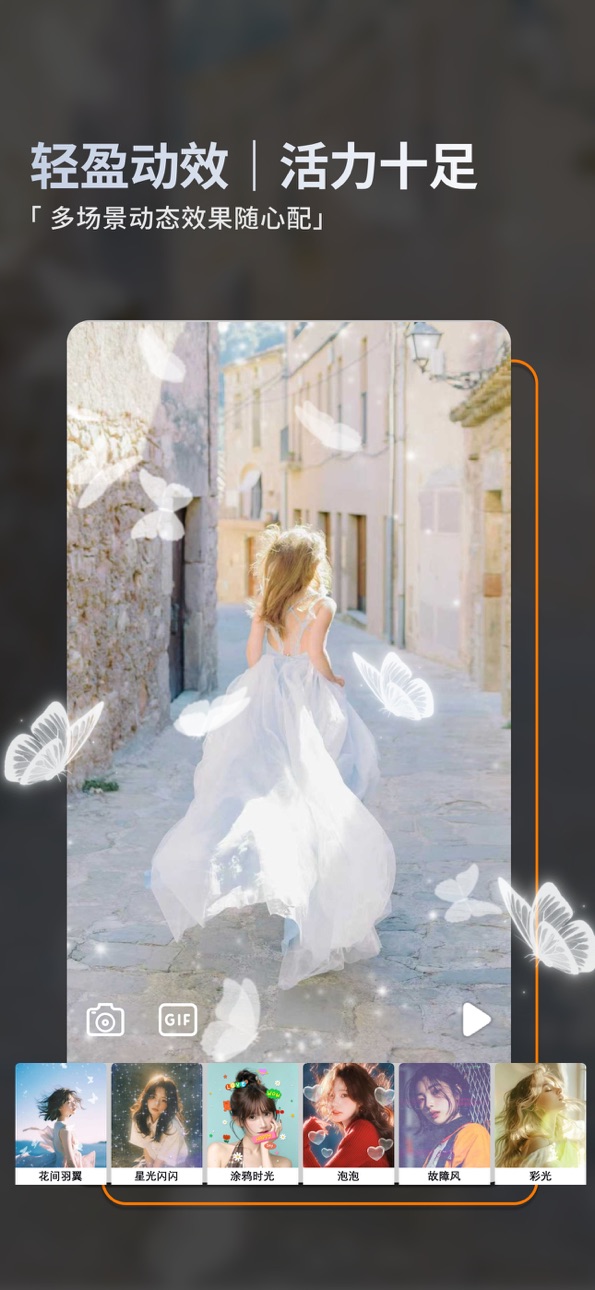
1.Added the "Dynamic Stickers" feature:Apply a variety of lively stickers to photos.
2.Introduced the "Dynamic Effects" feature:
New multi-scene dynamic effects such as shimmering stars, daily doodles, bubbles, petals, and floating snow ambiance.
3.Continued optimization of the overall photo editing interaction.
Build 880257805v2.1.12025-12-02 18:37:17
Improved photo selection screen
Fixed image decoding errors in certain scenarios
Enhanced overall performance for a better user experience
Build 879674533v2.1.02025-11-11 18:49:07
1.Portrait Makeup: Eyelashes, lipstick, eyeshadow & more to create your style.
2.Face Retouch: Reduce double chin, slim face, smooth skin & enhance features.
3.Better editing experience with bug fixes.
Build 878914843v2.0.22025-10-15 14:42:06
Added diverse mosaic styles
Enriched brush library with new basic brushes
Introduced multiple material brushes
Fixed known issues & optimized photo editing
Build 878316292v2.0.12025-09-22 05:43:33
Added HSL and Dehaze adjustments.
Added Radial Blur and Motion Blur effects.
Enhanced photo editing interactions.
Build 877380961v2.0.02025-08-19 18:38:48
Thank you for supporting Changtu!
Homepage redesign – try it now!
Added full-screen watermark feature
Enhanced photo editing interactions
Build 876338229v1.6.02025-07-12 14:37:58
Thank you for supporting Changtu!
1.Added Double Exposure
2. Added Color Overlay
3.Added Gradient Overlay
4. Added Selective Exposure
5. Fixed bugs & improved performance
Build 876056707v1.5.12025-07-02 15:38:14
感谢支持畅图:
小星球功能上线啦!欢迎您体验。
修复若干使用问题,持续为您优化产品体验。
Build 874149221v1.4.22025-04-20 14:33:58
感谢支持畅图:
精美文字模版、人像特效描边上线啦!欢迎您体验。
修复若干使用问题,持续为您优化产品体验。
Build 874111126v1.4.12025-04-17 17:40:17
感谢支持畅图:
1、新增文字 & 文字模板;
2、画笔 & 素材笔升级;
3、新增描边功能:基础描边、特效描边;
4、进行其他一些小优化
Build 873782628v1.3.12025-04-04 15:40:12
新增文字画笔功能
新增若干笔刷
增加图片矫正功能
进行其他用户体验优化
Build 873566263v1.2.12025-03-27 15:48:57
新增暗角、消散、鱼眼、双色调四个功能;
Build 873197257v1.1.12025-03-13 06:47:43
优化图片编辑的图片放大体验
Build 872492134v1.1.02025-02-27 12:00:44
Price history by region
Currency
Show
Columns
Search
Availability 175 of 175 storefronts
| Region | Language | Price | Ratings | Avg | Version |
|---|---|---|---|---|---|
| CN | zh-Hans-CN | Free | 81 | 4.6 | 2.5.2 |
| HK | zh-Hant-HK | Free | 3 | 5.0 | 2.5.2 |
| BR | pt-BR | Free | 1 | 5.0 | 2.5.2 |
| KR | ko | Free | 1 | 5.0 | 2.5.2 |
| MY | en-GB | Free | 1 | 5.0 | 2.5.2 |
| VN | en-GB | Free | 1 | 5.0 | 2.5.2 |
| AE | en-GB | Free | 0 | — | 2.5.2 |
| AF | en-GB | Free | 0 | — | 2.5.2 |
| AG | en-GB | Free | 0 | — | 2.5.2 |
| AI | en-GB | Free | 0 | — | 2.5.2 |
| AL | en-GB | Free | 0 | — | 2.5.2 |
| AM | en-GB | Free | 0 | — | 2.5.2 |
| AO | en-GB | Free | 0 | — | 2.5.2 |
| AR | es-MX | Free | 0 | — | 2.5.2 |
| AT | de-DE | Free | 0 | — | 2.5.2 |
| AU | en-AU | Free | 0 | — | 2.5.2 |
| AZ | en-GB | Free | 0 | — | 2.5.2 |
| BA | en-GB | Free | 0 | — | 2.5.2 |
| BB | en-GB | Free | 0 | — | 2.5.2 |
| BE | en-GB | Free | 0 | — | 2.5.2 |
| BF | en-GB | Free | 0 | — | 2.5.2 |
| BG | en-GB | Free | 0 | — | 2.5.2 |
| BH | en-GB | Free | 0 | — | 2.5.2 |
| BJ | en-GB | Free | 0 | — | 2.5.2 |
| BM | en-GB | Free | 0 | — | 2.5.2 |
| BN | en-GB | Free | 0 | — | 2.5.2 |
| BO | es-MX | Free | 0 | — | 2.5.2 |
| BS | en-GB | Free | 0 | — | 2.5.2 |
| BT | en-GB | Free | 0 | — | 2.5.2 |
| BW | en-GB | Free | 0 | — | 2.5.2 |
| BY | en-GB | Free | 0 | — | 2.5.2 |
| BZ | en-GB | Free | 0 | — | 2.5.2 |
| CA | en-CA | Free | 0 | — | 2.5.2 |
| CD | en-GB | Free | 0 | — | 2.5.2 |
| CG | en-GB | Free | 0 | — | 2.5.2 |
| CH | de-CH | Free | 0 | — | 2.5.2 |
| CI | fr-FR | Free | 0 | — | 2.5.2 |
| CL | es-MX | Free | 0 | — | 2.5.2 |
| CM | fr-FR | Free | 0 | — | 2.5.2 |
| CO | es-MX | Free | 0 | — | 2.5.2 |
| CR | es-MX | Free | 0 | — | 2.5.2 |
| CV | en-GB | Free | 0 | — | 2.5.2 |
| CY | en-GB | Free | 0 | — | 2.5.2 |
| CZ | en-GB | Free | 0 | — | 2.5.2 |
| DE | de-DE | Free | 0 | — | 2.5.2 |
| DK | en-GB | Free | 0 | — | 2.5.2 |
| DM | en-GB | Free | 0 | — | 2.5.2 |
| DO | es-MX | Free | 0 | — | 2.5.2 |
| DZ | en-GB | Free | 0 | — | 2.5.2 |
| EC | es-MX | Free | 0 | — | 2.5.2 |
| EE | en-GB | Free | 0 | — | 2.5.2 |
| EG | en-GB | Free | 0 | — | 2.5.2 |
| ES | es-ES | Free | 0 | — | 2.5.2 |
| FI | en-GB | Free | 0 | — | 2.5.2 |
| FJ | en-GB | Free | 0 | — | 2.5.2 |
| FM | en-GB | Free | 0 | — | 2.5.2 |
| FR | fr-FR | Free | 0 | — | 2.5.2 |
| GA | fr-FR | Free | 0 | — | 2.5.2 |
| GB | en-GB | Free | 0 | — | 2.5.2 |
| GD | en-GB | Free | 0 | — | 2.5.2 |
| GE | en-GB | Free | 0 | — | 2.5.2 |
| GH | en-GB | Free | 0 | — | 2.5.2 |
| GM | en-GB | Free | 0 | — | 2.5.2 |
| GR | en-GB | Free | 0 | — | 2.5.2 |
| GT | es-MX | Free | 0 | — | 2.5.2 |
| GW | en-GB | Free | 0 | — | 2.5.2 |
| GY | en-GB | Free | 0 | — | 2.5.2 |
| HN | es-MX | Free | 0 | — | 2.5.2 |
| HR | en-GB | Free | 0 | — | 2.5.2 |
| HU | en-GB | Free | 0 | — | 2.5.2 |
| ID | en-GB | Free | 0 | — | 2.5.2 |
| IE | en-GB | Free | 0 | — | 2.5.2 |
| IL | en-GB | Free | 0 | — | 2.5.2 |
| IN | en-GB | Free | 0 | — | 2.5.2 |
| IQ | en-GB | Free | 0 | — | 2.5.2 |
| IS | en-GB | Free | 0 | — | 2.5.2 |
| IT | it | Free | 0 | — | 2.5.2 |
| JM | en-GB | Free | 0 | — | 2.5.2 |
| JO | en-GB | Free | 0 | — | 2.5.2 |
| JP | ja | Free | 0 | — | 2.5.2 |
| KE | en-GB | Free | 0 | — | 2.5.2 |
| KG | en-GB | Free | 0 | — | 2.5.2 |
| KH | en-GB | Free | 0 | — | 2.5.2 |
| KN | en-GB | Free | 0 | — | 2.5.2 |
| KW | en-GB | Free | 0 | — | 2.5.2 |
| KY | en-GB | Free | 0 | — | 2.5.2 |
| KZ | en-GB | Free | 0 | — | 2.5.2 |
| LA | en-GB | Free | 0 | — | 2.5.2 |
| LB | en-GB | Free | 0 | — | 2.5.2 |
| LC | en-GB | Free | 0 | — | 2.5.2 |
| LK | en-GB | Free | 0 | — | 2.5.2 |
| LR | en-GB | Free | 0 | — | 2.5.2 |
| LT | en-GB | Free | 0 | — | 2.5.2 |
| LU | en-GB | Free | 0 | — | 2.5.2 |
| LV | en-GB | Free | 0 | — | 2.5.2 |
| LY | en-GB | Free | 0 | — | 2.5.2 |
| MA | en-GB | Free | 0 | — | 2.5.2 |
| MD | en-GB | Free | 0 | — | 2.5.2 |
| ME | en-GB | Free | 0 | — | 2.5.2 |
| MG | en-GB | Free | 0 | — | 2.5.2 |
| MK | en-GB | Free | 0 | — | 2.5.2 |
| ML | en-GB | Free | 0 | — | 2.5.2 |
| MM | en-GB | Free | 0 | — | 2.5.2 |
| MN | en-GB | Free | 0 | — | 2.5.2 |
| MO | zh-Hant-HK | Free | 0 | — | 2.5.2 |
| MR | en-GB | Free | 0 | — | 2.5.2 |
| MS | en-GB | Free | 0 | — | 2.5.2 |
| MT | en-GB | Free | 0 | — | 2.5.2 |
| MU | en-GB | Free | 0 | — | 2.5.2 |
| MV | en-GB | Free | 0 | — | 2.5.2 |
| MW | en-GB | Free | 0 | — | 2.5.2 |
| MX | es-MX | Free | 0 | — | 2.5.2 |
| MZ | en-GB | Free | 0 | — | 2.5.2 |
| NA | en-GB | Free | 0 | — | 2.5.2 |
| NE | en-GB | Free | 0 | — | 2.5.2 |
| NG | en-GB | Free | 0 | — | 2.5.2 |
| NI | es-MX | Free | 0 | — | 2.5.2 |
| NL | nl | Free | 0 | — | 2.5.2 |
| NO | en-GB | Free | 0 | — | 2.5.2 |
| NP | en-GB | Free | 0 | — | 2.5.2 |
| NR | en-GB | Free | 0 | — | 2.5.2 |
| NZ | en-AU | Free | 0 | — | 2.5.2 |
| OM | en-GB | Free | 0 | — | 2.5.2 |
| PA | es-MX | Free | 0 | — | 2.5.2 |
| PE | es-MX | Free | 0 | — | 2.5.2 |
| PG | en-GB | Free | 0 | — | 2.5.2 |
| PH | en-GB | Free | 0 | — | 2.5.2 |
| PK | en-GB | Free | 0 | — | 2.5.2 |
| PL | en-GB | Free | 0 | — | 2.5.2 |
| PT | pt-PT | Free | 0 | — | 2.5.2 |
| PW | en-GB | Free | 0 | — | 2.5.2 |
| PY | es-MX | Free | 0 | — | 2.5.2 |
| QA | en-GB | Free | 0 | — | 2.5.2 |
| RO | en-GB | Free | 0 | — | 2.5.2 |
| RS | en-GB | Free | 0 | — | 2.5.2 |
| RU | ru | Free | 0 | — | 2.5.2 |
| RW | en-GB | Free | 0 | — | 2.5.2 |
| SA | en-GB | Free | 0 | — | 2.5.2 |
| SB | en-GB | Free | 0 | — | 2.5.2 |
| SC | en-GB | Free | 0 | — | 2.5.2 |
| SE | sv | Free | 0 | — | 2.5.2 |
| SG | en-GB | Free | 0 | — | 2.5.2 |
| SI | en-GB | Free | 0 | — | 2.5.2 |
| SK | en-GB | Free | 0 | — | 2.5.2 |
| SL | en-GB | Free | 0 | — | 2.5.2 |
| SN | en-GB | Free | 0 | — | 2.5.2 |
| SR | en-GB | Free | 0 | — | 2.5.2 |
| ST | en-GB | Free | 0 | — | 2.5.2 |
| SV | es-MX | Free | 0 | — | 2.5.2 |
| SZ | en-GB | Free | 0 | — | 2.5.2 |
| TC | en-GB | Free | 0 | — | 2.5.2 |
| TD | en-GB | Free | 0 | — | 2.5.2 |
| TH | en-GB | Free | 0 | — | 2.5.2 |
| TJ | en-GB | Free | 0 | — | 2.5.2 |
| TM | en-GB | Free | 0 | — | 2.5.2 |
| TN | en-GB | Free | 0 | — | 2.5.2 |
| TO | en-GB | Free | 0 | — | 2.5.2 |
| TR | en-GB | Free | 0 | — | 2.5.2 |
| TT | en-GB | Free | 0 | — | 2.5.2 |
| TW | zh-Hant-TW | Free | 0 | — | 2.5.2 |
| TZ | en-GB | Free | 0 | — | 2.5.2 |
| UA | en-GB | Free | 0 | — | 2.5.2 |
| UG | en-GB | Free | 0 | — | 2.5.2 |
| US | en-US | Free | 0 | — | 2.5.2 |
| UY | en-GB | Free | 0 | — | 2.5.2 |
| UZ | en-GB | Free | 0 | — | 2.5.2 |
| VC | en-GB | Free | 0 | — | 2.5.2 |
| VE | es-MX | Free | 0 | — | 2.5.2 |
| VG | en-GB | Free | 0 | — | 2.5.2 |
| VU | en-GB | Free | 0 | — | 2.5.2 |
| XK | en-GB | Free | 0 | — | 2.5.2 |
| YE | en-GB | Free | 0 | — | 2.5.2 |
| ZA | en-GB | Free | 0 | — | 2.5.2 |
| ZM | en-GB | Free | 0 | — | 2.5.2 |
| ZW | en-GB | Free | 0 | — | 2.5.2 |
Change log 22 changes · PY
✎
releaseNotes updated
Added one-click stroke brush and improved the stroke algorithm;
Fixed some minor issues.
✎
description updated
All-in-One Photo Editor: Fun & Powerful Tools
Transform photos with one tap! Packed with creative tools:
1. Frames – Polaroid, vintage, minimalist, 3D & han
✎
subtitle updated
Photo Filters&Effects
✎
name updated
Photo Editor:changtu
◆
Version 2.5.2 released
Added one-click stroke brush and improved the stroke algorithm;
Fixed some minor issues.
◆
Version 2.5.1 released
1. Introducing "Match Color" - Get a Pro Look in One Tap!
(1)Replicate the style of any photo. Simply upload a reference image to automatically extract its color palette and create a stunning, professional-grade filter.
(2)Fine-tune your re
◆
Version 2.4.1 released
Portrait - Slim & Reshape: Simply push and drag to slim any part of your face or body.
Portrait - Long Legs: Get longer legs with a more natural lengthening effect.
Portrait - Body Tuner: Manually resize body parts and contour your waist
◆
Version 2.3.1 released
1. Introducing "Natural Light":
Add stunning sunlight effects with just one tap! Choose from a variety of colors and shapes. You can customize the temperature and adjust the angle and opacity to blend perfectly with your photo, giving it a
◆
Version 2.2.0 released
1.Added the "Dynamic Stickers" feature:Apply a variety of lively stickers to photos.
2.Introduced the "Dynamic Effects" feature:
New multi-scene dynamic effects such as shimmering stars, daily doodles, bubbles, petals, and floating snow a
◆
Version 2.1.1 released
Improved photo selection screen
Fixed image decoding errors in certain scenarios
Enhanced overall performance for a better user experience
◆
Version 2.1.0 released
1.Portrait Makeup: Eyelashes, lipstick, eyeshadow & more to create your style.
2.Face Retouch: Reduce double chin, slim face, smooth skin & enhance features.
3.Better editing experience with bug fixes.
◆
Version 2.0.2 released
Added diverse mosaic styles
Enriched brush library with new basic brushes
Introduced multiple material brushes
Fixed known issues & optimized photo editing
◆
Version 2.0.1 released
Added HSL and Dehaze adjustments.
Added Radial Blur and Motion Blur effects.
Enhanced photo editing interactions.
◆
Version 2.0.0 released
Thank you for supporting Changtu!
Homepage redesign – try it now!
Added full-screen watermark feature
Enhanced photo editing interactions
◆
Version 1.6.0 released
Thank you for supporting Changtu!
1.Added Double Exposure
2. Added Color Overlay
3.Added Gradient Overlay
4. Added Selective Exposure
5. Fixed bugs & improved performance
◆
Version 1.5.1 released
感谢支持畅图:
小星球功能上线啦!欢迎您体验。
修复若干使用问题,持续为您优化产品体验。
◆
Version 1.4.2 released
感谢支持畅图:
精美文字模版、人像特效描边上线啦!欢迎您体验。
修复若干使用问题,持续为您优化产品体验。
◆
Version 1.4.1 released
感谢支持畅图:
1、新增文字 & 文字模板;
2、画笔 & 素材笔升级;
3、新增描边功能:基础描边、特效描边;
4、进行其他一些小优化
◆
Version 1.3.1 released
新增文字画笔功能
新增若干笔刷
增加图片矫正功能
进行其他用户体验优化
◆
Version 1.2.1 released
新增暗角、消散、鱼眼、双色调四个功能;
◆
Version 1.1.1 released
优化图片编辑的图片放大体验
◆
Version 1.1.0 released