Home › Lifestyle

 ZM
ZM
 AIen-GB
 AOen-GB
 ARes-MX
 ATde-DE
 AUen-AU
 BAen-GB
 BEen-GB
 BFen-GB
 BGen-GB
 BJen-GB
 BOes-MX
 BRpt-BR
 BSen-GB
 BWen-GB
 BYen-GB
 CDen-GB
 CGen-GB
 CHde-CH
 CIfr-FR
 CLes-MX
 CMfr-FR
 COes-MX
 CRes-MX
 CVen-GB
 CZen-GB
 DEde-DE
 DKen-GB
 DOes-MX
 DZen-GB
 ECes-MX
 EEen-GB
 ESes-ES
 FIen-GB
 FRfr-FR
 GAfr-FR
 GBen-GB
 GDen-GB
 GHen-GB
 GMen-GB
 GRen-GB
 GTes-MX
 GWen-GB
 HNes-MX
 HRen-GB
 HUen-GB
 IEen-GB
 ISen-GB
 ITit
ITit JMen-GB
 KEen-GB
 KNen-GB
 LRen-GB
 LTen-GB
 LUen-GB
 LVen-GB
 LYen-GB
 MAen-GB
 MGen-GB
 MLen-GB
 MSen-GB
 MUen-GB
 MWen-GB
 MXes-MX
 MZen-GB
 NAen-GB
 NEen-GB
 NGen-GB
 NIes-MX
 NLnl
NLnl NOen-GB
 NZen-AU
 PAes-MX
 PEes-MX
 PLen-GB
 PTpt-PT
 PYes-MX
 ROen-GB
 RSen-GB
 RUru
RUru RWen-GB
 SCen-GB
 SEsv
SEsv SIen-GB
 SKen-GB
 SLen-GB
 SNen-GB
 STen-GB
 SVes-MX
 SZen-GB
 TCen-GB
 TDen-GB
 TNen-GB
 TTen-GB
 TZen-GB
 UAen-GB
 UGen-GB
 USen-US
 UYen-GB
 VCen-GB
 VEes-MX
 VGen-GBZMen-GB
 ZWen-GB
103 of 103 storefronts
Content in en-US
Content in en-US
Information
Preview 1 platform
iPhone 6 images


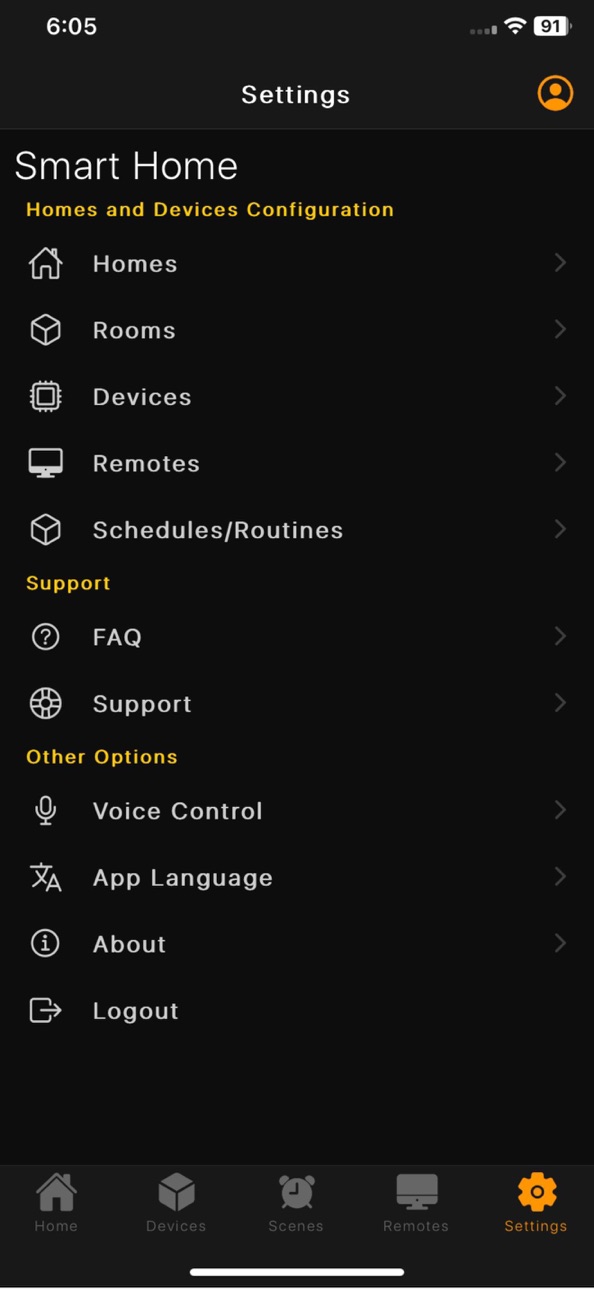
What’s New Version 3.1.1
What’s New in This Update
We’ve packed this release with performance improvements, new device support, and usability enhancements to make your smart home experience smarter, safer, and more responsive.
New Features
• Adjust font size within the app for improved accessibility and comfort
• Fan speed control is now available directly in Home screen switch shortcuts
• Lock Home now supports alerts triggered by motion sensors and camera-based motion detection for enhanced home security
Performance Improvements
• Significantly improved Home page loading time for a faster, smoother experience
Expanded Device Support
• Added support for Zigbee-based devices, including:
– Gas sensors
– Smoke sensors
– Vibration sensors
– Motion sensors
– Scene remotes
– Smart knobs
• All supported Zigbee devices now work seamlessly with workflows and automations
• Added support for water tank level sensors, including automation and workflow integration
Siri & Automation Fixes
• Fixed an issue where Siri Shortcuts were not executing reliably
Enhancements & Fixes
• Miscellaneous UI enhancements for a cleaner and more intuitive interface
• Bug fixes and stability improvements
Update now to enjoy better performance, smarter automation, and improved home security
Description
1. Control and Schedule all the appliances from the mobile anywhere, anytime.
2. Manage Access to other users by joining them into your home.
3. Control all your IR appliances like TV, Set Top Box, Air Conditioner, Projector etc.
4. Get a personalised and elaborate Entertainment Program Guide, to keep track of what's playing on your TV.
5. Schedule all your appliances using Routines and Scenes.
6. Create Workflows to do a set of actions based on room temperature, motion etc.
7. View real-time power consumption and energy stats of the appliances.
8. Control All your appliances using voice with Google Assistant and Amazon Alexa.
Accessibility
ipadiphonemacrealityDevicetvoswatch
Version history 4 versions
Build 882301613v3.1.12026-02-09 20:11:26
What’s New in This Update
We’ve packed this release with performance improvements, new device support, and usability enhancements to make your smart home experience smarter, safer, and more responsive.
New Features
• Adjust font size within the app for improved accessibility and comfort
• Fan speed control is now available directly in Home screen switch shortcuts
• Lock Home now supports alerts triggered by motion sensors and camera-based motion detection for enhanced home security
Performance Improvements
• Significantly improved Home page loading time for a faster, smoother experience
Expanded Device Support
• Added support for Zigbee-based devices, including:
– Gas sensors
– Smoke sensors
– Vibration sensors
– Motion sensors
– Scene remotes
– Smart knobs
• All supported Zigbee devices now work seamlessly with workflows and automations
• Added support for water tank level sensors, including automation and workflow integration
Siri & Automation Fixes
• Fixed an issue where Siri Shortcuts were not executing reliably
Enhancements & Fixes
• Miscellaneous UI enhancements for a cleaner and more intuitive interface
• Bug fixes and stability improvements
Update now to enjoy better performance, smarter automation, and improved home security
Build 878835834v3.1.02025-10-13 02:20:36
What's New in This Release:
Home Console Integration
- Full support for Home Console tablets with built-in smart home app interface
- Manage Weather, Shortcuts etc on Home Console using the mobile application.
Enhanced User Experience
- Comprehensive UI enhancements and performance improvements throughout the app
Enhanced Lighting Controls
- CCT Light Controllers can be converted to regular light dimmers with same UI.
- Converted CCT lights can be added in Group Control
Smart Insights & Notifications
- Daily home summary notifications delivered every morning
- Comprehensive previous day reports including:
- Energy consumption analysis
- Appliance runtime statistics
- Energy-saving and automation tips
- Sensor data summaries
- Get warning alerts before nearby system maintenance downtime
Stay informed about your home's performance and efficiency
Guest Access Control
- Temporary guest access feature - grant time-limited access to visitors
- Perfect for housekeepers, maintenance staff, or short-term visitors
- Complete control over guest permissions and access duration
Enhanced User Management
- Prime users can now restrict other users from adding or deleting devices in their home
Safety & Security Features
- New Safe Mode for energy meters with intelligent voltage monitoring
- Selected appliances will shutdown automatically when unsafe voltage conditions are detected
- Notification is sent when Safe Mode is triggered.
Technical Improvements
- Get clear reason when email OTP sending fails
- Various bug fixes and stability improvements
- Performance optimizations for smoother app experience
Automation Enhancements
- Set RGB colors in your automated Workflows/Automations
- Control CCT light temperature in your automated Workflows/Automations
Build 873518394v2.7.92025-03-25 19:38:39
-minor bug fixes.
Build 871940627v1.02025-01-23 20:55:12
No pricing data captured yet — comparisons appear once the app has paid storefronts or in-app purchases.
Availability 103 of 103 storefronts
| Region | Language | Price | Ratings | Avg | Version |
|---|---|---|---|---|---|
| AI | en-GB | Free | 0 | — | 3.1.1 |
| AO | en-GB | Free | 0 | — | 3.1.1 |
| AR | es-MX | Free | 0 | — | 3.1.1 |
| AT | de-DE | Free | 0 | — | 3.1.1 |
| AU | en-AU | Free | 0 | — | 3.1.1 |
| BA | en-GB | Free | 0 | — | 3.1.1 |
| BE | en-GB | Free | 0 | — | 3.1.1 |
| BF | en-GB | Free | 0 | — | 3.1.1 |
| BG | en-GB | Free | 0 | — | 3.1.1 |
| BJ | en-GB | Free | 0 | — | 3.1.1 |
| BO | es-MX | Free | 0 | — | 3.1.1 |
| BR | pt-BR | Free | 0 | — | 3.1.1 |
| BS | en-GB | Free | 0 | — | 3.1.1 |
| BW | en-GB | Free | 0 | — | 3.1.1 |
| BY | en-GB | Free | 0 | — | 3.1.1 |
| CD | en-GB | Free | 0 | — | 3.1.1 |
| CG | en-GB | Free | 0 | — | 3.1.1 |
| CH | de-CH | Free | 0 | — | 3.1.1 |
| CI | fr-FR | Free | 0 | — | 3.1.1 |
| CL | es-MX | Free | 0 | — | 3.1.1 |
| CM | fr-FR | Free | 0 | — | 3.1.1 |
| CO | es-MX | Free | 0 | — | 3.1.1 |
| CR | es-MX | Free | 0 | — | 3.1.1 |
| CV | en-GB | Free | 0 | — | 3.1.1 |
| CZ | en-GB | Free | 0 | — | 3.1.1 |
| DE | de-DE | Free | 0 | — | 3.1.1 |
| DK | en-GB | Free | 0 | — | 3.1.1 |
| DO | es-MX | Free | 0 | — | 3.1.1 |
| DZ | en-GB | Free | 0 | — | 3.1.1 |
| EC | es-MX | Free | 0 | — | 3.1.1 |
| EE | en-GB | Free | 0 | — | 3.1.1 |
| ES | es-ES | Free | 0 | — | 3.1.1 |
| FI | en-GB | Free | 0 | — | 3.1.1 |
| FR | fr-FR | Free | 0 | — | 3.1.1 |
| GA | fr-FR | Free | 0 | — | 3.1.1 |
| GB | en-GB | Free | 0 | — | 3.1.1 |
| GD | en-GB | Free | 0 | — | 3.1.1 |
| GH | en-GB | Free | 0 | — | 3.1.1 |
| GM | en-GB | Free | 0 | — | 3.1.1 |
| GR | en-GB | Free | 0 | — | 3.1.1 |
| GT | es-MX | Free | 0 | — | 3.1.1 |
| GW | en-GB | Free | 0 | — | 3.1.1 |
| HN | es-MX | Free | 0 | — | 3.1.1 |
| HR | en-GB | Free | 0 | — | 3.1.1 |
| HU | en-GB | Free | 0 | — | 3.1.1 |
| IE | en-GB | Free | 0 | — | 3.1.1 |
| IS | en-GB | Free | 0 | — | 3.1.1 |
| IT | it | Free | 0 | — | 3.1.1 |
| JM | en-GB | Free | 0 | — | 3.1.1 |
| KE | en-GB | Free | 0 | — | 3.1.1 |
| KN | en-GB | Free | 0 | — | 3.1.1 |
| LR | en-GB | Free | 0 | — | 3.1.1 |
| LT | en-GB | Free | 0 | — | 3.1.1 |
| LU | en-GB | Free | 0 | — | 3.1.1 |
| LV | en-GB | Free | 0 | — | 3.1.1 |
| LY | en-GB | Free | 0 | — | 3.1.1 |
| MA | en-GB | Free | 0 | — | 3.1.1 |
| MG | en-GB | Free | 0 | — | 3.1.1 |
| ML | en-GB | Free | 0 | — | 3.1.1 |
| MS | en-GB | Free | 0 | — | 3.1.1 |
| MU | en-GB | Free | 0 | — | 3.1.1 |
| MW | en-GB | Free | 0 | — | 3.1.1 |
| MX | es-MX | Free | 0 | — | 3.1.1 |
| MZ | en-GB | Free | 0 | — | 3.1.1 |
| NA | en-GB | Free | 0 | — | 3.1.1 |
| NE | en-GB | Free | 0 | — | 3.1.1 |
| NG | en-GB | Free | 0 | — | 3.1.1 |
| NI | es-MX | Free | 0 | — | 3.1.1 |
| NL | nl | Free | 0 | — | 3.1.1 |
| NO | en-GB | Free | 0 | — | 3.1.1 |
| NZ | en-AU | Free | 0 | — | 3.1.1 |
| PA | es-MX | Free | 0 | — | 3.1.1 |
| PE | es-MX | Free | 0 | — | 3.1.1 |
| PL | en-GB | Free | 0 | — | 3.1.1 |
| PT | pt-PT | Free | 0 | — | 3.1.1 |
| PY | es-MX | Free | 0 | — | 3.1.1 |
| RO | en-GB | Free | 0 | — | 3.1.1 |
| RS | en-GB | Free | 0 | — | 3.1.1 |
| RU | ru | Free | 0 | — | 3.1.1 |
| RW | en-GB | Free | 0 | — | 3.1.1 |
| SC | en-GB | Free | 0 | — | 3.1.1 |
| SE | sv | Free | 0 | — | 3.1.1 |
| SI | en-GB | Free | 0 | — | 3.1.1 |
| SK | en-GB | Free | 0 | — | 3.1.1 |
| SL | en-GB | Free | 0 | — | 3.1.1 |
| SN | en-GB | Free | 0 | — | 3.1.1 |
| ST | en-GB | Free | 0 | — | 3.1.1 |
| SV | es-MX | Free | 0 | — | 3.1.1 |
| SZ | en-GB | Free | 0 | — | 3.1.1 |
| TC | en-GB | Free | 0 | — | 3.1.1 |
| TD | en-GB | Free | 0 | — | 3.1.1 |
| TN | en-GB | Free | 0 | — | 3.1.1 |
| TT | en-GB | Free | 0 | — | 3.1.1 |
| TZ | en-GB | Free | 0 | — | 3.1.1 |
| UA | en-GB | Free | 0 | — | 3.1.1 |
| UG | en-GB | Free | 0 | — | 3.1.1 |
| US | en-US | Free | 0 | — | 3.1.1 |
| UY | en-GB | Free | 0 | — | 3.1.1 |
| VC | en-GB | Free | 0 | — | 3.1.1 |
| VE | es-MX | Free | 0 | — | 3.1.1 |
| VG | en-GB | Free | 0 | — | 3.1.1 |
| ZM | en-GB | Free | 0 | — | 3.1.1 |
| ZW | en-GB | Free | 0 | — | 3.1.1 |
Change log 7 changes · ZM
✎
releaseNotes updated
What’s New in This Update
We’ve packed this release with performance improvements, new device support, and usability enhancements to make your smart home exper
✎
description updated
1. Control and Schedule all the appliances from the mobile anywhere, anytime.
2. Manage Access to other users by joining them into your home.
3. Control
✎
name updated
MARU SMART HOME
◆
Version 3.1.1 released
What’s New in This Update
We’ve packed this release with performance improvements, new device support, and usability enhancements to make your smart home experience smarter, safer, and more responsive.
New Features
• Adjust font size wit
◆
Version 3.1.0 released
What's New in This Release:
Home Console Integration
- Full support for Home Console tablets with built-in smart home app interface
- Manage Weather, Shortcuts etc on Home Console using the mobile application.
Enhanced User Experience
-
◆
Version 2.7.9 released
-minor bug fixes.
◆
Version 1.0 released