Home › Finance

 CA
CA
 AEen-GB
 AFen-GB
 AGen-GB
 AIen-GB
 ALen-GB
 AMen-GB
 AOen-GB
 ARes-MX
 ATde-DE
 AUen-AU
 AZen-GB
 BAen-GB
 BBen-GB
 BEen-GB
 BFen-GB
 BGen-GB
 BHen-GB
 BJen-GB
 BMen-GB
 BNen-GB
 BOes-MX
 BRpt-BR
 BSen-GB
 BTen-GB
 BWen-GB
 BYen-GB
 BZen-GBCAen-CA
 CDen-GB
 CGen-GB
 CHde-CH
 CIfr-FR
 CLes-MX
 CMfr-FR
 CNzh-Hans-CN
 COes-MX
 CRes-MX
 CVen-GB
 CYen-GB
 CZen-GB
 DEde-DE
 DKen-GB
 DMen-GB
 DOes-MX
 DZen-GB
 ECes-MX
 EEen-GB
 EGen-GB
 ESes-ES
 FIen-GB
 FJen-GB
 FMen-GB
 FRfr-FR
 GAfr-FR
 GBen-GB
 GDen-GB
 GEen-GB
 GHen-GB
 GMen-GB
 GRen-GB
 GTes-MX
 GWen-GB
 GYen-GB
 HKzh-Hant-HK
 HNes-MX
 HRen-GB
 HUen-GB
 IDen-GB
 IEen-GB
 ILen-GB
 INen-GB
 IQen-GB
 ISen-GB
 ITit
ITit JMen-GB
 JOen-GB
 JPja
JPja KEen-GB
 KGen-GB
 KHen-GB
 KNen-GB
 KRko
KRko KWen-GB
 KYen-GB
 KZen-GB
 LAen-GB
 LBen-GB
 LCen-GB
 LKen-GB
 LRen-GB
 LTen-GB
 LUen-GB
 LVen-GB
 LYen-GB
 MAen-GB
 MDen-GB
 MEen-GB
 MGen-GB
 MKen-GB
 MLen-GB
 MMen-GB
 MNen-GB
 MOzh-Hant-HK
 MRen-GB
 MSen-GB
 MTen-GB
 MUen-GB
 MVen-GB
 MWen-GB
 MXes-MX
 MYen-GB
 MZen-GB
 NAen-GB
 NEen-GB
 NGen-GB
 NIes-MX
 NLnl
NLnl NOen-GB
 NPen-GB
 NRen-GB
 NZen-AU
 OMen-GB
 PAes-MX
 PEes-MX
 PGen-GB
 PHen-GB
 PKen-GB
 PLen-GB
 PTpt-PT
 PWen-GB
 PYes-MX
 QAen-GB
 ROen-GB
 RSen-GB
 RUru
RUru RWen-GB
 SAen-GB
 SBen-GB
 SCen-GB
 SEsv
SEsv SGen-GB
 SIen-GB
 SKen-GB
 SLen-GB
 SNen-GB
 SRen-GB
 STen-GB
 SVes-MX
 SZen-GB
 TCen-GB
 TDen-GB
 THen-GB
 TJen-GB
 TMen-GB
 TNen-GB
 TOen-GB
 TRen-GB
 TTen-GB
 TWzh-Hant-TW
 TZen-GB
 UAen-GB
 UGen-GB
 USen-US
 UYen-GB
 UZen-GB
 VCen-GB
 VEes-MX
 VGen-GB
 VNen-GB
 VUen-GB
 XKen-GB
 YEen-GB
 ZAen-GB
 ZMen-GB
 ZWen-GB
175 of 175 storefronts
Content in en-US
Content in en-US
Information
Preview 1 platform
iPhone 5 images
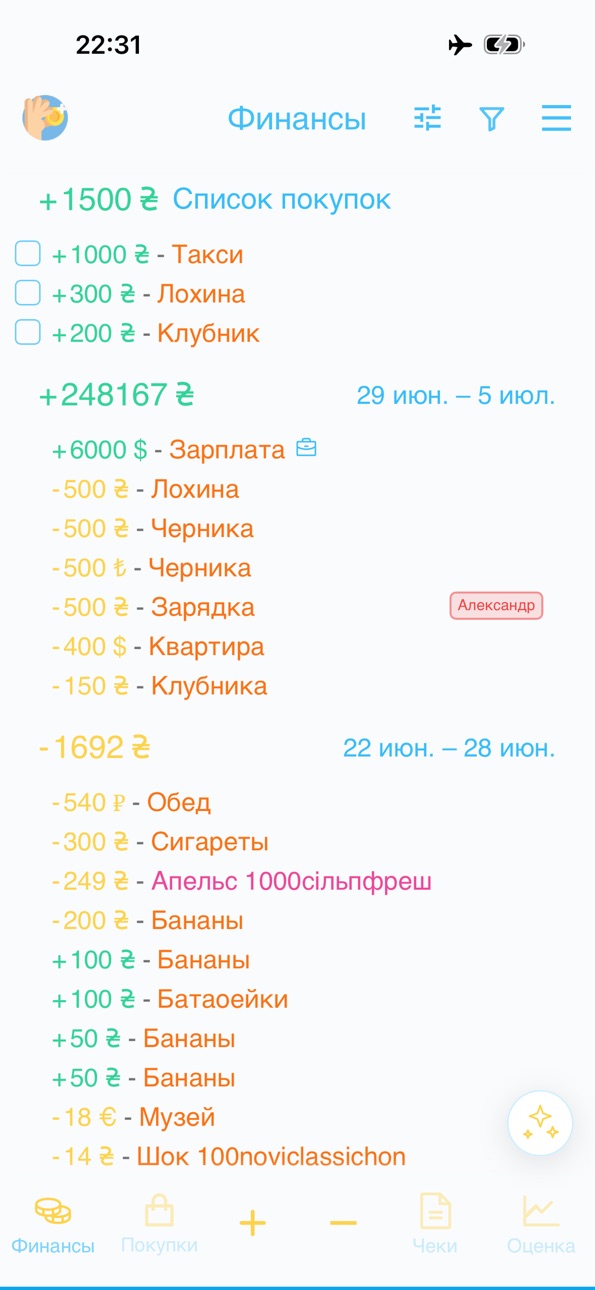

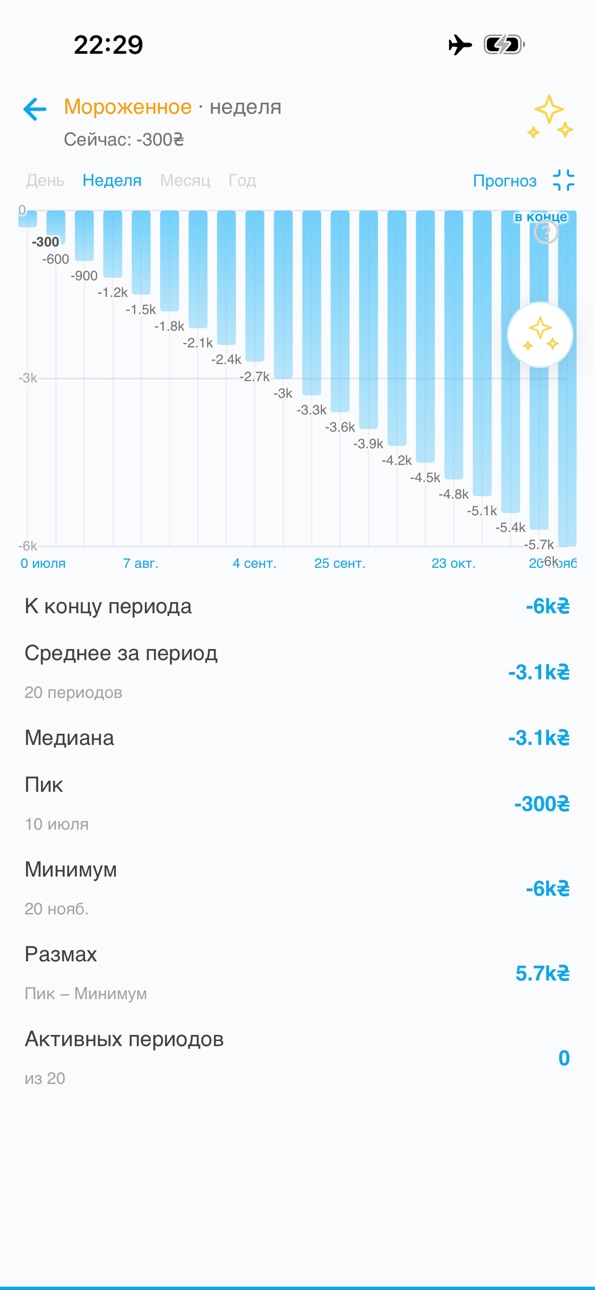


What’s New Version 2.8.0
- Added purchase analysis from a photo: ingredients, benefits, possible downsides, and evaluation history.
- Finances, shopping items, and receipts are now collected in one list.
- Shopping items can be marked as planned expenses and shared through shared access.
- Editing is easier: amount and currency are in one field, and buttons adapt to your habits.
- Improved navigation, sync, receipt photos, and expenses list stability.
Description
Expenses — a fast and simple expense tracker. Add an item by entering a name and amount, or just take a photo of a receipt — the app will fill in the rest automatically.
QUICK ENTRY
• Two fields: name and amount. Tap "Add", enter the next one, repeat.
• Popular items are suggested with one tap based on past entries.
• Save a batch of items in one action — no forced categories or long forms.
RECEIPT SCANNING
• Open the scanner, take a photo of the receipt.
• Built-in iOS text recognition (Apple Vision) reads the receipt directly on your device.
• A language model parses the text into clean items: name, amount, category.
• Review and adjust the result before saving.
EXPENSE LIST
• View expenses by period.
• Grouped by day — see where and how much you spent.
• Tap an item to edit or delete.
SETTINGS
• Show cents — on/off.
• Dark theme.
• 24 interface languages.
YOUR DATA
Expenses are stored on your device, not on our servers. Receipt photos are processed locally — only the recognized text (not the image) is sent to AI, without any personal data.
No ads, no subscriptions, no paywalls. Just a fast way to know where your money goes.
Accessibility
ipadiphonemacrealityDevicetvoswatch
Version history 9 versions
Build 887819775v2.8.02026-07-05 07:03:22
- Added purchase analysis from a photo: ingredients, benefits, possible downsides, and evaluation history.
- Finances, shopping items, and receipts are now collected in one list.
- Shopping items can be marked as planned expenses and shared through shared access.
- Editing is easier: amount and currency are in one field, and buttons adapt to your habits.
- Improved navigation, sync, receipt photos, and expenses list stability.
Build 887253320v2.7.02026-06-25 04:03:16
- New Pro account: one-month trial, then $10
- AI assistant and receipt scanning help you sort expenses faster
- Overview is more accurate: charts now match the selected data
- Expense and income filters help you find the right records faster
- The expenses screen and navigation feel calmer and easier for daily tracking
Build 886969782v2.62026-06-16 19:08:51
- Categories can now be moved to the bottom of the screen and selected with buttons
- Offline mode is now available for working without internet
- Local backup helps keep your data under control
- Recurring expenses and income can be tracked automatically
- Deleted records go to the trash and can be restored
- AI helps automatically assign categories and tags
- Autofill has become more accurate and offers more useful suggestions
- Usage tips now appear one at a time and don't interfere with your work
- Settings are clearer, and you can choose group icons yourself
Build 886342529v2.5.02026-06-02 10:47:39
— Google Sign-in on iOS — transition to GoogleSignIn 7.x (fix for App Store rejection ITMS-91061)
— "Report a Bug" mode promo
— Collapsible sidebar sections
— "Don't overspend" daily reminder
— Starred feedback panel — sending to support
— Welcome screen on first launch
— Graphs — pie chart by category and spending curve with forecast
— Spending categories with automatic selection by AI
— Income tracking — custom categories and income labels
— Logging in to another account via email
— Welcome screen — text and account login
— Graphs — period selection and category legend
— Bottom panel — concave notch under the "+" button
— Notifications about support responses
— Spending grouping — by category, name, or group
— Expanded categories do not collapse
— Receipts — currency conversion to the screen currency
— Group separators and indentation Default rows
— Undo/redo in the editor work
— Requests over the expense editor
— The panel is more compact, with the "Close" tooltip text
— Label switcher in the editing panel
— Expense doesn't close when switching to another section
— Requests via Capacitor Browser (SSO)
— Panel closing logic — module with tests
— Forecast in the tooltip by default
— A category with one element expands
— Notification when adding a task
— Toasts at the bottom of the screen
— Expense date only when editing
— Separators and indents are disabled by default
— AI tips in the interface language, friendly tone
— New expense labels with colors
— Category name and percentage on one line
Build 885993665v2.4.02026-05-28 13:26:44
— SideMenu and Expenses page
— Rrweb session recording and replay viewer
— SideMenu, RiInboxLine icon
— Cell height by content
— Delete confirmation, "Report error" toggle
— Swipe-to-dismiss in ReceiptPhoto
— Tickets-api and ticket list in dev-feedback
— "New task" instead of "New error", SVG login icons
— Anonymous tasks, ffmpeg video preview, status counters
— Global logout on 401, empty token protection
— Font size, settings synchronization, version badge with date
— Smooth autoscroll to the editable line, padding under the keyboard
— Transparent background for login icons in dark mode
— "New task" → "New ticket" in dev-feedback
— Skeleton photo in the group header, sorting items by total
— "Support" in the sidebar
— Expanded toast text when creating a task
— New EventsKit plugin for iOS
— Dark sidebar background
— Console toggle in the menu
— Menu and search redesign
— App Store metadata localization (40+ languages)
— Automatic currency conversion based on historical exchange rates
— Custom auth-api instead of Logto — anonymous users, Apple/Google login
— Extra space when auto-scrolling the date
— Deleted label not showing
— Currency instead of coin in the list
— Tapping doesn't reopen the form
— Apple/Google login fix
— Account unlinking on exit
— Autocamera and text label settings
— Swiping down closes the form
— Support requests
— Tutorial tips
— Restore settings and tutorial items deleted during iOS Dev Build
— Version and sign-out button in the same menu footer — the version is always visible
— Sign-out from Apple and Google accounts is restored (unlink)
— Auto-restart of listeners — the hotkey and gesture no longer freeze
— "Complete tutorial" button instead of "Show tutorial"
— Google client ID fallback — sign-in doesn't crash without env
— After signing in, the login page closes (Apple)
— Signing in again with Apple/Google re-enters the account
Build 885312856v2.3.02026-05-07 02:59:32
— Multiple spending flags (flag → flags[] migration)
— Custom flags — server synchronization (user_flags table)
— English localization
— iOS screenshots — autologin via Logto, RU+EN
— Toast for network errors; Chatwoot is disabled in native mode.
— Logto prompt: login — always a login form.
— Custom flags — adding, 18-color palette, deleting with long-press.
— Custom forecast horizons — adding, deleting, resetting to defaults.
— Forecast chart with drilldown (weeks/months/years)
— Edit overlay redesign — keyboard/date/flag/forecast modes.
— Login screen — 5 provider icons (Google, Apple, Microsoft, GitHub, Yandex), scale animation, centered icons, Login button below.
— Logto theme — Sunrise Rain logo, colors #0ea5e9/#38bdf8, enlarged logo, Yandex icon.
— The main page loader is vertically centered and doesn't freeze on loading errors.
— Login screen (email+password, 14 OAuth, guest) and profile page.
— Email and "Exit" in the side menu
— Forecast tooltip — app styles, toggle mode, toolbar icon
— Spending quality flags — 5 levels (terrible/bad/average/good/excellent)
— Spending forecast and DeepSeek advice in the EditToolbar tooltip
— When expanded, the group retains the aggregate row with ×N
Build 884656330v2.02026-04-29 16:34:07
— Developer mode and app version in the sidebar
— Sentence case and truncation of long product names
Build 883874118v1.12026-03-29 01:15:50
- Автозаполнение для названий трат
- Добавлены фильтры периода: месяц, неделя, год
- Добавлено "Связаться с нами"
- Очистка полей по нажатию на крестик
- Группировка трат по названиям
- Улучшен UI бокового меню
- Добавлено боковое меню
- Поддержка 24 языков
Build 871679404v1.02025-01-15 23:37:11
No pricing data captured yet — comparisons appear once the app has paid storefronts or in-app purchases.
Availability 175 of 175 storefronts
| Region | Language | Price | Ratings | Avg | Version |
|---|---|---|---|---|---|
| AE | en-GB | Free | 0 | — | 2.8.0 |
| AF | en-GB | Free | 0 | — | 2.8.0 |
| AG | en-GB | Free | 0 | — | 2.8.0 |
| AI | en-GB | Free | 0 | — | 2.8.0 |
| AL | en-GB | Free | 0 | — | 2.8.0 |
| AM | en-GB | Free | 0 | — | 2.8.0 |
| AO | en-GB | Free | 0 | — | 2.8.0 |
| AR | es-MX | Free | 0 | — | 2.8.0 |
| AT | de-DE | Free | 0 | — | 2.8.0 |
| AU | en-AU | Free | 0 | — | 2.8.0 |
| AZ | en-GB | Free | 0 | — | 2.8.0 |
| BA | en-GB | Free | 0 | — | 2.8.0 |
| BB | en-GB | Free | 0 | — | 2.8.0 |
| BE | en-GB | Free | 0 | — | 2.8.0 |
| BF | en-GB | Free | 0 | — | 2.8.0 |
| BG | en-GB | Free | 0 | — | 2.8.0 |
| BH | en-GB | Free | 0 | — | 2.8.0 |
| BJ | en-GB | Free | 0 | — | 2.8.0 |
| BM | en-GB | Free | 0 | — | 2.8.0 |
| BN | en-GB | Free | 0 | — | 2.8.0 |
| BO | es-MX | Free | 0 | — | 2.8.0 |
| BR | pt-BR | Free | 0 | — | 2.8.0 |
| BS | en-GB | Free | 0 | — | 2.8.0 |
| BT | en-GB | Free | 0 | — | 2.8.0 |
| BW | en-GB | Free | 0 | — | 2.8.0 |
| BY | en-GB | Free | 0 | — | 2.8.0 |
| BZ | en-GB | Free | 0 | — | 2.8.0 |
| CA | en-CA | Free | 0 | — | 2.8.0 |
| CD | en-GB | Free | 0 | — | 2.8.0 |
| CG | en-GB | Free | 0 | — | 2.8.0 |
| CH | de-CH | Free | 0 | — | 2.8.0 |
| CI | fr-FR | Free | 0 | — | 2.8.0 |
| CL | es-MX | Free | 0 | — | 2.8.0 |
| CM | fr-FR | Free | 0 | — | 2.8.0 |
| CN | zh-Hans-CN | Free | 0 | — | 2.8.0 |
| CO | es-MX | Free | 0 | — | 2.8.0 |
| CR | es-MX | Free | 0 | — | 2.8.0 |
| CV | en-GB | Free | 0 | — | 2.8.0 |
| CY | en-GB | Free | 0 | — | 2.8.0 |
| CZ | en-GB | Free | 0 | — | 2.8.0 |
| DE | de-DE | Free | 0 | — | 2.8.0 |
| DK | en-GB | Free | 0 | — | 2.8.0 |
| DM | en-GB | Free | 0 | — | 2.8.0 |
| DO | es-MX | Free | 0 | — | 2.8.0 |
| DZ | en-GB | Free | 0 | — | 2.8.0 |
| EC | es-MX | Free | 0 | — | 2.8.0 |
| EE | en-GB | Free | 0 | — | 2.8.0 |
| EG | en-GB | Free | 0 | — | 2.8.0 |
| ES | es-ES | Free | 0 | — | 2.8.0 |
| FI | en-GB | Free | 0 | — | 2.8.0 |
| FJ | en-GB | Free | 0 | — | 2.8.0 |
| FM | en-GB | Free | 0 | — | 2.8.0 |
| FR | fr-FR | Free | 0 | — | 2.8.0 |
| GA | fr-FR | Free | 0 | — | 2.8.0 |
| GB | en-GB | Free | 0 | — | 2.8.0 |
| GD | en-GB | Free | 0 | — | 2.8.0 |
| GE | en-GB | Free | 0 | — | 2.8.0 |
| GH | en-GB | Free | 0 | — | 2.8.0 |
| GM | en-GB | Free | 0 | — | 2.8.0 |
| GR | en-GB | Free | 0 | — | 2.8.0 |
| GT | es-MX | Free | 0 | — | 2.8.0 |
| GW | en-GB | Free | 0 | — | 2.8.0 |
| GY | en-GB | Free | 0 | — | 2.8.0 |
| HK | zh-Hant-HK | Free | 0 | — | 2.8.0 |
| HN | es-MX | Free | 0 | — | 2.8.0 |
| HR | en-GB | Free | 0 | — | 2.8.0 |
| HU | en-GB | Free | 0 | — | 2.8.0 |
| ID | en-GB | Free | 0 | — | 2.8.0 |
| IE | en-GB | Free | 0 | — | 2.8.0 |
| IL | en-GB | Free | 0 | — | 2.8.0 |
| IN | en-GB | Free | 0 | — | 2.8.0 |
| IQ | en-GB | Free | 0 | — | 2.8.0 |
| IS | en-GB | Free | 0 | — | 2.8.0 |
| IT | it | Free | 0 | — | 2.8.0 |
| JM | en-GB | Free | 0 | — | 2.8.0 |
| JO | en-GB | Free | 0 | — | 2.8.0 |
| JP | ja | Free | 0 | — | 2.8.0 |
| KE | en-GB | Free | 0 | — | 2.8.0 |
| KG | en-GB | Free | 0 | — | 2.8.0 |
| KH | en-GB | Free | 0 | — | 2.8.0 |
| KN | en-GB | Free | 0 | — | 2.8.0 |
| KR | ko | Free | 0 | — | 2.8.0 |
| KW | en-GB | Free | 0 | — | 2.8.0 |
| KY | en-GB | Free | 0 | — | 2.8.0 |
| KZ | en-GB | Free | 0 | — | 2.8.0 |
| LA | en-GB | Free | 0 | — | 2.8.0 |
| LB | en-GB | Free | 0 | — | 2.8.0 |
| LC | en-GB | Free | 0 | — | 2.8.0 |
| LK | en-GB | Free | 0 | — | 2.8.0 |
| LR | en-GB | Free | 0 | — | 2.8.0 |
| LT | en-GB | Free | 0 | — | 2.8.0 |
| LU | en-GB | Free | 0 | — | 2.8.0 |
| LV | en-GB | Free | 0 | — | 2.8.0 |
| LY | en-GB | Free | 0 | — | 2.8.0 |
| MA | en-GB | Free | 0 | — | 2.8.0 |
| MD | en-GB | Free | 0 | — | 2.8.0 |
| ME | en-GB | Free | 0 | — | 2.8.0 |
| MG | en-GB | Free | 0 | — | 2.8.0 |
| MK | en-GB | Free | 0 | — | 2.8.0 |
| ML | en-GB | Free | 0 | — | 2.8.0 |
| MM | en-GB | Free | 0 | — | 2.8.0 |
| MN | en-GB | Free | 0 | — | 2.8.0 |
| MO | zh-Hant-HK | Free | 0 | — | 2.8.0 |
| MR | en-GB | Free | 0 | — | 2.8.0 |
| MS | en-GB | Free | 0 | — | 2.8.0 |
| MT | en-GB | Free | 0 | — | 2.8.0 |
| MU | en-GB | Free | 0 | — | 2.8.0 |
| MV | en-GB | Free | 0 | — | 2.8.0 |
| MW | en-GB | Free | 0 | — | 2.8.0 |
| MX | es-MX | Free | 0 | — | 2.8.0 |
| MY | en-GB | Free | 0 | — | 2.8.0 |
| MZ | en-GB | Free | 0 | — | 2.8.0 |
| NA | en-GB | Free | 0 | — | 2.8.0 |
| NE | en-GB | Free | 0 | — | 2.8.0 |
| NG | en-GB | Free | 0 | — | 2.8.0 |
| NI | es-MX | Free | 0 | — | 2.8.0 |
| NL | nl | Free | 0 | — | 2.8.0 |
| NO | en-GB | Free | 0 | — | 2.8.0 |
| NP | en-GB | Free | 0 | — | 2.8.0 |
| NR | en-GB | Free | 0 | — | 2.8.0 |
| NZ | en-AU | Free | 0 | — | 2.8.0 |
| OM | en-GB | Free | 0 | — | 2.8.0 |
| PA | es-MX | Free | 0 | — | 2.8.0 |
| PE | es-MX | Free | 0 | — | 2.8.0 |
| PG | en-GB | Free | 0 | — | 2.8.0 |
| PH | en-GB | Free | 0 | — | 2.8.0 |
| PK | en-GB | Free | 0 | — | 2.8.0 |
| PL | en-GB | Free | 0 | — | 2.8.0 |
| PT | pt-PT | Free | 0 | — | 2.8.0 |
| PW | en-GB | Free | 0 | — | 2.8.0 |
| PY | es-MX | Free | 0 | — | 2.8.0 |
| QA | en-GB | Free | 0 | — | 2.8.0 |
| RO | en-GB | Free | 0 | — | 2.8.0 |
| RS | en-GB | Free | 0 | — | 2.8.0 |
| RU | ru | Free | 0 | — | 2.8.0 |
| RW | en-GB | Free | 0 | — | 2.8.0 |
| SA | en-GB | Free | 0 | — | 2.8.0 |
| SB | en-GB | Free | 0 | — | 2.8.0 |
| SC | en-GB | Free | 0 | — | 2.8.0 |
| SE | sv | Free | 0 | — | 2.8.0 |
| SG | en-GB | Free | 0 | — | 2.8.0 |
| SI | en-GB | Free | 0 | — | 2.8.0 |
| SK | en-GB | Free | 0 | — | 2.8.0 |
| SL | en-GB | Free | 0 | — | 2.8.0 |
| SN | en-GB | Free | 0 | — | 2.8.0 |
| SR | en-GB | Free | 0 | — | 2.8.0 |
| ST | en-GB | Free | 0 | — | 2.8.0 |
| SV | es-MX | Free | 0 | — | 2.8.0 |
| SZ | en-GB | Free | 0 | — | 2.8.0 |
| TC | en-GB | Free | 0 | — | 2.8.0 |
| TD | en-GB | Free | 0 | — | 2.8.0 |
| TH | en-GB | Free | 0 | — | 2.8.0 |
| TJ | en-GB | Free | 0 | — | 2.8.0 |
| TM | en-GB | Free | 0 | — | 2.8.0 |
| TN | en-GB | Free | 0 | — | 2.8.0 |
| TO | en-GB | Free | 0 | — | 2.8.0 |
| TR | en-GB | Free | 0 | — | 2.8.0 |
| TT | en-GB | Free | 0 | — | 2.8.0 |
| TW | zh-Hant-TW | Free | 0 | — | 2.8.0 |
| TZ | en-GB | Free | 0 | — | 2.8.0 |
| UA | en-GB | Free | 0 | — | 2.8.0 |
| UG | en-GB | Free | 0 | — | 2.8.0 |
| US | en-US | Free | 0 | — | 2.8.0 |
| UY | en-GB | Free | 0 | — | 2.8.0 |
| UZ | en-GB | Free | 0 | — | 2.8.0 |
| VC | en-GB | Free | 0 | — | 2.8.0 |
| VE | es-MX | Free | 0 | — | 2.8.0 |
| VG | en-GB | Free | 0 | — | 2.8.0 |
| VN | en-GB | Free | 0 | — | 2.8.0 |
| VU | en-GB | Free | 0 | — | 2.8.0 |
| XK | en-GB | Free | 0 | — | 2.8.0 |
| YE | en-GB | Free | 0 | — | 2.8.0 |
| ZA | en-GB | Free | 0 | — | 2.8.0 |
| ZM | en-GB | Free | 0 | — | 2.8.0 |
| ZW | en-GB | Free | 0 | — | 2.8.0 |
Change log 13 changes · CA
✎
releaseNotes updated
- Added purchase analysis from a photo: ingredients, benefits, possible downsides, and evaluation history.
- Finances, shopping items, and receipts are now coll
✎
description updated
Expenses — a fast and simple expense tracker. Add an item by entering a name and amount, or just take a photo of a receipt — the app will fill in the rest autom
✎
subtitle updated
Spending and receipt scanning
✎
name updated
Expenses Excel
◆
Version 2.8.0 released
- Added purchase analysis from a photo: ingredients, benefits, possible downsides, and evaluation history.
- Finances, shopping items, and receipts are now collected in one list.
- Shopping items can be marked as planned expenses and shared
◆
Version 2.7.0 released
- New Pro account: one-month trial, then $10
- AI assistant and receipt scanning help you sort expenses faster
- Overview is more accurate: charts now match the selected data
- Expense and income filters help you find the right records fast
◆
Version 2.6 released
- Categories can now be moved to the bottom of the screen and selected with buttons
- Offline mode is now available for working without internet
- Local backup helps keep your data under control
- Recurring expenses and income can be tracke
◆
Version 2.5.0 released
— Google Sign-in on iOS — transition to GoogleSignIn 7.x (fix for App Store rejection ITMS-91061)
— "Report a Bug" mode promo
— Collapsible sidebar sections
— "Don't overspend" daily reminder
— Starred feedback panel — sending to support
—
◆
Version 2.4.0 released
— SideMenu and Expenses page
— Rrweb session recording and replay viewer
— SideMenu, RiInboxLine icon
— Cell height by content
— Delete confirmation, "Report error" toggle
— Swipe-to-dismiss in ReceiptPhoto
— Tickets-api and ticket list in
◆
Version 2.3.0 released
— Multiple spending flags (flag → flags[] migration)
— Custom flags — server synchronization (user_flags table)
— English localization
— iOS screenshots — autologin via Logto, RU+EN
— Toast for network errors; Chatwoot is disabled in nati
◆
Version 2.0 released
— Developer mode and app version in the sidebar
— Sentence case and truncation of long product names
◆
Version 1.1 released
- Автозаполнение для названий трат
- Добавлены фильтры периода: месяц, неделя, год
- Добавлено "Связаться с нами"
- Очистка полей по нажатию на крестик
- Группировка трат по названиям
- Улучшен UI бокового меню
- Добавлено боковое меню
- По
◆
Version 1.0 released