Home › Productivity

Timeblocks Planner: Align
Activity scheduler & tasks
 DO
DO
 USen-US
 INen-GB
 GBen-GB
 CAen-CA
 DEde-DE
 BRpt-BR
 MXes-MX
 PHen-GB
 FRfr-FR
 HUen-GB
 ZAen-GB
 AEen-GB
 ATde-DE
 AUen-AU
 BEen-GB
 IDen-GB
 IEen-GB
 ILen-GB
 ITit
ITit JPja
JPja MYen-GB
 NGen-GB
 NLnl
NLnl RUru
RUru SEsv
SEsv THen-GB
 BOes-MX
 CHde-CH
 CMfr-FR
 CNzh-Hans-CN
 CRes-MX
 EGen-GB
 ESes-ES
 GHen-GB
 GTes-MX
 HKzh-Hant-HK
 MKen-GB
 MLen-GB
 MOzh-Hant-HK
 NOen-GB
 NZen-AU
 PEes-MX
 PKen-GB
 PLen-GB
 PYes-MX
 SAen-GB
 SKen-GB
 TRen-GB
 TWzh-Hant-TW
 VNen-GB
 AFen-GB
 AGen-GB
 AIen-GB
 ALen-GB
 AMen-GB
 AOen-GB
 ARes-MX
 AZen-GB
 BAen-GB
 BBen-GB
 BFen-GB
 BGen-GB
 BHen-GB
 BJen-GB
 BMen-GB
 BNen-GB
 BSen-GB
 BTen-GB
 BWen-GB
 BYen-GB
 BZen-GB
 CDen-GB
 CGen-GB
 CIfr-FR
 CLes-MX
 COes-MX
 CVen-GB
 CYen-GB
 CZen-GB
 DKen-GB
 DMen-GBDOes-MX
 DZen-GB
 ECes-MX
 EEen-GB
 FIen-GB
 FJen-GB
 FMen-GB
 GAfr-FR
 GDen-GB
 GEen-GB
 GMen-GB
 GRen-GB
 GWen-GB
 GYen-GB
 HNes-MX
 HRen-GB
 IQen-GB
 ISen-GB
 JMen-GB
 JOen-GB
 KEen-GB
 KGen-GB
 KHen-GB
 KNen-GB
 KRko
KRko KWen-GB
 KYen-GB
 KZen-GB
 LAen-GB
 LBen-GB
 LCen-GB
 LKen-GB
 LRen-GB
 LTen-GB
 LUen-GB
 LVen-GB
 LYen-GB
 MAen-GB
 MDen-GB
 MEen-GB
 MGen-GB
 MMen-GB
 MNen-GB
 MRen-GB
 MSen-GB
 MTen-GB
 MUen-GB
 MVen-GB
 MWen-GB
 MZen-GB
 NAen-GB
 NEen-GB
 NIes-MX
 NPen-GB
 NRen-GB
 OMen-GB
 PAes-MX
 PGen-GB
 PTpt-PT
 PWen-GB
 QAen-GB
 ROen-GB
 RSen-GB
 RWen-GB
 SBen-GB
 SCen-GB
 SGen-GB
 SIen-GB
 SLen-GB
 SNen-GB
 SRen-GB
 STen-GB
 SVes-MX
 SZen-GB
 TCen-GB
 TDen-GB
 TJen-GB
 TMen-GB
 TNen-GB
 TOen-GB
 TTen-GB
 TZen-GB
 UAen-GB
 UGen-GB
 UYen-GB
 UZen-GB
 VCen-GB
 VEes-MX
 VGen-GB
 VUen-GB
 XKen-GB
 YEen-GB
 ZMen-GB
 ZWen-GB
175 of 175 storefronts
Content in en-US
Content in en-US
Information
Preview 1 platform
iPhone 10 images

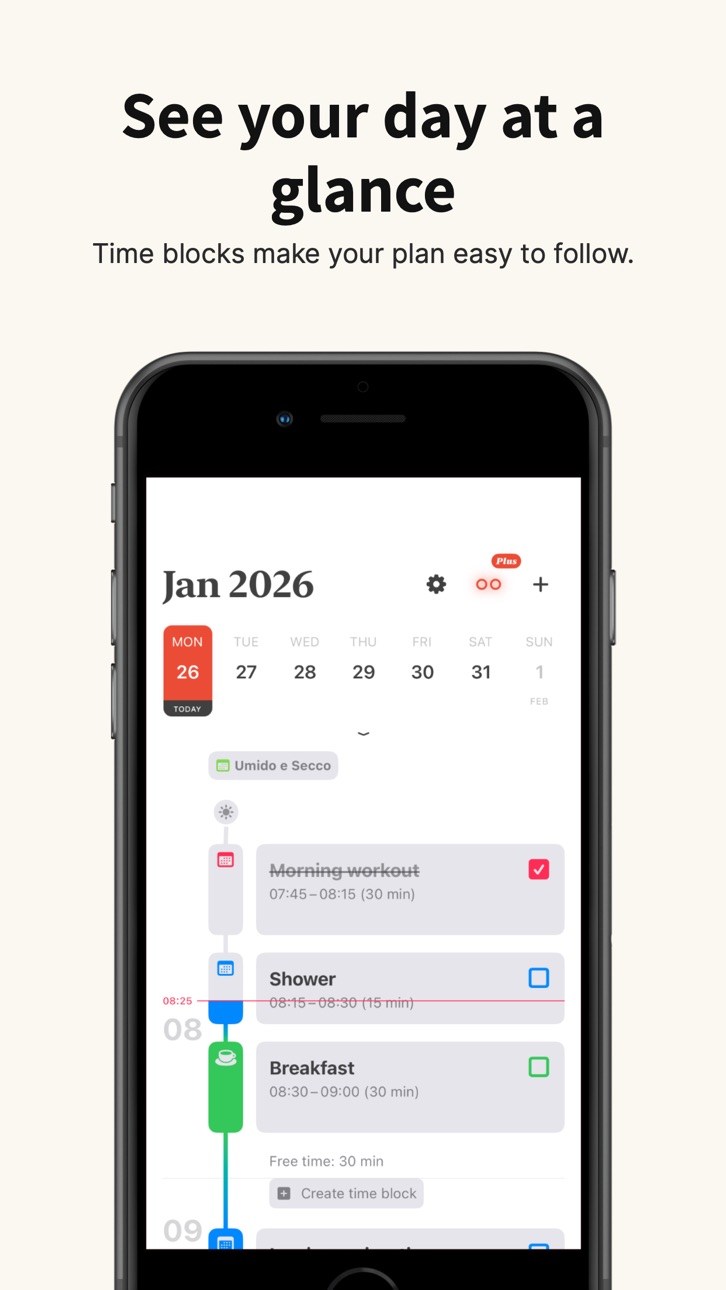


What’s New Version 1.17.3
In this version of Align - Time Blocking planner:
• Fix for widgets wrongly asking to sync calendar
• Fix crash when resizing a time block
Thank you for using Align.
Description
Align: The Best Daily Planner App for Time Blocking & Task Management
Plan your day, organize your life, and boost productivity with Align – the ultimate time blocking planner and visual schedule maker. Whether you need a free daily planner app, a structured daily planner for work, or the best apps for ADHD productivity, Align transforms your scattered tasks into a clear, actionable timeline.
FREE FEATURES - Start Planning Today:
• Best Daily Planner App Experience – Create unlimited time blocks to visualize your entire day.
• Time Blocking App Power – Turn your daily task list into beautiful blocks that fit your schedule.
• Calendar Sync – Seamlessly integrate your existing calendars with our digital planner app.
• Personalized Task System – Customize each block with unique icons and colors for an aesthetic to-do list.
• Smart Reminders & Notifications – Never miss a beat with the best app for reminders and custom alerts.
• Build Better Routines – Use recurring time blocks for habit building and a consistent morning routine app experience.
• Progress Tracking – Monitor your complete tasks with powerful visual indicators and a productivity log.
• Drag & Drop Reorganization – Easily move events and time blocks to reorganize your day or move tasks between days.
ALIGN PLUS - Advanced Organization Tools:
• Custom Day Start & End – Define your own day boundaries to match your schedule.
• Subtasks & Task Management – Add, reorder, and check off subtasks inside your time blocks.
• Intelligent Overlap Avoidance – The smartest time management software: resize blocks and resolve collisions automatically.
• Time Block Locking – Protect your deep work and important work management blocks from accidental changes.
• Enhanced ADHD To Do List App Features – Designed for focus, reducing decision fatigue and cognitive load.
Why Choose Align?
Transform your personal project management and life organization. Align is perfect for:
• Busy Professionals looking for work organization tools and a reliable work schedule maker.
• Students seeking a homework to do list and a better school planner.
• Entrepreneurs managing multiple projects with a visual project management tool.
• Users with ADHD who benefit from a visual planner and a structured daily schedule.
Align isn't just another list maker app or basic to-do list – it's your personal productivity partner and life organizer app. From a monthly to-do list to your daily task checklist, Align helps you create structure and make meaningful progress on what matters most.
Download Align today – the best free daily planner app that makes time blocking simple, effective, and beautiful. Your search for the perfect day planner app and organization tool ends here.
Capabilities
In-App Purchases
Accessibility
ipadiphonemacrealityDevicetvoswatch
Version history 23 versions
Build 887215710v1.17.32026-06-20 18:05:55
In this version of Align - Time Blocking planner:
• Fix for widgets wrongly asking to sync calendar
• Fix crash when resizing a time block
Thank you for using Align.
Build 886010358v1.17.22026-05-26 07:52:09
In this version of Align - Time Blocking planner:
• Fix for widgets wrongly asking to sync calendar
• Fix crash when resizing a time block
Thank you for using Align.
Build 885335583v1.17.12026-05-06 19:32:26
We're excited to share this update with you!
In this version of Align - Time Blocking planner:
• Fix for wrong day as “Today” on pass-midnight day end bound
• Fix for widget not showing day bounds
Also in this version:
• Custom day start/end. Set your own day start and end times
• Improved widget appearance with iOS 26 Liquid Glass design
• Performance optimizations and bug fixes
Thank you for using Align.
Build 885248769v1.17.02026-05-05 00:45:55
We're excited to share this update with you!
Here's what's new:
• Custom day start/end. Set your own day start and end times
• Improved widget appearance with iOS 26 Liquid Glass design
• Performance optimizations and bug fixes
Thank you for using Align - Time blocking planner!
Build 884695030v1.16.02026-04-20 18:07:28
We're excited to share this update with you!
• Color scheme setting - override the light/dark mode of the system.
• Editor minute increment setting - customize how times snap in the editor
• Default calendar selection in the event editor
• Performance optimizations and bug fixes
Thank you for using Align!
Build 884165334v1.15.02026-04-06 13:52:22
We're excited to share this update with you!
• Introducing drag and drop! - easily reorganize your schedule!
• Fixed a crash affecting widgets
• Fixed an issue preventing creation of all-day events
• Fixed being unable to mark time blocks created outside Align as completed
• Performance optimizations and other minor bug fixes
Thank you for using Align!
Build 882380397v1.14.02026-02-13 17:42:51
We're excited to share this update with you!
• Fresh new app icon and launch screen for a more modern experience
• Added support for Arabic, Japanese, Korean, Vietnamese, Russian, Chinese and more.
• Enhanced timeline: see time differences clearly while editing items
• Comprehensive accessibility improvements across core screens and controls
• Performance optimizations and minor bug fixes
Thank you for using Align!
Build 882076469v1.13.02026-02-02 23:27:30
We're excited to share this update with you!
• Add subtasks to time blocks to break work into smaller steps (Align Plus)
• Check off time blocks and subtasks to track your progress
• Bug fixes and performance improvements for a smoother experience
Thank you for using Align!
Build 879906739v1.12.02025-12-01 07:08:07
We're excited to share this update with you!
• Bug fixes and performance improvements for a smoother experience
• Introducing Align Plus - new subscription plans with enhanced features to help you stay organized and productive
Thank you for using Align!
Build 879028397v1.11.02025-10-26 13:32:36
In this version of Align - time blocking daily planner app:
- Now you can make your time block color be the same as its calendar
- Color picker: now you can select a custom color for your time block
- Now you can duplicate a time block by tapping the "Duplicate" button in the contextual menu
Build 878928032v1.10.02025-10-15 14:10:15
In this version of Align - time blocking daily planner app:
- Lock time blocks to protect important appointments from accidental changes
- Toggle off Overlap Avoidance to avoid shifting time blocks that occupy same time slot
- Fix bug where the widget wound't update when the timeline is empty
- Fix lockscreen widget getting stuck in placeholder view
- fix crash when navigating through dates
Build 878525330v1.9.02025-09-30 10:21:56
In this version of Align - time blocking daily planner app:
- Icon suggestion feature automatically recommend icons based on your time block titles.
- Pull to refresh timeline to sync the latest calendar updates from your device.
- Fix bug where icons would blink or disappear in the icon picker
- Fix crash when scrolling fast through the days
Build 878080988v1.8.02025-09-16 16:39:49
In this version of Align - time blocking daily planner app:
- Support for Liquid Glass UI
- Fix time block notes visibility in the selection menu
Build 876568717v1.7.02025-07-21 20:21:12
In this version of Align - time blocking app:
- Resizable Time Blocks with Overlap Avoidance
You can now resize any time block by dragging its top or bottom handle — and Align will intelligently adjust your schedule to prevent overlaps.
## How Overlap Avoidance Works:
When you resize a block and it collides with another:
* The app automatically shifts conflicting blocks forward or backward to make space.
* The duration of shifted blocks stays the same.
* This keeps your day clean, ordered, and conflict-free — without manual adjustments.
Build 875671329v1.6.02025-06-18 10:09:01
In this version of Align - time blocking app:
- You can add notes to any time-block and keep all your important details right where you need them
Build 875342770v1.5.02025-06-06 01:04:42
In this version of Align - time blocking app:
- New Time blocks imported from the calendar app, have the calendar corlor by default
- Today button was made more visible
Build 874868611v1.4.12025-05-19 16:43:44
- Fix crash when retrieving certain time blocks
Build 874734679v1.4.02025-05-14 08:17:54
- iCloud Syncing: Now Align seamlessly syncs your time blocks across all your Apple devices, ensuring your schedule stays up-to-date no matter where you are
- Bug fixes and performance improvements for a smoother planning experience
Build 874403505v1.3.02025-04-30 14:39:08
- Introducing Widgets!
Add the new Timeline Widget to your Home Screen to see your current and upcoming time blocks at a glance. Stay on track and manage your day even more efficiently—right from your Home Screen.
Build 873736623v1.2.02025-04-04 05:46:16
- Bug fix for creating a time block from an empty timeline, selects today's date instead of the selected date
- Bug fix where alarms were not being saved
- New dark mode and tinted icons.
Build 873311872v1.1.02025-03-18 14:23:52
- Fin random crash when updating time blocks as well as when marking them as completed
- Fix bug that would result in data lost when updating recurring time blocks
- Fix bug that would duplicate time blocks when updating recurrent time blocks
Build 872730853v1.0.12025-02-24 13:53:40
Fix for a bug when editing a recurrent task that would split the series.
Build 871545437v1.02025-02-04 13:11:36
No pricing data captured yet — comparisons appear once the app has paid storefronts or in-app purchases.
Availability 175 of 175 storefronts
| Region | Language | Price | Ratings | Avg | Version |
|---|---|---|---|---|---|
| US | en-US | Free | 50 | 4.6 | 1.17.3 |
| IN | en-GB | Free | 33 | 4.8 | 1.17.3 |
| GB | en-GB | Free | 15 | 4.5 | 1.17.3 |
| CA | en-CA | Free | 12 | 4.9 | 1.17.3 |
| DE | de-DE | Free | 7 | 5.0 | 1.17.3 |
| BR | pt-BR | Free | 6 | 4.5 | 1.17.3 |
| MX | es-MX | Free | 6 | 4.7 | 1.17.3 |
| PH | en-GB | Free | 6 | 4.8 | 1.17.3 |
| FR | fr-FR | Free | 5 | 4.2 | 1.17.3 |
| HU | en-GB | Free | 3 | 5.0 | 1.17.3 |
| ZA | en-GB | Free | 3 | 5.0 | 1.17.3 |
| AE | en-GB | Free | 2 | 5.0 | 1.17.3 |
| AT | de-DE | Free | 2 | 5.0 | 1.17.3 |
| AU | en-AU | Free | 2 | 5.0 | 1.17.3 |
| BE | en-GB | Free | 2 | 4.5 | 1.17.3 |
| ID | en-GB | Free | 2 | 5.0 | 1.17.3 |
| IE | en-GB | Free | 2 | 5.0 | 1.17.3 |
| IL | en-GB | Free | 2 | 5.0 | 1.17.3 |
| IT | it | Free | 2 | 4.0 | 1.17.3 |
| JP | ja | Free | 2 | 4.5 | 1.17.3 |
| MY | en-GB | Free | 2 | 3.5 | 1.17.3 |
| NG | en-GB | Free | 2 | 4.5 | 1.17.3 |
| NL | nl | Free | 2 | 5.0 | 1.17.3 |
| RU | ru | Free | 2 | 5.0 | 1.17.3 |
| SE | sv | Free | 2 | 5.0 | 1.17.3 |
| TH | en-GB | Free | 2 | 5.0 | 1.17.3 |
| BO | es-MX | Free | 1 | 4.0 | 1.17.3 |
| CH | de-CH | Free | 1 | 3.0 | 1.17.3 |
| CM | fr-FR | Free | 1 | 5.0 | 1.17.3 |
| CN | zh-Hans-CN | Free | 1 | 2.0 | 1.17.3 |
| CR | es-MX | Free | 1 | 5.0 | 1.17.3 |
| EG | en-GB | Free | 1 | 5.0 | 1.17.3 |
| ES | es-ES | Free | 1 | 5.0 | 1.17.3 |
| GH | en-GB | Free | 1 | 5.0 | 1.17.3 |
| GT | es-MX | Free | 1 | 5.0 | 1.17.3 |
| HK | zh-Hant-HK | Free | 1 | 5.0 | 1.17.3 |
| MK | en-GB | Free | 1 | 5.0 | 1.17.3 |
| ML | en-GB | Free | 1 | 5.0 | 1.17.3 |
| MO | zh-Hant-HK | Free | 1 | 5.0 | 1.17.3 |
| NO | en-GB | Free | 1 | 5.0 | 1.17.3 |
| NZ | en-AU | Free | 1 | 5.0 | 1.17.3 |
| PE | es-MX | Free | 1 | 5.0 | 1.17.3 |
| PK | en-GB | Free | 1 | 5.0 | 1.17.3 |
| PL | en-GB | Free | 1 | 4.0 | 1.17.3 |
| PY | es-MX | Free | 1 | 5.0 | 1.17.3 |
| SA | en-GB | Free | 1 | 5.0 | 1.17.3 |
| SK | en-GB | Free | 1 | 5.0 | 1.17.3 |
| TR | en-GB | Free | 1 | 5.0 | 1.17.3 |
| TW | zh-Hant-TW | Free | 1 | 1.0 | 1.17.3 |
| VN | en-GB | Free | 1 | 5.0 | 1.17.3 |
| AF | en-GB | Free | 0 | — | 1.17.3 |
| AG | en-GB | Free | 0 | — | 1.17.3 |
| AI | en-GB | Free | 0 | — | 1.17.3 |
| AL | en-GB | Free | 0 | — | 1.17.3 |
| AM | en-GB | Free | 0 | — | 1.17.3 |
| AO | en-GB | Free | 0 | — | 1.17.3 |
| AR | es-MX | Free | 0 | — | 1.17.3 |
| AZ | en-GB | Free | 0 | — | 1.17.3 |
| BA | en-GB | Free | 0 | — | 1.17.3 |
| BB | en-GB | Free | 0 | — | 1.17.3 |
| BF | en-GB | Free | 0 | — | 1.17.3 |
| BG | en-GB | Free | 0 | — | 1.17.3 |
| BH | en-GB | Free | 0 | — | 1.17.3 |
| BJ | en-GB | Free | 0 | — | 1.17.3 |
| BM | en-GB | Free | 0 | — | 1.17.3 |
| BN | en-GB | Free | 0 | — | 1.17.3 |
| BS | en-GB | Free | 0 | — | 1.17.3 |
| BT | en-GB | Free | 0 | — | 1.17.3 |
| BW | en-GB | Free | 0 | — | 1.17.3 |
| BY | en-GB | Free | 0 | — | 1.17.3 |
| BZ | en-GB | Free | 0 | — | 1.17.3 |
| CD | en-GB | Free | 0 | — | 1.17.3 |
| CG | en-GB | Free | 0 | — | 1.17.3 |
| CI | fr-FR | Free | 0 | — | 1.17.3 |
| CL | es-MX | Free | 0 | — | 1.17.3 |
| CO | es-MX | Free | 0 | — | 1.17.3 |
| CV | en-GB | Free | 0 | — | 1.17.3 |
| CY | en-GB | Free | 0 | — | 1.17.3 |
| CZ | en-GB | Free | 0 | — | 1.17.3 |
| DK | en-GB | Free | 0 | — | 1.17.3 |
| DM | en-GB | Free | 0 | — | 1.17.3 |
| DO | es-MX | Free | 0 | — | 1.17.3 |
| DZ | en-GB | Free | 0 | — | 1.17.3 |
| EC | es-MX | Free | 0 | — | 1.17.3 |
| EE | en-GB | Free | 0 | — | 1.17.3 |
| FI | en-GB | Free | 0 | — | 1.17.3 |
| FJ | en-GB | Free | 0 | — | 1.17.3 |
| FM | en-GB | Free | 0 | — | 1.17.3 |
| GA | fr-FR | Free | 0 | — | 1.17.3 |
| GD | en-GB | Free | 0 | — | 1.17.3 |
| GE | en-GB | Free | 0 | — | 1.17.3 |
| GM | en-GB | Free | 0 | — | 1.17.3 |
| GR | en-GB | Free | 0 | — | 1.17.3 |
| GW | en-GB | Free | 0 | — | 1.17.3 |
| GY | en-GB | Free | 0 | — | 1.17.3 |
| HN | es-MX | Free | 0 | — | 1.17.3 |
| HR | en-GB | Free | 0 | — | 1.17.3 |
| IQ | en-GB | Free | 0 | — | 1.17.3 |
| IS | en-GB | Free | 0 | — | 1.17.3 |
| JM | en-GB | Free | 0 | — | 1.17.3 |
| JO | en-GB | Free | 0 | — | 1.17.3 |
| KE | en-GB | Free | 0 | — | 1.17.3 |
| KG | en-GB | Free | 0 | — | 1.17.3 |
| KH | en-GB | Free | 0 | — | 1.17.3 |
| KN | en-GB | Free | 0 | — | 1.17.3 |
| KR | ko | Free | 0 | — | 1.17.3 |
| KW | en-GB | Free | 0 | — | 1.17.3 |
| KY | en-GB | Free | 0 | — | 1.17.3 |
| KZ | en-GB | Free | 0 | — | 1.17.3 |
| LA | en-GB | Free | 0 | — | 1.17.3 |
| LB | en-GB | Free | 0 | — | 1.17.3 |
| LC | en-GB | Free | 0 | — | 1.17.3 |
| LK | en-GB | Free | 0 | — | 1.17.3 |
| LR | en-GB | Free | 0 | — | 1.17.3 |
| LT | en-GB | Free | 0 | — | 1.17.3 |
| LU | en-GB | Free | 0 | — | 1.17.3 |
| LV | en-GB | Free | 0 | — | 1.17.3 |
| LY | en-GB | Free | 0 | — | 1.17.3 |
| MA | en-GB | Free | 0 | — | 1.17.3 |
| MD | en-GB | Free | 0 | — | 1.17.3 |
| ME | en-GB | Free | 0 | — | 1.17.3 |
| MG | en-GB | Free | 0 | — | 1.17.3 |
| MM | en-GB | Free | 0 | — | 1.17.3 |
| MN | en-GB | Free | 0 | — | 1.17.3 |
| MR | en-GB | Free | 0 | — | 1.17.3 |
| MS | en-GB | Free | 0 | — | 1.17.3 |
| MT | en-GB | Free | 0 | — | 1.17.3 |
| MU | en-GB | Free | 0 | — | 1.17.3 |
| MV | en-GB | Free | 0 | — | 1.17.3 |
| MW | en-GB | Free | 0 | — | 1.17.3 |
| MZ | en-GB | Free | 0 | — | 1.17.3 |
| NA | en-GB | Free | 0 | — | 1.17.3 |
| NE | en-GB | Free | 0 | — | 1.17.3 |
| NI | es-MX | Free | 0 | — | 1.17.3 |
| NP | en-GB | Free | 0 | — | 1.17.3 |
| NR | en-GB | Free | 0 | — | 1.17.3 |
| OM | en-GB | Free | 0 | — | 1.17.3 |
| PA | es-MX | Free | 0 | — | 1.17.3 |
| PG | en-GB | Free | 0 | — | 1.17.3 |
| PT | pt-PT | Free | 0 | — | 1.17.3 |
| PW | en-GB | Free | 0 | — | 1.17.3 |
| QA | en-GB | Free | 0 | — | 1.17.3 |
| RO | en-GB | Free | 0 | — | 1.17.3 |
| RS | en-GB | Free | 0 | — | 1.17.3 |
| RW | en-GB | Free | 0 | — | 1.17.3 |
| SB | en-GB | Free | 0 | — | 1.17.3 |
| SC | en-GB | Free | 0 | — | 1.17.3 |
| SG | en-GB | Free | 0 | — | 1.17.3 |
| SI | en-GB | Free | 0 | — | 1.17.3 |
| SL | en-GB | Free | 0 | — | 1.17.3 |
| SN | en-GB | Free | 0 | — | 1.17.3 |
| SR | en-GB | Free | 0 | — | 1.17.3 |
| ST | en-GB | Free | 0 | — | 1.17.3 |
| SV | es-MX | Free | 0 | — | 1.17.3 |
| SZ | en-GB | Free | 0 | — | 1.17.3 |
| TC | en-GB | Free | 0 | — | 1.17.3 |
| TD | en-GB | Free | 0 | — | 1.17.3 |
| TJ | en-GB | Free | 0 | — | 1.17.3 |
| TM | en-GB | Free | 0 | — | 1.17.3 |
| TN | en-GB | Free | 0 | — | 1.17.3 |
| TO | en-GB | Free | 0 | — | 1.17.3 |
| TT | en-GB | Free | 0 | — | 1.17.3 |
| TZ | en-GB | Free | 0 | — | 1.17.3 |
| UA | en-GB | Free | 0 | — | 1.17.3 |
| UG | en-GB | Free | 0 | — | 1.17.3 |
| UY | en-GB | Free | 0 | — | 1.17.3 |
| UZ | en-GB | Free | 0 | — | 1.17.3 |
| VC | en-GB | Free | 0 | — | 1.17.3 |
| VE | es-MX | Free | 0 | — | 1.17.3 |
| VG | en-GB | Free | 0 | — | 1.17.3 |
| VU | en-GB | Free | 0 | — | 1.17.3 |
| XK | en-GB | Free | 0 | — | 1.17.3 |
| YE | en-GB | Free | 0 | — | 1.17.3 |
| ZM | en-GB | Free | 0 | — | 1.17.3 |
| ZW | en-GB | Free | 0 | — | 1.17.3 |
Change log 27 changes · DO
✎
releaseNotes updated
In this version of Align - Time Blocking planner:
• Fix for widgets wrongly asking to sync calendar
• Fix crash when resizing a time block
Thank you for using
✎
description updated
Align: The Best Daily Planner App for Time Blocking & Task Management
Plan your day, organize your life, and boost productivity with Align – the ultimate time
✎
subtitle updated
Activity scheduler & tasks
✎
name updated
Timeblocks Planner: Align
◆
Version 1.17.3 released
In this version of Align - Time Blocking planner:
• Fix for widgets wrongly asking to sync calendar
• Fix crash when resizing a time block
Thank you for using Align.
◆
Version 1.17.2 released
In this version of Align - Time Blocking planner:
• Fix for widgets wrongly asking to sync calendar
• Fix crash when resizing a time block
Thank you for using Align.
◆
Version 1.17.1 released
We're excited to share this update with you!
In this version of Align - Time Blocking planner:
• Fix for wrong day as “Today” on pass-midnight day end bound
• Fix for widget not showing day bounds
Also in this version:
• Custom day start/
◆
Version 1.17.0 released
We're excited to share this update with you!
Here's what's new:
• Custom day start/end. Set your own day start and end times
• Improved widget appearance with iOS 26 Liquid Glass design
• Performance optimizations and bug fixes
Thank you
◆
Version 1.16.0 released
We're excited to share this update with you!
• Color scheme setting - override the light/dark mode of the system.
• Editor minute increment setting - customize how times snap in the editor
• Default calendar selection in the event editor
•
◆
Version 1.15.0 released
We're excited to share this update with you!
• Introducing drag and drop! - easily reorganize your schedule!
• Fixed a crash affecting widgets
• Fixed an issue preventing creation of all-day events
• Fixed being unable to mark time blocks
◆
Version 1.14.0 released
We're excited to share this update with you!
• Fresh new app icon and launch screen for a more modern experience
• Added support for Arabic, Japanese, Korean, Vietnamese, Russian, Chinese and more.
• Enhanced timeline: see time differences
◆
Version 1.13.0 released
We're excited to share this update with you!
• Add subtasks to time blocks to break work into smaller steps (Align Plus)
• Check off time blocks and subtasks to track your progress
• Bug fixes and performance improvements for a smoother ex
◆
Version 1.12.0 released
We're excited to share this update with you!
• Bug fixes and performance improvements for a smoother experience
• Introducing Align Plus - new subscription plans with enhanced features to help you stay organized and productive
Thank you f
◆
Version 1.11.0 released
In this version of Align - time blocking daily planner app:
- Now you can make your time block color be the same as its calendar
- Color picker: now you can select a custom color for your time block
- Now you can duplicate a time block by
◆
Version 1.10.0 released
In this version of Align - time blocking daily planner app:
- Lock time blocks to protect important appointments from accidental changes
- Toggle off Overlap Avoidance to avoid shifting time blocks that occupy same time slot
- Fix bug wher
◆
Version 1.9.0 released
In this version of Align - time blocking daily planner app:
- Icon suggestion feature automatically recommend icons based on your time block titles.
- Pull to refresh timeline to sync the latest calendar updates from your device.
- Fix bug
◆
Version 1.8.0 released
In this version of Align - time blocking daily planner app:
- Support for Liquid Glass UI
- Fix time block notes visibility in the selection menu
◆
Version 1.7.0 released
In this version of Align - time blocking app:
- Resizable Time Blocks with Overlap Avoidance
You can now resize any time block by dragging its top or bottom handle — and Align will intelligently adjust your schedule to prevent overlaps.
#
◆
Version 1.6.0 released
In this version of Align - time blocking app:
- You can add notes to any time-block and keep all your important details right where you need them
◆
Version 1.5.0 released
In this version of Align - time blocking app:
- New Time blocks imported from the calendar app, have the calendar corlor by default
- Today button was made more visible
◆
Version 1.4.1 released
- Fix crash when retrieving certain time blocks
◆
Version 1.4.0 released
- iCloud Syncing: Now Align seamlessly syncs your time blocks across all your Apple devices, ensuring your schedule stays up-to-date no matter where you are
- Bug fixes and performance improvements for a smoother planning experience
◆
Version 1.3.0 released
- Introducing Widgets!
Add the new Timeline Widget to your Home Screen to see your current and upcoming time blocks at a glance. Stay on track and manage your day even more efficiently—right from your Home Screen.
◆
Version 1.2.0 released
- Bug fix for creating a time block from an empty timeline, selects today's date instead of the selected date
- Bug fix where alarms were not being saved
- New dark mode and tinted icons.
◆
Version 1.1.0 released
- Fin random crash when updating time blocks as well as when marking them as completed
- Fix bug that would result in data lost when updating recurring time blocks
- Fix bug that would duplicate time blocks when updating recurrent time bloc
◆
Version 1.0.1 released
Fix for a bug when editing a recurrent task that would split the series.
◆
Version 1.0 released