Home › Productivity

 PY
PY
 ITit
ITit GBen-GB
 MYen-GB
 AEen-GB
 AFen-GB
 ALen-GB
 AMen-GB
 ATde-DE
 AUen-AU
 AZen-GB
 BAen-GB
 BEen-GB
 BGen-GB
 BHen-GB
 BNen-GB
 BOes-MX
 BRpt-BR
 BTen-GB
 BYen-GB
 CAen-CA
 CHde-CH
 CLes-MX
 CNzh-Hans-CN
 COes-MX
 CRes-MX
 CYen-GB
 CZen-GB
 DEde-DE
 DKen-GB
 ECes-MX
 EEen-GB
 EGen-GB
 ESes-ES
 FIen-GB
 FJen-GB
 FMen-GB
 FRfr-FR
 GEen-GB
 GMen-GB
 GRen-GB
 GTes-MX
 HKzh-Hant-HK
 HNes-MX
 HRen-GB
 HUen-GB
 IDen-GB
 IEen-GB
 ILen-GB
 INen-GB
 IQen-GB
 ISen-GB
 JOen-GB
 JPja
JPja KRko
KRko KWen-GB
 LBen-GB
 LRen-GB
 LTen-GB
 LUen-GB
 LVen-GB
 MDen-GB
 MEen-GB
 MKen-GB
 MOzh-Hant-HK
 MTen-GB
 MVen-GB
 MWen-GB
 MXes-MX
 NLnl
NLnl NOen-GB
 NRen-GB
 NZen-AU
 OMen-GB
 PAes-MX
 PEes-MX
 PGen-GB
 PHen-GB
 PKen-GB
 PLen-GB
 PTpt-PT
 PWen-GBPYes-MX
 QAen-GB
 ROen-GB
 RSen-GB
 RUru
RUru SAen-GB
 SBen-GB
 SEsv
SEsv SGen-GB
 SIen-GB
 SKen-GB
 SLen-GB
 SVes-MX
 THen-GB
 TJen-GB
 TMen-GB
 TOen-GB
 TRen-GB
 TWzh-Hant-TW
 UAen-GB
 USen-US
 UYen-GB
 UZen-GB
 VEes-MX
 VNen-GB
 VUen-GB
 XKen-GB
 YEen-GB
 ZAen-GB
110 of 110 storefronts
Content in en-US
Content in en-US
Information
Apple ID6738925411
Bundle IDcom.cascio.aiminute
SellerSeller
Min iOS18.1
Min macOS15.1
Device familiesiphone, ipad
Released2024-12-31
Copyright© Calogero Cascio
Privacy policyLink ↗
Preview 2 platforms
iPhone 4 images


iPad 3 images

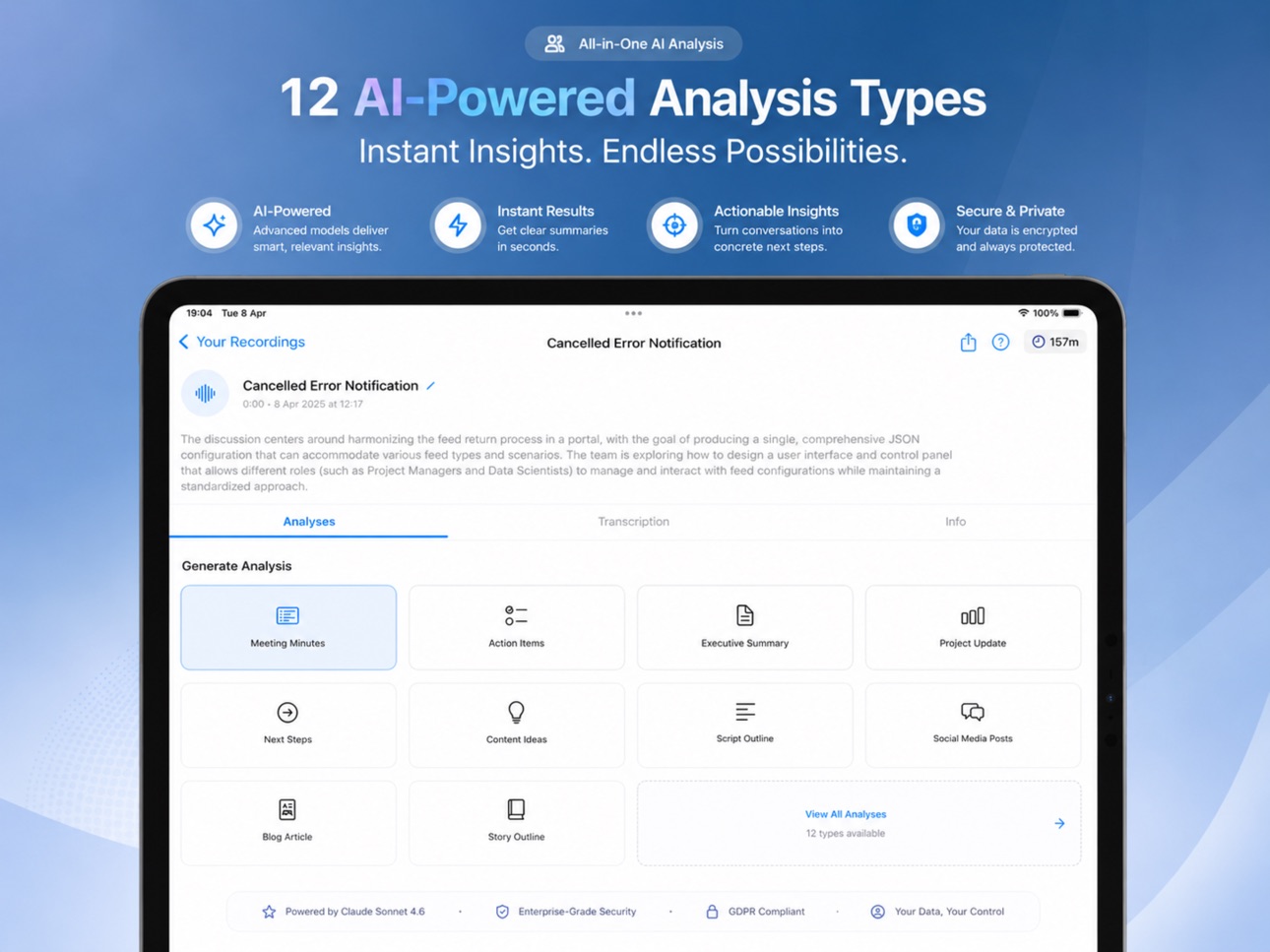

What’s New Version 6.6
Performance and model improvement
Description
Turn any recording into clear notes in seconds. AI Minute records meetings, lectures, and interviews — or imports your PDFs and text files — then gives you accurate transcripts, summaries, and action items you can actually use.
Record & Capture
• Record audio directly, or import PDF and text documents
• Transcribe in 100+ languages
• Organize everything in list, calendar, or timeline views
Understand Instantly
• AI summaries, action items, and outlines from any source
• Search and export your insights in multiple formats
• Sync across all your devices automatically
Pay Only For What You Use
Choose your transcription engine and see exactly what you'll get before you spend — no subscription required:
• Standard (OpenAI Whisper) — best accuracy
• Fast (Groq Whisper V3 Large) — 3× more minutes
• Max (Groq Whisper V3 Turbo) — 10× more minutes
One universal credit balance works across every engine. Switch anytime, and a live preview shows your remaining minutes for the
model you pick.
Private by design: local or cloud processing, end-to-end encryption for anything you share, and full control of your data.
Free to download. Buy credits only when you need them.
In-App Purchases PY pricing
One-Time Purchases
Starter Pack—
Enterprise Pack—
Professional Pack—
Capabilities
In-App Purchases
Accessibility
ipadiphonemacrealityDevicetvoswatch
Version history 25 versions
Build 887355954v6.62026-07-01 04:50:57
Performance and model improvement
Build 887145892v6.5.12026-06-18 19:11:51
Performance improvements
Build 886931504v6.52026-06-14 17:00:36
A more alive, more beautiful AI Minute
We've redesigned the app around a new "living" visual language:
• A breathing, iridescent orb now powers recording, transcription and AI summaries — so the app feels like it's truly thinking with you
• Elegant new glass surfaces across lists, detail screens and onboarding
• Smooth, choreographed transitions between every screen
• Staged reveals and refined haptics that make each summary a delight
• Full support for Reduce Motion, Dynamic Type and high contrast
Calm, premium, and alive in your hands.
Build 886591999v6.42026-06-06 06:03:20
Export & Search improvements
- Export recordings as Markdown (compatible with Notion and Obsidian), PDF, or plain text
- Share exports directly to Files, Notes, Mail, and more via the system share sheet
- Search now matches recording summaries in addition to titles and transcriptions
Build 885541362v6.3.12026-05-12 16:11:26
Small bug fix
Build 885324968v6.32026-05-06 23:25:49
Improved look for the list of recordings
Build 884662689v6.22026-04-19 19:12:18
This update brings a refreshed recording and detail experience across the app.
A redesigned recordings list with cleaner cards and smoother navigation
New task and term filters to find the right recording faster
A rebuilt recording detail view with dedicated tabs for transcription, AI analysis, and file info
Better transcription tools, richer AI context options, and improved playback controls with waveform scrubbing
Build 884400544v6.12026-04-12 00:25:38
Version 3.2 — A Quieter, Faster Feel
We gave AI Minute a visual refresh based on Apple's Human Interface Guidelines. The recordings list and timeline now feel calmer and more native: compact icon actions on each card, a unified toolbar menu, a pull-down search bar, and smoother scrolling through large libraries. Same features, less noise.
Build 883389672v6.0.32026-03-15 22:16:02
Bug fix
Build 883367495v6.0.22026-03-14 19:26:01
Bug fix
Build 882940906v6.0.12026-03-02 22:21:19
Improved image compression to be able to use more image in the abalysis
Build 882873224v6.02026-02-28 04:22:47
Now supporting image capture during the meeting
Build 882615423v5.72026-02-20 04:01:34
Now powered by Claude Sonnet 4.6
Build 882489465v5.62026-02-16 00:52:59
- Siri Shortcuts — Control your recordings hands-free. Start or stop recording, get a summary of your last recording, or search your library
— all from the Shortcuts app or by asking Siri.
- Improved Search — Search now finds recordings by title, transcription content, and tag names. Results are faster and more accurate.
- Smoother Scrolling — Large recording libraries now scroll more fluidly thanks to optimized list rendering.
- Performance Improvements — Reduced memory usage and faster loading times across the app.
Build 882053602v5.52026-02-02 16:57:35
What's New in 5.5
Action Items: AI Minute now automatically extracts tasks from your meetings and recordings. Set priorities, due dates, and assignees. Filter by status, and share action items with your collaborators when you share a room.
Build 881904599v5.42026-01-27 23:29:49
Transcription settings have been reorganized for a clearer experience. You'll now find a dedicated "Transcription" section in AI Settings, where you can choose between cloud models (OpenAI, Groq Whisper V3 Large, Groq Whisper V3 Turbo) or switch to on-device transcription with a local WhisperKit model — all in one place. OpenAI is now the default transcription service.
Build 881277393v5.32026-01-07 20:41:46
Improved onboarding and new analysis
Build 879801162v5.22025-11-15 20:19:03
Many small improvements to the UX
Build 879243717v5.12025-10-30 19:14:50
New "task" view to view the recordings grouped
Build 879034566v5.02025-10-20 22:00:33
New models added for both meetings transcription and content generation. You also provide file or text to set the context of the meeting, thus improving the content generated.
Build 877942583v4.52025-09-17 03:36:22
Added file manager and made different improvements under the hood
Build 877716986v4.4.12025-09-01 09:51:48
Bug fix
Build 877594763v4.42025-08-27 08:25:54
Added new type of analysis
Build 877095768v4.32025-08-08 21:19:54
Powered by Chat GPT 5
Build 875604503v4.22025-06-16 01:00:55
Different improvements and bug fix
Price history by region
Currency
Show
Columns
Search
Availability 110 of 110 storefronts
| Region | Language | Price | Ratings | Avg | Version |
|---|---|---|---|---|---|
| IT | it | Free | 5 | 5.0 | 6.6 |
| GB | en-GB | Free | 1 | 2.0 | 6.6 |
| MY | en-GB | Free | 1 | 5.0 | 6.6 |
| AE | en-GB | Free | 0 | — | 6.6 |
| AF | en-GB | Free | 0 | — | 6.6 |
| AL | en-GB | Free | 0 | — | 6.6 |
| AM | en-GB | Free | 0 | — | 6.6 |
| AT | de-DE | Free | 0 | — | 6.6 |
| AU | en-AU | Free | 0 | — | 6.6 |
| AZ | en-GB | Free | 0 | — | 6.6 |
| BA | en-GB | Free | 0 | — | 6.6 |
| BE | en-GB | Free | 0 | — | 6.6 |
| BG | en-GB | Free | 0 | — | 6.6 |
| BH | en-GB | Free | 0 | — | 6.6 |
| BN | en-GB | Free | 0 | — | 6.6 |
| BO | es-MX | Free | 0 | — | 6.6 |
| BR | pt-BR | Free | 0 | — | 6.6 |
| BT | en-GB | Free | 0 | — | 6.6 |
| BY | en-GB | Free | 0 | — | 6.6 |
| CA | en-CA | Free | 0 | — | 6.6 |
| CH | de-CH | Free | 0 | — | 6.6 |
| CL | es-MX | Free | 0 | — | 6.6 |
| CN | zh-Hans-CN | Free | 0 | — | 6.6 |
| CO | es-MX | Free | 0 | — | 6.6 |
| CR | es-MX | Free | 0 | — | 6.6 |
| CY | en-GB | Free | 0 | — | 6.6 |
| CZ | en-GB | Free | 0 | — | 6.6 |
| DE | de-DE | Free | 0 | — | 6.6 |
| DK | en-GB | Free | 0 | — | 6.6 |
| EC | es-MX | Free | 0 | — | 6.6 |
| EE | en-GB | Free | 0 | — | 6.6 |
| EG | en-GB | Free | 0 | — | 6.6 |
| ES | es-ES | Free | 0 | — | 6.6 |
| FI | en-GB | Free | 0 | — | 6.6 |
| FJ | en-GB | Free | 0 | — | 6.6 |
| FM | en-GB | Free | 0 | — | 6.6 |
| FR | fr-FR | Free | 0 | — | 6.6 |
| GE | en-GB | Free | 0 | — | 6.6 |
| GM | en-GB | Free | 0 | — | 6.6 |
| GR | en-GB | Free | 0 | — | 6.6 |
| GT | es-MX | Free | 0 | — | 6.6 |
| HK | zh-Hant-HK | Free | 0 | — | 6.6 |
| HN | es-MX | Free | 0 | — | 6.6 |
| HR | en-GB | Free | 0 | — | 6.6 |
| HU | en-GB | Free | 0 | — | 6.6 |
| ID | en-GB | Free | 0 | — | 6.6 |
| IE | en-GB | Free | 0 | — | 6.6 |
| IL | en-GB | Free | 0 | — | 6.6 |
| IN | en-GB | Free | 0 | — | 6.6 |
| IQ | en-GB | Free | 0 | — | 6.6 |
| IS | en-GB | Free | 0 | — | 6.6 |
| JO | en-GB | Free | 0 | — | 6.6 |
| JP | ja | Free | 0 | — | 6.6 |
| KR | ko | Free | 0 | — | 6.6 |
| KW | en-GB | Free | 0 | — | 6.6 |
| LB | en-GB | Free | 0 | — | 6.6 |
| LR | en-GB | Free | 0 | — | 6.6 |
| LT | en-GB | Free | 0 | — | 6.6 |
| LU | en-GB | Free | 0 | — | 6.6 |
| LV | en-GB | Free | 0 | — | 6.6 |
| MD | en-GB | Free | 0 | — | 6.6 |
| ME | en-GB | Free | 0 | — | 6.6 |
| MK | en-GB | Free | 0 | — | 6.6 |
| MO | zh-Hant-HK | Free | 0 | — | 6.6 |
| MT | en-GB | Free | 0 | — | 6.6 |
| MV | en-GB | Free | 0 | — | 6.6 |
| MW | en-GB | Free | 0 | — | 6.6 |
| MX | es-MX | Free | 0 | — | 6.6 |
| NL | nl | Free | 0 | — | 6.6 |
| NO | en-GB | Free | 0 | — | 6.6 |
| NR | en-GB | Free | 0 | — | 6.6 |
| NZ | en-AU | Free | 0 | — | 6.6 |
| OM | en-GB | Free | 0 | — | 6.6 |
| PA | es-MX | Free | 0 | — | 6.6 |
| PE | es-MX | Free | 0 | — | 6.6 |
| PG | en-GB | Free | 0 | — | 6.6 |
| PH | en-GB | Free | 0 | — | 6.6 |
| PK | en-GB | Free | 0 | — | 6.6 |
| PL | en-GB | Free | 0 | — | 6.6 |
| PT | pt-PT | Free | 0 | — | 6.6 |
| PW | en-GB | Free | 0 | — | 6.6 |
| PY | es-MX | Free | 0 | — | 6.6 |
| QA | en-GB | Free | 0 | — | 6.6 |
| RO | en-GB | Free | 0 | — | 6.6 |
| RS | en-GB | Free | 0 | — | 6.6 |
| RU | ru | Free | 0 | — | 6.6 |
| SA | en-GB | Free | 0 | — | 6.6 |
| SB | en-GB | Free | 0 | — | 6.6 |
| SE | sv | Free | 0 | — | 6.6 |
| SG | en-GB | Free | 0 | — | 6.6 |
| SI | en-GB | Free | 0 | — | 6.6 |
| SK | en-GB | Free | 0 | — | 6.6 |
| SL | en-GB | Free | 0 | — | 6.6 |
| SV | es-MX | Free | 0 | — | 6.6 |
| TH | en-GB | Free | 0 | — | 6.6 |
| TJ | en-GB | Free | 0 | — | 6.6 |
| TM | en-GB | Free | 0 | — | 6.6 |
| TO | en-GB | Free | 0 | — | 6.6 |
| TR | en-GB | Free | 0 | — | 6.6 |
| TW | zh-Hant-TW | Free | 0 | — | 6.6 |
| UA | en-GB | Free | 0 | — | 6.6 |
| US | en-US | Free | 0 | — | 6.6 |
| UY | en-GB | Free | 0 | — | 6.6 |
| UZ | en-GB | Free | 0 | — | 6.6 |
| VE | es-MX | Free | 0 | — | 6.6 |
| VN | en-GB | Free | 0 | — | 6.6 |
| VU | en-GB | Free | 0 | — | 6.6 |
| XK | en-GB | Free | 0 | — | 6.6 |
| YE | en-GB | Free | 0 | — | 6.6 |
| ZA | en-GB | Free | 0 | — | 6.6 |
Change log 29 changes · PY
✎
releaseNotes updated
Performance and model improvement
✎
description updated
Turn any recording into clear notes in seconds. AI Minute records meetings, lectures, and interviews — or imports your PDFs and text files — then gives you accu
✎
subtitle updated
Audio & PDF to Text Summaries
✎
name updated
AI Minute: Voice Transcription
◆
Version 6.6 released
Performance and model improvement
◆
Version 6.5.1 released
Performance improvements
◆
Version 6.5 released
A more alive, more beautiful AI Minute
We've redesigned the app around a new "living" visual language:
• A breathing, iridescent orb now powers recording, transcription and AI summaries — so the app feels like it's truly thinking with yo
◆
Version 6.4 released
Export & Search improvements
- Export recordings as Markdown (compatible with Notion and Obsidian), PDF, or plain text
- Share exports directly to Files, Notes, Mail, and more via the system share sheet
- Search now matches recording
◆
Version 6.3.1 released
Small bug fix
◆
Version 6.3 released
Improved look for the list of recordings
◆
Version 6.2 released
This update brings a refreshed recording and detail experience across the app.
A redesigned recordings list with cleaner cards and smoother navigation
New task and term filters to find the right recording faster
A rebuilt recording detail
◆
Version 6.1 released
Version 3.2 — A Quieter, Faster Feel
We gave AI Minute a visual refresh based on Apple's Human Interface Guidelines. The recordings list and timeline now feel calmer and more native: compact
◆
Version 6.0.3 released
Bug fix
◆
Version 6.0.2 released
Bug fix
◆
Version 6.0.1 released
Improved image compression to be able to use more image in the abalysis
◆
Version 6.0 released
Now supporting image capture during the meeting
◆
Version 5.7 released
Now powered by Claude Sonnet 4.6
◆
Version 5.6 released
- Siri Shortcuts — Control your recordings hands-free. Start or stop recording, get a summary of your last recording, or search your library
— all from the Shortcuts app or by asking Siri.
- Improved Search — Search now finds recording
◆
Version 5.5 released
What's New in 5.5
Action Items: AI Minute now automatically extracts tasks from your meetings and
◆
Version 5.4 released
Transcription settings have been reorganized for a clearer experience. You'll now find a dedicated "Transcription" section in AI Settings, where you can choose between cloud models (OpenAI, Groq Whisper V3 Large, Groq Whisper V3 Turbo) or s
◆
Version 5.3 released
Improved onboarding and new analysis
◆
Version 5.2 released
Many small improvements to the UX
◆
Version 5.1 released
New "task" view to view the recordings grouped
◆
Version 5.0 released
New models added for both meetings transcription and content generation. You also provide file or text to set the context of the meeting, thus improving the content generated.
◆
Version 4.5 released
Added file manager and made different improvements under the hood
◆
Version 4.4.1 released
Bug fix
◆
Version 4.4 released
Added new type of analysis
◆
Version 4.3 released
Powered by Chat GPT 5
◆
Version 4.2 released
Different improvements and bug fix