Home › Health & Fitness

 US
US
1 of 1 storefronts
Content in en-US
Content in en-US
Information
Preview 3 platforms
iPhone 8 images




iPad 4 images


Apple Watch 9 images


What’s New Version 1.4.97
Siri can now directly query real-time data such as exercise overview, distance, duration, heart rate, elevation gain, and route progress.
Added "New POI" in Control Center, allowing one-tap to record the current location as a POI.
POI supports tag management and combined filtering for quickly organizing and finding points of interest.
Added map location search, making long-press map operation more intuitive.
Description
Tooboo is an app designed for outdoor activities (hiking, cycling, trail running). Use it for route navigation on Apple Watch or iPhone.
Simply import GPX tracks from AllTrails or elsewhere to stay on course during your outdoor adventures.
** Battery Optimization **
Apple Watch Ultra battery usage: ~8% per hour, or 5% in Low Power Mode. Enable Low Power Mode for longer hikes.
** Key Features **
# Professional Mapping Experience
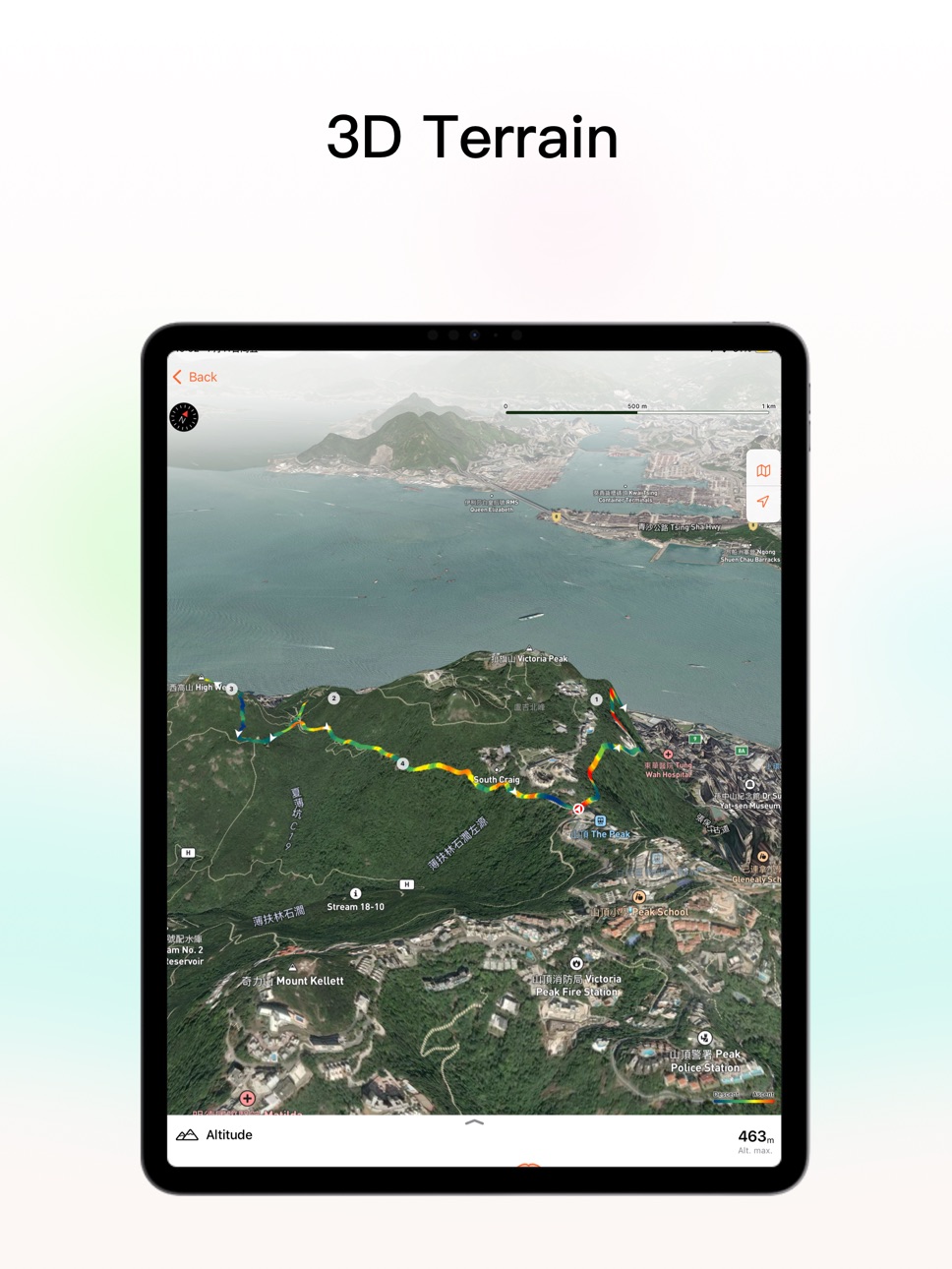
- High-precision contour lines & 3D terrain maps with comprehensive topographic details
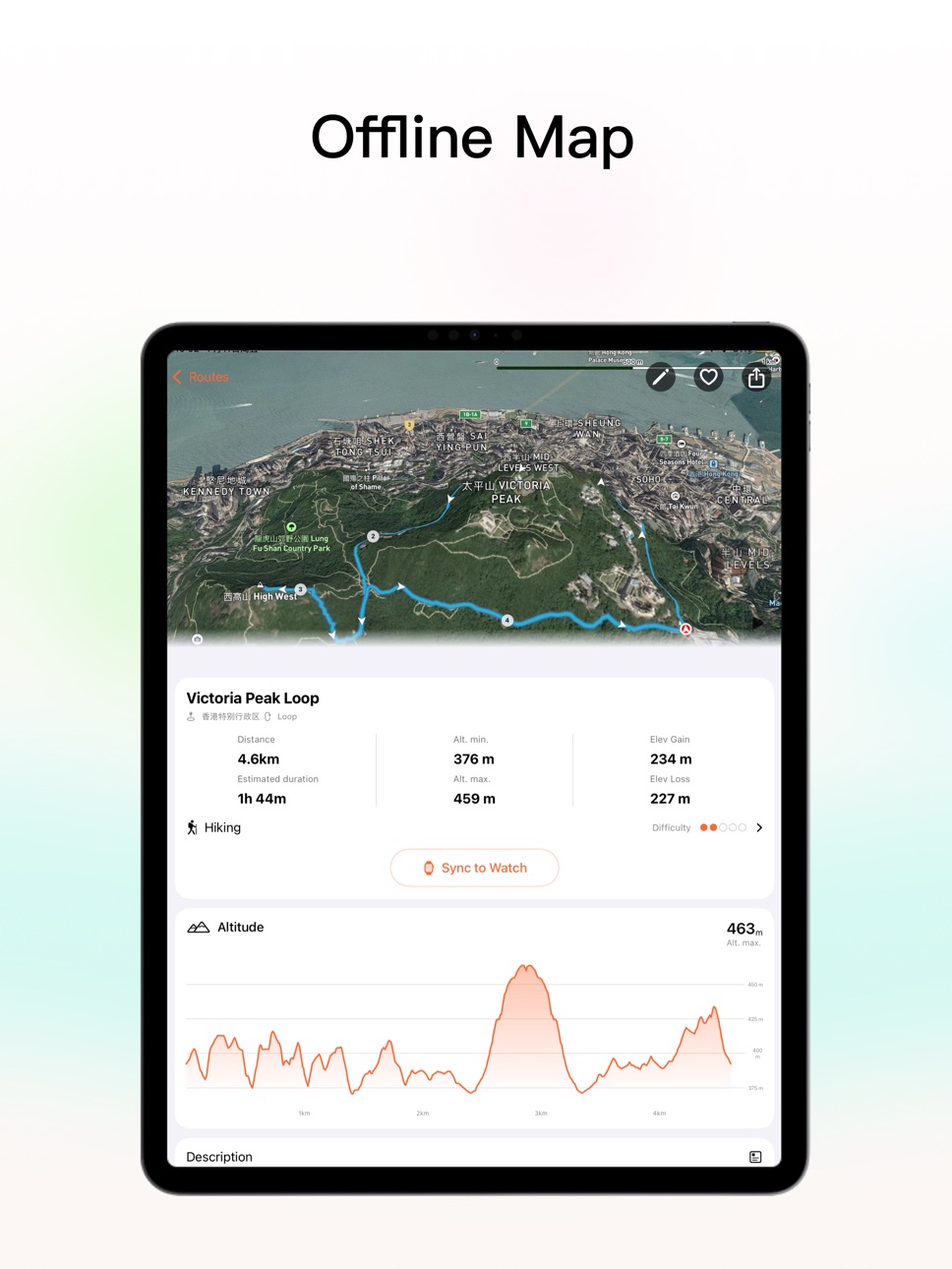
- Offline map support (watch + phone) for confident exploration without network coverage
# Smart Navigation System**
- Automatic off-track alerts with turn notifications via haptic feedback + voice guidance
- Intelligent backtrack feature for safe return along your original route
# Flexible Route Management
- Manual planning for personalized routes
- One-tap import of GPX/KML/KMZ/FIT track files (with photo attachments support)
- Multi-day trip merging for complete long-distance hiking records
# Workout Data Analytics**
- Intuitive slope visualization: Red for ascents | Blue for descents
- Real-time data monitoring: distance, heart rate, pace, elevation, remaining mileage
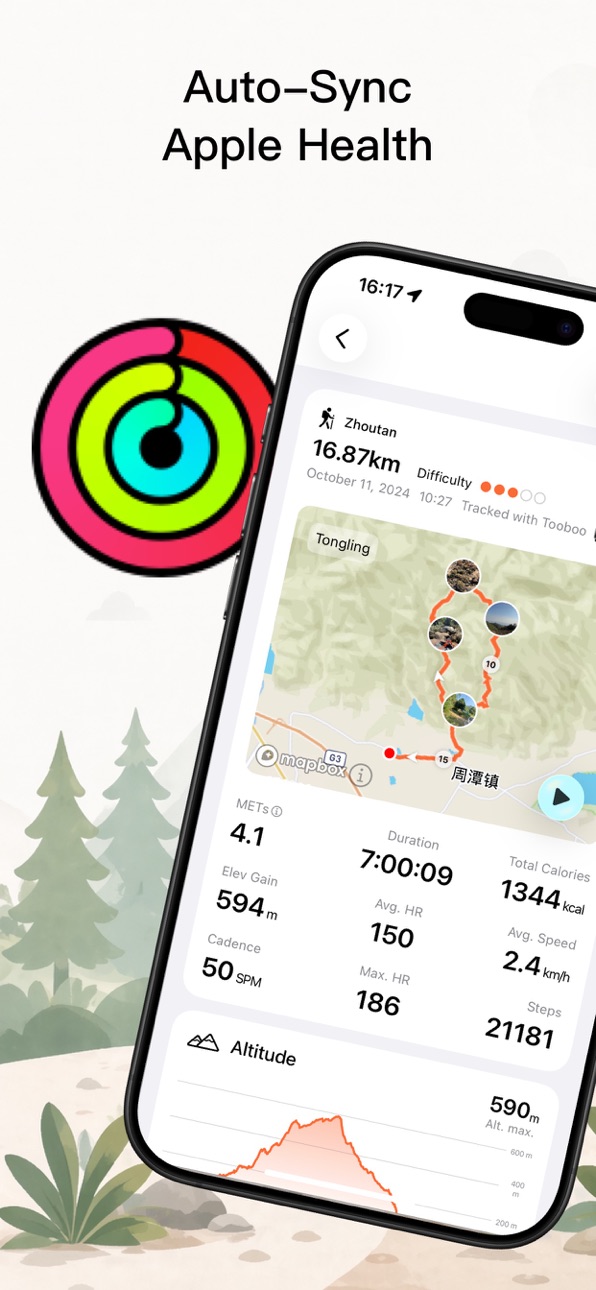
- Auto-sync with Apple Fitness to complete your daily activity goals
# Thoughtful Design Philosophy
- Seamless switching between map and data views
- Interface optimized specifically for outdoor activities
- Making every hike a safe and exciting adventure
** Privacy **
Ad-free forever. All workout data saves to Apple Health only. Automatically sync via iCloud.
GPS location used for navigation only, never uploaded to external servers.
Photos from the activity history or route are stored in your private iCloud and will not be uploaded to external servers. Automatically sync via iCloud.
Integrated with Apple Health for workout data sync.
Terms of Use: https://www.apple.com/legal/internet-services/itunes/dev/stdeula/
Privacy Policy: https://www.toobooapp.com/static/tooboo_privacy.html
In-App Purchases US pricing
Pro Version Subscription Subscription
Monthly · Monthly 7-day free trial$1.99
Yearly · Yearly$9.99
One-Time Purchases
Life Pro$19.99
Capabilities
In-App Purchases
Accessibility
ipadiphonemacrealityDevicetvoswatch
Version history 25 versions
Build 888089955v1.4.972026-07-11 21:49:35
Siri can now directly query real-time data such as exercise overview, distance, duration, heart rate, elevation gain, and route progress.
Added "New POI" in Control Center, allowing one-tap to record the current location as a POI.
POI supports tag management and combined filtering for quickly organizing and finding points of interest.
Added map location search, making long-press map operation more intuitive.
Build 887879874v1.4.962026-07-06 21:21:47
- Added cycling power zones, which can automatically read or manually set FTP and power zones.
- Apple Watch supports reading cadence data from 2-in-1 Bluetooth power meters, making cycling records more complete.
- Added statistical display of cycling power zones, supporting viewing the range of each zone and dwell time.
- Optimized the chart display of speed, power, etc. on the sports details page, making trends clearer.
Thank you to user (nk4321) for providing the bicycle for testing.
Build 887846667v1.4.952026-07-05 20:23:43
- Added cycling power zones, which can automatically read or manually set FTP and power zones.
- Apple Watch supports reading cadence data from 2-in-1 Bluetooth power meters, making cycling records more complete.
- Added statistical display of cycling power zones, supporting viewing the range of each zone and dwell time.
- Optimized the chart display of speed, power, etc. on the sports details page, making trends clearer.
Thank you to user (nk4321) for providing the bicycle for testing.
Build 887433064v1.4.942026-06-25 23:01:27
- Bug Fixes & Performance Improvements
Build 887264832v1.4.932026-06-24 23:53:58
Added a quick way to add the Tooboo exclusive watch face
Build 887222739v1.4.922026-06-20 20:38:39
Bug Fixes & Performance Improvements
Build 886862115v1.4.912026-06-12 17:58:54
Added 3 methods to extend watch battery life on the settings page:
1. Enable Low Power Mode
2. Enable Tooboo Expedition Mode
3. Connect third-party heart rate strap
Build 886657076v1.4.902026-06-08 14:22:21
1. New Expedition Mode (can increase battery life by approximately 30%-40% when enabled):
Optimized for long-duration hiking, cycling, and outdoor activities. When enabled, it reduces heart rate sampling frequency and supports custom sampling intervals.
Some high-power-consuming features will be restricted in Expedition Mode to help Apple Watch last longer during extended outdoor activities.
2. Routes and Points of Interest (POI) list support long-press multi-select operation
3. Temporarily disabled the auto-pause feature of the iOS app, as this feature has a bug on iOS 26
Build 886504843v1.4.892026-06-07 17:13:37
1. New Expedition Mode (Enabling Expedition Mode will approximately increase battery life by 30%-40%):
Optimized for long-duration hiking, cycling, and outdoor activities. When enabled, it reduces heart rate sampling frequency and supports custom sampling intervals.
In Expedition Mode, some high-power-consuming features will be restricted to help Apple Watch last longer during extended outdoor activities.
2. The Routes and Points of Interest list supports long-press multi-selection.
Build 886308357v1.4.882026-06-01 16:35:35
A brand-new POI experience:
• Create global POIs by long-pressing the map or entering coordinates, with categories, notes, photos, and elevation
• New POI list and detail views with search, filters, distance and bearing, plus GPX import and export
• POIs now sync to Apple Watch and can be shown during workouts, with visibility control
Build 885938546v1.4.872026-05-21 14:21:23
Bug Fixes & Performance Improvements
Build 885791930v1.4.862026-05-18 19:15:54
Optimized the loading speed of the route file list
Build 885604474v1.4.852026-05-13 18:57:11
Support customizing the data layout on the watch app via the mobile app.
Build 885557613v1.4.842026-05-12 19:28:09
Bug Fixes & Performance Improvements
Build 885356083v1.4.832026-05-07 19:14:50
Bug Fixes & Performance Improvements
Build 885051002v1.4.822026-04-29 19:55:50
Apple Watch watch face adds new rectangular complications:
The Weekly Activity Summary complication allows you to quickly view counts, distance, elevation gain, and calories burned.
The Weather complication supports temperature, precipitation probability, wind speed, and outdoor activity recommendations.
Build 884762834v1.4.812026-04-23 10:20:38
- More deer image designs have been introduced in the app.
- An option to turn off vibration has been added in the watch app.
Build 884685782v1.4.802026-04-20 02:03:44
Resolve the issue of error reporting when marked points exceed 25 during custom route planning.
Build 884588637v1.4.792026-04-17 18:16:47
Support customizing the font size of the bottom data area in the Watch App's workout interface
Added Apple Watch weather complication, which supports displaying the deer logo weather icon based on the current location (select Tooboo Weather in complications)
Fixed the issue where some two-in-one power meters could not correctly read cadence
Build 884438202v1.4.782026-04-13 22:07:14
Improved the mechanism for syncing route files to the watch. If communication between the phone and the watch fails (which often occurs when the system versions of the phone and watch do not match), iCloud sync will be used.
This improvement can solve the sync failure issue encountered by some users. Additionally, it brings an extra benefit: you can now use Tooboo on your iPad or Mac to sync route files to the watch.
Build 884418474v1.4.772026-04-12 22:51:58
- In the workout statistics map, clicking on the distance label allows you to quickly locate and zoom to the corresponding route segment.
- Optimize the data loading speed of the training details page to view sports metrics faster.
Build 884301998v1.4.762026-04-09 12:54:40
Now you can tap the reference route on the mobile app map to switch to the reference route for navigation (if the route file does not exist on the watch, it will prompt to sync the file before switching).
Build 884273535v1.4.752026-04-08 17:14:23
Bug Fixes & Performance Improvements
Build 884124208v1.4.732026-04-06 08:45:46
New "Reference Route" feature: During workout, you can select nearby routes as a reference, which are displayed as a dashed line overlaid on the map to help you more intuitively compare your current location with surrounding alternative routes.
Build 884189495v1.4.742026-04-06 19:07:07
You can now see clearer turn-by-turn directions on iPhone, Apple Watch, Live Activities, and widgets. Additionally, the 3D route flyover animation now supports playback speed adjustment and the option to show or hide waypoint images.
Price history by region
Currency
Show
Columns
Search
Availability 1 of 1 storefronts
| Region | Language | Price | Ratings | Avg | Version |
|---|---|---|---|---|---|
| US | en-US | Free | 37 | 4.6 | 1.4.97 |
Change log 29 changes · US
✎
releaseNotes updated
Siri can now directly query real-time data such as exercise overview, distance, duration, heart rate, elevation gain, and route progress.
Added "New POI" in C
✎
description updated
Tooboo is an app designed for outdoor activities (hiking, cycling, trail running). Use it for route navigation on Apple Watch or iPhone.
Simply import GPX track
✎
subtitle updated
Watch Offline GPS Navigation
✎
name updated
Tooboo - Hiking Trail Guides
◆
Version 1.4.97 released
Siri can now directly query real-time data such as exercise overview, distance, duration, heart rate, elevation gain, and route progress.
Added "New POI" in Control Center, allowing one-tap to record the current location as a POI.
POI s
◆
Version 1.4.96 released
- Added cycling power zones, which can automatically read or manually set FTP and power zones.
- Apple Watch supports reading cadence data from 2-in-1 Bluetooth power meters, making cycling records more complete.
- Added statistical dis
◆
Version 1.4.95 released
- Added cycling power zones, which can automatically read or manually set FTP and power zones.
- Apple Watch supports reading cadence data from 2-in-1 Bluetooth power meters, making cycling records more complete.
- Added statistical dis
◆
Version 1.4.94 released
- Bug Fixes & Performance Improvements
◆
Version 1.4.93 released
Added a quick way to add the Tooboo exclusive watch face
◆
Version 1.4.92 released
Bug Fixes & Performance Improvements
◆
Version 1.4.91 released
Added 3 methods to extend watch battery life on the settings page:
1. Enable Low Power Mode
2. Enable Tooboo Expedition Mode
3. Connect third-party heart rate strap
◆
Version 1.4.90 released
1. New Expedition Mode (can increase battery life by approximately 30%-40% when enabled):
Optimized for long-duration hiking, cycling, and outdoor activities. When enabled, it reduces heart rate sampling frequency and supports custom samp
◆
Version 1.4.89 released
1. New Expedition Mode (Enabling Expedition Mode will approximately increase battery life by 30%-40%):
Optimized for long-duration hiking, cycling, and outdoor activities. When enabled, it reduces heart rate sampling frequency and support
◆
Version 1.4.88 released
A brand-new POI experience:
• Create global POIs by long-pressing the map or entering coordinates, with categories, notes, photos, and elevation
• New POI list and detail views with search, filters, distance and bearing, plus GPX import and
◆
Version 1.4.87 released
Bug Fixes & Performance Improvements
◆
Version 1.4.86 released
Optimized the loading speed of the route file list
◆
Version 1.4.85 released
Support customizing the data layout on the watch app via the mobile app.
◆
Version 1.4.84 released
Bug Fixes & Performance Improvements
◆
Version 1.4.83 released
Bug Fixes & Performance Improvements
◆
Version 1.4.82 released
Apple Watch watch face adds new rectangular complications:
The Weekly Activity Summary complication allows you to quickly view counts, distance, elevation gain, and calories burned.
The Weather complication supports temperature, preci
◆
Version 1.4.81 released
- More deer image designs have been introduced in the app.
- An option to turn off vibration has been added in the watch app.
◆
Version 1.4.80 released
Resolve the issue of error reporting when marked points exceed 25 during custom route planning.
◆
Version 1.4.79 released
Support customizing the font size of the bottom data area in the Watch App's workout interface
Added Apple Watch weather complication, which supports displaying the deer logo weather icon based on the current location (select Tooboo Weath
◆
Version 1.4.78 released
Improved the mechanism for syncing route files to the watch. If communication between the phone and the watch fails (which often occurs when the system versions of the phone and watch do not match), iCloud sync will be used.
This improve
◆
Version 1.4.77 released
- In the workout statistics map, clicking on the distance label allows you to quickly locate and zoom to the corresponding route segment.
- Optimize the data loading speed of the training details page to view sports metrics faster.
◆
Version 1.4.76 released
Now you can tap the reference route on the mobile app map to switch to the reference route for navigation (if the route file does not exist on the watch, it will prompt to sync the file before switching).
◆
Version 1.4.75 released
Bug Fixes & Performance Improvements
◆
Version 1.4.74 released
You can now see clearer turn-by-turn directions on iPhone, Apple Watch, Live Activities, and widgets. Additionally, the 3D route flyover animation now supports playback speed adjustment and the option to show or hide waypoint images.
◆
Version 1.4.73 released
New "Reference Route" feature: During workout, you can select nearby routes as a reference, which are displayed as a dashed line overlaid on the map to help you more intuitively compare your current location with surrounding alternative rou