Home › Productivity

 PG
PG
 CNzh-Hans-CN
 INen-GB
 KRko
KRko MXes-MX
 VNen-GB
 AEen-GB
 AFen-GB
 AGen-GB
 AIen-GB
 ALen-GB
 AMen-GB
 AOen-GB
 ARes-MX
 ATde-DE
 AUen-AU
 AZen-GB
 BAen-GB
 BBen-GB
 BEen-GB
 BFen-GB
 BGen-GB
 BHen-GB
 BJen-GB
 BMen-GB
 BNen-GB
 BOes-MX
 BRpt-BR
 BSen-GB
 BTen-GB
 BWen-GB
 BYen-GB
 BZen-GB
 CAen-CA
 CDen-GB
 CGen-GB
 CHde-CH
 CIfr-FR
 CLes-MX
 CMfr-FR
 COes-MX
 CRes-MX
 CVen-GB
 CYen-GB
 CZen-GB
 DEde-DE
 DKen-GB
 DMen-GB
 DOes-MX
 DZen-GB
 ECes-MX
 EEen-GB
 EGen-GB
 ESes-ES
 FIen-GB
 FJen-GB
 FMen-GB
 FRfr-FR
 GAfr-FR
 GBen-GB
 GDen-GB
 GEen-GB
 GHen-GB
 GMen-GB
 GRen-GB
 GTes-MX
 GWen-GB
 GYen-GB
 HKzh-Hant-HK
 HNes-MX
 HRen-GB
 HUen-GB
 IDen-GB
 IEen-GB
 ILen-GB
 IQen-GB
 ISen-GB
 ITit
ITit JMen-GB
 JOen-GB
 JPja
JPja KEen-GB
 KGen-GB
 KHen-GB
 KNen-GB
 KWen-GB
 KYen-GB
 KZen-GB
 LAen-GB
 LBen-GB
 LCen-GB
 LKen-GB
 LRen-GB
 LTen-GB
 LUen-GB
 LVen-GB
 LYen-GB
 MAen-GB
 MDen-GB
 MEen-GB
 MGen-GB
 MKen-GB
 MLen-GB
 MMen-GB
 MNen-GB
 MOzh-Hant-HK
 MRen-GB
 MSen-GB
 MTen-GB
 MUen-GB
 MVen-GB
 MWen-GB
 MYen-GB
 MZen-GB
 NAen-GB
 NEen-GB
 NGen-GB
 NIes-MX
 NLnl
NLnl NOen-GB
 NPen-GB
 NRen-GB
 NZen-AU
 OMen-GB
 PAes-MX
 PEes-MXPGen-GB
 PHen-GB
 PKen-GB
 PLen-GB
 PTpt-PT
 PWen-GB
 PYes-MX
 QAen-GB
 ROen-GB
 RSen-GB
 RUru
RUru RWen-GB
 SAen-GB
 SBen-GB
 SCen-GB
 SEsv
SEsv SGen-GB
 SIen-GB
 SKen-GB
 SLen-GB
 SNen-GB
 SRen-GB
 STen-GB
 SVes-MX
 SZen-GB
 TCen-GB
 TDen-GB
 THen-GB
 TJen-GB
 TMen-GB
 TNen-GB
 TOen-GB
 TRen-GB
 TTen-GB
 TWzh-Hant-TW
 TZen-GB
 UAen-GB
 UGen-GB
 USen-US
 UYen-GB
 UZen-GB
 VCen-GB
 VEes-MX
 VGen-GB
 VUen-GB
 XKen-GB
 YEen-GB
 ZAen-GB
 ZMen-GB
 ZWen-GB
175 of 175 storefronts
Content in en-US
Content in en-US
Information
Apple ID6733222153
Bundle IDcom.foowei.eTableCollector
SellerSeller
Min iOS16.0
Device familiesmac, iphone, ipad
Released2024-11-09
Copyright© 2024-2026 aiwei.
Privacy policyLink ↗
Preview 3 platforms
iPhone 6 images


iPad 5 images


Mac 6 images


What’s New Version 1.2.4
This update refreshes the App Store screenshots.
Description
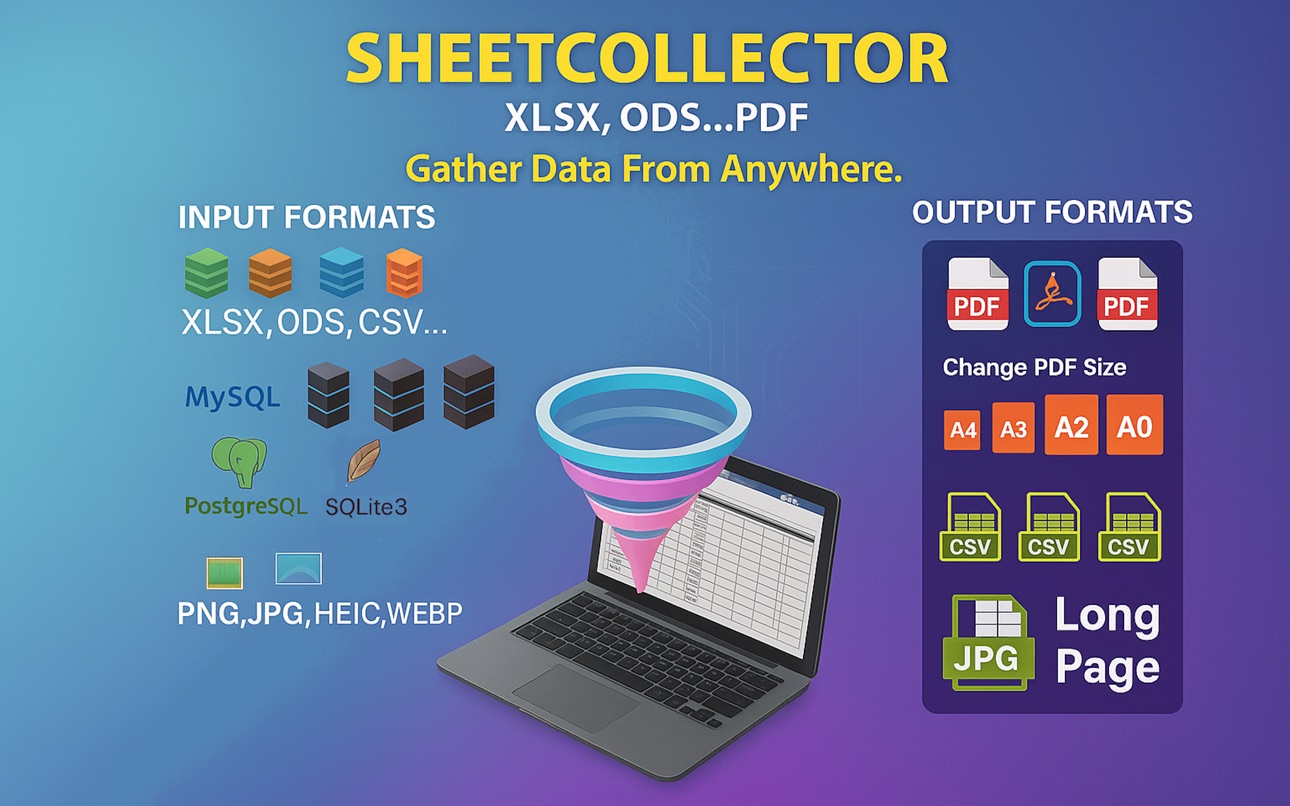
SheetCollector helps you collect tables from real-world sources, refine them locally, and export clean deliverables on Apple devices.
Instead of acting like a generic spreadsheet viewer, SheetCollector is built for turning files, image files, and databases into clean PDF, CSV, or JPG outputs.
Camera capture and scan intake are available on iPhone and iPad. On Mac, image intake is limited to image files imported from disk.
Use it when you need to:
• collect tables from CSV, TSV, JSON, XLSX, ODS, HTML, PDF, XML, Markdown, databases, or image files
• keep imported data independent from the original source
• clean up rows and columns before delivery
• export polished PDF, CSV, or JPG outputs while keeping collected data on your device
Why SheetCollector is different
• Collected data stays on your device after import.
• Multi-source intake: import from CSV, TSV, JSON, XLSX, ODS, HTML, PDF, XML, Markdown, SQLite3, MySQL, MariaDB, PostgreSQL, and image files, with camera capture on iPhone and iPad.
• Structured editing: add, modify, clear, reorder, and swap rows or columns after import.
• Publish-ready export: generate CSV, PDF, or JPG output for sharing, reporting, archiving, or compliance workflows.
• Output control: customize page size, orientation, long-page JPG output, borders, headers, footers, fonts, colors, and backgrounds.
• Business-ready documents: add logos, private statements, and PDF protection with separate read and edit passwords.
Typical workflows
• Turn a database table into a client-ready PDF report.
• Collect table data from an image file, or use camera scan on iPhone or iPad, then export a cleaner structured output.
• Reformat spreadsheets into branded deliverables while keeping collected data on device.
• Prepare audit, archive, and documentation outputs on iPhone, iPad, or Mac.
Private by design
• Data stays on your device
• No ads
• No tracking
Unlocks
• Free: unlimited CSV and SQLite3 imports, editing, and viewing with no row or column limits
• Subscription: unlock the full workflow
• One-time purchase: permanently unlock the features you need
Subscription Terms
• Payment is charged to your App Store account.
• Auto-renews unless turned off at least 24 hours before the current period ends.
• Manage subscriptions in App Store settings.
• Privacy Policy: https://h53d.github.io/eTable/policy.html
• Terms of Use (EULA): https://www.apple.com/legal/internet-services/itunes/dev/stdeula/
Support: danjian42@gmail.com
In-App Purchases PG pricing
Pro Cycle Subscriptions Subscription
Pro Infinity · Yearly—
Pro Light · Monthly—
Pro Flex · 7 days—
One-Time Purchases
XLSX—
ODS—
MySQL/MariaDB—
PostgreSQL—
Unlock All Features Below—
MySQL/MariaDB & PostgreSQL—
Unlock Custom Style Export—
Capabilities
In-App Purchases
Accessibility
ipadiphonemacrealityDevicetvoswatch
Version history 25 versions
Build 885055891v1.2.42026-04-29 20:39:17
This update refreshes the App Store screenshots.
Build 884436310v1.2.32026-04-21 22:46:43
This update refreshes the App Store listing with clearer screenshots and localized store content.
Build 884021622v1.2.22026-04-02 22:01:00
Version 1.2.2 improves import reliability and adds more file support:
- Added table import support for PDF, Markdown, XML, and HTML.
- Improved JSON import compatibility for more real-world file formats.
- Improved output behavior so style settings and default sizing are applied more consistently.
Build 883632100v1.2.12026-03-26 01:09:12
- Improved import and image capture workflows for faster, more reliable table collection.
- Refined the Collected and Export experience with smoother updates, better previews, and clearer actions.
- Polished the Input screen layout and helper panels for a cleaner, easier-to-use interface.
Build 880573486v1.2.02026-02-15 23:11:09
- The user interface has been optimized to match the aesthetic of iOS and macOS 26.
- Updated Privacy Policy and Support documents for better readability via web-based viewing.
Build 879078831v1.1.242025-10-21 02:06:54
- Consolidate subscription and one-time purchase options into a single view for easy comparison and selection.
- Custom table exports are no longer exclusive to subscribers; you can now unlock them with a one-time purchase.
- Subscribe for full access to all features.
Build 877908689v1.1.232025-09-08 18:40:03
- Minor UI detail adjustments
Build 877718433v1.1.222025-09-02 07:22:22
- Support extracting table data from HEIC image files
- Optimized the UI displayed when sharing the app on macOS
- Upgraded payment interface to StoreKit 2
Build 876956266v1.1.212025-08-08 03:03:33
- Import module UI optimization;
- Subscription description fine-tuning;
Build 876272388v1.1.202025-07-12 06:04:44
- Small enhancements to interactions and usability
Build 875730288v1.1.192025-06-23 12:59:14
- Supports taking photos/scanning with camera to import spreadsheet contents.
Build 875707639v1.1.182025-06-19 09:53:57
- Renamed "eTable Collector" to "SheetCollector" to better reflect App's functionality.
Build 875291859v1.1.172025-06-08 09:40:50
- Supports importing table data from png, jpg, bmp, tiff, and webp format images (Mac supports image files, iOS supports image files and album photos).
- Multiple SQLite3 extension tables in the collected module have been merged into one column (SQLITE3);
Build 875012026v1.1.162025-05-26 02:43:38
- Supports sharing app information.
- Supports sharing exported spreadsheet files.
- Supports opening xlsx, ods, csv, tsv, and psv spreadsheet files in other apps using eTableCollector.
- Supports opening xlsx, ods, csv, tsv, and psv files with eTableCollector in the File app on iOS (or Finder on macOS).
Build 873711514v1.1.152025-04-03 06:16:14
- Remove some UI elements;
- Simplify export operations;
Build 873600758v1.1.142025-03-31 07:50:34
- Made some UI updates to enhance UX.
Build 873356522v1.1.132025-03-19 13:54:13
- Fixed some PDF page size bugs
- Support setting read password and edit password separately when generating PDF files with custom output
- Output module UI optimization
Build 872643679v1.1.122025-03-04 13:25:36
- Fixed a bug related to collecting CSV table files
- Optimized column width for viewing data tables
Build 872569363v1.1.112025-02-19 14:05:05
- Improve the dark mode UI.
- Supports data collection from SQLite3 tables.
- Improve UI prompts for collecting data from MySQL, MariaDB, and PostgreSQL.
Build 872284787v1.1.92025-02-10 15:35:37
- Supports collecting data from a PostgreSQL table.
Build 872251649v1.1.82025-02-05 09:26:11
- Supports collecting data from a MySQL/MariaDB table.
Build 871958778v1.1.72025-01-27 00:26:41
- Output now supports selecting or deselecting all columns/rows.
- Improved the UI style of the output preview menu.
- Added new options to the output preview menu: "Gen All" and "Open Dir."
- Added a demo table of CSV file data.
Build 871561838v1.1.62025-01-20 11:47:56
- Added subscription functionality.
- Supported table design for PDF/JPEG output: custom borders, headers, bodies, and footers; interactive design of data fonts, colors, sizes, positions, etc.
- Added the option to include your own statement and logo in the output PDFs/JPEGs.
- The above customization features are available on macOS, iPhone, and iPad with consistent functionality across all devices.
- Improved the interactive UI experience in the data collection module.
Build 871455390v1.1.42025-01-05 22:59:35
- Input Module: Supports pausing, resuming, and stopping file collection. Paused collections now show a detailed status list of all files.
- Collection Module: Enhanced UI for editing and managing table rows and columns.
- Output Module: Supports content preview before final generation.
- Rename the app back to "eTable Collector".
Build 871349537v1.1.32024-12-30 09:55:13
Improved version: "Optimize the editing of rows and columns in table data.
Price history by region
Currency
Show
Columns
Search
Availability 175 of 175 storefronts
| Region | Language | Price | Ratings | Avg | Version |
|---|---|---|---|---|---|
| CN | zh-Hans-CN | Free | 4 | 4.0 | 1.2.4 |
| IN | en-GB | Free | 1 | 4.0 | 1.2.4 |
| KR | ko | Free | 1 | 5.0 | 1.2.4 |
| MX | es-MX | Free | 1 | 5.0 | 1.2.4 |
| VN | en-GB | Free | 1 | 5.0 | 1.2.4 |
| AE | en-GB | Free | 0 | — | 1.2.4 |
| AF | en-GB | Free | 0 | — | 1.2.4 |
| AG | en-GB | Free | 0 | — | 1.2.4 |
| AI | en-GB | Free | 0 | — | 1.2.4 |
| AL | en-GB | Free | 0 | — | 1.2.4 |
| AM | en-GB | Free | 0 | — | 1.2.4 |
| AO | en-GB | Free | 0 | — | 1.2.4 |
| AR | es-MX | Free | 0 | — | 1.2.4 |
| AT | de-DE | Free | 0 | — | 1.2.4 |
| AU | en-AU | Free | 0 | — | 1.2.4 |
| AZ | en-GB | Free | 0 | — | 1.2.4 |
| BA | en-GB | Free | 0 | — | 1.2.4 |
| BB | en-GB | Free | 0 | — | 1.2.4 |
| BE | en-GB | Free | 0 | — | 1.2.4 |
| BF | en-GB | Free | 0 | — | 1.2.4 |
| BG | en-GB | Free | 0 | — | 1.2.4 |
| BH | en-GB | Free | 0 | — | 1.2.4 |
| BJ | en-GB | Free | 0 | — | 1.2.4 |
| BM | en-GB | Free | 0 | — | 1.2.4 |
| BN | en-GB | Free | 0 | — | 1.2.4 |
| BO | es-MX | Free | 0 | — | 1.2.4 |
| BR | pt-BR | Free | 0 | — | 1.2.4 |
| BS | en-GB | Free | 0 | — | 1.2.4 |
| BT | en-GB | Free | 0 | — | 1.2.4 |
| BW | en-GB | Free | 0 | — | 1.2.4 |
| BY | en-GB | Free | 0 | — | 1.2.4 |
| BZ | en-GB | Free | 0 | — | 1.2.4 |
| CA | en-CA | Free | 0 | — | 1.2.4 |
| CD | en-GB | Free | 0 | — | 1.2.4 |
| CG | en-GB | Free | 0 | — | 1.2.4 |
| CH | de-CH | Free | 0 | — | 1.2.4 |
| CI | fr-FR | Free | 0 | — | 1.2.4 |
| CL | es-MX | Free | 0 | — | 1.2.4 |
| CM | fr-FR | Free | 0 | — | 1.2.4 |
| CO | es-MX | Free | 0 | — | 1.2.4 |
| CR | es-MX | Free | 0 | — | 1.2.4 |
| CV | en-GB | Free | 0 | — | 1.2.4 |
| CY | en-GB | Free | 0 | — | 1.2.4 |
| CZ | en-GB | Free | 0 | — | 1.2.4 |
| DE | de-DE | Free | 0 | — | 1.2.4 |
| DK | en-GB | Free | 0 | — | 1.2.4 |
| DM | en-GB | Free | 0 | — | 1.2.4 |
| DO | es-MX | Free | 0 | — | 1.2.4 |
| DZ | en-GB | Free | 0 | — | 1.2.4 |
| EC | es-MX | Free | 0 | — | 1.2.4 |
| EE | en-GB | Free | 0 | — | 1.2.4 |
| EG | en-GB | Free | 0 | — | 1.2.4 |
| ES | es-ES | Free | 0 | — | 1.2.4 |
| FI | en-GB | Free | 0 | — | 1.2.4 |
| FJ | en-GB | Free | 0 | — | 1.2.4 |
| FM | en-GB | Free | 0 | — | 1.2.4 |
| FR | fr-FR | Free | 0 | — | 1.2.4 |
| GA | fr-FR | Free | 0 | — | 1.2.4 |
| GB | en-GB | Free | 0 | — | 1.2.4 |
| GD | en-GB | Free | 0 | — | 1.2.4 |
| GE | en-GB | Free | 0 | — | 1.2.4 |
| GH | en-GB | Free | 0 | — | 1.2.4 |
| GM | en-GB | Free | 0 | — | 1.2.4 |
| GR | en-GB | Free | 0 | — | 1.2.4 |
| GT | es-MX | Free | 0 | — | 1.2.4 |
| GW | en-GB | Free | 0 | — | 1.2.4 |
| GY | en-GB | Free | 0 | — | 1.2.4 |
| HK | zh-Hant-HK | Free | 0 | — | 1.2.4 |
| HN | es-MX | Free | 0 | — | 1.2.4 |
| HR | en-GB | Free | 0 | — | 1.2.4 |
| HU | en-GB | Free | 0 | — | 1.2.4 |
| ID | en-GB | Free | 0 | — | 1.2.4 |
| IE | en-GB | Free | 0 | — | 1.2.4 |
| IL | en-GB | Free | 0 | — | 1.2.4 |
| IQ | en-GB | Free | 0 | — | 1.2.4 |
| IS | en-GB | Free | 0 | — | 1.2.4 |
| IT | it | Free | 0 | — | 1.2.4 |
| JM | en-GB | Free | 0 | — | 1.2.4 |
| JO | en-GB | Free | 0 | — | 1.2.4 |
| JP | ja | Free | 0 | — | 1.2.4 |
| KE | en-GB | Free | 0 | — | 1.2.4 |
| KG | en-GB | Free | 0 | — | 1.2.4 |
| KH | en-GB | Free | 0 | — | 1.2.4 |
| KN | en-GB | Free | 0 | — | 1.2.4 |
| KW | en-GB | Free | 0 | — | 1.2.4 |
| KY | en-GB | Free | 0 | — | 1.2.4 |
| KZ | en-GB | Free | 0 | — | 1.2.4 |
| LA | en-GB | Free | 0 | — | 1.2.4 |
| LB | en-GB | Free | 0 | — | 1.2.4 |
| LC | en-GB | Free | 0 | — | 1.2.4 |
| LK | en-GB | Free | 0 | — | 1.2.4 |
| LR | en-GB | Free | 0 | — | 1.2.4 |
| LT | en-GB | Free | 0 | — | 1.2.4 |
| LU | en-GB | Free | 0 | — | 1.2.4 |
| LV | en-GB | Free | 0 | — | 1.2.4 |
| LY | en-GB | Free | 0 | — | 1.2.4 |
| MA | en-GB | Free | 0 | — | 1.2.4 |
| MD | en-GB | Free | 0 | — | 1.2.4 |
| ME | en-GB | Free | 0 | — | 1.2.4 |
| MG | en-GB | Free | 0 | — | 1.2.4 |
| MK | en-GB | Free | 0 | — | 1.2.4 |
| ML | en-GB | Free | 0 | — | 1.2.4 |
| MM | en-GB | Free | 0 | — | 1.2.4 |
| MN | en-GB | Free | 0 | — | 1.2.4 |
| MO | zh-Hant-HK | Free | 0 | — | 1.2.4 |
| MR | en-GB | Free | 0 | — | 1.2.4 |
| MS | en-GB | Free | 0 | — | 1.2.4 |
| MT | en-GB | Free | 0 | — | 1.2.4 |
| MU | en-GB | Free | 0 | — | 1.2.4 |
| MV | en-GB | Free | 0 | — | 1.2.4 |
| MW | en-GB | Free | 0 | — | 1.2.4 |
| MY | en-GB | Free | 0 | — | 1.2.4 |
| MZ | en-GB | Free | 0 | — | 1.2.4 |
| NA | en-GB | Free | 0 | — | 1.2.4 |
| NE | en-GB | Free | 0 | — | 1.2.4 |
| NG | en-GB | Free | 0 | — | 1.2.4 |
| NI | es-MX | Free | 0 | — | 1.2.4 |
| NL | nl | Free | 0 | — | 1.2.4 |
| NO | en-GB | Free | 0 | — | 1.2.4 |
| NP | en-GB | Free | 0 | — | 1.2.4 |
| NR | en-GB | Free | 0 | — | 1.2.4 |
| NZ | en-AU | Free | 0 | — | 1.2.4 |
| OM | en-GB | Free | 0 | — | 1.2.4 |
| PA | es-MX | Free | 0 | — | 1.2.4 |
| PE | es-MX | Free | 0 | — | 1.2.4 |
| PG | en-GB | Free | 0 | — | 1.2.4 |
| PH | en-GB | Free | 0 | — | 1.2.4 |
| PK | en-GB | Free | 0 | — | 1.2.4 |
| PL | en-GB | Free | 0 | — | 1.2.4 |
| PT | pt-PT | Free | 0 | — | 1.2.4 |
| PW | en-GB | Free | 0 | — | 1.2.4 |
| PY | es-MX | Free | 0 | — | 1.2.4 |
| QA | en-GB | Free | 0 | — | 1.2.4 |
| RO | en-GB | Free | 0 | — | 1.2.4 |
| RS | en-GB | Free | 0 | — | 1.2.4 |
| RU | ru | Free | 0 | — | 1.2.4 |
| RW | en-GB | Free | 0 | — | 1.2.4 |
| SA | en-GB | Free | 0 | — | 1.2.4 |
| SB | en-GB | Free | 0 | — | 1.2.4 |
| SC | en-GB | Free | 0 | — | 1.2.4 |
| SE | sv | Free | 0 | — | 1.2.4 |
| SG | en-GB | Free | 0 | — | 1.2.4 |
| SI | en-GB | Free | 0 | — | 1.2.4 |
| SK | en-GB | Free | 0 | — | 1.2.4 |
| SL | en-GB | Free | 0 | — | 1.2.4 |
| SN | en-GB | Free | 0 | — | 1.2.4 |
| SR | en-GB | Free | 0 | — | 1.2.4 |
| ST | en-GB | Free | 0 | — | 1.2.4 |
| SV | es-MX | Free | 0 | — | 1.2.4 |
| SZ | en-GB | Free | 0 | — | 1.2.4 |
| TC | en-GB | Free | 0 | — | 1.2.4 |
| TD | en-GB | Free | 0 | — | 1.2.4 |
| TH | en-GB | Free | 0 | — | 1.2.4 |
| TJ | en-GB | Free | 0 | — | 1.2.4 |
| TM | en-GB | Free | 0 | — | 1.2.4 |
| TN | en-GB | Free | 0 | — | 1.2.4 |
| TO | en-GB | Free | 0 | — | 1.2.4 |
| TR | en-GB | Free | 0 | — | 1.2.4 |
| TT | en-GB | Free | 0 | — | 1.2.4 |
| TW | zh-Hant-TW | Free | 0 | — | 1.2.4 |
| TZ | en-GB | Free | 0 | — | 1.2.4 |
| UA | en-GB | Free | 0 | — | 1.2.4 |
| UG | en-GB | Free | 0 | — | 1.2.4 |
| US | en-US | Free | 0 | — | 1.2.4 |
| UY | en-GB | Free | 0 | — | 1.2.4 |
| UZ | en-GB | Free | 0 | — | 1.2.4 |
| VC | en-GB | Free | 0 | — | 1.2.4 |
| VE | es-MX | Free | 0 | — | 1.2.4 |
| VG | en-GB | Free | 0 | — | 1.2.4 |
| VU | en-GB | Free | 0 | — | 1.2.4 |
| XK | en-GB | Free | 0 | — | 1.2.4 |
| YE | en-GB | Free | 0 | — | 1.2.4 |
| ZA | en-GB | Free | 0 | — | 1.2.4 |
| ZM | en-GB | Free | 0 | — | 1.2.4 |
| ZW | en-GB | Free | 0 | — | 1.2.4 |
Change log 29 changes · PG
✎
releaseNotes updated
This update refreshes the App Store screenshots.
✎
description updated
SheetCollector helps you collect tables from real-world sources, refine them locally, and export clean deliverables on Apple devices.
Instead of acting like a
✎
subtitle updated
Collect tables, export PDFs
✎
name updated
SheetCollector:xlsx ods...pdf
◆
Version 1.2.4 released
This update refreshes the App Store screenshots.
◆
Version 1.2.3 released
This update refreshes the App Store listing with clearer screenshots and localized store content.
◆
Version 1.2.2 released
Version 1.2.2 improves import reliability and adds more file support:
- Added table import support for PDF, Markdown, XML, and HTML.
- Improved JSON import compatibility for more real-world file formats.
- Improved output behavior so style
◆
Version 1.2.1 released
- Improved import and image capture workflows for faster, more reliable table collection.
- Refined the Collected and Export experience with smoother updates, better previews, and clearer actions.
- Polished the Input screen layout and help
◆
Version 1.2.0 released
- The user interface has been optimized to match the aesthetic of iOS and macOS 26.
- Updated Privacy Policy and Support documents for better readability via web-based viewing.
◆
Version 1.1.24 released
- Consolidate subscription and one-time purchase options into a single view for easy comparison and selection.
- Custom table exports are no longer exclusive to subscribers; you can now unlock them with a one-time purchase.
- Subscribe for
◆
Version 1.1.23 released
- Minor UI detail adjustments
◆
Version 1.1.22 released
- Support extracting table data from HEIC image files
- Optimized the UI displayed when sharing the app on macOS
- Upgraded payment interface to StoreKit 2
◆
Version 1.1.21 released
- Import module UI optimization;
- Subscription description fine-tuning;
◆
Version 1.1.20 released
- Small enhancements to interactions and usability
◆
Version 1.1.19 released
- Supports taking photos/scanning with camera to import spreadsheet contents.
◆
Version 1.1.18 released
- Renamed "eTable Collector" to "SheetCollector" to better reflect App's functionality.
◆
Version 1.1.17 released
- Supports importing table data from png, jpg, bmp, tiff, and webp format images (Mac supports image files, iOS supports image files and album photos).
- Multiple SQLite3 extension tables in the collected module have been merged into one co
◆
Version 1.1.16 released
- Supports sharing app information.
- Supports sharing exported spreadsheet files.
- Supports opening xlsx, ods, csv, tsv, and psv spreadsheet files in other apps using eTableCollector.
- Supports opening xlsx, ods, csv, tsv, and psv fil
◆
Version 1.1.15 released
- Remove some UI elements;
- Simplify export operations;
◆
Version 1.1.14 released
- Made some UI updates to enhance UX.
◆
Version 1.1.13 released
- Fixed some PDF page size bugs
- Support setting read password and edit password separately when generating PDF files with custom output
- Output module UI optimization
◆
Version 1.1.12 released
- Fixed a bug related to collecting CSV table files
- Optimized column width for viewing data tables
◆
Version 1.1.11 released
- Improve the dark mode UI.
- Supports data collection from SQLite3 tables.
- Improve UI prompts for collecting data from MySQL, MariaDB, and PostgreSQL.
◆
Version 1.1.9 released
- Supports collecting data from a PostgreSQL table.
◆
Version 1.1.8 released
- Supports collecting data from a MySQL/MariaDB table.
◆
Version 1.1.7 released
- Output now supports selecting or deselecting all columns/rows.
- Improved the UI style of the output preview menu.
- Added new options to the output preview menu: "Gen All" and "Open Dir."
- Added a demo table of CSV file data.
◆
Version 1.1.6 released
- Added subscription functionality.
- Supported table design for PDF/JPEG output: custom borders, headers, bodies, and footers; interactive design of data fonts, colors, sizes, positions, etc.
- Added the option to include your own statem
◆
Version 1.1.4 released
- Input Module: Supports pausing, resuming, and stopping file collection. Paused collections now show a detailed status list of all files.
- Collection Module: Enhanced UI for editing and managing table rows and columns.
- Output Module:
◆
Version 1.1.3 released
Improved version: "Optimize the editing of rows and columns in table data.