Home › Productivity

 BB
BB
 USen-US
 AUen-AU
 MXes-MX
 AEen-GB
 AGen-GB
 AIen-GB
 ALen-GB
 AMen-GB
 AOen-GB
 ARes-MX
 ATde-DE
 AZen-GB
 BAen-GBBBen-GB
 BEen-GB
 BFen-GB
 BGen-GB
 BJen-GB
 BNen-GB
 BOes-MX
 BRpt-BR
 BSen-GB
 BTen-GB
 BWen-GB
 BYen-GB
 BZen-GB
 CDen-GB
 CGen-GB
 CHde-CH
 CIfr-FR
 CLes-MX
 CMfr-FR
 CNzh-Hans-CN
 COes-MX
 CRes-MX
 CVen-GB
 CYen-GB
 CZen-GB
 DEde-DE
 DKen-GB
 DMen-GB
 DOes-MX
 DZen-GB
 ECes-MX
 EEen-GB
 ESes-ES
 FIen-GB
 FJen-GB
 FMen-GB
 FRfr-FR
 GAfr-FR
 GDen-GB
 GEen-GB
 GHen-GB
 GMen-GB
 GRen-GB
 GTes-MX
 GWen-GB
 GYen-GB
 HKzh-Hant-HK
 HNes-MX
 HRen-GB
 HUen-GB
 IDen-GB
 IEen-GB
 ILen-GB
 INen-GB
 ISen-GB
 ITit
ITit JMen-GB
 JPja
JPja KEen-GB
 KGen-GB
 KNen-GB
 KRko
KRko KWen-GB
 KYen-GB
 KZen-GB
 LCen-GB
 LRen-GB
 LTen-GB
 LUen-GB
 LVen-GB
 LYen-GB
 MAen-GB
 MDen-GB
 MEen-GB
 MGen-GB
 MKen-GB
 MLen-GB
 MMen-GB
 MNen-GB
 MOzh-Hant-HK
 MRen-GB
 MSen-GB
 MTen-GB
 MUen-GB
 MVen-GB
 MWen-GB
 MYen-GB
 NAen-GB
 NEen-GB
 NGen-GB
 NIes-MX
 NLnl
NLnl NOen-GB
 NRen-GB
 NZen-AU
 PAes-MX
 PEes-MX
 PGen-GB
 PKen-GB
 PLen-GB
 PWen-GB
 PYes-MX
 QAen-GB
 ROen-GB
 RSen-GB
 RUru
RUru RWen-GB
 SAen-GB
 SBen-GB
 SCen-GB
 SEsv
SEsv SGen-GB
 SIen-GB
 SKen-GB
 SLen-GB
 SNen-GB
 SRen-GB
 STen-GB
 SVes-MX
 SZen-GB
 TCen-GB
 TDen-GB
 THen-GB
 TJen-GB
 TMen-GB
 TNen-GB
 TOen-GB
 TRen-GB
 TTen-GB
 TWzh-Hant-TW
 TZen-GB
 UAen-GB
 UGen-GB
 UYen-GB
 UZen-GB
 VCen-GB
 VEes-MX
 VGen-GB
 VNen-GB
 VUen-GB
 XKen-GB
 YEen-GB
 ZAen-GB
 ZMen-GB
 ZWen-GB
158 of 158 storefronts
Content in en-US
Content in en-US
Information
Preview 2 platforms
iPhone 5 images
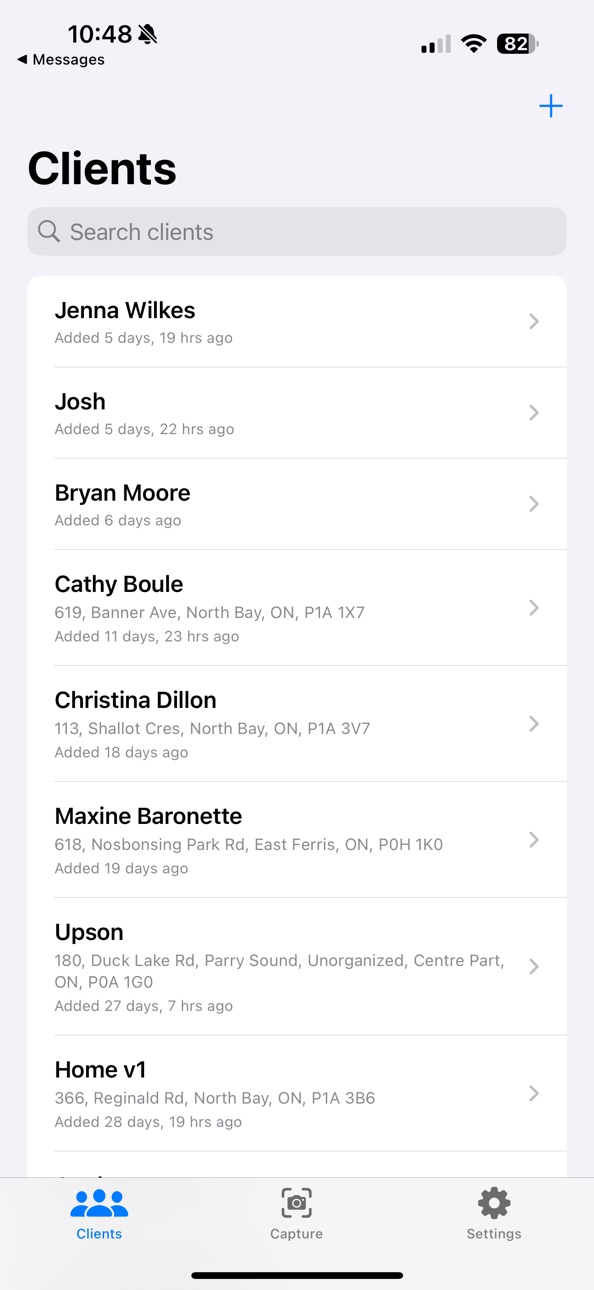
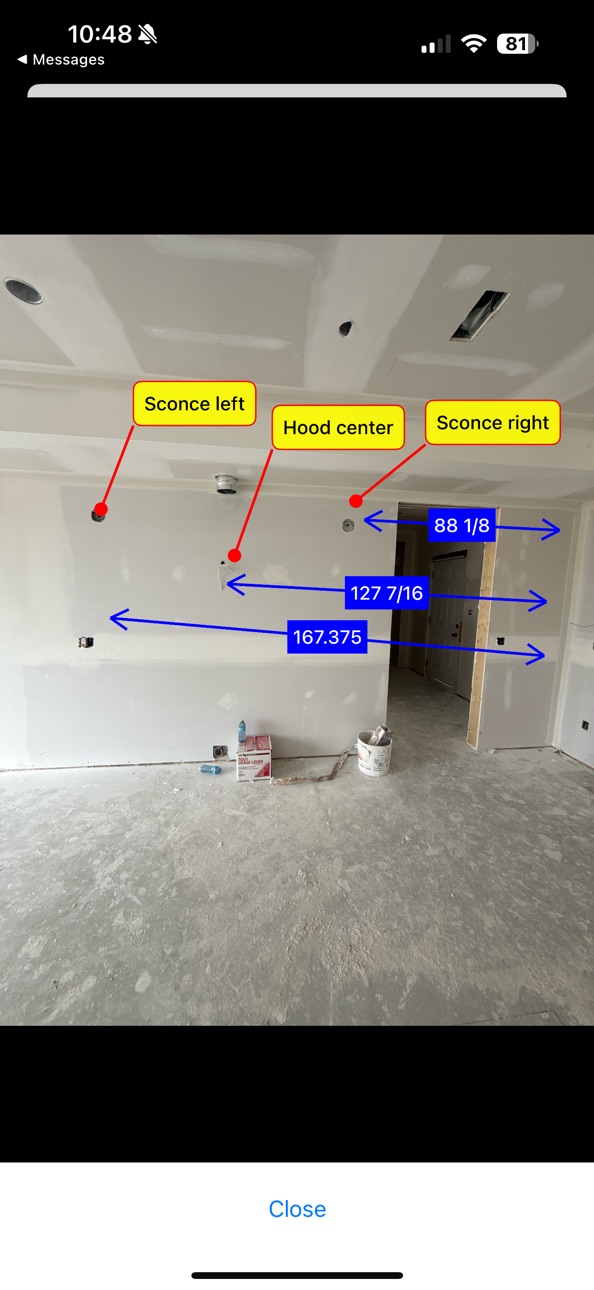

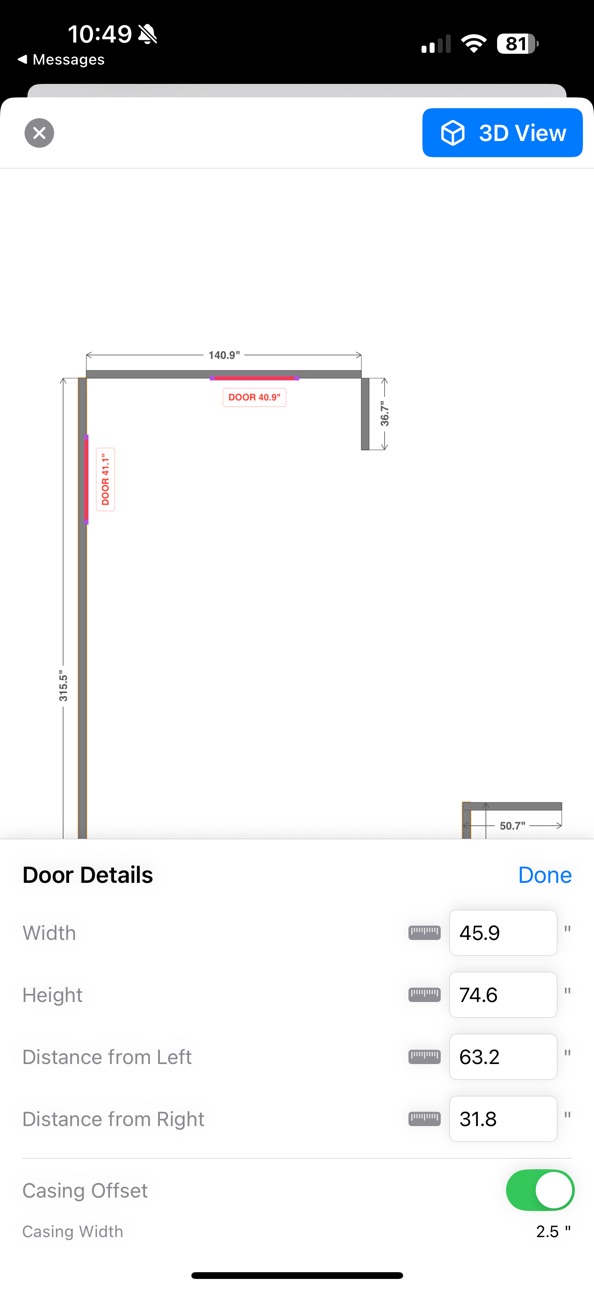

iPad 10 images


What’s New Version 2.1
3D Room Visualization — scanned rooms now show real 3D appliance and cabinet models where they were detected, and you can tap any object to add a note shown right in 3D.
Create Clients from Calendar — import a client's name and address straight from a calendar appointment, with custom filters to tidy up the title.
Recording Improvements — conversation recording is now free for everyone, the screen stays awake reliably while recording, and deleting a recording now asks for confirmation.
Editable AI Summaries — edit a summary after it's generated, or add your own OpenAI key in Settings for free, unlimited summaries.
Description
Millwork Scanner streamlines room capture and export for professionals using Mozaik, KCD, Autokitchen, Cabmaster, and ProKitchen. Scan with LiDAR, fine-tune in 2D and 3D, then export in the formats your cabinet design software expects—fast, accurate, and reliable.
Key Features
- 1. Export to your workflow
- Export directly for Mozaik, KCD, Autokitchen, Cabmaster, and ProKitchen.
- Generate properly formatted files for immediate import—no manual conversions.
- 2. Accurate room scanning
- Powered by ARKit and RoomPlan for detailed models of walls, doors, windows, and more.
- 3. 2D and 3D editing
- Refine rooms in 3D or switch to a precision 2D floor plan view.
- Rotate and align rooms to your preferred axes.
- 4. Connection‑aware wall editing (new)
- Walls maintain corner connections during edits.
- Connected walls auto‑update when you stretch a wall.
- Visual highlights show connected walls and corner points for clarity.
- 5. Lockable dimensions (new)
- Lock individual walls to prevent unwanted changes.
- Auto‑lock after edits helps protect finalized dimensions.
- 6. Client management
- Keep organized client records with attached scans and images.
Device Compatibility
- Requires an iPhone or iPad with built‑in LiDAR (e.g., iPhone 13–15 Pro, iPad Pro models with LiDAR).
Why Millwork Scanner?
Purpose‑built for cabinetry and millwork pros, Millwork Scanner cuts steps out of your process—scan, refine, and export directly to the software you already use, with accuracy you can trust.
Get Started
- Open Millwork Scanner on a LiDAR‑enabled device.
- Create a project, scan your room, refine in 2D/3D, and export to Mozaik, KCD, Autokitchen, Cabmaster, or ProKitchen.
About Us
Hillcrest Cabinets builds tools that make professional workflows faster and more precise—designed for real shop conditions and real deadlines.
Terms of Use: [hillcrestcabinets.ca/terms-of-use](https://www.hillcrestcabinets.ca/terms-of-use)
In-App Purchases BB pricing
Millwork Scanner Subscription Subscription
Export to Mozaik · Monthly—
Capabilities
In-App Purchases
Accessibility
ipadiphonemacrealityDevicetvoswatch
Version history 22 versions
Build 887962709v2.12026-07-08 05:20:19
3D Room Visualization — scanned rooms now show real 3D appliance and cabinet models where they were detected, and you can tap any object to add a note shown right in 3D.
Create Clients from Calendar — import a client's name and address straight from a calendar appointment, with custom filters to tidy up the title.
Recording Improvements — conversation recording is now free for everyone, the screen stays awake reliably while recording, and deleting a recording now asks for confirmation.
Editable AI Summaries — edit a summary after it's generated, or add your own OpenAI key in Settings for free, unlimited summaries.
Build 886540363v2.02026-06-08 09:53:03
NEW: AI Conversation Recording (Pro)
Never miss a client detail again. Record your entire conversation while scanning, measuring, and taking photos — then let AI organize everything for you.
- Record hands-free on any screen, even during LiDAR scans
- Works offline — record on-site, summarize later at the shop
- AI generates organized summaries: client requirements, room details, decisions made, and follow-up items
- Summaries attach to clients and export with your project files
- Customize the summary style to match your workflow
- Supports recordings of any length (auto-chunks long sessions)
Upgrade to Pro to unlock AI Conversation Recording. Includes all export features.
Build 886054679v1.7.72026-06-02 22:33:01
- Fixed an issue where the 2D floor plan view displayed measurements in inches even when millimeters was selected.
- Fixed screen recordings being matched to the wrong scan when multiple clients have scans with the same name.
- Bug report form is now scrollable so the submit button is always reachable, and the screen properly closes after sending.
- You can now attach scan files to bug reports for faster diagnosis.
Build 885645299v1.7.62026-05-14 17:19:43
- Fixed an issue where the 2D floor plan view displayed measurements in inches even when millimeters was selected.
- You can now attach a scan to bug reports, sending us the floor plan data to help diagnose issues faster.
Build 883278209v1.7.52026-03-12 00:03:27
- Fixed an issue where doors were not properly loaded by CAD software when exporting via EDF.
- Fixed screen recordings not being included when sharing a complete client export.
Build 882993726v1.7.42026-03-04 05:00:00
Fixed an issue where tapping a door in the 2D floor plan showed 'no data available' instead of the door's dimensions and position.
Build 882421877v1.7.32026-02-13 17:28:05
2D/3D View Sync: Fixed an issue where the 2D floor plan could show the wrong layout for scans with the same name across different clients.
Screen Recording Playback: Improved screen recording matching so older scans now correctly play their associated recordings.
Build 882318382v1.7.12026-02-10 19:08:16
Screen Recording Fix: Fixed an issue where screen recordings were not connecting properly to renamed scans.
Report a Bug: Found an issue? You can now easily submit bug reports from Settings to help us improve the app.
Build 882246175v1.7.02026-02-07 10:28:13
Bug fixes and performance improvements.
Build 882163570v1.6.62026-02-04 21:02:40
Minor bug fixes and performance improvements.
Build 882126432v1.6.52026-02-03 22:48:30
Fixed a bug that was preventing exports from working properly.
Build 881718056v1.6.42026-01-22 22:04:24
NEW: Beta Stud Scanning
- Detect and visualize wall studs using AR technology
- Live AR stud visualization with 3D preview
- Pro Mode for advanced framing detection
- Export framing data for professional workflows
UI IMPROVEMENTS:
- Fixed Export button visibility for iOS 18/26 Liquid Glass compatibility
- Improved button placement for new floating tab bar design
Bug fixes and performance improvements
Build 878692494v1.6.32025-10-07 13:01:52
Various Bug Fixes
Build 878609937v1.6.22025-10-02 21:55:12
various bug fixes and improvements.
Build 877587189v1.6.12025-08-27 00:01:32
Various bug fixes and solved an issue preventing some devices from retrieving the export files. ### Enhanced User Experience
* Optimized navigation transitions for a more fluid interface
* Graceful fallback to 2D view when 3D models are unavailable
* Clearer error messaging with helpful recovery options
Build 877160835v1.62025-08-12 19:15:44
- Connection‑aware 2D editing
- Connected walls stay attached during edits; corners are preserved automatically.
- Detail bar now shows connection info for selected walls.
- Visual guidance in 2D
- Color‑coded highlights for connected walls and pulsing markers for connection points.
- Lockable walls
- Lock/unlock wall dimensions from the detail bar; fields disable when locked.
- Auto‑lock after edits to prevent accidental changes.
- Performance and reliability
- Faster floor plan updates and smoother editing.
- Export and stability improvements, plus general bug fixes.
- Smaller refinements
- UI polish and clearer feedback while editing dimensions.
- Version: 1.6
Build 871445422v1.52024-12-30 12:54:17
What’s New in Millwork Scanner
Version 1.5
1. Enhanced Image Importing
2. Streamlined Client Management
• Improved tools for managing client details, making it faster to update contact information, notes, and linked files.
3. Export Options
• Expanded export functionality, including better handling of client images and organized file structures in export packages.
4. Bug Fixes and Performance Enhancements
• Resolved issues with image scaling and alignment during export.
• Optimized app performance for a smoother experience.
Build 870171386v1.42024-11-04 06:21:58
This update is packed with powerful new features and improvements to boost your productivity! Here’s what’s new:
• Complete Client Export: Export all scan data for each client in one step, making it simple to share or archive comprehensive client records.
• OBJ Export Format: We’ve added OBJ export support! Now you can export scans in OBJ format for seamless integration with various 3D modeling software.
• Draw on Image: Annotate directly on images with our new drawing feature. Perfect for adding custom notes or markings on scanned images.
• Improved Subscription Handling: Subscribed users will no longer see repeated subscription prompts. The subscription sheet now appears only when needed.
• Enhanced Scan Naming: Unique scan names are automatically generated, even across different clients, to prevent accidental overwrites.
• Casing Width Offset Adjustment: Set a custom casing width offset in settings to align measurements with Mozaik software standards.
• General Performance Enhancements: We’ve made improvements under the hood to ensure a smoother, more reliable experience.
Build 867915310v1.32024-08-06 21:47:32
What's New in This Version
Room Auto-Rotates
The room will now automatically rotate to align Wall 1 to 0 degrees. This ensures that the room is properly oriented when exporting to Mozaik.
Screen Recording
Screen recording functionality has been added to the settings. Turn it on to record your scan sessions and review past sessions for better analysis and improvements.
Image Attaching and Camera Capture
You can now attach images and capture photos directly for your clients. This helps in maintaining a visual record of your work.
Location Suggestion Bug Fix
The bug related to fetching suggested locations when adding new clients has been fixed for smoother client management.
Edit Saved Client Details
You can now edit the details of saved clients, providing more flexibility and control over client information.
Export to Additional Cabinet Software
Export functionality has been extended to support KCD, Autokitchen, Cabmaster, and ProKitchen, ensuring compatibility with more cabinet design software.
Build 867852029v1.22024-07-30 21:45:36
What's New in Version 1.2
New Features:
Room Auto-Rotates
Rooms now automatically rotate to align Wall 1 to 0 degrees before exporting to Mozaik. This ensures that the room is properly oriented, making the export process smoother and more accurate.
Screen Recording
Screen recording functionality has been added to the settings. Enable this feature to record your scan sessions and review past sessions for better analysis and improvements. This feature can be toggled on or off in the Settings tab.
Improvements:
Improved user interface for a smoother and more intuitive experience.
Enhanced performance and stability during room scanning and exporting.
Bug Fixes:
Fixed minor bugs and improved overall app performance.
User Experience Enhancements:
Added a "What's New" screen that pops up once after updating, detailing the new features and improvements. This screen ensures that users are informed about the latest updates and can take full advantage of the new functionalities.
Build 867558087v1.1.12024-07-21 21:55:15
Bug Fixes for the Camera
Build 867387524v1.02024-07-16 20:55:26
Price history by region
Currency
Show
Columns
Search
Availability 158 of 158 storefronts
| Region | Language | Price | Ratings | Avg | Version |
|---|---|---|---|---|---|
| US | en-US | Free | 3 | 5.0 | 2.1 |
| AU | en-AU | Free | 1 | 5.0 | 2.1 |
| MX | es-MX | Free | 1 | 5.0 | 2.1 |
| AE | en-GB | Free | 0 | — | 2.1 |
| AG | en-GB | Free | 0 | — | 2.1 |
| AI | en-GB | Free | 0 | — | 2.1 |
| AL | en-GB | Free | 0 | — | 2.1 |
| AM | en-GB | Free | 0 | — | 2.1 |
| AO | en-GB | Free | 0 | — | 2.1 |
| AR | es-MX | Free | 0 | — | 2.1 |
| AT | de-DE | Free | 0 | — | 2.1 |
| AZ | en-GB | Free | 0 | — | 2.1 |
| BA | en-GB | Free | 0 | — | 2.1 |
| BB | en-GB | Free | 0 | — | 2.1 |
| BE | en-GB | Free | 0 | — | 2.1 |
| BF | en-GB | Free | 0 | — | 2.1 |
| BG | en-GB | Free | 0 | — | 2.1 |
| BJ | en-GB | Free | 0 | — | 2.1 |
| BN | en-GB | Free | 0 | — | 2.1 |
| BO | es-MX | Free | 0 | — | 2.1 |
| BR | pt-BR | Free | 0 | — | 2.1 |
| BS | en-GB | Free | 0 | — | 2.1 |
| BT | en-GB | Free | 0 | — | 2.1 |
| BW | en-GB | Free | 0 | — | 2.1 |
| BY | en-GB | Free | 0 | — | 2.1 |
| BZ | en-GB | Free | 0 | — | 2.1 |
| CD | en-GB | Free | 0 | — | 2.1 |
| CG | en-GB | Free | 0 | — | 2.1 |
| CH | de-CH | Free | 0 | — | 2.1 |
| CI | fr-FR | Free | 0 | — | 2.1 |
| CL | es-MX | Free | 0 | — | 2.1 |
| CM | fr-FR | Free | 0 | — | 2.1 |
| CN | zh-Hans-CN | Free | 0 | — | 2.1 |
| CO | es-MX | Free | 0 | — | 2.1 |
| CR | es-MX | Free | 0 | — | 2.1 |
| CV | en-GB | Free | 0 | — | 2.1 |
| CY | en-GB | Free | 0 | — | 2.1 |
| CZ | en-GB | Free | 0 | — | 2.1 |
| DE | de-DE | Free | 0 | — | 2.1 |
| DK | en-GB | Free | 0 | — | 2.1 |
| DM | en-GB | Free | 0 | — | 2.1 |
| DO | es-MX | Free | 0 | — | 2.1 |
| DZ | en-GB | Free | 0 | — | 2.1 |
| EC | es-MX | Free | 0 | — | 2.1 |
| EE | en-GB | Free | 0 | — | 2.1 |
| ES | es-ES | Free | 0 | — | 2.1 |
| FI | en-GB | Free | 0 | — | 2.1 |
| FJ | en-GB | Free | 0 | — | 2.1 |
| FM | en-GB | Free | 0 | — | 2.1 |
| FR | fr-FR | Free | 0 | — | 2.1 |
| GA | fr-FR | Free | 0 | — | 2.1 |
| GD | en-GB | Free | 0 | — | 2.1 |
| GE | en-GB | Free | 0 | — | 2.1 |
| GH | en-GB | Free | 0 | — | 2.1 |
| GM | en-GB | Free | 0 | — | 2.1 |
| GR | en-GB | Free | 0 | — | 2.1 |
| GT | es-MX | Free | 0 | — | 2.1 |
| GW | en-GB | Free | 0 | — | 2.1 |
| GY | en-GB | Free | 0 | — | 2.1 |
| HK | zh-Hant-HK | Free | 0 | — | 2.1 |
| HN | es-MX | Free | 0 | — | 2.1 |
| HR | en-GB | Free | 0 | — | 2.1 |
| HU | en-GB | Free | 0 | — | 2.1 |
| ID | en-GB | Free | 0 | — | 2.1 |
| IE | en-GB | Free | 0 | — | 2.1 |
| IL | en-GB | Free | 0 | — | 2.1 |
| IN | en-GB | Free | 0 | — | 2.1 |
| IS | en-GB | Free | 0 | — | 2.1 |
| IT | it | Free | 0 | — | 2.1 |
| JM | en-GB | Free | 0 | — | 2.1 |
| JP | ja | Free | 0 | — | 2.1 |
| KE | en-GB | Free | 0 | — | 2.1 |
| KG | en-GB | Free | 0 | — | 2.1 |
| KN | en-GB | Free | 0 | — | 2.1 |
| KR | ko | Free | 0 | — | 2.1 |
| KW | en-GB | Free | 0 | — | 2.1 |
| KY | en-GB | Free | 0 | — | 2.1 |
| KZ | en-GB | Free | 0 | — | 2.1 |
| LC | en-GB | Free | 0 | — | 2.1 |
| LR | en-GB | Free | 0 | — | 2.1 |
| LT | en-GB | Free | 0 | — | 2.1 |
| LU | en-GB | Free | 0 | — | 2.1 |
| LV | en-GB | Free | 0 | — | 2.1 |
| LY | en-GB | Free | 0 | — | 2.1 |
| MA | en-GB | Free | 0 | — | 2.1 |
| MD | en-GB | Free | 0 | — | 2.1 |
| ME | en-GB | Free | 0 | — | 2.1 |
| MG | en-GB | Free | 0 | — | 2.1 |
| MK | en-GB | Free | 0 | — | 2.1 |
| ML | en-GB | Free | 0 | — | 2.1 |
| MM | en-GB | Free | 0 | — | 2.1 |
| MN | en-GB | Free | 0 | — | 2.1 |
| MO | zh-Hant-HK | Free | 0 | — | 2.1 |
| MR | en-GB | Free | 0 | — | 2.1 |
| MS | en-GB | Free | 0 | — | 2.1 |
| MT | en-GB | Free | 0 | — | 2.1 |
| MU | en-GB | Free | 0 | — | 2.1 |
| MV | en-GB | Free | 0 | — | 2.1 |
| MW | en-GB | Free | 0 | — | 2.1 |
| MY | en-GB | Free | 0 | — | 2.1 |
| NA | en-GB | Free | 0 | — | 2.1 |
| NE | en-GB | Free | 0 | — | 2.1 |
| NG | en-GB | Free | 0 | — | 2.1 |
| NI | es-MX | Free | 0 | — | 2.1 |
| NL | nl | Free | 0 | — | 2.1 |
| NO | en-GB | Free | 0 | — | 2.1 |
| NR | en-GB | Free | 0 | — | 2.1 |
| NZ | en-AU | Free | 0 | — | 2.1 |
| PA | es-MX | Free | 0 | — | 2.1 |
| PE | es-MX | Free | 0 | — | 2.1 |
| PG | en-GB | Free | 0 | — | 2.1 |
| PK | en-GB | Free | 0 | — | 2.1 |
| PL | en-GB | Free | 0 | — | 2.1 |
| PW | en-GB | Free | 0 | — | 2.1 |
| PY | es-MX | Free | 0 | — | 2.1 |
| QA | en-GB | Free | 0 | — | 2.1 |
| RO | en-GB | Free | 0 | — | 2.1 |
| RS | en-GB | Free | 0 | — | 2.1 |
| RU | ru | Free | 0 | — | 2.1 |
| RW | en-GB | Free | 0 | — | 2.1 |
| SA | en-GB | Free | 0 | — | 2.1 |
| SB | en-GB | Free | 0 | — | 2.1 |
| SC | en-GB | Free | 0 | — | 2.1 |
| SE | sv | Free | 0 | — | 2.1 |
| SG | en-GB | Free | 0 | — | 2.1 |
| SI | en-GB | Free | 0 | — | 2.1 |
| SK | en-GB | Free | 0 | — | 2.1 |
| SL | en-GB | Free | 0 | — | 2.1 |
| SN | en-GB | Free | 0 | — | 2.1 |
| SR | en-GB | Free | 0 | — | 2.1 |
| ST | en-GB | Free | 0 | — | 2.1 |
| SV | es-MX | Free | 0 | — | 2.1 |
| SZ | en-GB | Free | 0 | — | 2.1 |
| TC | en-GB | Free | 0 | — | 2.1 |
| TD | en-GB | Free | 0 | — | 2.1 |
| TH | en-GB | Free | 0 | — | 2.1 |
| TJ | en-GB | Free | 0 | — | 2.1 |
| TM | en-GB | Free | 0 | — | 2.1 |
| TN | en-GB | Free | 0 | — | 2.1 |
| TO | en-GB | Free | 0 | — | 2.1 |
| TR | en-GB | Free | 0 | — | 2.1 |
| TT | en-GB | Free | 0 | — | 2.1 |
| TW | zh-Hant-TW | Free | 0 | — | 2.1 |
| TZ | en-GB | Free | 0 | — | 2.1 |
| UA | en-GB | Free | 0 | — | 2.1 |
| UG | en-GB | Free | 0 | — | 2.1 |
| UY | en-GB | Free | 0 | — | 2.1 |
| UZ | en-GB | Free | 0 | — | 2.1 |
| VC | en-GB | Free | 0 | — | 2.1 |
| VE | es-MX | Free | 0 | — | 2.1 |
| VG | en-GB | Free | 0 | — | 2.1 |
| VN | en-GB | Free | 0 | — | 2.1 |
| VU | en-GB | Free | 0 | — | 2.1 |
| XK | en-GB | Free | 0 | — | 2.1 |
| YE | en-GB | Free | 0 | — | 2.1 |
| ZA | en-GB | Free | 0 | — | 2.1 |
| ZM | en-GB | Free | 0 | — | 2.1 |
| ZW | en-GB | Free | 0 | — | 2.1 |
Change log 26 changes · BB
✎
releaseNotes updated
3D Room Visualization — scanned rooms now show real 3D appliance and cabinet models where they were detected, and you can tap any object to add a note shown rig
✎
description updated
Millwork Scanner streamlines room capture and export for professionals using Mozaik, KCD, Autokitchen, Cabmaster, and ProKitchen. Scan with LiDAR, fine-tune in
✎
subtitle updated
3D Room Scan Direct to Mozaik
✎
name updated
Millwork Scanner
◆
Version 2.1 released
3D Room Visualization — scanned rooms now show real 3D appliance and cabinet models where they were detected, and you can tap any object to add a note shown right in 3D.
Create Clients from Calendar — import a client's name and address str
◆
Version 2.0 released
NEW: AI Conversation Recording (Pro)
Never miss a client detail again. Record your entire conversation while scanning, measuring, and taking photos — then let AI organize everything for you.
- Record hands-free on any screen, even during
◆
Version 1.7.7 released
- Fixed an issue where the 2D floor plan view displayed measurements in inches even when millimeters was selected.
- Fixed screen recordings being matched to the wrong scan when multiple clients have scans with the same name.
- Bug report f
◆
Version 1.7.6 released
- Fixed an issue where the 2D floor plan view displayed measurements in inches even when millimeters was selected.
- You can now attach a scan to bug reports, sending us the floor plan data to help diagnose issues faster.
◆
Version 1.7.5 released
- Fixed an issue where doors were not properly loaded by CAD software when exporting via EDF.
- Fixed screen recordings not being included when sharing a complete client export.
◆
Version 1.7.4 released
Fixed an issue where tapping a door in the 2D floor plan showed 'no data available' instead of the door's dimensions and position.
◆
Version 1.7.3 released
2D/3D View Sync: Fixed an issue where the 2D floor plan could show the wrong layout for scans with the same name across different clients.
Screen Recording Playback: Improved screen recording matching so older scans now correctly play thei
◆
Version 1.7.1 released
Screen Recording Fix: Fixed an issue where screen recordings were not connecting properly to renamed scans.
Report a Bug: Found an issue? You can now easily submit bug reports from Settings to help us improve the app.
◆
Version 1.7.0 released
Bug fixes and performance improvements.
◆
Version 1.6.6 released
Minor bug fixes and performance improvements.
◆
Version 1.6.5 released
Fixed a bug that was preventing exports from working properly.
◆
Version 1.6.4 released
NEW: Beta Stud Scanning
- Detect and visualize wall studs using AR technology
- Live AR stud visualization with 3D preview
- Pro Mode for advanced framing detection
- Export framing data for professional workflows
UI IMPROVEMENTS:
-
◆
Version 1.6.3 released
Various Bug Fixes
◆
Version 1.6.2 released
various bug fixes and improvements.
◆
Version 1.6.1 released
Various bug fixes and solved an issue preventing some devices from retrieving the export files. ### Enhanced User Experience
* Optimized navigation transitions for a more fluid interface
* Graceful fallback to 2D view when 3D models are un
◆
Version 1.6 released
- Connection‑aware 2D editing
- Connected walls stay attached during edits; corners are preserved automatically.
- Detail bar now shows connection info for selected walls.
- Visual guidance in 2D
- Color‑coded highlights for co
◆
Version 1.5 released
What’s New in Millwork Scanner
Version 1.5
1. Enhanced Image Importing
2. Streamlined Client Management
• Improved tools for managing client details, making it faster to update contact information, notes, and linked files.
3. Export Opt
◆
Version 1.4 released
This update is packed with powerful new features and improvements to boost your productivity! Here’s what’s new:
• Complete Client Export: Export all scan data for each client in one step, making it simple to share or archive comprehensiv
◆
Version 1.3 released
What's New in This Version
Room Auto-Rotates
The room will now automatically rotate to align Wall 1 to 0 degrees. This ensures that the room is properly oriented when exporting to Mozaik.
Screen Recording
Screen recording functionality has
◆
Version 1.2 released
What's New in Version 1.2
New Features:
Room Auto-Rotates
Rooms now automatically rotate to align Wall 1 to 0 degrees before exporting to Mozaik. This ensures that the room is properly oriented, making the export process smoother and more
◆
Version 1.1.1 released
Bug Fixes for the Camera
◆
Version 1.0 released