Home › Graphics & Design

 MO
MO
 KRko
KRko DEde-DE
 AEen-GB
 AFen-GB
 AGen-GB
 AIen-GB
 ALen-GB
 AMen-GB
 AOen-GB
 ARes-MX
 ATde-DE
 AUen-AU
 AZen-GB
 BAen-GB
 BBen-GB
 BEen-GB
 BFen-GB
 BGen-GB
 BHen-GB
 BJen-GB
 BMen-GB
 BNen-GB
 BOes-MX
 BRpt-BR
 BSen-GB
 BTen-GB
 BWen-GB
 BYen-GB
 BZen-GB
 CAen-CA
 CDen-GB
 CGen-GB
 CHde-CH
 CIfr-FR
 CLes-MX
 CMfr-FR
 CNzh-Hans-CN
 COes-MX
 CRes-MX
 CVen-GB
 CYen-GB
 CZen-GB
 DKen-GB
 DMen-GB
 DOes-MX
 DZen-GB
 ECes-MX
 EEen-GB
 EGen-GB
 ESes-ES
 FIen-GB
 FJen-GB
 FMen-GB
 FRfr-FR
 GAfr-FR
 GBen-GB
 GDen-GB
 GEen-GB
 GHen-GB
 GMen-GB
 GRen-GB
 GTes-MX
 GWen-GB
 GYen-GB
 HKzh-Hant-HK
 HNes-MX
 HRen-GB
 HUen-GB
 IDen-GB
 IEen-GB
 ILen-GB
 INen-GB
 IQen-GB
 ISen-GB
 ITit
ITit JMen-GB
 JOen-GB
 JPja
JPja KEen-GB
 KGen-GB
 KHen-GB
 KNen-GB
 KWen-GB
 KYen-GB
 KZen-GB
 LAen-GB
 LBen-GB
 LCen-GB
 LKen-GB
 LRen-GB
 LTen-GB
 LUen-GB
 LVen-GB
 LYen-GB
 MAen-GB
 MDen-GB
 MEen-GB
 MGen-GB
 MKen-GB
 MLen-GB
 MMen-GB
 MNen-GBMOzh-Hant-HK
 MRen-GB
 MSen-GB
 MTen-GB
 MUen-GB
 MVen-GB
 MWen-GB
 MXes-MX
 MYen-GB
 MZen-GB
 NAen-GB
 NEen-GB
 NGen-GB
 NIes-MX
 NLnl
NLnl NOen-GB
 NPen-GB
 NRen-GB
 NZen-AU
 OMen-GB
 PAes-MX
 PEes-MX
 PGen-GB
 PHen-GB
 PKen-GB
 PLen-GB
 PTpt-PT
 PWen-GB
 PYes-MX
 QAen-GB
 ROen-GB
 RSen-GB
 RUru
RUru RWen-GB
 SAen-GB
 SBen-GB
 SCen-GB
 SEsv
SEsv SGen-GB
 SIen-GB
 SKen-GB
 SLen-GB
 SNen-GB
 SRen-GB
 STen-GB
 SVes-MX
 SZen-GB
 TCen-GB
 TDen-GB
 THen-GB
 TJen-GB
 TMen-GB
 TNen-GB
 TOen-GB
 TRen-GB
 TTen-GB
 TWzh-Hant-TW
 TZen-GB
 UAen-GB
 UGen-GB
 USen-US
 UYen-GB
 UZen-GB
 VCen-GB
 VEes-MX
 VGen-GB
 VNen-GB
 VUen-GB
 XKen-GB
 YEen-GB
 ZAen-GB
 ZMen-GB
 ZWen-GB
175 of 175 storefronts
Content in en-US
Content in en-US
Information
Apple ID6499101592
Bundle IDapp.layerz.Layerz
SellerSeller
Min iOS18.1
Device familiesmac, iphone, ipad
Released2024-06-11
Copyright© 2024-2026 Layerz Corp.
Privacy policyLink ↗
Preview 3 platforms
iPhone 6 images


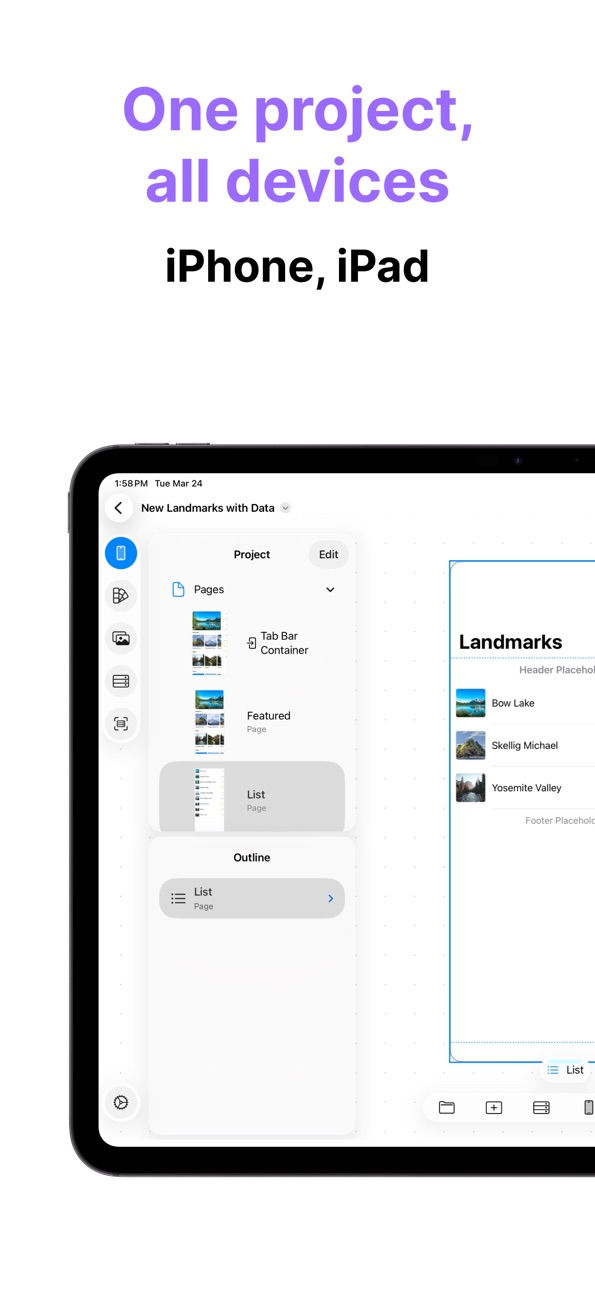
iPad 6 images



Mac 6 images


What’s New Version 3.6.0
A polish update — refreshed screens and smoother editing.
- Redesigned template gallery, Settings, and project overview
- Free users can now start editing a template right in their Free Project
- Editor refinements, improved data bindings, plus performance and stability improvements
Description
Layerz — Design Your App
Layerz is a visual design tool for creating fully functional iOS apps without writing code.
Define design, data, behavior, and live API connections in one app — and run it instantly.
Design with Data
Create and manage your own data directly inside Layerz.
- Define custom data schemas, enums, and dates
- Filter and sort lists with live conditions
- Save data to disk — it's restored on the next run
- Bind data to UI components
When data changes, UI updates automatically.
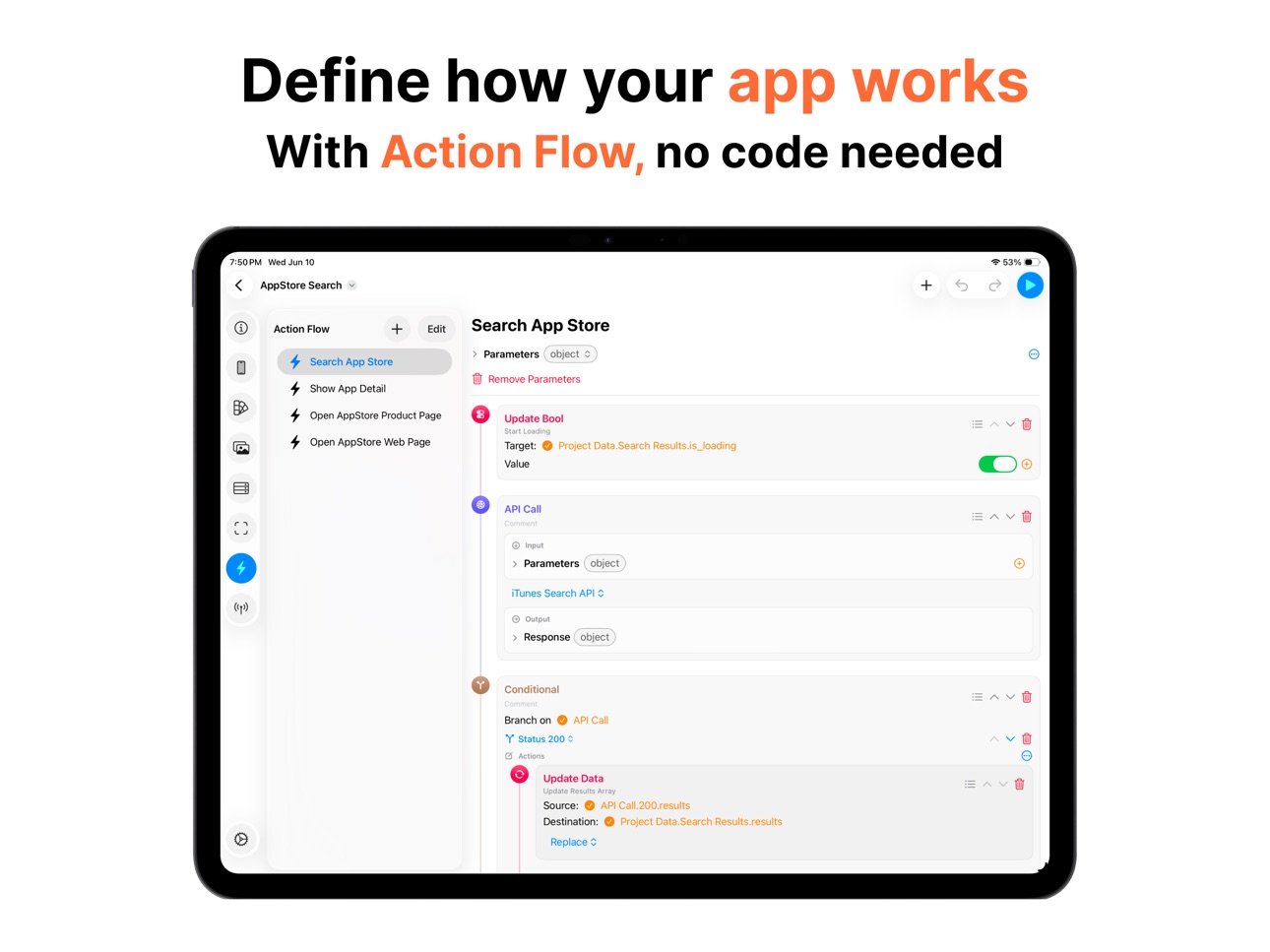
Action Flow
Action Flow lets you define how your app behaves.
- Navigate between screens
- Manipulate data and call APIs
- Branch on conditions — if this, then that
- Alerts, input prompts, sharing, sounds, haptics
Connect Action Flows to events (button tap, page load, etc.) to bring your app to life.
API Integration
Connect your app to the real world.
- Configure HTTP endpoints (GET, POST, and more)
- Import OpenAPI / Swagger specs from a file or URL
- Authentication, retries, and per-status responses
- Bind responses straight to your UI
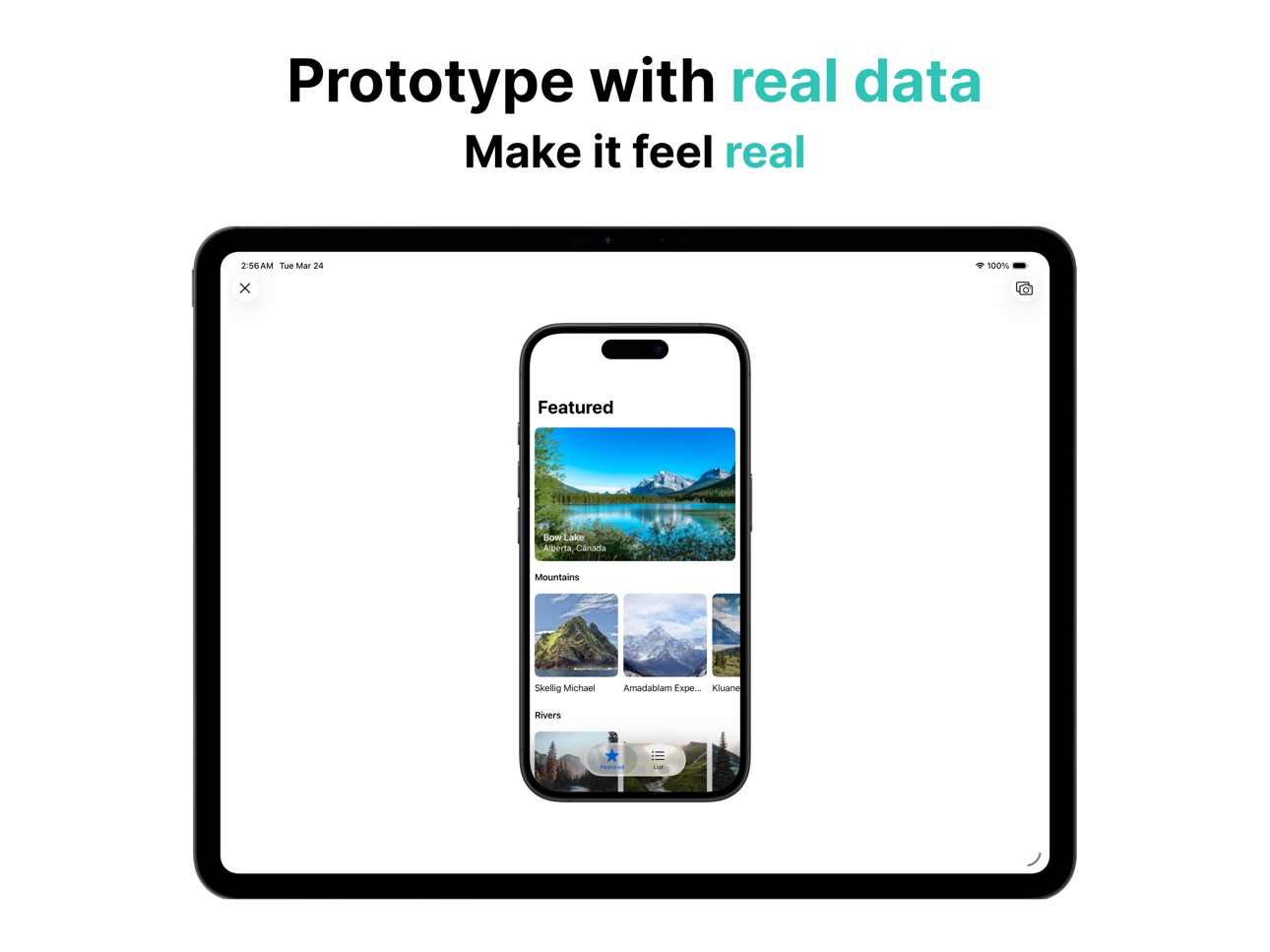
Your prototype talks to real data.
Instant Preview
See your work come to life immediately.
- No build process
- No waiting
- Switch devices and themes on the fly
What you design is exactly what you experience.
Cross-Platform
Design across all your Apple devices.
- iPhone
- iPad
- Mac
Work seamlessly wherever you are.
Built for Creators
- Designers building apps that actually work
- Developers prototyping ideas fast
- Makers creating apps without code
Terms of Use: https://www.apple.com/legal/internet-services/itunes/dev/stdeula/
Privacy Policy: https://is.gd/hYxRSE
We always welcome feedback.
support@layerz.app
In-App Purchases MO pricing
Layerz App Designer Subscription Subscription
Annual · Yearly—
Monthly · Monthly—
One-Time Purchases
Lifetime—
Capabilities
In-App Purchases
Accessibility
ipadiphonemacrealityDevicetvoswatch
Version history 22 versions
Build 887705952v3.6.02026-07-02 14:31:15
A polish update — refreshed screens and smoother editing.
- Redesigned template gallery, Settings, and project overview
- Free users can now start editing a template right in their Free Project
- Editor refinements, improved data bindings, plus performance and stability improvements
Build 887303740v3.5.02026-06-23 13:57:12
Dynamic data — your lists come alive.
- Filter array-bound lists with live conditions (AND / OR, data-bound values, enums)
- Sort lists by one or more fields
- New Date data type with a configurable format
Action Flow:
- New actions: Make Data Instance, Invoke Action Flow, Alert with Input, Toggle Bool, Generate
- Edit dialog button actions inline; new `isEmpty` condition operator
More:
- New List layout with row separators and swipe-to-delete
- Custom toggle type for the Switch component
Build 886767714v3.4.02026-06-10 18:34:50
Introducing API Integration — connect your app to real data.
- Configure HTTP endpoints with headers, body, auth, timeout, and retry
- Import OpenAPI 3.x / Swagger 2.0 specs from a file or URL
- Import standalone JSON Schema documents (full metadata preserved)
- Organize endpoints into API Collections
- Per-status response schemes + Send Test Request
Action Flow:
- Branching — run different actions based on conditions or API status
- New actions: Compare Number, Compare Text, Update String/Number/Bool, Array Count, App Store Product Page
- Redesigned editor with an inline, type-colored timeline
More:
- Data Enums for schemes (String / Integer)
- Search bar text binding and search button event
- New template: App Store Search
- New Tips category: Action Flow
Build 886277358v3.3.02026-05-31 23:17:09
Introducing Action Flow — define how your app behaves.
- Navigation, data manipulation, alerts, sharing, URL opening, and more
- Connect to events like button taps and page load
- Inject data with Action Flow Parameters
Improvements:
- Device and theme switching in the Previewer
- Dashed border (stroke dash) support
- Expand All / Collapse All in ViewModel Outline
- Image list performance improvements
- Undo support and delete button in Data Editor
- New template: Web Browser
- Data tips category added
Build 885569129v3.2.02026-05-12 20:54:39
- Redesigned Main Screen with sidebar navigation, Design Gallery, and in-app Tips
- New templates: Delivery, Weather, Components, WebViews
- Start a free project to explore the editor without purchasing
- Share your .layerz file with anyone
- Space + drag to scroll, Cmd + wheel to zoom (Mac)
- Per-project color mode (Light / Auto / Dark)
Build 884336102v3.1.02026-04-09 22:03:19
You can now use various gradient types, including linear, angular, and radial.
Build 883453254v3.0.02026-03-25 00:06:35
Bring your UI to life with real data.
Now you can bind data directly to your design and create truly dynamic prototypes.
Build 878108479v2.5.02025-09-15 19:59:24
Get ready for iOS 26 and iPadOS 26!
- Fresh, updated UI that looks great on the new OS.
- New Liquid Glass effect for Views, Buttons, Tab Bars, and more — try it out in your designs.
- Added a Helper Button to quickly close iPhone Preview.
- Meet the new iPad menu bar – making navigation smoother than ever.
- iPad Preview can now show a Sidebar instead of a Tab Bar.
Build 877996208v2.4.02025-09-11 02:18:32
We’ve prepared an update for iOS 26 and iPadOS 26.
- The app’s UI has been refreshed to match the new OS.
- You can now use the Liquid Glass effect in your app designs. Check out how it looks on Views, Buttons, Tab Bars, and Bar Buttons.
- Added a Helper Button to iPhone Preview, making it easier to close the preview.
- You can now use the app through the new menu bar on iPad.
Build 877659880v2.3.02025-08-29 14:50:32
Fixed minor bugs.
Build 877389581v2.2.02025-08-20 07:06:51
Fixed minor bugs.
Build 877224571v2.1.02025-08-14 01:17:07
Now, when you select a view, the margin guidelines are displayed.
When moving a view, the floating toolbar is hidden so you can better check its position.
A new template, Landmarks, has been added.
Build 876304476v2.0.02025-07-14 13:09:02
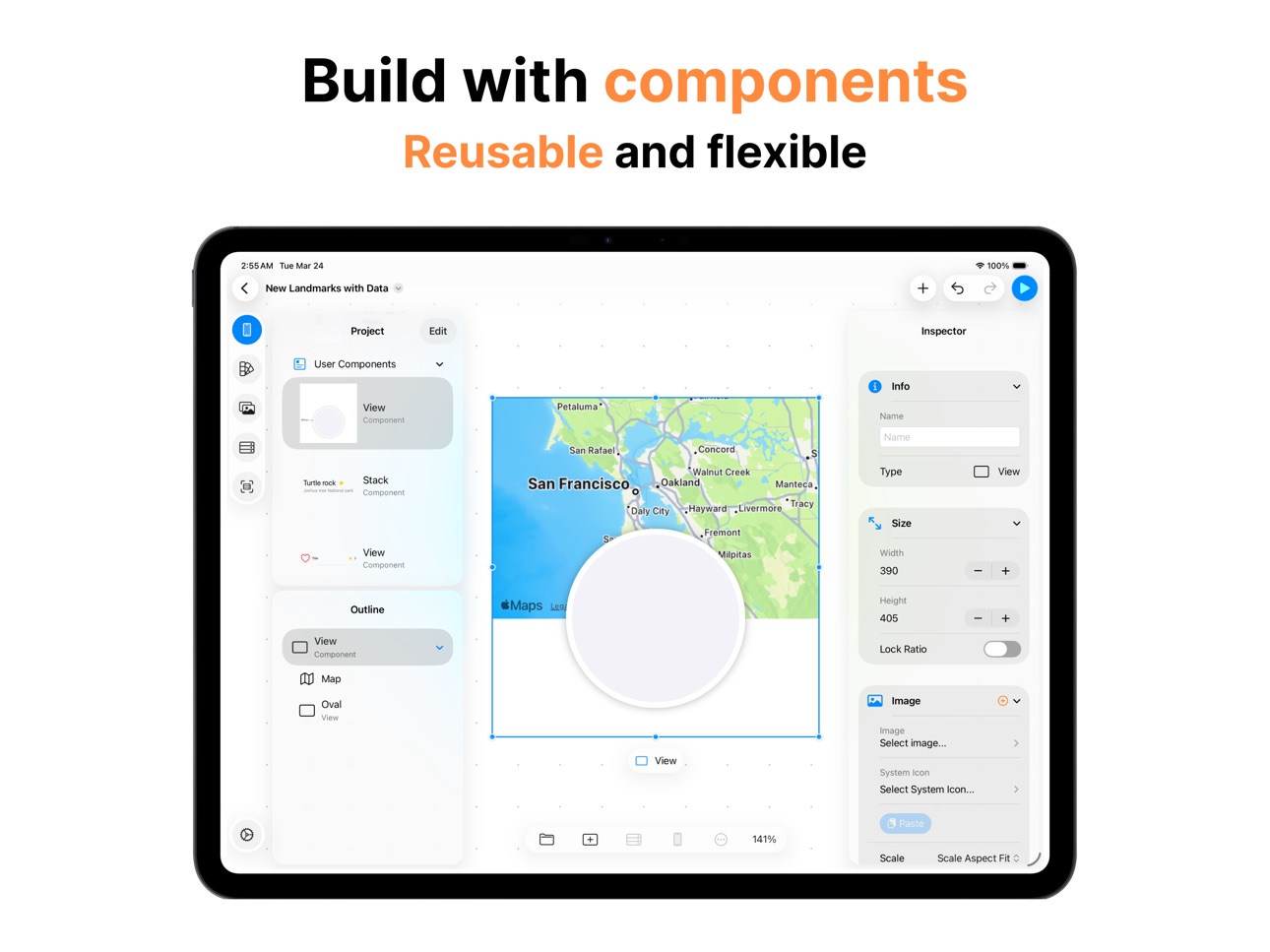
Editor Improvements: Numerous enhancements to the UI editor, including component templates, tab scenes, blur view support, gradient scenes, and stackview interaction.
New Features: Added welcome view with tutorials, image importing, GIF support, view drag behaviors and fluid transitions.
App Icon refinements.
Build 868848554v1.4.02024-09-08 18:11:46
Bug fixes and performance improvements.
Build 868120507v1.3.22024-08-12 20:09:06
Minor bugs have been fixed.
Build 867502691v1.3.12024-07-17 15:15:42
Minor bugs have been fixed.
Build 867466051v1.3.02024-07-15 14:58:56
A new type, WebView, has been added. Try using WebView in your app design.
Build 867366360v1.2.02024-07-10 06:51:24
You can now add gradient effects to empty or image views.
Build 867104738v1.1.12024-07-01 11:24:46
A preview button has been added to the sidebar, making it easier to check your designs.
Stability has been improved.
Build 867090060v1.1.02024-06-30 20:38:14
You can now set images directly on empty views, not just image views.
Build 866931929v1.0.12024-06-25 00:32:05
New templates have been added.
Korean language support has been added.
Build 865362236v1.0.02024-06-12 06:26:19
Price history by region
Currency
Show
Columns
Search
Availability 175 of 175 storefronts
| Region | Language | Price | Ratings | Avg | Version |
|---|---|---|---|---|---|
| KR | ko | Free | 5 | 5.0 | 3.6.0 |
| DE | de-DE | Free | 1 | 5.0 | 3.6.0 |
| AE | en-GB | Free | 0 | — | 3.6.0 |
| AF | en-GB | Free | 0 | — | 3.6.0 |
| AG | en-GB | Free | 0 | — | 3.6.0 |
| AI | en-GB | Free | 0 | — | 3.6.0 |
| AL | en-GB | Free | 0 | — | 3.6.0 |
| AM | en-GB | Free | 0 | — | 3.6.0 |
| AO | en-GB | Free | 0 | — | 3.6.0 |
| AR | es-MX | Free | 0 | — | 3.6.0 |
| AT | de-DE | Free | 0 | — | 3.6.0 |
| AU | en-AU | Free | 0 | — | 3.6.0 |
| AZ | en-GB | Free | 0 | — | 3.6.0 |
| BA | en-GB | Free | 0 | — | 3.6.0 |
| BB | en-GB | Free | 0 | — | 3.6.0 |
| BE | en-GB | Free | 0 | — | 3.6.0 |
| BF | en-GB | Free | 0 | — | 3.6.0 |
| BG | en-GB | Free | 0 | — | 3.6.0 |
| BH | en-GB | Free | 0 | — | 3.6.0 |
| BJ | en-GB | Free | 0 | — | 3.6.0 |
| BM | en-GB | Free | 0 | — | 3.6.0 |
| BN | en-GB | Free | 0 | — | 3.6.0 |
| BO | es-MX | Free | 0 | — | 3.6.0 |
| BR | pt-BR | Free | 0 | — | 3.6.0 |
| BS | en-GB | Free | 0 | — | 3.6.0 |
| BT | en-GB | Free | 0 | — | 3.6.0 |
| BW | en-GB | Free | 0 | — | 3.6.0 |
| BY | en-GB | Free | 0 | — | 3.6.0 |
| BZ | en-GB | Free | 0 | — | 3.6.0 |
| CA | en-CA | Free | 0 | — | 3.6.0 |
| CD | en-GB | Free | 0 | — | 3.6.0 |
| CG | en-GB | Free | 0 | — | 3.6.0 |
| CH | de-CH | Free | 0 | — | 3.6.0 |
| CI | fr-FR | Free | 0 | — | 3.6.0 |
| CL | es-MX | Free | 0 | — | 3.6.0 |
| CM | fr-FR | Free | 0 | — | 3.6.0 |
| CN | zh-Hans-CN | Free | 0 | — | 3.6.0 |
| CO | es-MX | Free | 0 | — | 3.6.0 |
| CR | es-MX | Free | 0 | — | 3.6.0 |
| CV | en-GB | Free | 0 | — | 3.6.0 |
| CY | en-GB | Free | 0 | — | 3.6.0 |
| CZ | en-GB | Free | 0 | — | 3.6.0 |
| DK | en-GB | Free | 0 | — | 3.6.0 |
| DM | en-GB | Free | 0 | — | 3.6.0 |
| DO | es-MX | Free | 0 | — | 3.6.0 |
| DZ | en-GB | Free | 0 | — | 3.6.0 |
| EC | es-MX | Free | 0 | — | 3.6.0 |
| EE | en-GB | Free | 0 | — | 3.6.0 |
| EG | en-GB | Free | 0 | — | 3.6.0 |
| ES | es-ES | Free | 0 | — | 3.6.0 |
| FI | en-GB | Free | 0 | — | 3.6.0 |
| FJ | en-GB | Free | 0 | — | 3.6.0 |
| FM | en-GB | Free | 0 | — | 3.6.0 |
| FR | fr-FR | Free | 0 | — | 3.6.0 |
| GA | fr-FR | Free | 0 | — | 3.6.0 |
| GB | en-GB | Free | 0 | — | 3.6.0 |
| GD | en-GB | Free | 0 | — | 3.6.0 |
| GE | en-GB | Free | 0 | — | 3.6.0 |
| GH | en-GB | Free | 0 | — | 3.6.0 |
| GM | en-GB | Free | 0 | — | 3.6.0 |
| GR | en-GB | Free | 0 | — | 3.6.0 |
| GT | es-MX | Free | 0 | — | 3.6.0 |
| GW | en-GB | Free | 0 | — | 3.6.0 |
| GY | en-GB | Free | 0 | — | 3.6.0 |
| HK | zh-Hant-HK | Free | 0 | — | 3.6.0 |
| HN | es-MX | Free | 0 | — | 3.6.0 |
| HR | en-GB | Free | 0 | — | 3.6.0 |
| HU | en-GB | Free | 0 | — | 3.6.0 |
| ID | en-GB | Free | 0 | — | 3.6.0 |
| IE | en-GB | Free | 0 | — | 3.6.0 |
| IL | en-GB | Free | 0 | — | 3.6.0 |
| IN | en-GB | Free | 0 | — | 3.6.0 |
| IQ | en-GB | Free | 0 | — | 3.6.0 |
| IS | en-GB | Free | 0 | — | 3.6.0 |
| IT | it | Free | 0 | — | 3.6.0 |
| JM | en-GB | Free | 0 | — | 3.6.0 |
| JO | en-GB | Free | 0 | — | 3.6.0 |
| JP | ja | Free | 0 | — | 3.6.0 |
| KE | en-GB | Free | 0 | — | 3.6.0 |
| KG | en-GB | Free | 0 | — | 3.6.0 |
| KH | en-GB | Free | 0 | — | 3.6.0 |
| KN | en-GB | Free | 0 | — | 3.6.0 |
| KW | en-GB | Free | 0 | — | 3.6.0 |
| KY | en-GB | Free | 0 | — | 3.6.0 |
| KZ | en-GB | Free | 0 | — | 3.6.0 |
| LA | en-GB | Free | 0 | — | 3.6.0 |
| LB | en-GB | Free | 0 | — | 3.6.0 |
| LC | en-GB | Free | 0 | — | 3.6.0 |
| LK | en-GB | Free | 0 | — | 3.6.0 |
| LR | en-GB | Free | 0 | — | 3.6.0 |
| LT | en-GB | Free | 0 | — | 3.6.0 |
| LU | en-GB | Free | 0 | — | 3.6.0 |
| LV | en-GB | Free | 0 | — | 3.6.0 |
| LY | en-GB | Free | 0 | — | 3.6.0 |
| MA | en-GB | Free | 0 | — | 3.6.0 |
| MD | en-GB | Free | 0 | — | 3.6.0 |
| ME | en-GB | Free | 0 | — | 3.6.0 |
| MG | en-GB | Free | 0 | — | 3.6.0 |
| MK | en-GB | Free | 0 | — | 3.6.0 |
| ML | en-GB | Free | 0 | — | 3.6.0 |
| MM | en-GB | Free | 0 | — | 3.6.0 |
| MN | en-GB | Free | 0 | — | 3.6.0 |
| MO | zh-Hant-HK | Free | 0 | — | 3.6.0 |
| MR | en-GB | Free | 0 | — | 3.6.0 |
| MS | en-GB | Free | 0 | — | 3.6.0 |
| MT | en-GB | Free | 0 | — | 3.6.0 |
| MU | en-GB | Free | 0 | — | 3.6.0 |
| MV | en-GB | Free | 0 | — | 3.6.0 |
| MW | en-GB | Free | 0 | — | 3.6.0 |
| MX | es-MX | Free | 0 | — | 3.6.0 |
| MY | en-GB | Free | 0 | — | 3.6.0 |
| MZ | en-GB | Free | 0 | — | 3.6.0 |
| NA | en-GB | Free | 0 | — | 3.6.0 |
| NE | en-GB | Free | 0 | — | 3.6.0 |
| NG | en-GB | Free | 0 | — | 3.6.0 |
| NI | es-MX | Free | 0 | — | 3.6.0 |
| NL | nl | Free | 0 | — | 3.6.0 |
| NO | en-GB | Free | 0 | — | 3.6.0 |
| NP | en-GB | Free | 0 | — | 3.6.0 |
| NR | en-GB | Free | 0 | — | 3.6.0 |
| NZ | en-AU | Free | 0 | — | 3.6.0 |
| OM | en-GB | Free | 0 | — | 3.6.0 |
| PA | es-MX | Free | 0 | — | 3.6.0 |
| PE | es-MX | Free | 0 | — | 3.6.0 |
| PG | en-GB | Free | 0 | — | 3.6.0 |
| PH | en-GB | Free | 0 | — | 3.6.0 |
| PK | en-GB | Free | 0 | — | 3.6.0 |
| PL | en-GB | Free | 0 | — | 3.6.0 |
| PT | pt-PT | Free | 0 | — | 3.6.0 |
| PW | en-GB | Free | 0 | — | 3.6.0 |
| PY | es-MX | Free | 0 | — | 3.6.0 |
| QA | en-GB | Free | 0 | — | 3.6.0 |
| RO | en-GB | Free | 0 | — | 3.6.0 |
| RS | en-GB | Free | 0 | — | 3.6.0 |
| RU | ru | Free | 0 | — | 3.6.0 |
| RW | en-GB | Free | 0 | — | 3.6.0 |
| SA | en-GB | Free | 0 | — | 3.6.0 |
| SB | en-GB | Free | 0 | — | 3.6.0 |
| SC | en-GB | Free | 0 | — | 3.6.0 |
| SE | sv | Free | 0 | — | 3.6.0 |
| SG | en-GB | Free | 0 | — | 3.6.0 |
| SI | en-GB | Free | 0 | — | 3.6.0 |
| SK | en-GB | Free | 0 | — | 3.6.0 |
| SL | en-GB | Free | 0 | — | 3.6.0 |
| SN | en-GB | Free | 0 | — | 3.6.0 |
| SR | en-GB | Free | 0 | — | 3.6.0 |
| ST | en-GB | Free | 0 | — | 3.6.0 |
| SV | es-MX | Free | 0 | — | 3.6.0 |
| SZ | en-GB | Free | 0 | — | 3.6.0 |
| TC | en-GB | Free | 0 | — | 3.6.0 |
| TD | en-GB | Free | 0 | — | 3.6.0 |
| TH | en-GB | Free | 0 | — | 3.6.0 |
| TJ | en-GB | Free | 0 | — | 3.6.0 |
| TM | en-GB | Free | 0 | — | 3.6.0 |
| TN | en-GB | Free | 0 | — | 3.6.0 |
| TO | en-GB | Free | 0 | — | 3.6.0 |
| TR | en-GB | Free | 0 | — | 3.6.0 |
| TT | en-GB | Free | 0 | — | 3.6.0 |
| TW | zh-Hant-TW | Free | 0 | — | 3.6.0 |
| TZ | en-GB | Free | 0 | — | 3.6.0 |
| UA | en-GB | Free | 0 | — | 3.6.0 |
| UG | en-GB | Free | 0 | — | 3.6.0 |
| US | en-US | Free | 0 | — | 3.6.0 |
| UY | en-GB | Free | 0 | — | 3.6.0 |
| UZ | en-GB | Free | 0 | — | 3.6.0 |
| VC | en-GB | Free | 0 | — | 3.6.0 |
| VE | es-MX | Free | 0 | — | 3.6.0 |
| VG | en-GB | Free | 0 | — | 3.6.0 |
| VN | en-GB | Free | 0 | — | 3.6.0 |
| VU | en-GB | Free | 0 | — | 3.6.0 |
| XK | en-GB | Free | 0 | — | 3.6.0 |
| YE | en-GB | Free | 0 | — | 3.6.0 |
| ZA | en-GB | Free | 0 | — | 3.6.0 |
| ZM | en-GB | Free | 0 | — | 3.6.0 |
| ZW | en-GB | Free | 0 | — | 3.6.0 |
Change log 26 changes · MO
✎
releaseNotes updated
A polish update — refreshed screens and smoother editing.
- Redesigned template gallery, Settings, and project overview
- Free users can now start editing a tem
✎
description updated
Layerz — Design Your App
Layerz is a visual design tool for creating fully functional iOS apps without writing code.
Define design, data, behavior, and live A
✎
subtitle updated
Interactive App Design
✎
name updated
Layerz App Designer
◆
Version 3.6.0 released
A polish update — refreshed screens and smoother editing.
- Redesigned template gallery, Settings, and project overview
- Free users can now start editing a template right in their Free Project
- Editor refinements, improved data bindings,
◆
Version 3.5.0 released
Dynamic data — your lists come alive.
- Filter array-bound lists with live conditions (AND / OR, data-bound values, enums)
- Sort lists by one or more fields
- New Date data type with a configurable format
Action Flow:
- New actions: Make
◆
Version 3.4.0 released
Introducing API Integration — connect your app to real data.
- Configure HTTP endpoints with headers, body, auth, timeout, and retry
- Import OpenAPI 3.x / Swagger 2.0 specs from a file or URL
- Import standalone JSON Schema documents (full
◆
Version 3.3.0 released
Introducing Action Flow — define how your app behaves.
- Navigation, data manipulation, alerts, sharing, URL opening, and more
- Connect to events like button taps and page load
- Inject data with Action Flow Parameters
Improvements:
- Dev
◆
Version 3.2.0 released
- Redesigned Main Screen with sidebar navigation, Design Gallery, and in-app Tips
- New templates: Delivery, Weather, Components, WebViews
- Start a free project to explore the editor without purchasing
- Share your .layerz file with anyone
◆
Version 3.1.0 released
You can now use various gradient types, including linear, angular, and radial.
◆
Version 3.0.0 released
Bring your UI to life with real data.
Now you can bind data directly to your design and create truly dynamic prototypes.
◆
Version 2.5.0 released
Get ready for iOS 26 and iPadOS 26!
- Fresh, updated UI that looks great on the new OS.
- New Liquid Glass effect for Views, Buttons, Tab Bars, and more — try it out in your designs.
- Added a Helper Button to quickly close iPhone Preview.
◆
Version 2.4.0 released
We’ve prepared an update for iOS 26 and iPadOS 26.
- The app’s UI has been refreshed to match the new OS.
- You can now use the Liquid Glass effect in your app designs. Check out how it looks on Views, Buttons, Tab Bars, and Bar Buttons.
-
◆
Version 2.3.0 released
Fixed minor bugs.
◆
Version 2.2.0 released
Fixed minor bugs.
◆
Version 2.1.0 released
Now, when you select a view, the margin guidelines are displayed.
When moving a view, the floating toolbar is hidden so you can better check its position.
A new template, Landmarks, has been added.
◆
Version 2.0.0 released
Editor Improvements: Numerous enhancements to the UI editor, including component templates, tab scenes, blur view support, gradient scenes, and stackview interaction.
New Features: Added welcome view with tutorials, image importing, GIF su
◆
Version 1.4.0 released
Bug fixes and performance improvements.
◆
Version 1.3.2 released
Minor bugs have been fixed.
◆
Version 1.3.1 released
Minor bugs have been fixed.
◆
Version 1.3.0 released
A new type, WebView, has been added. Try using WebView in your app design.
◆
Version 1.2.0 released
You can now add gradient effects to empty or image views.
◆
Version 1.1.1 released
A preview button has been added to the sidebar, making it easier to check your designs.
Stability has been improved.
◆
Version 1.1.0 released
You can now set images directly on empty views, not just image views.
◆
Version 1.0.1 released
New templates have been added.
Korean language support has been added.
◆
Version 1.0.0 released