Home › Education

 OM
OM
 USen-US
 CNzh-Hans-CN
 AEen-GB
 AFen-GB
 ALen-GB
 ATde-DE
 AUen-AU
 BAen-GB
 BEen-GB
 BGen-GB
 BHen-GB
 BMen-GB
 BNen-GB
 BTen-GB
 BYen-GB
 CAen-CA
 CHde-CH
 CYen-GB
 DEde-DE
 DKen-GB
 EEen-GB
 ESes-ES
 FIen-GB
 FJen-GB
 FRfr-FR
 GBen-GB
 GEen-GB
 GRen-GB
 HKzh-Hant-HK
 HRen-GB
 HUen-GB
 IDen-GB
 IEen-GB
 ILen-GB
 INen-GB
 IQen-GB
 ITit
ITit JOen-GB
 JPja
JPja KGen-GB
 KHen-GB
 KRko
KRko KWen-GB
 KZen-GB
 LAen-GB
 LBen-GB
 LKen-GB
 LTen-GB
 LUen-GB
 LVen-GB
 MDen-GB
 MEen-GB
 MKen-GB
 MMen-GB
 MNen-GB
 MOzh-Hant-HK
 MRen-GB
 MTen-GB
 MVen-GB
 MYen-GB
 NLnl
NLnl NOen-GB
 NPen-GB
 NZen-AUOMen-GB
 PHen-GB
 PKen-GB
 PTpt-PT
 QAen-GB
 ROen-GB
 RSen-GB
 RUru
RUru SEsv
SEsv SGen-GB
 SIen-GB
 THen-GB
 TJen-GB
 TMen-GB
 TRen-GB
 TWzh-Hant-TW
 UAen-GB
 UZen-GB
 VNen-GB
 XKen-GB
 YEen-GB
85 of 85 storefronts
Content in en-US
Content in en-US
Information
Preview 3 platforms
iPhone 10 images




iPad 10 images


Mac 10 images


What’s New Version 2.0
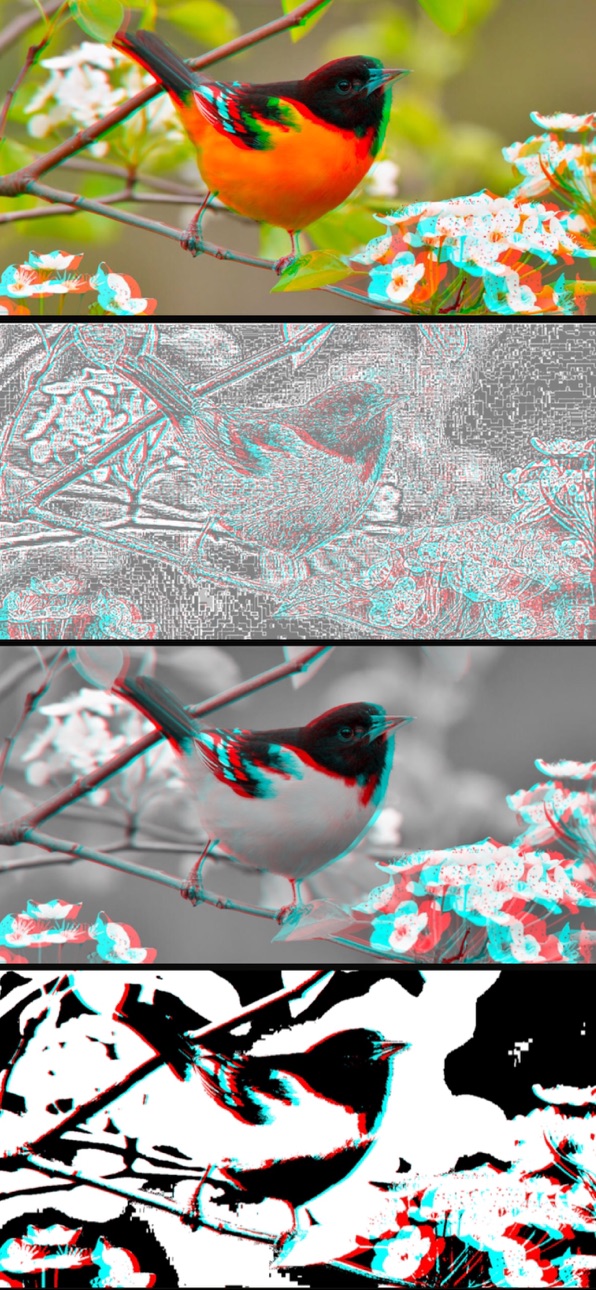
• The Image anaglyph view has new auto-generate feature so changes to parameters, like disparity intensity, are easier to experiment with
• Background removal for each media type now available
• The new background can be clear, average color of original, or a chosen specific color
• New option to generate spatial videos using depth prediction
• The existing B+W (black and white) filter can now take advantage of transparency in media for thresholding
• New edge detection filter for additional special effect to generate anaglyphs
• For video there is an option to select and open any video frame as a photo in the Image anaglyph view
• Improved user interface has enhanced informational tips with titles
• Bug fixes and many other changes for a better user experience, such as enhanced alerts
Description
Anaglyph 3D creates anaglyphs for photos, Live Photos and videos by generating stereo image pairs from depth prediction.
Two photos taken with a slight horizontal offset—mimicking human vision—form a stereo image pair. When viewed with special glasses, Virtual Reality headsets, or free-viewing techniques like cross-eye or parallel viewing, this offset allows the brain to perceive depth, creating a 3D effect.
An anaglyph combines the left and right images of a stereo pair into a single image, creating a 3D effect when viewed with red-cyan glasses. Specifically, the left image is represented in shades of red, while the right image appears in shades of cyan. The color-matching lenses ensure that each eye receives the correct image, enabling depth perception.
Traditionally, a stereo pair is captured with a dual lens or double shot camera, as in our app Cameranaglyph. This app offers an alternative approach, using a single image to generate a stereo pair from depth prediction and machine learning.
Each of your eyes sees a slightly different view because they are spaced apart horizontally. This causes objects to appear slightly shifted between the left and right views. The amount of horizontal shift between common objects in both views is called disparity. Closer objects have a larger disparity than those farther away. You can observe this effect by looking at an object with one eye closed, then switching to the other eye. The closer the object, the more it appears to shift between views. Your brain uses this difference to perceive depth and distance.
Machine learning is a process where computers analyze data to make predictions without being explicitly programmed for each task. It employs a model to detect and analyze patterns within the data. Training involves optimizing the model by iteratively adjusting its parameters using labeled data to minimize prediction errors and improve performance.
One application of machine learning is depth prediction in images, where the model estimates how far objects are from the camera. By training on millions of images, the model learns to recognize visual patterns that indicate depth.
A depth map is an image that represents object distances by encoding them as grayscale pixel values. Using machine learning, it’s possible to predict depth from a single photo or video frame, creating a depth map. The depth map is used to create a disparity filter to generate a right and left image stereo pair by shifting pixels in the original image. The stereo pair can then be used to create an anaglyph.
The Disparity Intensity parameter adjusts the pixel shift between the left and right stereo images generated from depth prediction. Increasing the value exaggerates depth differences, enhancing the 3D effect, while decreasing it reduces the disparity for a more subtle stereo effect — similar to adjusting contrast in an image.
Select a photo or video using the browser or from the sample media in the app menu. For a conventional video stereo pairs are generated from depth prediction on the single image extracted from a video frame. Each stereo pair is then used to generate three types of video output—Anaglyph, Side by Side and Spatial—as follows:
Anaglyph: Each output video frame is an anaglyph created using a stereo image pair generated from depth prediction on the input video frame, for 3D glasses.
Side by Side: Each output video frame is a juxtaposition of the images using a stereo image pair generated from depth prediction on the input video frame. The placement of images is intended for parallel viewing. To see the 3D effect, the viewer must train their eyes to focus as if looking at a distant object, allowing each eye to align with the corresponding image.
Spatial: Each output video frame consists of a stereo image pair generated from depth prediction on the input video frame to create a spatial video. A spatial video is a stereoscopic 3D video format introduced for the Apple Vision Pro.
Accessibility
ipadiphonemacrealityDevicetvoswatch
Version history 7 versions
Build 883876492v2.02026-03-29 21:39:15
• The Image anaglyph view has new auto-generate feature so changes to parameters, like disparity intensity, are easier to experiment with
• Background removal for each media type now available
• The new background can be clear, average color of original, or a chosen specific color
• New option to generate spatial videos using depth prediction
• The existing B+W (black and white) filter can now take advantage of transparency in media for thresholding
• New edge detection filter for additional special effect to generate anaglyphs
• For video there is an option to select and open any video frame as a photo in the Image anaglyph view
• Improved user interface has enhanced informational tips with titles
• Bug fixes and many other changes for a better user experience, such as enhanced alerts
Build 880328784v1.0.52025-12-04 19:57:05
In each anaglyph generator view (Image, Live Photo and Video) the anaglyph filter type 'B+W' (black and white) now has adjustable threshold (from 0 to 1), extending the artistic effect of this filter type.
In the view for generating anaglyphs from images we have a new 'Spatial Image From Stereo Pair' menu item in the Export menu - useful in particular when you load your own stereo pair from the main view menu, using the menu item 'Choose Stereo Pair…' (a feature introduced recently in v 1.0.3). A spatial image is an image format that stores a stereo pair - left and right images. They are intended for viewing with devices that enable you to view those images in a way that the left eye receives only the left image and the right eye receives only the right image. But it is also a convenient file package for stereo pairs.
Note: Anaglyph 3D provides help for understanding stereo pairs and how anaglyphs are generated and viewed! After you launch the app tap the '?' in the top left corner to access help.
Previous v. 1.0.4
In the view for generating anaglyphs from images the export menu has a new menu item 'Stereo Pair from Depth Prediction' that displays the stereo pair left and right images for saving each to files, photos or sharing to other apps. This feature is complimentary to the previous update that enables you to load stereo pairs into the app for generating anaglyphs.
Previous v. 1.0.3
Added support for loading existing stereo image pairs to create anaglyphs. Use the new menu item named 'Choose Stereo Pair…' in the app menu (located in the top right corner of the main view). This way you can turn any stereo pair into an anaglyph, including those created by this app using disparity from a depth map
Previous v. 1.0.2:
Added support for pasting/copying images from/to the clipboard. Use the new item named 'Paste Image' in the app menu (located in the top right corner of the main view). It's a convenience for loading images to create their anaglyphs.
Previous v. 1.0.1
Added option to choose parallel vs cross-eye intentions for Side-by-Side video conversion to spatial; added side by side image sample (a frame from the hummingbird side-by-side video sample.)
Build 880295724v1.0.42025-12-03 18:28:40
In the view for generating anaglyphs from images the export menu has a new menu item 'Stereo Pair from Depth Prediction' that displays the stereo pair left and right images for saving each to files, photos or sharing with other apps. This feature is complimentary to the previous update that enables you to load stereo pairs into the app for generating anaglyphs.
Previous v. 1.0.3
Added support for loading existing stereo image pairs to create anaglyphs. Use the new menu item named 'Choose Stereo Pair…' in the app menu (located in the top right corner of the main view). This way you can turn any stereo pair into an anaglyph, including those created by this app using disparity from a depth map
Previous v. 1.0.2:
Added support for pasting/copying images from/to the clipboard. Use the new item named 'Paste Image' in the app menu (located in the top right corner of the main view). It's a convenience for loading images to create their anaglyphs.
Build 880217737v1.0.32025-12-01 05:38:58
Added support for loading existing stereo image pairs to create anaglyphs. Use the new menu item named 'Choose Stereo Pair…' in the app menu (located in the top right corner of the main view). This way you can turn any stereo pair into an anaglyph, including those created by this app using disparity from a depth map
Previous v. 1.0.2:
Added support for pasting/copying images from/to the clipboard. Use the new item named 'Paste Image' in the app menu (located in the top right corner of the main view). It's a convenience for loading images to create their anaglyphs.
Build 873768656v1.0.22025-04-04 22:05:39
Added support for pasting/copying images from/to the clipboard. Use the new item named 'Paste Image' in the app menu (located in the top right corner of the main view). It's a convenience for loading images to create their anaglyphs.
Build 873736352v1.0.12025-04-03 05:39:48
• Side-by-Side images for 3d viewing can be converted to a spatial photo from the new Image Tools section of the image anaglyph view. An associated toggle named Parallel Viewing allows you to specify if the Side-by-Side image is intended to be viewed using the parallel or cross-eye technique, i.e. specify which side is the actual right and left eye images. Once converted to a spatial photo an anaglyph for the Side-by-Side image can be generated.
• Added same associated toggle named Parallel Viewing for converting Side-by-Side videos for 3d viewing to spatial videos in the Video Tools section of the video anaglyph view.
• The webp extension, that signifies a file in the WebP image format, has been added to the allowed image extensions for the File Browser.
• Added Drag and Drop capability to the main screen so that image and videos files can be dragged into the main view to load them, as an alternative to the Photo and File Browser.
• The app has also been enabled to respond to sharing or opening image and video files from other apps.
• Added an additional info view to the main view about Depth Prediction, along with other helpful tips.
• Added a sample Side-by-Side image for parallel viewing to the samples for trying out the new Side-by-Side to spatial feature for images.
Build 868082100v1.02025-03-28 08:31:44
No pricing data captured yet — comparisons appear once the app has paid storefronts or in-app purchases.
Availability 85 of 85 storefronts
| Region | Language | Price | Ratings | Avg | Version |
|---|---|---|---|---|---|
| US | en-US | Free | 2 | 3.0 | 2.0 |
| CN | zh-Hans-CN | Free | 1 | 5.0 | 2.0 |
| AE | en-GB | Free | 0 | — | 2.0 |
| AF | en-GB | Free | 0 | — | 2.0 |
| AL | en-GB | Free | 0 | — | 2.0 |
| AT | de-DE | Free | 0 | — | 2.0 |
| AU | en-AU | Free | 0 | — | 2.0 |
| BA | en-GB | Free | 0 | — | 2.0 |
| BE | en-GB | Free | 0 | — | 2.0 |
| BG | en-GB | Free | 0 | — | 2.0 |
| BH | en-GB | Free | 0 | — | 2.0 |
| BM | en-GB | Free | 0 | — | 2.0 |
| BN | en-GB | Free | 0 | — | 2.0 |
| BT | en-GB | Free | 0 | — | 2.0 |
| BY | en-GB | Free | 0 | — | 2.0 |
| CA | en-CA | Free | 0 | — | 2.0 |
| CH | de-CH | Free | 0 | — | 2.0 |
| CY | en-GB | Free | 0 | — | 2.0 |
| DE | de-DE | Free | 0 | — | 2.0 |
| DK | en-GB | Free | 0 | — | 2.0 |
| EE | en-GB | Free | 0 | — | 2.0 |
| ES | es-ES | Free | 0 | — | 2.0 |
| FI | en-GB | Free | 0 | — | 2.0 |
| FJ | en-GB | Free | 0 | — | 2.0 |
| FR | fr-FR | Free | 0 | — | 2.0 |
| GB | en-GB | Free | 0 | — | 2.0 |
| GE | en-GB | Free | 0 | — | 2.0 |
| GR | en-GB | Free | 0 | — | 2.0 |
| HK | zh-Hant-HK | Free | 0 | — | 2.0 |
| HR | en-GB | Free | 0 | — | 2.0 |
| HU | en-GB | Free | 0 | — | 2.0 |
| ID | en-GB | Free | 0 | — | 2.0 |
| IE | en-GB | Free | 0 | — | 2.0 |
| IL | en-GB | Free | 0 | — | 2.0 |
| IN | en-GB | Free | 0 | — | 2.0 |
| IQ | en-GB | Free | 0 | — | 2.0 |
| IT | it | Free | 0 | — | 2.0 |
| JO | en-GB | Free | 0 | — | 2.0 |
| JP | ja | Free | 0 | — | 2.0 |
| KG | en-GB | Free | 0 | — | 2.0 |
| KH | en-GB | Free | 0 | — | 2.0 |
| KR | ko | Free | 0 | — | 2.0 |
| KW | en-GB | Free | 0 | — | 2.0 |
| KZ | en-GB | Free | 0 | — | 2.0 |
| LA | en-GB | Free | 0 | — | 2.0 |
| LB | en-GB | Free | 0 | — | 2.0 |
| LK | en-GB | Free | 0 | — | 2.0 |
| LT | en-GB | Free | 0 | — | 2.0 |
| LU | en-GB | Free | 0 | — | 2.0 |
| LV | en-GB | Free | 0 | — | 2.0 |
| MD | en-GB | Free | 0 | — | 2.0 |
| ME | en-GB | Free | 0 | — | 2.0 |
| MK | en-GB | Free | 0 | — | 2.0 |
| MM | en-GB | Free | 0 | — | 2.0 |
| MN | en-GB | Free | 0 | — | 2.0 |
| MO | zh-Hant-HK | Free | 0 | — | 2.0 |
| MR | en-GB | Free | 0 | — | 2.0 |
| MT | en-GB | Free | 0 | — | 2.0 |
| MV | en-GB | Free | 0 | — | 2.0 |
| MY | en-GB | Free | 0 | — | 2.0 |
| NL | nl | Free | 0 | — | 2.0 |
| NO | en-GB | Free | 0 | — | 2.0 |
| NP | en-GB | Free | 0 | — | 2.0 |
| NZ | en-AU | Free | 0 | — | 2.0 |
| OM | en-GB | Free | 0 | — | 2.0 |
| PH | en-GB | Free | 0 | — | 2.0 |
| PK | en-GB | Free | 0 | — | 2.0 |
| PT | pt-PT | Free | 0 | — | 2.0 |
| QA | en-GB | Free | 0 | — | 2.0 |
| RO | en-GB | Free | 0 | — | 2.0 |
| RS | en-GB | Free | 0 | — | 2.0 |
| RU | ru | Free | 0 | — | 2.0 |
| SE | sv | Free | 0 | — | 2.0 |
| SG | en-GB | Free | 0 | — | 2.0 |
| SI | en-GB | Free | 0 | — | 2.0 |
| TH | en-GB | Free | 0 | — | 2.0 |
| TJ | en-GB | Free | 0 | — | 2.0 |
| TM | en-GB | Free | 0 | — | 2.0 |
| TR | en-GB | Free | 0 | — | 2.0 |
| TW | zh-Hant-TW | Free | 0 | — | 2.0 |
| UA | en-GB | Free | 0 | — | 2.0 |
| UZ | en-GB | Free | 0 | — | 2.0 |
| VN | en-GB | Free | 0 | — | 2.0 |
| XK | en-GB | Free | 0 | — | 2.0 |
| YE | en-GB | Free | 0 | — | 2.0 |
Change log 11 changes · OM
✎
releaseNotes updated
• The Image anaglyph view has new auto-generate feature so changes to parameters, like disparity intensity, are easier to experiment with
• Background removal f
✎
description updated
Anaglyph 3D creates anaglyphs for photos, Live Photos and videos by generating stereo image pairs from depth prediction.
Two photos taken with a slight horizon
✎
subtitle updated
Create photo & video anaglyphs
✎
name updated
Anaglyph 3D
◆
Version 2.0 released
• The Image anaglyph view has new auto-generate feature so changes to parameters, like disparity intensity, are easier to experiment with
• Background removal for each media type now available
• The new background can be clear, average colo
◆
Version 1.0.5 released
In each anaglyph generator view (Image, Live Photo and Video) the anaglyph filter type 'B+W' (black and white) now has adjustable threshold (from 0 to 1), extending the artistic effect of this filter type.
In the view for generating anagl
◆
Version 1.0.4 released
In the view for generating anaglyphs from images the export menu has a new menu item 'Stereo Pair from Depth Prediction' that displays the stereo pair left and right images for saving each to files, photos or sharing with other apps. This f
◆
Version 1.0.3 released
Added support for loading existing stereo image pairs to create anaglyphs. Use the new menu item named 'Choose Stereo Pair…' in the app menu (located in the top right corner of the main view). This way you can turn any stereo pair into an a
◆
Version 1.0.2 released
Added support for pasting/copying images from/to the clipboard. Use the new item named 'Paste Image' in the app menu (located in the top right corner of the main view). It's a convenience for loading images to create their anaglyphs.
◆
Version 1.0.1 released
• Side-by-Side images for 3d viewing can be converted to a spatial photo from the new Image Tools section of the image anaglyph view. An associated toggle named Parallel Viewing allows you to specify if the Side-by-Side image is intended to
◆
Version 1.0 released