Home › Utilities

 ZM
ZM
 CNzh-Hans-CN
 AUen-AU
 FRfr-FR
 USen-US
 AEen-GB
 AFen-GB
 AGen-GB
 AIen-GB
 ALen-GB
 AOen-GB
 ARes-MX
 ATde-DE
 AZen-GB
 BAen-GB
 BBen-GB
 BEen-GB
 BFen-GB
 BGen-GB
 BHen-GB
 BJen-GB
 BMen-GB
 BNen-GB
 BOes-MX
 BRpt-BR
 BSen-GB
 BTen-GB
 BWen-GB
 BYen-GB
 BZen-GB
 CAen-CA
 CDen-GB
 CGen-GB
 CHde-CH
 CIfr-FR
 CLes-MX
 CMfr-FR
 COes-MX
 CRes-MX
 CVen-GB
 CYen-GB
 CZen-GB
 DEde-DE
 DKen-GB
 DMen-GB
 DOes-MX
 DZen-GB
 ECes-MX
 EGen-GB
 ESes-ES
 FIen-GB
 FJen-GB
 FMen-GB
 GAfr-FR
 GBen-GB
 GDen-GB
 GEen-GB
 GHen-GB
 GMen-GB
 GRen-GB
 GTes-MX
 GWen-GB
 GYen-GB
 HNes-MX
 HRen-GB
 HUen-GB
 IDen-GB
 IEen-GB
 ILen-GB
 INen-GB
 IQen-GB
 ISen-GB
 ITit
ITit JMen-GB
 JOen-GB
 JPja
JPja KEen-GB
 KGen-GB
 KHen-GB
 KNen-GB
 KRko
KRko KWen-GB
 KYen-GB
 KZen-GB
 LAen-GB
 LBen-GB
 LCen-GB
 LKen-GB
 LRen-GB
 LTen-GB
 LUen-GB
 LVen-GB
 LYen-GB
 MAen-GB
 MDen-GB
 MEen-GB
 MGen-GB
 MKen-GB
 MLen-GB
 MMen-GB
 MNen-GB
 MOzh-Hant-HK
 MRen-GB
 MSen-GB
 MTen-GB
 MUen-GB
 MVen-GB
 MWen-GB
 MXes-MX
 MYen-GB
 MZen-GB
 NAen-GB
 NEen-GB
 NGen-GB
 NIes-MX
 NLnl
NLnl NOen-GB
 NPen-GB
 NRen-GB
 NZen-AU
 OMen-GB
 PAes-MX
 PEes-MX
 PGen-GB
 PHen-GB
 PKen-GB
 PLen-GB
 PTpt-PT
 PWen-GB
 PYes-MX
 QAen-GB
 ROen-GB
 RSen-GB
 RUru
RUru RWen-GB
 SAen-GB
 SBen-GB
 SCen-GB
 SEsv
SEsv SGen-GB
 SKen-GB
 SLen-GB
 SNen-GB
 SRen-GB
 STen-GB
 SVes-MX
 SZen-GB
 TCen-GB
 TDen-GB
 THen-GB
 TJen-GB
 TMen-GB
 TNen-GB
 TOen-GB
 TRen-GB
 TTen-GB
 TWzh-Hant-TW
 TZen-GB
 UAen-GB
 UGen-GB
 UYen-GB
 UZen-GB
 VCen-GB
 VEes-MX
 VGen-GB
 VNen-GB
 VUen-GB
 XKen-GB
 ZAen-GBZMen-GB
 ZWen-GB
170 of 170 storefronts
Content in en-US
Content in en-US
Information
Apple ID6477580263
Bundle IDcom.StarList
SellerSeller
Min iOS15.0
Device familiesmac, iphone, ipad, ipod
Released2024-09-08
Copyright© 广州星未信息科技有限公司
Privacy policyLink ↗
Preview 3 platforms
iPhone 7 images


iPad 7 images




Mac 6 images


What’s New Version 3.3.5
Now with widget group switching! Plus, several bug fixes for a smoother, more refined experience.
Description
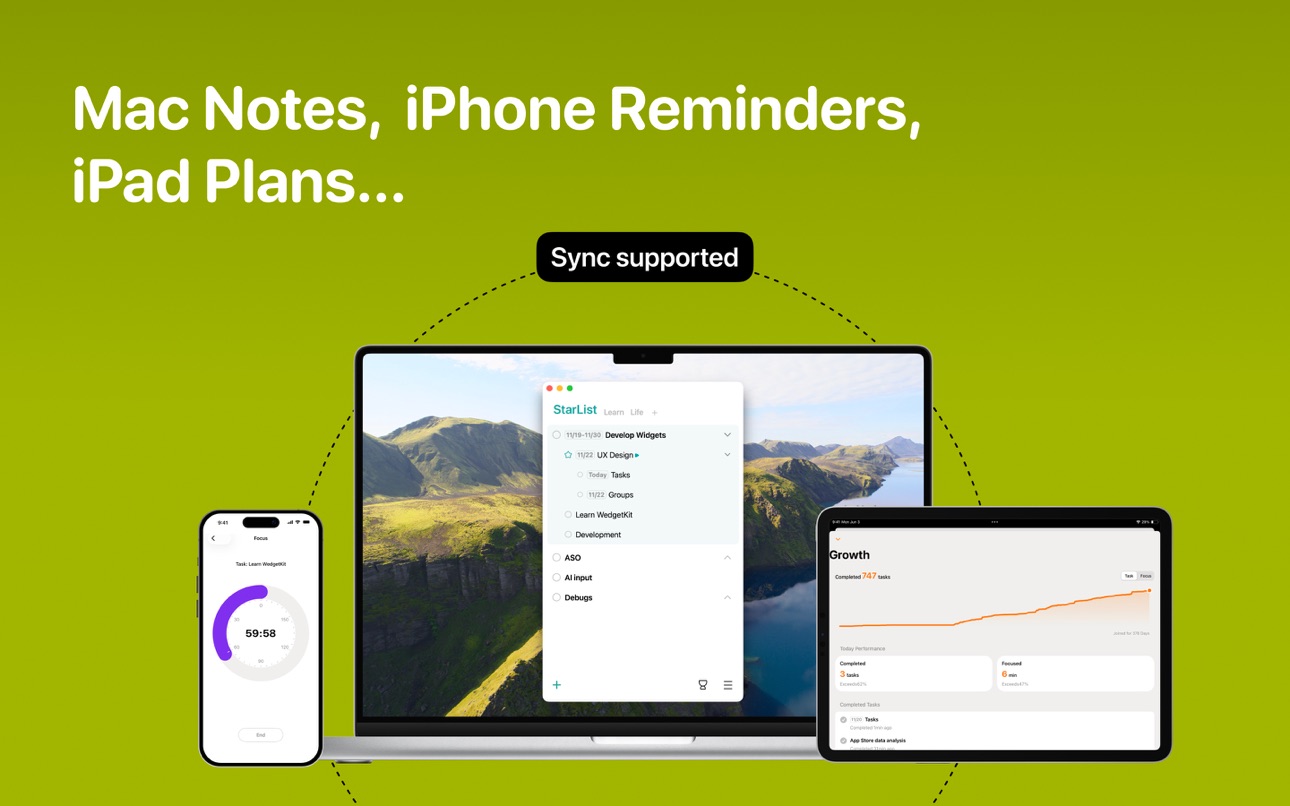
StarList is a simple yet powerful personal task management tool that supports data synchronization across iOS, macOS, and iPadOS.
Why Create It?
We found that many people face challenges when using mainstream to-do list apps, making it hard for them to stick with the app. These challenges include:
1. Task Delays Lead to Frustration: Research shows that task delays are common, but excessive reminders and negative feedback only increase frustration. Our research indicates that task delays are a normal occurrence, not a user's fault. A human-centered product should embrace delays and encourage users.
2. Complex Operations Increase Maintenance Costs: Mainstream apps typically use date and task categories, making task editing more complex. Users need to adjust and update tasks in real-time, leading to high maintenance costs, delayed updates, and task accumulation. A truly human-centered product should address these practical challenges.
3.Neglect of Task Value and Meaning: Many apps overly focus on "time" and "schedules," leading users to prioritize efficiency and completion over task selection and evaluation of meaning. This can result in rushing to meet deadlines, sacrificing quality, and feeling stuck in busyness without growth or purpose. A human-centered product should inspire users to reflect on task value and help them find meaning.
We aim to create a simple yet powerful to-do list that helps users find meaning and purpose in their tasks.
What’s the Concept?
StarList is based on the concept of 'important tasks first,' encouraging users to focus their energy on a few essential and meaningful tasks. There's no need to spend too much time categorizing tasks or worrying about deadlines. Simply clarify your thoughts, identify what’s important and meaningful, and then focus on those tasks.
What Are the Features?
1. One-Page Method: Combining task breakdowns, star marking, and date recognition into one page, StarList lets you manage most tasks efficiently. It’s more intuitive, real-time updates are easy, and it prevents task overload by encouraging you to delete unnecessary tasks.
2. Date Setting with Space Bar: You can now set dates easily by typing a specific format + space. This simple interaction supports single dates, recurring dates, multiple repeats, reminders, and duration.
3. Focus Timer Integration: It’s not just about planning but execution. With the prominent focus button, you can select a task and enter a timer page, using the countdown to stay focused and improve concentration.
What Are the Other Features?
Task Input Bar: The task input bar floats above the keyboard, allowing easy task level switching and date/reminder setting with a pop-up. This ensures a smooth input experience without interruptions from keyboard switching.
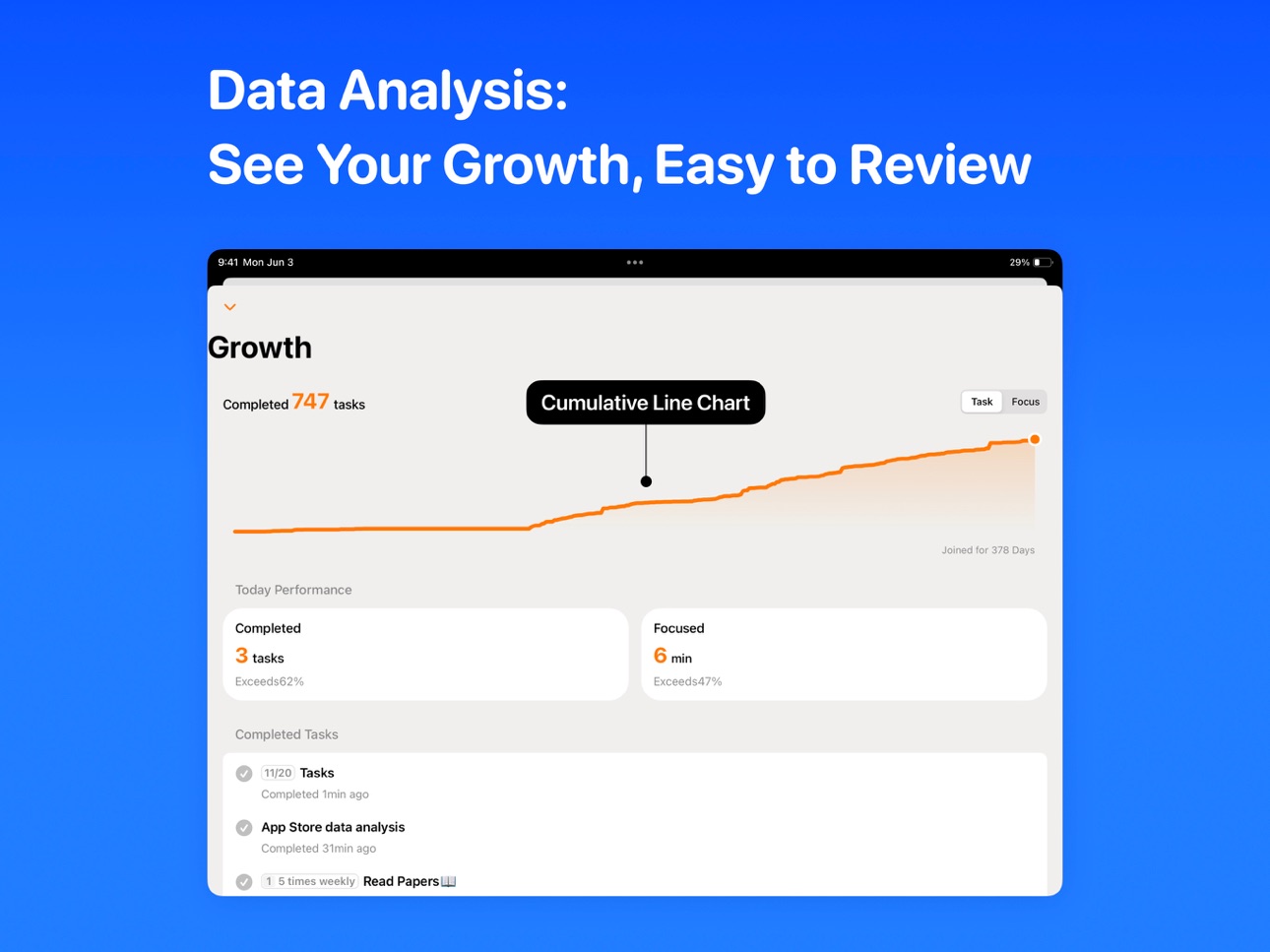
Growth Module: Track your progress with an ascending graph showing completed tasks and focus time. View daily performance, task completion, focus duration, and historical comparisons. The "Recent Tasks" section helps with task review.
Personalization: Customize themes, languages, and date formats. You can also choose to automatically clear completed tasks based on your preferences.
Who Can Benefit from StarList?
Professionals: If you have many tasks to manage and prefer a simple, lightweight way to stay organized, StarList is perfect for you. It’s intuitive, easy to maintain, and helps you prioritize tasks with minimal time investment.
Homebodies: If you need a daily reminder list and want to build good habits, StarList is ideal due to its simplicity, natural interactions, and ease of use.
Students: If you need to plan your study schedule, StarList’s "time slot" feature lets you allocate tasks by time, and the three-level task breakdown helps you organize by subject. Plus, the focus timer will help you stay on track and boost your study efficiency.
StarList is a simple, versatile tool, as universal as stationery, suitable for anyone who needs it.
Email:uservoice@star-list.com
In-App Purchases ZM pricing
Monthly Subscription
Monthly—
Annual Subscription
Yearly—
One-Time Purchases
LifeTime—
Capabilities
In-App Purchases
Accessibility
ipadiphonemacrealityDevicetvoswatch
Version history 25 versions
Build 885795956v3.3.52026-05-18 21:39:54
Now with widget group switching! Plus, several bug fixes for a smoother, more refined experience.
Build 882344749v3.3.42026-02-13 00:04:21
Now with widget group switching! Plus several bug fixes for a smoother, more refined experience.
Build 880540614v3.3.22025-12-11 16:50:34
Now with widget group switching! Plus several bug fixes for a smoother, more refined experience.
Build 880452550v3.3.12025-12-09 10:33:59
Now with widget group switching! Plus several bug fixes for a smoother, more refined experience.
Build 880258843v3.3.02025-12-03 10:16:19
Now with widget group switching! Plus several bug fixes for a smoother, more refined experience.
Build 880153549v3.2.102025-11-29 00:51:41
This update brings colorful scenario categories — whether for work, life, study, or any kind of project, you can now add them as new scenarios.
Build 879982276v3.2.92025-11-24 10:28:21
This update brings colorful scenario categories — whether for work, life, study, or any kind of project, you can now add them as new scenarios.
In addition, several bugs have been fixed for a smoother experience:
1. Avoid drag-and-drop actions in edit mode to facilitate text selection;
2. Optimized the display of the task editing panel;
3. Fixed an unexpected shutdown issue during data synchronization;
4. Fixed an issue where date tags were not updating.
Build 879506152v3.2.82025-11-14 22:29:42
This update brings colorful scenario categories — whether for work, life, study, or any kind of project, you can now add them as new scenarios.
In addition, several bugs have been fixed for a smoother experience:
1. Reminder times are now retained when adjusting dates.
2. Fixed an issue where multiple recurring dates were not updating correctly.
3. Fixed accidental back navigation when sliding the timer.
4. Fixed a display issue with the “End” button in the timer.
5. Fixed a crash that could occur during data synchronization.
Build 879342154v3.2.72025-11-03 21:41:58
This update brings colorful scenario categories — whether for work, life, study, or any kind of project, you can now add them as new scenarios.
In addition, several bugs have been fixed for a smoother experience:
1. Reminder times are now retained when adjusting dates.
2. Fixed an issue where multiple recurring dates were not updating correctly.
3. Fixed accidental back navigation when sliding the timer.
4. Fixed a display issue with the “End” button in the timer.
5. Fixed a crash that could occur during data synchronization.
Build 879025668v3.2.62025-10-19 20:32:57
Now with colorful scenario categories — whether for work, life, study, or any kind of project, you can add them as new scenarios. In addition, multiple bugs have been fixed to bring an even better product experience.
Build 878848960v3.2.52025-10-13 09:42:07
Now with colorful scenario categories — whether for work, life, study, or any kind of project, you can add them as new scenarios. In addition, multiple bugs have been fixed to bring an even better product experience.
Build 878743681v3.2.32025-10-10 07:09:50
Now with colorful scenario categories — whether work, life, study, or any project, you can add them as new scenarios.
Build 878597264v3.2.22025-10-02 07:25:21
New! Colorful Scenario Categories—add work, life, study, or any project with its own color and switch with ease. Bug fixes included for an even smoother experience. Try it now!
Build 878104138v3.2.12025-09-23 16:06:28
New! Colorful Scenario Categories—add work, life, study, or any project with its own color and switch with ease. Bug fixes included for an even smoother experience. Try it now!
Build 877476110v3.1.42025-08-24 09:33:43
1. Added time abbreviation feature: simply enter "8:" followed by a space, and the system will automatically complete it as "8:00" and set a reminder time. Similarly, entering "8:-9:" followed by a space will set a time range;
2. Support for syncing collapsed states;
3. Improved error handling mechanism in the login process;
4. Fixed an issue with duplicate tasks being marked as completed abnormally;
5. Fixed an issue where date labels were not updated after the date expired;
6. Fixed other bugs and optimized the user experience.
Build 877325351v3.1.22025-08-18 15:21:33
1.Optimize the login process
2.Fix the date label display issue
3.Fix some bugs and improve the user experience
Build 877135070v3.1.02025-08-13 15:44:55
1. Added login feature with cross-platform data sync.
2. Growth module now supports task undo.
3. After starring a task, you can enter Focus Mode directly via the button at the end of the task.
4. Improved sorting algorithm.
5. Fixed multiple bugs and further enhanced the user experience.
Build 874514736v3.0.42025-05-05 17:35:09
1.Optimized guided workflow based on the Priorities First Method: refine, plan, and star.
2.Pinned star tasks card to the top.
3.display a red badge on the app icon when the reminder time arrives.
4.Drag and drop experience optimized.
5.Folding experience optimized.
6.Fixed a crash when selecting another task after completing a subtask.
7.Fixed a rare crash when changing the reminder time in the edit bar.
8.Fixed the collapse button disappearing after completing a repeating task.
Build 873923036v3.0.32025-04-10 14:58:09
1.Optimized guided workflow based on the Priorities First Method: refine, plan, and star.
2.Pinned star tasks card to the top.
3.display a red badge on the app icon when the reminder time arrives.
4.Drag and drop experience optimized.
5.Folding experience optimized.
6.Fixed some bugs.
7.Redesigned the App Store preview images to better highlight the app's key features.
Build 873753517v3.0.22025-04-03 22:28:51
1.Optimized guided workflow based on the Priorities First Method: refine, plan, and star.
2.Pinned star tasks card to the top.
3.display a red badge on the app icon when the reminder time arrives.
4.Drag and drop experience optimized.
5.Folding experience optimized.
6.Fixed some bugs.
Build 873693196v3.0.12025-04-01 18:57:10
1.Optimized guided workflow based on the Priorities First Method: refine, plan, and star.
2.Pinned star tasks card to the top.
3.display a red badge on the app icon when the reminder time arrives.
4.Drag and drop experience optimized.
5.Folding experience optimized.
6.Fixed some bugs.
Build 873529474v3.0.02025-03-28 16:11:36
1.Optimized guided workflow based on the Priorities First Method: refine, plan, and star.
2.Pinned star tasks card to the top.
3.display a red badge on the app icon when the reminder time arrives.
4.Drag and drop experience optimized.
5.Folding experience optimized.
6.Fixed some bugs.
Build 871099496v2.1.22024-12-18 16:06:18
1.More intuitive feature layout.
2.Clearer folding/unfolding experience for subtasks.
3.Fixed a bug in date settings.
Build 870675974v2.0.32024-11-26 08:38:11
1. Duration date format recognition like "10/21-10/27," "9:00-12:00," and "Daily 9:00-10:00."
2. Date styles upgraded to labels for better visibility and clearer status.
3. Enhanced focus entry for a more natural way to start focusing, with tasks marked as focused, achieving "task-focus" synergy.
4. Added a features menu for growth, personalization (new), and my tasks, further enhancing simplicity.
5. Vibrant orange color scheme, a new logo, clearer task hierarchy, and optimized UI details.
6. Launched an international version supporting English, Simplified Chinese, and Traditional Chinese, with a rewritten date recognition algorithm for different languages in the new personalization module.
Build 870530899v2.0.22024-11-19 21:08:55
1. Duration date format recognition like "10/21-10/27," "9:00-12:00," and "Daily 9:00-10:00."
2. Date styles upgraded to labels for better visibility and clearer status.
3. Enhanced focus entry for a more natural way to start focusing, with tasks marked as focused, achieving "task-focus" synergy.
4. Added a features menu for growth, personalization (new), and my tasks, further enhancing simplicity.
5. Vibrant orange color scheme, a new logo, clearer task hierarchy, and optimized UI details.
6. Launched an international version supporting English, Simplified Chinese, and Traditional Chinese, with a rewritten date recognition algorithm for different languages in the new personalization module.
Price history by region
Currency
Show
Columns
Search
Availability 170 of 170 storefronts
| Region | Language | Price | Ratings | Avg | Version |
|---|---|---|---|---|---|
| CN | zh-Hans-CN | Free | 29 | 5.0 | 3.3.5 |
| AU | en-AU | Free | 1 | 5.0 | 3.3.5 |
| FR | fr-FR | Free | 1 | 5.0 | 3.3.5 |
| US | en-US | Free | 1 | 5.0 | 3.3.5 |
| AE | en-GB | Free | 0 | — | 3.3.5 |
| AF | en-GB | Free | 0 | — | 3.3.5 |
| AG | en-GB | Free | 0 | — | 3.3.5 |
| AI | en-GB | Free | 0 | — | 3.3.5 |
| AL | en-GB | Free | 0 | — | 3.3.5 |
| AO | en-GB | Free | 0 | — | 3.3.5 |
| AR | es-MX | Free | 0 | — | 3.3.5 |
| AT | de-DE | Free | 0 | — | 3.3.5 |
| AZ | en-GB | Free | 0 | — | 3.3.5 |
| BA | en-GB | Free | 0 | — | 3.3.5 |
| BB | en-GB | Free | 0 | — | 3.3.5 |
| BE | en-GB | Free | 0 | — | 3.3.5 |
| BF | en-GB | Free | 0 | — | 3.3.5 |
| BG | en-GB | Free | 0 | — | 3.3.5 |
| BH | en-GB | Free | 0 | — | 3.3.5 |
| BJ | en-GB | Free | 0 | — | 3.3.5 |
| BM | en-GB | Free | 0 | — | 3.3.5 |
| BN | en-GB | Free | 0 | — | 3.3.5 |
| BO | es-MX | Free | 0 | — | 3.3.5 |
| BR | pt-BR | Free | 0 | — | 3.3.5 |
| BS | en-GB | Free | 0 | — | 3.3.5 |
| BT | en-GB | Free | 0 | — | 3.3.5 |
| BW | en-GB | Free | 0 | — | 3.3.5 |
| BY | en-GB | Free | 0 | — | 3.3.5 |
| BZ | en-GB | Free | 0 | — | 3.3.5 |
| CA | en-CA | Free | 0 | — | 3.3.5 |
| CD | en-GB | Free | 0 | — | 3.3.5 |
| CG | en-GB | Free | 0 | — | 3.3.5 |
| CH | de-CH | Free | 0 | — | 3.3.5 |
| CI | fr-FR | Free | 0 | — | 3.3.5 |
| CL | es-MX | Free | 0 | — | 3.3.5 |
| CM | fr-FR | Free | 0 | — | 3.3.5 |
| CO | es-MX | Free | 0 | — | 3.3.5 |
| CR | es-MX | Free | 0 | — | 3.3.5 |
| CV | en-GB | Free | 0 | — | 3.3.5 |
| CY | en-GB | Free | 0 | — | 3.3.5 |
| CZ | en-GB | Free | 0 | — | 3.3.5 |
| DE | de-DE | Free | 0 | — | 3.3.5 |
| DK | en-GB | Free | 0 | — | 3.3.5 |
| DM | en-GB | Free | 0 | — | 3.3.5 |
| DO | es-MX | Free | 0 | — | 3.3.5 |
| DZ | en-GB | Free | 0 | — | 3.3.5 |
| EC | es-MX | Free | 0 | — | 3.3.5 |
| EG | en-GB | Free | 0 | — | 3.3.5 |
| ES | es-ES | Free | 0 | — | 3.3.5 |
| FI | en-GB | Free | 0 | — | 3.3.5 |
| FJ | en-GB | Free | 0 | — | 3.3.5 |
| FM | en-GB | Free | 0 | — | 3.3.5 |
| GA | fr-FR | Free | 0 | — | 3.3.5 |
| GB | en-GB | Free | 0 | — | 3.3.5 |
| GD | en-GB | Free | 0 | — | 3.3.5 |
| GE | en-GB | Free | 0 | — | 3.3.5 |
| GH | en-GB | Free | 0 | — | 3.3.5 |
| GM | en-GB | Free | 0 | — | 3.3.5 |
| GR | en-GB | Free | 0 | — | 3.3.5 |
| GT | es-MX | Free | 0 | — | 3.3.5 |
| GW | en-GB | Free | 0 | — | 3.3.5 |
| GY | en-GB | Free | 0 | — | 3.3.5 |
| HN | es-MX | Free | 0 | — | 3.3.5 |
| HR | en-GB | Free | 0 | — | 3.3.5 |
| HU | en-GB | Free | 0 | — | 3.3.5 |
| ID | en-GB | Free | 0 | — | 3.3.5 |
| IE | en-GB | Free | 0 | — | 3.3.5 |
| IL | en-GB | Free | 0 | — | 3.3.5 |
| IN | en-GB | Free | 0 | — | 3.3.5 |
| IQ | en-GB | Free | 0 | — | 3.3.5 |
| IS | en-GB | Free | 0 | — | 3.3.5 |
| IT | it | Free | 0 | — | 3.3.5 |
| JM | en-GB | Free | 0 | — | 3.3.5 |
| JO | en-GB | Free | 0 | — | 3.3.5 |
| JP | ja | Free | 0 | — | 3.3.5 |
| KE | en-GB | Free | 0 | — | 3.3.5 |
| KG | en-GB | Free | 0 | — | 3.3.5 |
| KH | en-GB | Free | 0 | — | 3.3.5 |
| KN | en-GB | Free | 0 | — | 3.3.5 |
| KR | ko | Free | 0 | — | 3.3.5 |
| KW | en-GB | Free | 0 | — | 3.3.5 |
| KY | en-GB | Free | 0 | — | 3.3.5 |
| KZ | en-GB | Free | 0 | — | 3.3.5 |
| LA | en-GB | Free | 0 | — | 3.3.5 |
| LB | en-GB | Free | 0 | — | 3.3.5 |
| LC | en-GB | Free | 0 | — | 3.3.5 |
| LK | en-GB | Free | 0 | — | 3.3.5 |
| LR | en-GB | Free | 0 | — | 3.3.5 |
| LT | en-GB | Free | 0 | — | 3.3.5 |
| LU | en-GB | Free | 0 | — | 3.3.5 |
| LV | en-GB | Free | 0 | — | 3.3.5 |
| LY | en-GB | Free | 0 | — | 3.3.5 |
| MA | en-GB | Free | 0 | — | 3.3.5 |
| MD | en-GB | Free | 0 | — | 3.3.5 |
| ME | en-GB | Free | 0 | — | 3.3.5 |
| MG | en-GB | Free | 0 | — | 3.3.5 |
| MK | en-GB | Free | 0 | — | 3.3.5 |
| ML | en-GB | Free | 0 | — | 3.3.5 |
| MM | en-GB | Free | 0 | — | 3.3.5 |
| MN | en-GB | Free | 0 | — | 3.3.5 |
| MO | zh-Hant-HK | Free | 0 | — | 3.3.5 |
| MR | en-GB | Free | 0 | — | 3.3.5 |
| MS | en-GB | Free | 0 | — | 3.3.5 |
| MT | en-GB | Free | 0 | — | 3.3.5 |
| MU | en-GB | Free | 0 | — | 3.3.5 |
| MV | en-GB | Free | 0 | — | 3.3.5 |
| MW | en-GB | Free | 0 | — | 3.3.5 |
| MX | es-MX | Free | 0 | — | 3.3.5 |
| MY | en-GB | Free | 0 | — | 3.3.5 |
| MZ | en-GB | Free | 0 | — | 3.3.5 |
| NA | en-GB | Free | 0 | — | 3.3.5 |
| NE | en-GB | Free | 0 | — | 3.3.5 |
| NG | en-GB | Free | 0 | — | 3.3.5 |
| NI | es-MX | Free | 0 | — | 3.3.5 |
| NL | nl | Free | 0 | — | 3.3.5 |
| NO | en-GB | Free | 0 | — | 3.3.5 |
| NP | en-GB | Free | 0 | — | 3.3.5 |
| NR | en-GB | Free | 0 | — | 3.3.5 |
| NZ | en-AU | Free | 0 | — | 3.3.5 |
| OM | en-GB | Free | 0 | — | 3.3.5 |
| PA | es-MX | Free | 0 | — | 3.3.5 |
| PE | es-MX | Free | 0 | — | 3.3.5 |
| PG | en-GB | Free | 0 | — | 3.3.5 |
| PH | en-GB | Free | 0 | — | 3.3.5 |
| PK | en-GB | Free | 0 | — | 3.3.5 |
| PL | en-GB | Free | 0 | — | 3.3.5 |
| PT | pt-PT | Free | 0 | — | 3.3.5 |
| PW | en-GB | Free | 0 | — | 3.3.5 |
| PY | es-MX | Free | 0 | — | 3.3.5 |
| QA | en-GB | Free | 0 | — | 3.3.5 |
| RO | en-GB | Free | 0 | — | 3.3.5 |
| RS | en-GB | Free | 0 | — | 3.3.5 |
| RU | ru | Free | 0 | — | 3.3.5 |
| RW | en-GB | Free | 0 | — | 3.3.5 |
| SA | en-GB | Free | 0 | — | 3.3.5 |
| SB | en-GB | Free | 0 | — | 3.3.5 |
| SC | en-GB | Free | 0 | — | 3.3.5 |
| SE | sv | Free | 0 | — | 3.3.5 |
| SG | en-GB | Free | 0 | — | 3.3.5 |
| SK | en-GB | Free | 0 | — | 3.3.5 |
| SL | en-GB | Free | 0 | — | 3.3.5 |
| SN | en-GB | Free | 0 | — | 3.3.5 |
| SR | en-GB | Free | 0 | — | 3.3.5 |
| ST | en-GB | Free | 0 | — | 3.3.5 |
| SV | es-MX | Free | 0 | — | 3.3.5 |
| SZ | en-GB | Free | 0 | — | 3.3.5 |
| TC | en-GB | Free | 0 | — | 3.3.5 |
| TD | en-GB | Free | 0 | — | 3.3.5 |
| TH | en-GB | Free | 0 | — | 3.3.5 |
| TJ | en-GB | Free | 0 | — | 3.3.5 |
| TM | en-GB | Free | 0 | — | 3.3.5 |
| TN | en-GB | Free | 0 | — | 3.3.5 |
| TO | en-GB | Free | 0 | — | 3.3.5 |
| TR | en-GB | Free | 0 | — | 3.3.5 |
| TT | en-GB | Free | 0 | — | 3.3.5 |
| TW | zh-Hant-TW | Free | 0 | — | 3.3.5 |
| TZ | en-GB | Free | 0 | — | 3.3.5 |
| UA | en-GB | Free | 0 | — | 3.3.5 |
| UG | en-GB | Free | 0 | — | 3.3.5 |
| UY | en-GB | Free | 0 | — | 3.3.5 |
| UZ | en-GB | Free | 0 | — | 3.3.5 |
| VC | en-GB | Free | 0 | — | 3.3.5 |
| VE | es-MX | Free | 0 | — | 3.3.5 |
| VG | en-GB | Free | 0 | — | 3.3.5 |
| VN | en-GB | Free | 0 | — | 3.3.5 |
| VU | en-GB | Free | 0 | — | 3.3.5 |
| XK | en-GB | Free | 0 | — | 3.3.5 |
| ZA | en-GB | Free | 0 | — | 3.3.5 |
| ZM | en-GB | Free | 0 | — | 3.3.5 |
| ZW | en-GB | Free | 0 | — | 3.3.5 |
Change log 29 changes · ZM
✎
releaseNotes updated
Now with widget group switching! Plus, several bug fixes for a smoother, more refined experience.
✎
description updated
StarList is a simple yet powerful personal task management tool that supports data synchronization across iOS, macOS, and iPadOS.
Why Create It?
We found that
✎
subtitle updated
Focus on what matters
✎
name updated
StarList:One-Page To Do List
◆
Version 3.3.5 released
Now with widget group switching! Plus, several bug fixes for a smoother, more refined experience.
◆
Version 3.3.4 released
Now with widget group switching! Plus several bug fixes for a smoother, more refined experience.
◆
Version 3.3.2 released
Now with widget group switching! Plus several bug fixes for a smoother, more refined experience.
◆
Version 3.3.1 released
Now with widget group switching! Plus several bug fixes for a smoother, more refined experience.
◆
Version 3.3.0 released
Now with widget group switching! Plus several bug fixes for a smoother, more refined experience.
◆
Version 3.2.10 released
This update brings colorful scenario categories — whether for work, life, study, or any kind of project, you can now add them as new scenarios.
◆
Version 3.2.9 released
This update brings colorful scenario categories — whether for work, life, study, or any kind of project, you can now add them as new scenarios.
In addition, several bugs have been fixed for a smoother experience:
1. Avoid drag-and-drop acti
◆
Version 3.2.8 released
This update brings colorful scenario categories — whether for work, life, study, or any kind of project, you can now add them as new scenarios.
In addition, several bugs have been fixed for a smoother experience:
1. Reminder times are now
◆
Version 3.2.7 released
This update brings colorful scenario categories — whether for work, life, study, or any kind of project, you can now add them as new scenarios.
In addition, several bugs have been fixed for a smoother experience:
1. Reminder times are now
◆
Version 3.2.6 released
Now with colorful scenario categories — whether for work, life, study, or any kind of project, you can add them as new scenarios. In addition, multiple bugs have been fixed to bring an even better product experience.
◆
Version 3.2.5 released
Now with colorful scenario categories — whether for work, life, study, or any kind of project, you can add them as new scenarios. In addition, multiple bugs have been fixed to bring an even better product experience.
◆
Version 3.2.3 released
Now with colorful scenario categories — whether work, life, study, or any project, you can add them as new scenarios.
◆
Version 3.2.2 released
New! Colorful Scenario Categories—add work, life, study, or any project with its own color and switch with ease. Bug fixes included for an even smoother experience. Try it now!
◆
Version 3.2.1 released
New! Colorful Scenario Categories—add work, life, study, or any project with its own color and switch with ease. Bug fixes included for an even smoother experience. Try it now!
◆
Version 3.1.4 released
1. Added time abbreviation feature: simply enter "8:" followed by a space, and the system will automatically complete it as "8:00" and set a reminder time. Similarly, entering "8:-9:" followed by a space will set a time range;
2. Support fo
◆
Version 3.1.2 released
1.Optimize the login process
2.Fix the date label display issue
3.Fix some bugs and improve the user experience
◆
Version 3.1.0 released
1. Added login feature with cross-platform data sync.
2. Growth module now supports task undo.
3. After starring a task, you can enter Focus Mode directly via the button at the end of the task.
4. Improved sorting algorithm.
5. Fixed multip
◆
Version 3.0.4 released
1.Optimized guided workflow based on the Priorities First Method: refine, plan, and star.
2.Pinned star tasks card to the top.
3.display a red badge on the app icon when the reminder time arrives.
4.Drag and drop experience optimized.
5.Fol
◆
Version 3.0.3 released
1.Optimized guided workflow based on the Priorities First Method: refine, plan, and star.
2.Pinned star tasks card to the top.
3.display a red badge on the app icon when the reminder time arrives.
4.Drag and drop experience optimized.
5.Fol
◆
Version 3.0.2 released
1.Optimized guided workflow based on the Priorities First Method: refine, plan, and star.
2.Pinned star tasks card to the top.
3.display a red badge on the app icon when the reminder time arrives.
4.Drag and drop experience optimized.
5.Fol
◆
Version 3.0.1 released
1.Optimized guided workflow based on the Priorities First Method: refine, plan, and star.
2.Pinned star tasks card to the top.
3.display a red badge on the app icon when the reminder time arrives.
4.Drag and drop experience optimized.
5.Fol
◆
Version 3.0.0 released
1.Optimized guided workflow based on the Priorities First Method: refine, plan, and star.
2.Pinned star tasks card to the top.
3.display a red badge on the app icon when the reminder time arrives.
4.Drag and drop experience optimized.
5.Fol
◆
Version 2.1.2 released
1.More intuitive feature layout.
2.Clearer folding/unfolding experience for subtasks.
3.Fixed a bug in date settings.
◆
Version 2.0.3 released
1. Duration date format recognition like "10/21-10/27," "9:00-12:00," and "Daily 9:00-10:00."
2. Date styles upgraded to labels for better visibility and clearer status.
3. Enhanced focus entry for a more natural way to start focusing, with
◆
Version 2.0.2 released
1. Duration date format recognition like "10/21-10/27," "9:00-12:00," and "Daily 9:00-10:00."
2. Date styles upgraded to labels for better visibility and clearer status.
3. Enhanced focus entry for a more natural way to start focusing, with