Home › Business

 EE
EE
 CAen-CA
 MYen-GB
 ATde-DE
 BEen-GB
 CHde-CH
 CYen-GB
 CZen-GB
 DKen-GBEEen-GB
 FIen-GB
 FRfr-FR
 HRen-GB
 HUen-GB
 IEen-GB
 ITit
ITit JPja
JPja LTen-GB
 LUen-GB
 LVen-GB
 MTen-GB
 NOen-GB
 PLen-GB
 PTpt-PT
 ROen-GB
 SEsv
SEsv SGen-GB
 SIen-GB
 SKen-GB
 USen-US
 AENot Available
 AFNot Available
 AGNot Available
 AINot Available
 ALNot Available
 AMNot Available
 AONot Available
 ARNot Available
 AZNot Available
 BANot Available
 BBNot Available
 BFNot Available
 BGNot Available
 BHNot Available
 BJNot Available
 BMNot Available
 BNNot Available
 BONot Available
 BRNot Available
 BSNot Available
 BWNot Available
 BYNot Available
 BZNot Available
 CDNot Available
 CGNot Available
 CINot Available
 CLNot Available
 CMNot Available
 CONot Available
 CRNot Available
 CVNot Available
 DMNot Available
 DONot Available
 DZNot Available
 ECNot Available
 EGNot Available
 FMNot Available
 GANot Available
 GDNot Available
 GENot Available
 GHNot Available
 GMNot Available
 GRNot Available
 GTNot Available
 GWNot Available
 GYNot Available
 HKNot Available
 HNNot Available
 IDNot Available
 ILNot Available
 INNot Available
 IQNot Available
 JMNot Available
 JONot Available
 KENot Available
 KHNot Available
 KNNot Available
 KRNot Available
 KWNot Available
 KYNot Available
 KZNot Available
 LANot Available
 LBNot Available
 LCNot Available
 LKNot Available
 LRNot Available
 LYNot Available
 MANot Available
 MDNot Available
 MENot Available
 MGNot Available
 MKNot Available
 MLNot Available
 MMNot Available
 MNNot Available
 MONot Available
 MRNot Available
 MSNot Available
 MUNot Available
 MVNot Available
 MWNot Available
 MXNot Available
 MZNot Available
 NANot Available
 NENot Available
 NGNot Available
 NINot Available
 NPNot Available
 NRNot Available
 OMNot Available
 PANot Available
 PENot Available
 PHNot Available
 PKNot Available
 PWNot Available
 PYNot Available
 QANot Available
 RSNot Available
 RUNot Available
 RWNot Available
 SANot Available
 SBNot Available
 SCNot Available
 SLNot Available
 SNNot Available
 SRNot Available
 STNot Available
 SVNot Available
 SZNot Available
 TCNot Available
 TDNot Available
 THNot Available
 TJNot Available
 TMNot Available
 TNNot Available
 TONot Available
 TRNot Available
 TTNot Available
 TZNot Available
 UANot Available
 UGNot Available
 UYNot Available
 UZNot Available
 VCNot Available
 VENot Available
 VGNot Available
 VNNot Available
 VUNot Available
 XKNot Available
 YENot Available
 ZANot Available
 ZMNot Available
 ZWNot Available
29 of 162 storefronts
Content in en-US
Content in en-US
Information
Preview 2 platforms
iPhone 10 images





iPad 9 images


What’s New Version 4.1.1
Cash payments are here!
• Take cash payments – ring up a sale, enter the cash received, and AlfaPOS works out the change. No card reader or Stripe account needed, and it works offline.
• Cash receipts – email one on the spot, or send it later from the sale details.
• Cash refunds – refund any cash sale in a tap.
• Sales Report – see cash and card totals side by side, or filter by payment type.
• Cash receipt language – set the language for printed and emailed receipts.
• Attach a customer to any cash sale, and see their full purchase history – cash included.
• Invoices have moved into Sales to keep the main navigation focused.
• Updated French and Italian translations.
Questions or feature requests? Contact us at support@alfapos.ca
Description
AlfaPOS, powered by Stripe, is an all-in-one payment app designed to help modern businesses accept in-person payments – by card or in cash. Whether you're running a retail store, an event space, a food stand, or offering professional services, AlfaPOS makes it easy to accept payments, manage your product and subscription catalog, track transactions, and more – all while keeping costs low.
FOR EXISTING STRIPE USERS
Already running your business on Stripe? AlfaPOS extends your existing Stripe account to in-person payments – no new platform to learn, no separate reconciliation. Your online and in-person sales flow through the same Stripe Dashboard you already use.
FOR NEW BUSINESSES
New to payments? AlfaPOS gives you instant access to Stripe's world-class payment infrastructure. Accept payments globally, access detailed analytics, and tap into Stripe's full ecosystem of business tools – invoicing, subscriptions, financial reporting, and more – all through one simple app.
Join a growing community of businesses using AlfaPOS.
ACCEPT PAYMENTS ANYWHERE, ANYTIME
• Accept all major credit and debit cards
• Take cash payments – AlfaPOS calculates the change and tracks cash and card together
• Go hardware-free with Apple Tap to Pay, or use any Stripe-supported card reader
• Send invoices with a secure payment link for easy online payment
• Sell products and subscriptions
• Accept payments offline – never miss a sale, even without an Internet connection
• Pre-authorize cards for future final transactions
• Use Kiosk mode to turn your iPad or iPhone into a secure self-service checkout
INVITE YOUR TEAM
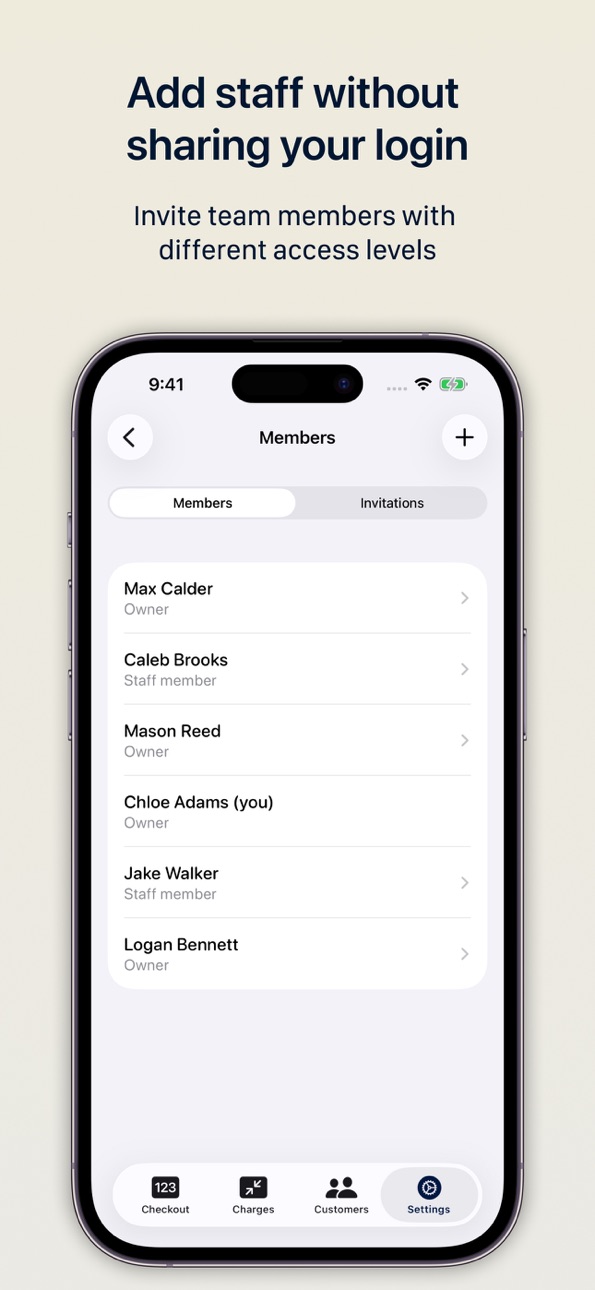
• Invite your team members without sharing Stripe credentials
• Assign roles: Owners have full access; Staff members have limited permissions
POWER YOUR BUSINESS WITH SMART TOOLS
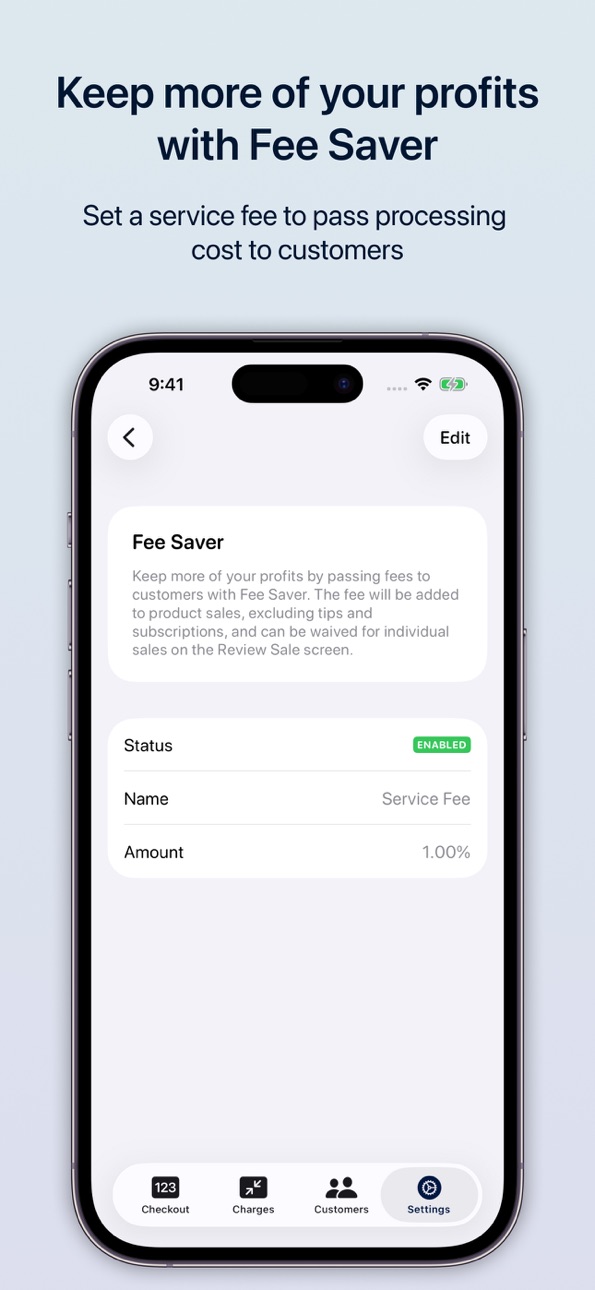
• Keep more of every sale with Fee Saver – let customers cover the processing fee
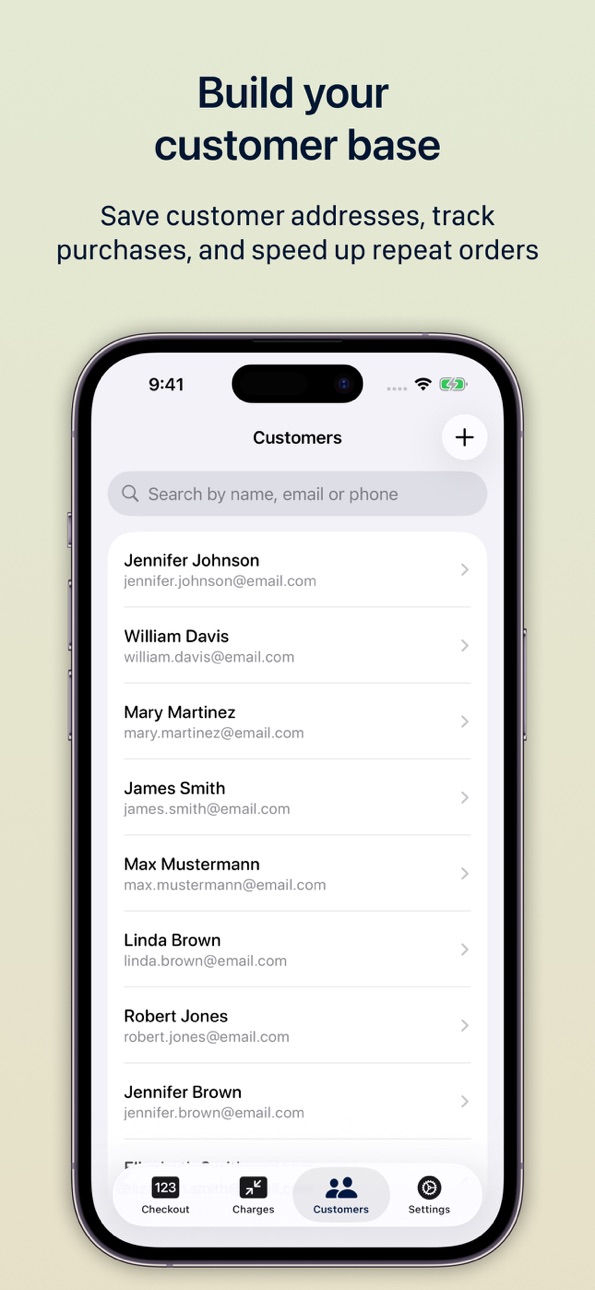
• Manage your product and subscription catalog and customer information in one place
• View detailed transaction history and issue full or partial refunds
• Collect tips with smart percentage suggestions
• View and export Sales reports with breakdowns by payment method and by product sold
GET STARTED IN MINUTES
• Low fees – just 1% on top of Stripe’s processing fee
• No monthly fees – pay only when you sell
• No hardware required – start accepting payments today
• Simple setup – create your account and take your first payment in minutes
Capabilities
Wallet
Accessibility
ipadiphonemacrealityDevicetvoswatch
Version history 25 versions
Build 886911698v4.1.12026-06-24 16:57:44
Cash payments are here!
• Take cash payments – ring up a sale, enter the cash received, and AlfaPOS works out the change. No card reader or Stripe account needed, and it works offline.
• Cash receipts – email one on the spot, or send it later from the sale details.
• Cash refunds – refund any cash sale in a tap.
• Sales Report – see cash and card totals side by side, or filter by payment type.
• Cash receipt language – set the language for printed and emailed receipts.
• Attach a customer to any cash sale, and see their full purchase history – cash included.
• Invoices have moved into Sales to keep the main navigation focused.
• Updated French and Italian translations.
Questions or feature requests? Contact us at support@alfapos.ca
Build 886893281v4.12026-06-13 00:26:32
Cash payments are here!
• Take cash payments – ring up a sale, enter the cash received, and AlfaPOS works out the change. No card reader or Stripe account needed, and it works offline.
• Cash receipts – email one on the spot, or send it later from the sale details.
• Cash refunds – refund any cash sale in a tap.
• Sales Report – see cash and card totals side by side, or filter by payment type.
• Cash receipt language – set the language for printed and emailed receipts.
• Attach a customer to any cash sale, and see their full purchase history – cash included.
• Invoices have moved into Sales to keep the main navigation focused.
• Updated French and Italian translations.
Questions or feature requests? Contact us at support@alfapos.ca
Build 886395527v4.0.22026-06-01 23:36:52
Resolved an issue where the checkout area could become unresponsive to touch on devices running iOS 17.
Questions or feature requests? Contact us at support@alfapos.ca
Build 885741290v4.0.12026-05-17 13:56:52
– Introducing Sales Reports. Get a quick overview of how your business is performing with breakdowns by payment method and products sold.
– You can now set a default sales description that automatically applies to every sale. This speeds up checkout and can be especially useful in Kiosk mode.
Questions or feature requests? Contact us at support@alfapos.ca
Build 885552627v4.02026-05-12 19:23:54
Introducing Sales reports. See how your business is doing at a glance with breakdowns by payment method and by product sold. CSV export included.
Build 884176909v3.7.12026-04-06 18:25:07
Bug fixes and performance improvements.
Questions or feature requests? Contact us: support@alfapos.ca
Build 883849325v3.72026-03-28 16:26:41
Introducing invoice payments. You can now accept payments via invoices when selling products and subscriptions. Invoices are created through Stripe and will appear in your Stripe account. When an invoice is sent, your customer receives it by email and can pay it online by following the payment link.
Questions or feature requests? Contact us: support@alfapos.ca
Build 882687301v3.6.42026-02-23 03:25:50
Bug fixes and performance improvements.
Questions or feature requests? Contact us: support@alfapos.ca
Build 881830851v3.6.22026-01-26 02:03:45
New in Kiosk Mode: Added auto-clear for abandoned sales. The checkout automatically resets after inactivity, keeping your kiosk ready for the next customer.
Questions or feature requests? Contact us: support@alfapos.ca
Build 881835933v3.6.32026-01-26 06:38:57
New in Kiosk Mode: Added auto-clear for abandoned sales. The checkout automatically resets after a period of inactivity, keeping your kiosk ready for the next customer.
Questions or feature requests? Contact us: support@alfapos.ca
Build 881573515v3.6.12026-01-19 06:15:53
• Bug fixes and performance improvements.
Questions or feature requests? Contact us: support@alfapos.ca
Build 881265577v3.62026-01-07 10:22:44
• You can now reorder products and subscriptions on the Checkout screen. Go to Settings → Checkout View to manage the order.
• Bug fixes and performance improvements.
Questions or feature requests? Contact us: support@alfapos.ca
Build 881052819v3.5.12025-12-29 00:53:52
Tap to Pay on iPhone is now supported in Croatia, Cyprus, Estonia, Hungary, Japan, Latvia, Liechtenstein, Lithuania, Malta, Norway, Romania, Singapore, Slovakia, and Slovenia.
Questions or feature requests? Contact us: support@alfapos.ca
Build 880962609v3.52025-12-26 19:14:47
Bug fixes and performance improvements.
Questions or feature requests? Contact us: support@alfapos.ca
Build 880668573v3.42025-12-17 21:32:02
Introducing Kiosk mode. Turn your iPad or iPhone into a self-service checkout.
With Kiosk mode, you can lock AlfaPOS to the checkout screen so customers can browse items and complete purchases without staff assistance. Perfect for unattended checkouts, pop-ups, and busy retail environments.
Questions or feature requests? Contact us: support@alfapos.ca
Build 880183458v3.3.32025-12-13 00:56:48
Bug fixes and performance improvements.
Questions or feature requests? Contact us: support@alfapos.ca
Build 879885978v3.3.22025-11-20 03:36:05
Introducing support for saving cards for future charges.
When this option is enabled in Settings, cards are saved so you can charge customers later – for subscriptions, invoices, or repeat services. Security requirements like Strong Customer Authentication (SCA) in Europe are followed, so subsequent payments are less likely to be declined or require extra authentication.
Build 879822907v3.3.12025-11-17 18:30:43
• Introducing support for Internet-connected readers. You can now use AlfaPOS with BBPOS WisePOS E, Stripe Reader S700 and S710, Verifone P400, V660p, UX700, M425, and P630.
• Bug fixes and performance improvements.
Build 879804491v3.32025-11-16 21:42:11
• Introducing support for Internet-connected readers. You can now use AlfaPOS with BBPOS WisePOS E, Stripe Reader S700 and S710, and Verifone P400, V660p, UX700, M425, and P630.
• Bug fixes and performance improvements.
Build 879406563v3.2.12025-11-01 20:32:42
– Added search functionality to the Checkout screen for Products and Subscriptions
– Bug fixes and performance improvements
Build 879350668v3.22025-10-30 17:59:51
– Added search functionality to the Checkout screen for Products and Subscriptions
– Bug fixes and performance improvements
Build 879070606v3.12025-10-21 09:06:25
This update introduces support for coupons and includes bug fixes and performance improvements.
Build 878859899v3.0.02025-10-13 16:37:23
This update introduces support for selling subscriptions and includes improvements throughout the app.
- Subscriptions: You can now sell and manage subscriptions directly in the app.
- Customer Profiles: Added support for shipping and billing addresses.
- Stripe Connection: Fixed an issue that prevented some users from connecting their Stripe accounts.
- Offline Mode: Improved offline mode – the product catalog now gets cached to remain available between app restarts.
- Performance & Stability: We’ve made numerous improvements and fixes to keep things running smoothly.
Build 877525523v2.2.52025-08-25 09:01:13
- Bug fixes and performance improvements
Build 877397911v2.2.42025-08-23 00:19:20
- Support for tax rates with up to three decimal places
- Various bug fixes and performance improvements
No pricing data captured yet — comparisons appear once the app has paid storefronts or in-app purchases.
Availability 29 of 162 storefronts
| Region | Language | Price | Ratings | Avg | Version |
|---|---|---|---|---|---|
| CA | en-CA | Free | 3 | 5.0 | 4.1.1 |
| MY | en-GB | Free | 1 | 5.0 | 4.1.1 |
| AT | de-DE | Free | 0 | — | 4.1.1 |
| BE | en-GB | Free | 0 | — | 4.1.1 |
| CH | de-CH | Free | 0 | — | 4.1.1 |
| CY | en-GB | Free | 0 | — | 4.1.1 |
| CZ | en-GB | Free | 0 | — | 4.1.1 |
| DK | en-GB | Free | 0 | — | 4.1.1 |
| EE | en-GB | Free | 0 | — | 4.1.1 |
| FI | en-GB | Free | 0 | — | 4.1.1 |
| FR | fr-FR | Free | 0 | — | 4.1.1 |
| HR | en-GB | Free | 0 | — | 4.1.1 |
| HU | en-GB | Free | 0 | — | 4.1.1 |
| IE | en-GB | Free | 0 | — | 4.1.1 |
| IT | it | Free | 0 | — | 4.1.1 |
| JP | ja | Free | 0 | — | 4.1.1 |
| LT | en-GB | Free | 0 | — | 4.1.1 |
| LU | en-GB | Free | 0 | — | 4.1.1 |
| LV | en-GB | Free | 0 | — | 4.1.1 |
| MT | en-GB | Free | 0 | — | 4.1.1 |
| NO | en-GB | Free | 0 | — | 4.1.1 |
| PL | en-GB | Free | 0 | — | 4.1.1 |
| PT | pt-PT | Free | 0 | — | 4.1.1 |
| RO | en-GB | Free | 0 | — | 4.1.1 |
| SE | sv | Free | 0 | — | 4.1.1 |
| SG | en-GB | Free | 0 | — | 4.1.1 |
| SI | en-GB | Free | 0 | — | 4.1.1 |
| SK | en-GB | Free | 0 | — | 4.1.1 |
| US | en-US | Free | 0 | — | 4.1.1 |
Not available in: AE, AF, AG, AI, AL, AM, AO, AR, AZ, BA, BB, BF, BG, BH, BJ, BM, BN, BO, BR, BS, BW, BY, BZ, CD, CG, CI, CL, CM, CO, CR, CV, DM, DO, DZ, EC, EG, FM, GA, GD, GE, GH, GM, GR, GT, GW, GY, HK, HN, ID, IL, IN, IQ, JM, JO, KE, KH, KN, KR, KW, KY, KZ, LA, LB, LC, LK, LR, LY, MA, MD, ME, MG, MK, ML, MM, MN, MO, MR, MS, MU, MV, MW, MX, MZ, NA, NE, NG, NI, NP, NR, OM, PA, PE, PH, PK, PW, PY, QA, RS, RU, RW, SA, SB, SC, SL, SN, SR, ST, SV, SZ, TC, TD, TH, TJ, TM, TN, TO, TR, TT, TZ, UA, UG, UY, UZ, VC, VE, VG, VN, VU, XK, YE, ZA, ZM, ZW
Change log 29 changes · EE
✎
releaseNotes updated
Cash payments are here!
• Take cash payments – ring up a sale, enter the cash received, and AlfaPOS works out the change. No card reader or Stripe account need
✎
description updated
AlfaPOS, powered by Stripe, is an all-in-one payment app designed to help modern businesses accept in-person payments – by card or in cash. Whether you're runni
✎
subtitle updated
Small Business Point of Sale
✎
name updated
AlfaPOS: Payments for Stripe
◆
Version 4.1.1 released
Cash payments are here!
• Take cash payments – ring up a sale, enter the cash received, and AlfaPOS works out the change. No card reader or Stripe account needed, and it works offline.
• Cash receipts – email one on the spot, or send it la
◆
Version 4.1 released
Cash payments are here!
• Take cash payments – ring up a sale, enter the cash received, and AlfaPOS works out the change. No card reader or Stripe account needed, and it works offline.
• Cash receipts – email one on the spot, or send it la
◆
Version 4.0.2 released
Resolved an issue where the checkout area could become unresponsive to touch on devices running iOS 17.
Questions or feature requests? Contact us at support@alfapos.ca
◆
Version 4.0.1 released
– Introducing Sales Reports. Get a quick overview of how your business is performing with breakdowns by payment method and products sold.
– You can now set a default sales description that automatically applies to every sale. This speeds up
◆
Version 4.0 released
Introducing Sales reports. See how your business is doing at a glance with breakdowns by payment method and by product sold. CSV export included.
◆
Version 3.7.1 released
Bug fixes and performance improvements.
Questions or feature requests? Contact us: support@alfapos.ca
◆
Version 3.7 released
Introducing invoice payments. You can now accept payments via invoices when selling products and subscriptions. Invoices are created through Stripe and will appear in your Stripe account. When an invoice is sent, your customer receives it b
◆
Version 3.6.4 released
Bug fixes and performance improvements.
Questions or feature requests? Contact us: support@alfapos.ca
◆
Version 3.6.3 released
New in Kiosk Mode: Added auto-clear for abandoned sales. The checkout automatically resets after a period of inactivity, keeping your kiosk ready for the next customer.
Questions or feature requests? Contact us: support@alfapos.ca
◆
Version 3.6.2 released
New in Kiosk Mode: Added auto-clear for abandoned sales. The checkout automatically resets after inactivity, keeping your kiosk ready for the next customer.
Questions or feature requests? Contact us: support@alfapos.ca
◆
Version 3.6.1 released
• Bug fixes and performance improvements.
Questions or feature requests? Contact us: support@alfapos.ca
◆
Version 3.6 released
• You can now reorder products and subscriptions on the Checkout screen. Go to Settings → Checkout View to manage the order.
• Bug fixes and performance improvements.
Questions or feature requests? Contact us: support@alfapos.ca
◆
Version 3.5.1 released
Tap to Pay on iPhone is now supported in Croatia, Cyprus, Estonia, Hungary, Japan, Latvia, Liechtenstein, Lithuania, Malta, Norway, Romania, Singapore, Slovakia, and Slovenia.
Questions or feature requests? Contact us: support@alfapos.ca
◆
Version 3.5 released
Bug fixes and performance improvements.
Questions or feature requests? Contact us: support@alfapos.ca
◆
Version 3.4 released
Introducing Kiosk mode. Turn your iPad or iPhone into a self-service checkout.
With Kiosk mode, you can lock AlfaPOS to the checkout screen so customers can browse items and complete purchases without staff assistance. Perfect for unattend
◆
Version 3.3.3 released
Bug fixes and performance improvements.
Questions or feature requests? Contact us: support@alfapos.ca
◆
Version 3.3.2 released
Introducing support for saving cards for future charges.
When this option is enabled in Settings, cards are saved so you can charge customers later – for subscriptions, invoices, or repeat services. Security requirements like Strong Custom
◆
Version 3.3.1 released
• Introducing support for Internet-connected readers. You can now use AlfaPOS with BBPOS WisePOS E, Stripe Reader S700 and S710, Verifone P400, V660p, UX700, M425, and P630.
• Bug fixes and performance improvements.
◆
Version 3.3 released
• Introducing support for Internet-connected readers. You can now use AlfaPOS with BBPOS WisePOS E, Stripe Reader S700 and S710, and Verifone P400, V660p, UX700, M425, and P630.
• Bug fixes and performance improvements.
◆
Version 3.2.1 released
– Added search functionality to the Checkout screen for Products and Subscriptions
– Bug fixes and performance improvements
◆
Version 3.2 released
– Added search functionality to the Checkout screen for Products and Subscriptions
– Bug fixes and performance improvements
◆
Version 3.1 released
This update introduces support for coupons and includes bug fixes and performance improvements.
◆
Version 3.0.0 released
This update introduces support for selling subscriptions and includes improvements throughout the app.
- Subscriptions: You can now sell and manage subscriptions directly in the app.
- Customer Profiles: Added support for shipping and bil
◆
Version 2.2.5 released
- Bug fixes and performance improvements
◆
Version 2.2.4 released
- Support for tax rates with up to three decimal places
- Various bug fixes and performance improvements