Home › Business

 BB
BB
 AEen-GB
 AFen-GB
 AGen-GB
 AIen-GB
 ALen-GB
 AMen-GB
 AOen-GB
 ARes-MX
 ATde-DE
 AUen-AU
 AZen-GB
 BAen-GBBBen-GB
 BEen-GB
 BFen-GB
 BGen-GB
 BHen-GB
 BJen-GB
 BMen-GB
 BNen-GB
 BOes-MX
 BRpt-BR
 BSen-GB
 BTen-GB
 BWen-GB
 BYen-GB
 BZen-GB
 CAen-CA
 CDen-GB
 CGen-GB
 CHde-CH
 CIfr-FR
 CLes-MX
 CMfr-FR
 CNzh-Hans-CN
 COes-MX
 CRes-MX
 CVen-GB
 CYen-GB
 CZen-GB
 DEde-DE
 DKen-GB
 DMen-GB
 DOes-MX
 DZen-GB
 ECes-MX
 EEen-GB
 EGen-GB
 ESes-ES
 FIen-GB
 FJen-GB
 FMen-GB
 FRfr-FR
 GAfr-FR
 GBen-GB
 GDen-GB
 GEen-GB
 GHen-GB
 GMen-GB
 GRen-GB
 GTes-MX
 GWen-GB
 GYen-GB
 HKzh-Hant-HK
 HNes-MX
 HRen-GB
 HUen-GB
 IDen-GB
 IEen-GB
 ILen-GB
 INen-GB
 IQen-GB
 ISen-GB
 ITit
ITit JMen-GB
 JOen-GB
 JPja
JPja KEen-GB
 KGen-GB
 KHen-GB
 KNen-GB
 KRko
KRko KWen-GB
 KYen-GB
 KZen-GB
 LAen-GB
 LBen-GB
 LCen-GB
 LKen-GB
 LRen-GB
 LTen-GB
 LUen-GB
 LVen-GB
 LYen-GB
 MAen-GB
 MDen-GB
 MEen-GB
 MGen-GB
 MKen-GB
 MLen-GB
 MMen-GB
 MNen-GB
 MOzh-Hant-HK
 MRen-GB
 MSen-GB
 MTen-GB
 MUen-GB
 MVen-GB
 MWen-GB
 MXes-MX
 MYen-GB
 MZen-GB
 NAen-GB
 NEen-GB
 NGen-GB
 NIes-MX
 NLnl
NLnl NOen-GB
 NPen-GB
 NRen-GB
 NZen-AU
 OMen-GB
 PAes-MX
 PEes-MX
 PGen-GB
 PHen-GB
 PKen-GB
 PLen-GB
 PTpt-PT
 PWen-GB
 PYes-MX
 QAen-GB
 ROen-GB
 RSen-GB
 RUru
RUru RWen-GB
 SAen-GB
 SBen-GB
 SCen-GB
 SEsv
SEsv SGen-GB
 SIen-GB
 SKen-GB
 SLen-GB
 SNen-GB
 SRen-GB
 STen-GB
 SVes-MX
 SZen-GB
 TCen-GB
 TDen-GB
 THen-GB
 TJen-GB
 TMen-GB
 TNen-GB
 TOen-GB
 TRen-GB
 TTen-GB
 TWzh-Hant-TW
 TZen-GB
 UAen-GB
 UGen-GB
 USen-US
 UYen-GB
 UZen-GB
 VCen-GB
 VEes-MX
 VGen-GB
 VNen-GB
 VUen-GB
 XKen-GB
 YEen-GB
 ZAen-GB
 ZMen-GB
 ZWen-GB
175 of 175 storefronts
Content in en-US
Content in en-US
Information
Apple ID6473059257
Bundle IDcom.aidaluu.dancingletters
SellerSeller
Min iOS16.6
Device familiesmac, watch, iphone, ipad
Released2025-07-16
Copyright© Aidaluu Inc.
Privacy policyLink ↗
Preview 4 platforms
iPhone 5 images


iPad 5 images


Mac 5 images



Apple Watch 5 images


What’s New Version 2.3
Added support for Apple Watch - Apple Watch companion app supports drawing and adding text to images
Bug fixes and performance tweaks
We would love to hear your feedback and suggestions for new features, reach out to us at aidaluu.com
Description
AnnotateUp is built for fast, structured image annotation. Whether you’re labeling equipment, marking objects, documenting inspections, or adding quick reference notes, it gives you a simple workflow designed for clarity and speed — no formatting, no styling decisions, no friction.
Fast, Direct Markups
Draw directly on your images with tools built for quick, accurate labeling. Just mark what matters and move on.
Automatic Numbering
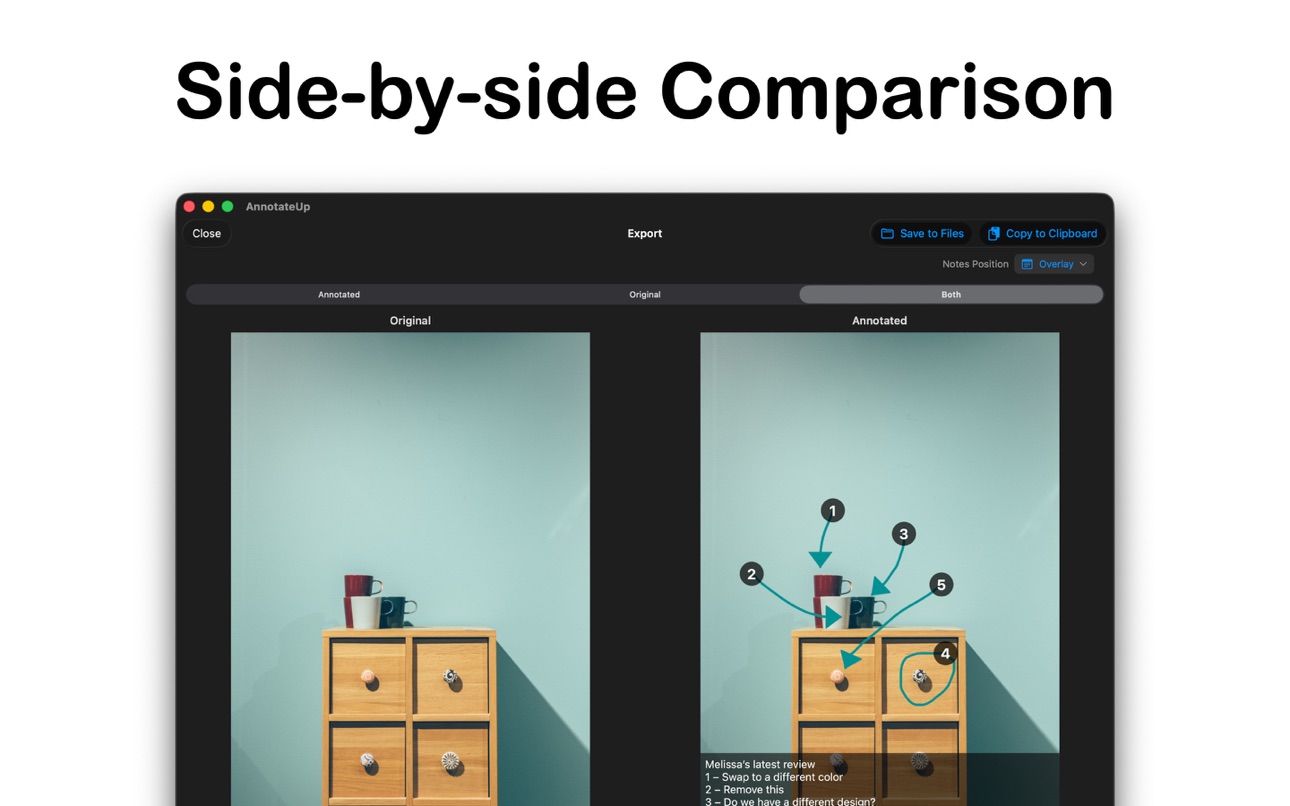
Each new mark is numbered for you, keeping annotations organized without any manual setup. Turn numbering off anytime for a cleaner layout.
Directional Arrows (Optional)
When enabled, the app automatically adds arrows based on the direction you draw — ideal for marking flow direction and path. Arrows can be toggled on or off depending on the task.
Notes That Stay Attached
Add notes linked to each numbered label. Notes appear directly on the image, making it easy to connect details to the exact point they refer to.
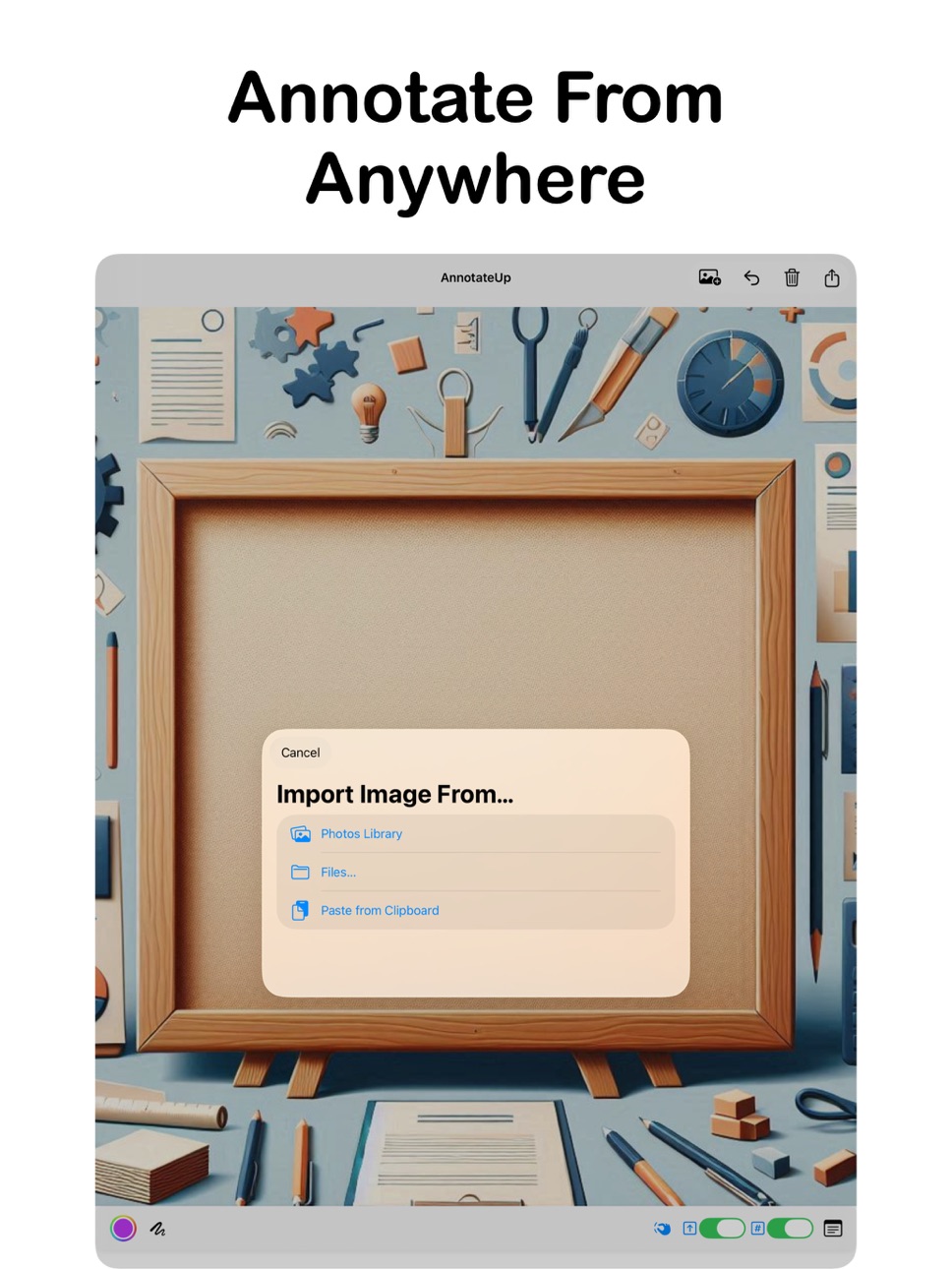
Simple Image Input
Bring images in however you work:
- Choose from your photo library
- Import from Files
- Paste directly from your clipboard
Designed for “Label and Go” Work
No formatting. No layout adjustments. No extra steps. Just fast, consistent annotation that helps you capture information clearly and get back to the real work.
Apple Watch Companion
A companion app for Apple Watch allows for simplified drawing and adding text to images.
The free version carries watermarks on saved images and limits the number of marking strokes you can make.
Upgrade to the Pro Edition to remove watermarks, unlock unlimited marking, and access all features.
In-App Purchases BB pricing
One-Time Purchases
Pro Upgrade (Perpetual)—
Capabilities
In-App Purchases
Accessibility
ipadiphonemacrealityDevicetvoswatch
Version history 4 versions
Build 886844493v2.32026-06-11 22:14:08
Added support for Apple Watch - Apple Watch companion app supports drawing and adding text to images
Bug fixes and performance tweaks
We would love to hear your feedback and suggestions for new features, reach out to us at aidaluu.com
Build 883903818v2.22026-03-30 20:34:02
Zoom Scale Indicator
A new on‑screen hint now appears while you pan and zoom, showing your current zoom level in real time. It gives you a clearer sense of scale so you always know exactly how close you’re working.
Adjustable Arrow Size & Stroke Width
Directional arrows and label strokes are now fully adjustable. Tune arrow length and line thickness to match the level of detail your task requires.
Build 880663362v2.12025-12-26 19:36:00
New Pen Mode — A streamlined pen for faster, more natural strokes when marking up images.
Arrow Controls — New toggle lets you enable or disable automatic arrows; when enabled, arrows follow the direction of your stroke.
Note Placement Options — Choose how notes appear: overlay directly on the image or attach to the bottom of the image for a cleaner view.
Broader Annotation Support — Built on the original pipe/plumbing workflow, now optimized for general annotation across more use cases.
Build 861736157v2.02025-07-16 23:23:42
Price history by region
Currency
Show
Columns
Search
Availability 175 of 175 storefronts
| Region | Language | Price | Ratings | Avg | Version |
|---|---|---|---|---|---|
| AE | en-GB | Free | 0 | — | 2.3 |
| AF | en-GB | Free | 0 | — | 2.3 |
| AG | en-GB | Free | 0 | — | 2.3 |
| AI | en-GB | Free | 0 | — | 2.3 |
| AL | en-GB | Free | 0 | — | 2.3 |
| AM | en-GB | Free | 0 | — | 2.3 |
| AO | en-GB | Free | 0 | — | 2.3 |
| AR | es-MX | Free | 0 | — | 2.3 |
| AT | de-DE | Free | 0 | — | 2.3 |
| AU | en-AU | Free | 0 | — | 2.3 |
| AZ | en-GB | Free | 0 | — | 2.3 |
| BA | en-GB | Free | 0 | — | 2.3 |
| BB | en-GB | Free | 0 | — | 2.3 |
| BE | en-GB | Free | 0 | — | 2.3 |
| BF | en-GB | Free | 0 | — | 2.3 |
| BG | en-GB | Free | 0 | — | 2.3 |
| BH | en-GB | Free | 0 | — | 2.3 |
| BJ | en-GB | Free | 0 | — | 2.3 |
| BM | en-GB | Free | 0 | — | 2.3 |
| BN | en-GB | Free | 0 | — | 2.3 |
| BO | es-MX | Free | 0 | — | 2.3 |
| BR | pt-BR | Free | 0 | — | 2.3 |
| BS | en-GB | Free | 0 | — | 2.3 |
| BT | en-GB | Free | 0 | — | 2.3 |
| BW | en-GB | Free | 0 | — | 2.3 |
| BY | en-GB | Free | 0 | — | 2.3 |
| BZ | en-GB | Free | 0 | — | 2.3 |
| CA | en-CA | Free | 0 | — | 2.3 |
| CD | en-GB | Free | 0 | — | 2.3 |
| CG | en-GB | Free | 0 | — | 2.3 |
| CH | de-CH | Free | 0 | — | 2.3 |
| CI | fr-FR | Free | 0 | — | 2.3 |
| CL | es-MX | Free | 0 | — | 2.3 |
| CM | fr-FR | Free | 0 | — | 2.3 |
| CN | zh-Hans-CN | Free | 0 | — | 2.3 |
| CO | es-MX | Free | 0 | — | 2.3 |
| CR | es-MX | Free | 0 | — | 2.3 |
| CV | en-GB | Free | 0 | — | 2.3 |
| CY | en-GB | Free | 0 | — | 2.3 |
| CZ | en-GB | Free | 0 | — | 2.3 |
| DE | de-DE | Free | 0 | — | 2.3 |
| DK | en-GB | Free | 0 | — | 2.3 |
| DM | en-GB | Free | 0 | — | 2.3 |
| DO | es-MX | Free | 0 | — | 2.3 |
| DZ | en-GB | Free | 0 | — | 2.3 |
| EC | es-MX | Free | 0 | — | 2.3 |
| EE | en-GB | Free | 0 | — | 2.3 |
| EG | en-GB | Free | 0 | — | 2.3 |
| ES | es-ES | Free | 0 | — | 2.3 |
| FI | en-GB | Free | 0 | — | 2.3 |
| FJ | en-GB | Free | 0 | — | 2.3 |
| FM | en-GB | Free | 0 | — | 2.3 |
| FR | fr-FR | Free | 0 | — | 2.3 |
| GA | fr-FR | Free | 0 | — | 2.3 |
| GB | en-GB | Free | 0 | — | 2.3 |
| GD | en-GB | Free | 0 | — | 2.3 |
| GE | en-GB | Free | 0 | — | 2.3 |
| GH | en-GB | Free | 0 | — | 2.3 |
| GM | en-GB | Free | 0 | — | 2.3 |
| GR | en-GB | Free | 0 | — | 2.3 |
| GT | es-MX | Free | 0 | — | 2.3 |
| GW | en-GB | Free | 0 | — | 2.3 |
| GY | en-GB | Free | 0 | — | 2.3 |
| HK | zh-Hant-HK | Free | 0 | — | 2.3 |
| HN | es-MX | Free | 0 | — | 2.3 |
| HR | en-GB | Free | 0 | — | 2.3 |
| HU | en-GB | Free | 0 | — | 2.3 |
| ID | en-GB | Free | 0 | — | 2.3 |
| IE | en-GB | Free | 0 | — | 2.3 |
| IL | en-GB | Free | 0 | — | 2.3 |
| IN | en-GB | Free | 0 | — | 2.3 |
| IQ | en-GB | Free | 0 | — | 2.3 |
| IS | en-GB | Free | 0 | — | 2.3 |
| IT | it | Free | 0 | — | 2.3 |
| JM | en-GB | Free | 0 | — | 2.3 |
| JO | en-GB | Free | 0 | — | 2.3 |
| JP | ja | Free | 0 | — | 2.3 |
| KE | en-GB | Free | 0 | — | 2.3 |
| KG | en-GB | Free | 0 | — | 2.3 |
| KH | en-GB | Free | 0 | — | 2.3 |
| KN | en-GB | Free | 0 | — | 2.3 |
| KR | ko | Free | 0 | — | 2.3 |
| KW | en-GB | Free | 0 | — | 2.3 |
| KY | en-GB | Free | 0 | — | 2.3 |
| KZ | en-GB | Free | 0 | — | 2.3 |
| LA | en-GB | Free | 0 | — | 2.3 |
| LB | en-GB | Free | 0 | — | 2.3 |
| LC | en-GB | Free | 0 | — | 2.3 |
| LK | en-GB | Free | 0 | — | 2.3 |
| LR | en-GB | Free | 0 | — | 2.3 |
| LT | en-GB | Free | 0 | — | 2.3 |
| LU | en-GB | Free | 0 | — | 2.3 |
| LV | en-GB | Free | 0 | — | 2.3 |
| LY | en-GB | Free | 0 | — | 2.3 |
| MA | en-GB | Free | 0 | — | 2.3 |
| MD | en-GB | Free | 0 | — | 2.3 |
| ME | en-GB | Free | 0 | — | 2.3 |
| MG | en-GB | Free | 0 | — | 2.3 |
| MK | en-GB | Free | 0 | — | 2.3 |
| ML | en-GB | Free | 0 | — | 2.3 |
| MM | en-GB | Free | 0 | — | 2.3 |
| MN | en-GB | Free | 0 | — | 2.3 |
| MO | zh-Hant-HK | Free | 0 | — | 2.3 |
| MR | en-GB | Free | 0 | — | 2.3 |
| MS | en-GB | Free | 0 | — | 2.3 |
| MT | en-GB | Free | 0 | — | 2.3 |
| MU | en-GB | Free | 0 | — | 2.3 |
| MV | en-GB | Free | 0 | — | 2.3 |
| MW | en-GB | Free | 0 | — | 2.3 |
| MX | es-MX | Free | 0 | — | 2.3 |
| MY | en-GB | Free | 0 | — | 2.3 |
| MZ | en-GB | Free | 0 | — | 2.3 |
| NA | en-GB | Free | 0 | — | 2.3 |
| NE | en-GB | Free | 0 | — | 2.3 |
| NG | en-GB | Free | 0 | — | 2.3 |
| NI | es-MX | Free | 0 | — | 2.3 |
| NL | nl | Free | 0 | — | 2.3 |
| NO | en-GB | Free | 0 | — | 2.3 |
| NP | en-GB | Free | 0 | — | 2.3 |
| NR | en-GB | Free | 0 | — | 2.3 |
| NZ | en-AU | Free | 0 | — | 2.3 |
| OM | en-GB | Free | 0 | — | 2.3 |
| PA | es-MX | Free | 0 | — | 2.3 |
| PE | es-MX | Free | 0 | — | 2.3 |
| PG | en-GB | Free | 0 | — | 2.3 |
| PH | en-GB | Free | 0 | — | 2.3 |
| PK | en-GB | Free | 0 | — | 2.3 |
| PL | en-GB | Free | 0 | — | 2.3 |
| PT | pt-PT | Free | 0 | — | 2.3 |
| PW | en-GB | Free | 0 | — | 2.3 |
| PY | es-MX | Free | 0 | — | 2.3 |
| QA | en-GB | Free | 0 | — | 2.3 |
| RO | en-GB | Free | 0 | — | 2.3 |
| RS | en-GB | Free | 0 | — | 2.3 |
| RU | ru | Free | 0 | — | 2.3 |
| RW | en-GB | Free | 0 | — | 2.3 |
| SA | en-GB | Free | 0 | — | 2.3 |
| SB | en-GB | Free | 0 | — | 2.3 |
| SC | en-GB | Free | 0 | — | 2.3 |
| SE | sv | Free | 0 | — | 2.3 |
| SG | en-GB | Free | 0 | — | 2.3 |
| SI | en-GB | Free | 0 | — | 2.3 |
| SK | en-GB | Free | 0 | — | 2.3 |
| SL | en-GB | Free | 0 | — | 2.3 |
| SN | en-GB | Free | 0 | — | 2.3 |
| SR | en-GB | Free | 0 | — | 2.3 |
| ST | en-GB | Free | 0 | — | 2.3 |
| SV | es-MX | Free | 0 | — | 2.3 |
| SZ | en-GB | Free | 0 | — | 2.3 |
| TC | en-GB | Free | 0 | — | 2.3 |
| TD | en-GB | Free | 0 | — | 2.3 |
| TH | en-GB | Free | 0 | — | 2.3 |
| TJ | en-GB | Free | 0 | — | 2.3 |
| TM | en-GB | Free | 0 | — | 2.3 |
| TN | en-GB | Free | 0 | — | 2.3 |
| TO | en-GB | Free | 0 | — | 2.3 |
| TR | en-GB | Free | 0 | — | 2.3 |
| TT | en-GB | Free | 0 | — | 2.3 |
| TW | zh-Hant-TW | Free | 0 | — | 2.3 |
| TZ | en-GB | Free | 0 | — | 2.3 |
| UA | en-GB | Free | 0 | — | 2.3 |
| UG | en-GB | Free | 0 | — | 2.3 |
| US | en-US | Free | 0 | — | 2.3 |
| UY | en-GB | Free | 0 | — | 2.3 |
| UZ | en-GB | Free | 0 | — | 2.3 |
| VC | en-GB | Free | 0 | — | 2.3 |
| VE | es-MX | Free | 0 | — | 2.3 |
| VG | en-GB | Free | 0 | — | 2.3 |
| VN | en-GB | Free | 0 | — | 2.3 |
| VU | en-GB | Free | 0 | — | 2.3 |
| XK | en-GB | Free | 0 | — | 2.3 |
| YE | en-GB | Free | 0 | — | 2.3 |
| ZA | en-GB | Free | 0 | — | 2.3 |
| ZM | en-GB | Free | 0 | — | 2.3 |
| ZW | en-GB | Free | 0 | — | 2.3 |
Change log 8 changes · BB
✎
releaseNotes updated
Added support for Apple Watch - Apple Watch companion app supports drawing and adding text to images
Bug fixes and performance tweaks
We would love to hear you
✎
description updated
AnnotateUp is built for fast, structured image annotation. Whether you’re labeling equipment, marking objects, documenting inspections, or adding quick referenc
✎
subtitle updated
Annotate image, edit photos
✎
name updated
AnnotateUp - Image Annotation
◆
Version 2.3 released
Added support for Apple Watch - Apple Watch companion app supports drawing and adding text to images
Bug fixes and performance tweaks
We would love to hear your feedback and suggestions for new features, reach out to us at aidaluu.com
◆
Version 2.2 released
Zoom Scale Indicator
A new on‑screen hint now appears while you pan and zoom, showing your current zoom level in real time. It gives you a clearer sense of scale so you always know exactly how close you’re working.
Adjustable Arrow Size &
◆
Version 2.1 released
New Pen Mode — A streamlined pen for faster, more natural strokes when marking up images.
Arrow Controls — New toggle lets you enable or disable automatic arrows; when enabled, arrows follow the direction of your stroke.
Note Placement Opti
◆
Version 2.0 released