Home › Finance

Expense AI - Budget Tracker
Scan Receipts & Money Manager
 DO
DO
 NGen-GB
 USen-US
 ARes-MX
 AGen-GB
 AIen-GB
 AOen-GB
 BBen-GB
 BFen-GB
 BJen-GB
 BOes-MX
 BRpt-BR
 BSen-GB
 BWen-GB
 BZen-GB
 CDen-GB
 CGen-GB
 CIfr-FR
 CLes-MX
 CMfr-FR
 COes-MX
 CRes-MX
 CVen-GB
 DMen-GBDOes-MX
 DZen-GB
 ECes-MX
 GAfr-FR
 GDen-GB
 GHen-GB
 GMen-GB
 GTes-MX
 GWen-GB
 GYen-GB
 HNes-MX
 JMen-GB
 KEen-GB
 KNen-GB
 KYen-GB
 LCen-GB
 LRen-GB
 LYen-GB
 MAen-GB
 MGen-GB
 MLen-GB
 MSen-GB
 MUen-GB
 MWen-GB
 MXes-MX
 MZen-GB
 NAen-GB
 NEen-GB
 NIes-MX
 PAes-MX
 PEes-MX
 PYes-MX
 RWen-GB
 SCen-GB
 SLen-GB
 SNen-GB
 SRen-GB
 STen-GB
 SVes-MX
 SZen-GB
 TCen-GB
 TDen-GB
 TNen-GB
 TTen-GB
 TZen-GB
 UGen-GB
 UYen-GB
 VCen-GB
 VEes-MX
 VGen-GB
 ZMen-GB
 ZWen-GB
75 of 75 storefronts
Content in en-US
Content in en-US
Information
Preview 2 platforms
iPhone 5 images



iPad 5 images



What’s New Version 2.0.3
A lot has changed, here's everything new:
Fresh New Design
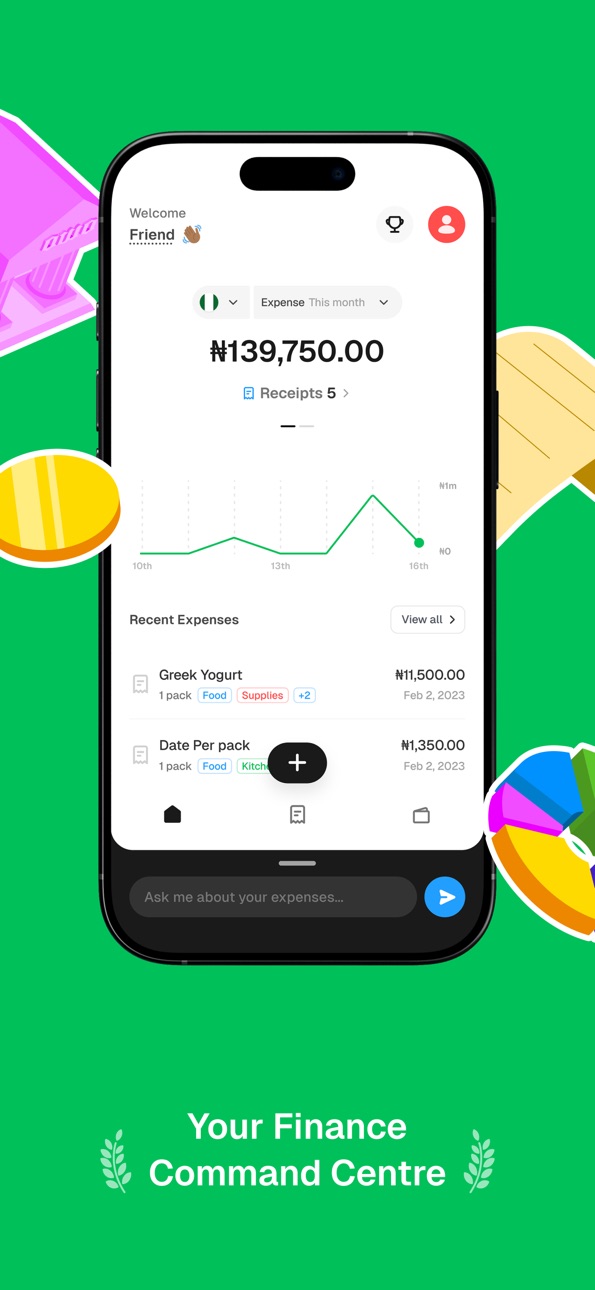
Expense AI has a beautiful new design with fluid animations throughout: smoother transitions, a redesigned home screen with live spending charts, top merchants, and category breakdowns all at a glance.
Import Transactions
Import your bank statements or CSV files directly into Expense AI. Review each transaction, edit details inline, and confirm your import, no manual entry needed.
Budget Management
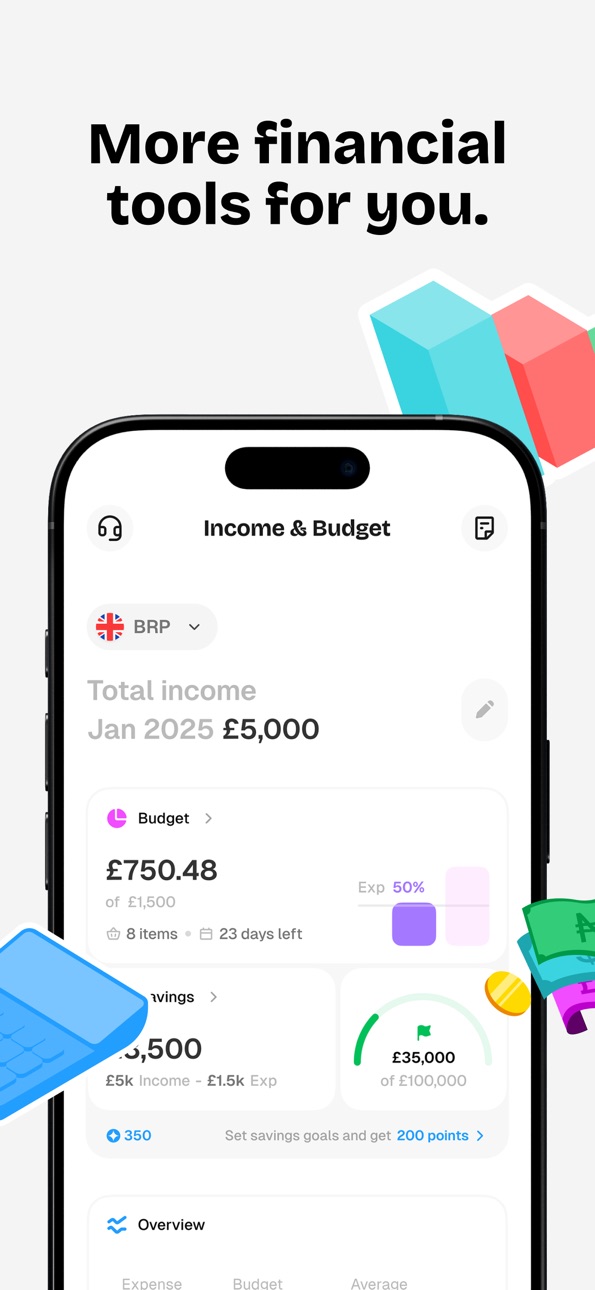
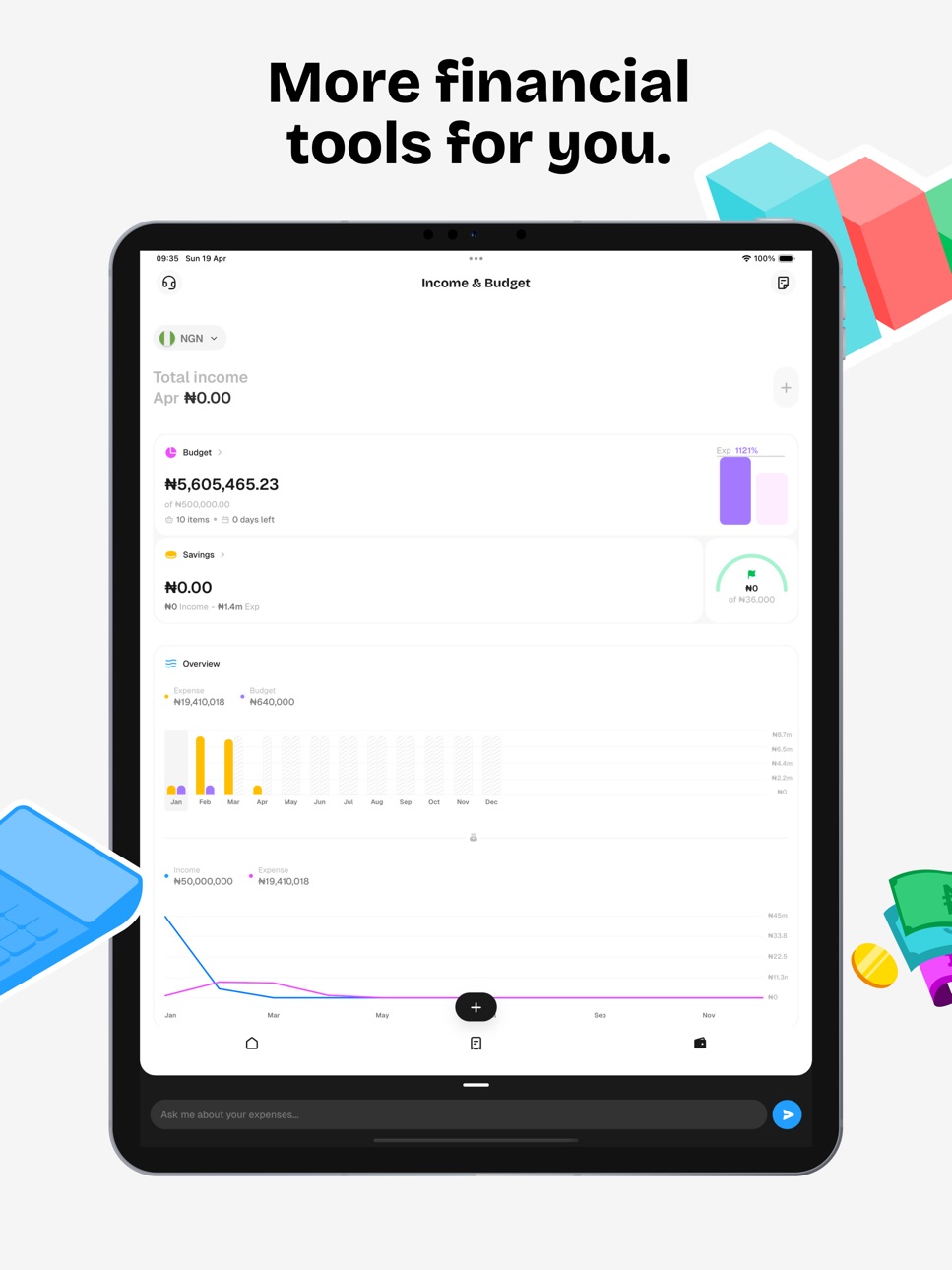
Create budgets and allocate them by spending category. Track real-time usage with visual charts, add or remove budget categories with custom emoji icons, and review your full budget history.
Savings Goals
Set savings goals with target amounts and end dates. Track progress on a visual timeline, update targets, reset, or mark goals complete. See your total savings across all active goals.
Financial Health & Insights
A new dedicated section showing your spending patterns, income vs. expense trends, and personalized insights about your overall financial wellbeing.
Personalize Your App
Choose a custom app icon from a collection of beautiful designs. Toggle haptic feedback on or off from your Personalization settings.
Share Extension
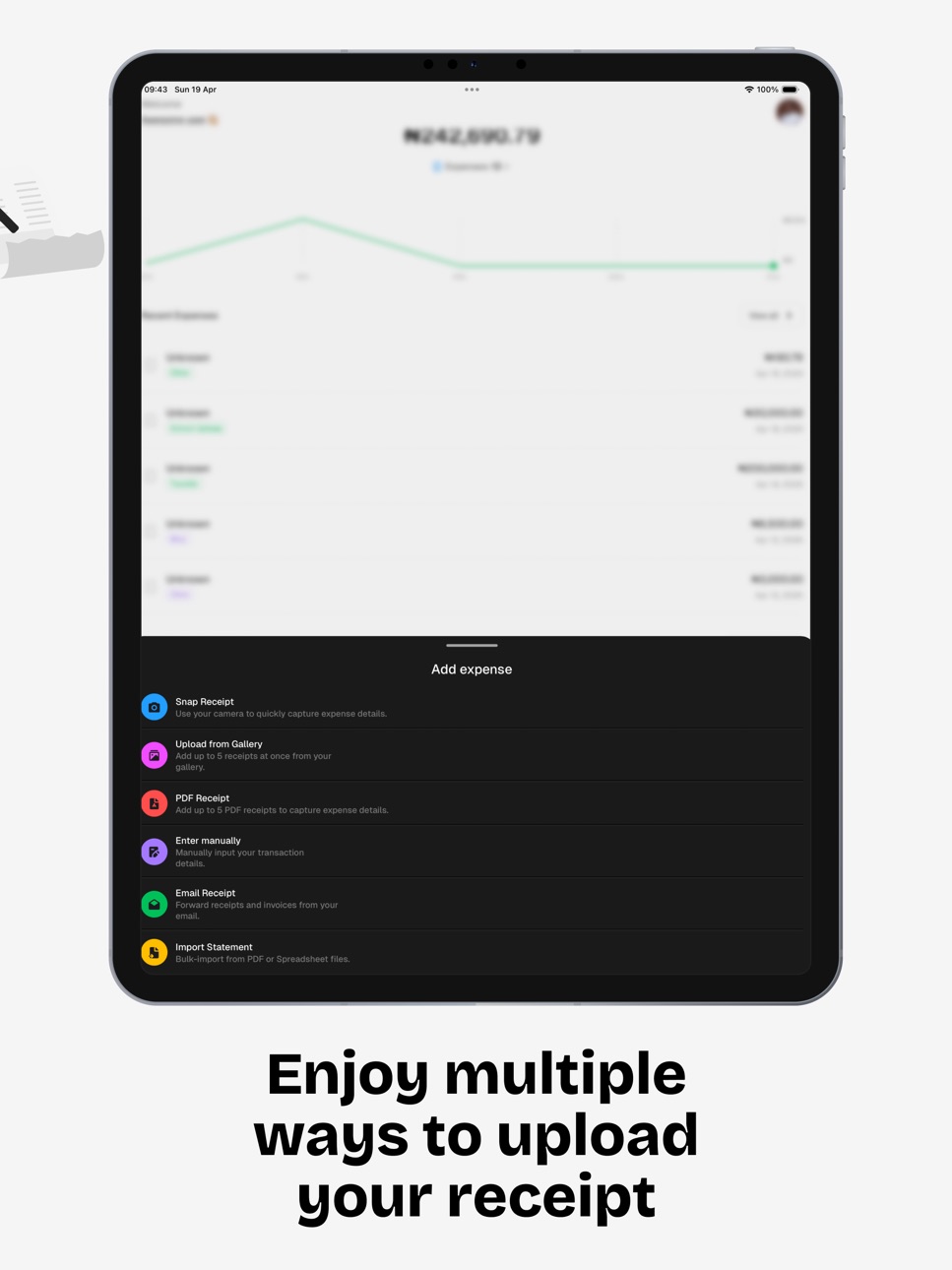
Upload receipts from Photos, Files, or any other app: tap Share → Expense AI and it's queued instantly.
More Improvements
• Rescan any receipt to re-run AI extraction
• Email receipt flow improvements
• Bug fixes and performance improvements
Description
Snap a receipt. Expense AI reads it, categorizes it, and files it, in seconds. No spreadsheets. No manual entry. Just a beautifully designed app that finally makes expense tracking effortless.
Whether you're managing personal spending, tracking business receipts, or getting your finances properly organized for the first time, Expense AI does the heavy lifting.
----------------------
ALL-NEW DESIGN IN V2
----------------------
Expense AI has been completely redesigned. Every screen is faster, more polished, and built around how you actually use the app: fluid animations, a redesigned home screen with live spending charts, and your most important numbers front and center.
----------------------
SCAN & CAPTURE RECEIPTS
----------------------
Take a photo of any receipt and AI automatically extracts the merchant, amount, date, items, and tax. Or forward receipt emails to your personal Expense AI address: the app captures everything without you lifting a finger. Supports photos, PDFs, and email attachments.
----------------------
BUDGETS & SAVINGS GOALS
----------------------
Create budgets by spending category and track usage against your limits in real time with visual charts. Set savings goals with target amounts and deadlines, follow your progress on a timeline, and mark them complete when you get there.
----------------------
FINANCIAL HEALTH & INSIGHTS
----------------------
See beyond the numbers. Expense AI surfaces your spending patterns, income vs. expense trends, and personalized insights about your overall financial wellbeing, so you always know where you stand.
----------------------
IMPORT TRANSACTIONS
----------------------
Already have history elsewhere? Import bank statements and CSV files directly into Expense AI. Review each transaction, edit details inline, and confirm before anything is added.
----------------------
CHAT WITH YOUR FINANCES
----------------------
Ask anything. "How much did I spend on food last month?" "Show me my top merchants this quarter." Expense AI answers instantly, generates reports, and visualizes your data, all from a simple chat.
----------------------
EVERYTHING ELSE
----------------------
• Multi-currency support for international spending
• Share extension: upload receipts from Photos, Files, or any app
• Custom app icons and dark mode
• Export reports as CSV or PDF
• Detailed analytics: top merchants, top products, category breakdown
----------------------
SUBSCRIPTION
----------------------
Free to download. Premium features require a subscription billed to your Apple ID. Subscription renews automatically: manage or cancel anytime in Account Settings.
support@expenseai.app
Privacy: https://expenseai.app/privacy
Terms: https://expenseai.app/terms
In-App Purchases DO pricing
Monthly Subscription
Yearly · Yearly—
Monthly—
Weekly · 7 days—
Quarterly · 3 months—
Capabilities
In-App Purchases
Accessibility
ipadiphonemacrealityDevicetvoswatch
Version history 21 versions
Build 886071757v2.0.32026-05-25 04:32:27
A lot has changed, here's everything new:
Fresh New Design
Expense AI has a beautiful new design with fluid animations throughout: smoother transitions, a redesigned home screen with live spending charts, top merchants, and category breakdowns all at a glance.
Import Transactions
Import your bank statements or CSV files directly into Expense AI. Review each transaction, edit details inline, and confirm your import, no manual entry needed.
Budget Management
Create budgets and allocate them by spending category. Track real-time usage with visual charts, add or remove budget categories with custom emoji icons, and review your full budget history.
Savings Goals
Set savings goals with target amounts and end dates. Track progress on a visual timeline, update targets, reset, or mark goals complete. See your total savings across all active goals.
Financial Health & Insights
A new dedicated section showing your spending patterns, income vs. expense trends, and personalized insights about your overall financial wellbeing.
Personalize Your App
Choose a custom app icon from a collection of beautiful designs. Toggle haptic feedback on or off from your Personalization settings.
Share Extension
Upload receipts from Photos, Files, or any other app: tap Share → Expense AI and it's queued instantly.
More Improvements
• Rescan any receipt to re-run AI extraction
• Email receipt flow improvements
• Bug fixes and performance improvements
Build 885371309v2.0.22026-05-07 20:35:57
A lot has changed. Here's everything new:
Fresh New Design
Expense AI has a beautiful new design with fluid animations throughout — smoother transitions, a redesigned home screen with live spending charts, top merchants, and category breakdowns all at a glance.
Import Transactions
Import your bank statements or CSV files directly into Expense AI. Review each transaction, edit details inline, and confirm your import — no manual entry needed.
Budget Management
Create budgets and allocate them by spending category. Track real-time usage with visual charts, add or remove budget categories with custom emoji icons, and review your full budget history.
Savings Goals
Set savings goals with target amounts and end dates. Track progress on a visual timeline, update targets, reset, or mark goals complete. See your total savings across all active goals.
Financial Health & Insights
A new dedicated section showing your spending patterns, income vs. expense trends, and personalized insights about your overall financial wellbeing.
Personalize Your App
Choose a custom app icon from a collection of beautiful designs. Toggle haptic feedback on or off from your Personalization settings.
Share Extension
Upload receipts from Photos, Files, or any other app — tap Share → Expense AI and it's queued instantly.
More Improvements
• Rescan any receipt to re-run AI extraction
• Email receipt flow improvements
• Bug fixes and performance improvements
Build 885105377v2.0.12026-04-30 20:41:08
A lot has changed — here's everything new:
Fresh New Design
Expense AI has a beautiful new design with fluid animations throughout — smoother transitions, a redesigned home screen with live spending charts, top merchants, and category breakdowns all at a glance.
Import Transactions
Import your bank statements or CSV files directly into Expense AI. Review each transaction, edit details inline, and confirm your import — no manual entry needed.
Budget Management
Create budgets and allocate them by spending category. Track real-time usage with visual charts, add or remove budget categories with custom emoji icons, and review your full budget history.
Savings Goals
Set savings goals with target amounts and end dates. Track progress on a visual timeline, update targets, reset, or mark goals complete. See your total savings across all active goals.
Financial Health & Insights
A new dedicated section showing your spending patterns, income vs. expense trends, and personalized insights about your overall financial wellbeing.
Personalize Your App
Choose a custom app icon from a collection of beautiful designs. Toggle haptic feedback on or off from your Personalization settings.
Share Extension
Upload receipts from Photos, Files, or any other app — tap Share → Expense AI and it's queued instantly.
More Improvements
• Rescan any receipt to re-run AI extraction
• Email receipt flow improvements
• Bug fixes and performance improvements
Build 884020325v2.0.02026-04-21 04:56:44
A lot has changed — here's everything new:
Fresh New Design
Expense AI has a beautiful new design with fluid animations throughout — smoother transitions, a redesigned home screen with live spending charts, top merchants, and category breakdowns all at a glance.
Import Transactions
Import your bank statements or CSV files directly into Expense AI. Review each transaction, edit details inline, and confirm your import — no manual entry needed.
Budget Management
Create budgets and allocate them by spending category. Track real-time usage with visual charts, add or remove budget categories with custom emoji icons, and review your full budget history.
Savings Goals
Set savings goals with target amounts and end dates. Track progress on a visual timeline, update targets, reset, or mark goals complete. See your total savings across all active goals.
Financial Health & Insights
A new dedicated section showing your spending patterns, income vs. expense trends, and personalized insights about your overall financial wellbeing.
Personalize Your App
Choose a custom app icon from a collection of beautiful designs. Toggle haptic feedback on or off from your Personalization settings.
Share Extension
Upload receipts from Photos, Files, or any other app — tap Share → Expense AI and it's queued instantly.
More Improvements
• Rescan any receipt to re-run AI extraction
• Email receipt flow improvements
• Bug fixes and performance improvements
Build 876928748v1.2.52025-08-04 06:41:41
We’ve added new features to help you take control of your expenses:
AI Personalization:
- Set your default currency, country, date format, and even create custom rules for how your receipts are recorded.
Integrations:
- Connect your accounting tools with our new Webhook support. We’ll send your data in real time as expenses are recorded.
Let us know what integrations you'd love to see next, We're listening!
Manual Expense Entry
- Calculator Input: Quickly add expenses with a built-in calculator for accurate totals.
- Product Management: Add products to each expense and customize details for more precise records.
- Tax Breakdown: Add and modify tax details for each entry, keeping your records fully compliant.
Report Generation:
- Ability to apply a filter before generating the report.
- You can now download your reports in your preferred format! Choose between Spreadsheet (CSV) or PDF for easy sharing and analysis.
PDF Receipt:
- Introducing a new option to add expenses with PDF Receipt.
- This will allow you to upload a PDF document with multiple expense records, and Expense AI will handle the rest.
Email Receipt:
- The new Email Receipts feature allows you to create a dedicated Expense AI email address to forward receipts from your email to Expense AI, with auto-forwarding support.
- This means you can keep track of all your Expenses from Expense AI without worrying about remembering to scan your receipts.
- Expense AI will process both PDF and image files attached to your emails when creating expense records.
Assistant
- Generate Expense reports using natural language. For example, you could generate a report comparing your spending this month and the last one.
- Improved UI
- Realtime response
- Image, CSV, or PDF Report generation
- Generate data visualization with a prompt.
- Response streaming
- Image, CSV, or PDF Report generation
- Dictate the report style/theme, e.g., use calm colors or a sun color variant.
Receipt upload
- Faster receipt upload
- More receipt language support
General bug fixes and performance improvements.
Build 876750946v1.2.42025-07-28 16:05:00
We’ve added new features to help you take control of your expenses:
AI Personalization:
- Set your default currency, country, date format, and even create custom rules for how your receipts are recorded.
Integrations:
- Connect your accounting tools with our new Webhook support. We’ll send your data in real time as expenses are recorded.
Let us know what integrations you'd love to see next, We're listening!
Manual Expense Entry
- Calculator Input: Quickly add expenses with a built-in calculator for accurate totals.
- Product Management: Add products to each expense and customize details for more precise records.
- Tax Breakdown: Add and modify tax details for each entry, keeping your records fully compliant.
Report Generation:
- Ability to apply a filter before generating the report.
- You can now download your reports in your preferred format! Choose between Spreadsheet (CSV) or PDF for easy sharing and analysis.
PDF Receipt:
- Introducing a new option to add expenses with PDF Receipt.
- This will allow you to upload a PDF document with multiple expense records, and Expense AI will handle the rest.
Email Receipt:
- The new Email Receipts feature allows you to create a dedicated Expense AI email address to forward receipts from your email to Expense AI, with auto-forwarding support.
- This means you can keep track of all your Expenses from Expense AI without worrying about remembering to scan your receipts.
- Expense AI will process both PDF and image files attached to your emails when creating expense records.
Assistant
- Generate Expense reports using natural language. For example, you could generate a report comparing your spending this month and the last one.
- Improved UI
- Realtime response
- Image, CSV, or PDF Report generation
- Generate data visualization with a prompt.
- Response streaming
- Image, CSV, or PDF Report generation
- Dictate the report style/theme, e.g., use calm colors or a sun color variant.
Receipt upload
- Faster receipt upload
- More receipt language support
General bug fixes and performance improvements.
Build 874436017v1.2.32025-05-01 08:47:15
We’ve added new features to help you take control of your expenses:
AI Personalization:
- Set your default currency, country, date format, and even create custom rules for how your receipts are recorded.
Integrations:
- Connect your accounting tools with our new Webhook support. We’ll send your data in real time as expenses are recorded.
Let us know what integrations you'd love to see next, We're listening!
Manual Expense Entry
- Calculator Input: Quickly add expenses with a built-in calculator for accurate totals.
- Product Management: Add products to each expense and customize details for more precise records.
- Tax Breakdown: Add and modify tax details for each entry, keeping your records fully compliant.
Report Generation:
- Ability to apply a filter before generating the report.
- You can now download your reports in your preferred format! Choose between Spreadsheet (CSV) or PDF for easy sharing and analysis.
PDF Receipt:
- Introducing a new option to add expenses with PDF Receipt.
- This will allow you to upload a PDF document with multiple expense records, and Expense AI will handle the rest.
Email Receipt:
- The new Email Receipts feature allows you to create a dedicated Expense AI email address to forward receipts from your email to Expense AI, with auto-forwarding support.
- This means you can keep track of all your Expenses from Expense AI without worrying about remembering to scan your receipts.
- Expense AI will process both PDF and image files attached to your emails when creating expense records.
Assistant
- Generate Expense reports using natural language. For example, you could generate a report comparing your spending this month and the last one.
- Improved UI
- Realtime response
- Image, CSV, or PDF Report generation
- Generate data visualization with a prompt.
- Response streaming
- Image, CSV, or PDF Report generation
- Dictate the report style/theme, e.g., use calm colors or a sun color variant.
Receipt upload
- Faster receipt upload
- More receipt language support
General bug fixes and performance improvements.
Build 874311562v1.2.22025-04-26 04:51:06
We’ve added new features to help you take control of your expenses:
AI Personalization:
- Set your default currency, country, date format, and even create custom rules for how your receipts are recorded.
Integrations:
- Connect your accounting tools with our new Webhook support. We’ll send your data in real time as expenses are recorded.
Let us know what integrations you'd love to see next, We're listening!
Manual Expense Entry
- Calculator Input: Quickly add expenses with a built-in calculator for accurate totals.
- Product Management: Add products to each expense and customize details for more precise records.
- Tax Breakdown: Add and modify tax details for each entry, keeping your records fully compliant.
Report Generation:
- Ability to apply a filter before generating the report.
- You can now download your reports in your preferred format! Choose between Spreadsheet (CSV) or PDF for easy sharing and analysis.
PDF Receipt:
- Introducing a new option to add expenses with PDF Receipt.
- This will allow you to upload a PDF document with multiple expense records, and Expense AI will handle the rest.
Email Receipt:
- The new Email Receipts feature allows you to create a dedicated Expense AI email address to forward receipts from your email to Expense AI, with auto-forwarding support.
- This means you can keep track of all your Expenses from Expense AI without worrying about remembering to scan your receipts.
- Expense AI will process both PDF and image files attached to your emails when creating expense records.
Assistant
- Generate Expense reports using natural language. For example, you could generate a report comparing your spending this month and the last one.
- Improved UI
- Realtime response
- Image, CSV, or PDF Report generation
- Generate data visualization with a prompt.
- Response streaming
- Image, CSV, or PDF Report generation
- Dictate the report style/theme, e.g., use calm colors or a sun color variant.
Receipt upload
- Faster receipt upload
- More receipt language support
General bug fixes and performance improvements.
Build 874288048v1.2.12025-04-25 08:34:55
We’ve added new features to help you take control of your expenses:
AI Personalization:
- Set your default currency, country, date format, and even create custom rules for how your receipts are recorded.
Integrations:
- Connect your accounting tools with our new Webhook support. We’ll send your data in real time as expenses are recorded.
Let us know what integrations you'd love to see next, We're listening!
Manual Expense Entry
- Calculator Input: Quickly add expenses with a built-in calculator for accurate totals.
- Product Management: Add products to each expense and customize details for more precise records.
- Tax Breakdown: Add and modify tax details for each entry, keeping your records fully compliant.
Report Generation:
- Ability to apply a filter before generating the report.
- You can now download your reports in your preferred format! Choose between Spreadsheet (CSV) or PDF for easy sharing and analysis.
PDF Receipt:
- Introducing a new option to add expenses with PDF Receipt.
- This will allow you to upload a PDF document with multiple expense records, and Expense AI will handle the rest.
Email Receipt:
- The new Email Receipts feature allows you to create a dedicated Expense AI email address to forward receipts from your email to Expense AI, with auto-forwarding support.
- This means you can keep track of all your Expenses from Expense AI without worrying about remembering to scan your receipts.
- Expense AI will process both PDF and image files attached to your emails when creating expense records.
Assistant
- Generate Expense reports using natural language. For example, you could generate a report comparing your spending this month and the last one.
- Improved UI
- Realtime response
- Image, CSV, or PDF Report generation
- Generate data visualization with a prompt.
- Response streaming
- Image, CSV, or PDF Report generation
- Dictate the report style/theme, e.g., use calm colors or a sun color variant.
Receipt upload
- Faster receipt upload
- More receipt language support
General bug fixes, and performance improvements.
Build 871366243v1.2.02024-12-26 09:34:41
Manual Expense Entry
- Calculator Input: Quickly add expenses with a built-in calculator for accurate totals.
- Product Management: Add products to each expense and customize details for more precise records.
- Tax Breakdown: Add and modify tax details for each entry, keeping your records fully compliant.
Report Generation:
- Ability to apply a filter before generating the report.
- You can now download your reports in your preferred format! Choose between Spreadsheet (CSV) or PDF for easy sharing and analysis.
PDF Receipt:
- Introducing a new option to add expenses with PDF Receipt.
- This will allow you to upload a PDF document with multiple expense records, and Expense AI will handle the rest.
Email Receipt:
- The new Email Receipts feature allows you to create a dedicated Expense AI email address to forward receipts from your email to Expense AI, with auto-forwarding support.
- This means you can keep track of all your Expenses from Expense AI without worrying about remembering to scan your receipts.
- Expense AI will process both PDF and image files attached to your emails when creating expense records.
Assistant
- Generate Expense reports using natural language. For example, you could generate a report comparing your spending this month and the last one.
- Improved UI
- Realtime response
- Image, CSV, or PDF Report generation
- Generate data visualization with a prompt.
- Response streaming
- Image, CSV, or PDF Report generation
- Dictate the report style/theme, e.g., use calm colors or a sun color variant.
Receipt upload
- Faster receipt upload
- More receipt language support
General bug fixes, and performance improvements.
Build 870077300v1.1.02024-10-30 18:47:53
Manual Expense Entry
- Calculator Input: Quickly add expenses with a built-in calculator for accurate totals.
- Product Management: Add products to each expense and customize details for more precise records.
- Tax Breakdown: Add and modify tax details for each entry, keeping your records fully compliant.
Report Generation:
- Ability to apply a filter before generating the report.
- You can now download your reports in your preferred format! Choose between Spreadsheet (CSV) or PDF for easy sharing and analysis.
PDF Receipt:
- Introducing a new option to add expenses with PDF Receipt.
- This will allow you to upload a PDF document with multiple expense records, and Expense AI will handle the rest.
Email Receipt:
- The new Email Receipts feature allows you to create a dedicated Expense AI email address to forward receipts from your email to Expense AI, with auto-forwarding support.
- This means you can keep track of all your Expenses from Expense AI without worrying about remembering to scan your receipts.
- Expense AI will process both PDF and image files attached to your emails when creating expense records.
Assistant
- Generate Expense reports using natural language. For example, you could generate a report comparing your spending this month and the last one.
- Improved UI
- Realtime response
- Image, CSV, or PDF Report generation
- Generate data visualization with a prompt.
- Response streaming
- Image, CSV, or PDF Report generation
- Dictate the report style/theme, e.g., use calm colors or a sun color variant.
Receipt upload
- Faster receipt upload
- More receipt language support
General bug fixes, and performance improvements.
Build 868936595v1.0.92024-09-11 20:36:42
Report Generation:
- You can now generate PDF reports of your expenses.
- Ability to apply a filter before generating the report.
PDF Receipt:
- Introducing a new option to add expenses with PDF Receipt.
- This will allow you to upload a PDF document with multiple expense records, and Expense AI will handle the rest.
Email Receipt:
- The new Email Receipts feature allows you to create a dedicated Expense AI email address to forward receipts from your email to Expense AI, with auto-forwarding support.
- This means you can keep track of all your Expenses from Expense AI without worrying about remembering to scan your receipts.
- Expense AI will process both PDF and image files attached to your emails when creating expense records.
Assistant
- Generate Expense reports using natural language. For example, you could generate a report comparing your spending this month and the last one.
- Improved UI
- Realtime response
- Image, CSV, or PDF Report generation
- Generate data visualization with a prompt.
- Response streaming
- Image, CSV, or PDF Report generation
- Dictate the report style/theme, e.g., use calm colors or a sun color variant.
Image Preview
- Download and Share Images.
- Faster image load time
Receipt upload
- Faster receipt upload
- More receipt language support
Receipt
- Introduced Subcategories
- Introduced grouping products by category
General bug fixes, and performance improvements.
Build 867785137v1.0.82024-07-28 07:41:31
PDF Receipt:
- Introducing a new option to add expenses with PDF Receipt.
- This will allow you to upload a PDF document with multiple expense records, and Expense AI will handle the rest.
Email Receipt:
- The new Email Receipts feature allows you to create a dedicated Expense AI email address to forward receipts from your email to Expense AI, with auto-forwarding support.
- This means you can keep track of all your Expenses from Expense AI without worrying about remembering to scan your receipts.
- Expense AI will process both PDF and image files attached to your emails when creating expense records.
Assistant
- Generate Expense reports using natural language. For example, you could generate a report comparing your spending this month and the last one.
- Improved UI
- Realtime response
- Image, CSV, or PDF Report generation
- Generate data visualization with a prompt.
- Response streaming
- Image, CSV, or PDF Report generation
- Dictate the report style/theme, e.g., use calm colors or a sun color variant.
Image Preview
- Download and Share Images.
- Faster image load time
Receipt upload
- Faster receipt upload
- More receipt language support
Receipt
- Introduced Subcategories
- Introduced grouping products by category
- Apple Sign In
General bug fixes, and performance improvements.
Build 867104417v1.0.72024-07-02 07:05:59
Email Receipt:
- The new Email Receipts feature allows you to create a dedicated Expense AI email address to forward receipts from your email to Expense AI, with auto-forwarding support.
- This means you can keep track of all your Expenses from Expense AI without worrying about remembering to scan your receipts.
Assistant
- Generate Expense reports using natural language. For example, you could generate a report comparing your spending this month and the last one.
- Improved UI
- Realtime response
- Image, CSV, or PDF Report generation
- Generate data visualization with a prompt.
- Response streaming
- Image, CSV, or PDF Report generation
- Dictate the report style/theme, e.g., use calm colors or a sun color variant.
Image Preview
- Download and Share Images.
- Faster image load time
Receipt upload
- Faster receipt upload
- More receipt language support
Receipt
- Introduced Subcategories
- Introduced grouping products by category
- Apple Sign In
General bug fixes, and performance improvements.
Build 866802134v1.0.62024-06-24 08:00:31
Email Receipt:
- The new Email Receipts feature allows you to create a dedicated Expense AI email address to forward receipts from your email to Expense AI, with auto-forwarding support.
- This means you can keep track of all your Expenses from Expense AI without worrying about remembering to scan your receipts.
Assistant
- Generate Expense reports using natural language. For example, you could generate a report comparing your spending this month and the last one.
- Improved UI
- Realtime response
- Image, CSV, or PDF Report generation
- Generate data visualization with a prompt.
- Response streaming
- Image, CSV, or PDF Report generation
- Dictate the report style/theme, e.g., use calm colors or a sun color variant.
Image Preview
- Download and Share Images.
- Faster image load time
Receipt upload
- Faster receipt upload
- More receipt language support
Receipt
- Introduced Subcategories
- Introduced grouping products by category
General bug fixes, and performance improvements.
Build 865135642v1.0.52024-04-11 22:45:06
- You can now edit by tapping an item on the receipt detail.
- Expense AI now captures the unit measurement of product quantity, e.g., kg, g, pack, etc.
- You can now view the tax details for an expense from the expense detail screen.
- Visible action button to add notes, edit, and delete a receipt.
- Annotate receipts with Notes and Tags.
- Improved feedback screen that allows us to support customers better.
Build 864413165v1.0.42024-03-13 16:04:50
- Support for Google Authentication.
- Improved app user experience.
- Performance improvement and bug fixes.
Build 864031688v1.0.32024-02-27 18:05:04
- Bug fixes and performance optimization.
Build 863868938v1.0.22024-02-20 18:34:41
- Performance improvement and bug fixes.
Build 863748717v1.0.12024-02-15 10:52:33
- Improved experience when editing receipts.
- Tiny UI fixes.
- Performance improvement and bug fixes.
Build 861688013v0.0.12024-02-07 10:01:23
Price history by region
Currency
Show
Columns
Search
Availability 75 of 75 storefronts
| Region | Language | Price | Ratings | Avg | Version |
|---|---|---|---|---|---|
| NG | en-GB | Free | 21 | 4.8 | 2.0.3 |
| US | en-US | Free | 7 | 4.4 | 2.0.3 |
| AR | es-MX | Free | 1 | 4.0 | 2.0.3 |
| AG | en-GB | Free | 0 | — | 2.0.3 |
| AI | en-GB | Free | 0 | — | 2.0.3 |
| AO | en-GB | Free | 0 | — | 2.0.3 |
| BB | en-GB | Free | 0 | — | 2.0.3 |
| BF | en-GB | Free | 0 | — | 2.0.3 |
| BJ | en-GB | Free | 0 | — | 2.0.3 |
| BO | es-MX | Free | 0 | — | 2.0.3 |
| BR | pt-BR | Free | 0 | — | 2.0.3 |
| BS | en-GB | Free | 0 | — | 2.0.3 |
| BW | en-GB | Free | 0 | — | 2.0.3 |
| BZ | en-GB | Free | 0 | — | 2.0.3 |
| CD | en-GB | Free | 0 | — | 2.0.3 |
| CG | en-GB | Free | 0 | — | 2.0.3 |
| CI | fr-FR | Free | 0 | — | 2.0.3 |
| CL | es-MX | Free | 0 | — | 2.0.3 |
| CM | fr-FR | Free | 0 | — | 2.0.3 |
| CO | es-MX | Free | 0 | — | 2.0.3 |
| CR | es-MX | Free | 0 | — | 2.0.3 |
| CV | en-GB | Free | 0 | — | 2.0.3 |
| DM | en-GB | Free | 0 | — | 2.0.3 |
| DO | es-MX | Free | 0 | — | 2.0.3 |
| DZ | en-GB | Free | 0 | — | 2.0.3 |
| EC | es-MX | Free | 0 | — | 2.0.3 |
| GA | fr-FR | Free | 0 | — | 2.0.3 |
| GD | en-GB | Free | 0 | — | 2.0.3 |
| GH | en-GB | Free | 0 | — | 2.0.3 |
| GM | en-GB | Free | 0 | — | 2.0.3 |
| GT | es-MX | Free | 0 | — | 2.0.3 |
| GW | en-GB | Free | 0 | — | 2.0.3 |
| GY | en-GB | Free | 0 | — | 2.0.3 |
| HN | es-MX | Free | 0 | — | 2.0.3 |
| JM | en-GB | Free | 0 | — | 2.0.3 |
| KE | en-GB | Free | 0 | — | 2.0.3 |
| KN | en-GB | Free | 0 | — | 2.0.3 |
| KY | en-GB | Free | 0 | — | 2.0.3 |
| LC | en-GB | Free | 0 | — | 2.0.3 |
| LR | en-GB | Free | 0 | — | 2.0.3 |
| LY | en-GB | Free | 0 | — | 2.0.3 |
| MA | en-GB | Free | 0 | — | 2.0.3 |
| MG | en-GB | Free | 0 | — | 2.0.3 |
| ML | en-GB | Free | 0 | — | 2.0.3 |
| MS | en-GB | Free | 0 | — | 2.0.3 |
| MU | en-GB | Free | 0 | — | 2.0.3 |
| MW | en-GB | Free | 0 | — | 2.0.3 |
| MX | es-MX | Free | 0 | — | 2.0.3 |
| MZ | en-GB | Free | 0 | — | 2.0.3 |
| NA | en-GB | Free | 0 | — | 2.0.3 |
| NE | en-GB | Free | 0 | — | 2.0.3 |
| NI | es-MX | Free | 0 | — | 2.0.3 |
| PA | es-MX | Free | 0 | — | 2.0.3 |
| PE | es-MX | Free | 0 | — | 2.0.3 |
| PY | es-MX | Free | 0 | — | 2.0.3 |
| RW | en-GB | Free | 0 | — | 2.0.3 |
| SC | en-GB | Free | 0 | — | 2.0.3 |
| SL | en-GB | Free | 0 | — | 2.0.3 |
| SN | en-GB | Free | 0 | — | 2.0.3 |
| SR | en-GB | Free | 0 | — | 2.0.3 |
| ST | en-GB | Free | 0 | — | 2.0.3 |
| SV | es-MX | Free | 0 | — | 2.0.3 |
| SZ | en-GB | Free | 0 | — | 2.0.3 |
| TC | en-GB | Free | 0 | — | 2.0.3 |
| TD | en-GB | Free | 0 | — | 2.0.3 |
| TN | en-GB | Free | 0 | — | 2.0.3 |
| TT | en-GB | Free | 0 | — | 2.0.3 |
| TZ | en-GB | Free | 0 | — | 2.0.3 |
| UG | en-GB | Free | 0 | — | 2.0.3 |
| UY | en-GB | Free | 0 | — | 2.0.3 |
| VC | en-GB | Free | 0 | — | 2.0.3 |
| VE | es-MX | Free | 0 | — | 2.0.3 |
| VG | en-GB | Free | 0 | — | 2.0.3 |
| ZM | en-GB | Free | 0 | — | 2.0.3 |
| ZW | en-GB | Free | 0 | — | 2.0.3 |
Change log 25 changes · DO
✎
releaseNotes updated
A lot has changed, here's everything new:
Fresh New Design
Expense AI has a beautiful new design with fluid animations throughout: smoother transitions, a rede
✎
description updated
Snap a receipt. Expense AI reads it, categorizes it, and files it, in seconds. No spreadsheets. No manual entry. Just a beautifully designed app that finally ma
✎
subtitle updated
Scan Receipts & Money Manager
✎
name updated
Expense AI - Budget Tracker
◆
Version 2.0.3 released
A lot has changed, here's everything new:
Fresh New Design
Expense AI has a beautiful new design with fluid animations throughout: smoother transitions, a redesigned home screen with live spending charts, top merchants, and category breakd
◆
Version 2.0.2 released
A lot has changed. Here's everything new:
Fresh New Design
Expense AI has a beautiful new design with fluid animations throughout — smoother transitions, a redesigned home screen with live spending charts, top merchants, and category break
◆
Version 2.0.1 released
A lot has changed — here's everything new:
Fresh New Design
Expense AI has a beautiful new design with fluid animations throughout — smoother transitions, a redesigned home screen with live spending charts, top merchants, and category brea
◆
Version 2.0.0 released
A lot has changed — here's everything new:
Fresh New Design
Expense AI has a beautiful new design with fluid animations throughout — smoother transitions, a redesigned home screen with live spending charts, top merchants, and category brea
◆
Version 1.2.5 released
We’ve added new features to help you take control of your expenses:
AI Personalization:
- Set your default currency, country, date format, and even create custom rules for how your receipts are recorded.
Integrations:
- Connect your accou
◆
Version 1.2.4 released
We’ve added new features to help you take control of your expenses:
AI Personalization:
- Set your default currency, country, date format, and even create custom rules for how your receipts are recorded.
Integrations:
- Connect your accou
◆
Version 1.2.3 released
We’ve added new features to help you take control of your expenses:
AI Personalization:
- Set your default currency, country, date format, and even create custom rules for how your receipts are recorded.
Integrations:
- Connect your accou
◆
Version 1.2.2 released
We’ve added new features to help you take control of your expenses:
AI Personalization:
- Set your default currency, country, date format, and even create custom rules for how your receipts are recorded.
Integrations:
- Connect your accou
◆
Version 1.2.1 released
We’ve added new features to help you take control of your expenses:
AI Personalization:
- Set your default currency, country, date format, and even create custom rules for how your receipts are recorded.
Integrations:
- Connect your accou
◆
Version 1.2.0 released
Manual Expense Entry
- Calculator Input: Quickly add expenses with a built-in calculator for accurate totals.
- Product Management: Add products to each expense and customize details for more precise records.
- Tax Breakdown: Add and modify
◆
Version 1.1.0 released
Manual Expense Entry
- Calculator Input: Quickly add expenses with a built-in calculator for accurate totals.
- Product Management: Add products to each expense and customize details for more precise records.
- Tax Breakdown: Add and modify
◆
Version 1.0.9 released
Report Generation:
- You can now generate PDF reports of your expenses.
- Ability to apply a filter before generating the report.
PDF Receipt:
- Introducing a new option to add expenses with PDF Receipt.
- This will allow you to upload a P
◆
Version 1.0.8 released
PDF Receipt:
- Introducing a new option to add expenses with PDF Receipt.
- This will allow you to upload a PDF document with multiple expense records, and Expense AI will handle the rest.
Email Receipt:
- The new Email Receipts feature al
◆
Version 1.0.7 released
Email Receipt:
- The new Email Receipts feature allows you to create a dedicated Expense AI email address to forward receipts from your email to Expense AI, with auto-forwarding support.
- This means you can keep track of all your Expenses
◆
Version 1.0.6 released
Email Receipt:
- The new Email Receipts feature allows you to create a dedicated Expense AI email address to forward receipts from your email to Expense AI, with auto-forwarding support.
- This means you can keep track of all your Expenses
◆
Version 1.0.5 released
- You can now edit by tapping an item on the receipt detail.
- Expense AI now captures the unit measurement of product quantity, e.g., kg, g, pack, etc.
- You can now view the tax details for an expense from the expense detail screen.
-
◆
Version 1.0.4 released
- Support for Google Authentication.
- Improved app user experience.
- Performance improvement and bug fixes.
◆
Version 1.0.3 released
- Bug fixes and performance optimization.
◆
Version 1.0.2 released
- Performance improvement and bug fixes.
◆
Version 1.0.1 released
- Improved experience when editing receipts.
- Tiny UI fixes.
- Performance improvement and bug fixes.
◆
Version 0.0.1 released