Home › Photo & Video

 CA
CA
 USen-US
 JPja
JPja DEde-DE
 RUruCAen-CA
 GBen-GB
 ATde-DE
 AUen-AU
 AENot Available
 AFNot Available
 AGNot Available
 AINot Available
 ALNot Available
 AMNot Available
 AONot Available
 ARNot Available
 AZNot Available
 BANot Available
 BBNot Available
 BENot Available
 BFNot Available
 BGNot Available
 BHNot Available
 BJNot Available
 BMNot Available
 BNNot Available
 BONot Available
 BRNot Available
 BSNot Available
 BTNot Available
 BWNot Available
 BYNot Available
 BZNot Available
 CDNot Available
 CGNot Available
 CHNot Available
 CINot Available
 CLNot Available
 CMNot Available
 CNNot Available
 CONot Available
 CRNot Available
 CVNot Available
 CYNot Available
 CZNot Available
 DKNot Available
 DMNot Available
 DONot Available
 DZNot Available
 ECNot Available
 EENot Available
 EGNot Available
 ESNot Available
 FINot Available
 FJNot Available
 FMNot Available
 FRNot Available
 GANot Available
 GDNot Available
 GENot Available
 GHNot Available
 GMNot Available
 GRNot Available
 GTNot Available
 GWNot Available
 GYNot Available
 HKNot Available
 HNNot Available
 HRNot Available
 HUNot Available
 IDNot Available
 IENot Available
 ILNot Available
 INNot Available
 IQNot Available
 ISNot Available
 ITNot Available
 JMNot Available
 JONot Available
 KENot Available
 KGNot Available
 KHNot Available
 KNNot Available
 KRNot Available
 KWNot Available
 KYNot Available
 KZNot Available
 LANot Available
 LBNot Available
 LCNot Available
 LKNot Available
 LRNot Available
 LTNot Available
 LUNot Available
 LVNot Available
 LYNot Available
 MANot Available
 MDNot Available
 MENot Available
 MGNot Available
 MKNot Available
 MLNot Available
 MMNot Available
 MNNot Available
 MONot Available
 MRNot Available
 MSNot Available
 MTNot Available
 MUNot Available
 MVNot Available
 MWNot Available
 MXNot Available
 MYNot Available
 MZNot Available
 NANot Available
 NENot Available
 NGNot Available
 NINot Available
 NLNot Available
 NONot Available
 NPNot Available
 NRNot Available
 NZNot Available
 OMNot Available
 PANot Available
 PENot Available
 PGNot Available
 PHNot Available
 PKNot Available
 PLNot Available
 PTNot Available
 PWNot Available
 PYNot Available
 QANot Available
 RONot Available
 RSNot Available
 RWNot Available
 SANot Available
 SBNot Available
 SCNot Available
 SENot Available
 SGNot Available
 SINot Available
 SKNot Available
 SLNot Available
 SNNot Available
 SRNot Available
 STNot Available
 SVNot Available
 SZNot Available
 TCNot Available
 TDNot Available
 THNot Available
 TJNot Available
 TMNot Available
 TNNot Available
 TONot Available
 TRNot Available
 TTNot Available
 TWNot Available
 TZNot Available
 UANot Available
 UGNot Available
 UYNot Available
 UZNot Available
 VCNot Available
 VENot Available
 VGNot Available
 VNNot Available
 VUNot Available
 XKNot Available
 YENot Available
 ZANot Available
 ZMNot Available
 ZWNot Available
8 of 175 storefronts
Content in en-US
Content in en-US
Information
Apple ID6470156115
Bundle IDcom.usefulmobileapps.remote-camera-control
SellerSeller
Min iOS12.4
Min macOS11.0
Device familiesiphone, ipad, ipod
Released2024-06-05
Copyright© 2024 Dmitriy Kharutskiy
Privacy policyLink ↗
Preview 2 platforms
iPhone 10 images


iPad 8 images




What’s New Version 2.5
• Interface rotation lock.
• Reconnect button when connection is lost.
• Option to enable keeping enabled functions when restarting the app.
Description
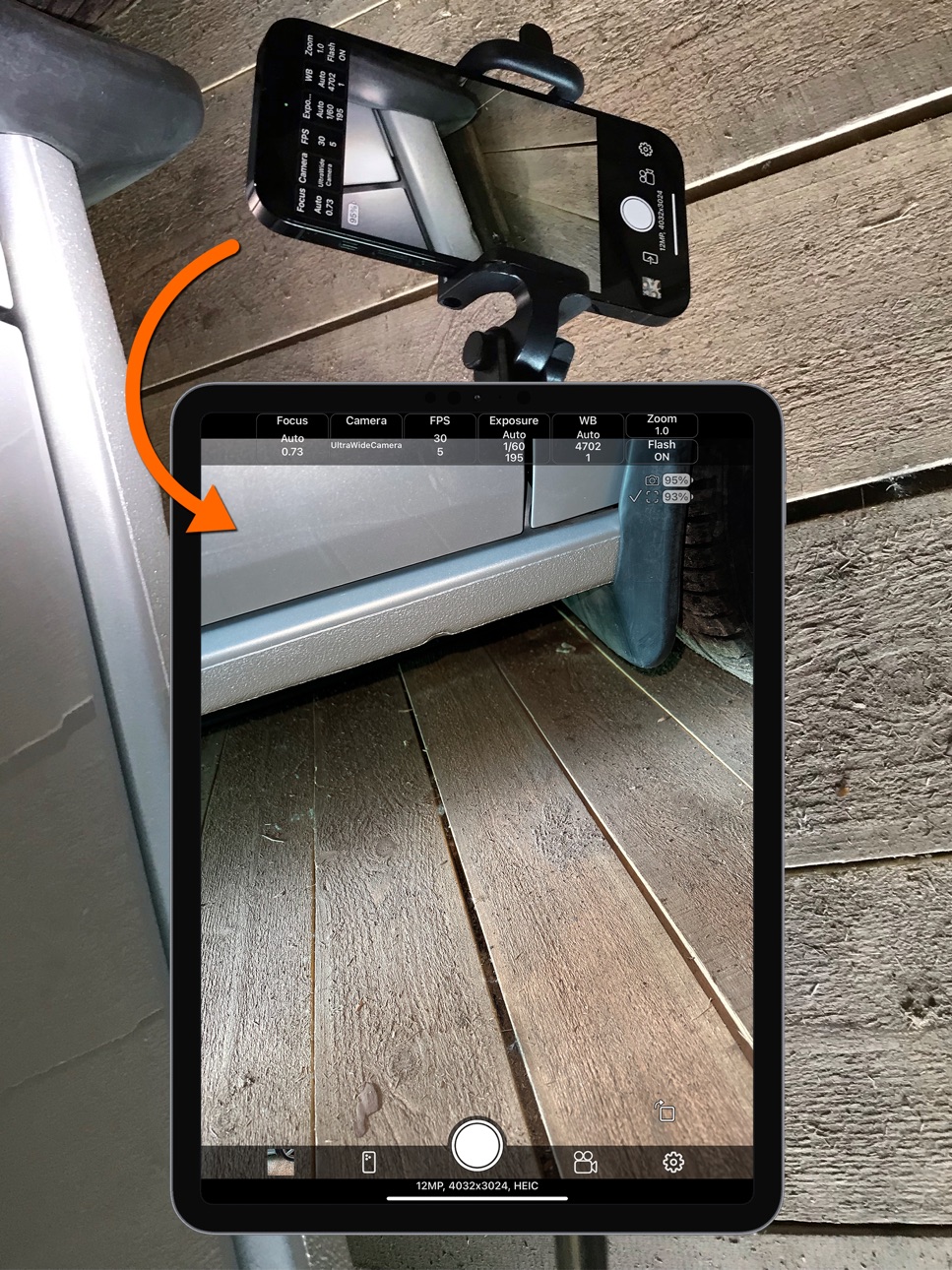
The app for remote control of an iPhone/iPad camera using another iPhone/iPad. The two devices use peer-to-peer Wi-Fi, which allows the devices to communicate directly, even if they are not on the same Wi-Fi infrastructure network. This technology is used by AirPlay, AirDrop, etc. In other words, Internet access or a Wi-Fi router is NOT needed. The maximum distance at which a connection can be maintained between two devices is about 20 foot.
The app has the following features:
• Control the iPhone/iPad camera using another iPhone/iPad.
• Show the camera preview image on another iPhone/iPad.
• You can enable the use of the device's camera when the same device acts as a screen. Disabled by default.
• Manual camera settings, including frame rate settings.
• Save camera settings to a list of settings for different situations. Read more about this below.
• Lock camera settings with one button.
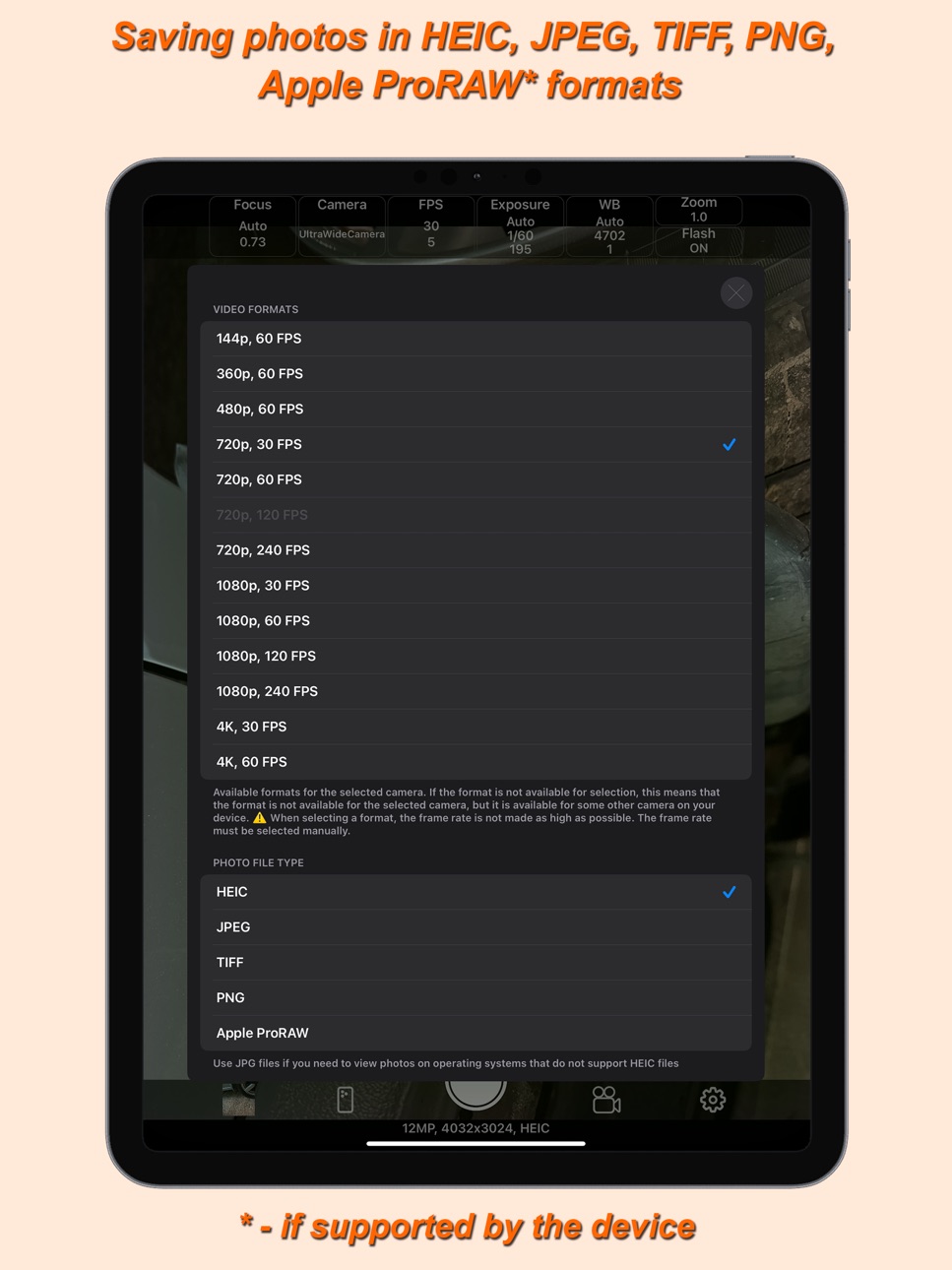
• Select video format from 144p to 4K.
• Pause during video recording.
• Capturing photos in video recording mode. With the dimensions of the selected video format.
• Save photos in HEIC, JPEG, TIFF, PNG, Apple ProRAW formats (if supported by the device).
• Taking photos at 48 MP resolution. If the device has cameras that support this resolution.
• Various grid options, including the ability to display your own PNG grid file. PNG file must have a transparent background. It is possible to select the thickness of the grid lines. The overlay grid image of the PNG file can be shifted. The PNG file image shifting feature is made for adaptation to the Video Telescope Collimation proposed by Dr. Leon Palmer (https://rigelsys.com/video collimation.html).
• A series of photos with a custom time interval between photos and the number of photos in a series.
• Overlay photos for subsequent combination of different photos or videos. To overlay a PNG file grid, you need to use a different function in the grid settings.
• Averaging a series of frames to remove moving objects.
• Slow motion video.
• Time-lapse video.
• Cinematic video stabilization.
• Mirror image flipping on the device acting as a screen.
• Timer.
• Selecting a location to save photos and videos (including an external drive). In the photo library of the "Photos" app. In the folder of this app or any other app that has a folder in the "Files" app. On an external drive connected to the iPhone/iPad, while the external drive can be encrypted. You can even record video to an external drive, but for this, the write speed to the external drive must be high enough. When saving to something other than the photo library of the "Photos" app, you can create and change subfolders for saving within the already selected location for saving photos and videos. Use the text input field "Subfolder for saving". Using the "/" symbol, you can write several nested folders. For example: "Subfolder/Subsubfolder/SubSubSubfolder/". The nesting level of folders is not limited.
• Customize the file name when saving to something other than the photo library in the "Photos" app. Sequence number, date and time, prefix, suffix.
• Control the camera "shutter" using the volume buttons or "shutter" remote control button (a selfie stick button, a bluetooth "shutter" remote control button).
• Silent mode.
• Selecting a camera if the device has several cameras.
The frame rate of the device acting as a screen is also adjustable. By reducing the frame rate, you can reduce energy consumption and, therefore, battery life. This is especially important if you are using a very old iPhone/iPad with a weak battery as a screen.
The app can be used without a second device, for taking photos and videos with manual camera settings. In the app settings, you can configure the app to launch as a camera, without having to select.
The app can work on iOS 12 and newer. This makes it possible to use old iPhones starting with the iPhone 5S and newer as a screen.
IMPORTANT!!! SEE THE "HELP" SECTION IN THE APP!
In-App Purchases CA pricing
One-Time Purchases
Full version—
Capabilities
In-App Purchases
Accessibility
ipadiphonemacrealityDevicetvoswatch
Version history 15 versions
Build 884860821v2.52026-04-23 23:26:01
• Interface rotation lock.
• Reconnect button when connection is lost.
• Option to enable keeping enabled functions when restarting the app.
Build 882273657v2.4.42026-02-08 22:03:29
• Bug fixes.
Build 882047727v2.4.32026-02-02 04:28:06
• Bug fixes.
Build 881463012v2.4.22026-01-14 03:16:35
• Bug fixes.
Build 881240520v2.4.12026-01-07 07:27:00
• Bug fixes.
Build 879826981v2.42025-12-17 20:40:27
• Adaptation to windowed apps mode on iPad.
• Adjustable offset grid image for your own grid PNG file.
• The ability to enable indication of a taken photo by briefly turning the flash on or off immediately after taking the photo.
Build 879246468v2.32025-10-27 23:21:14
• Using the device's camera when the same device acts as a screen.
• Taking photos at 48 MP resolution. If the device has cameras that support this resolution.
• Selecting the thickness of the grid lines.
• Bug fixes.
Build 877907326v2.2.12025-09-09 17:50:29
• Bug fixes.
Build 876253885v2.22025-08-21 08:11:38
• Viewing photos and videos on a device that acts as a screen.
• Capturing photos in video recording mode. With the dimensions of the selected video format.
• Indication of the video stabilization mode, which takes into account the support of stabilization by the selected video format.
• Bug fixes.
Build 875909020v2.12025-06-27 01:37:27
• Time-lapse video.
• Cinematic video stabilization.
• Camera focus on touch.
• Diagonal grid.
• Hide camera settings panel.
• Stretch image to full screen for iPad.
• Silent mode.
• Easily enable slow motion video recording.
• Bug fixes.
Build 873188951v2.02025-03-14 19:22:53
• Saving photos in TIFF, PNG, Apple ProRAW formats (if supported by the device).
• Various grid options, including the ability to display your own PNG grid file. PNG file must have a transparent background.
• A series of photos with a custom time interval between photos and the number of photos in the series.
• Averaging a series of frames to remove moving objects.
• Selecting where to save photos and videos. In the photo library of the "Photos" app. In the folder of this app or any other app that has a folder in the "Files" app. On an external drive connected to the iPhone/iPad, while the external drive can be encrypted. You can even record video to an external drive, but for this, the write speed to the external drive must be high enough. When saving to something other than the photo library of the "Photos" app, you can create and change subfolders for saving within the already selected location for saving photos and videos. Use the text input field "Subfolder for saving". Using the "/" symbol, you can write several nested folders. For example: "Subfolder/Subsubfolder/SubSubSubfolder/". The nesting level of folders is not limited.
• Customize the file name when saving to something other than the photo library in the "Photos" app. Sequence number, date and time, prefix, suffix.
• Offset for auto exposure.
• Default device role.
• Now when you lock the camera settings with one button, the focus is not locked.
• Full support for iPad.
• Bug fixes.
Build 870186733v1.22024-11-04 21:48:27
• Pause video recording.
• Opening saved camera settings when recording video. But if the saved settings have a different video format, the video format will not change.
• Increased the maximum possible frame sending rate.
• Timer.
• Photo overlay.
• Disable display of the image on the device acting as a camera.
• Mirror flip of the image on the device acting as a screen.
• Bug fixes.
Build 868835960v1.1.12024-09-08 07:21:11
• Control using volume buttons or "shutter" remote control button.
• Bug fixes.
Build 868254547v1.12024-08-16 13:32:11
• Saving settings.
• Grid.
• Deleting photos and videos.
• Other small improvements.
Build 860874862v1.02024-06-05 13:58:52
Price history by region
Currency
Show
Columns
Search
Availability 8 of 175 storefronts
| Region | Language | Price | Ratings | Avg | Version |
|---|---|---|---|---|---|
| US | en-US | Free | 20 | 4.1 | 2.5 |
| JP | ja | Free | 18 | 4.3 | 2.5 |
| DE | de-DE | Free | 9 | 3.4 | 2.5 |
| RU | ru | Free | 9 | 3.2 | 2.5 |
| CA | en-CA | Free | 2 | 1.0 | 2.5 |
| GB | en-GB | Free | 1 | 5.0 | 2.5 |
| AT | de-DE | Free | 0 | — | 2.5 |
| AU | en-AU | Free | 0 | — | 2.5 |
Not available in: AE, AF, AG, AI, AL, AM, AO, AR, AZ, BA, BB, BE, BF, BG, BH, BJ, BM, BN, BO, BR, BS, BT, BW, BY, BZ, CD, CG, CH, CI, CL, CM, CN, CO, CR, CV, CY, CZ, DK, DM, DO, DZ, EC, EE, EG, ES, FI, FJ, FM, FR, GA, GD, GE, GH, GM, GR, GT, GW, GY, HK, HN, HR, HU, ID, IE, IL, IN, IQ, IS, IT, JM, JO, KE, KG, KH, KN, KR, KW, KY, KZ, LA, LB, LC, LK, LR, LT, LU, LV, LY, MA, MD, ME, MG, MK, ML, MM, MN, MO, MR, MS, MT, MU, MV, MW, MX, MY, MZ, NA, NE, NG, NI, NL, NO, NP, NR, NZ, OM, PA, PE, PG, PH, PK, PL, PT, PW, PY, QA, RO, RS, RW, SA, SB, SC, SE, SG, SI, SK, SL, SN, SR, ST, SV, SZ, TC, TD, TH, TJ, TM, TN, TO, TR, TT, TW, TZ, UA, UG, UY, UZ, VC, VE, VG, VN, VU, XK, YE, ZA, ZM, ZW
Change log 19 changes · CA
✎
releaseNotes updated
• Interface rotation lock.
• Reconnect button when connection is lost.
• Option to enable keeping enabled functions when restarting the app.
✎
description updated
The app for remote control of an iPhone/iPad camera using another iPhone/iPad. The two devices use peer-to-peer Wi-Fi, which allows the devices to communicate d
✎
subtitle updated
Manual camera settings
✎
name updated
Remote Camera Control via Air
◆
Version 2.5 released
• Interface rotation lock.
• Reconnect button when connection is lost.
• Option to enable keeping enabled functions when restarting the app.
◆
Version 2.4.4 released
• Bug fixes.
◆
Version 2.4.3 released
• Bug fixes.
◆
Version 2.4.2 released
• Bug fixes.
◆
Version 2.4.1 released
• Bug fixes.
◆
Version 2.4 released
• Adaptation to windowed apps mode on iPad.
• Adjustable offset grid image for your own grid PNG file.
• The ability to enable indication of a taken photo by briefly turning the flash on or off immediately after taking the photo.
◆
Version 2.3 released
• Using the device's camera when the same device acts as a screen.
• Taking photos at 48 MP resolution. If the device has cameras that support this resolution.
• Selecting the thickness of the grid lines.
• Bug fixes.
◆
Version 2.2.1 released
• Bug fixes.
◆
Version 2.2 released
• Viewing photos and videos on a device that acts as a screen.
• Capturing photos in video recording mode. With the dimensions of the selected video format.
• Indication of the video stabilization mode, which takes into account the support
◆
Version 2.1 released
• Time-lapse video.
• Cinematic video stabilization.
• Camera focus on touch.
• Diagonal grid.
• Hide camera settings panel.
• Stretch image to full screen for iPad.
• Silent mode.
• Easily enable slow motion video recording.
• Bug fixes.
◆
Version 2.0 released
• Saving photos in TIFF, PNG, Apple ProRAW formats (if supported by the device).
• Various grid options, including the ability to display your own PNG grid file. PNG file must have a transparent background.
• A series of photos with a custo
◆
Version 1.2 released
• Pause video recording.
• Opening saved camera settings when recording video. But if the saved settings have a different video format, the video format will not change.
• Increased the maximum possible frame sending rate.
• Timer.
• Photo
◆
Version 1.1.1 released
• Control using volume buttons or "shutter" remote control button.
• Bug fixes.
◆
Version 1.1 released
• Saving settings.
• Grid.
• Deleting photos and videos.
• Other small improvements.
◆
Version 1.0 released