Home › Productivity

 CD
CD
 AEen-GB
 AGen-GB
 AIen-GB
 ALen-GB
 AMen-GB
 AOen-GB
 ARes-MX
 ATde-DE
 AUen-AU
 AZen-GB
 BAen-GB
 BBen-GB
 BEen-GB
 BFen-GB
 BGen-GB
 BHen-GB
 BJen-GB
 BNen-GB
 BOes-MX
 BRpt-BR
 BSen-GB
 BTen-GB
 BWen-GB
 BYen-GB
 BZen-GB
 CAen-CACDen-GB
 CGen-GB
 CHde-CH
 CIfr-FR
 CLes-MX
 CMfr-FR
 CNzh-Hans-CN
 COes-MX
 CRes-MX
 CVen-GB
 CYen-GB
 DEde-DE
 DKen-GB
 DMen-GB
 DOes-MX
 DZen-GB
 ECes-MX
 EEen-GB
 EGen-GB
 ESes-ES
 FJen-GB
 FRfr-FR
 GAfr-FR
 GBen-GB
 GDen-GB
 GEen-GB
 GHen-GB
 GMen-GB
 GRen-GB
 GTes-MX
 GWen-GB
 GYen-GB
 HKzh-Hant-HK
 HNes-MX
 HRen-GB
 HUen-GB
 IDen-GB
 IEen-GB
 ILen-GB
 INen-GB
 IQen-GB
 ITit
ITit JMen-GB
 JOen-GB
 JPja
JPja KEen-GB
 KGen-GB
 KNen-GB
 KRko
KRko KWen-GB
 KYen-GB
 KZen-GB
 LBen-GB
 LCen-GB
 LRen-GB
 LTen-GB
 LUen-GB
 LVen-GB
 LYen-GB
 MAen-GB
 MDen-GB
 MEen-GB
 MGen-GB
 MKen-GB
 MLen-GB
 MMen-GB
 MNen-GB
 MOzh-Hant-HK
 MSen-GB
 MTen-GB
 MUen-GB
 MVen-GB
 MWen-GB
 MXes-MX
 MYen-GB
 MZen-GB
 NAen-GB
 NEen-GB
 NGen-GB
 NIes-MX
 NLnl
NLnl NOen-GB
 NZen-AU
 OMen-GB
 PAes-MX
 PEes-MX
 PGen-GB
 PHen-GB
 PTpt-PT
 PYes-MX
 QAen-GB
 ROen-GB
 RSen-GB
 RUru
RUru RWen-GB
 SAen-GB
 SBen-GB
 SCen-GB
 SEsv
SEsv SGen-GB
 SIen-GB
 SKen-GB
 SLen-GB
 SNen-GB
 SRen-GB
 STen-GB
 SVes-MX
 SZen-GB
 TCen-GB
 TDen-GB
 THen-GB
 TJen-GB
 TMen-GB
 TNen-GB
 TOen-GB
 TRen-GB
 TTen-GB
 TWzh-Hant-TW
 TZen-GB
 UAen-GB
 UGen-GB
 USen-US
 UYen-GB
 UZen-GB
 VCen-GB
 VEes-MX
 VGen-GB
 VNen-GB
 VUen-GB
 XKen-GB
 YEen-GB
 ZMen-GB
 ZWen-GB
159 of 159 storefronts
Content in en-US
Content in en-US
Information
Preview 2 platforms
iPhone 4 images


iPad 4 images


What’s New Version 2.2
2.2 redesigns how CyberDeck shows and manages your connection.
- Connection status moved from the bottom bar to a rail at the top of the screen: name, address, and live state always visible. A one-time callout points you to its new home after the update.
- No more dead ends. Every connection failure now offers a next step: retry, edit the connection, or switch to another.
- The screen stays awake while connected, so the surface doesn't go dark mid-show. Settings > Keep Screen Awake turns it off.
- Dark is now the default theme. Light and System are still in Settings > Theme.
- Sharper button images on iPad.
- Restore Purchases now finds v1 grandfathered unlocks more reliably.
- Connection editor cleanup: setup goes straight to the editor, and the port field moved behind Advanced (the default almost always works).
Description
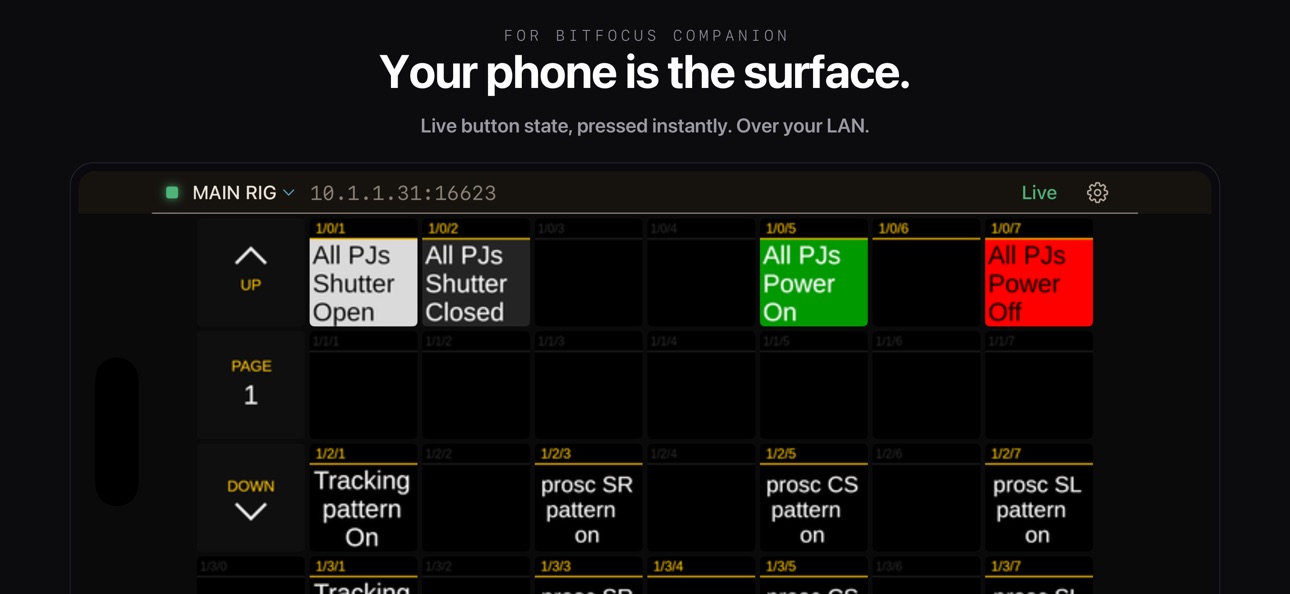
CyberDeck turns your iPhone or iPad into a button surface for Bitfocus Companion. If you run Companion on a Mac or PC to drive OBS, video switchers, lighting consoles, audio mixers, or anything else Companion supports, you can press those buttons from your phone.
Setup takes seconds. No config files. CyberDeck auto-discovers your Companion server using mDNS, or you can enter the host and port manually. The connection persists across launches and reconnects automatically if it drops.
Connection status lives in a rail at the top of the screen: name, address, and live state, with retry and switching one tap away.
What you get free:
- Live button surface that mirrors any Companion page
- Touch presses send to Companion instantly
- Page navigation drives Companion page changes
- The screen stays awake while you're connected (can be turned off)
- PIN pad for locked surfaces
- Diagnostics view with a shareable event log
- Dark, light, and system theme; optional haptic feedback
The Full Version (one-time in-app purchase) unlocks:
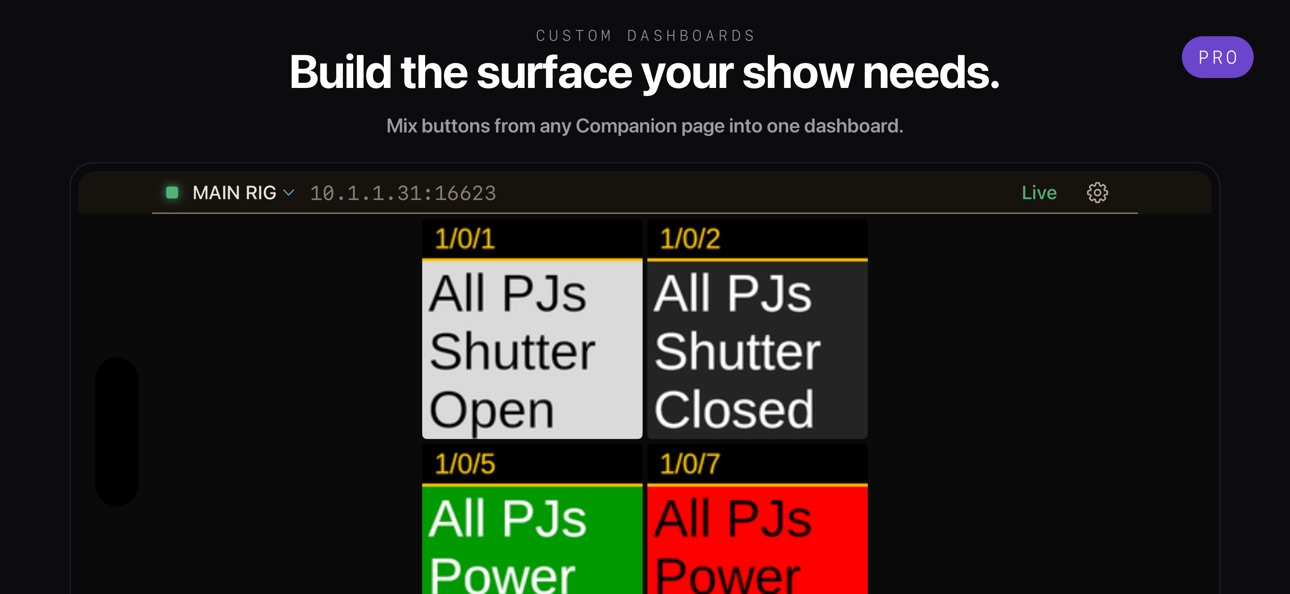
- Custom Dashboards. Pull the buttons you use most from any Companion pages into one screen. Each cell can be a button or a rotary encoder.
- Multi-connection switching. Configure multiple Companion servers and switch between them with a tap.
Rotary encoders: touch and hold an encoder cell, then drag vertically to rotate clockwise or counter-clockwise. Same gesture on the live surface and inside Custom Dashboards.
V1 owners: you're already grandfathered. The Full Version unlocks automatically the first time you launch v2 on the same Apple ID that bought v1. No re-purchase, no setup.
Support and bug reports: support@cyberdeckapp.com. The Settings > Diagnostics view has a Share button that exports the event log; attach it if you're hitting a connection or subscription issue.
In-App Purchases CD pricing
One-Time Purchases
Unlock full version—
Buy Coffee—
Buy Lunch—
Buy Dinner—
Capabilities
In-App Purchases
Accessibility
ipadiphonemacrealityDevicetvoswatch
Version history 7 versions
Build 887920264v2.22026-07-07 17:14:56
2.2 redesigns how CyberDeck shows and manages your connection.
- Connection status moved from the bottom bar to a rail at the top of the screen: name, address, and live state always visible. A one-time callout points you to its new home after the update.
- No more dead ends. Every connection failure now offers a next step: retry, edit the connection, or switch to another.
- The screen stays awake while connected, so the surface doesn't go dark mid-show. Settings > Keep Screen Awake turns it off.
- Dark is now the default theme. Light and System are still in Settings > Theme.
- Sharper button images on iPad.
- Restore Purchases now finds v1 grandfathered unlocks more reliably.
- Connection editor cleanup: setup goes straight to the editor, and the port field moved behind Advanced (the default almost always works).
Build 885979240v2.12026-05-21 22:33:44
Now runs on iOS 17 — previously required iOS 18.
Fixed a rare ghost cell that could appear when opening the editor on a connected dashboard.
Tapping outside the expanded connection pill now closes it, so you can't accidentally trigger a Companion button under it during a show.
Build 883285768v2.02026-05-12 20:21:18
New since v1:
- No config files. CyberDeck auto-discovers your Companion via mDNS, or you can enter host and port manually.
- Custom Dashboards (Full Version). Pull buttons from any Companion page into one screen, configurable per-cell as button or encoder.
- Multi-connection switching (Full Version). Configure multiple Companion servers and switch with a tap.
- Rotary encoder gestures. Touch and hold a cell, then drag vertically to rotate.
- ConnectionPill bottom nav for connections and dashboards.
- Light, dark, and system theme. Optional haptic feedback.
- Diagnostics view with shareable event log.
- Refined visual chrome: Mosaic launch screen, softer light mode.
Polished through months of TestFlight beta. Bug reports welcome at support@cyberdeckapp.com
Build 864634642v1.12024-03-22 10:55:37
Supports latest version of Companion© (stable v3.2.2 and beta v3.3.0)
Create decks of different sizes and import them into CyberDeck.
Swipe up, down, left, and right to access buttons outside of the standard grid size.
Coming soon:
Larger visible grid area on iPad.
Known Issues:
Does not support grids with negative width or height.
Font size style currently not working.
Build 863724497v1.0.22024-02-13 07:43:29
Updated alert messages to be more clear.
Build 862314514v1.0.12023-12-19 14:12:48
Fixed a display issue on smaller screen devices.
Build 860683346v1.02023-12-02 15:00:39
Price history by region
Currency
Show
Columns
Search
Availability 159 of 159 storefronts
| Region | Language | Price | Ratings | Avg | Version |
|---|---|---|---|---|---|
| AE | en-GB | Free | 0 | — | 2.2 |
| AG | en-GB | Free | 0 | — | 2.2 |
| AI | en-GB | Free | 0 | — | 2.2 |
| AL | en-GB | Free | 0 | — | 2.2 |
| AM | en-GB | Free | 0 | — | 2.2 |
| AO | en-GB | Free | 0 | — | 2.2 |
| AR | es-MX | Free | 0 | — | 2.2 |
| AT | de-DE | Free | 0 | — | 2.2 |
| AU | en-AU | Free | 0 | — | 2.2 |
| AZ | en-GB | Free | 0 | — | 2.2 |
| BA | en-GB | Free | 0 | — | 2.2 |
| BB | en-GB | Free | 0 | — | 2.2 |
| BE | en-GB | Free | 0 | — | 2.2 |
| BF | en-GB | Free | 0 | — | 2.2 |
| BG | en-GB | Free | 0 | — | 2.2 |
| BH | en-GB | Free | 0 | — | 2.2 |
| BJ | en-GB | Free | 0 | — | 2.2 |
| BN | en-GB | Free | 0 | — | 2.2 |
| BO | es-MX | Free | 0 | — | 2.2 |
| BR | pt-BR | Free | 0 | — | 2.2 |
| BS | en-GB | Free | 0 | — | 2.2 |
| BT | en-GB | Free | 0 | — | 2.2 |
| BW | en-GB | Free | 0 | — | 2.2 |
| BY | en-GB | Free | 0 | — | 2.2 |
| BZ | en-GB | Free | 0 | — | 2.2 |
| CA | en-CA | Free | 0 | — | 2.2 |
| CD | en-GB | Free | 0 | — | 2.2 |
| CG | en-GB | Free | 0 | — | 2.2 |
| CH | de-CH | Free | 0 | — | 2.2 |
| CI | fr-FR | Free | 0 | — | 2.2 |
| CL | es-MX | Free | 0 | — | 2.2 |
| CM | fr-FR | Free | 0 | — | 2.2 |
| CN | zh-Hans-CN | Free | 0 | — | 2.2 |
| CO | es-MX | Free | 0 | — | 2.2 |
| CR | es-MX | Free | 0 | — | 2.2 |
| CV | en-GB | Free | 0 | — | 2.2 |
| CY | en-GB | Free | 0 | — | 2.2 |
| DE | de-DE | Free | 0 | — | 2.2 |
| DK | en-GB | Free | 0 | — | 2.2 |
| DM | en-GB | Free | 0 | — | 2.2 |
| DO | es-MX | Free | 0 | — | 2.2 |
| DZ | en-GB | Free | 0 | — | 2.2 |
| EC | es-MX | Free | 0 | — | 2.2 |
| EE | en-GB | Free | 0 | — | 2.2 |
| EG | en-GB | Free | 0 | — | 2.2 |
| ES | es-ES | Free | 0 | — | 2.2 |
| FJ | en-GB | Free | 0 | — | 2.2 |
| FR | fr-FR | Free | 0 | — | 2.2 |
| GA | fr-FR | Free | 0 | — | 2.2 |
| GB | en-GB | Free | 0 | — | 2.2 |
| GD | en-GB | Free | 0 | — | 2.2 |
| GE | en-GB | Free | 0 | — | 2.2 |
| GH | en-GB | Free | 0 | — | 2.2 |
| GM | en-GB | Free | 0 | — | 2.2 |
| GR | en-GB | Free | 0 | — | 2.2 |
| GT | es-MX | Free | 0 | — | 2.2 |
| GW | en-GB | Free | 0 | — | 2.2 |
| GY | en-GB | Free | 0 | — | 2.2 |
| HK | zh-Hant-HK | Free | 0 | — | 2.2 |
| HN | es-MX | Free | 0 | — | 2.2 |
| HR | en-GB | Free | 0 | — | 2.2 |
| HU | en-GB | Free | 0 | — | 2.2 |
| ID | en-GB | Free | 0 | — | 2.2 |
| IE | en-GB | Free | 0 | — | 2.2 |
| IL | en-GB | Free | 0 | — | 2.2 |
| IN | en-GB | Free | 0 | — | 2.2 |
| IQ | en-GB | Free | 0 | — | 2.2 |
| IT | it | Free | 0 | — | 2.2 |
| JM | en-GB | Free | 0 | — | 2.2 |
| JO | en-GB | Free | 0 | — | 2.2 |
| JP | ja | Free | 0 | — | 2.2 |
| KE | en-GB | Free | 0 | — | 2.2 |
| KG | en-GB | Free | 0 | — | 2.2 |
| KN | en-GB | Free | 0 | — | 2.2 |
| KR | ko | Free | 0 | — | 2.2 |
| KW | en-GB | Free | 0 | — | 2.2 |
| KY | en-GB | Free | 0 | — | 2.2 |
| KZ | en-GB | Free | 0 | — | 2.2 |
| LB | en-GB | Free | 0 | — | 2.2 |
| LC | en-GB | Free | 0 | — | 2.2 |
| LR | en-GB | Free | 0 | — | 2.2 |
| LT | en-GB | Free | 0 | — | 2.2 |
| LU | en-GB | Free | 0 | — | 2.2 |
| LV | en-GB | Free | 0 | — | 2.2 |
| LY | en-GB | Free | 0 | — | 2.2 |
| MA | en-GB | Free | 0 | — | 2.2 |
| MD | en-GB | Free | 0 | — | 2.2 |
| ME | en-GB | Free | 0 | — | 2.2 |
| MG | en-GB | Free | 0 | — | 2.2 |
| MK | en-GB | Free | 0 | — | 2.2 |
| ML | en-GB | Free | 0 | — | 2.2 |
| MM | en-GB | Free | 0 | — | 2.2 |
| MN | en-GB | Free | 0 | — | 2.2 |
| MO | zh-Hant-HK | Free | 0 | — | 2.2 |
| MS | en-GB | Free | 0 | — | 2.2 |
| MT | en-GB | Free | 0 | — | 2.2 |
| MU | en-GB | Free | 0 | — | 2.2 |
| MV | en-GB | Free | 0 | — | 2.2 |
| MW | en-GB | Free | 0 | — | 2.2 |
| MX | es-MX | Free | 0 | — | 2.2 |
| MY | en-GB | Free | 0 | — | 2.2 |
| MZ | en-GB | Free | 0 | — | 2.2 |
| NA | en-GB | Free | 0 | — | 2.2 |
| NE | en-GB | Free | 0 | — | 2.2 |
| NG | en-GB | Free | 0 | — | 2.2 |
| NI | es-MX | Free | 0 | — | 2.2 |
| NL | nl | Free | 0 | — | 2.2 |
| NO | en-GB | Free | 0 | — | 2.2 |
| NZ | en-AU | Free | 0 | — | 2.2 |
| OM | en-GB | Free | 0 | — | 2.2 |
| PA | es-MX | Free | 0 | — | 2.2 |
| PE | es-MX | Free | 0 | — | 2.2 |
| PG | en-GB | Free | 0 | — | 2.2 |
| PH | en-GB | Free | 0 | — | 2.2 |
| PT | pt-PT | Free | 0 | — | 2.2 |
| PY | es-MX | Free | 0 | — | 2.2 |
| QA | en-GB | Free | 0 | — | 2.2 |
| RO | en-GB | Free | 0 | — | 2.2 |
| RS | en-GB | Free | 0 | — | 2.2 |
| RU | ru | Free | 0 | — | 2.2 |
| RW | en-GB | Free | 0 | — | 2.2 |
| SA | en-GB | Free | 0 | — | 2.2 |
| SB | en-GB | Free | 0 | — | 2.2 |
| SC | en-GB | Free | 0 | — | 2.2 |
| SE | sv | Free | 0 | — | 2.2 |
| SG | en-GB | Free | 0 | — | 2.2 |
| SI | en-GB | Free | 0 | — | 2.2 |
| SK | en-GB | Free | 0 | — | 2.2 |
| SL | en-GB | Free | 0 | — | 2.2 |
| SN | en-GB | Free | 0 | — | 2.2 |
| SR | en-GB | Free | 0 | — | 2.2 |
| ST | en-GB | Free | 0 | — | 2.2 |
| SV | es-MX | Free | 0 | — | 2.2 |
| SZ | en-GB | Free | 0 | — | 2.2 |
| TC | en-GB | Free | 0 | — | 2.2 |
| TD | en-GB | Free | 0 | — | 2.2 |
| TH | en-GB | Free | 0 | — | 2.2 |
| TJ | en-GB | Free | 0 | — | 2.2 |
| TM | en-GB | Free | 0 | — | 2.2 |
| TN | en-GB | Free | 0 | — | 2.2 |
| TO | en-GB | Free | 0 | — | 2.2 |
| TR | en-GB | Free | 0 | — | 2.2 |
| TT | en-GB | Free | 0 | — | 2.2 |
| TW | zh-Hant-TW | Free | 0 | — | 2.2 |
| TZ | en-GB | Free | 0 | — | 2.2 |
| UA | en-GB | Free | 0 | — | 2.2 |
| UG | en-GB | Free | 0 | — | 2.2 |
| US | en-US | Free | 0 | — | 2.2 |
| UY | en-GB | Free | 0 | — | 2.2 |
| UZ | en-GB | Free | 0 | — | 2.2 |
| VC | en-GB | Free | 0 | — | 2.2 |
| VE | es-MX | Free | 0 | — | 2.2 |
| VG | en-GB | Free | 0 | — | 2.2 |
| VN | en-GB | Free | 0 | — | 2.2 |
| VU | en-GB | Free | 0 | — | 2.2 |
| XK | en-GB | Free | 0 | — | 2.2 |
| YE | en-GB | Free | 0 | — | 2.2 |
| ZM | en-GB | Free | 0 | — | 2.2 |
| ZW | en-GB | Free | 0 | — | 2.2 |
Change log 11 changes · CD
✎
releaseNotes updated
2.2 redesigns how CyberDeck shows and manages your connection.
- Connection status moved from the bottom bar to a rail at the top of the screen: name, address,
✎
description updated
CyberDeck turns your iPhone or iPad into a button surface for Bitfocus Companion. If you run Companion on a Mac or PC to drive OBS, video switchers, lighting co
✎
subtitle updated
Surface for Bitfocus Companion
✎
name updated
CyberDeck for Companion
◆
Version 2.2 released
2.2 redesigns how CyberDeck shows and manages your connection.
- Connection status moved from the bottom bar to a rail at the top of the screen: name, address, and live state always visible. A one-time callout points you to its new home af
◆
Version 2.1 released
Now runs on iOS 17 — previously required iOS 18.
Fixed a rare ghost cell that could appear when opening the editor on a connected dashboard.
Tapping outside the expanded connection pill now closes it, so you can't accidentally trigger a Com
◆
Version 2.0 released
New since v1:
- No config files. CyberDeck auto-discovers your Companion via mDNS, or you can enter host and port manually.
- Custom Dashboards (Full Version). Pull buttons from any Companion page into one screen, configurable per-cell as b
◆
Version 1.1 released
Supports latest version of Companion© (stable v3.2.2 and beta v3.3.0)
Create decks of different sizes and import them into CyberDeck.
Swipe up, down, left, and right to access buttons outside of the standard grid size.
Coming soon:
Larger
◆
Version 1.0.2 released
Updated alert messages to be more clear.
◆
Version 1.0.1 released
Fixed a display issue on smaller screen devices.
◆
Version 1.0 released