Home › Business

 US
US
USen-US AFNot Available
 AGNot Available
 AINot Available
 ALNot Available
 AMNot Available
 AONot Available
 ARNot Available
 ATNot Available
 AUNot Available
 AZNot Available
 BANot Available
 BBNot Available
 BENot Available
 BFNot Available
 BGNot Available
 BHNot Available
 BJNot Available
 BMNot Available
 BONot Available
 BRNot Available
 BSNot Available
 BWNot Available
 BYNot Available
 BZNot Available
 CANot Available
 CHNot Available
 CINot Available
 CLNot Available
 CMNot Available
 CNNot Available
 CONot Available
 CRNot Available
 CVNot Available
 CZNot Available
 DENot Available
 DKNot Available
 DMNot Available
 DONot Available
 DZNot Available
 ECNot Available
 EENot Available
 EGNot Available
 ESNot Available
 FINot Available
 FRNot Available
 GANot Available
 GBNot Available
 GDNot Available
 GENot Available
 GHNot Available
 GMNot Available
 GRNot Available
 GTNot Available
 GYNot Available
 HKNot Available
 HNNot Available
 HRNot Available
 HUNot Available
 IDNot Available
 IENot Available
 INNot Available
 IQNot Available
 ISNot Available
 ITNot Available
 JMNot Available
 JONot Available
 JPNot Available
 KENot Available
 KNNot Available
 KRNot Available
 KYNot Available
 LBNot Available
 LCNot Available
 LKNot Available
 LRNot Available
 LTNot Available
 LUNot Available
 LVNot Available
 MANot Available
 MDNot Available
 MGNot Available
 MKNot Available
 MLNot Available
 MONot Available
 MRNot Available
 MSNot Available
 MUNot Available
 MWNot Available
 MXNot Available
 MYNot Available
 MZNot Available
 NANot Available
 NENot Available
 NGNot Available
 NINot Available
 NLNot Available
 NONot Available
 NPNot Available
 OMNot Available
 PANot Available
 PENot Available
 PHNot Available
 PKNot Available
 PLNot Available
 PTNot Available
 PYNot Available
 RONot Available
 RSNot Available
 RUNot Available
 RWNot Available
 SCNot Available
 SENot Available
 SGNot Available
 SINot Available
 SKNot Available
 SLNot Available
 SNNot Available
 SRNot Available
 STNot Available
 SVNot Available
 SZNot Available
 TCNot Available
 THNot Available
 TNNot Available
 TTNot Available
 TWNot Available
 TZNot Available
 UANot Available
 UGNot Available
 UYNot Available
 VCNot Available
 VENot Available
 VGNot Available
 VNNot Available
 YENot Available
 ZMNot Available
 ZWNot Available
1 of 138 storefronts
Content in en-US
Content in en-US
Information
Preview 1 platform
iPhone 7 images




What’s New Version 2.0.3
This update includes general bug fixes and performance improvements, with a focus on enhancing the DigiSite installation experience for smoother setup and reliability.
Description
Ziosk Go is the go-to app for DigiSite sensor installation and management. Not only does it make installation easier, this upgraded version allows you to manage your Ziosk devices right from the app. Built to help you make smarter, faster decisions, this new version of the app simplifies workflows, enhances connectivity, and provides real-time status – putting the data you need at your fingertips.
Ziosk Go can help take your restaurant management to the next level with:
Sensor Installation & Management – Easily install and sync DigiSite sensors for smooth setup, plus see sensor and device status to help troubleshoot potential problems.
Daily Alcohol Code – Eliminate the need to check emails with the daily alcohol code displayed within the Ziosk Go app.
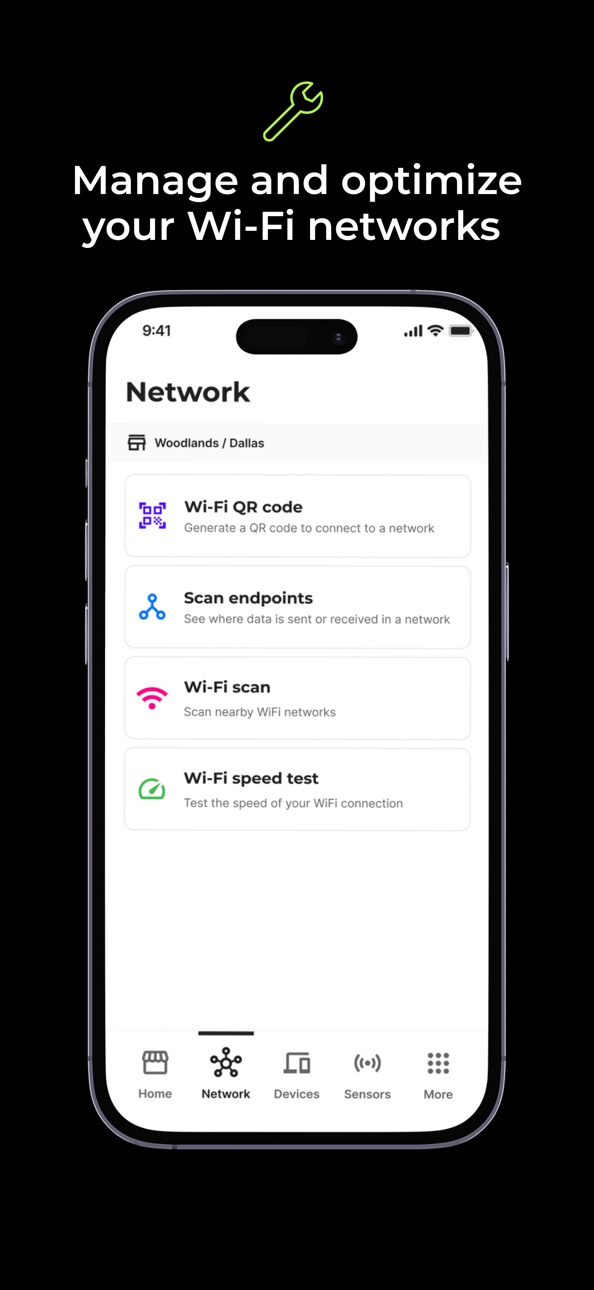
Network Diagnostics – Ensure your Wi-Fi network is operating properly, check Wi-Fi speeds and scan endpoints to prevent disruptions and confirm connectivity.
Support in Your Pocket – Quickly contact Ziosk support with any problems that arise - uploading photos for techs to see, storing images for reference, and accessing Ziosk knowledge base.
Accessibility
ipadiphonemacrealityDevicetvoswatch
Version history 8 versions
Build 879003236v2.0.32025-10-22 01:04:42
This update includes general bug fixes and performance improvements, with a focus on enhancing the DigiSite installation experience for smoother setup and reliability.
Build 877073641v2.0.22025-08-10 04:54:49
Bug fixes
Build 874848274v2.0.12025-05-19 13:38:02
Bug fixes
Build 873336866v2.0.02025-05-12 14:59:22
Sensor Installation & Management – Easily install and sync DigiSite sensors for smooth setup, plus see sensor status and device to help troubleshoot potential problems.
Daily Alcohol Code – Eliminate the need to check emails with the daily alcohol code displayed within the Ziosk Go app.
Network Diagnostics – Ensure your Wi-Fi network is operating properly, check Wi-Fi speeds and scan endpoints to prevent disruptions and confirm connectivity.
Support in Your Pocket – Quickly contact Ziosk support with any problems that arise - uploading photos for techs to see, storing images for reference, and accessing Ziosk knowledge base.
Build 866122278v1.1.02024-05-22 15:34:23
Added feature to upload site map directly from Ziosk Go.
Added support for sensor registration for convenience stores.
New fix it feature - Modify sensor info directly from sensor listing screen
User interface enhancements
Updated legal links
Build 864454169v1.0.22024-04-13 12:15:09
Hotfix for sensor manufacturing error.
Build 861824156v1.0.12024-03-05 16:07:58
ZioskGo v1.0.1 new features & bug-fixes
1. Registering a new table type (dimensions, shape, material) will trigger a calibration.
2. Calibration now shows status
3. Fix: Site is now detected using GPS location
4. Fix: Sensor detection randomly stopping
5. Fix: QR code generator will save QR code
6. Fix: Previously registered sensors can now be reconfigured
7. Fix: Some sensor UUID's were not detected properly
8. Fix: Calibration values are no longer negative when stored
9. Fix: "Add Another" after registering a sensor no longer randomly crashes
10. Fix: Manual venue selection would sometimes require two attempts
11. Fix: Table height value is no longer reset when adding more sensors of the same table type
12. Fix: Sometimes a new sensor would create two records
13. Fix: When adding another sensor, switching sensor types "table" to "bar" for example would cause fields from the previous type to be saved into the new sensor
Build 860138088v1.02023-11-27 21:12:29
No pricing data captured yet — comparisons appear once the app has paid storefronts or in-app purchases.
Availability 1 of 138 storefronts
| Region | Language | Price | Ratings | Avg | Version |
|---|---|---|---|---|---|
| US | en-US | Free | 9 | 5.0 | 2.0.3 |
Not available in: AF, AG, AI, AL, AM, AO, AR, AT, AU, AZ, BA, BB, BE, BF, BG, BH, BJ, BM, BO, BR, BS, BW, BY, BZ, CA, CH, CI, CL, CM, CN, CO, CR, CV, CZ, DE, DK, DM, DO, DZ, EC, EE, EG, ES, FI, FR, GA, GB, GD, GE, GH, GM, GR, GT, GY, HK, HN, HR, HU, ID, IE, IN, IQ, IS, IT, JM, JO, JP, KE, KN, KR, KY, LB, LC, LK, LR, LT, LU, LV, MA, MD, MG, MK, ML, MO, MR, MS, MU, MW, MX, MY, MZ, NA, NE, NG, NI, NL, NO, NP, OM, PA, PE, PH, PK, PL, PT, PY, RO, RS, RU, RW, SC, SE, SG, SI, SK, SL, SN, SR, ST, SV, SZ, TC, TH, TN, TT, TW, TZ, UA, UG, UY, VC, VE, VG, VN, YE, ZM, ZW
Change log 11 changes · US
✎
releaseNotes updated
This update includes general bug fixes and performance improvements, with a focus on enhancing the DigiSite installation experience for smoother setup and relia
✎
description updated
Ziosk Go is the go-to app for DigiSite sensor installation and management. Not only does it make installation easier, this upgraded version allows you to manage
✎
name updated
Ziosk Go
◆
Version 2.0.3 released
This update includes general bug fixes and performance improvements, with a focus on enhancing the DigiSite installation experience for smoother setup and reliability.
◆
Version 2.0.2 released
Bug fixes
◆
Version 2.0.1 released
Bug fixes
◆
Version 2.0.0 released
Sensor Installation & Management – Easily install and sync DigiSite sensors for smooth setup, plus see sensor status and device to help troubleshoot potential problems.
Daily Alcohol Code – Eliminate the need to check emails with the daily
◆
Version 1.1.0 released
Added feature to upload site map directly from Ziosk Go.
Added support for sensor registration for convenience stores.
New fix it feature - Modify sensor info directly from sensor listing screen
User interface enhancements
Updated legal lin
◆
Version 1.0.2 released
Hotfix for sensor manufacturing error.
◆
Version 1.0.1 released
ZioskGo v1.0.1 new features & bug-fixes
1. Registering a new table type (dimensions, shape, material) will trigger a calibration.
2. Calibration now shows status
3. Fix: Site is now detected using GPS location
4. Fix: Sensor detection ran
◆
Version 1.0 released