Home › Photo & Video

 ZM
ZM
 AGen-GB
 AIen-GB
 AOen-GB
 ARes-MX
 BBen-GB
 BFen-GB
 BJen-GB
 BOes-MX
 BRpt-BR
 BSen-GB
 BWen-GB
 BZen-GB
 CDen-GB
 CGen-GB
 CIfr-FR
 CLes-MX
 CMfr-FR
 COes-MX
 CRes-MX
 CVen-GB
 DMen-GB
 DOes-MX
 DZen-GB
 ECes-MX
 GAfr-FR
 GDen-GB
 GHen-GB
 GMen-GB
 GTes-MX
 GWen-GB
 GYen-GB
 HNes-MX
 JMen-GB
 KEen-GB
 KNen-GB
 KYen-GB
 LCen-GB
 LRen-GB
 LYen-GB
 MAen-GB
 MGen-GB
 MLen-GB
 MSen-GB
 MUen-GB
 MWen-GB
 MXes-MX
 MZen-GB
 NAen-GB
 NEen-GB
 NGen-GB
 NIes-MX
 PAes-MX
 PEes-MX
 PYes-MX
 RWen-GB
 SCen-GB
 SLen-GB
 SNen-GB
 SRen-GB
 STen-GB
 SVes-MX
 SZen-GB
 TCen-GB
 TDen-GB
 TNen-GB
 TTen-GB
 TZen-GB
 UGen-GB
 USen-US
 UYen-GB
 VCen-GB
 VEes-MX
 VGen-GBZMen-GB
 ZWen-GB
75 of 75 storefronts
Content in en-US
Content in en-US
Information
Preview 4 platforms
iPhone 7 images





iPad 9 images


Mac 10 images


Apple Watch 3 images


What’s New Version 10.4.0
Added Sony camera support.
Description
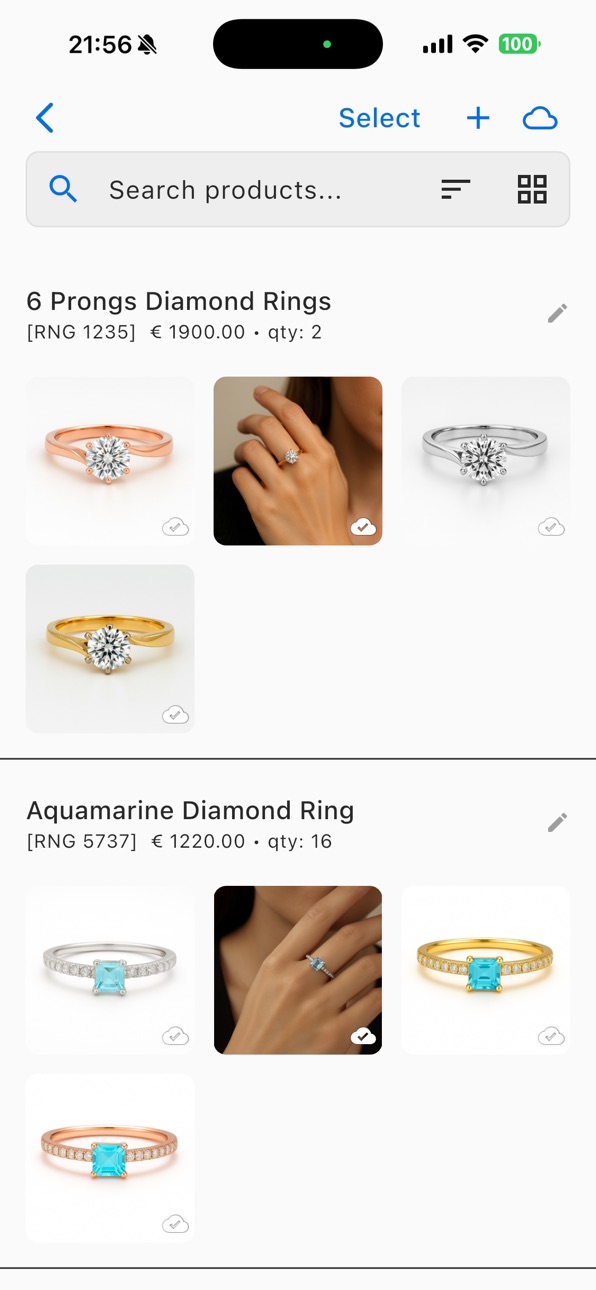
ALO App transforms your iPhone into a professional photography studio with cutting-edge AI technology and advanced scanning capabilities. Whether you're an e-commerce entrepreneur, content creator, or photography enthusiast, ALO App delivers studio-quality results with unprecedented ease and precision.
Terms of Use: https://www.apple.com/legal/internet-services/itunes/dev/stdeula/
Privacy Policy: https://www.alo.zone/legal/privacy-policy
ADVANCED AI TECHNOLOGY
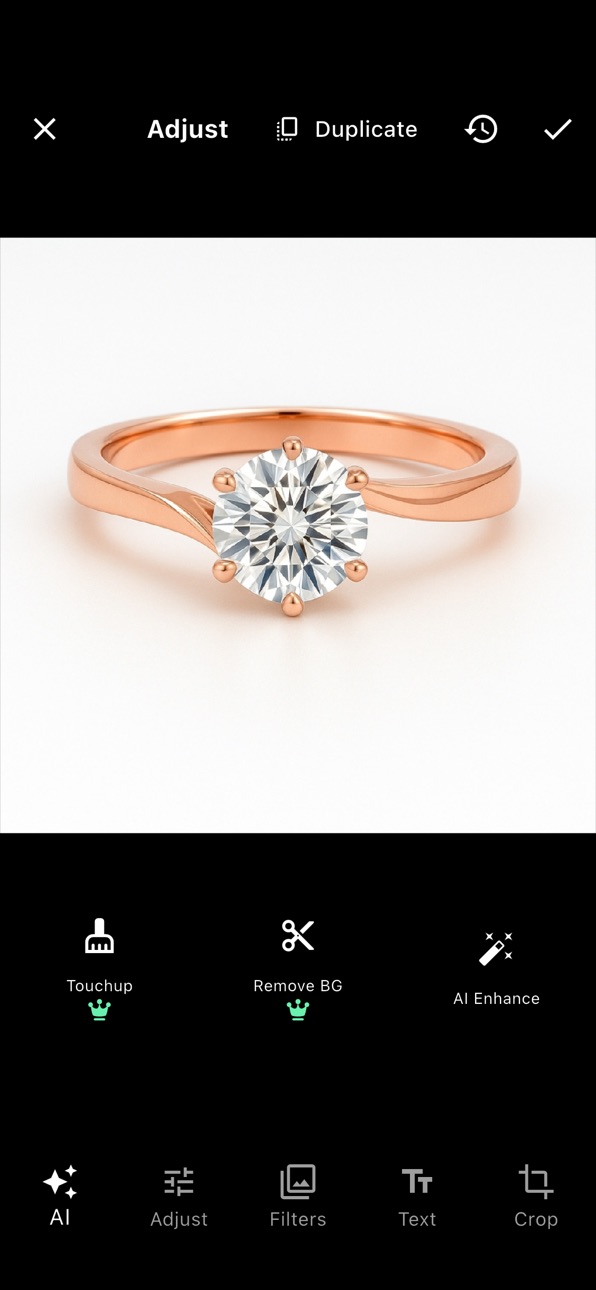
Experience the future of mobile photography with our intelligent AI engine that doesn't just filter your photos—it enhances them. Our AI-powered image restoration automatically corrects imperfections, optimizes clarity, and brings out details you never knew were there. The smart AI Describe feature generates accurate descriptions of your images, perfect for cataloging and content creation.
PROFESSIONAL PHOTOGRAPHY TOOLS
Take control of your photography with professional-grade camera settings including precise white balance adjustment, color temperature control (2000K-9000K), and advanced tint corrections (-100 to +100). Multiple camera support lets you switch between different configurations for optimal results, while burst mode with ISO control ensures you capture the perfect shot every time.
360 DEGREE PRODUCT PHOTOGRAPHY
Create stunning rotating product images with our advanced 360 degree photography system. Perfect for e-commerce listings, product catalogs, and professional presentations. Customize rotation speed and steps with precision controls, and connect external hardware via Bluetooth for automated product photography workflows.
SEAMLESS CLOUD INTEGRATION
ALO Cloud keeps your work synchronized across all devices with secure authentication and automatic backup. Start a project on your iPhone, continue on your iPad, and access everything from anywhere. Your creative work is always protected and accessible when inspiration strikes.
PROFESSIONAL EDITING SUITE
Fine-tune every aspect of your images with our comprehensive editing tools:
- Real-time camera preview with live adjustments
- Advanced equalizer for precise color grading
- Custom presets for consistent results
- Professional white balance controls
- Interface opacity customization for optimal viewing
- Reset functions for quick workflow management
OPTIMIZED MOBILE EXPERIENCE
Designed specifically for iOS with intuitive gesture-based navigation and beautiful dark mode support that adapts to your system preferences. The interface automatically adjusts for optimal viewing in any lighting condition, ensuring a seamless experience whether you're working indoors or outdoors.
HARDWARE INTEGRATION
Connect external devices via Bluetooth for professional workflows. Control rotation equipment, adjust settings remotely, and create automated photography sequences. Perfect for product photography setups and professional studio environments.
WHAT'S NEW IN VERSION 2.0.2
- Enhanced dark mode optimization for better usability
- Improved AI image restoration with faster processing
- Advanced rotation controls for precise product photography
- Better cloud synchronization and stability
- Optimized performance across all iOS devices
- Enhanced user interface with improved accessibility
PERFECT FOR
- E-commerce businesses creating product catalogs
- Content creators building their brand
- Professional photographers on the go
- Small business owners showcasing products
- Social media influencers creating engaging content
- Anyone demanding professional-quality mobile photography
*** Your iPhone is more powerful than you think—ALO App shows you how to unleash its full potential. ***
In-App Purchases ZM pricing
ALO Cloud Pro Subscription
Monthly—
ALO Cloud Storage Subscription
2 GB · Monthly—
2 GB · Yearly—
One-Time Purchases
ALO Coins 100—
ALO Coins 200—
ALO Coins 500—
Capabilities
In-App Purchases
Accessibility
ipadiphonemacrealityDevicetvoswatch
Version history 25 versions
Build 887477656v10.4.02026-07-02 23:54:58
Added Sony camera support.
Build 887335018v10.3.102026-06-24 23:21:04
• Improved ALO Cloud login reliability through ALO-ID.
• Enhanced session and token refresh handling, reducing cases where login is requested again after reopening the app.
• Improved Cloud Sync stability when the session is refreshed automatically.
• Added AI background removal support in the image editor.
• Improved camera/video handling and technical updates for better stability and compatibility.
Build 887261961v10.3.92026-06-22 14:55:03
Oauth autologin fixed
Build 887220076v10.3.82026-06-20 15:39:15
Bug fixes and overall stability improvements.
Build 887027014v10.3.72026-06-16 18:02:13
Bug fixes and overall stability improvements.
Build 886808091v10.3.62026-06-11 21:59:53
Shopify connection improvement.
Minor bug fixes,
Build 886681467v10.3.52026-06-08 21:37:49
Overall stability and bug fixes.
Build 886323950v10.3.32026-06-01 18:22:26
Bug fixes and overall stability improvements
Build 886396596v10.3.42026-06-01 23:34:14
Improved cloud synchronisation, overall stability and bug fixes
Build 885542776v10.32026-05-29 12:17:36
Version 10.3 Cloud Pro subscription Introducing Cloud Pro — a new subscription plan that unlocks advanced AI features and expanded cloud storage. Subscribe directly from within the app, with automatic restore on reinstall and cross-device access. AI Enhancement upgrades AI image enhancement is now faster and more reliable. Processing status persists when switching between apps, and you'll see clear progress information while your photos are being enhanced (up to 5 minutes for ultra-quality results). Push notifications Stay informed with a new in-app notification inbox. Receive updates on completed jobs, cloud sync status, and important account events — even when the app is in the background. Image editor improvements The Cloud Pro editing experience has been refined with a cleaner enhancement flow, improved expiry and renewal handling, and updated UI throughout. Bug fixes & stability Improved connection reliability for hardware devices, enhanced error handling, and various performance optimisations across the app.
Build 886287099v10.3.22026-05-29 18:49:33
New desktop sphere preview controls with keyboard handling and simulation support.
Improved camera experience with live preview color filters, persistent exposure, contrast, saturation, and equalizer settings.
Better hardware stability with enhanced sphere serial handling, blacklist logic, BLE compatibility, and cloud sync support.
UI and layout refinements for media viewer, desktop responsiveness, image masking, JPEG export, and image decoding.
Fixed camera layout issues, focus stacking control positioning, duplicate preview labels, desktop color styling, and Italian localization.
Bug fixes
Build 877619840v2.0.52025-11-18 01:28:24
Added height of the item in AI prompt
Build 877582961v2.0.42025-08-26 21:06:58
Loca Access to the app
Catalogue Report
Bug fixes
Build 877249998v2.0.22025-08-18 12:10:25
- Enhanced dark mode optimization for better usability and improved user experience in low-light conditions.
- Improved AI image restoration with faster processing speeds and better quality results.
- Advanced rotation controls for precise product photography with customizable speed and step settings.
- Better cloud synchronization and stability for seamless cross-device workflows.
- Optimized performance across all iOS devices with reduced memory usage.
- Enhanced user interface with improved accessibility features and gesture navigation.
- Bug fixes
Build 877345884v2.0.32025-08-18 23:56:51
Zoomable preview
Bug fixes
Build 876757485v1.2.72025-07-29 08:06:54
General stability improvements. Added Pixel sunsetting message.
Build 875659487v1.2.62025-06-17 22:09:47
General stability issues resolved
Build 875287119v1.2.52025-06-04 02:44:49
Bug Fixes
Build 873522474v1.2.42025-03-25 21:40:52
What’s New in ALO
We’ve been working hard to bring you powerful new features and improvements! Here’s what’s new in this update:
• New “Levels” Control in the Equalizer
Fine-tune your media with even greater precision using the new Levels control.
• Magic Zoom Disabled by Default
Magic Zoom is now turned off by default for a cleaner workflow—re-enable it anytime in settings.
• Default Duration Set to 3 Seconds
Set your timing effortlessly—default media duration is now 3 seconds.
• All-New Touchup & Background Removal AI Engine
Achieve stunning results with the latest AI-powered tools for touchup and background removal.
• Smarter AI Descriptions
Get better, more relevant AI-generated descriptions for your products.
• Media List View Now Supports Session Grouping
Easily navigate your media by grouping files based on session context.
• SKU Functionality Added
Organize and track your assets more efficiently with new SKU support.
• Advanced Filtering in Media List View
Quickly find what you need with powerful new filters.
• Stretch/Fit Mode for Preview
Customize how your media is displayed with new stretch and fit options in the preview.
• Camera Lens Selection Support
Choose the perfect lens directly from the app for more creative control.
• Bug Fixes & Performance Improvements
As always, we’ve squashed some bugs and fine-tuned performance for a smoother experience.
Build 870215494v1.2.32024-11-07 17:17:21
Whats New:
• Enhanced Camera Capabilities
• Improved zoom, focus, and exposure controls for more precise adjustments.
• Added real-time brightness, contrast, and saturation controls within the camera preview.
• Corrected issues with photo and video orientation, ensuring accurate display according to EXIF data.
• Image Editing Tools
• New image editing tools, including brightness, contrast, and saturation adjustments.
• Cropping functionality with multiple aspect ratio options, including a dedicated square mode.
• Progressive image loading for faster viewing and editing of high-resolution images.
• Video and Photo Mode Management
• Streamlined the interface for switching between video and photo modes.
• Updated video recording settings with enhancements for stability and visual quality.
• Improved integration for photo and video management, allowing users to save and retrieve media efficiently.
• UI and Usability Enhancements
• Updated the equalizer interface for real-time editing and visual adjustments.
• Optimized layout for catalog browsing and media viewing, especially on larger iPhone models.
• Added minor visual tweaks for a more polished and user-friendly experience.
• General Stability and Bug Fixes
• Fixed memory management issues to improve app stability.
• Addressed bugs affecting zoom and exposure functionality.
• Minor improvements across the app for better overall performance and user experience.
Build 867487966v1.2.22024-07-15 18:29:54
Bugs fixes
Build 863788018v1.2.12024-05-03 19:06:36
Bug fixes and speed improvements
Build 860740690v1.2.02024-01-26 04:22:23
ALO Pixel account management button.
New interface improvement
AI buttons
Bug fixes
Build 860522903v1.1.32023-10-14 04:49:24
AI background removal free, for all, forever.
Build 860491482v1.1.22023-10-08 13:24:21
AI Background removal
Big fixes
Price history by region
Currency
Show
Columns
Search
Availability 75 of 75 storefronts
| Region | Language | Price | Ratings | Avg | Version |
|---|---|---|---|---|---|
| AG | en-GB | Free | 0 | — | 10.4.0 |
| AI | en-GB | Free | 0 | — | 10.4.0 |
| AO | en-GB | Free | 0 | — | 10.4.0 |
| AR | es-MX | Free | 0 | — | 10.4.0 |
| BB | en-GB | Free | 0 | — | 10.4.0 |
| BF | en-GB | Free | 0 | — | 10.4.0 |
| BJ | en-GB | Free | 0 | — | 10.4.0 |
| BO | es-MX | Free | 0 | — | 10.4.0 |
| BR | pt-BR | Free | 0 | — | 10.4.0 |
| BS | en-GB | Free | 0 | — | 10.4.0 |
| BW | en-GB | Free | 0 | — | 10.4.0 |
| BZ | en-GB | Free | 0 | — | 10.4.0 |
| CD | en-GB | Free | 0 | — | 10.4.0 |
| CG | en-GB | Free | 0 | — | 10.4.0 |
| CI | fr-FR | Free | 0 | — | 10.4.0 |
| CL | es-MX | Free | 0 | — | 10.4.0 |
| CM | fr-FR | Free | 0 | — | 10.4.0 |
| CO | es-MX | Free | 0 | — | 10.4.0 |
| CR | es-MX | Free | 0 | — | 10.4.0 |
| CV | en-GB | Free | 0 | — | 10.4.0 |
| DM | en-GB | Free | 0 | — | 10.4.0 |
| DO | es-MX | Free | 0 | — | 10.4.0 |
| DZ | en-GB | Free | 0 | — | 10.4.0 |
| EC | es-MX | Free | 0 | — | 10.4.0 |
| GA | fr-FR | Free | 0 | — | 10.4.0 |
| GD | en-GB | Free | 0 | — | 10.4.0 |
| GH | en-GB | Free | 0 | — | 10.4.0 |
| GM | en-GB | Free | 0 | — | 10.4.0 |
| GT | es-MX | Free | 0 | — | 10.4.0 |
| GW | en-GB | Free | 0 | — | 10.4.0 |
| GY | en-GB | Free | 0 | — | 10.4.0 |
| HN | es-MX | Free | 0 | — | 10.4.0 |
| JM | en-GB | Free | 0 | — | 10.4.0 |
| KE | en-GB | Free | 0 | — | 10.4.0 |
| KN | en-GB | Free | 0 | — | 10.4.0 |
| KY | en-GB | Free | 0 | — | 10.4.0 |
| LC | en-GB | Free | 0 | — | 10.4.0 |
| LR | en-GB | Free | 0 | — | 10.4.0 |
| LY | en-GB | Free | 0 | — | 10.4.0 |
| MA | en-GB | Free | 0 | — | 10.4.0 |
| MG | en-GB | Free | 0 | — | 10.4.0 |
| ML | en-GB | Free | 0 | — | 10.4.0 |
| MS | en-GB | Free | 0 | — | 10.4.0 |
| MU | en-GB | Free | 0 | — | 10.4.0 |
| MW | en-GB | Free | 0 | — | 10.4.0 |
| MX | es-MX | Free | 0 | — | 10.4.0 |
| MZ | en-GB | Free | 0 | — | 10.4.0 |
| NA | en-GB | Free | 0 | — | 10.4.0 |
| NE | en-GB | Free | 0 | — | 10.4.0 |
| NG | en-GB | Free | 0 | — | 10.4.0 |
| NI | es-MX | Free | 0 | — | 10.4.0 |
| PA | es-MX | Free | 0 | — | 10.4.0 |
| PE | es-MX | Free | 0 | — | 10.4.0 |
| PY | es-MX | Free | 0 | — | 10.4.0 |
| RW | en-GB | Free | 0 | — | 10.4.0 |
| SC | en-GB | Free | 0 | — | 10.4.0 |
| SL | en-GB | Free | 0 | — | 10.4.0 |
| SN | en-GB | Free | 0 | — | 10.4.0 |
| SR | en-GB | Free | 0 | — | 10.4.0 |
| ST | en-GB | Free | 0 | — | 10.4.0 |
| SV | es-MX | Free | 0 | — | 10.4.0 |
| SZ | en-GB | Free | 0 | — | 10.4.0 |
| TC | en-GB | Free | 0 | — | 10.4.0 |
| TD | en-GB | Free | 0 | — | 10.4.0 |
| TN | en-GB | Free | 0 | — | 10.4.0 |
| TT | en-GB | Free | 0 | — | 10.4.0 |
| TZ | en-GB | Free | 0 | — | 10.4.0 |
| UG | en-GB | Free | 0 | — | 10.4.0 |
| US | en-US | Free | 0 | — | 10.4.0 |
| UY | en-GB | Free | 0 | — | 10.4.0 |
| VC | en-GB | Free | 0 | — | 10.4.0 |
| VE | es-MX | Free | 0 | — | 10.4.0 |
| VG | en-GB | Free | 0 | — | 10.4.0 |
| ZM | en-GB | Free | 0 | — | 10.4.0 |
| ZW | en-GB | Free | 0 | — | 10.4.0 |
Change log 29 changes · ZM
✎
releaseNotes updated
Added Sony camera support.
✎
description updated
ALO App transforms your iPhone into a professional photography studio with cutting-edge AI technology and advanced scanning capabilities. Whether you're an e-co
✎
subtitle updated
ALO PhotoTube Jewelry Lightbox
✎
name updated
ALO app
◆
Version 10.4.0 released
Added Sony camera support.
◆
Version 10.3.10 released
• Improved ALO Cloud login reliability through ALO-ID.
• Enhanced session and token refresh handling, reducing cases where login is requested again after reopening the app.
• Improved Cloud Sync stability when the session is refreshed autom
◆
Version 10.3.9 released
Oauth autologin fixed
◆
Version 10.3.8 released
Bug fixes and overall stability improvements.
◆
Version 10.3.7 released
Bug fixes and overall stability improvements.
◆
Version 10.3.6 released
Shopify connection improvement.
Minor bug fixes,
◆
Version 10.3.5 released
Overall stability and bug fixes.
◆
Version 10.3.4 released
Improved cloud synchronisation, overall stability and bug fixes
◆
Version 10.3.3 released
Bug fixes and overall stability improvements
◆
Version 10.3.2 released
New desktop sphere preview controls with keyboard handling and simulation support.
Improved camera experience with live preview color filters, persistent exposure, contrast, saturation, and equalizer settings.
Better hardware stability with
◆
Version 10.3 released
Version 10.3 Cloud Pro subscription Introducing Cloud Pro — a new subscription plan that unlocks advanced AI features and expanded cloud storage. Subscribe directly from within the app, with automatic restore on reinstall and cross-device
◆
Version 2.0.5 released
Added height of the item in AI prompt
◆
Version 2.0.4 released
Loca Access to the app
Catalogue Report
Bug fixes
◆
Version 2.0.3 released
Zoomable preview
Bug fixes
◆
Version 2.0.2 released
- Enhanced dark mode optimization for better usability and improved user experience in low-light conditions.
- Improved AI image restoration with faster processing speeds and better quality results.
- Advanced rotation controls for precis
◆
Version 1.2.7 released
General stability improvements. Added Pixel sunsetting message.
◆
Version 1.2.6 released
General stability issues resolved
◆
Version 1.2.5 released
Bug Fixes
◆
Version 1.2.4 released
What’s New in ALO
We’ve been working hard to bring you powerful new features and improvements! Here’s what’s new in this update:
• New “Levels” Control in the Equalizer
Fine-tune your media with even greater precision using the new Levels
◆
Version 1.2.3 released
Whats New:
• Enhanced Camera Capabilities
• Improved zoom, focus, and exposure controls for more precise adjustments.
• Added real-time brightness, contrast, and saturation controls within the camera preview.
• Corrected issues with ph
◆
Version 1.2.2 released
Bugs fixes
◆
Version 1.2.1 released
Bug fixes and speed improvements
◆
Version 1.2.0 released
ALO Pixel account management button.
New interface improvement
AI buttons
Bug fixes
◆
Version 1.1.3 released
AI background removal free, for all, forever.
◆
Version 1.1.2 released
AI Background removal
Big fixes