Home › Photo & Video

 PY
PY
 RUru
RUru KZen-GB
 BYen-GB
 UAen-GB
 UZen-GB
 KGen-GB
 USen-US
 PLen-GB
 BRpt-BR
 DEde-DE
 TRen-GB
 MDen-GB
 AMen-GB
 GEen-GB
 ESes-ES
 CAen-CA
 AZen-GB
 CZen-GB
 GBen-GB
 ITit
ITit FRfr-FR
 ILen-GB
 LVen-GB
 AUen-AU
 EEen-GB
 KRko
KRko TJen-GB
 AEen-GB
 THen-GB
 IDen-GB
 PTpt-PT
 RSen-GB
 NLnl
NLnl ROen-GB
 CLes-MX
 MNen-GB
 LTen-GB
 MXes-MX
 BGen-GB
 CYen-GB
 ATde-DE
 JPja
JPja CHde-CH
 INen-GB
 FIen-GB
 PHen-GB
 NOen-GB
 BEen-GB
 IEen-GB
 ARes-MX
 GRen-GB
 SEsv
SEsv TMen-GB
 VNen-GB
 CNzh-Hans-CN
 EGen-GB
 AOen-GB
 PEes-MX
 DKen-GB
 SAen-GB
 SKen-GB
 HUen-GB
 MYen-GB
 MEen-GB
 SIen-GB
 ZAen-GB
 ALen-GB
 HKzh-Hant-HK
 HRen-GB
 LUen-GB
 MTen-GB
 MZen-GB
 NZen-AUPYes-MX
 QAen-GB
 TWzh-Hant-TW
 BHen-GB
 BSen-GB
 COes-MX
 JOen-GB
 LBen-GB
 MAen-GB
 NGen-GB
 SGen-GB
 SNen-GB
 VEes-MX
 AIen-GB
 BWen-GB
 CGen-GB
 CIfr-FR
 CMfr-FR
 DOes-MX
 DZen-GB
 GHen-GB
 GTes-MX
 IQen-GB
 ISen-GB
 KEen-GB
 LCen-GB
 MLen-GB
 NEen-GB
 NPen-GB
 PGen-GB
 PKen-GB
 SZen-GB
 UGen-GB
 UYen-GB
 VUen-GB
 ZWen-GB
 AFen-GB
 AGen-GB
 BAen-GB
 BBen-GB
 BFen-GB
 BJen-GB
 BMen-GB
 BNen-GB
 BOes-MX
 BTen-GB
 BZen-GB
 CDen-GB
 CRes-MX
 CVen-GB
 DMen-GB
 ECes-MX
 FJen-GB
 FMen-GB
 GAfr-FR
 GDen-GB
 GMen-GB
 GWen-GB
 GYen-GB
 HNes-MX
 JMen-GB
 KHen-GB
 KNen-GB
 KWen-GB
 KYen-GB
 LAen-GB
 LKen-GB
 LRen-GB
 LYen-GB
 MGen-GB
 MKen-GB
 MMen-GB
 MOzh-Hant-HK
 MRen-GB
 MSen-GB
 MUen-GB
 MVen-GB
 MWen-GB
 NAen-GB
 NIes-MX
 NRen-GB
 OMen-GB
 PAes-MX
 PWen-GB
 RWen-GB
 SBen-GB
 SCen-GB
 SLen-GB
 SRen-GB
 STen-GB
 SVes-MX
 TCen-GB
 TDen-GB
 TNen-GB
 TOen-GB
 TTen-GB
 TZen-GB
 VCen-GB
 VGen-GB
 XKen-GB
 YEen-GB
 ZMen-GB
175 of 175 storefronts
Content in en-US
Content in en-US
Information
Apple ID6447904215
Bundle IDbiser.zebra
SellerSeller
Min iOS17.0
Min macOS14.0
Device familiesiphone
Released2023-04-23
Copyright© Vrednaya
Privacy policyLink ↗
Preview 1 platform
iPhone 10 images




What’s New Version 3.32
Hey! A fresh update just dropped ◕‿◕
This one is purely technical: I squashed a ton of bugs, so everything now runs noticeably smoother and faster. Plus I added new ready-made templates so you can put things together even quicker.
Thanks for using the app and writing in — I read every single review, it truly means a lot)
P.S. You can reach me via the “Settings” button on the main screen. Always open to your ideas and suggestions
Description
Zebra - a photo and video editor for bloggers: text on photos, AI background and object removal, film filters and effects. Create content for Stories, Reels, and TikTok in a minute ◕‿◕
I built Zebra for my wife (@VrednayaModa) to make her blogger life easier - and I hope you'll find it useful too.
What's inside?
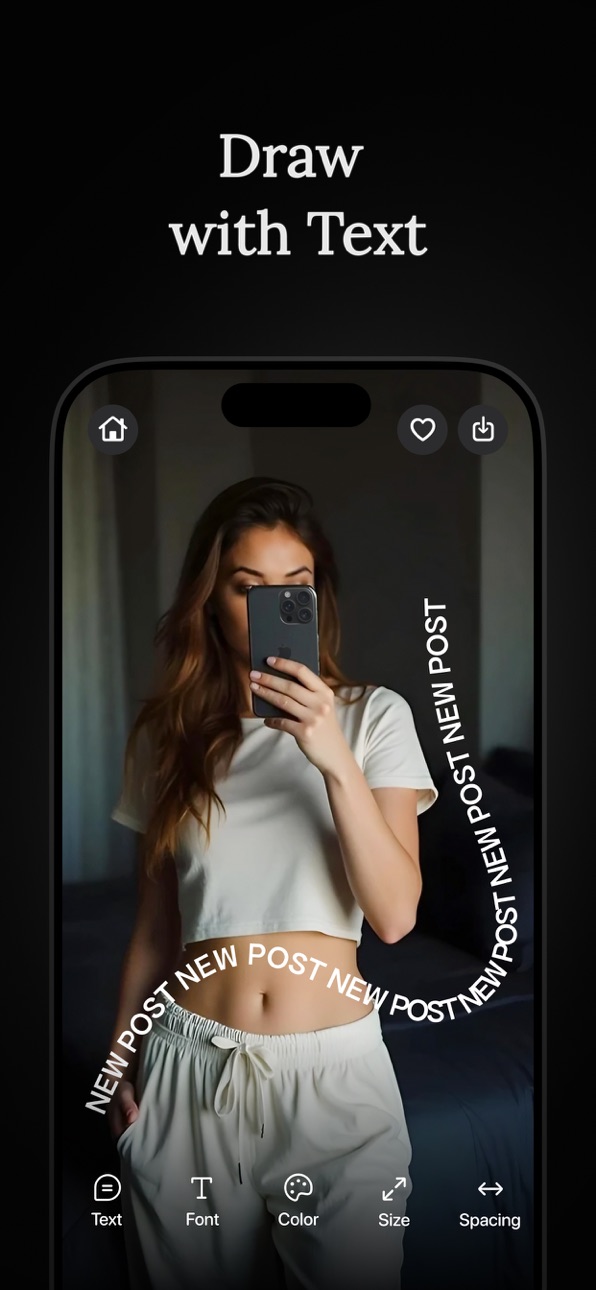
• Text on photos and text drawing
The heart of Zebra. Trendy text effects in a minute:
- add YOUR OWN fonts and stickers - write with your own fonts, not just standard ones
- text along a curve, spiral, waves, rows, or rays
- 3D text tilt and layer editing
- alignment, letter and line spacing
- highlight words: marker, underline, background fill
- text BEHIND objects: wraps around a person or object (the background is cut out on your device, no internet needed)
- draw with a brush: regular, neon glow, glitter, and emoji
• Seamless carousels
A hot format for Stories and posts. Slice a photo or video so the image continues seamlessly as you swipe - your feed looks like one canvas
- ready-made templates: pick a grid of 2, 3, or more frames, add shots, done in one tap
- manual mode: cut and arrange frames yourself
• Photo and video effects
Dark - a "blogger" darkening of the whole photo or a chosen area (like the bottom) so text stays readable
Grain - a cinematic film effect that makes a shot feel alive
One-tap Blur - 12 variations: from simple to motion and wet glass. Focus blur for a soft accent, background blur, and blur only the areas you want
• Collages
Build collages from photos and videos:
- a huge library of ready-made grids for every taste: pick one, add shots, done in one tap
- manual mode: move, scale, and arrange frames however you like
- add text and captions on the collage
• High-quality background removal
- works on your device, no internet and no uploading to a server
- automatic or manual, pixel-perfect precision
- lots of trendy outlines: a colored stroke of any thickness to make your subject pop
- fast export with a result that matches the preview exactly
• AI object removal
Remove unwanted people and objects - fast and clean, with no traces
There's an on-device mode too - remove things fast without internet
• AI styling
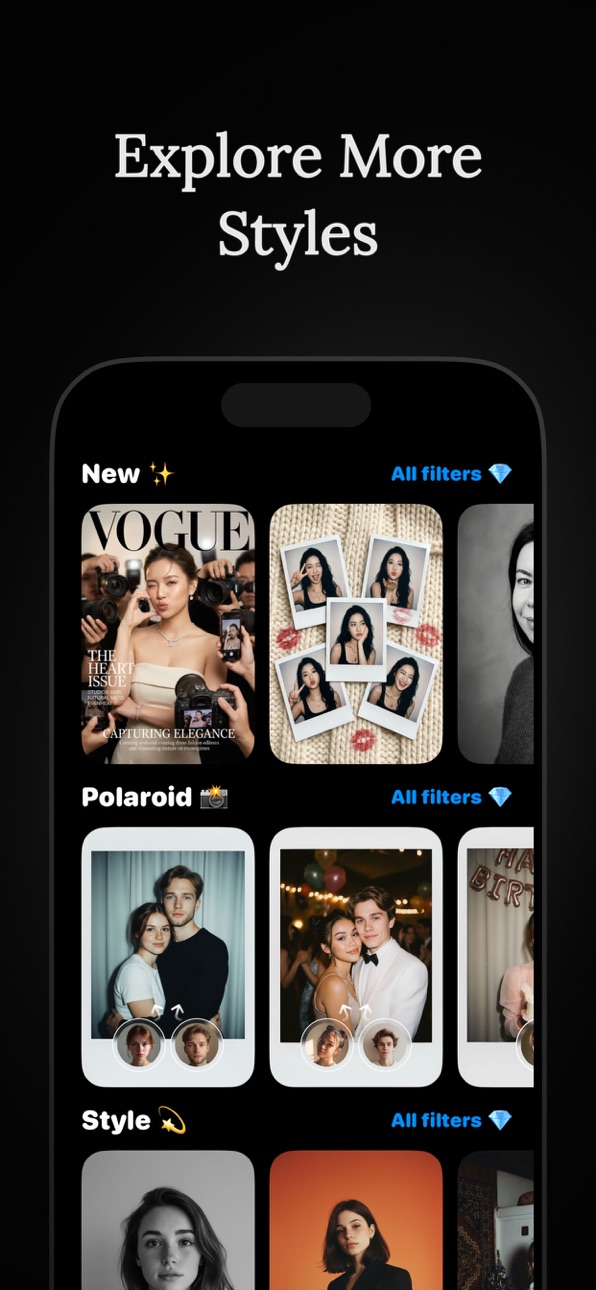
Turn an ordinary photo into art: Ghibli style, anime, oil paint, sketch, and more. Upload a shot and AI repaints it in your chosen style in seconds
Make profile pics, covers, and creatives no one else has
• Stickers
Hundreds of original stickers in ready-made packs - from trendy ones to arrows and captions. The most popular stay on top
Question Sticker, Alert Sticker, Calendar Sticker - beautiful and customizable
• Filters
Film LUT presets inspired by Kodak, Fuji, and Polaroid
Original filters from bloggers
Full-screen mode - swipe through filters like Reels and pick the best
Video filters
• DuoCam
Shoot video in two formats in one take - horizontal for YouTube and vertical for Reels and Stories at once. Shoot once, get both
Exposure control by swiping across the frame
• Unicode fonts
Stylish fonts for your profile bio, comments, and any app
• Watermark
Protect your photos from theft:
- your own text or logo, with adjustable opacity, size, and position
- mosaic mode: tile the mark across the whole photo, like news outlets do - impossible to crop out
More tools: video speed, video compression, text from video, finding large videos, Zip archive, QR code, mask shapes, rounded corners, boomerang, and before/after video.
That's all for now, but only for now. I keep developing the app and adding new features. Stay tuned!
Thanks for reading all the way here :)
Contact me: ZebraAppStore(at)gmail.com
Premium is optional. Payment will be charged to your iTunes account, and you can cancel your subscription anytime in your Apple settings.
Privacy Policy: https://zebra.tg/app-privacy/
Terms of Use: https://www.apple.com/legal/internet-services/itunes/dev/stdeula/
In-App Purchases PY pricing
Premium Subscription
Month premium · Monthly—
Annual premium · Yearly—
Week Premium · 7 days—
One-Time Purchases
Zebra One Coins—
Zebra 10 Coins—
Zebra 5 Coins—
Capabilities
In-App Purchases
Accessibility
ipadiphonemacrealityDevicetvoswatch
Version history 25 versions
Build 887896429v3.322026-07-06 20:23:04
Hey! A fresh update just dropped ◕‿◕
This one is purely technical: I squashed a ton of bugs, so everything now runs noticeably smoother and faster. Plus I added new ready-made templates so you can put things together even quicker.
Thanks for using the app and writing in — I read every single review, it truly means a lot)
P.S. You can reach me via the “Settings” button on the main screen. Always open to your ideas and suggestions
Build 887628733v3.312026-07-01 04:45:17
Hey! A big update is here — and I also fixed a bunch of bugs so everything runs smoother ◕‿◕
• I added a whole new Templates tab — the trendiest blogger stories and Pinterest layouts are now just one tap away. Pick a template, drop in your photo, and your post is ready — nothing to set up. There are already plenty of templates, and I'll keep adding more, so check back for new ones
• Filters and effects are now full-fledged projects. Apply a filter and it saves itself to Projects — you can come back, swipe through nearby ones right in the editor, and add favorites
• Collages now have drafts — a gallery with all your unfinished collages, so nothing gets lost
• A new sticker screen: with search and a Recent section, so you can find what you need fast
• Carousels now auto-save drafts — even if you minimize or close the app, your work won't be lost
• Little things: in the video editor I added letter and line spacing, a unified set of stickers across Stories, Carousels, and Collages, and your login session now lasts 6x longer — so you'll have to sign in again far less often
• Fixed bugs and crashes, and tidied up fonts and translations across the whole app. It's all more stable and polished now
P.S. As always, thank you for the reviews — I read every single one, and it really means a lot)
P.P.S. You can reach me through the Settings button on the home screen. Always open to your ideas and suggestions
Build 887438846v3.302026-06-26 14:29:38
Hey! A big update is here ◕‿◕
• I added a whole new Templates tab — the trendiest blogger stories and Pinterest layouts are now just one tap away. Pick a template, drop in your photo, and your post is ready — nothing to set up. There are already plenty of templates, and I'll keep adding more, so check back for new ones
• Filters and effects are now full-fledged projects. Apply a filter and it saves itself to Projects — you can come back, swipe through nearby ones right in the editor, and add favorites
• Collages now have drafts — a gallery with all your unfinished collages, so nothing gets lost
• A new sticker screen: with search and a Recent section, so you can find what you need fast
• Carousels now auto-save drafts — even if you minimize or close the app, your work won't be lost
• Little things: in the video editor I added letter and line spacing, a unified set of stickers across Stories, Carousels, and Collages, and your login session now lasts 6x longer — so you'll have to sign in again far less often
• Fixed bugs and crashes, and tidied up fonts and translations across the whole app. It's all more stable and polished now
P.S. As always, thank you for the reviews — I read every single one, and it really means a lot)
P.P.S. You can reach me through the Settings button on the home screen. Always open to your ideas and suggestions
Build 886715759v3.292026-06-09 23:35:30
Hey! Rolled out another fresh update ◕‿◕
Collages. I completely reworked the section: there are way more ready-made templates for every taste now, and everything runs more stably and faster. Build a collage from photos and videos in a couple of taps
Text behind objects. I added new wrap effects to Draw with Text: text in a spiral, in waves, in lines or in rays wraps right AROUND a person/object - like it's going behind them. The background is cut out right on your phone, no internet needed. Pick an effect in the pretty new menu with previews - and you're done
Saving curved text got more flexible - there's a new export menu: either the whole image, or just the text as a transparent PNG so you can paste it anywhere
In Text on Photo I added brush drawing - a regular brush, neon glow, glitter and even an emoji brush. Draw right on top of your photo
Film filters. I added 23 new presets in the style of Kodak, Fuji and Polaroid - on every screen with filters. The most popular ones are at the top now
Background Removal got snappier - the object outline exports 4x faster and now matches the preview pixel for pixel
In DuoCam I added exposure control - swipe up/down on the frame to make it lighter or darker
Fixed bugs and crashes: black preview when opening filters, a crash when undoing an action, copying/saving an element without the selection frame. Things are more stable now
P.S. As always, thanks for your feedback - I read every single one, and it really means a lot to me)
P.P.S. You can reach me through the Settings button on the home screen. Always open to your ideas and suggestions
Build 886293661v3.282026-06-06 20:25:34
Hello! The latest update has rolled out again ◕‿◕
Text behind the object! In “Draw with text” he introduced new wrapper effects: text in a spiral, waves, lines or rays immediately wraps AROUND a person/object - as if it goes behind him. The background is cut directly on the phone, without the Internet. Select an effect in the new beautiful menu with previews - and you're done
Saving text along a curve has become more flexible - a new export menu: either the entire image, or just the text as a transparent PNG, so you can paste it anywhere
In “Text on Photo” I added brush painting - regular, neon glow, glitter and even an emoji brush. Draw directly on top of the photo
Film filters! I brought 23 new LUT presets in the style of Kodak, Fuji and Polaroid - in all screens with filters. The most popular are now on top
“Background removal” has become faster - the object’s outline is exported 4 times faster and now pixel-for-pixel matches what you see in the preview
DuoCam has added exposure control - swiping up/down the frame makes it lighter or darker
Fixed bugs and crashes: black preview when opening filters, crash when canceling an action, copying/saving an element without a selection frame. It has become more stable
P.S. As always, thank you for your reviews - I read every one, I’m very pleased)
P.P.S. You can contact me through the “Settings” button on the main screen. Always open to your ideas and suggestions
Build 886238394v3.272026-05-28 18:50:46
Hey! Dropped another fresh update ◕‿◕
Carousels now do video! I've added video slots to the carousel editor — build carousel posts from photos AND videos at once. Plus you can now build carousels by hand and save them as projects — come back and finish whenever you want. And smart slots: drop in several photos at once, and the zoom and frame position get remembered
I rebuilt Curved Text almost from scratch — a semicircle and new presets, shapes (including a heart) you can drag with your finger, delete with the little x, and draw your own text on top. It saves as a transparent PNG so you can stick it anywhere
Outline got an upgrade — I added new styles: double, gradient, wavy, scalloped, "sketch," and soft glow. Both in Remove Background and in the standalone tool
Blur got some love too — now you can paint over things by hand with a brush (handy for faces/plates), plus a new soft glow effect
Fixed a ton of bugs and crashes: export in Text on Photo (layers, transparency, out-of-memory crashes), filter loading, slow-motion video export, and memory hogging. It's all more stable now
P.S. As always, thanks for the reviews — I read every single one, it really means a lot)
P.P.S. You can reach me through the "Settings" button on the main screen. Always open to your ideas and suggestions
Build 885732677v3.262026-05-17 17:59:13
Hey! Fresh update just dropped ◕‿◕
The main new thing — DuoCam. One take = two ready-to-go videos at once: 9:16 (Reels/Shorts/TikTok) and 16:9 (YouTube). Shoot once, post everywhere, no recropping needed. 4K up to 60 fps, with sound
Fixed a ton of bugs and crashes — there'll be way fewer crashes now (especially in Text on Photo, Remove Background, and the video editor)
Cleaned up a bunch of small things based on your reports — thanks for writing in, I read everything
P.S. As always, thanks for the reviews — I read every single one, and it really means a lot)
P.P.S. You can reach me through the Settings button on the main screen. Always open to your ideas and suggestions
Build 885215071v3.252026-05-04 00:25:58
Hey! Another big update ◕‿◕
New:
- Auto-Enhance — an on-device neural network balances light, color and contrast with one tap
- Price-tag stickers (Tag) — the trendy “tag” look: font, color, rotation, fully customizable
- The AI assistant is smarter — it remembers your recent messages and no longer “jumps” when replying
Filters:
- Added a fresh pack of filters to the Filters screen — new 2026 presets
- Previews load faster and scroll more smoothly
Object removal:
- Now works offline and is super fast — wipe stuff out in a second, no internet needed
- The old cloud method is still there — it’s slower, but the quality is higher, pick whichever fits the job
Text on photo:
- Fixed “text behind object” — the state is no longer lost when you reopen the project
- The background under the text no longer “degrades” after repeated edits
- The canvas size menu now opens on the first tap
- Fixed a crash when undoing inside the curved text editor
And, as always, a ton of small fixes and speed-ups — thanks for sending reports, I read every single one!
P.S. To get in touch — the “Settings” button on the home screen. Always glad to hear your ideas
Build 882643930v3.242026-04-26 20:50:06
Hello. A big update has arrived ◕‿◕
Fixed a huge number of bugs and crashes on iOS 18 - there will be much fewer crashes
“Text on Photo” has a new trendy effect “convex text” - it looks fashionable
Added 5 new fonts for 2026, as you requested
Fixed cursor jumping and characters disappearing when typing/inserting
Work in “Text on Photo” is no longer lost after minimizing the application
New “Background Removal” option that works directly on the device, without the Internet
The stroke has become super smooth (dots/dotted lines), the glow is brighter, preview in 4K
Well, as usual, I fixed a huge bunch of bugs so that everything worked as it should (thanks for writing about them)
P.S. As always, thank you for your reviews - I read every single one of them, and I’m very pleased with it)
P.P.S. You can contact me through the “Settings” button on the main screen. I am always open to your suggestions and ideas
Build 882094636v3.232026-02-17 19:18:59
Hey there. The new update is here ◕‿◕
Another hotfix for iOS 17 fixed collages that were breaking on this version.
In collages, you can now add stickers and text, just like you asked
Added a \"Shuffle Media\" button
Video quality in collages is now 2x better (4K)
Text and stickers can now also be added in carousels
Text on video now works more stable
Text extraction from video now works properly
And as usual - fixed a bunch of bugs to make everything work right
P.S. As always, thank you for your reviews - I read every single one, and it really means a lot to me)
P.P.S. You can reach me through the \"Settings\" button on the main screen. I'm always open to your suggestions and ideas
Build 882033623v3.222026-02-02 16:57:28
Hey there. A new update is here ◕‿◕
Hotfix for iOS 17 and 18 - fixed collages that were breaking on these versions. Also added some new ones
Text on video - you asked a lot for this, so I made it. Basic functionality for now, but if you need something added - let me know, I'll keep improving it
Updates in the "Text on Photo" section:
Glass blinds - a new trendy effect, looks really stylish
Carousels - you can now add text directly to carousels
And as usual - fixed a bunch of small bugs so everything works the way it should
P.S. As always, thank you for your reviews - I read every single one, and it really means a lot to me)
P.P.S. You can reach me through the "Settings" button on the main screen. I'm always open to your suggestions and ideas
Build 881648830v3.212026-01-23 09:50:15
Hello! Meet a cool (hopefully) update ◕‿◕
Updates to the Text on Photo tool:
AI text is a cool new thing for highlighting your stories! Many different AI styles that will be updated once a week. I hope you like it - write if you need to add anything
Bubble message - can now be transferred using enter, it has become more convenient to write.
New styles for highlighting text
“Glass” effect - can be made to any height or length, convenient for text
Recap - now always available on the Miscellaneous screen
I try very hard to quickly fix all bugs to make using Zebra better
P.S. As always, thank you for your reviews - I read every single one of them, and I’m very pleased with it)
P.P.S. You can contact me through the “Settings” button on the main screen. I am always open to your suggestions and ideas
Build 881051249v3.202025-12-30 00:18:28
Hello! This is an update again, please don't swear!
I try very hard to quickly fix all the bugs so that zebra can be used better ◕‿◕
Have a nice day!
P.S. As always, thank you for your reviews - I read every single one of them, and I’m very pleased with it)
P.P.S. You can contact me through the “Settings” button on the main screen. I am always open to your suggestions and ideas
Build 881000864v3.192025-12-26 00:45:52
Hello, and happy holidays to you!
This is a critical bugfix for the year's results. I hurried and made people laugh, but nothing - whoever didn’t fall didn’t get up!
I hope I’ll make it in time for the end of the year) I made a mini recap based on your photos, I hope you like it!
+ fixed a lot of bugs, of course ◕‿◕
P.S. As always, thank you for your reviews - I read every single one of them, and I’m very pleased with it)
P.P.S. You can contact me through the “Settings” button on the main screen. I am always open to your suggestions and ideas
Build 880981852v3.182025-12-24 23:23:23
Hello, and happy holidays to you!
I hope I’ll make it in time for the end of the year) I made a mini recap based on your photos, I hope you like it!
+ fixed a lot of bugs, of course ◕‿◕
P.S. As always, thank you for your reviews - I read every single one of them, and I’m very pleased with it)
P.P.S. You can contact me through the “Settings” button on the main screen. I am always open to your suggestions and ideas
Build 880884930v3.172025-12-21 23:05:50
Hello, and happy holidays to you!
Meet a completely new section - styling
+ fixed a lot of bugs
P.S. As always, thank you for your reviews - I read every single one of them, and I’m very pleased with it)
P.P.S. You can contact me through the “Settings” button on the main screen. I am always open to your suggestions and ideas
Build 880775479v3.162025-12-18 18:52:08
Happy upcoming! There is nothing directly new in this release, but there are a lot of bug fixes, and I hope now you will be even more comfortable working with Zebra :o
P.S. As always, thank you for your reviews - I read every single one of them, and I’m very pleased with it)
P.P.S. You can contact me through the “Settings” button on the main screen. I am always open to your suggestions and ideas
Build 880420336v3.152025-12-07 22:11:53
You're probably thinking, is this an update again?
Yes :| There are more bugs than I would like, and I fix everything as quickly as possible - that’s good!
I fixed filters, blur and a lot more under the hood.
Thank you for your patience and good mood
P.S. As always, thank you for your reviews - I read every single one of them, and I’m very pleased with it)
P.P.S. You can contact me through the “Settings” button on the main screen. I am always open to your suggestions and ideas
Build 880346730v3.142025-12-04 19:52:57
Another update (doing everything I can)
Fixed another batch of bugs, should work better
You can now share "Text on Photo" projects with a friend
I really hope that everything will work as it should now
Everyone have a great mood!
P.S. As always, thank you for your feedback — I read every single one, and it makes me very happy)
P.P.S. You can contact me through the "Settings" button on the main screen. I'm always open to your suggestions and ideas
Build 880000679v3.132025-11-28 17:12:51
Another update (I'm doing my best)
Fixed a bunch of bugs and remade a lot from scratch
I really hope that everything will work as it should now
Have a good mood everyone!
P.S. As always, thank you for your reviews - I read every single one of them, and I’m very pleased with it)
P.P.S. You can contact me through the “Settings” button on the main screen. I am always open to your suggestions and ideas
Build 879869722v3.122025-11-18 19:55:14
Another urgent update (sorry, I'm doing my best)
Text on photo:
Fixed errors with text, printing, cropping, etc.
Improved interaction with objects - now the grip works even smoother and more accurately
New fonts added
New text selection mode
Cleaned up the top menu
Speeded up saving the project
Fixed various bugs
Thank you for using Zebra and recommending it to your friends ◕‿◕
P.S. As always, thank you for your reviews - I read every single one of them, and I’m very pleased with it)
P.P.S. You can contact me through the “Settings” button on the main screen. I am always open to your suggestions and ideas
Build 879788677v3.112025-11-17 03:16:55
Fixed a critical text editor bug (text no longer gets cut off) and also fixed several other bugs.
Plus added a new tool — creating trending photos is now even easier and more convenient
Hello! Long time no see ;)
I've been working on something truly amazing — and here it is: completely new COLLAGES!
Main features:
Now collages can be customized the way you want — move dividers, create unique shapes and experiment with layouts. Plus, all templates now work with videos, even those with many cells or circular shapes
What's new with videos:
- Enable sound for the videos you need, the rest will remain silent
- Customize playback order — videos will play in sequence (it's really cool)
Editing capabilities:
- Mirror photos
- Pin shots so you don't accidentally move them
- Swap photos with one movement
- Round corners of the entire template or individual photos
- Change background color, dividers, or remove dividers altogether
- Choose any color from the palette
Also:
- Tons of new templates, including ones with dividing text (can't find what you need? Write via feedback — I'll add it)
- All popular formats: stories, posts, squares — work with any template
- Add favorite templates to favorites for quick access
A completely updated photo editor is coming very soon — you'll definitely love it) Just a little bit left
Thank you for using Zebra and recommending it to your friends ◕‿◕
P.S. As always, thank you for your reviews — I read every single one, and it means a lot to me)
P.P.S. You can contact me through the "Settings" button on the main screen. I'm always open to your suggestions and ideas
Build 879279975v3.102025-11-12 23:44:08
Hello! Long time no see ;)
I've been working on something truly amazing — and here it is: completely new COLLAGES!
Main features:
Now collages can be customized the way you want — move dividers, create unique shapes and experiment with layouts. Plus, all templates now work with videos, even those with many cells or circular shapes
What's new with videos:
- Enable sound for the videos you need, the rest will remain silent
- Customize playback order — videos will play in sequence (it's really cool)
Editing capabilities:
- Mirror photos
- Pin shots so you don't accidentally move them
- Swap photos with one movement
- Round corners of the entire template or individual photos
- Change background color, dividers, or remove dividers altogether
- Choose any color from the palette
Also:
- Tons of new templates, including ones with dividing text (can't find what you need? Write via feedback — I'll add it)
- All popular formats: stories, posts, squares — work with any template
- Add favorite templates to favorites for quick access
A completely updated photo editor is coming very soon — you'll definitely love it) Just a little bit left
Thank you for using Zebra and recommending it to your friends ◕‿◕
P.S. As always, thank you for your reviews — I read every single one, and it means a lot to me)
P.P.S. You can contact me through the "Settings" button on the main screen. I'm always open to your suggestions and ideas
Build 875403743v3.9.112025-06-13 12:42:39
Hi! Believe in yourself, do your stretches, update Zebra!
◕‿◕ As always, thank you for your feedback — I read every single one of them, and it means a lot to me)
Update to the "Text on Photo" tool:
◕ Layers are here
You can lock them, reorder them, etc.
This helps prevent accidental shifts — especially useful when working with text backgrounds (stickers)
◕ More precise text and sticker selection
It’s now easier to move and resize items, especially smaller ones
◕ Paste from clipboard
Just copy a photo from anywhere and paste it via the "Photo" menu
◕ Bottom darkening
With one click, you can now darken the bottom of a photo right in the editor — great for text readability
◕ New fonts
Completely redesigned blur screen
It’s now much more user-friendly and intuitive: you can blur the background, add shapes (like a heart), or draw. I hope you’ll like it)
New "Audio Trimming" tool
If you need to trim audio — like a voice message from a messenger (I had to cut a funny part from a friend’s audio) — now you can easily do it via the "Share" menu or by selecting the desired file
Fixed a lot of bugs
Thanks for reading this far — have a great day!
P.S. You can contact me via the "Settings" button on the main screen. I'm always open to your suggestions and ideas.
Build 874509600v3.9.102025-05-07 10:58:38
Hi! Believe in yourself, do some exercise, update your Zebra!
◕‿◕ As always, thank you for your feedback - I read them all-all and it makes me feel really good)
I hope to please you:
On-trend stylizations are now in Zebra
- You can make a popular doll effect, anime effect, or show your clothes separately in a minute, 15+ just the most popular effects in total
Text on Photo tool update (by your requests ;)
- Transparency: now you can change the transparency of a text or sticker.
- Duplicate: now text can be duplicated (click on it), it is useful when you want to write another text with the same font and size.
- Fill color: you can choose a color from the photo or just any color, you don't always need a photo on the background.
- Fixed bugs with adding your own fonts + added new beautiful fonts (hopefully)
Transition from collages to editor
- Now when you save a collage, you can go to the editor and add stickers, text, etc.
Fixed a lot of bugs
Thanks for reading up to this point! Have a great day! ◕‿◕
P.S. You can contact me via the “Settings” button on the home screen. I am always open to your suggestions and ideas! ◕‿◕
Price history by region
Currency
Show
Columns
Search
Availability 175 of 175 storefronts
| Region | Language | Price | Ratings | Avg | Version |
|---|---|---|---|---|---|
| RU | ru | Free | 20.8k | 4.9 | 3.32 |
| KZ | en-GB | Free | 2.9k | 4.9 | 3.32 |
| BY | en-GB | Free | 1.6k | 5.0 | 3.32 |
| UA | en-GB | Free | 1.4k | 4.9 | 3.32 |
| UZ | en-GB | Free | 1.0k | 4.8 | 3.32 |
| KG | en-GB | Free | 827 | 4.8 | 3.32 |
| US | en-US | Free | 761 | 4.9 | 3.32 |
| PL | en-GB | Free | 530 | 4.9 | 3.32 |
| BR | pt-BR | Free | 454 | 4.8 | 3.32 |
| DE | de-DE | Free | 292 | 4.9 | 3.32 |
| TR | en-GB | Free | 226 | 4.9 | 3.32 |
| MD | en-GB | Free | 217 | 5.0 | 3.32 |
| AM | en-GB | Free | 178 | 4.9 | 3.32 |
| GE | en-GB | Free | 160 | 5.0 | 3.32 |
| ES | es-ES | Free | 136 | 4.7 | 3.32 |
| CA | en-CA | Free | 111 | 4.8 | 3.32 |
| AZ | en-GB | Free | 108 | 4.8 | 3.32 |
| CZ | en-GB | Free | 105 | 4.9 | 3.32 |
| GB | en-GB | Free | 101 | 4.9 | 3.32 |
| IT | it | Free | 97 | 5.0 | 3.32 |
| FR | fr-FR | Free | 90 | 4.9 | 3.32 |
| IL | en-GB | Free | 87 | 4.9 | 3.32 |
| LV | en-GB | Free | 82 | 4.9 | 3.32 |
| AU | en-AU | Free | 68 | 4.8 | 3.32 |
| EE | en-GB | Free | 62 | 5.0 | 3.32 |
| KR | ko | Free | 59 | 4.9 | 3.32 |
| TJ | en-GB | Free | 57 | 4.9 | 3.32 |
| AE | en-GB | Free | 51 | 4.9 | 3.32 |
| TH | en-GB | Free | 49 | 5.0 | 3.32 |
| ID | en-GB | Free | 41 | 4.9 | 3.32 |
| PT | pt-PT | Free | 40 | 4.9 | 3.32 |
| RS | en-GB | Free | 39 | 4.9 | 3.32 |
| NL | nl | Free | 38 | 5.0 | 3.32 |
| RO | en-GB | Free | 35 | 5.0 | 3.32 |
| CL | es-MX | Free | 34 | 4.9 | 3.32 |
| MN | en-GB | Free | 33 | 4.9 | 3.32 |
| LT | en-GB | Free | 32 | 4.9 | 3.32 |
| MX | es-MX | Free | 26 | 4.9 | 3.32 |
| BG | en-GB | Free | 25 | 5.0 | 3.32 |
| CY | en-GB | Free | 25 | 4.8 | 3.32 |
| AT | de-DE | Free | 23 | 5.0 | 3.32 |
| JP | ja | Free | 22 | 4.5 | 3.32 |
| CH | de-CH | Free | 21 | 5.0 | 3.32 |
| IN | en-GB | Free | 21 | 4.8 | 3.32 |
| FI | en-GB | Free | 20 | 4.8 | 3.32 |
| PH | en-GB | Free | 20 | 4.6 | 3.32 |
| NO | en-GB | Free | 18 | 5.0 | 3.32 |
| BE | en-GB | Free | 17 | 4.8 | 3.32 |
| IE | en-GB | Free | 17 | 5.0 | 3.32 |
| AR | es-MX | Free | 14 | 4.6 | 3.32 |
| GR | en-GB | Free | 14 | 4.9 | 3.32 |
| SE | sv | Free | 13 | 4.7 | 3.32 |
| TM | en-GB | Free | 13 | 5.0 | 3.32 |
| VN | en-GB | Free | 13 | 4.7 | 3.32 |
| CN | zh-Hans-CN | Free | 12 | 4.8 | 3.32 |
| EG | en-GB | Free | 12 | 4.8 | 3.32 |
| AO | en-GB | Free | 10 | 4.9 | 3.32 |
| PE | es-MX | Free | 10 | 4.8 | 3.32 |
| DK | en-GB | Free | 9 | 4.6 | 3.32 |
| SA | en-GB | Free | 9 | 4.6 | 3.32 |
| SK | en-GB | Free | 8 | 5.0 | 3.32 |
| HU | en-GB | Free | 7 | 5.0 | 3.32 |
| MY | en-GB | Free | 6 | 5.0 | 3.32 |
| ME | en-GB | Free | 5 | 5.0 | 3.32 |
| SI | en-GB | Free | 4 | 5.0 | 3.32 |
| ZA | en-GB | Free | 4 | 4.8 | 3.32 |
| AL | en-GB | Free | 3 | 5.0 | 3.32 |
| HK | zh-Hant-HK | Free | 3 | 4.7 | 3.32 |
| HR | en-GB | Free | 3 | 5.0 | 3.32 |
| LU | en-GB | Free | 3 | 5.0 | 3.32 |
| MT | en-GB | Free | 3 | 5.0 | 3.32 |
| MZ | en-GB | Free | 3 | 5.0 | 3.32 |
| NZ | en-AU | Free | 3 | 4.0 | 3.32 |
| PY | es-MX | Free | 3 | 5.0 | 3.32 |
| QA | en-GB | Free | 3 | 4.3 | 3.32 |
| TW | zh-Hant-TW | Free | 3 | 5.0 | 3.32 |
| BH | en-GB | Free | 2 | 5.0 | 3.32 |
| BS | en-GB | Free | 2 | 4.5 | 3.32 |
| CO | es-MX | Free | 2 | 5.0 | 3.32 |
| JO | en-GB | Free | 2 | 5.0 | 3.32 |
| LB | en-GB | Free | 2 | 5.0 | 3.32 |
| MA | en-GB | Free | 2 | 5.0 | 3.32 |
| NG | en-GB | Free | 2 | 4.5 | 3.32 |
| SG | en-GB | Free | 2 | 5.0 | 3.32 |
| SN | en-GB | Free | 2 | 4.5 | 3.32 |
| VE | es-MX | Free | 2 | 5.0 | 3.32 |
| AI | en-GB | Free | 1 | 5.0 | 3.32 |
| BW | en-GB | Free | 1 | 5.0 | 3.32 |
| CG | en-GB | Free | 1 | 2.0 | 3.32 |
| CI | fr-FR | Free | 1 | 5.0 | 3.32 |
| CM | fr-FR | Free | 1 | 4.0 | 3.32 |
| DO | es-MX | Free | 1 | 4.0 | 3.32 |
| DZ | en-GB | Free | 1 | 5.0 | 3.32 |
| GH | en-GB | Free | 1 | 4.0 | 3.32 |
| GT | es-MX | Free | 1 | 5.0 | 3.32 |
| IQ | en-GB | Free | 1 | 3.0 | 3.32 |
| IS | en-GB | Free | 1 | 5.0 | 3.32 |
| KE | en-GB | Free | 1 | 5.0 | 3.32 |
| LC | en-GB | Free | 1 | 3.0 | 3.32 |
| ML | en-GB | Free | 1 | 5.0 | 3.32 |
| NE | en-GB | Free | 1 | 5.0 | 3.32 |
| NP | en-GB | Free | 1 | 5.0 | 3.32 |
| PG | en-GB | Free | 1 | 5.0 | 3.32 |
| PK | en-GB | Free | 1 | 4.0 | 3.32 |
| SZ | en-GB | Free | 1 | 4.0 | 3.32 |
| UG | en-GB | Free | 1 | 4.0 | 3.32 |
| UY | en-GB | Free | 1 | 5.0 | 3.32 |
| VU | en-GB | Free | 1 | 5.0 | 3.32 |
| ZW | en-GB | Free | 1 | 5.0 | 3.32 |
| AF | en-GB | Free | 0 | — | 3.32 |
| AG | en-GB | Free | 0 | — | 3.32 |
| BA | en-GB | Free | 0 | — | 3.32 |
| BB | en-GB | Free | 0 | — | 3.32 |
| BF | en-GB | Free | 0 | — | 3.32 |
| BJ | en-GB | Free | 0 | — | 3.32 |
| BM | en-GB | Free | 0 | — | 3.32 |
| BN | en-GB | Free | 0 | — | 3.32 |
| BO | es-MX | Free | 0 | — | 3.32 |
| BT | en-GB | Free | 0 | — | 3.32 |
| BZ | en-GB | Free | 0 | — | 3.32 |
| CD | en-GB | Free | 0 | — | 3.32 |
| CR | es-MX | Free | 0 | — | 3.32 |
| CV | en-GB | Free | 0 | — | 3.32 |
| DM | en-GB | Free | 0 | — | 3.32 |
| EC | es-MX | Free | 0 | — | 3.32 |
| FJ | en-GB | Free | 0 | — | 3.32 |
| FM | en-GB | Free | 0 | — | 3.32 |
| GA | fr-FR | Free | 0 | — | 3.32 |
| GD | en-GB | Free | 0 | — | 3.32 |
| GM | en-GB | Free | 0 | — | 3.32 |
| GW | en-GB | Free | 0 | — | 3.32 |
| GY | en-GB | Free | 0 | — | 3.32 |
| HN | es-MX | Free | 0 | — | 3.32 |
| JM | en-GB | Free | 0 | — | 3.32 |
| KH | en-GB | Free | 0 | — | 3.32 |
| KN | en-GB | Free | 0 | — | 3.32 |
| KW | en-GB | Free | 0 | — | 3.32 |
| KY | en-GB | Free | 0 | — | 3.32 |
| LA | en-GB | Free | 0 | — | 3.32 |
| LK | en-GB | Free | 0 | — | 3.32 |
| LR | en-GB | Free | 0 | — | 3.32 |
| LY | en-GB | Free | 0 | — | 3.32 |
| MG | en-GB | Free | 0 | — | 3.32 |
| MK | en-GB | Free | 0 | — | 3.32 |
| MM | en-GB | Free | 0 | — | 3.32 |
| MO | zh-Hant-HK | Free | 0 | — | 3.32 |
| MR | en-GB | Free | 0 | — | 3.32 |
| MS | en-GB | Free | 0 | — | 3.32 |
| MU | en-GB | Free | 0 | — | 3.32 |
| MV | en-GB | Free | 0 | — | 3.32 |
| MW | en-GB | Free | 0 | — | 3.32 |
| NA | en-GB | Free | 0 | — | 3.32 |
| NI | es-MX | Free | 0 | — | 3.32 |
| NR | en-GB | Free | 0 | — | 3.32 |
| OM | en-GB | Free | 0 | — | 3.32 |
| PA | es-MX | Free | 0 | — | 3.32 |
| PW | en-GB | Free | 0 | — | 3.32 |
| RW | en-GB | Free | 0 | — | 3.32 |
| SB | en-GB | Free | 0 | — | 3.32 |
| SC | en-GB | Free | 0 | — | 3.32 |
| SL | en-GB | Free | 0 | — | 3.32 |
| SR | en-GB | Free | 0 | — | 3.32 |
| ST | en-GB | Free | 0 | — | 3.32 |
| SV | es-MX | Free | 0 | — | 3.32 |
| TC | en-GB | Free | 0 | — | 3.32 |
| TD | en-GB | Free | 0 | — | 3.32 |
| TN | en-GB | Free | 0 | — | 3.32 |
| TO | en-GB | Free | 0 | — | 3.32 |
| TT | en-GB | Free | 0 | — | 3.32 |
| TZ | en-GB | Free | 0 | — | 3.32 |
| VC | en-GB | Free | 0 | — | 3.32 |
| VG | en-GB | Free | 0 | — | 3.32 |
| XK | en-GB | Free | 0 | — | 3.32 |
| YE | en-GB | Free | 0 | — | 3.32 |
| ZM | en-GB | Free | 0 | — | 3.32 |
Change log 29 changes · PY
✎
releaseNotes updated
Hey! A fresh update just dropped ◕‿◕
This one is purely technical: I squashed a ton of bugs, so everything now runs noticeably smoother and faster. Plus I adde
✎
description updated
Zebra - a photo and video editor for bloggers: text on photos, AI background and object removal, film filters and effects. Create content for Stories, Reels, an
✎
subtitle updated
Collage, Crop, Color Pictures
✎
name updated
Zebra: Photo & Video Editor
◆
Version 3.32 released
Hey! A fresh update just dropped ◕‿◕
This one is purely technical: I squashed a ton of bugs, so everything now runs noticeably smoother and faster. Plus I added new ready-made templates so you can put things together even quicker.
Thanks
◆
Version 3.31 released
Hey! A big update is here — and I also fixed a bunch of bugs so everything runs smoother ◕‿◕
• I added a whole new Templates tab — the trendiest blogger stories and Pinterest layouts are now just one tap away. Pick a template, drop in your
◆
Version 3.30 released
Hey! A big update is here ◕‿◕
• I added a whole new Templates tab — the trendiest blogger stories and Pinterest layouts are now just one tap away. Pick a template, drop in your photo, and your post is ready — nothing to set up. There are a
◆
Version 3.29 released
Hey! Rolled out another fresh update ◕‿◕
Collages. I completely reworked the section: there are way more ready-made templates for every taste now, and everything runs more stably and faster. Build a collage from photos and videos in a coup
◆
Version 3.28 released
Hello! The latest update has rolled out again ◕‿◕
Text behind the object! In “Draw with text” he introduced new wrapper effects: text in a spiral, waves, lines or rays immediately wraps AROUND a person/object - as if it goes behind him. Th
◆
Version 3.27 released
Hey! Dropped another fresh update ◕‿◕
Carousels now do video! I've added video slots to the carousel editor — build carousel posts from photos AND videos at once. Plus you can now build carousels by hand and save them as projects — come ba
◆
Version 3.26 released
Hey! Fresh update just dropped ◕‿◕
The main new thing — DuoCam. One take = two ready-to-go videos at once: 9:16 (Reels/Shorts/TikTok) and 16:9 (YouTube). Shoot once, post everywhere, no recropping needed. 4K up to 60 fps, with sound
Fixed
◆
Version 3.25 released
Hey! Another big update ◕‿◕
New:
- Auto-Enhance — an on-device neural network balances light, color and contrast with one tap
- Price-tag stickers (Tag) — the trendy “tag” look: font, color, rotation, fully customizable
- The AI assistant
◆
Version 3.24 released
Hello. A big update has arrived ◕‿◕
Fixed a huge number of bugs and crashes on iOS 18 - there will be much fewer crashes
“Text on Photo” has a new trendy effect “convex text” - it looks fashionable
Added 5 new fonts for 2026, as you requ
◆
Version 3.23 released
Hey there. The new update is here ◕‿◕
Another hotfix for iOS 17 fixed collages that were breaking on this version.
In collages, you can now add stickers and text, just like you asked
Added a \"Shuffle Media\" button
Video quality in coll
◆
Version 3.22 released
Hey there. A new update is here ◕‿◕
Hotfix for iOS 17 and 18 - fixed collages that were breaking on these versions. Also added some new ones
Text on video - you asked a lot for this, so I made it. Basic functionality for now, but if you n
◆
Version 3.21 released
Hello! Meet a cool (hopefully) update ◕‿◕
Updates to the Text on Photo tool:
AI text is a cool new thing for highlighting your stories! Many different AI styles that will be updated once a week. I hope you like it - write if you need to a
◆
Version 3.20 released
Hello! This is an update again, please don't swear!
I try very hard to quickly fix all the bugs so that zebra can be used better ◕‿◕
Have a nice day!
P.S. As always, thank you for your reviews - I read every single one of them, and I’m
◆
Version 3.19 released
Hello, and happy holidays to you!
This is a critical bugfix for the year's results. I hurried and made people laugh, but nothing - whoever didn’t fall didn’t get up!
I hope I’ll make it in time for the end of the year) I made a mini rec
◆
Version 3.18 released
Hello, and happy holidays to you!
I hope I’ll make it in time for the end of the year) I made a mini recap based on your photos, I hope you like it!
+ fixed a lot of bugs, of course ◕‿◕
P.S. As always, thank you for your reviews - I read
◆
Version 3.17 released
Hello, and happy holidays to you!
Meet a completely new section - styling
+ fixed a lot of bugs
P.S. As always, thank you for your reviews - I read every single one of them, and I’m very pleased with it)
P.P.S. You can contact me throu
◆
Version 3.16 released
Happy upcoming! There is nothing directly new in this release, but there are a lot of bug fixes, and I hope now you will be even more comfortable working with Zebra :o
P.S. As always, thank you for your reviews - I read every single one of
◆
Version 3.15 released
You're probably thinking, is this an update again?
Yes :| There are more bugs than I would like, and I fix everything as quickly as possible - that’s good!
I fixed filters, blur and a lot more under the hood.
Thank you for your patience an
◆
Version 3.14 released
Another update (doing everything I can)
Fixed another batch of bugs, should work better
You can now share "Text on Photo" projects with a friend
I really hope that everything will work as it should now
Everyone have a great mood!
P.S. A
◆
Version 3.13 released
Another update (I'm doing my best)
Fixed a bunch of bugs and remade a lot from scratch
I really hope that everything will work as it should now
Have a good mood everyone!
P.S. As always, thank you for your reviews - I read every single
◆
Version 3.12 released
Another urgent update (sorry, I'm doing my best)
Text on photo:
Fixed errors with text, printing, cropping, etc.
Improved interaction with objects - now the grip works even smoother and more accurately
New fonts added
New text selection m
◆
Version 3.11 released
Fixed a critical text editor bug (text no longer gets cut off) and also fixed several other bugs.
Plus added a new tool — creating trending photos is now even easier and more convenient
Hello! Long time no see ;)
I've been working on some
◆
Version 3.10 released
Hello! Long time no see ;)
I've been working on something truly amazing — and here it is: completely new COLLAGES!
Main features:
Now collages can be customized the way you want — move dividers, create unique shapes and experiment with l
◆
Version 3.9.11 released
Hi! Believe in yourself, do your stretches, update Zebra!
◕‿◕ As always, thank you for your feedback — I read every single one of them, and it means a lot to me)
Update to the "Text on Photo" tool:
◕ Layers are here
You can lock them, re
◆
Version 3.9.10 released
Hi! Believe in yourself, do some exercise, update your Zebra!
◕‿◕ As always, thank you for your feedback - I read them all-all and it makes me feel really good)
I hope to please you:
On-trend stylizations are now in Zebra
- You can make