Fruitful Registry
Home › Utilities
Aurigo Masterworks icon

Aurigo Masterworks

Field inspections made easy
CA flag CA
USen-USINen-GBCAen-CAAENot AvailableAFNot AvailableAGNot AvailableAINot AvailableALNot AvailableAMNot AvailableAONot AvailableARNot AvailableATNot AvailableAUNot AvailableAZNot AvailableBANot AvailableBBNot AvailableBENot AvailableBFNot AvailableBGNot AvailableBHNot AvailableBJNot AvailableBMNot AvailableBNNot AvailableBONot AvailableBRNot AvailableBSNot AvailableBTNot AvailableBWNot AvailableBYNot AvailableBZNot AvailableCDNot AvailableCGNot AvailableCHNot AvailableCINot AvailableCLNot AvailableCMNot AvailableCNNot AvailableCONot AvailableCRNot AvailableCVNot AvailableCYNot AvailableCZNot AvailableDENot AvailableDKNot AvailableDMNot AvailableDONot AvailableDZNot AvailableECNot AvailableEENot AvailableEGNot AvailableESNot AvailableFINot AvailableFJNot AvailableFMNot AvailableFRNot AvailableGANot AvailableGBNot AvailableGDNot AvailableGENot AvailableGHNot AvailableGMNot AvailableGRNot AvailableGTNot AvailableGWNot AvailableGYNot AvailableHKNot AvailableHNNot AvailableHRNot AvailableHUNot AvailableIDNot AvailableIENot AvailableILNot AvailableIQNot AvailableISNot AvailableITNot AvailableJMNot AvailableJONot AvailableJPNot AvailableKENot AvailableKGNot AvailableKHNot AvailableKNNot AvailableKRNot AvailableKWNot AvailableKYNot AvailableKZNot AvailableLANot AvailableLBNot AvailableLCNot AvailableLKNot AvailableLRNot AvailableLTNot AvailableLUNot AvailableLVNot AvailableLYNot AvailableMANot AvailableMDNot AvailableMENot AvailableMGNot AvailableMKNot AvailableMLNot AvailableMMNot AvailableMNNot AvailableMONot AvailableMRNot AvailableMSNot AvailableMTNot AvailableMUNot AvailableMVNot AvailableMWNot AvailableMXNot AvailableMYNot AvailableMZNot AvailableNANot AvailableNENot AvailableNGNot AvailableNINot AvailableNLNot AvailableNONot AvailableNPNot AvailableNRNot AvailableNZNot AvailableOMNot AvailablePANot AvailablePENot AvailablePGNot AvailablePHNot AvailablePKNot AvailablePLNot AvailablePTNot AvailablePWNot AvailablePYNot AvailableQANot AvailableRONot AvailableRSNot AvailableRUNot AvailableRWNot AvailableSANot AvailableSBNot AvailableSCNot AvailableSENot AvailableSGNot AvailableSINot AvailableSKNot AvailableSLNot AvailableSNNot AvailableSRNot AvailableSTNot AvailableSVNot AvailableSZNot AvailableTCNot AvailableTDNot AvailableTHNot AvailableTJNot AvailableTMNot AvailableTNNot AvailableTONot AvailableTRNot AvailableTTNot AvailableTWNot AvailableTZNot AvailableUANot AvailableUGNot AvailableUYNot AvailableUZNot AvailableVCNot AvailableVENot AvailableVGNot AvailableVNNot AvailableVUNot AvailableXKNot AvailableYENot AvailableZANot AvailableZMNot AvailableZWNot Available
3 of 175 storefronts
Content in en-US
Age Rating
4+
Years
Language
EN
Size
88.1
MB

Information

Apple ID6444443158
Bundle IDorg.aurigo.aurigobuildmvp
SellerSeller
Min iOS16
Min macOS13.0
Device familiesiphone, ipad, ipod
Released2022-11-28
Copyright© Aurigo Software Technologies, Inc.
Privacy policyLink ↗

Preview 2 platforms

iPhone 10 images

iPhone screenshot
iPhone screenshot
iPhone screenshot
iPhone screenshot
iPhone screenshot
iPhone screenshot
iPhone screenshot
iPhone screenshot
iPhone screenshot
iPhone screenshot

iPad 9 images

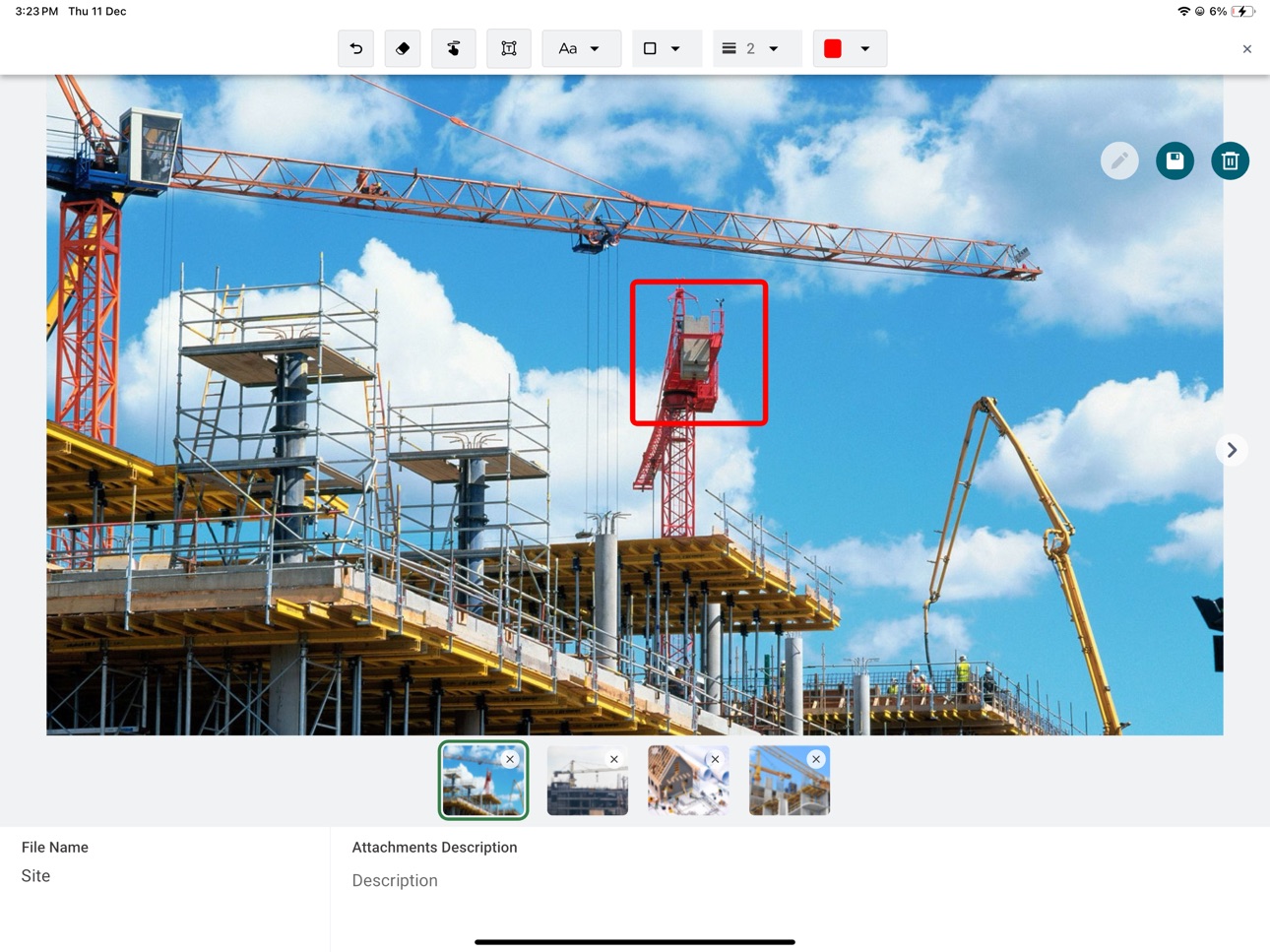
iPad screenshot
iPad screenshot
iPad screenshot
iPad screenshot
iPad screenshot
iPad screenshot
iPad screenshot
iPad screenshot
iPad screenshot

What’s New Version 3.1.0

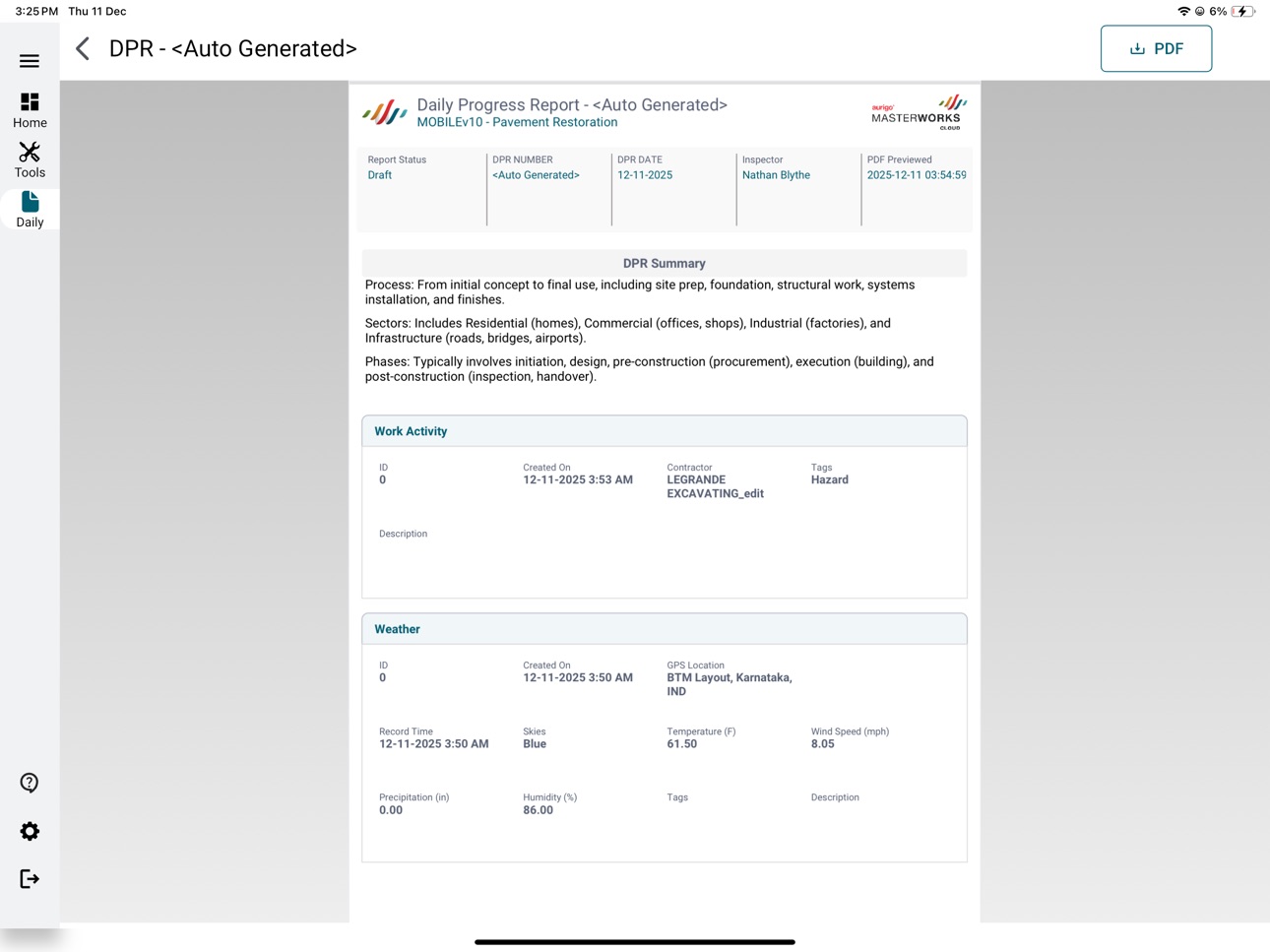
Phone Smart DPR Widget Summaries — Instantly validate Daily Progress Report entries at a glance with auto-generated summaries for each widget. Built-in Quick Reference Guide — A quick-reference cheat sheet is now available right inside the app for fast, on-the-go help. Tablet Improved Linked Records — Linking records across forms is now smoother, cleaner, and easier to discover. Phone & Tablet Offline Download Controls — Choose how data is downloaded offline with three flexible modes: One-Time Snapshot, Rolling Window, or both.

Description

Aurigo Masterworks is a powerful field execution app that helps inspectors, engineers, and project teams capture site progress, complete inspections, access project files, and submit approvals directly from the job site. Designed for fast, reliable field work, the app works fully offline, syncs seamlessly when connected, and ensures every update is accurate and secure. Key Features - Capture inspections and progress on the go with easy, mobile-friendly forms. - Track inspections, tasks, and approvals in real time to keep work moving. - Work efficiently—even offline with automatic sync when connectivity returns. - Access project files instantly—photos, documents, drawings, and field records. - Quick, secure biometric login using fingerprint or face—works offline, eliminates passwords, and keeps teams productive. Benefits for Field Teams - Uninterrupted field operations with dependable offline capability. - Faster, error-free inspections using standardized workflows. - Instant access to documents to avoid delays or missing information. - Real-time collaboration between field and office teams. - Prevent costly data errors in approvals and submissions. - Accelerate approvals and keep construction activities on schedule.

Accessibility

ipadiphonemacrealityDevicetvoswatch

Version history 25 versions

Build 885560120v3.1.02026-05-14 05:41:19
Phone Smart DPR Widget Summaries — Instantly validate Daily Progress Report entries at a glance with auto-generated summaries for each widget. Built-in Quick Reference Guide — A quick-reference cheat sheet is now available right inside the app for fast, on-the-go help. Tablet Improved Linked Records — Linking records across forms is now smoother, cleaner, and easier to discover. Phone & Tablet Offline Download Controls — Choose how data is downloaded offline with three flexible modes: One-Time Snapshot, Rolling Window, or both.
Build 883830767v3.0.02026-04-06 06:18:25
Masterworks is now on phones! Log daily progress, post items, manage punch lists, and track issues from the job site.
Build 881211217v2.10.12026-01-06 05:36:20
- Added auto-save functionality to the Daily Progress Report form for improved reliability and a smoother user experience.
Build 880670220v2.10.02026-01-05 07:17:47
- Introduced Auto-Save for the Daily Progress Report form to enhance reliability and user experience.
Build 879589505v2.9.02025-11-10 06:13:12
- Sign in quickly and securely with fingerprint or facial recognition after initial setup— No more repeated password entry! - Continue My Work & My Tasks now use globally unique identifiers. - Review file access permissions on document management even when offline.
Build 878898797v2.8.02025-10-15 07:40:18
- In-App Access to Training Manual - Bug Fixes
Build 877671022v2.7.02025-09-15 07:51:05
- Integrated weather data (temperature, humidity, wind, precipitation) into DPR using OpenWeather API - Added option to copy DPR records for faster data entry - UI fixes
Build 876906604v2.6.02025-08-04 05:19:23
- Punch List & Issue Log is now enabled by default on mobile and works offline - Numeric fields auto-select and overwrite the default 0.00 - Server URLs auto-convert to lowercase for consistency - "Add Last Items" button disabled during processing to prevent duplicates
Build 875764602v2.5.02025-06-23 05:35:03
- Additional Configurability - Performance Fixes
Build 873791806v2.4.02025-04-07 05:44:16
- Bug fixes and enhancements to improve app reliability
Build 873093096v2.3.12025-03-10 05:41:32
Bug Fixes and Enhancements
Build 872110253v2.3.02025-02-26 06:56:11
Bug fixes and enhancements to provide a smoother, more intuitive user experience, improving navigation, data accuracy and workflow consistency.
Build 871614091v2.2.02025-01-13 05:46:07
Document Management - View and manage files based on project permissions. - Customize your file browsing experience. - Navigate effortlessly between folders. - Quickly locate files with advanced search filters. - Upload, download, delete, and manage files even when offline. - Organize files intuitively for efficient document workflows. Enhancements - Improved Data Management. - Faster and seamless data downloading. - Accurate population of forms, projects, and records. - Robust synchronisation ensures real-time updates across all records. - Stay informed with real-time progress bars for syncing. - Enhanced workflows for managing project records. Bug Fixes - Resolved issues to improve performance and ensure smooth data handling. - Addressed minor glitches for a more reliable user experience.
Build 870785390v2.1.02024-12-02 13:28:49
Introducing New Features and Improvements! - Status Column Filtering - Added a powerful new filter for the status column across all list pages. - This filter dynamically includes every unique status present in the list (not just the currently loaded records). - Find what you need faster with the status filter now positioned at the top of the filter pane! - App Upgrade Notifications - Stay up-to-date effortlessly! You'll now receive notifications prompting you about app updates to ensure you're always using the latest version. - Enhanced Weather Widget for DPR - The Location field in the Weather widget is no longer mandatory, offering greater flexibility in data input. - UI Fixes in Forms - Resolved an issue where edit icons were overlapping with field text in: - Bridge Deck Pour Checklist - Bridge Deck Pre-Pour Conference Checklist - Exception Forms
Build 869157023v2.0.102024-09-22 06:31:52
Bug fixes and performance enhancements
Build 868148900v2.0.92024-08-16 10:45:02
Bug fixes and performance enhancements as what’s new section.
Build 867436913v2.0.82024-07-13 05:54:07
Bug fixes and performance enhancements
Build 866349249v2.0.72024-06-10 07:33:22
Bug fixes and performance improvements
Build 865556808v2.0.62024-04-30 04:59:03
Performance enhancements and bug fixes.
Build 865483013v2.0.52024-04-26 05:57:43
Performance enhancements and bug fixes
Build 865306309v2.0.42024-04-19 12:02:37
Performance enhancements and bug fixes
Build 864817158v2.0.32024-03-29 16:32:54
Performance enhancements and bug fixes
Build 864611548v2.0.22024-03-22 09:44:05
- Enhancement in customer forms. - Improved performance. - Bug fixes.
Build 864264139v2.0.12024-03-11 06:48:32
- Extra features added for filtering - Bug fixes
Build 863861831v2.0.02024-03-04 19:01:40
This update brings you many key features. You can now view all your form progress right from the home screen dashboard, and use the QR scanner for quick autofill for onsite materials forms. You can quickly toggle between forms with just a few clicks.

No pricing data captured yet — comparisons appear once the app has paid storefronts or in-app purchases.

Availability 3 of 175 storefronts

RegionLanguagePriceRatingsAvgVersion
US en-USFree82.03.1.0
IN en-GBFree44.83.1.0
CA en-CAFree03.1.0

Not available in: AE, AF, AG, AI, AL, AM, AO, AR, AT, AU, AZ, BA, BB, BE, BF, BG, BH, BJ, BM, BN, BO, BR, BS, BT, BW, BY, BZ, CD, CG, CH, CI, CL, CM, CN, CO, CR, CV, CY, CZ, DE, DK, DM, DO, DZ, EC, EE, EG, ES, FI, FJ, FM, FR, GA, GB, GD, GE, GH, GM, GR, GT, GW, GY, HK, HN, HR, HU, ID, IE, IL, IQ, IS, IT, JM, JO, JP, KE, KG, KH, KN, KR, KW, KY, KZ, LA, LB, LC, LK, LR, LT, LU, LV, LY, MA, MD, ME, MG, MK, ML, MM, MN, MO, MR, MS, MT, MU, MV, MW, MX, MY, MZ, NA, NE, NG, NI, NL, NO, NP, NR, NZ, OM, PA, PE, PG, PH, PK, PL, PT, PW, PY, QA, RO, RS, RU, RW, SA, SB, SC, SE, SG, SI, SK, SL, SN, SR, ST, SV, SZ, TC, TD, TH, TJ, TM, TN, TO, TR, TT, TW, TZ, UA, UG, UY, UZ, VC, VE, VG, VN, VU, XK, YE, ZA, ZM, ZW

Change log 29 changes · CA

releaseNotes updated
Phone Smart DPR Widget Summaries — Instantly validate Daily Progress Report entries at a glance with auto-generated summaries for each widget. Built-in Quick R
description updated
Aurigo Masterworks is a powerful field execution app that helps inspectors, engineers, and project teams capture site progress, complete inspections, access pro
subtitle updated
Field inspections made easy
name updated
Aurigo Masterworks
Version 3.1.0 released
Phone Smart DPR Widget Summaries — Instantly validate Daily Progress Report entries at a glance with auto-generated summaries for each widget. Built-in Quick Reference Guide — A quick-reference cheat sheet is now available right inside the
Version 3.0.0 released
Masterworks is now on phones! Log daily progress, post items, manage punch lists, and track issues from the job site.
Version 2.10.1 released
- Added auto-save functionality to the Daily Progress Report form for improved reliability and a smoother user experience.
Version 2.10.0 released
- Introduced Auto-Save for the Daily Progress Report form to enhance reliability and user experience.
Version 2.9.0 released
- Sign in quickly and securely with fingerprint or facial recognition after initial setup— No more repeated password entry! - Continue My Work & My Tasks now use globally unique identifiers. - Review file access permissions on document mana
Version 2.8.0 released
- In-App Access to Training Manual - Bug Fixes
Version 2.7.0 released
- Integrated weather data (temperature, humidity, wind, precipitation) into DPR using OpenWeather API - Added option to copy DPR records for faster data entry - UI fixes
Version 2.6.0 released
- Punch List & Issue Log is now enabled by default on mobile and works offline - Numeric fields auto-select and overwrite the default 0.00 - Server URLs auto-convert to lowercase for consistency - "Add Last Items" button disabled during pro
Version 2.5.0 released
- Additional Configurability - Performance Fixes
Version 2.4.0 released
- Bug fixes and enhancements to improve app reliability
Version 2.3.1 released
Bug Fixes and Enhancements
Version 2.3.0 released
Bug fixes and enhancements to provide a smoother, more intuitive user experience, improving navigation, data accuracy and workflow consistency.
Version 2.2.0 released
Document Management - View and manage files based on project permissions. - Customize your file browsing experience. - Navigate effortlessly between folders. - Quickly locate files with advanced search filters. - Upload, download, delete, a
Version 2.1.0 released
Introducing New Features and Improvements! - Status Column Filtering - Added a powerful new filter for the status column across all list pages. - This filter dynamically includes every unique status present in the list (not ju
Version 2.0.10 released
Bug fixes and performance enhancements
Version 2.0.9 released
Bug fixes and performance enhancements as what’s new section.
Version 2.0.8 released
Bug fixes and performance enhancements
Version 2.0.7 released
Bug fixes and performance improvements
Version 2.0.6 released
Performance enhancements and bug fixes.
Version 2.0.5 released
Performance enhancements and bug fixes
Version 2.0.4 released
Performance enhancements and bug fixes
Version 2.0.3 released
Performance enhancements and bug fixes
Version 2.0.2 released
- Enhancement in customer forms. - Improved performance. - Bug fixes.
Version 2.0.1 released
- Extra features added for filtering - Bug fixes
Version 2.0.0 released
This update brings you many key features. You can now view all your form progress right from the home screen dashboard, and use the QR scanner for quick autofill for onsite materials forms. You can quickly toggle between forms with just a f
expanded screenshot