Home › Health & Fitness

 US
US
USen-US GBen-GB
 CAen-CA
 AUen-AU
 DEde-DE
 NZen-AU
 ITit
ITit ZAen-GB
 SGen-GB
 MXes-MX
 SVes-MX
 TWzh-Hant-TW
 HKzh-Hant-HK
 AENot Available
 AFNot Available
 AGNot Available
 AINot Available
 AMNot Available
 AONot Available
 ARNot Available
 AZNot Available
 BBNot Available
 BFNot Available
 BGNot Available
 BHNot Available
 BJNot Available
 BMNot Available
 BNNot Available
 BONot Available
 BRNot Available
 BSNot Available
 BTNot Available
 BWNot Available
 BYNot Available
 BZNot Available
 CDNot Available
 CGNot Available
 CINot Available
 CLNot Available
 CMNot Available
 CNNot Available
 CONot Available
 CRNot Available
 CVNot Available
 CYNot Available
 CZNot Available
 DKNot Available
 DMNot Available
 DONot Available
 DZNot Available
 ECNot Available
 EENot Available
 EGNot Available
 ESNot Available
 FINot Available
 FJNot Available
 FMNot Available
 FRNot Available
 GANot Available
 GDNot Available
 GENot Available
 GHNot Available
 GMNot Available
 GRNot Available
 GTNot Available
 GWNot Available
 GYNot Available
 HNNot Available
 HRNot Available
 HUNot Available
 IDNot Available
 IENot Available
 ILNot Available
 INNot Available
 IQNot Available
 ISNot Available
 JMNot Available
 JONot Available
 JPNot Available
 KENot Available
 KGNot Available
 KHNot Available
 KRNot Available
 KWNot Available
 KYNot Available
 KZNot Available
 LANot Available
 LBNot Available
 LCNot Available
 LKNot Available
 LRNot Available
 LTNot Available
 LUNot Available
 LVNot Available
 LYNot Available
 MANot Available
 MENot Available
 MGNot Available
 MLNot Available
 MMNot Available
 MNNot Available
 MONot Available
 MRNot Available
 MSNot Available
 MTNot Available
 MUNot Available
 MVNot Available
 MWNot Available
 MYNot Available
 MZNot Available
 NANot Available
 NENot Available
 NGNot Available
 NINot Available
 NLNot Available
 NONot Available
 NPNot Available
 NRNot Available
 OMNot Available
 PANot Available
 PENot Available
 PGNot Available
 PKNot Available
 PLNot Available
 PWNot Available
 PYNot Available
 QANot Available
 RONot Available
 RSNot Available
 RUNot Available
 RWNot Available
 SANot Available
 SBNot Available
 SCNot Available
 SINot Available
 SKNot Available
 SLNot Available
 SNNot Available
 SRNot Available
 STNot Available
 SZNot Available
 TCNot Available
 TDNot Available
 THNot Available
 TJNot Available
 TMNot Available
 TNNot Available
 TONot Available
 TRNot Available
 TTNot Available
 TZNot Available
 UANot Available
 UGNot Available
 UYNot Available
 UZNot Available
 VCNot Available
 VENot Available
 VNNot Available
 VUNot Available
 XKNot Available
 YENot Available
 ZMNot Available
 ZWNot Available
13 of 163 storefronts
Content in en-US
Content in en-US
Information
Preview 3 platforms
iPhone 6 images


iPad 3 images


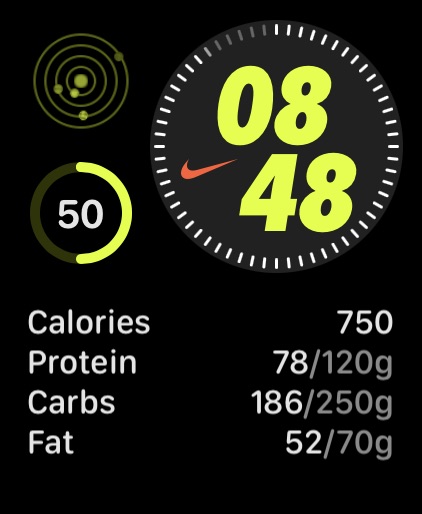
Apple Watch 3 images


What’s New Version 3.16
New: Apple Watch app – check your progress right from your wrist.
New: Add support for FitBee on iPad.
Fixed: Nutrient Goal widget did not display progress correctly.
Improved: Camera launches more quickly on iOS 26.
Improved: Camera got a visual update for iOS 26 users.
Improved: Prevent accidental food-row taps while editing serving amounts by blocking touches beneath the keyboard shortcut bar.
Improved: Reduced app size by ~25%.
Description
FitBee is the fastest and most accurate way to track your nutrition for free.
KEY FEATURES
• Large & Accurate food database of over 1 million foods
• Ad Free
• Free barcode and nutrition label scanning
• Snap a photo to log your meal
• Create recipes or import them from any website
• Syncs with Apple Health
• Beautiful Home Screen Widgets
• Dark Mode Support
• Optimized for iOS 26
ACCURATE FOOD DATABASE
• Over 1 million foods with accurate nutrition data
• Easily report missing or inaccurate foods
AD FREE & PRIVATE
• No ads in the product, ever.
• Private by default. We do not collect any data for marketing purposes.
BARCODE SCANNING
• Barcode scanning is always free
• Scan nutrition labels to create foods in a snap
PHOTO LOGGING
• Log your meals by just taking a photo
• Uses AI to estimate the calorie and macros of your meal
APPLE HEALTH INTEGRATION
• Import your workouts from Apple Health
• Read/write your nutrition data to Apple Health
In-App Purchases US pricing
FitBee Premium Subscription
Monthly Plan w/ Family Sharing · Monthly 7-day free trial$14.99
Annual Plan w/ Family Sharing · Yearly 7-day free trial$89.99
FitBee Monthly · Monthly 7-day free trial$9.99
FitBee Annual · Yearly 7-day free trial$59.99
One-Time Purchases
Buy Once$149.99
One Time w/ Family Sharing$199.99
Capabilities
In-App Purchases
Accessibility
ipadiphonemacrealityDevicetvoswatch
Version history 25 versions
Build 887496606v3.162026-06-27 20:15:51
New: Apple Watch app – check your progress right from your wrist.
New: Add support for FitBee on iPad.
Fixed: Nutrient Goal widget did not display progress correctly.
Improved: Camera launches more quickly on iOS 26.
Improved: Camera got a visual update for iOS 26 users.
Improved: Prevent accidental food-row taps while editing serving amounts by blocking touches beneath the keyboard shortcut bar.
Improved: Reduced app size by ~25%.
Build 886647454v3.15.42026-06-08 01:11:53
Fixed: Another crash that could occur due to a user having multiple favorites for the same food.
Build 886624840v3.15.32026-06-07 16:30:05
Fixed: Crash that could occur after favoriting the same food more than once.
Fixed: Serving amounts now always respect your device’s number format, including decimal separators.
Build 886599054v3.15.22026-06-06 16:57:03
Fixed: Crash when a food has duplicate nutrition information.
Build 886336855v3.15.12026-05-31 19:59:45
Fixed: Improved reliability of camera on older devices.
Fixed: Some custom foods could show “1 g” instead of the serving name after editing for users in the EU.
Build 886204290v3.152026-05-27 19:30:14
New: Your remaining energy now stays visible as you scroll through Home.
New: Open the camera from a Lock Screen Widget.
Fixed: Crash when tapping on meal reminder notifications.
Improved: Accessibility improvements throughout the app.
Build 885195510v3.14.72026-05-03 02:24:10
New: Mark your day as complete to celebrate your progress and see a weight projection based on how the day went.
New: Duplicate an existing food to make modifications or create variations.
Improved: Filter by meal when viewing recent food entries.
Fixed: A rare crash that could occur when searching for a food that had duplicate favorite records.
Build 885141827v3.14.62026-05-01 16:13:06
New: Mark your day as complete to celebrate your progress and see a weight projection based on how the day went.
New: Duplicate an existing food to make modifications or create variations.
Improved: Filter by meal when viewing recent food entries.
Build 884727872v3.14.52026-04-20 18:11:56
Improved: When saving a custom food, FitBee now tells you which required fields are missing.
Improved: Added the ability to toggle flash when scanning barcodes or taking photos.
Fixed: Food logging did not work for users running on iOS 18.3.2 or below.
Fixed: Crash when tapping a notification from FitBee.
Fixed: Editing a custom food’s serving size could create incorrect 1g or 100g serving options.
Build 884435838v3.14.42026-04-13 17:09:33
Improved: Foods you’ve eaten recently in the same meal are now more likely to appear near the top of recents.
Fixed: Certain food entries could end up on the wrong date when exporting your data to CSV or PDF.
Build 883752724v3.14.32026-03-25 14:42:57
3.14.3
Fixed: Resolved an issue on iOS 18 where the meal action row could grow taller while scrolling.
3.14.2
New: Added an Export Data shortcut for automating data exports.
New: Customize nutrients when using Quick Add.
Improved: Faster access to your recent items—view and log them directly from the Home screen.
Improved: Added a new setting to choose your first day of the week. The default is now Monday.
Fixed: Text Export now respects your selected nutrients.
Build 883688834v3.14.22026-03-24 21:58:09
New: Added an Export Data shortcut for automating data exports.
New: Customize nutrients when using Quick Add.
Improved: Faster access to your recent items—view and log them directly from the Home screen.
Improved: Added a new setting to choose your first day of the week. The default is now Monday.
Fixed: Text Export now respects your selected nutrients.
Build 883360017v3.14.12026-03-14 21:17:07
New: Share your weight progress and celebrate your results.
Improved: Cleaned up up the Settings screen.
Improved: Increased the tappable area of the Quick Add button in food search results.
Fixed: Resolved an issue where swiping to delete on the Home Screen could cause the footer to appear twice.
Build 883190585v3.142026-03-10 11:45:15
New: Add notes to any day to keep track of how food affects your health goals.
New: Added the ability to create custom workouts.
New: FitBee now lets you know when there’s an ongoing service disruption.
Improved: Made the next/previous text field buttons easier to tap.
Improved: Made it easier to copy a meal from yesterday to today using the Copy menu.
Build 883030654v3.13.52026-03-04 21:39:49
3.13.5
Fixed: The order of goals on the widget was reversed.
3.13.4
Improved: Significantly reduced FitBee’s on-device database size.
Improved: Active Energy trends and averages are now more accurate when Apple Health has missing or zero-value days.
Fixed: On first launch, the “What’s New” card could appear on Home and sometimes could not be dismissed.
Build 882991569v3.13.42026-03-03 20:44:37
Improved: Significantly reduced FitBee’s on-device database size.
Improved: Active Energy trends and averages are now more accurate when Apple Health has missing or zero-value days.
Fixed: On first launch, the “What’s New” card could appear on Home and sometimes could not be dismissed.
Build 882498130v3.13.32026-02-17 14:14:53
New: Added an Energy Goal Calculation screen that explains how your daily goal is computed.
Improved: Fixed an issue where Active Energy adjustments could make your goal unrealistically low at the start of the day.
Improved: Water entries in fluid ounces now support two decimal places.
Improved: Added a link with instructions on how to set up Family Sharing.
Improved: Tapping on a goal card on the home screen now shows the goal details.
Improved: Add a % of calories by macronutrient section in Nutrition Summary.
Improved: Removed the confusing % of calories from macros view on the Home View.
Improved: The keyboard dismiss button now appears as a compact floating button instead of a full-width bar.
Fixed: What's New on the Home Screen could reappear after dismissal.
Fixed: Scanned nutrition labels now correctly convert sodium to salt for UK/EU formats instead of showing inflated salt values.
Build 882161421v3.13.22026-02-04 19:58:41
New: Added a Weight Trend widget to quickly see your latest weight and progress at a glance.
Improved: Your library sort order now persists.
Improved: Your data export options now persists.
Fixed: Daily summary exports now respects your nutrition label format.
Build 881941190v3.13.12026-01-29 02:19:28
New: Share your day as a PDF or plain text — perfect for sending to a coach or your favorite AI.
Fixed: Widget calorie and macro totals could include entries from disabled or deleted meal types.
Fixed: Copied meals now use the current time when duplicating entries.
Fixed: The app could freeze when rotating to landscape while using Describe on iOS 26.
Build 881401881v3.132026-01-11 23:40:27
New: See a breakdown of your nutrition for the day, including which foods had the biggest impact on your goals.
New: Track which foods contribute most to your goals over time.
New: Choose light/dark mode independent of your system settings.
Improved: Retry photo analysis scans directly if the initial attempt fails.
Improved: Enter decimal values when editing metric serving sizes for more accurate logging.
Improved: Access the Describe feature directly from the home screen.
Fixed: Widgets could show outdated water and nutrient data after midnight.
Build 880778212v3.12.102025-12-17 21:17:42
Happy holidays from FitBee! 2025 was a landmark year for us, and we can't wait to show you what's in store in 2026.
Fixed: After deleting a nutrient goal, the detail screen didn’t dismiss correctly.
Fixed: Re-arranging or deleting goals from the Edit Goals screen would sometimes cause a crash.
Improved: When Quick Adding calories or macros, the Log button now prompts you for the meal if none is set.
Improved: Recipe ingredient matching
Build 880661458v3.12.92025-12-15 15:07:16
Fixed: In rare circumstances, steps from a connected Apple Watch did not sync correctly.
Build 880529593v3.12.82025-12-13 15:52:34
Fixed: Use available carbs instead of total carbs for AU/NZ nutrition label format.
Build 880320744v3.12.62025-12-04 01:00:03
Fixed: Keyboard now opens on the weight field instead of the notes field when logging your weight.
Build 880346848v3.12.72025-12-04 19:41:55
Fixed: Keyboard now opens on the weight field instead of the notes field when logging your weight.
Price history by region
Currency
Show
Columns
Search
Availability 13 of 163 storefronts
| Region | Language | Price | Ratings | Avg | Version |
|---|---|---|---|---|---|
| US | en-US | Free | 2.2k | 4.8 | 3.16 |
| GB | en-GB | Free | 252 | 4.7 | 3.16 |
| CA | en-CA | Free | 219 | 4.8 | 3.16 |
| AU | en-AU | Free | 97 | 4.6 | 3.16 |
| DE | de-DE | Free | 34 | 4.8 | 3.16 |
| NZ | en-AU | Free | 18 | 4.7 | 3.16 |
| IT | it | Free | 11 | 5.0 | 3.16 |
| ZA | en-GB | Free | 7 | 4.4 | 3.16 |
| SG | en-GB | Free | 3 | 3.7 | 3.16 |
| MX | es-MX | Free | 1 | 5.0 | 3.16 |
| SV | es-MX | Free | 1 | 5.0 | 3.16 |
| TW | zh-Hant-TW | Free | 1 | 5.0 | 3.16 |
| HK | zh-Hant-HK | Free | 0 | — | 3.16 |
Not available in: AE, AF, AG, AI, AM, AO, AR, AZ, BB, BF, BG, BH, BJ, BM, BN, BO, BR, BS, BT, BW, BY, BZ, CD, CG, CI, CL, CM, CN, CO, CR, CV, CY, CZ, DK, DM, DO, DZ, EC, EE, EG, ES, FI, FJ, FM, FR, GA, GD, GE, GH, GM, GR, GT, GW, GY, HN, HR, HU, ID, IE, IL, IN, IQ, IS, JM, JO, JP, KE, KG, KH, KR, KW, KY, KZ, LA, LB, LC, LK, LR, LT, LU, LV, LY, MA, ME, MG, ML, MM, MN, MO, MR, MS, MT, MU, MV, MW, MY, MZ, NA, NE, NG, NI, NL, NO, NP, NR, OM, PA, PE, PG, PK, PL, PW, PY, QA, RO, RS, RU, RW, SA, SB, SC, SI, SK, SL, SN, SR, ST, SZ, TC, TD, TH, TJ, TM, TN, TO, TR, TT, TZ, UA, UG, UY, UZ, VC, VE, VN, VU, XK, YE, ZM, ZW
Change log 29 changes · US
✎
releaseNotes updated
New: Apple Watch app – check your progress right from your wrist.
New: Add support for FitBee on iPad.
Fixed: Nutrient Goal widget did not display progress corr
✎
description updated
FitBee is the fastest and most accurate way to track your nutrition for free.
KEY FEATURES
• Large & Accurate food database of over 1 million foods
• Ad Free
✎
subtitle updated
Free, fast, no-ads tracker
✎
name updated
FitBee Calorie & Macro Counter
◆
Version 3.16 released
New: Apple Watch app – check your progress right from your wrist.
New: Add support for FitBee on iPad.
Fixed: Nutrient Goal widget did not display progress correctly.
Improved: Camera launches more quickly on iOS 26.
Improved: Camera got a
◆
Version 3.15.4 released
Fixed: Another crash that could occur due to a user having multiple favorites for the same food.
◆
Version 3.15.3 released
Fixed: Crash that could occur after favoriting the same food more than once.
Fixed: Serving amounts now always respect your device’s number format, including decimal separators.
◆
Version 3.15.2 released
Fixed: Crash when a food has duplicate nutrition information.
◆
Version 3.15.1 released
Fixed: Improved reliability of camera on older devices.
Fixed: Some custom foods could show “1 g” instead of the serving name after editing for users in the EU.
◆
Version 3.15 released
New: Your remaining energy now stays visible as you scroll through Home.
New: Open the camera from a Lock Screen Widget.
Fixed: Crash when tapping on meal reminder notifications.
Improved: Accessibility improvements throughout the app.
◆
Version 3.14.7 released
New: Mark your day as complete to celebrate your progress and see a weight projection based on how the day went.
New: Duplicate an existing food to make modifications or create variations.
Improved: Filter by meal when viewing recent food e
◆
Version 3.14.6 released
New: Mark your day as complete to celebrate your progress and see a weight projection based on how the day went.
New: Duplicate an existing food to make modifications or create variations.
Improved: Filter by meal when viewing recent food e
◆
Version 3.14.5 released
Improved: When saving a custom food, FitBee now tells you which required fields are missing.
Improved: Added the ability to toggle flash when scanning barcodes or taking photos.
Fixed: Food logging did not work for users running on iOS 18.3
◆
Version 3.14.4 released
Improved: Foods you’ve eaten recently in the same meal are now more likely to appear near the top of recents.
Fixed: Certain food entries could end up on the wrong date when exporting your data to CSV or PDF.
◆
Version 3.14.3 released
3.14.3
Fixed: Resolved an issue on iOS 18 where the meal action row could grow taller while scrolling.
3.14.2
New: Added an Export Data shortcut for automating data exports.
New: Customize nutrients when using Quick Add.
Improved: Faster
◆
Version 3.14.2 released
New: Added an Export Data shortcut for automating data exports.
New: Customize nutrients when using Quick Add.
Improved: Faster access to your recent items—view and log them directly from the Home screen.
Improved: Added a new setting to c
◆
Version 3.14.1 released
New: Share your weight progress and celebrate your results.
Improved: Cleaned up up the Settings screen.
Improved: Increased the tappable area of the Quick Add button in food search results.
Fixed: Resolved an issue where swiping to delete
◆
Version 3.14 released
New: Add notes to any day to keep track of how food affects your health goals.
New: Added the ability to create custom workouts.
New: FitBee now lets you know when there’s an ongoing service disruption.
Improved: Made the next/previous tex
◆
Version 3.13.5 released
3.13.5
Fixed: The order of goals on the widget was reversed.
3.13.4
Improved: Significantly reduced FitBee’s on-device database size.
Improved: Active Energy trends and averages are now more accurate when Apple Health has missing or zero-v
◆
Version 3.13.4 released
Improved: Significantly reduced FitBee’s on-device database size.
Improved: Active Energy trends and averages are now more accurate when Apple Health has missing or zero-value days.
Fixed: On first launch, the “What’s New” card could appear
◆
Version 3.13.3 released
New: Added an Energy Goal Calculation screen that explains how your daily goal is computed.
Improved: Fixed an issue where Active Energy adjustments could make your goal unrealistically low at the start of the day.
Improved: Water entries i
◆
Version 3.13.2 released
New: Added a Weight Trend widget to quickly see your latest weight and progress at a glance.
Improved: Your library sort order now persists.
Improved: Your data export options now persists.
Fixed: Daily summary exports now respects your nut
◆
Version 3.13.1 released
New: Share your day as a PDF or plain text — perfect for sending to a coach or your favorite AI.
Fixed: Widget calorie and macro totals could include entries from disabled or deleted meal types.
Fixed: Copied meals now use the current time
◆
Version 3.13 released
New: See a breakdown of your nutrition for the day, including which foods had the biggest impact on your goals.
New: Track which foods contribute most to your goals over time.
New: Choose light/dark mode independent of your system settings.
◆
Version 3.12.10 released
Happy holidays from FitBee! 2025 was a landmark year for us, and we can't wait to show you what's in store in 2026.
Fixed: After deleting a nutrient goal, the detail screen didn’t dismiss correctly.
Fixed: Re-arranging or deleting goals
◆
Version 3.12.9 released
Fixed: In rare circumstances, steps from a connected Apple Watch did not sync correctly.
◆
Version 3.12.8 released
Fixed: Use available carbs instead of total carbs for AU/NZ nutrition label format.
◆
Version 3.12.7 released
Fixed: Keyboard now opens on the weight field instead of the notes field when logging your weight.
◆
Version 3.12.6 released
Fixed: Keyboard now opens on the weight field instead of the notes field when logging your weight.