Home › Photo & Video

 PY
PY
 USen-US
 MXes-MX
 BRpt-BR
 CLes-MX
 ARes-MX
 COes-MX
 CRes-MX
 DOes-MX
 ECes-MX
 PEes-MX
 UYen-GB
 GTes-MX
 PAes-MX
 HNes-MX
 SVes-MX
 DZen-GB
 VEes-MXPYes-MX
 GHen-GB
 BOes-MX
 TNen-GB
 KEen-GB
 NGen-GB
 JMen-GB
 TTen-GB
 AOen-GB
 NIes-MX
 UGen-GB
 TZen-GB
 SNen-GB
 AGen-GB
 KYen-GB
 MZen-GB
 ZWen-GB
 BSen-GB
 BWen-GB
 CGen-GB
 BFen-GB
 CDen-GB
 CVen-GB
 LRen-GB
 MAen-GB
 MGen-GB
 MUen-GB
 NAen-GB
 AIen-GB
 BJen-GB
 BZen-GB
 CIfr-FR
 DMen-GB
 GMen-GB
 GYen-GB
 MLen-GB
 SLen-GB
 TCen-GB
 TDen-GB
 VCen-GB
 VGen-GB
 BBen-GB
 CMfr-FR
 GAfr-FR
 GDen-GB
 GWen-GB
 KNen-GB
 LCen-GB
 LYen-GB
 MSen-GB
 MWen-GB
 NEen-GB
 RWen-GB
 SCen-GB
 SRen-GB
 STen-GB
 SZen-GB
 ZMen-GB
75 of 75 storefronts
Content in en-US
Content in en-US
Information
Apple ID635238395
Bundle IDcom.astrotek.ptp.base.standard
SellerSeller
Min iOS9.0
Min macOS11.0
Device familiesiphone, ipad, ipod
Released2013-06-06
Copyright©2020 iCatch Technology Inc.,
Privacy policyLink ↗
Preview 2 platforms
iPhone 6 images


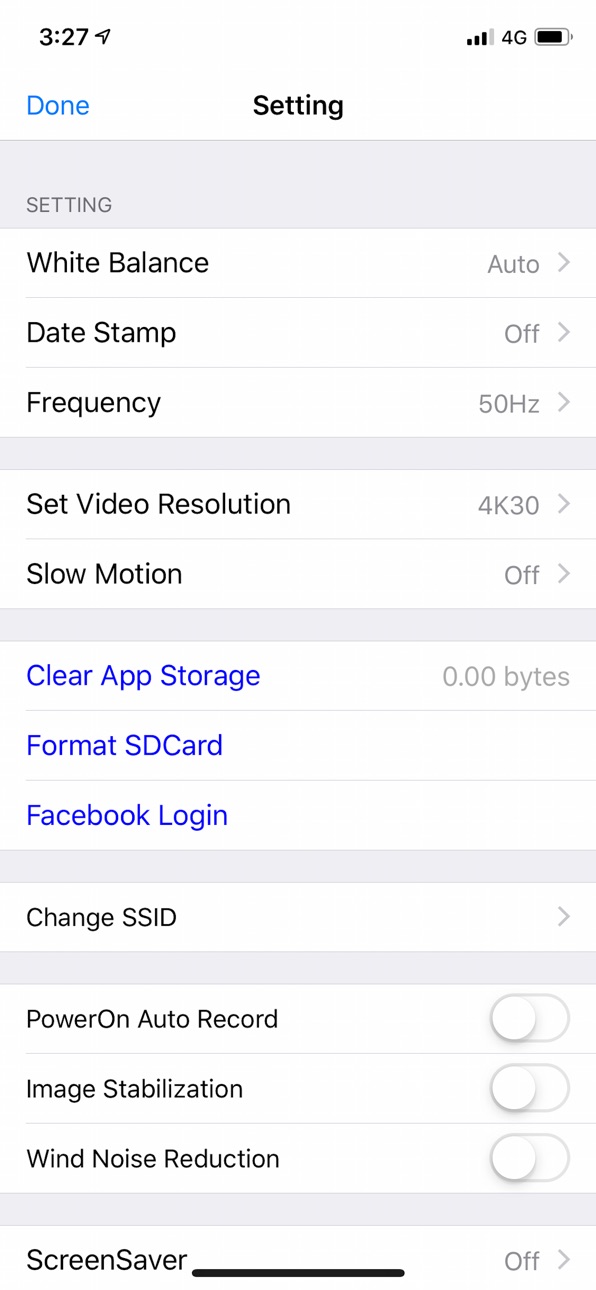


iPad 5 images


What’s New Version 1.4.53
1. Check the network permissions of the app.
Description
With iSmartDV, you could control the iCatch Technology's based DSP camera by using your iPhone or iPad. Like remote viewfinder/preview, view photo album.
Any APP question you can contact us via https://www.facebook.com/ismartdvuser
Connection Steps.
1. Turn on the Camera Wi-Fi, it will act as a Wi-Fi AP.
2. in iPhone/iPad, Setting->Wi-Fi turn it on and find out camera SSID then connect. the SSID & password should be on your manual or contact servce.
3. Open the APP
Now you can streaming the preview, take a picture or video.
Q&A
Q: Why cannot create a new camera?
A: First make sure you have follow connection step and established the connection, second, try to pding 192.168.1.1 by other Apps, like Ping Lite, make sure the wireless signal was strong enough for work.
Q: Why cannot download the video?
A: Before download, you should make sure the video format is compatible with iPhone/iPad, and allow iSmart DV to access Photo Library.
Features:
1. Preview stream, Live streaming from camera.
2. Trigger action, In the preview stream, you can trigger camera to take a video or picture.
3. Support burst shot
4. Support delay capture.
5. Support video quality change.
6. Support image size change.
7. Support white-balance change
8. Format the camera SD card.
*9. Listing photo & video files and download or delete files.
10. Single photo playback.
11. Automatic time correction with iPhone or iPad when established the connection.
12. Preview streaming is more smoothing.
*13. Support video playback with audio before download.
14. Support upside down.
15. Support slow motion.
16. Support social network sharing (by cell network)
17. Support change camera SSID & password ( remember turn off/on camera wifi)
18. Support Date-Time Stamp setting in video mode
*1. Make sure the camera file format is compatible with iOS, the AVI not support.
*2. Make sure the camera is designed by iCatch SPCA6330 or SPCA6350 chip.
*3. Play video without download feature is base on camera.
We are looking for your feedback, if you have any problem please leave camera name, app version and error message on our website.
http://www.icatchtek.com/fae.asp
We will improved it and enhance new function in the future.
Enjoy.
2016.8.24 updated.
Some people feedback us they cannot download the big video files (more than 2GB), thanks for your feedback, we are check much more camera and found the problem is camera suddenly disconnect the Wi-Fi connection during download, we cannot fix the camera crash issue, sorry.
Information:
Feedback your experience to us continually, we will improve it in the feature. if you have any question, visit iCatch web site and leave information about your question and your camera info., we will contact you back by email.
Again, some features are based on camera, such like, video playback, zoom in/out, time-lapse mode, when your camera is support these feature, iSmart DV will show more buttons and actions automatically on your iPhone/iPad.
Accessibility
ipadiphonemacrealityDevicetvoswatch
Version history 25 versions
Build 847560724v1.4.532022-03-07 16:27:47
1. Check the network permissions of the app.
Build 841809052v1.4.522021-04-23 17:11:09
Improve the adaptation to Russian.
Build 840362907v1.4.512021-02-05 13:55:38
Add support for Russian language。
Build 838135570v1.4.502020-10-09 13:07:13
Add more product name string.
Build 838023977v1.4.492020-09-30 22:00:58
Fix the wrong time zone format.
Build 837453962v1.4.482020-08-22 12:42:59
Update SDK and fix some minor bug
Build 837268877v1.4.472020-08-12 18:08:48
Solve the problem that the first connection fails after installation。
Build 837212743v1.4.462020-08-04 19:08:31
Add a connection check process with camera。
Build 837017273v1.4.452020-07-27 18:38:41
Modify the connection retry process.
Build 836184060v1.4.442020-05-29 11:28:49
Fix camera mode disappear bug.
Build 835950194v1.4.432020-05-18 13:15:29
Fix some known issues.
Build 834024083v1.4.422019-12-16 20:49:35
Support some camera which support looping recording like dash camera.
Fix Chinese language translation error.
Performance improved on browsing remote camera's photos/videos list.
Build 833712130v1.4.412019-11-25 17:19:47
Support self-capture countdown feature.
Fix local playback video crash issue.
Build 832908642v1.4.402019-09-25 22:49:54
iOS13 compatible.
Support dark mode.
Fix download files issue.
Build 832816801v1.4.392019-09-18 20:33:55
Fix batch downloading more than 5 videos/photos will stock on iOS 12.x issue.
Build 832730743v1.4.382019-09-11 23:27:11
Support iCatch Technology V55 8K camera chip.
Build 832567296v1.4.372019-08-29 22:53:24
Support new dash camera feature - PIV capture.
Take a photo in video mode or under record.
Build 832055948v1.4.352019-07-18 18:14:23
Fix Spanish German Italian language problem.
Build 832022158v1.4.342019-07-16 20:14:56
Add some video size
Build 831935271v1.4.332019-07-09 16:27:19
FIx white balance not match camera’s menu issue.
Build 831915801v1.4.322019-07-06 16:09:26
Support new camera which with underwater white balance setting.
Build 831329043v1.4.312019-05-16 17:32:53
Fix Facebook Live cannot stop issue.
Fix some minor bug.
Build 830729025v1.4.302019-03-25 19:51:47
Fix iPad crash on tape help button.
Build 830708769v1.4.292019-03-22 19:34:34
Update Facebook SDK version.
Build 830564181v1.4.282019-03-11 19:43:15
Update privacy link.
Fix some minor bug.
No pricing data captured yet — comparisons appear once the app has paid storefronts or in-app purchases.
Availability 75 of 75 storefronts
| Region | Language | Price | Ratings | Avg | Version |
|---|---|---|---|---|---|
| US | en-US | Free | 20.6k | 4.2 | 1.4.53 |
| MX | es-MX | Free | 1.6k | 4.4 | 1.4.53 |
| BR | pt-BR | Free | 1.0k | 4.2 | 1.4.53 |
| CL | es-MX | Free | 775 | 4.5 | 1.4.53 |
| AR | es-MX | Free | 487 | 4.4 | 1.4.53 |
| CO | es-MX | Free | 370 | 4.5 | 1.4.53 |
| CR | es-MX | Free | 161 | 4.3 | 1.4.53 |
| DO | es-MX | Free | 136 | 4.4 | 1.4.53 |
| EC | es-MX | Free | 111 | 4.5 | 1.4.53 |
| PE | es-MX | Free | 96 | 4.4 | 1.4.53 |
| UY | en-GB | Free | 92 | 4.4 | 1.4.53 |
| GT | es-MX | Free | 74 | 4.5 | 1.4.53 |
| PA | es-MX | Free | 45 | 4.6 | 1.4.53 |
| HN | es-MX | Free | 30 | 4.4 | 1.4.53 |
| SV | es-MX | Free | 30 | 4.6 | 1.4.53 |
| DZ | en-GB | Free | 23 | 4.7 | 1.4.53 |
| VE | es-MX | Free | 23 | 4.9 | 1.4.53 |
| PY | es-MX | Free | 18 | 4.2 | 1.4.53 |
| GH | en-GB | Free | 16 | 4.8 | 1.4.53 |
| BO | es-MX | Free | 14 | 4.9 | 1.4.53 |
| TN | en-GB | Free | 14 | 4.2 | 1.4.53 |
| KE | en-GB | Free | 13 | 4.2 | 1.4.53 |
| NG | en-GB | Free | 13 | 4.5 | 1.4.53 |
| JM | en-GB | Free | 10 | 4.5 | 1.4.53 |
| TT | en-GB | Free | 10 | 4.4 | 1.4.53 |
| AO | en-GB | Free | 7 | 4.4 | 1.4.53 |
| NI | es-MX | Free | 7 | 4.7 | 1.4.53 |
| UG | en-GB | Free | 7 | 4.7 | 1.4.53 |
| TZ | en-GB | Free | 6 | 4.8 | 1.4.53 |
| SN | en-GB | Free | 5 | 4.4 | 1.4.53 |
| AG | en-GB | Free | 4 | 4.8 | 1.4.53 |
| KY | en-GB | Free | 4 | 5.0 | 1.4.53 |
| MZ | en-GB | Free | 4 | 4.8 | 1.4.53 |
| ZW | en-GB | Free | 4 | 5.0 | 1.4.53 |
| BS | en-GB | Free | 3 | 4.0 | 1.4.53 |
| BW | en-GB | Free | 3 | 4.0 | 1.4.53 |
| CG | en-GB | Free | 3 | 4.7 | 1.4.53 |
| BF | en-GB | Free | 2 | 5.0 | 1.4.53 |
| CD | en-GB | Free | 2 | 5.0 | 1.4.53 |
| CV | en-GB | Free | 2 | 5.0 | 1.4.53 |
| LR | en-GB | Free | 2 | 4.0 | 1.4.53 |
| MA | en-GB | Free | 2 | 5.0 | 1.4.53 |
| MG | en-GB | Free | 2 | 5.0 | 1.4.53 |
| MU | en-GB | Free | 2 | 3.0 | 1.4.53 |
| NA | en-GB | Free | 2 | 4.5 | 1.4.53 |
| AI | en-GB | Free | 1 | 1.0 | 1.4.53 |
| BJ | en-GB | Free | 1 | 2.0 | 1.4.53 |
| BZ | en-GB | Free | 1 | 5.0 | 1.4.53 |
| CI | fr-FR | Free | 1 | 5.0 | 1.4.53 |
| DM | en-GB | Free | 1 | 5.0 | 1.4.53 |
| GM | en-GB | Free | 1 | 5.0 | 1.4.53 |
| GY | en-GB | Free | 1 | 5.0 | 1.4.53 |
| ML | en-GB | Free | 1 | 5.0 | 1.4.53 |
| SL | en-GB | Free | 1 | 4.0 | 1.4.53 |
| TC | en-GB | Free | 1 | 5.0 | 1.4.53 |
| TD | en-GB | Free | 1 | 1.0 | 1.4.53 |
| VC | en-GB | Free | 1 | 2.0 | 1.4.53 |
| VG | en-GB | Free | 1 | 3.0 | 1.4.53 |
| BB | en-GB | Free | 0 | — | 1.4.53 |
| CM | fr-FR | Free | 0 | — | 1.4.53 |
| GA | fr-FR | Free | 0 | — | 1.4.53 |
| GD | en-GB | Free | 0 | — | 1.4.53 |
| GW | en-GB | Free | 0 | — | 1.4.53 |
| KN | en-GB | Free | 0 | — | 1.4.53 |
| LC | en-GB | Free | 0 | — | 1.4.53 |
| LY | en-GB | Free | 0 | — | 1.4.53 |
| MS | en-GB | Free | 0 | — | 1.4.53 |
| MW | en-GB | Free | 0 | — | 1.4.53 |
| NE | en-GB | Free | 0 | — | 1.4.53 |
| RW | en-GB | Free | 0 | — | 1.4.53 |
| SC | en-GB | Free | 0 | — | 1.4.53 |
| SR | en-GB | Free | 0 | — | 1.4.53 |
| ST | en-GB | Free | 0 | — | 1.4.53 |
| SZ | en-GB | Free | 0 | — | 1.4.53 |
| ZM | en-GB | Free | 0 | — | 1.4.53 |
Change log 29 changes · PY
✎
releaseNotes updated
1. Check the network permissions of the app.
✎
description updated
With iSmartDV, you could control the iCatch Technology's based DSP camera by using your iPhone or iPad. Like remote viewfinder/preview, view photo album.
Any
✎
subtitle updated
Catching the Beauty of Life
✎
name updated
iSmart DV
◆
Version 1.4.53 released
1. Check the network permissions of the app.
◆
Version 1.4.52 released
Improve the adaptation to Russian.
◆
Version 1.4.51 released
Add support for Russian language。
◆
Version 1.4.50 released
Add more product name string.
◆
Version 1.4.49 released
Fix the wrong time zone format.
◆
Version 1.4.48 released
Update SDK and fix some minor bug
◆
Version 1.4.47 released
Solve the problem that the first connection fails after installation。
◆
Version 1.4.46 released
Add a connection check process with camera。
◆
Version 1.4.45 released
Modify the connection retry process.
◆
Version 1.4.44 released
Fix camera mode disappear bug.
◆
Version 1.4.43 released
Fix some known issues.
◆
Version 1.4.42 released
Support some camera which support looping recording like dash camera.
Fix Chinese language translation error.
Performance improved on browsing remote camera's photos/videos list.
◆
Version 1.4.41 released
Support self-capture countdown feature.
Fix local playback video crash issue.
◆
Version 1.4.40 released
iOS13 compatible.
Support dark mode.
Fix download files issue.
◆
Version 1.4.39 released
Fix batch downloading more than 5 videos/photos will stock on iOS 12.x issue.
◆
Version 1.4.38 released
Support iCatch Technology V55 8K camera chip.
◆
Version 1.4.37 released
Support new dash camera feature - PIV capture.
Take a photo in video mode or under record.
◆
Version 1.4.35 released
Fix Spanish German Italian language problem.
◆
Version 1.4.34 released
Add some video size
◆
Version 1.4.33 released
FIx white balance not match camera’s menu issue.
◆
Version 1.4.32 released
Support new camera which with underwater white balance setting.
◆
Version 1.4.31 released
Fix Facebook Live cannot stop issue.
Fix some minor bug.
◆
Version 1.4.30 released
Fix iPad crash on tape help button.
◆
Version 1.4.29 released
Update Facebook SDK version.
◆
Version 1.4.28 released
Update privacy link.
Fix some minor bug.