Home › Education

 MS
MS
 USen-US
 MXes-MX
 BRpt-BR
 ARes-MX
 COes-MX
 CLes-MX
 PAes-MX
 PEes-MX
 CRes-MX
 GTes-MX
 GYen-GB
 HNes-MX
 KYen-GB
 NGen-GB
 SVes-MX
 TTen-GB
 AGen-GB
 AIen-GB
 AOen-GB
 BBen-GB
 BFen-GB
 BJen-GB
 BOes-MX
 BSen-GB
 BWen-GB
 BZen-GB
 CDen-GB
 CGen-GB
 CIfr-FR
 CMfr-FR
 CVen-GB
 DMen-GB
 DOes-MX
 DZen-GB
 ECes-MX
 GAfr-FR
 GDen-GB
 GHen-GB
 GMen-GB
 GWen-GB
 JMen-GB
 KEen-GB
 KNen-GB
 LCen-GB
 LRen-GB
 LYen-GB
 MAen-GB
 MGen-GB
 MLen-GBMSen-GB
 MUen-GB
 MWen-GB
 MZen-GB
 NAen-GB
 NEen-GB
 NIes-MX
 PYes-MX
 RWen-GB
 SCen-GB
 SLen-GB
 SNen-GB
 SRen-GB
 STen-GB
 SZen-GB
 TCen-GB
 TDen-GB
 TNen-GB
 TZen-GB
 UGen-GB
 UYen-GB
 VCen-GB
 VEes-MX
 VGen-GB
 ZMen-GB
 ZWen-GB
75 of 75 storefronts
Content in en-US
Content in en-US
Information
Preview 2 platforms

iPhone 8 images


iPad 9 images



What’s New Version 5.3
• iOS 26 compatibility and now available in Brazilian Portuguese, including letter names and sounds (phonics)
Description
"Fantastic, customizable tracing practice with fun rewards." 5 Stars - Common Sense Media
470,000+ units sold (including 260,000 to schools) !
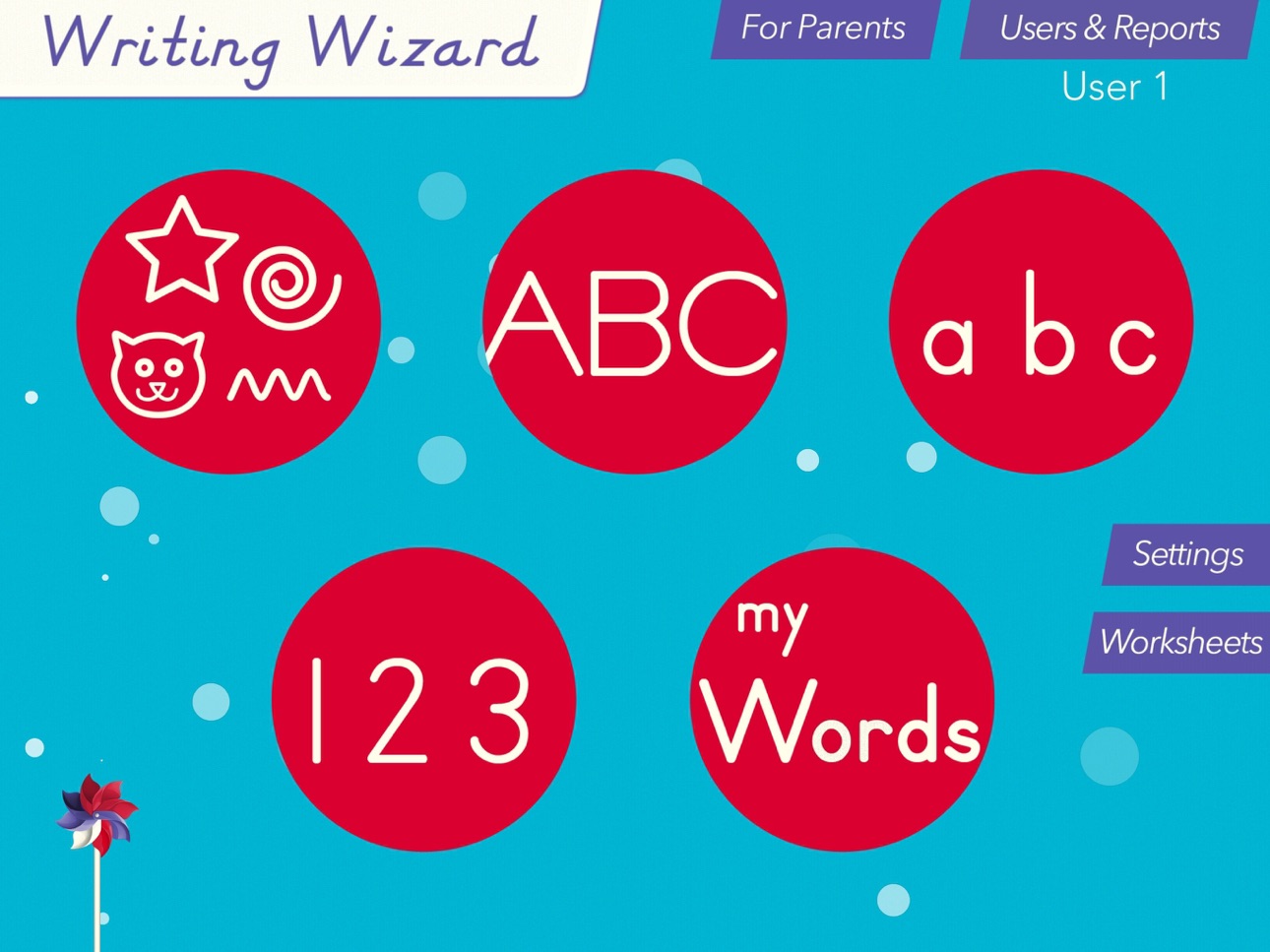
Writing Wizard is designed to help every child learn how to trace letters, numbers, and words through a fun system carefully designed to maintain motivation.
• Show and enforce how to trace letters correctly
• 16 Fonts available (including 3 most popular USA fonts)
• Fun tracing using 50+ animated stickers, sound effects and interactive games that animate letters at the end of tracing
• Letter names and phonics
• Uppercase & lowercase letters, numbers and words
• Ability to create your own word lists (and record audio for each word)
• Fully customizable to suit every child’s needs (letter size, difficulty,...)
• Check progress thanks to reports that display what the child has traced
• Shapes tracing activity for toddlers
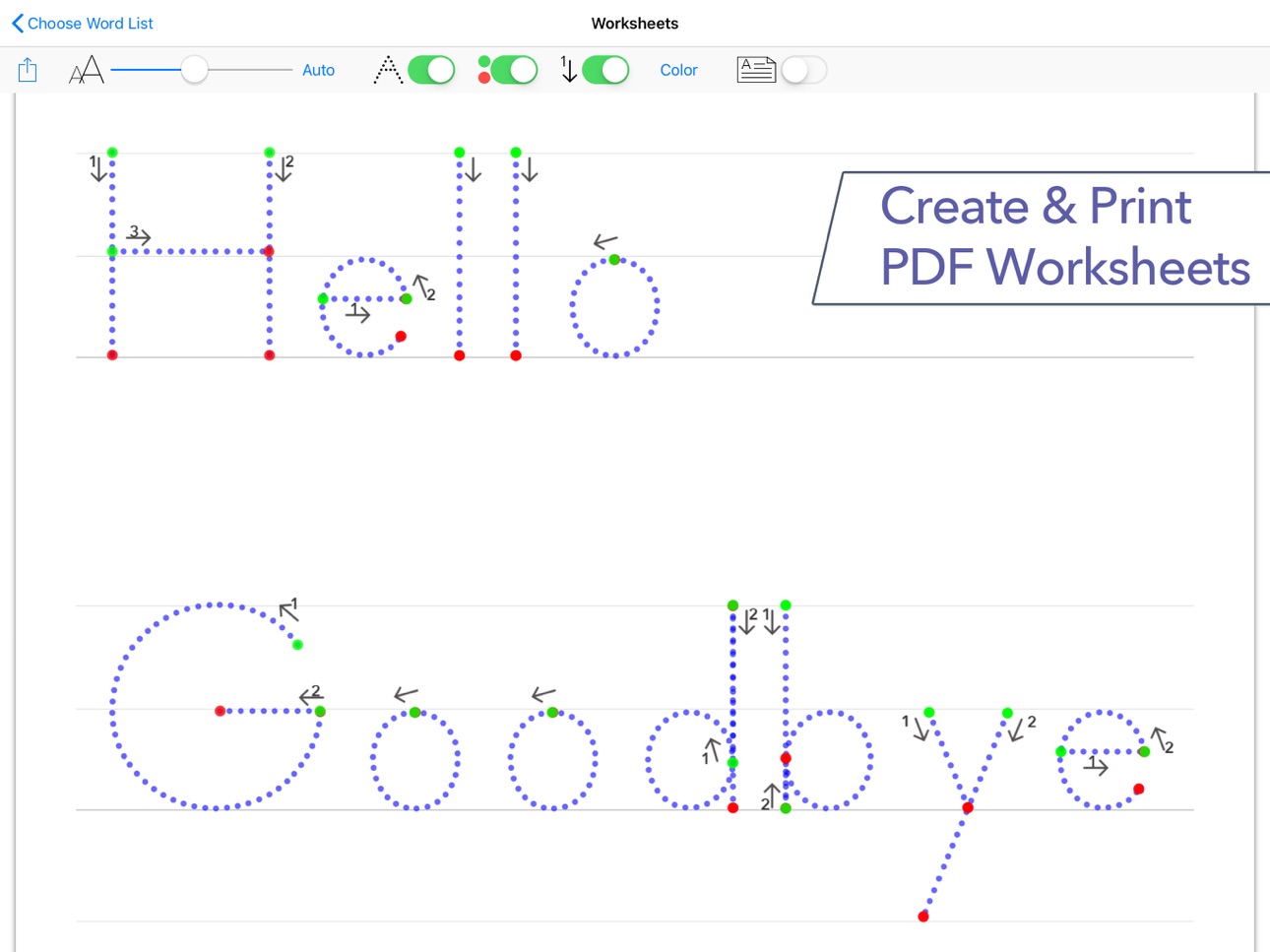
• Create PDF Worksheets and print them to help your child to write on paper
• Use Apple pencil to write at very small size
_______
ACCOLADES
• "Writing Wizard is the most complete and intelligent letter tracing app we’ve seen"" AppoLearning.com
• "This brand-new app should be the go-to for every parent, teacher and therapist to work on handwriting" - TOP PICKS - 5 stars - SmartAppsForKids.com
• "Writing Wizard by L’Escapadou is everything a parent wants in a handwriting app, and more." 5/5 - kids-app-reviews.com
• "L’Escapadou has made handwriting fun." AppyMall.com 5/5
• Listed in "20 best educational iPhone and iPad apps for kids of 2013" - appsplayground.com
• Editor's Choice Award for Excellence in Design - Children's Technology Review
_______
PERFECT FOR KIDS
Kids want to have fun, and Writing Wizard offers a lot of fun to keep them motivated in the learning process !
• They can trace using 50+ animated stickers and sound effects
• Once tracing is complete, they can interact with them on 4 games that animate letters
• They can trace any word - like their name - and record their voice for each word
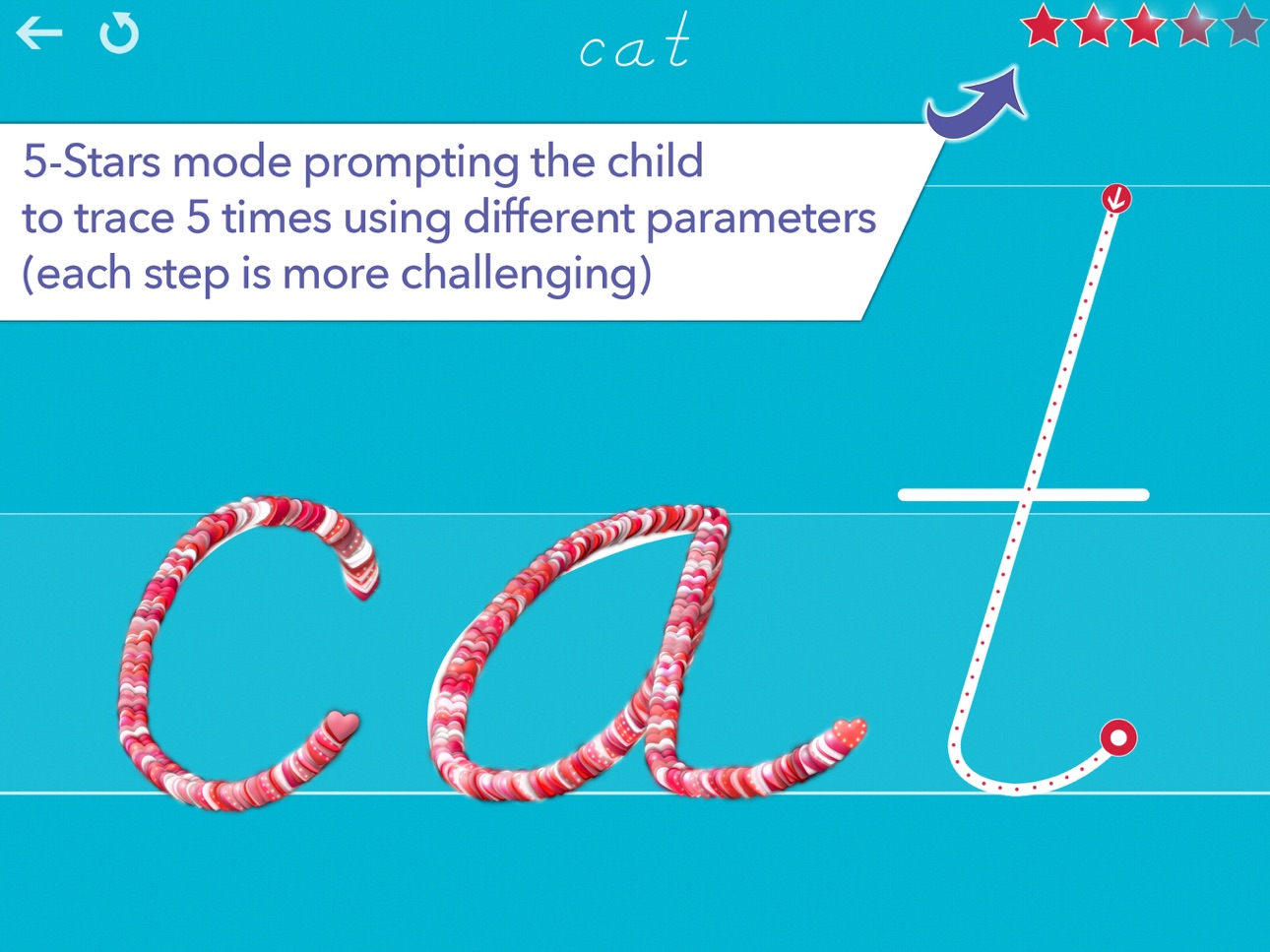
• They can collect stars in 5-Stars play mode
_______
PERFECT FOR PARENTS & TEACHERS
• Ability to create your own word lists (and record audio for each word)
• Detailed reports provide information on what kids have done, including the ability to replay and export the tracings to view kids' progress
• Share word lists via iCloud drive or other cloud providers, adhoc network, or email
• Multiple parameters to customize the app according to the child’s current education level (e.g. letter size, difficulty, show/hide model, allow to stop between key points, etc.)
• 3 most popular fonts in the US (ZB, DN & HWT) and 13 international fonts (UK, Scandinavia,Australia, germany, France)
• Upper and lower case letters, numbers (and word lists)
• Letter names and phonics (which can be customized)
• A customizable 5-Stars play mode prompting the child to trace a letter or a word 5 times using different parameters (each step is more challenging)
• Create an unlimited number of users
• Many settings to customize the app (sound, game time limit, black background,...)
• In the A-Z section, special graphics available to match letters (e.g. ant graphic for A/a)
_______
Note that a free to try version is available (search for "Writing Wizard -Starter" on the App Store)
_______
Privacy Policy
KNOW WHAT'S INSIDE
As a Moms with Apps member, we follow the "Know what's inside" best practices for kids’ apps
L’Escapadou takes children’s privacy seriously. We believe you should not have to worry about your kids being tracked by apps or websites. This app:
• Does not collect any user information (we do not use data collection tools)
• Does not contain in-app purchases
• External Links: Protected parent sections are available where you can send us a mail and check out our others apps. Before accessing a parent section, an addition must be solved so that young kids cannot access it. *
Accessibility
ipadiphonemacrealityDevicetvoswatch
Version history 25 versions
Build 878656408v5.32025-10-10 10:55:36
• iOS 26 compatibility and now available in Brazilian Portuguese, including letter names and sounds (phonics)
Build 866253789v5.1.22024-05-29 14:15:58
• New font: ABC Boum (Québec)
• New accented letters added to the UK 2 font
• New simple shapes have been added
• New tiny font size is now available in the settings for the 5-star mode
• The Complex Child Lock mode is now even more... complex
As always, please send us your feedback and suggestions so we can make the app even better (support@lescapadou.com). And don't hesitate to rate the app, it is very important for us! Thanks :-)
Build 865130894v5.1.12024-04-11 17:52:58
• New font: ABC Boum (Québec)
• New simple shapes have been added
• New tiny font size is now available in the settings for the 5-star mode
• The Complex Child Lock mode is now even more... complex
As always, please send us your feedback and suggestions so we can make the app even better (support@lescapadou.com). And don't hesitate to rate the app, it is very important for us! Thanks :-)
Build 863862394v5.12024-04-10 17:34:42
• New font: ABC Boum (Québec)
• New simple shapes have been added
• New tiny font size is now available in the settings for the 5-star mode
• The Complex Child Lock mode is now even more... complex
As always, please send us your feedback and suggestions so we can make the app even better (support@lescapadou.com). And don't hesitate to rate the app, it is very important for us! Thanks :-)
Build 860582475v5.0.72023-10-19 11:22:45
[For Schools] Using your MDM, you can now remotely erase and deploy word lists
Build 859742743v5.0.22023-09-09 11:13:47
• New behaviors when the app detects that the child's finger, or the stylus, is out the correct path. There are now 3 possible behaviors : “Stay in Place”, “Back to the Last Validated Key Point”, and “Back to the Start of the Letter”
• New font used in Australia (Queensland)
• Possibility to add a child lock before going back to the homepage (so the child stays in a specific activity)
• Update the 'f' in the Australian NSW font
• (For Schools) New settings can be remotely set via your MDM
Build 855281254v5.0.12023-03-02 17:44:45
• New behaviors when the app detects that the child's finger, or the stylus, is out the correct path. There are now 3 possible behaviors : “Stay in Place”, “Back to the Last Validated Key Point”, and “Back to the Start of the Letter”
• New font used in Australia (Queensland)
• Possibility to add a child lock before going back to the homepage (so the child stays in a specific activity)
• (For Schools) New settings can be remotely set via your MDM
Build 854484308v5.02023-02-01 11:35:50
• New behaviors when the app detects that the child's finger, or the stylus, is out the correct path. There are now 3 possible behaviors : “Stay in Place”, “Back to the Last Validated Key Point”, and “Back to the Start of the Letter”
• New font (Queensland)
• Possibility to add a child lock before going back to the homepage (so the child stays in a specific activity)
• (For Schools) New settings can be remotely set via your MDM
As always, please send us your feedback and suggestions so we can make the app even better (support@lescapadou.com) !
Build 852627160v4.92022-10-13 15:44:35
• Apple Pencil: New Setting to only allow the Apple pencil to write letters and words
• New Settings to customize the guiding lines displayed when writing
• Printable Worksheets: New Settings to customize the background color
• New German font (Grundschrift)
• (Schools) New Settings can now be remotely set using your MDM (including Letter Size, Difficulty and more)
As always, please send us your feedback and suggestions so we can make the app even better (support@lescapadou.com)
Build 847223308v4.8.12022-02-18 13:37:38
• Improved import of word lists from text files (you can now specify the lists precisely as well as the titles)
• You can now Import Word Lists from the Web
• (Schools) New Settings can now be remotely set using MDM
Build 847093030v4.82022-02-15 20:38:31
• Improved import of word lists from text files (you can now specify the lists precisely as well as the titles)
• You can now Import Word Lists from the Web
• (Schools) New Settings can now be remotely set using MDM
Build 846734166v4.72022-01-21 16:28:21
• Schools can now configure some settings remotely using MDM (contact us for more information)
• New setting to hide the More Apps button
Build 842624375v4.62021-09-01 09:26:58
• Two new fonts (15 fonts are now included)
• Ability to disable or enable each activity in the settings
• The tracing of the model is now much faster is the maximum speed is set
• Sámi letters are now available in the Scandinavia and UK fonts
Build 842025743v4.52021-05-10 11:02:43
• New shapes to trace
• "My Words" section: Playback of long recordings is now possible
• Reports: you can now filter the letters or words displayed in the "View Tracings" section
• New setting to disable the failure sound when the child is tracing
• Improvements to the UK font
• iOS 14 optimization
As usual, do not hesitate to send us your suggestions for the next update (support@lescapadou.com). Thank you!
Build 837693149v4.22020-09-16 20:33:21
• 3 new fonts (12 fonts are now available!)
• Apple Pencil: improved support
Build 834454749v4.02020-02-03 23:10:05
Version 4.0! New features include:
• (iPad) New setting for the size of the letters: Size can now be very small, the use of an Apple pencil is recommended for small sizes
• The maximum word length is now 20 characters
• New font (Swiss-German)
• New shapes
• New animation to show the tracing that the child must do
• Updated all fonts for better character spacing
• Optimization of animations for high-end devices
New settings:
• Choose between the sound of the letter, or the name of the letter, or both
• Option to automatically repeat the drawing of the model
• 5-star mode: parameter to define the drawing speed of the model
As usual, please send us your feedback and suggestions so we can make the app even better (support@lescapadou.com). Thanks :-)
Build 830886809v3.82019-04-07 00:18:54
• You can add spaces again when you add a new word (eg "an apple")
• Better support for iPhone X, XS, XS Max & XR
Don't hesitate to send us suggestions for the next update!
Build 829326947v3.7.22018-11-28 18:10:15
• Optimization for new iPads & iPhones
Don't hesitate to send us feedback and suggestions for the next update!
Build 829147515v3.7.12018-11-08 13:19:56
• iOS 12 optimization
• Adding words containing apostrophe is working on all iOS versions
Don't hesitate to send us feedback and suggestions for the next update!
Build 828625545v3.72018-09-27 11:38:27
• New setting to go to next letter automatically after the time limit
• New setting to disable phonics and letter/word name
• Optimized for any screen size (including iPad Pro,iPhone XS & XS Max)
Don't hesitate to send us suggestions for the next update (support@lescapadou.com)
Build 823863765v3.5.12017-10-03 15:44:15
Rare bug fix!
Build 822845395v3.52017-08-09 22:00:47
• New Fonts: Australian (NSW et Victoria) & French - (9 fonts are now available in the app!)
• Hand Color Setting
• Create Word Lists from text files
• Reorder Word Lists
• More Complex Parental Control Setting
• iOS 11 compatibility
As usual, please send me your feedback so I can make the app even better, and don't hesitate to rate the app on the App Store :-)
Build 812491908v3.0.22015-05-24 09:22:40
v3.0 !
• Create PDF worksheets from your word lists when it's time to practice on real paper ! You can directly print them from the app or email them.
• Share word lists via iCloud drive or other cloud providers, adhoc network, or email
• In the A-Z section, 26 new graphics available to match letters (e.g. ant graphic for A/a)
• Left-handed support
• New font for UK
• New font for Scandinavia
• Color options for students with significant developmental challenges (colored background, green start arrow)
Build 812452538v3.0.12015-05-18 22:26:06
This version fixes issues with importing and exporting word lists + more colors for background
-- v3.0 --
• Create PDF worksheets from word lists (print or email them)
• Share word lists via iCloud drive or other cloud providers, adhoc network, or email
• In the A-Z section, 26 new graphics available to match letters (e.g. ant graphic for A/a)
• New font for UK
• New font for Scandinavia
• Left-handed support
• Color options for students with significant developmental challenges (black background, green start arrow)
• Fix an issue in the Shapes activity
Build 811915272v3.02015-05-13 12:47:10
• Create PDF worksheets from word lists (print or email them)
• Share word lists via iCloud drive or other cloud providers, adhoc network, or email
• In the A-Z section, 26 new graphics available to match letters (e.g. ant graphic for A/a)
• New font for UK
• New font for Scandinavia
• Left-handed support
• Color options for students with significant developmental challenges (black background, green start arrow)
• Fix an issue in the Shapes activity
Price history by region
Currency
Show
Columns
Search
Availability 75 of 75 storefronts
| Region | Language | Price | Ratings | Avg | Version |
|---|---|---|---|---|---|
| US | en-US | USD 13.99 | 3.3k | 4.3 | 5.3 |
| MX | es-MX | MXN 299 | 30 | 4.5 | 5.3 |
| BR | pt-BR | BRL 99.9 | 8 | 4.0 | 5.3 |
| AR | es-MX | USD 13.99 | 3 | 4.3 | 5.3 |
| CO | es-MX | COP 59900 | 3 | 5.0 | 5.3 |
| CL | es-MX | CLP 14990 | 2 | 4.5 | 5.3 |
| PA | es-MX | USD 13.99 | 2 | 3.5 | 5.3 |
| PE | es-MX | PEN 59.9 | 2 | 4.0 | 5.3 |
| CR | es-MX | USD 13.99 | 1 | 5.0 | 5.3 |
| GT | es-MX | USD 13.99 | 1 | 5.0 | 5.3 |
| GY | en-GB | USD 13.99 | 1 | 3.0 | 5.3 |
| HN | es-MX | USD 13.99 | 1 | 4.0 | 5.3 |
| KY | en-GB | USD 13.99 | 1 | 5.0 | 5.3 |
| NG | en-GB | NGN 22900 | 1 | 5.0 | 5.3 |
| SV | es-MX | USD 13.99 | 1 | 4.0 | 5.3 |
| TT | en-GB | USD 13.99 | 1 | 4.0 | 5.3 |
| AG | en-GB | USD 13.99 | 0 | — | 5.3 |
| AI | en-GB | USD 13.99 | 0 | — | 5.3 |
| AO | en-GB | USD 13.99 | 0 | — | 5.3 |
| BB | en-GB | USD 17.99 | 0 | — | 5.3 |
| BF | en-GB | USD 13.99 | 0 | — | 5.3 |
| BJ | en-GB | USD 17.99 | 0 | — | 5.3 |
| BO | es-MX | USD 13.99 | 0 | — | 5.3 |
| BS | en-GB | USD 14.99 | 0 | — | 5.3 |
| BW | en-GB | USD 13.99 | 0 | — | 5.3 |
| BZ | en-GB | USD 13.99 | 0 | — | 5.3 |
| CD | en-GB | USD 13.99 | 0 | — | 5.3 |
| CG | en-GB | USD 13.99 | 0 | — | 5.3 |
| CI | fr-FR | USD 17.99 | 0 | — | 5.3 |
| CM | fr-FR | USD 17.99 | 0 | — | 5.3 |
| CV | en-GB | USD 13.99 | 0 | — | 5.3 |
| DM | en-GB | USD 13.99 | 0 | — | 5.3 |
| DO | es-MX | USD 13.99 | 0 | — | 5.3 |
| DZ | en-GB | USD 13.99 | 0 | — | 5.3 |
| EC | es-MX | USD 13.99 | 0 | — | 5.3 |
| GA | fr-FR | USD 13.99 | 0 | — | 5.3 |
| GD | en-GB | USD 13.99 | 0 | — | 5.3 |
| GH | en-GB | USD 17.99 | 0 | — | 5.3 |
| GM | en-GB | USD 13.99 | 0 | — | 5.3 |
| GW | en-GB | USD 13.99 | 0 | — | 5.3 |
| JM | en-GB | USD 13.99 | 0 | — | 5.3 |
| KE | en-GB | USD 17.99 | 0 | — | 5.3 |
| KN | en-GB | USD 13.99 | 0 | — | 5.3 |
| LC | en-GB | USD 13.99 | 0 | — | 5.3 |
| LR | en-GB | USD 13.99 | 0 | — | 5.3 |
| LY | en-GB | USD 13.99 | 0 | — | 5.3 |
| MA | en-GB | USD 13.99 | 0 | — | 5.3 |
| MG | en-GB | USD 13.99 | 0 | — | 5.3 |
| ML | en-GB | USD 13.99 | 0 | — | 5.3 |
| MS | en-GB | USD 13.99 | 0 | — | 5.3 |
| MU | en-GB | USD 17.99 | 0 | — | 5.3 |
| MW | en-GB | USD 13.99 | 0 | — | 5.3 |
| MZ | en-GB | USD 13.99 | 0 | — | 5.3 |
| NA | en-GB | USD 13.99 | 0 | — | 5.3 |
| NE | en-GB | USD 13.99 | 0 | — | 5.3 |
| NI | es-MX | USD 13.99 | 0 | — | 5.3 |
| PY | es-MX | USD 13.99 | 0 | — | 5.3 |
| RW | en-GB | USD 13.99 | 0 | — | 5.3 |
| SC | en-GB | USD 13.99 | 0 | — | 5.3 |
| SL | en-GB | USD 13.99 | 0 | — | 5.3 |
| SN | en-GB | USD 17.99 | 0 | — | 5.3 |
| SR | en-GB | USD 14.99 | 0 | — | 5.3 |
| ST | en-GB | USD 13.99 | 0 | — | 5.3 |
| SZ | en-GB | USD 13.99 | 0 | — | 5.3 |
| TC | en-GB | USD 13.99 | 0 | — | 5.3 |
| TD | en-GB | USD 13.99 | 0 | — | 5.3 |
| TN | en-GB | USD 13.99 | 0 | — | 5.3 |
| TZ | en-GB | TZS 39900 | 0 | — | 5.3 |
| UG | en-GB | USD 17.99 | 0 | — | 5.3 |
| UY | en-GB | USD 13.99 | 0 | — | 5.3 |
| VC | en-GB | USD 13.99 | 0 | — | 5.3 |
| VE | es-MX | USD 13.99 | 0 | — | 5.3 |
| VG | en-GB | USD 13.99 | 0 | — | 5.3 |
| ZM | en-GB | USD 17.99 | 0 | — | 5.3 |
| ZW | en-GB | USD 17.99 | 0 | — | 5.3 |
Change log 29 changes · MS
✎
releaseNotes updated
• iOS 26 compatibility and now available in Brazilian Portuguese, including letter names and sounds (phonics)
✎
description updated
"Fantastic, customizable tracing practice with fun rewards." 5 Stars - Common Sense Media
470,000+ units sold (including 260,000 to schools) !
Writing Wizard
✎
subtitle updated
Learn to Write Letters & Words
✎
name updated
Writing Wizard - School Ed.
◆
Version 5.3 released
• iOS 26 compatibility and now available in Brazilian Portuguese, including letter names and sounds (phonics)
◆
Version 5.1.2 released
• New font: ABC Boum (Québec)
• New accented letters added to the UK 2 font
• New simple shapes have been added
• New tiny font size is now available in the settings for the 5-star mode
• The Complex Child Lock mode is now even more... com
◆
Version 5.1.1 released
• New font: ABC Boum (Québec)
• New simple shapes have been added
• New tiny font size is now available in the settings for the 5-star mode
• The Complex Child Lock mode is now even more... complex
As always, please send us your feedback
◆
Version 5.1 released
• New font: ABC Boum (Québec)
• New simple shapes have been added
• New tiny font size is now available in the settings for the 5-star mode
• The Complex Child Lock mode is now even more... complex
As always, please send us your feedback
◆
Version 5.0.7 released
[For Schools] Using your MDM, you can now remotely erase and deploy word lists
◆
Version 5.0.2 released
• New behaviors when the app detects that the child's finger, or the stylus, is out the correct path. There are now 3 possible behaviors : “Stay in Place”, “Back to the Last Validated Key Point”, and “Back to the Start of the Letter”
• New
◆
Version 5.0.1 released
• New behaviors when the app detects that the child's finger, or the stylus, is out the correct path. There are now 3 possible behaviors : “Stay in Place”, “Back to the Last Validated Key Point”, and “Back to the Start of the Letter”
• New
◆
Version 5.0 released
• New behaviors when the app detects that the child's finger, or the stylus, is out the correct path. There are now 3 possible behaviors : “Stay in Place”, “Back to the Last Validated Key Point”, and “Back to the Start of the Letter”
• New
◆
Version 4.9 released
• Apple Pencil: New Setting to only allow the Apple pencil to write letters and words
• New Settings to customize the guiding lines displayed when writing
• Printable Worksheets: New Settings to customize the background color
• New German f
◆
Version 4.8.1 released
• Improved import of word lists from text files (you can now specify the lists precisely as well as the titles)
• You can now Import Word Lists from the Web
• (Schools) New Settings can now be remotely set using MDM
◆
Version 4.8 released
• Improved import of word lists from text files (you can now specify the lists precisely as well as the titles)
• You can now Import Word Lists from the Web
• (Schools) New Settings can now be remotely set using MDM
◆
Version 4.7 released
• Schools can now configure some settings remotely using MDM (contact us for more information)
• New setting to hide the More Apps button
◆
Version 4.6 released
• Two new fonts (15 fonts are now included)
• Ability to disable or enable each activity in the settings
• The tracing of the model is now much faster is the maximum speed is set
• Sámi letters are now available in the Scandinavia and UK fo
◆
Version 4.5 released
• New shapes to trace
• "My Words" section: Playback of long recordings is now possible
• Reports: you can now filter the letters or words displayed in the "View Tracings" section
• New setting to disable the failure sound when the child is
◆
Version 4.2 released
• 3 new fonts (12 fonts are now available!)
• Apple Pencil: improved support
◆
Version 4.0 released
Version 4.0! New features include:
• (iPad) New setting for the size of the letters: Size can now be very small, the use of an Apple pencil is recommended for small sizes
• The maximum word length is now 20 characters
• New font (Swiss-Ger
◆
Version 3.8 released
• You can add spaces again when you add a new word (eg "an apple")
• Better support for iPhone X, XS, XS Max & XR
Don't hesitate to send us suggestions for the next update!
◆
Version 3.7.2 released
• Optimization for new iPads & iPhones
Don't hesitate to send us feedback and suggestions for the next update!
◆
Version 3.7.1 released
• iOS 12 optimization
• Adding words containing apostrophe is working on all iOS versions
Don't hesitate to send us feedback and suggestions for the next update!
◆
Version 3.7 released
• New setting to go to next letter automatically after the time limit
• New setting to disable phonics and letter/word name
• Optimized for any screen size (including iPad Pro,iPhone XS & XS Max)
Don't hesitate to send us suggestions for th
◆
Version 3.5.1 released
Rare bug fix!
◆
Version 3.5 released
• New Fonts: Australian (NSW et Victoria) & French - (9 fonts are now available in the app!)
• Hand Color Setting
• Create Word Lists from text files
• Reorder Word Lists
• More Complex Parental Control Setting
• iOS 11 compatibility
As
◆
Version 3.0.2 released
v3.0 !
• Create PDF worksheets from your word lists when it's time to practice on real paper ! You can directly print them from the app or email them.
• Share word lists via iCloud drive or other cloud providers, adhoc network, or email
• I
◆
Version 3.0.1 released
This version fixes issues with importing and exporting word lists + more colors for background
-- v3.0 --
• Create PDF worksheets from word lists (print or email them)
• Share word lists via iCloud drive or other cloud providers, adhoc ne
◆
Version 3.0 released
• Create PDF worksheets from word lists (print or email them)
• Share word lists via iCloud drive or other cloud providers, adhoc network, or email
• In the A-Z section, 26 new graphics available to match letters (e.g. ant graphic for A/a)